How I Reported a DoS Vulnerability to AWS
A honeypot endpoint used the client-supplied X-Forwarded-For header to decide which IP address to blacklist, so an attacker could blacklist arbitrary IP addresses and cause a denial of service. The issue affected an AWS open-source WAF automation and was fixed by using the request context source IP instead.
 Published on techkranti.com
As much as I love reading bug hunting stories, I enjoy writing them too. This story was waiting long in my drafts pending disclosure approval from two companies involved with this bug.
The full write-up lives on its author's site
It belongs to its author, so we link to it rather than copy it. The other two tabs are our own rewrites, checked against it.
Context
While hunting on a private program, I came across an endpoint that behaved in a way I did not expect. The platform was hosted behind CloudFront and the endpoint /administrator was one I had never come across during days of testing.
The bug I found is that the Lambda function trusts the X-Forwarded-For header supplied by the client when deciding which IP address to blacklist. An attacker can therefore send arbitrary IP addresses in that header and have them blacklisted, which can be used to deny access to legitimate users and to crawlers.
Setup
The testing was done on a private program, with Burp Suite used for proxying and for the Sitemap and Repeater features. For the IP-change tests I used a VPN and, later, the Betternet VPN extension for Chrome. To reproduce the behaviour outside the program, I deployed my own instance of the AWS honeypot using the AWS CloudFormation template from the awslabs/aws-waf-security-automations repository, which took about 15 minutes. I then used AWS CloudWatch to inspect the Lambda logs.
Finding it
While going through the Sitemap in Burp, I noticed an endpoint I had never seen during days of testing: /administrator. It had presumably been picked up through scraping rather than through an actual call. I requested it in the browser:
and got a JSON response:
{"message": "[X.X.X.X] Thanks for the visit."}
where X.X.X.X was my IP address. In the Burp logs I saw that the endpoint redirected to:
some-random-id.execute-api.eu-west-1.amazonaws.com/ProdStage/administrator
and that this was the endpoint actually returning the response. Directory brute forcing returned the same result on every request.
Shortly afterwards I could no longer access the platform at all. Every request returned a CloudFront 403 Forbidden page.
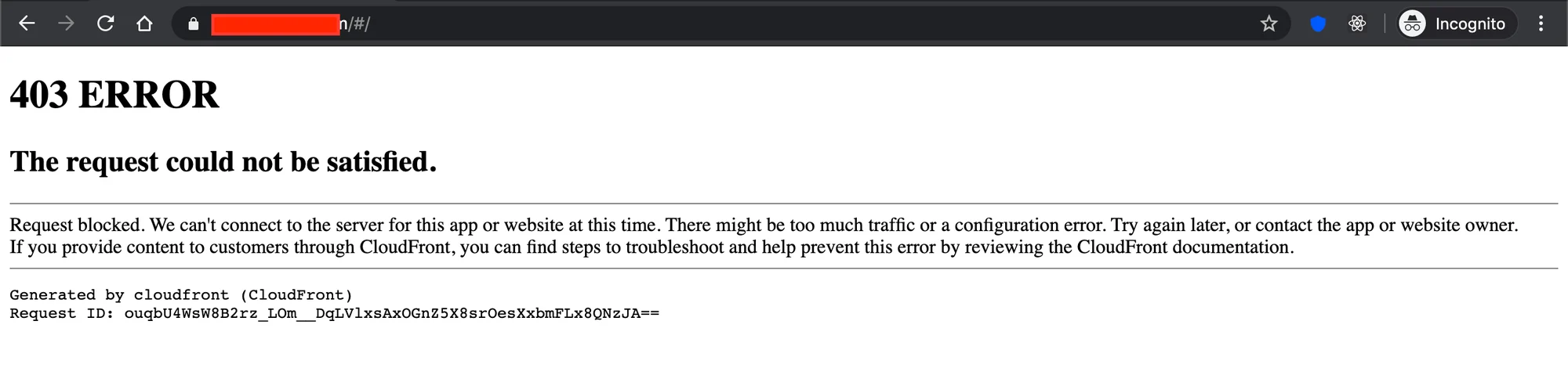
My first hypothesis was that my IP had been blocked for visiting /administrator. I changed my IP through a VPN and could access the platform again. Visiting /administrator through the VPN and then trying the site again resulted in another block, which confirmed the hypothesis: visiting the endpoint puts your IP on some kind of blacklist.
I then hypothesised that something critical was hidden behind the endpoint. A Google search for:
execute-api "Thanks for the visit"
returned a SANS document as the first result. Searching inside it for the phrase "Thanks for the visit" led to source code on page 27.
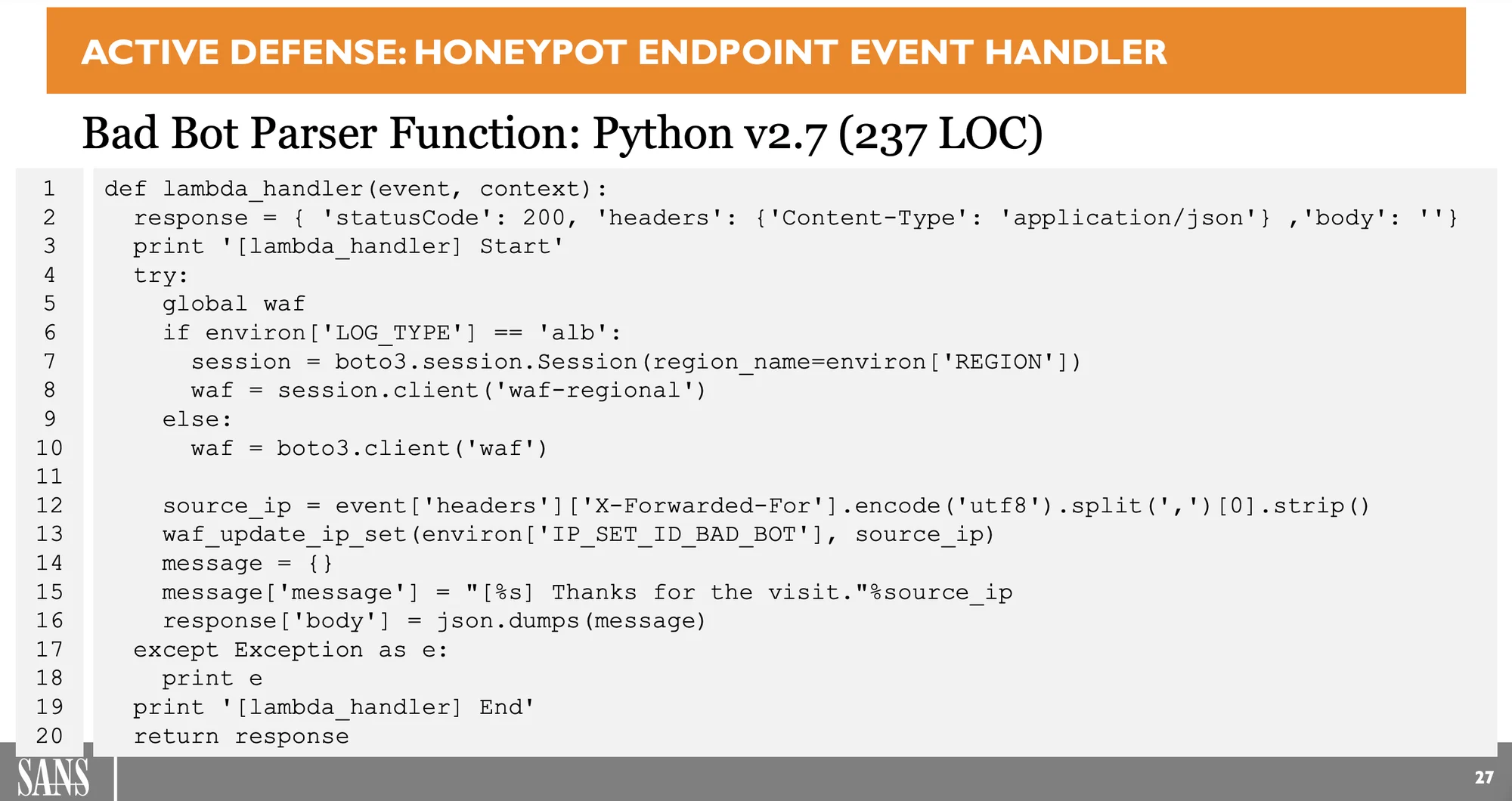
The heading made it clear that this was a honeypot, so there was nothing critical behind the endpoint. While reading the code I noticed this line:
source_ip = event['headers']['X-Forwarded-For'].encode('utf8').split(',')[0].strip()
The endpoint was using the X-Forwarded-For header to decide which IP to blacklist. That led to a third hypothesis: if I send my own X-Forwarded-For header, I can make the endpoint pick the IP in the header instead of my real IP.
Exploitation
Step 1: Confirm the header is reflected
I sent a request with my own X-Forwarded-For value and the endpoint responded with the IP from the header instead of my actual IP.
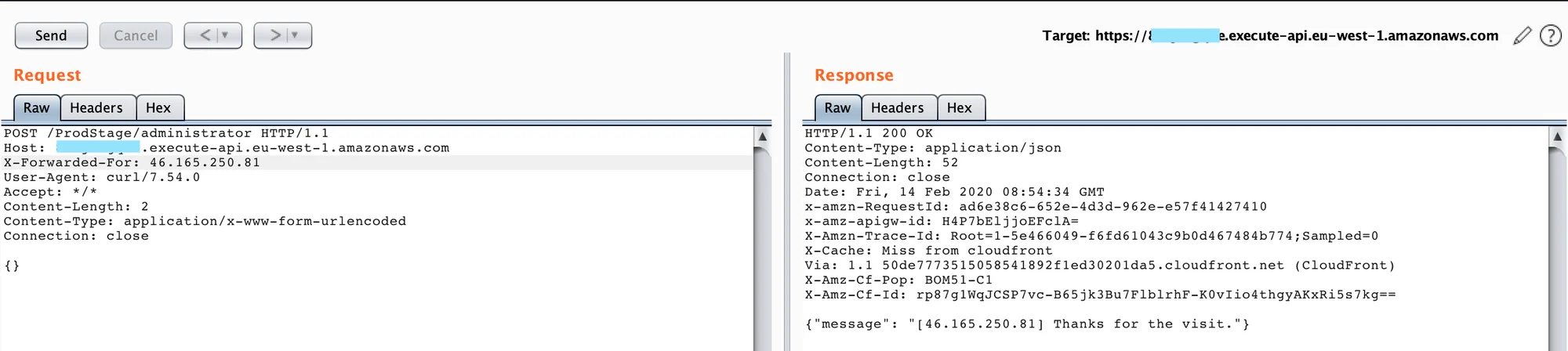
This half-proved the hypothesis: the reflection worked, but I still had to confirm that the IP from the header was actually blacklisted.
Step 2: The litmus test
- Installed the Betternet VPN extension for Chrome and enabled the VPN.
- Verified that the site was reachable through the VPN.
- Checked the VPN public IP address by googling "What is my IP".
- Sent the following request through Burp Repeater, with
X.X.X.Xset to the VPN IP. The request does not go through the VPN because the VPN only runs as a Chrome extension:
GET /ProdStage/administrator HTTP/1.1
Host: some-random-id.execute-api.eu-west-1.amazonaws.com
X-Forwarded-For: X.X.X.X
Connection: close
- The response reflected the IP from the header as expected.
- Accessing the site through the same VPN returned a CloudFront 403 Forbidden page, confirming that the VPN IP had been blacklisted.
Step 3: Reproduce on my own deployment
I deployed the AWS honeypot from the CloudFormation template, obtained the unique honeypot URL, and followed the same steps I had used on the program's endpoint. My Lambda function reflected back the IP address passed in the X-Forwarded-For header, proving the hypothesis again for a different sample.
Step 4: Find the root cause in the logs
I checked the Lambda logs in CloudWatch. The handler extracts the source IP as follows:
source_ip = event['headers']['X-Forwarded-For'].split(',')[0].strip()
so I inspected the value of event['headers']['X-Forwarded-For'] in the logs.
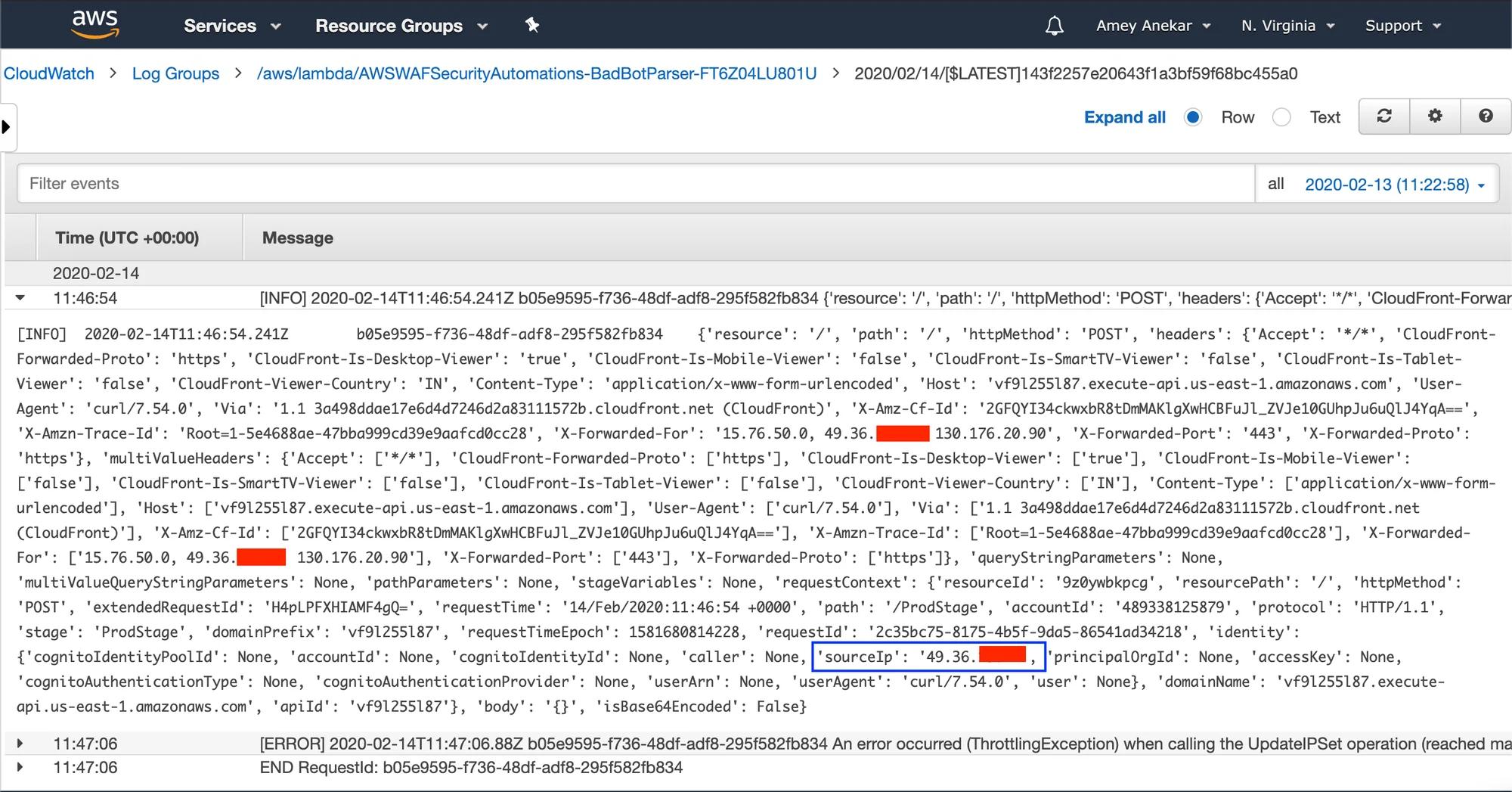
In the log, [redacted] was the IP I passed in the header and the masked IP was my actual IP. The logs showed that a reverse proxy handles the request first and then sets the X-Forwarded-For header before forwarding it to the Lambda function. Instead of replacing the header supplied by the client, the proxy appends IP addresses to it. The client-supplied IP therefore always ends up first in the comma-separated list, and the code that splits on commas and takes element 0 always picks the attacker-controlled value.
Root cause
The Lambda function derives the IP to blacklist from the client-controlled X-Forwarded-For header, taking the first element of the comma-separated list. The reverse proxy in front of the function appends to the header rather than replacing it, so the first element is always whatever the client sent.
Impact
An attacker who sends arbitrary IP addresses in the X-Forwarded-For header to the endpoint will cause legitimate users to be blacklisted from the platform. With enough requests, the attacker can add the entire public IP range to the blacklist, effectively causing a massive denial of service. An attacker can also affect a platform's Google ranking by blacklisting Google crawler IP addresses.
Fix
I contributed a one-line change to the repository and created a pull request. The actual client IP is available in two places in the event:
event['headers']['X-Forwarded-For']event['requestContext']['identity']['sourceIp']
In the first, the real IP is always the second-to-last element of the comma-separated list, so the code could pick len-2 instead of 0. That is not future-proof: if the network architecture changes and a new component adds its own IP to the list, the reverse proxy IP would become the second-to-last element and the wrong IP would be blacklisted again.
The second option, event['requestContext']['identity']['sourceIp'], is reliable and free of ambiguity. The fix replaces the header parsing with that value:
-        source_ip = event['headers']['X-Forwarded-For'].split(',')[0].strip()
+        source_ip = event['requestContext']['identity']['sourceIp']
Variants to test
- Look for endpoints that return your IP address in a response, especially ones that also cause a block or rate limit. A positive result is that the returned IP matches a value you supplied in
X-Forwarded-Forrather than your real IP. - Send a request with a
X-Forwarded-Forheader containing a known IP and then check whether that IP is blocked. A positive result is that the IP you supplied, not your own, is denied access. - Check whether the proxy in front of the application appends to or replaces
X-Forwarded-For. A positive result is that your supplied value appears first in the list in the application logs. - Test other headers used for client IP resolution, such as
X-Real-IPorForwarded, in the same way. A positive result is that the application trusts the header value for security decisions such as blacklisting or rate limiting. - Deploy the AWS honeypot from the repository and repeat the test against your own instance. A positive result is that the Lambda reflects the IP from the header, confirming the vulnerable code path.
What happened, in plain words
A security researcher was testing a website for bugs. While poking around, he found a hidden page called /administrator. When he visited it, the page replied with a short message that included his own IP address, the number that identifies his computer on the internet. Soon after, he found he could no longer open the website at all: every visit showed a "403 Forbidden" error page. Visiting that hidden page had put his IP address on a blocklist.
He then discovered that the page was not a secret admin panel at all. It was a decoy, a "honeypot".
The flaw was in how the trap decided which IP address to block. It read a value that the visitor's own browser (or tool) can set freely, a header called X-Forwarded-For. Because of that, anyone could send the trap a list of IP addresses of their choosing and have those addresses blocked. By sending enough addresses, an attacker could block huge numbers of real users, or block Google's crawlers so the site drops in search results. That is a denial of service (DoS): making a service unavailable to the people who should be able to use it.
The researcher proved this on the original site, then rebuilt the same trap on his own AWS account to show the flaw was in AWS's code, not just in that one website. He reported it, and he submitted a one-line change himself as a pull request.
Background you need first
Before walking through the steps, here are the ideas the story relies on, explained from scratch.
- IP address: the number that identifies a device on the internet, a bit like a postal address for your computer. Websites see the IP address of whoever connects to them.
- HTTP request and response: when your browser opens a page, it sends a request ("please give me this page") and the server sends back a response (the page, or an error). Each request has a first line with a method and a path, then a list of headers, which are labelled lines of extra information.
- Header: a named field in a request or response, such as
Host(which site you want) orConnection(whether to keep the connection open). Some headers are set by the browser; others can be set by whoever sends the request. X-Forwarded-For(XFF): a header meant to carry the original visitor's IP address when a request passes through an intermediary. A large website rarely has one server talking to the internet directly. It usually has a reverse proxy in front: a server that receives every request first and then passes it on to the servers behind it. The proxy addsX-Forwarded-Forso the servers behind know who the real visitor was. The important point: because it is just a header, a client can send its own value, and the proxy may add to it rather than replace it.- API and API Gateway: an API is a way for one program to talk to another, like a service counter where you ask for something specific and get a structured answer back rather than a whole web page. AWS API Gateway is Amazon's service for putting such counters on the internet. Endpoints on it look like
something.execute-api.region.amazonaws.com. - AWS Lambda: a service where you upload a small function (a piece of code) and Amazon runs it whenever it is called, without you managing a server. The function receives an
eventobject: a bundle of data about the incoming request, including its headers. - CloudFront: Amazon's content delivery network, a layer of servers that sit in front of a website, cache its content and can block requests. A "CloudFront 403 Forbidden" page means CloudFront refused to let the request through.
- WAF (Web Application Firewall): a filter in front of a website that allows or blocks requests according to rules, for example a list of blocked IP addresses (a blacklist).
- Honeypot: a decoy page that no real user would visit. Anything that visits it is assumed to be an automated bot, so its IP is blocked.
- Burp Suite: a tool that sits between your browser and the internet so you can see and edit every request. Its Sitemap lists every address the tool has seen, and its Repeater lets you send the same request again and again with changes.
- JSON: a simple text format for structured data, made of names and values in curly braces, like
{"message": "hello"}. - VPN: a service that routes your traffic through another computer, so websites see that computer's IP address instead of yours. Useful here because it gives you a fresh IP address whenever you need one.
- CloudWatch: Amazon's service for storing logs, the recorded messages that programs write while running.
- Google dork: a search query crafted to find specific things on the web, such as pages containing a particular phrase.
- robots.txt: a file at the root of a website that tells search engines which pages they should not crawl.
- Pull request: a proposed change to someone else's code on GitHub, which the owners can review and accept.
Setup
The testing was done on a private bug bounty program, meaning a company that invites selected researchers to test its systems. Burp Suite was used to watch and replay traffic. For changing IP addresses, a VPN was used, and later the Betternet VPN extension for Chrome. To reproduce the behaviour outside the program, the researcher deployed his own copy of the AWS honeypot using the AWS CloudFormation template from the awslabs/aws-waf-security-automations repository, which took about 15 minutes. CloudFormation is Amazon's way of describing a whole set of cloud resources in a file so they can be created automatically. AWS CloudWatch was then used to read the Lambda logs.
Finding it
While going through the Sitemap in Burp, the researcher noticed an endpoint he had never seen during days of testing: /administrator. An endpoint is a specific address on a server that does something, like a particular counter in a building. It had presumably been picked up through scraping, meaning Burp had found the address written somewhere in the pages it had loaded, even though no request to it had actually been made. He requested it in the browser:
Line by line:
GET /administrator HTTP/1.1asks the server for the resource at the path/administrator, using version 1.1 of the HTTP protocol.GETmeans "give me this".Host: platform.comtells the server which website is being requested. One server can host many sites, so this line says which one.
and got a JSON response:
{"message": "[X.X.X.X] Thanks for the visit."}
This is a small data object with one field, message, whose text contains an IP address in square brackets followed by "Thanks for the visit." The X.X.X.X was the researcher's own IP address, which is why the reply felt strange: the page knew who he was and was greeting him by address.
In the Burp logs he saw that the endpoint redirected to:
some-random-id.execute-api.eu-west-1.amazonaws.com/ProdStage/administrator
This is an address on AWS API Gateway: some-random-id is a placeholder for a unique identifier, eu-west-1 is the AWS region (Ireland), and /ProdStage/administrator is the path on that API. So the page on the website was only a front; the real work was done by an AWS service behind it. Directory brute forcing, which means trying a long list of common folder and file names to see what exists, returned the same result on every request.
Shortly afterwards he could no longer access the platform at all. Every request returned a CloudFront 403 Forbidden page.
The image shows that CloudFront 403 Forbidden page: the request was refused before it ever reached the website.
His first hypothesis, meaning an educated guess to be tested, was that his IP had been blocked for visiting /administrator. He changed his IP through a VPN and could access the platform again. Visiting /administrator through the VPN and then trying the site again resulted in another block, which confirmed the hypothesis: visiting the endpoint puts your IP on some kind of blacklist.
He then hypothesised that something critical was hidden behind the endpoint, which would explain such strict protection. A Google search for:
execute-api "Thanks for the visit"
returned a SANS document as the first result. SANS is a well-known security training organisation, and the document was a presentation from one of its summits. Searching inside it for the phrase "Thanks for the visit" led to source code on page 27.
The image shows that excerpt of source code from the document.
The heading made it clear that this was a honeypot, so there was nothing critical behind the endpoint. While reading the code he noticed this line:
source_ip = event['headers']['X-Forwarded-For'].encode('utf8').split(',')[0].strip()
Line by line:
event['headers']['X-Forwarded-For']takes the value of theX-Forwarded-Forheader from the incoming request data..encode('utf8')turns that text into bytes, a technical detail needed by the next step..split(',')cuts the value into pieces wherever there is a comma, producing a list. This matters becauseX-Forwarded-Forcan hold several IP addresses separated by commas.[0]picks the first piece of that list..strip()removes any spaces at the start or end.- The result is stored in a variable called
source_ip, which is the address the code will treat as the visitor's address.
The endpoint was using the X-Forwarded-For header to decide which IP to blacklist. That led to a third hypothesis: if I send my own X-Forwarded-For header, I can make the endpoint pick the IP in the header instead of my real IP.
Exploitation
Step 1: Confirm the header is reflected
He sent a request with his own X-Forwarded-For value and the endpoint responded with the IP from the header instead of his actual IP.
The image shows the response: the address in the greeting is the one that was supplied in the header, not the researcher's real address.
This half-proved the hypothesis: the reflection worked, meaning the server repeated back the value it was given, but he still had to confirm that the IP from the header was actually blacklisted.
Step 2: The litmus test
A litmus test is a single decisive check that settles a question. Here it was: does the address I put in the header really get blocked?
- Installed the Betternet VPN extension for Chrome and enabled the VPN.
- Verified that the site was reachable through the VPN.
- Checked the VPN public IP address by googling "What is my IP".
- Sent the following request through Burp Repeater, with
X.X.X.Xset to the VPN IP. The request does not go through the VPN because the VPN only runs as a Chrome extension, so Burp sends it from the real connection:
GET /ProdStage/administrator HTTP/1.1
Host: some-random-id.execute-api.eu-west-1.amazonaws.com
X-Forwarded-For: X.X.X.X
Connection: close
Line by line:
GET /ProdStage/administrator HTTP/1.1asks the AWS API for the honeypot path.Host: some-random-id.execute-api.eu-west-1.amazonaws.comnames the AWS API Gateway address that hosts it.X-Forwarded-For: X.X.X.Xis the header the researcher added himself, carrying the VPN's IP address. This is the whole trick: the server is being told "the visitor's address is this one".Connection: closeasks the server to close the connection after the response, rather than keeping it open for more requests.
- The response reflected the IP from the header as expected.
- Accessing the site through the same VPN returned a CloudFront 403 Forbidden page, confirming that the VPN IP had been blacklisted. In other words, the address he had written in the header, not his own, was now denied access.
Step 3: Reproduce on my own deployment
To show the flaw was not a quirk of that one website, he deployed the AWS honeypot from the CloudFormation template, obtained the unique honeypot URL, and repeated the same steps. His own Lambda function reflected back the IP address passed in the X-Forwarded-For header, proving the hypothesis again for a different sample.
Step 4: Find the root cause in the logs
The root cause is the underlying reason the bug exists, as opposed to its symptoms. He checked the Lambda logs in CloudWatch. The handler, meaning the function that runs on each request, extracts the source IP as follows:
source_ip = event['headers']['X-Forwarded-For'].split(',')[0].strip()
This is the same logic as before: take the X-Forwarded-For header, split it at commas, keep the first piece, trim spaces. So he inspected the value of event['headers']['X-Forwarded-For'] in the logs, to see what the header actually contained when it reached the function.
The image shows a CloudWatch log entry. In it, [redacted] was the IP he passed in the header and the masked IP was his actual IP.
The logs showed that a reverse proxy handles the request first and then sets the X-Forwarded-For header before forwarding it to the Lambda function. Instead of replacing the header supplied by the client, the proxy appends IP addresses to it. Picture a chain of people passing a note along: each one adds their own name at the end rather than crossing out what is already written. The client-supplied IP therefore always ends up first in the comma-separated list, and the code that splits on commas and takes element 0 always picks the attacker-controlled value.
Root cause
The Lambda function derives the IP to blacklist from the client-controlled X-Forwarded-For header, taking the first element of the comma-separated list. The reverse proxy in front of the function appends to the header rather than replacing it, so the first element is always whatever the client sent.
Impact
Impact means what harm an attacker could actually do with the bug. An attacker who sends arbitrary IP addresses in the X-Forwarded-For header to the endpoint will cause legitimate users to be blacklisted from the platform. With enough requests, the attacker can add the entire public IP range to the blacklist, effectively causing a massive denial of service. An attacker can also affect a platform's Google ranking by blacklisting Google crawler IP addresses: if Google's crawlers are refused, the site cannot be indexed properly and sinks in search results.
Fix
He contributed a one-line change to the repository and created a pull request. The actual client IP is available in two places in the event:
event['headers']['X-Forwarded-For']event['requestContext']['identity']['sourceIp']
In the first, the real IP is always the second-to-last element of the comma-separated list, so the code could pick len-2 instead of 0. That is not future-proof: if the network architecture changes and a new component adds its own IP to the list, the reverse proxy IP would become the second-to-last element and the wrong IP would be blacklisted again. It is like fixing a clock by moving the hands to the right time every morning instead of repairing the mechanism.
The second option, event['requestContext']['identity']['sourceIp'], is reliable and free of ambiguity. The fix replaces the header parsing with that value:
-        source_ip = event['headers']['X-Forwarded-For'].split(',')[0].strip()
+        source_ip = event['requestContext']['identity']['sourceIp']
Line by line:
- The line starting with
-is the old code, removed: it read the client-supplied header, split it at commas and took the first piece. - The line starting with
+is the new code: it takes the address fromevent['requestContext']['identity']['sourceIp'], a field that AWS fills in with the real connecting address, and stores it insource_ip.
Variants to test
If you want to look for similar bugs yourself, these are the checks worth trying. Each one states what a positive result looks like.
- Look for endpoints that return your IP address in a response, especially ones that also cause a block or rate limit. A positive result is that the returned IP matches a value you supplied in
X-Forwarded-Forrather than your real IP. - Send a request with a
X-Forwarded-Forheader containing a known IP and then check whether that IP is blocked. A positive result is that the IP you supplied, not your own, is denied access. - Check whether the proxy in front of the application appends to or replaces
X-Forwarded-For. A positive result is that your supplied value appears first in the list in the application logs. - Test other headers used for client IP resolution, such as
X-Real-IPorForwarded, in the same way. A positive result is that the application trusts the header value for security decisions such as blacklisting or rate limiting. - Deploy the AWS honeypot from the repository and repeat the test against your own instance. A positive result is that the Lambda reflects the IP from the header, confirming the vulnerable code path.
Glossary
- API: a way for one program to ask another for specific data or actions, like a service counter rather than a whole shop.
- API Gateway: Amazon's service for publishing APIs on the internet, with addresses like
something.execute-api.region.amazonaws.com. - AWS (Amazon Web Services): Amazon's cloud platform, offering computing, storage and security services.
- Blacklist: a list of things (here, IP addresses) that are refused access.
- Bot: an automated program that visits websites without a human, such as a search engine crawler or a scraper.
- Brute forcing (directory): trying a long list of common names to discover hidden pages or folders.
- Burp Suite: a tool that sits between your browser and the internet so you can inspect and modify requests; its Sitemap lists seen addresses and its Repeater resends edited requests.
- CloudFormation: Amazon's service for creating a whole set of cloud resources from a template file.
- CloudFront: Amazon's content delivery network, a layer of servers in front of a site that can cache content and block requests.
- CloudWatch: Amazon's service for storing and viewing logs from cloud resources.
- Crawler: a program, such as Google's, that automatically visits pages to index them for search.
- Denial of service (DoS): making a service unavailable to the people who should be able to use it.
- Endpoint: a specific address on a server that performs a particular action.
- Event object: the bundle of data a Lambda function receives about the request that triggered it, including headers and request context.
- execute-api: the part of an AWS API Gateway address that identifies it as an API endpoint.
- Google dork: a search query crafted to find specific pages or information on the web.
- Header: a labelled line of extra information in an HTTP request or response, such as
HostorX-Forwarded-For. - Honeypot: a decoy page that no real user would visit, used to catch bots and block them.
- HTTP: the protocol browsers and servers use to exchange requests and responses.
- Impact: the harm an attacker could cause by exploiting a bug.
- IP address: the number identifying a device on the internet, like a postal address for a computer.
- JSON: a text format for structured data made of names and values in curly braces.
- Lambda: Amazon's service for running a small function on demand without managing a server.
- Litmus test: a single decisive check that settles a question.
- Private program: a bug bounty programme that only invited researchers may test.
- Reflection: when a server repeats back a value that was supplied to it.
- Reverse proxy: a server that receives requests first and passes them on to servers behind it.
- robots.txt: a file at a site's root telling search engines which pages not to crawl.
- Root cause: the underlying reason a bug exists, as opposed to its symptoms.
- SANS: a well-known security training organisation that publishes summit presentations.
- Scraping: automatically collecting content or addresses from web pages.
- Source IP: the IP address a request appears to come from.
- VPN: a service that routes your traffic through another computer so sites see that computer's IP address instead of yours.
- WAF (Web Application Firewall): a filter in front of a website that allows or blocks requests according to rules, such as a blacklist.
- X-Forwarded-For (XFF): a header meant to carry the original visitor's IP address through intermediaries; because it is a header, a client can send its own value.


