Breaking Docker Named Pipes SYSTEMatically: Docker Desktop Privilege Escalation – Part 2
Several Docker Desktop API methods accepted user-controlled paths and daemon settings, letting a low-privileged local user make the SYSTEM-level service create, overwrite or delete files in protected locations. By combining arbitrary file deletion with a Windows Installer rollback trick, the researchers achieved full privilege escalation.
 Published on cyberark.com
In the previous blog post, we described how the Docker research started and showed how we could gain a full privilege escalation through a vulnerability in Docker Desktop. In this follow-up blog post, we will show the other vulnerable functions we were able to exploit.
The full write-up lives on its author's site
It belongs to its author, so we link to it rather than copy it. The other two tabs are our own rewrites, checked against it.
Context
This is the second and final part of a research series into Docker Desktop for Windows. The first part covered how the research started and showed a full privilege escalation through a vulnerability in Docker Desktop; this part covers the other vulnerable functions the researcher was able to exploit.
Docker Desktop exposes a local API that a low-privileged user can call. Two controllers are relevant here. The WindowsContainersController class exposes start and stop methods that start and stop the dockerd service, and the HyperVController (route prefix hyperv) exposes hyperv/destroy and hyperv/create. The bugs are in how these API methods take user-controlled paths and settings and pass them to privileged components such as dockerd, com.docker.service and vmms.exe.
The researcher found and reported several privilege escalation vulnerabilities:
- Arbitrary file delete that can be leveraged to full privilege escalation: CVE-2022-37326 and CVE-2022-38730.
- Arbitrary file overwrite: CVE-2022-31647 and CVE-2022-34292.

Setup
The work is done from a low-privilege user on Windows, calling the Docker Desktop API. No special role is needed: the whole point is that a standard user can reach these methods. The tools used are the API itself and Procmon to observe file operations; the references cite James Forshaw's symbolic link testing tools and NtApiDotNet. Testing was also done on a fresh Windows 11 installation, which matters for one of the exploits below.
Finding it
The researcher continued searching for vulnerable API methods and found two promising ones: the start and stop functions inside the WindowsContainersController class. These can start and stop the dockerd service from a low-privilege user. The start function receives a WindowsContainerStartRequest object as an argument.

That class has three members, and the Start function uses two of them:
public class WindowsContainerStartRequest
{
	public Settings Settings { get; set; }
	public string DaemonJSON { get; set; }
	public string UserCertsDirectory { get; set; }
}
DaemonJSON holds the path for the daemon.json file, the Docker daemon's configuration file. Settings is a class containing all the fields that live inside the daemon JSON file (listed in Appendix A of the original).
The Settings member turned out not to be useful. After the call to _windowsDockerDaemon.Start, the settings argument was passed to three functions: RewriteOptions, GetServiceEnv and TryToStartService.

Although it was passed as an argument, it was used only in the GetServiceEnv method, and only for the Proxy fields.
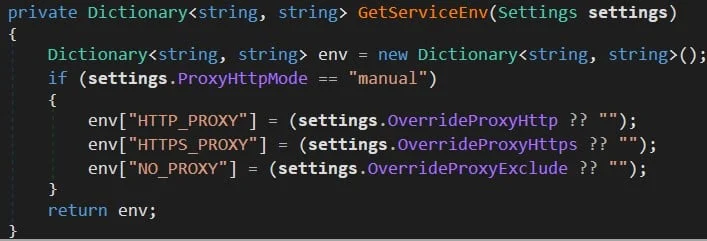
So the settings argument could not be used to manipulate the service. The researcher moved to the next user-controlled argument, daemonOptions, and from RewriteOptions saw that it was used as the parameter to the --config-file switch in dockerd, which meant the dockerd settings were under user control:
public string RewriteOptions(string daemonOptions, Settings settings, string userName, bool useProtectedNamedPipe) {
  ...
  optionsObject = JsonConvert.DeserializeObject(daemonOptions);
  ...
  File.WriteAllText(this._jsonFilePath, optionsObject.ToString());
  return args + " --config-file \"" + this._jsonFilePath + "\"";
}
DaemonJSON options
The Docker daemon JSON fields are documented by Docker, and there are many of them (Appendix B of the original lists the Windows set). One thing to notice is that there are two separate versions, one for Linux and one for Windows, which can cause problems when fields are supposed to work only on one platform.
The researcher added the requested input to each field in the JSON file and checked whether it returned something interesting. Some results were odd, such as making the daemon create a new named pipe by changing the hosts field:
\"hosts\": [ \"npipe:////./pipe/docker_engine_windows5\", \"tcp://[redacted]:2376\" ]
Out of all these experiments, two cases allowed privilege escalation.
Exploitation
Step 1: data-root to arbitrary file overwrite
The first field is data-root, the path to a directory containing all the container resources. The Docker documentation quoted in the report says:
--data-root is the path where persisted data such as images, volumes, and cluster state are stored. The default value is /var/lib/docker. To avoid any conflict with other daemons, set this parameter separately for each daemon.
On Windows the default is C:\ProgramData\Docker, a protected place the user does not control, but the field can be changed to anywhere. The researcher set DaemonJSON to a JSON string with data-root pointing at C:\dataRoot:
container.DaemonJSON = "{ \"data-root\": \"c:\\\\dataRoot\" }";
After executing the start method, the directory C:\dataRoot was created, but the user had no access to it. This was bypassed by creating the directory before calling the API request, so the daemon saw that C:\dataRoot already existed and wrote all the directories and files with SYSTEM privileges. The user then had full access to the newly created directory because it inherited the default permissions the standard user had.
The next step was to look inside the directory for files vulnerable to symlink attacks. One was C:\dataRoot\network\files\local-kv.db. Deleting the directory C:\dataRoot\network\files, then stopping and starting the dockerd service through the API (no privileges required), made the daemon create the directory and then the file.
This is a classic TOCTOU attack on the race condition. The daemon can be made to create the directory, and before it creates the file, the directory is changed to a junction directory, then an object manager symlink is created pointing to any place desired.
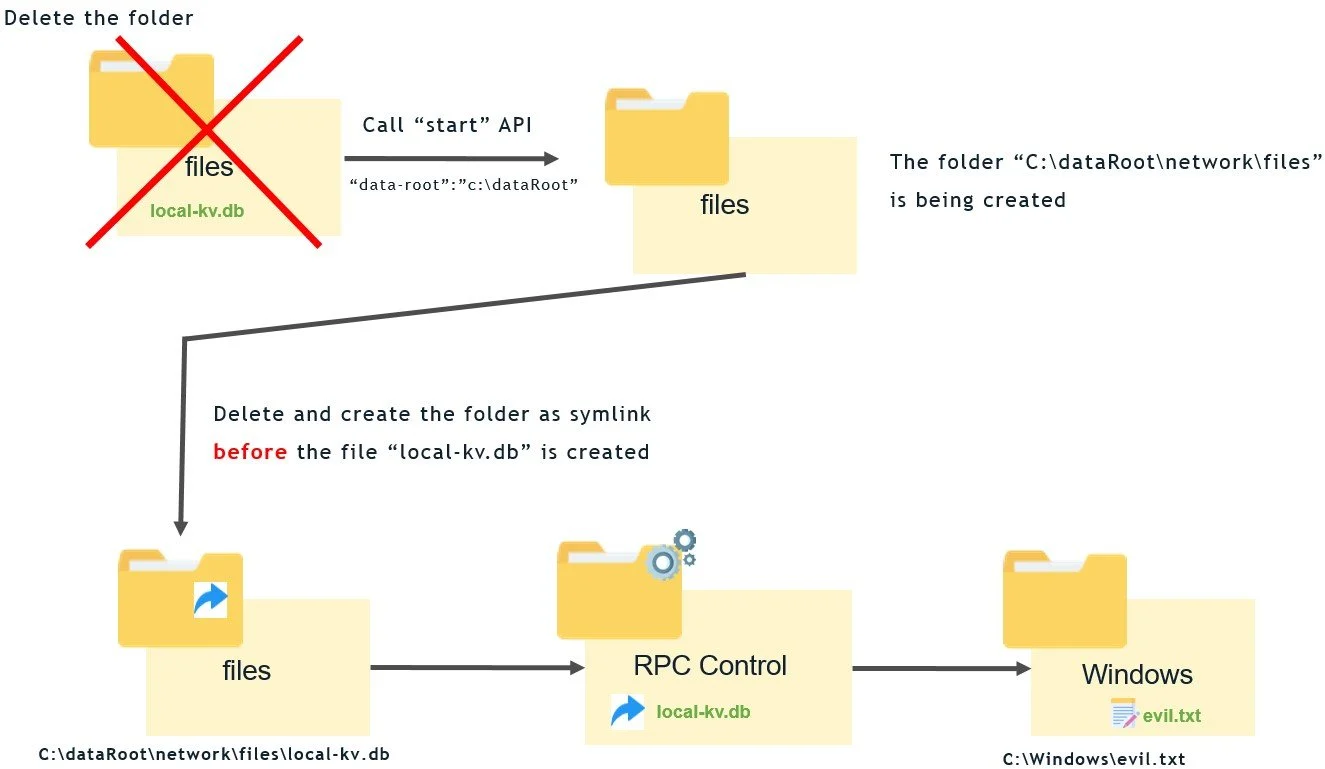
After running the exploit it took several attempts before the directory could be changed to a junction directory in time, so the file could be written anywhere (without controlling the content), including protected paths. That can easily cause a denial of service if one is creative enough.
This issue was fixed in version 4.7.0 and assigned CVE-2022-38730.

Step 2: pidfile to arbitrary delete and overwrite
The second vulnerable field is pidfile, which holds a file path that stores the Docker daemon's process ID. The Docker documentation quoted says:
-p, --pidfile=/var/run/docker.pid is the path where the process ID of the daemon is stored. Specify the path for your pid file here.
The researcher set DaemonJSON with a pidfile field pointing at a privileged location:
{ \"pidfile\" : \"c:\\\\windows\\\\evil.txt\"}
After executing the start method, the target file was created, and stopping the service with the stop method deleted it.

In this way any file can be deleted.

Step 3: from arbitrary file deletion to full LPE
Deleting arbitrary files is useful, but can it be leveraged to full privilege escalation? The Zero Day Initiative published an article about a technique that leverages arbitrary file delete vulnerabilities to full privilege escalation by exploiting Windows Installer service behaviour when rolling back an installation.
That technique needs write access to C:\Config.msi, a special protected directory low-privileged users cannot modify. The ZDI authors showed that if the vulnerable process calls DeleteFileA/DeleteFileW and the directory is empty, the directory can be deleted by adding the path with the following index data: C:\Config.Msi::$INDEX_ALLOCATION.
In this case, dockerd used DeleteFileW to delete the file based on the pidfile field.
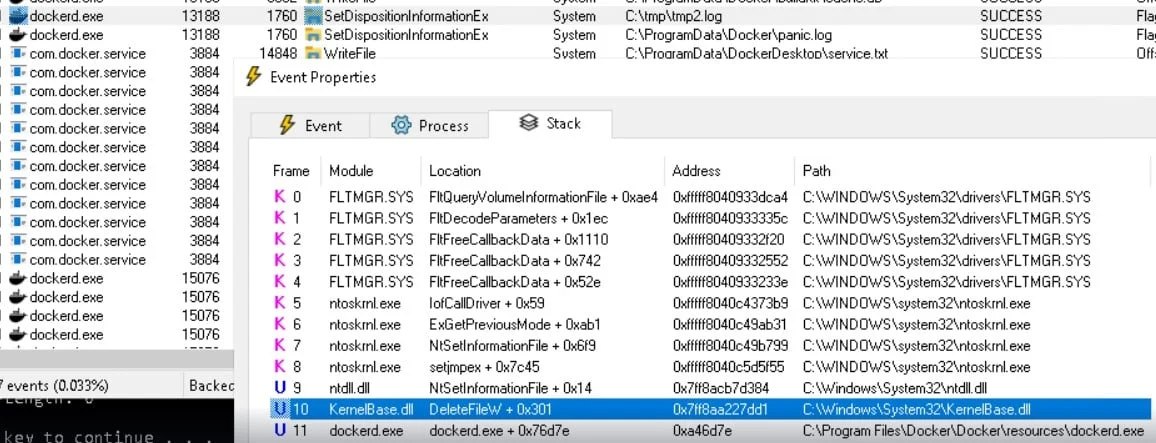
But that path could not be used directly, because the first thing that happens is that a file is created from the pidfile field. In this case it would create a file named C:\Config.Msi::$INDEX_ALLOCATION, which causes a collision because the C:\Config.Msi directory already existed from old MSI installations.

This was bypassed by passing a random file location such as C:\tmp\sym\tmp.txt. After the file was created, it was deleted and the file's directory (c:\tmp\sym) was converted to a junction directory with an object manager symlink pointing to C:\Config.Msi::$INDEX_ALLOCATION.

When the service was stopped, it tried to delete the directory but failed because the directory was not empty.
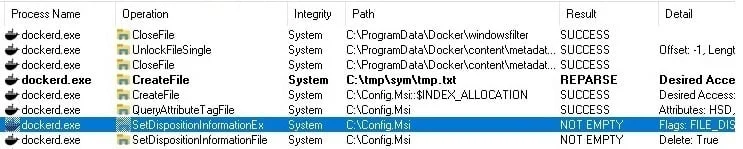
An empty directory is one of the prerequisites mentioned in the ZDI article: "Note that the only required exploit primitive here is the ability to delete an empty folder."
Looking at the files inside C:\Config.Msi, they were randomly generated names with numbers and letters. Guessing the names through brute-forcing and trying to delete them was considered, but that involved starting and stopping the service multiple times, which would be time consuming.
C:\WINDOWS\system32>dir c:\Config.Msi
 Volume in drive C is OS
 Volume Serial Number is 8CDA-914A

 Directory of c:\Config.Msi

31/07/2015  09:57        19,722,432 1011996e.rbf
31/07/2015  09:57        82,045,120 1011996f.rbf
31/07/2015  09:57         1,802,920 101199c8.rbf
16/09/2019  18:45           458,160 10119aff.rbf
31/07/2015  09:58         6,542,016 34558643.rbf
18/06/2020  08:36         1,021,048 43c89f06.rbf
31/07/2015  09:57            70,312 480e66af.rbf
31/07/2015  10:01         1,512,152 480e685b.rbf
31/07/2015  10:00         8,901,800 480e6860.rbf
The next step was to look at Windows 11 specifically. Surprisingly, on a new fresh Windows 11 the C:\Config.msi directory did not exist, so it could be created with the user's permissions and the exploit worked.
This issue was fixed in version 4.7.0 and assigned CVE-2022-37326.

In the proof of concept an empty restricted C:\Config was created to show it can be deleted, but usually that directory is not present on a fresh installation.
Step 4: HyperV destroy to arbitrary file delete
There were two more interesting API functions in the HyperVController (hyperv):
hyperv/destroyhyperv/create
The destroy API function is implemented by DestroyAsync, which receives an object named settings as an argument. It then calls GetDiskPath, which returns a file path to diskpath and eventually deletes the file.
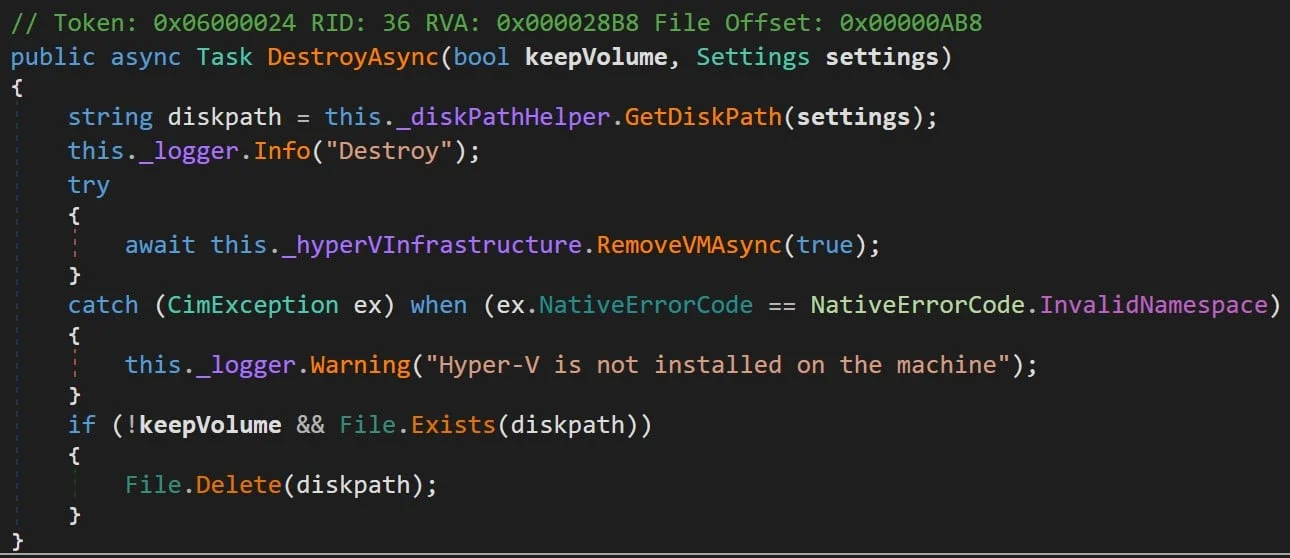
GetDiskPath took the path from settings.DataFolder (controlled by the user) and concatenated it with the name DockerDesktop.vhdx.
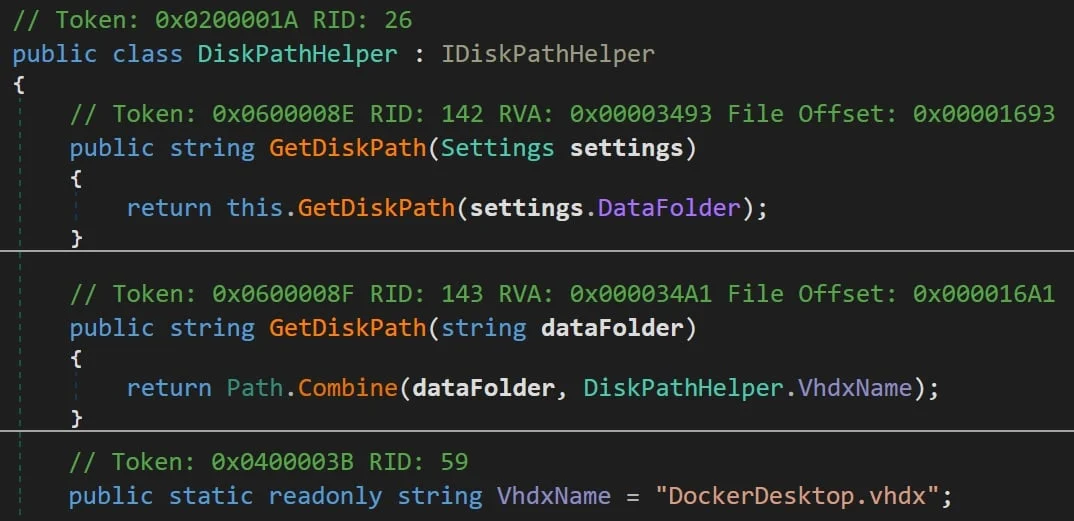
The API request could be called with any file path inside settings.DataFolder (for example C:\tmp\myvhd) and delete a file with the name DockerDesktop.vhdx.

With the same method used in the previous exploits, a junction directory with an object manager symlink was used to change the name of the default file DockerDesktop.vhdx to any file chosen, and delete it.

This issue was fixed in version 4.6.0 and assigned CVE-2022-31647.

Step 5: HyperV create to arbitrary file overwrite
Similarly, the create API function is implemented by CreateOrConfigureAsync, which calls GetDiskPath to extract the DataFolder field from the settings object.
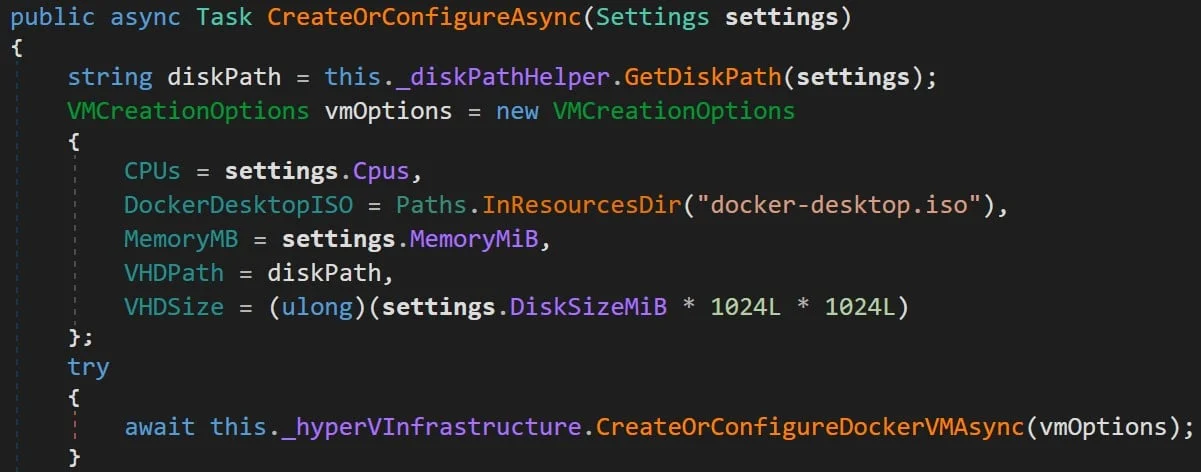
It creates a default DockerDesktop.vhdx file based on the path in the DataFolder field, so the file could be placed anywhere chosen, for example C:\Windows.

In that case the vmms.exe service was the one that created the file, not com.docker.service as in the previous examples.

As in the previous examples, the same technique was used to rename the file to any file wanted in any location.
This issue was fixed in version 4.6.0 and assigned CVE-2022-34292.

Root cause
The common mistake is that API methods reachable by a low-privileged user accept file paths and daemon settings and pass them to privileged components without constraining where those paths point. In the Windows containers case, RewriteOptions writes the user-supplied daemon options to a file and hands it to dockerd with --config-file, so fields such as data-root and pidfile decide where a SYSTEM process creates and deletes files. In the HyperV case, GetDiskPath concatenates the user-controlled settings.DataFolder with a fixed file name, and DestroyAsync and CreateOrConfigureAsync act on the result.
The second half of the root cause is the file-system layer. The privileged process follows junctions and object manager symlinks, so a directory the user controls can be redirected to a protected location between the check and the use. The data-root exploit is a TOCTOU race: the daemon creates the directory, and the attacker swaps it for a junction before the file is written. The pidfile and HyperV exploits use the same redirection to turn a fixed file name into an arbitrary one.
Impact
A low-privileged local user can make privileged Docker Desktop components create, overwrite and delete files in protected locations. The data-root bug gives an arbitrary file overwrite without control of the content, which the report notes can easily cause a denial of service. The pidfile bug gives deletion of any file, and on a fresh Windows 11, where C:\Config.msi did not exist, it was leveraged to full privilege escalation using the Windows Installer rollback technique. The HyperV destroy and create bugs give arbitrary file delete and arbitrary file overwrite respectively, again in privileged locations. All of these require local access as a standard user on a Windows machine running the affected Docker Desktop versions.
Fix
Docker fixed the issues in two releases. Version 4.6.0 fixed CVE-2022-31647 and CVE-2022-34292, the HyperV destroy and create bugs. Version 4.7.0 fixed CVE-2022-38730 and CVE-2022-37326, the data-root and pidfile bugs. The disclosure timeline in the report records the initial report on 23/02/22, the 4.6.0 release on 14/03/22, Docker advising that the remaining fixes would come in 4.7.0 on 17/03/22, an installation of 4.7.0 sent for checking on 28/03/22, confirmation of the fix on 31/03/22, and the 4.7.0 release on 07/04/22.
Variants to test
- Enumerate other API methods that accept a path or a settings object and pass it to a SYSTEM service. A positive result is a request that makes the privileged process create or delete a file outside its expected directory.
- Feed every documented daemon JSON field through the
--config-filepath, including fields documented only for the other platform. A positive result is a field that changes where the daemon writes or deletes files. - Look for fixed file names concatenated with a user-controlled directory, as with
DockerDesktop.vhdx. A positive result is being able to redirect the fixed name to an arbitrary target with a junction or object manager symlink. - Look for create-then-use sequences on directories the user can modify. A positive result is winning the race and having the privileged process write through a junction.
- Check whether the target system has
C:\Config.msipresent. A positive result for the delete-to-LPE technique is an absent or empty directory that the vulnerable process can be made to delete. - Watch the privileged process with Procmon for
DeleteFileWand file creation in protected paths. A positive result is a delete or create whose path came from user input.
What happened, in plain words
Docker Desktop is a program that lets you run Docker containers on your own computer, including Windows. To do its work it runs background services with very high permissions, higher than the normal user who is logged in. A researcher looked at the small local API that Docker Desktop exposes, the set of commands the program accepts from other programs on the same machine, and found that some of those commands let an ordinary user tell those powerful background services where to create, overwrite and delete files. By pointing those file paths at protected places on disk, an ordinary user could make a highly privileged service create, overwrite or delete files, and in one case escalate to full control of the machine.
This article is the second and final part of that research. The first part explained how the research started and showed one full privilege escalation. This part walks through the other vulnerable functions the researcher was able to exploit.
In short, the researcher found and reported several privilege escalation vulnerabilities inside Docker Desktop for Windows:
- Arbitrary file delete that can be leveraged to full privilege escalation: CVE-2022-37326 and CVE-2022-38730.
- Arbitrary file overwrite: CVE-2022-31647 and CVE-2022-34292.
The report says the researcher followed responsible disclosure guidelines, and that Docker handled the notifications quickly and efficiently.
Before going further, a few words on the ideas that come back all the time.
What is an API? Think of a restaurant. You do not walk into the kitchen and cook; you read the menu, order a dish, and the kitchen makes it. An API (Application Programming Interface) is that menu plus the waiter: a fixed list of requests a program accepts, and the answers it gives back.
What is a privilege escalation? On Windows, not every account can do everything. A standard user can change their own files; a SYSTEM account can change anything, including the operating system itself. Privilege escalation means finding a way for the weaker account to get the stronger account to act for it, so that the weak account effectively gains the strong account's powers.
What is an arbitrary file delete or overwrite? Normally a program only deletes or overwrites files in its own folders. If you can make it delete or overwrite a file of your choosing, anywhere, that is called arbitrary: the choice is yours, not the program's.
What is a symlink and a junction? A symlink (symbolic link) is a shortcut that looks like a file or folder but actually points somewhere else. A junction is the folder version of the same idea on Windows. If a powerful program follows a shortcut you control, it may end up working in a place you were never allowed to touch.
What is TOCTOU? It stands for time-of-check to time-of-use. Imagine a bouncer checks your ticket, then you swap it for another one before you walk in. The check happened at one moment, the use at another, and the thing checked is not the thing used. In computing, it is a race: you change something in the tiny gap between the program looking at it and the program acting on it.
Setup
The work is done from a low-privilege user on Windows, calling the Docker Desktop API. No special role is needed: the whole point is that a standard user can reach these methods. The tools used are the API itself and Procmon to observe file operations; the references cite James Forshaw's symbolic link testing tools and NtApiDotNet. Testing was also done on a fresh Windows 11 installation, which matters for one of the exploits below.
What is Procmon? Process Monitor is a free Microsoft tool that records what programs do on a machine: which files they open, create or delete, and which registry keys they touch. It is like a security camera for the file system, and it is how the researcher could see the privileged service doing the work.
Finding it
The researcher continued searching for vulnerable API methods and found two promising ones: the start and stop functions inside the WindowsContainersController class. These can start and stop the dockerd service from a low-privilege user. The start function receives a WindowsContainerStartRequest object as an argument.
What is a class? In programming, a class is a template that describes a bundle of related data and actions. WindowsContainersController is the part of Docker Desktop that handles requests about Windows containers; start and stop are two of the actions it offers. dockerd is the Docker daemon, the background program that actually runs containers.
That class has three members, and the Start function uses two of them:
public class WindowsContainerStartRequest
{
	public Settings Settings { get; set; }
	public string DaemonJSON { get; set; }
	public string UserCertsDirectory { get; set; }
}
Line by line:
public class WindowsContainerStartRequestdeclares the template for the request that the start function accepts.public Settings Settings { get; set; }is a member calledSettings, holding a structured object of typeSettings.public string DaemonJSON { get; set; }is a member calledDaemonJSON, holding text (a string).public string UserCertsDirectory { get; set; }is a third member, holding text, which the Start function does not use.
DaemonJSON holds the path for the daemon.json file, the Docker daemon's configuration file. Settings is a class containing all the fields that live inside the daemon JSON file (listed in Appendix A of the original).
What is a configuration file? Many programs read a settings file at startup: a plain text file listing options such as where to store data or which network port to use. For the Docker daemon that file is daemon.json. Whoever controls that file controls how the daemon behaves, which is why it becomes interesting here.
The Settings member turned out not to be useful. After the call to _windowsDockerDaemon.Start, the settings argument was passed to three functions: RewriteOptions, GetServiceEnv and TryToStartService.
Although it was passed as an argument, it was used only in the GetServiceEnv method, and only for the Proxy fields.
So the settings argument could not be used to manipulate the service. The researcher moved to the next user-controlled argument, daemonOptions, and from RewriteOptions saw that it was used as the parameter to the --config-file switch in dockerd, which meant the dockerd settings were under user control:
public string RewriteOptions(string daemonOptions, Settings settings, string userName, bool useProtectedNamedPipe) {
  ...
  optionsObject = JsonConvert.DeserializeObject(daemonOptions);
  ...
  File.WriteAllText(this._jsonFilePath, optionsObject.ToString());
  return args + " --config-file \"" + this._jsonFilePath + "\"";
}
Line by line:
public string RewriteOptions(...)declares a function that takes the daemon options text, the settings object, a user name and a true/false flag, and returns text.optionsObject = JsonConvert.DeserializeObject(daemonOptions);turns the text supplied by the caller into a structured object. JSON is a common text format for structured data, using curly braces and quoted names.File.WriteAllText(this._jsonFilePath, optionsObject.ToString());writes that object into a file on disk.return args + " --config-file \"" + this._jsonFilePath + "\"";builds the command line fordockerdand adds--config-filefollowed by the path of the file just written.
In plain words: the user's text is saved to a file, and the daemon is told to read its configuration from that file. So the user chooses the daemon's settings.
DaemonJSON options
The Docker daemon JSON fields are documented by Docker, and there are many of them (Appendix B of the original lists the Windows set). One thing to notice is that there are two separate versions, one for Linux and one for Windows, which can cause problems when fields are supposed to work only on one platform.
The researcher added the requested input to each field in the JSON file and checked whether it returned something interesting. Some results were odd, such as making the daemon create a new named pipe by changing the hosts field:
\"hosts\": [ \"npipe:////./pipe/docker_engine_windows5\", \"tcp://[redacted]:2376\" ]
Line by line:
"hosts"is the name of the setting being changed.[ ... ]means a list of values."npipe:////./pipe/docker_engine_windows5"is a named pipe address. A named pipe is a channel that programs on the same machine use to talk to each other, like an internal intercom; this one is calleddocker_engine_windows5."tcp://[redacted]:2376"is a network address on the local machine ([redacted] always means this computer) on port 2376.
Out of all these experiments, two cases allowed privilege escalation.
Exploitation
Step 1: data-root to arbitrary file overwrite
The first field is data-root, the path to a directory containing all the container resources. The Docker documentation quoted in the report says:
--data-root is the path where persisted data such as images, volumes, and cluster state are stored. The default value is /var/lib/docker. To avoid any conflict with other daemons, set this parameter separately for each daemon.
In plain words: data-root tells Docker where to keep its saved data. On Windows the default is C:\ProgramData\Docker, a protected place the user does not control, but the field can be changed to anywhere. The researcher set DaemonJSON to a JSON string with data-root pointing at C:\dataRoot:
container.DaemonJSON = "{ \"data-root\": \"c:\\\\dataRoot\" }";
Line by line:
container.DaemonJSON = ...assigns a value to theDaemonJSONmember of the request.- The value is a piece of text that itself contains JSON:
{ "data-root": "c:\\dataRoot" }. - The backslashes are doubled because they are escaped: in a text string,
\\stands for a single backslash, so the path the daemon finally sees isc:\dataRoot.
After executing the start method, the directory C:\dataRoot was created, but the user had no access to it. This was bypassed by creating the directory before calling the API request, so the daemon saw that C:\dataRoot already existed and wrote all the directories and files with SYSTEM privileges. The user then had full access to the newly created directory because it inherited the default permissions the standard user had.
Why create the folder first? If the powerful service creates a brand new folder, it may lock it down so the ordinary user cannot enter. But if the folder already exists and belongs to the user, the service just writes inside it, and the user keeps their access. It is like leaving your own box on the kitchen counter so the chef puts the dish in your box instead of a locked cabinet.
The next step was to look inside the directory for files vulnerable to symlink attacks. One was C:\dataRoot\network\files\local-kv.db. Deleting the directory C:\dataRoot\network\files, then stopping and starting the dockerd service through the API (no privileges required), made the daemon create the directory and then the file.
This is a classic TOCTOU attack on the race condition. The daemon can be made to create the directory, and before it creates the file, the directory is changed to a junction directory, then an object manager symlink is created pointing to any place desired.
What is an object manager symlink? Windows has an internal namespace, managed by the object manager, in which system objects such as devices and pipes have names. A symlink in that namespace can redirect a name to another location, and it can reach places that ordinary file shortcuts cannot. Combined with a junction, it lets the user swap the meaning of a folder path after the program has decided to use it.
After running the exploit it took several attempts before the directory could be changed to a junction directory in time, so the file could be written anywhere (without controlling the content), including protected paths. That can easily cause a denial of service if one is creative enough.
What is a denial of service? Making a system or program stop working properly for its legitimate users, for example by overwriting a file the system needs. Here the attacker does not choose what is written, only where, which is still enough to break things.
This issue was fixed in version 4.7.0 and assigned CVE-2022-38730.
Step 2: pidfile to arbitrary delete and overwrite
The second vulnerable field is pidfile, which holds a file path that stores the Docker daemon's process ID. The Docker documentation quoted says:
-p, --pidfile=/var/run/docker.pid is the path where the process ID of the daemon is stored. Specify the path for your pid file here.
What is a process ID? Every running program on a computer gets a number, its process ID or PID, so the system can tell programs apart. A pidfile is simply a small file where a program writes its own number so other tools can find it later.
The researcher set DaemonJSON with a pidfile field pointing at a privileged location:
{ \"pidfile\" : \"c:\\\\windows\\\\evil.txt\"}
Line by line:
- The text is a JSON object with one setting,
pidfile. - The escaped backslashes resolve to the path
c:\windows\evil.txt, inside the Windows system folder, a place an ordinary user cannot normally write to.
After executing the start method, the target file was created, and stopping the service with the stop method deleted it.
In this way any file can be deleted.
Why does this matter? The daemon creates the file when it starts and removes it when it stops, both as SYSTEM. Since the path comes from the user, the user decides which file gets created and then deleted, even in protected folders.
Step 3: from arbitrary file deletion to full LPE
Deleting arbitrary files is useful, but can it be leveraged to full privilege escalation? The Zero Day Initiative published an article about a technique that leverages arbitrary file delete vulnerabilities to full privilege escalation by exploiting Windows Installer service behaviour when rolling back an installation.
What is Windows Installer rollback? When you install software with a Windows installer package (an MSI file), Windows keeps a record of what it changed so it can undo everything if the installation fails. That undo process runs with high privileges. If an attacker can remove or replace files the undo process relies on, the undo itself can be turned against the system. The ZDI article describes exactly this trick.
That technique needs write access to C:\Config.msi, a special protected directory low-privileged users cannot modify. The ZDI authors showed that if the vulnerable process calls DeleteFileA/DeleteFileW and the directory is empty, the directory can be deleted by adding the path with the following index data: C:\Config.Msi::$INDEX_ALLOCATION.
What is ::$INDEX_ALLOCATION? It is a special suffix that tells Windows to treat the path as the folder's internal index rather than as a normal file. Deleting that index effectively deletes the folder itself, but only if the folder is empty.
In this case, dockerd used DeleteFileW to delete the file based on the pidfile field.
But that path could not be used directly, because the first thing that happens is that a file is created from the pidfile field. In this case it would create a file named C:\Config.Msi::$INDEX_ALLOCATION, which causes a collision because the C:\Config.Msi directory already existed from old MSI installations.
What is a collision here? The daemon first tries to create a file at the given path. But that path already means "the folder's index", and the folder exists, so the creation fails before any deletion can happen. The trick needs the delete step, not the create step.
This was bypassed by passing a random file location such as C:\tmp\sym\tmp.txt. After the file was created, it was deleted and the file's directory (c:\tmp\sym) was converted to a junction directory with an object manager symlink pointing to C:\Config.Msi::$INDEX_ALLOCATION.
In plain words: the daemon is told to use a harmless path in a folder the user owns. The file gets created there, so the create step succeeds. Then the user deletes that file and replaces the folder with a junction that redirects to the protected folder's index. When the stop method runs, the daemon thinks it is deleting its own pidfile, but the path now leads to the protected folder.
When the service was stopped, it tried to delete the directory but failed because the directory was not empty.
An empty directory is one of the prerequisites mentioned in the ZDI article: "Note that the only required exploit primitive here is the ability to delete an empty folder."
Looking at the files inside C:\Config.Msi, they were randomly generated names with numbers and letters. Guessing the names through brute-forcing and trying to delete them was considered, but that involved starting and stopping the service multiple times, which would be time consuming.
C:\WINDOWS\system32>dir c:\Config.Msi
 Volume in drive C is OS
 Volume Serial Number is 8CDA-914A

 Directory of c:\Config.Msi

31/07/2015  09:57        19,722,432 1011996e.rbf
31/07/2015  09:57        82,045,120 1011996f.rbf
31/07/2015  09:57         1,802,920 101199c8.rbf
16/09/2019  18:45           458,160 10119aff.rbf
31/07/2015  09:58         6,542,016 34558643.rbf
18/06/2020  08:36         1,021,048 43c89f06.rbf
31/07/2015  09:57            70,312 480e66af.rbf
31/07/2015  10:01         1,512,152 480e685b.rbf
31/07/2015  10:00         8,901,800 480e6860.rbf
Line by line:
C:\WINDOWS\system32>dir c:\Config.Msiis the command prompt showing thedircommand, which lists the contents of a folder, run againstc:\Config.Msi.Volume in drive C is OSandVolume Serial Number is 8CDA-914Aidentify the disk.Directory of c:\Config.Msisays which folder is being listed.- Each following line is one file: date, time, size in bytes, and name. The names look random, made of digits and letters, and end in
.rbf.
Why brute force? Brute forcing means trying many possibilities until one works. Here it would mean guessing those random file names and deleting them one by one to empty the folder. Each attempt needs a start and stop of the service, so it would be slow.
The next step was to look at Windows 11 specifically. Surprisingly, on a new fresh Windows 11 the C:\Config.msi directory did not exist, so it could be created with the user's permissions and the exploit worked.
This issue was fixed in version 4.7.0 and assigned CVE-2022-37326.
In the proof of concept an empty restricted C:\Config was created to show it can be deleted, but usually that directory is not present on a fresh installation.
Why does an absent folder help? The technique needs to delete an empty folder. If the folder does not exist yet, the user can create it themselves, empty, and then the daemon's delete succeeds. On older systems the folder exists but is full of installer leftovers, so the delete fails.
Step 4: HyperV destroy to arbitrary file delete
There were two more interesting API functions in the HyperVController (hyperv):
hyperv/destroyhyperv/create
What is Hyper-V? It is Microsoft's virtualisation feature: it lets one computer run other computers as software, called virtual machines. Docker Desktop on Windows can use Hyper-V to host its Linux environment, and a virtual machine's disk is stored in a file with the extension .vhdx.
The destroy API function is implemented by DestroyAsync, which receives an object named settings as an argument. It then calls GetDiskPath, which returns a file path to diskpath and eventually deletes the file.
GetDiskPath took the path from settings.DataFolder (controlled by the user) and concatenated it with the name DockerDesktop.vhdx.
What does concatenated mean? Joined end to end. If the folder is C:\tmp\myvhd and the fixed name is DockerDesktop.vhdx, the result is C:\tmp\myvhd\DockerDesktop.vhdx. The user chooses the folder; the program adds the file name.
The API request could be called with any file path inside settings.DataFolder (for example C:\tmp\myvhd) and delete a file with the name DockerDesktop.vhdx.
With the same method used in the previous exploits, a junction directory with an object manager symlink was used to change the name of the default file DockerDesktop.vhdx to any file chosen, and delete it.
In plain words: the program always deletes a file called DockerDesktop.vhdx, but because the folder part is the user's, the user can make that folder a junction that points elsewhere and rename the target so that the fixed name lands on a file they want gone.
This issue was fixed in version 4.6.0 and assigned CVE-2022-31647.
Step 5: HyperV create to arbitrary file overwrite
Similarly, the create API function is implemented by CreateOrConfigureAsync, which calls GetDiskPath to extract the DataFolder field from the settings object.
It creates a default DockerDesktop.vhdx file based on the path in the DataFolder field, so the file could be placed anywhere chosen, for example C:\Windows.
In that case the vmms.exe service was the one that created the file, not com.docker.service as in the previous examples.
What are these services? com.docker.service is Docker's own helper on Windows. vmms.exe is the Hyper-V Virtual Machine Management service, part of Windows itself.
As in the previous examples, the same technique was used to rename the file to any file wanted in any location.
This issue was fixed in version 4.6.0 and assigned CVE-2022-34292.
Root cause
The common mistake is that API methods reachable by a low-privileged user accept file paths and daemon settings and pass them to privileged components without constraining where those paths point. In the Windows containers case, RewriteOptions writes the user-supplied daemon options to a file and hands it to dockerd with --config-file, so fields such as data-root and pidfile decide where a SYSTEM process creates and deletes files. In the HyperV case, GetDiskPath concatenates the user-controlled settings.DataFolder with a fixed file name, and DestroyAsync and CreateOrConfigureAsync act on the result.
The second half of the root cause is the file-system layer. The privileged process follows junctions and object manager symlinks, so a directory the user controls can be redirected to a protected location between the check and the use. The data-root exploit is a TOCTOU race: the daemon creates the directory, and the attacker swaps it for a junction before the file is written. The pidfile and HyperV exploits use the same redirection to turn a fixed file name into an arbitrary one.
Impact
A low-privileged local user can make privileged Docker Desktop components create, overwrite and delete files in protected locations. The data-root bug gives an arbitrary file overwrite without control of the content, which the report notes can easily cause a denial of service. The pidfile bug gives deletion of any file, and on a fresh Windows 11, where C:\Config.msi did not exist, it was leveraged to full privilege escalation using the Windows Installer rollback technique. The HyperV destroy and create bugs give arbitrary file delete and arbitrary file overwrite respectively, again in privileged locations. All of these require local access as a standard user on a Windows machine running the affected Docker Desktop versions.
Fix
Docker fixed the issues in two releases. Version 4.6.0 fixed CVE-2022-31647 and CVE-2022-34292, the HyperV destroy and create bugs. Version 4.7.0 fixed CVE-2022-38730 and CVE-2022-37326, the data-root and pidfile bugs. The disclosure timeline in the report records the initial report on 23/02/22, the 4.6.0 release on 14/03/22, Docker advising that the remaining fixes would come in 4.7.0 on 17/03/22, an installation of 4.7.0 sent for checking on 28/03/22, confirmation of the fix on 31/03/22, and the 4.7.0 release on 07/04/22.
Variants to test
- Enumerate other API methods that accept a path or a settings object and pass it to a SYSTEM service. A positive result is a request that makes the privileged process create or delete a file outside its expected directory.
- Feed every documented daemon JSON field through the
--config-filepath, including fields documented only for the other platform. A positive result is a field that changes where the daemon writes or deletes files. - Look for fixed file names concatenated with a user-controlled directory, as with
DockerDesktop.vhdx. A positive result is being able to redirect the fixed name to an arbitrary target with a junction or object manager symlink. - Look for create-then-use sequences on directories the user can modify. A positive result is winning the race and having the privileged process write through a junction.
- Check whether the target system has
C:\Config.msipresent. A positive result for the delete-to-LPE technique is an absent or empty directory that the vulnerable process can be made to delete. - Watch the privileged process with Procmon for
DeleteFileWand file creation in protected paths. A positive result is a delete or create whose path came from user input.
Glossary
- API: a fixed list of requests a program accepts from other programs, like a menu you order from.
- Arbitrary file delete / overwrite: making a program delete or overwrite a file of your choosing, anywhere on disk.
- Brute force: trying many possibilities until one works, such as guessing random file names.
- Class: in programming, a template describing a bundle of related data and actions.
- Collision: here, when the daemon tries to create a file at a path that already means something else, so the creation fails.
- Concatenate: join two pieces of text end to end.
- Configuration file: a plain text file of settings a program reads at startup, such as
daemon.json. - CVE: a public identifier for a known security vulnerability, so people can refer to it unambiguously.
- Daemon: a background program that runs without a visible window, such as
dockerd. - Denial of service (DoS): making a system or program stop working properly for its legitimate users.
- Docker Desktop: a program that runs Docker containers on a personal computer, including Windows.
- dockerd: the Docker daemon, the background program that actually runs containers.
- Escape (escaping): in text strings, a backslash used to mark a special character, so
\\stands for one real backslash. - Hyper-V: Microsoft's virtualisation feature, which runs virtual machines as software.
- Junction: a Windows folder shortcut that points to another folder.
- JSON: a common text format for structured data, using curly braces and quoted names.
- LPE (local privilege escalation): gaining higher permissions on a machine you already have a low-privilege account on.
- MSI: a Windows installer package format; Windows keeps rollback data for it.
- Named pipe: a channel programs on the same machine use to talk to each other, like an internal intercom.
- Object manager symlink: a shortcut in Windows' internal object namespace that can redirect a name to another location.
- PID (process ID): the number the system gives a running program so it can be told apart from others.
- Pidfile: a small file where a program writes its own process ID.
- Privilege escalation: getting a more powerful account to act on your behalf, so you gain its powers.
- Procmon: Microsoft's Process Monitor tool, which records file and registry activity.
- Proof of concept (PoC): a demonstration that a vulnerability can actually be exploited.
- Race condition: a bug that depends on timing, where changing something in a tiny gap changes the outcome.
- Responsible disclosure: reporting a vulnerability privately to the vendor and giving them time to fix it before publishing.
- Rollback: undoing changes made by an installation, which Windows Installer does with high privileges.
- Root cause: the underlying mistake that makes a vulnerability possible.
- SYSTEM: the most powerful built-in Windows account, able to change anything on the machine.
- Symlink (symbolic link): a shortcut that looks like a file or folder but points somewhere else.
- TOCTOU (time-of-check to time-of-use): a race where the thing checked is changed before it is used.
- Virtual machine (VM): a computer simulated in software, stored on disk as files such as
.vhdx. - vmms.exe: the Hyper-V Virtual Machine Management service, part of Windows.
.vhdx: the file format of a Hyper-V virtual machine's disk.


