Availability Impact from Exploiting Project Name Vulnerabilities
A user could change a project's name to a malicious string containing a script-like payload, which caused other users to be logged out when they tried to access the project. This resulted in a denial of service, preventing all users, including administrators, from accessing or deleting the project.
 Originally disclosed on HackerOne
- Fixed in 4 days
- Paid in 4 days
- Disclosed after 20 days
Summary:
The vulnerability allows user to change the project name to a malicious string, which results in other users being logged out of their accounts when they attempt to access the project. This leads to a denial of service for all users attempting to interact with the affected project, severely impacting its availability
Steps To Reproduce:
-
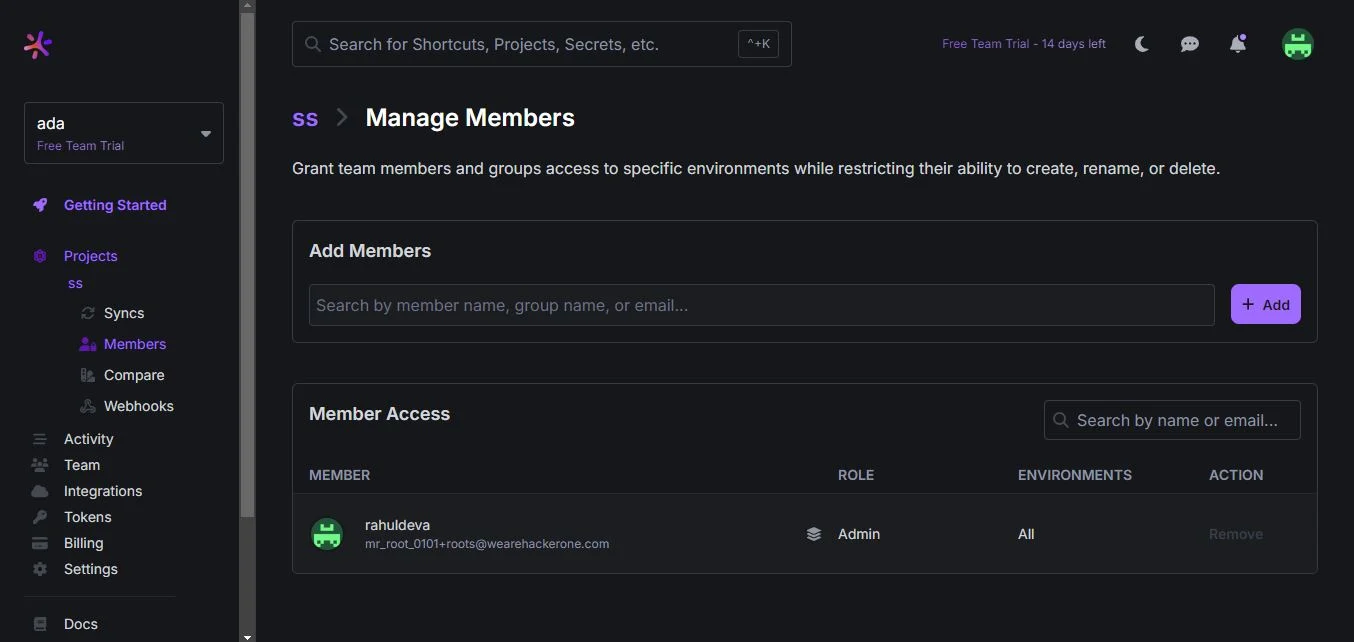
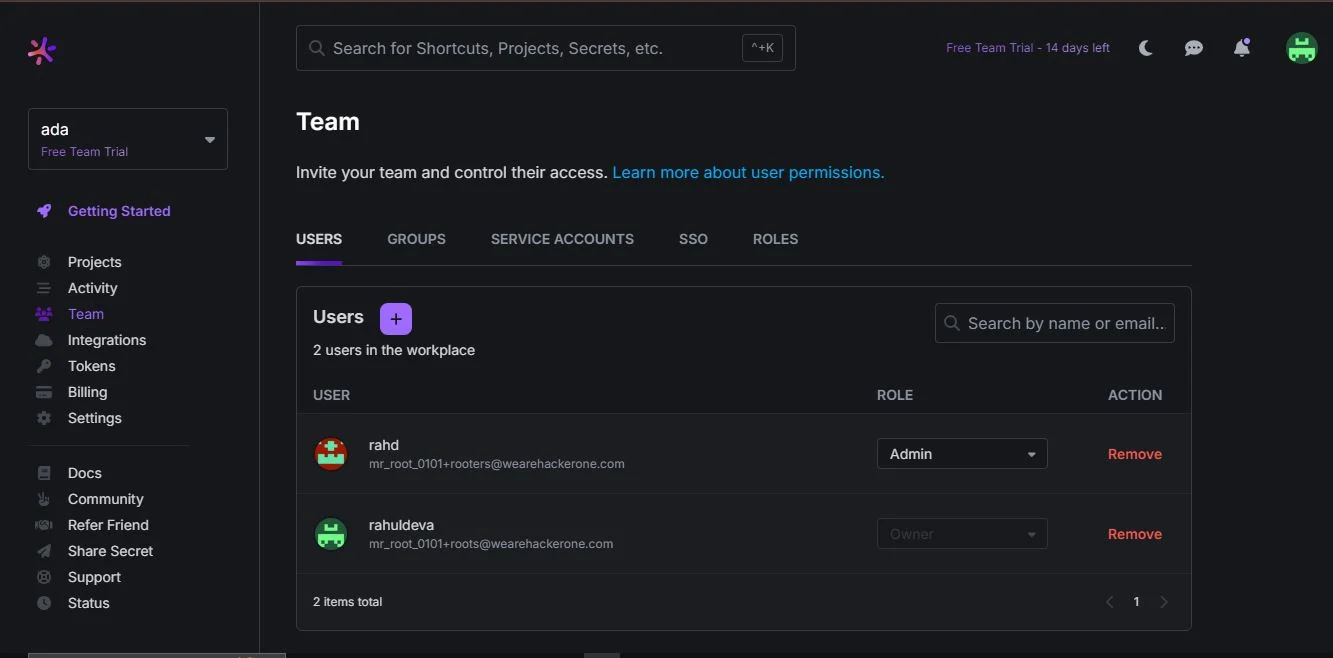
( F3703735 ) here i have created a project with name ss. Then i have added the other user to the project (F3703740).
-
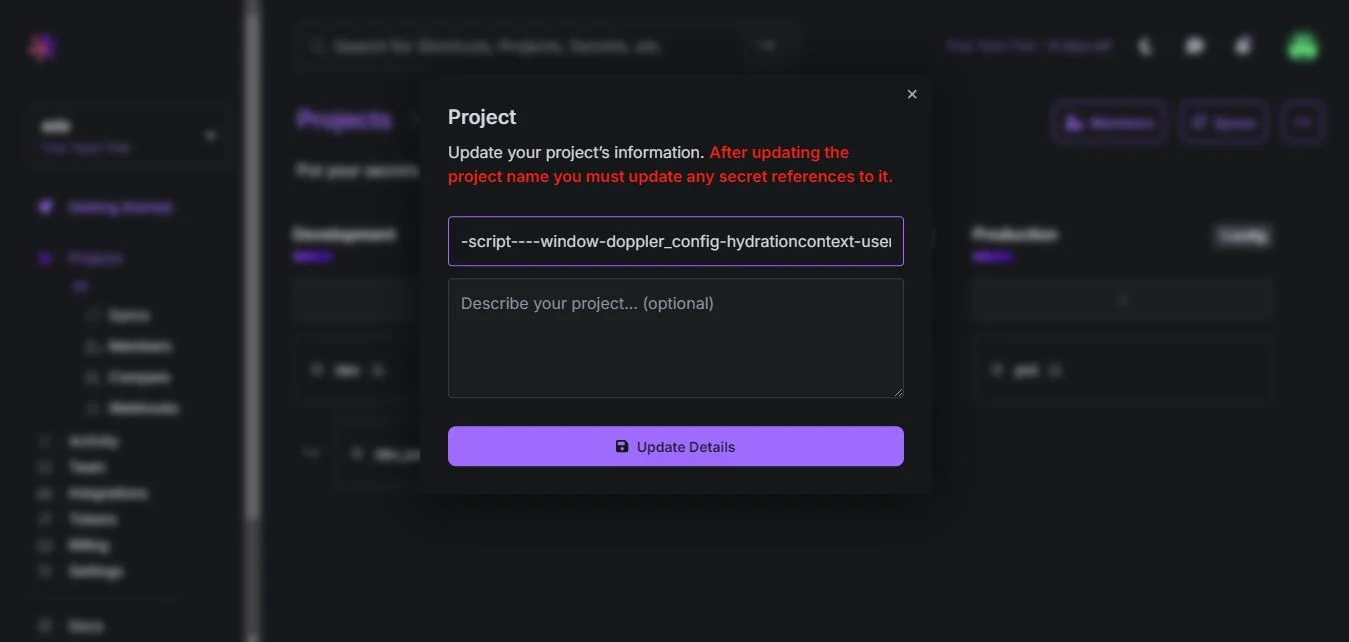
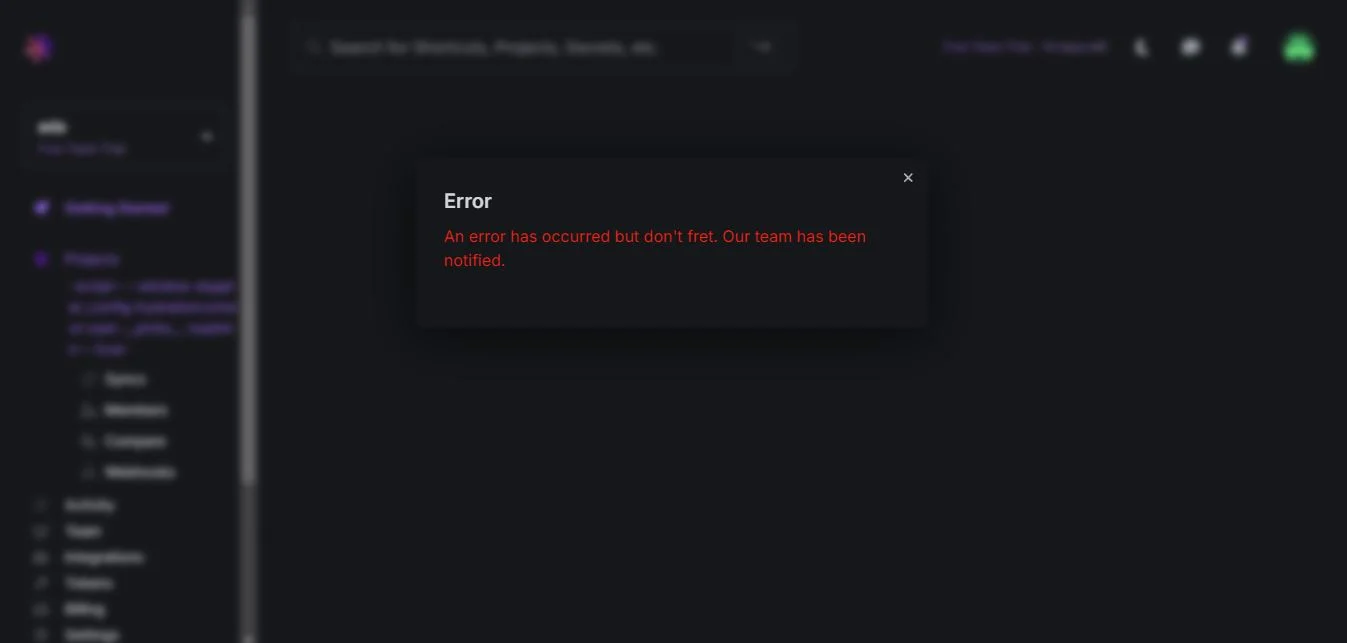
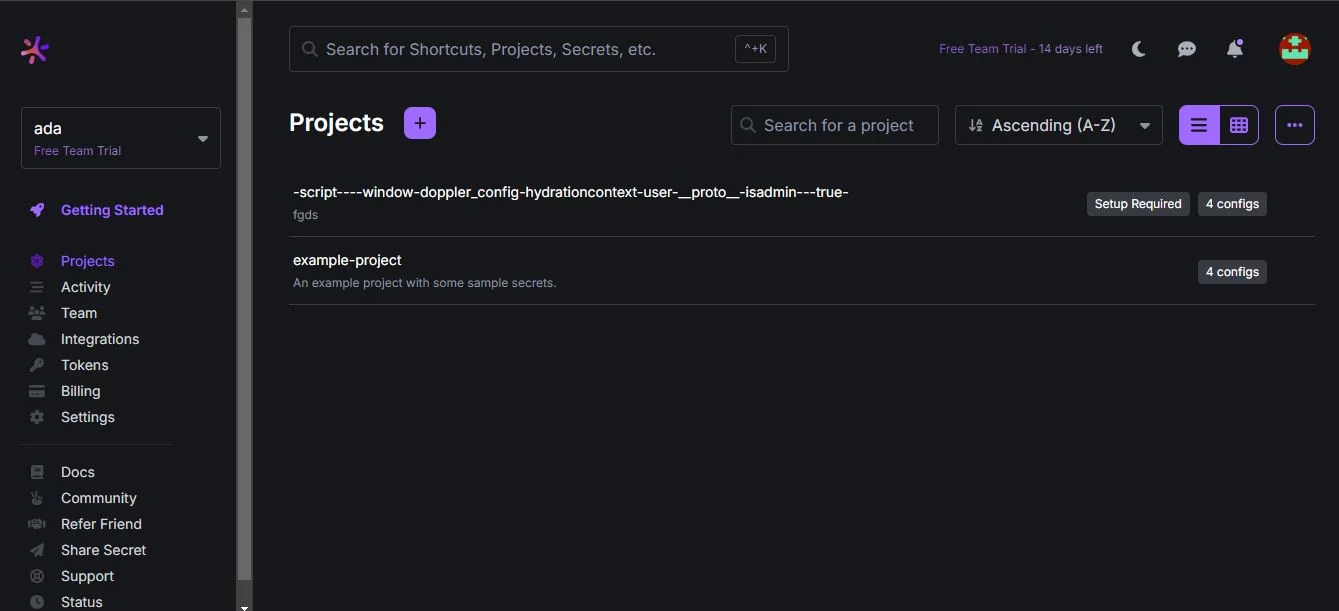
(F3703744) now i am changing the project name into "-script----window-doppler_config-hydrationcontext-user-proto-isadmin---true-" since i was trying for prototype pollution and instantly i am logged out due to security reason F3703753 . The prototype pollution or cross site scripting was not successfull, But the project name was successfully changed to malicious string stored inside the account.
-
Now i have logged in from another user account which i have added previously to the project. From this account the project is displayed F3703757. Now any user cannot open the project and also delete the project even if he has admin role to that project. Thus acting like a D.O.S attack and also high impact on availability because the project is not accessible.
Impact
Denial of Service (DoS)
The primary impact of this vulnerability is that no user, including administrators, can edit or access the project after it has been manipulated. This effectively denies all users the ability to manage or update the project, leading to significant operational disruption.
Impact on Availability
The project's availability is severely compromised. Users attempting to access the project are automatically logged out, preventing any interaction with the project. This not only disrupts ongoing work but also hinders collaborative efforts
Attachments
Context
Doppler is a secrets management platform, and the report concerns its dashboard at dashboard.doppler.com. The feature involved is the project name: a project is created with a name, other users can be added to it, and the name can later be changed. Normally a project name is just a label, and renaming a project should have no effect on who can open it.
The researcher found that the name is not treated as inert data. A crafted name, once stored, causes other users to be logged out when they try to access the project, which makes the project inaccessible to everyone, including administrators. The report classifies this as a business logic error with a denial of service impact, rated low severity, and it was disclosed on 13 November 2024 with a 250 USD bounty.
Setup
The report describes two accounts. The first account creates a project and is the one that performs the rename. The second account is added to that project and is used to show the effect on another user. The researcher refers to the project and the added user by internal identifiers, F3703735 for the project and F3703740 for the user, and to later states by similar identifiers (F3703744, F3703753, F3703757). No tools, versions or special preconditions are described beyond the ability to create a project, add a user to it and rename it.
Finding it
The researcher was experimenting with a name intended to trigger prototype pollution, and noticed that the rename itself succeeded and was stored, while the application logged the acting user out immediately afterwards. The prototype pollution and cross site scripting attempts did not succeed, but the malicious string remained as the project name inside the account. That gap, a payload that fails at its intended goal but is still persisted and still breaks the application, is what the report is about.
Exploitation
Step 1: create a project and add a second user
A project is created with the name ss (project F3703735), and another user (F3703740) is added to it. This establishes the normal collaborative setup: two accounts, one project, both with access.
Step 2: rename the project to the payload
The project name is changed to the following string:
-script----window-doppler_config-hydrationcontext-user-__proto__-isadmin---true-
The researcher states the intent was prototype pollution, and the string contains __proto__ and an isadmin property. The rename is accepted and the string is stored as the project name. Immediately after the change the acting user is logged out "due to security reason" (state F3703753). The report is explicit that neither the prototype pollution nor cross site scripting succeeded; what succeeded was storing the malicious string.
Step 3: access the project from the second account
Logging in as the previously added user, the project is still displayed in the listing (state F3703757). However, that user cannot open the project, and cannot delete it either, even with an admin role on the project. The report describes this as acting like a DoS attack with a high impact on availability, because the project is not accessible.
Root cause
The report does not analyse the code. What it shows is that the project name is stored, and that users who then access the project are logged out. Because the name is persisted, every user who subsequently loads the project hits the same path and is logged out, so the effect is not limited to the user who made the change. The exact mechanism is not stated in the report; likely the name reaches a client-side rendering or hydration step that treats part of the string as markup or as a property path, and a defence that logs the user out on detecting the pattern fires instead of neutralising the stored value. The report does not say why the name was accepted and stored.
Impact
After the rename, no user, including administrators, can edit or access the project. Users attempting to access it are automatically logged out, which prevents any interaction with the project and disrupts ongoing work and collaboration. The report frames this as a denial of service against all users of the affected project, with significant operational disruption. The scope is the single manipulated project: the report does not claim effects on other projects or on the account as a whole.
Fix
The report does not describe a fix or a change made by the vendor. What follows from the finding is that the project name should be validated or sanitised on write, and that stored names should be rendered as text rather than interpreted when the project is loaded, so that a name can never terminate a session or block access.
Variants to test
- Rename other user-controlled labels (project, environment, config, branch, description) with the same string and check whether the acting user is logged out and whether other members are locked out of the object.
- Try the same payload with different property names in place of
isadmin, and with other prototype paths, to see whether the logout is triggered by the pattern or by the specific string. - Test whether the lockout is reversible: rename the project back from an account that can still reach it, or via any API endpoint that does not render the name. A positive result is a project that becomes accessible again once the name is changed.
- Check whether the same stored value affects listing pages, audit logs or notification emails, which would widen the set of users who hit the broken rendering path.
- Test whether a non-admin member can perform the rename, which would let a low-privileged user deny access to administrators.
Hunting notes
This kind of bug hides in rename and edit endpoints for objects that are displayed to multiple users: anything stored once and rendered for everyone is a candidate for a stored denial of service. During recon, look for features where a name or label is echoed into a client-side context, and watch for session termination or error pages immediately after saving unusual input. The researcher showed impact by adding a second account to the project and demonstrating that the lockout applies to that user as well, including one with an admin role, which turns a self-inflicted logout into a denial of service against collaborators.
Attachments
What happened, in plain words
Doppler is a service that helps teams keep their passwords, API keys and other secrets in one safe place. The report is about Doppler's dashboard, the website at dashboard.doppler.com where people log in and manage their projects. A project is simply a container: you give it a name, you add other people to it, and later you can rename it. Normally a project name is just a label, like the title written on a folder. Renaming the folder should not stop anyone from opening it.
The researcher found that this label is not treated as harmless text. If you give a project a specially crafted name, that name is saved, and afterwards every user who tries to open the project is thrown out of their session (logged out). The project becomes impossible to open or delete, even for the person who administers it. The report calls this a business logic error with a denial of service impact, rates it low severity, and it was disclosed on 13 November 2024 with a 250 USD bounty.
A few words before we start, because they come up constantly:
- Session: the state of being logged in. When you log in, the site gives your browser a small piece of data (often called a cookie or a token) that it sends back with every request so the server knows who you are. Being "logged out" means that piece of data is no longer accepted.
- Denial of service (DoS): an attack whose goal is not to steal data but to stop something from working. Think of putting glue in a door lock: nobody gets in, including the owner.
- Business logic error: a flaw not in the low-level plumbing but in the rules of the application itself. The software does exactly what it was told, but the rules allow something that should never be allowed.
The setup
The report uses two accounts. The first account creates a project and performs the rename. The second account is added to that project, and it exists to show what happens to somebody else, not just to the person who typed the name.
The researcher refers to the project and the added user by internal identifiers: F3703735 for the project, F3703740 for the added user, and later states by similar identifiers (F3703744, F3703753, F3703757). These are just labels the platform uses to track items; you can read them as "the project", "the second user" and so on. No special tools, software versions or preconditions are described beyond the ordinary ability to create a project, add a user to it and rename it.
Finding it
The researcher was not originally looking for a denial of service. They were trying a name designed to trigger prototype pollution, and noticed something odd along the way: the rename itself was accepted and saved, and the application logged the acting user out immediately afterwards.
Prototype pollution deserves a short explanation, because the payload is built around it. In JavaScript, the programming language used heavily in web front ends, every object inherits from a shared template called a prototype. If an attacker can sneak a property into that shared template, every object in the page may suddenly have that property. A classic goal is to add something like isadmin set to true, so that code checking "is this user an admin?" finds the answer already sitting there. The payload also contains __proto__, which is the name JavaScript uses to reach that shared template, and window, which is the browser's global object.
The important part of the story is that the prototype pollution did not work, and neither did cross site scripting (injecting script code into a page so it runs in another user's browser). What did work was saving the malicious string as the project name. A payload that fails at its intended goal but is still stored, and still breaks the application, is exactly what this report is about.
Exploitation
Step 1: create a project and add a second user
A project is created with the name ss (project F3703735), and another user (F3703740) is added to it. This sets up the normal collaborative situation: two accounts, one project, both with access. Without this step there would be no way to show that the problem affects other people and not only the person who made the change.
Step 2: rename the project to the payload
The project name is changed to the following string:
-script----window-doppler_config-hydrationcontext-user-__proto__-isadmin---true-
Line by line, in plain words:
- The leading
-script-looks like an attempt to write an HTML<script>tag, the classic way to get code to run in a browser, with the angle brackets replaced by hyphens. The leading-script-resembles an attempt to write an HTML<script>tag with the angle brackets replaced by hyphens. windowis the browser's global object, the top-level container for everything a page can reach.doppler_configandhydrationcontextare parts of the crafted string; the report does not explain them. Hydration is the step where a modern web page, first delivered as plain HTML, is brought to life by JavaScript that attaches behaviour to it. If user-controlled text ends up in that step, it may be treated as instructions rather than as a label.useris another segment of the crafted string; the report does not explain it.__proto__is the JavaScript hook into the shared prototype described above.isadminandtrueare the property and value the researcher hoped to plant, so that an admin check would pass.
The researcher states the intent was prototype pollution, and the string contains __proto__ and an isadmin property. The rename is accepted and the string is stored as the project name. Immediately after the change, the acting user is logged out "due to security reason" (state F3703753). The report is explicit that neither the prototype pollution nor the cross site scripting succeeded; what succeeded was storing the malicious string.
Step 3: access the project from the second account
Logging in as the previously added user, the project is still shown in the listing (state F3703757). However, that user cannot open the project, and cannot delete it either, even with an admin role on the project. The report describes this as acting like a DoS attack with a high impact on availability, because the project is not accessible.
This is the moment the bug turns from an annoyance into a real problem. If only the person who typed the name were affected, they could simply undo their own mistake. Because a second, innocent user is locked out too, and because even an administrator cannot get in to fix it, the project is effectively sealed shut.
Root cause
The report does not analyse the code, so the exact mechanism is not stated. What it shows is that the project name is stored, and that users who then access the project are logged out. Because the name is persisted (saved on the server, not just in one browser), every user who subsequently loads the project hits the same path and is logged out, so the effect is not limited to the user who made the change.
A likely explanation, though the report does not confirm it, is that the name reaches a client-side rendering or hydration step that treats part of the string as markup or as a property path, and that a defence which logs the user out on detecting the pattern fires instead of neutralising the stored value. In other words, the safety net catches the intruder but leaves the door glued shut.
Impact
After the rename, no user, including administrators, can edit or access the project. Users attempting to access it are automatically logged out, which prevents any interaction with the project and disrupts ongoing work and collaboration. The report frames this as a denial of service against all users of the affected project, with significant operational disruption.
The scope is the single manipulated project. The report does not claim effects on other projects or on the account as a whole.
Fix
What follows from the finding is that the project name should be validated or sanitised when it is saved, and that stored names should be rendered as text rather than interpreted when the project is loaded, so that a name can never terminate a session or block access.
Variants to test
- Rename other user-controlled labels (project, environment, config, branch, description) with the same string and check whether the acting user is logged out and whether other members are locked out of the object.
- Try the same payload with different property names in place of
isadmin, and with other prototype paths, to see whether the logout is triggered by the pattern or by the specific string. - Test whether the lockout is reversible: rename the project back from an account that can still reach it, or via any API endpoint that does not render the name. A positive result is a project that becomes accessible again once the name is changed.
- Check whether the same stored value affects listing pages, audit logs or notification emails, which would widen the set of users who hit the broken rendering path.
- Test whether a non-admin member can perform the rename, which would let a low-privileged user deny access to administrators.
Hunting notes
This kind of bug hides in rename and edit endpoints for objects that are displayed to multiple users: anything stored once and rendered for everyone is a candidate for a stored denial of service. During recon, look for features where a name or label is echoed into a client-side context, and watch for session termination or error pages immediately after saving unusual input. The researcher showed impact by adding a second account to the project and demonstrating that the lockout applies to that user as well, including one with an admin role, which turns a self-inflicted logout into a denial of service against collaborators.
Attachments
Glossary
- API: the set of addresses and rules a website uses behind the scenes to send and receive data, like a service counter where requests are handed over.
- Business logic error: a flaw in the application's own rules rather than in its low-level plumbing; the software does what it was told, but the rules allow something harmful.
- Cookie: a small piece of data a website stores in your browser and receives back on each visit, often used to remember that you are logged in.
- Cross site scripting (XSS): injecting code into a page so that it runs in another user's browser.
- Denial of service (DoS): an attack that stops something from working for its legitimate users, rather than stealing data.
- Endpoint: a specific address on a server that accepts a particular kind of request, such as the one used to rename a project.
- Hydration: the step where a web page delivered as plain HTML is brought to life by JavaScript that attaches behaviour to it.
- Impact: the practical harm a vulnerability causes.
- Payload: the crafted input an attacker sends, here the malicious project name.
- Persisted / stored: saved on the server so that it remains and is served to everyone, not just kept in one browser.
- Prototype: in JavaScript, the shared template that objects inherit properties from.
- Prototype pollution: tricking an application into adding properties to that shared template, so that many objects gain them, for example an
isadminflag. __proto__: the JavaScript name for the link to that shared prototype.- Recon: the exploratory phase of security testing, where you look around an application to see what it does and where input goes.
- Rendering: the process of turning stored data into what you see on the page.
- Root cause: the underlying reason a vulnerability exists.
- Sanitisation: cleaning or restricting input so that dangerous characters cannot do anything harmful.
- Session: the state of being logged in, maintained by a cookie or token sent with each request.
- Severity: a rating of how serious a vulnerability is.
- Token: a piece of data, similar in role to a cookie, that proves who you are to the server.
- Validation: checking input against rules before accepting it.
- Vendor: the company that makes and runs the product.
window: the browser's global object, the top-level container for everything a page can reach.


