Story of critical security flaws I found in Glints
The job platform Glints had multiple access-control flaws: an employer could change a job ID to read other companies' applicants' personal data, an RSS feed exposed candidate details, a public profile API leaked resume file names that could be downloaded from S3, and a GraphQL query exposed recruiter information. An attacker could steal all users' personal information, including resumes and emails.

2022-02-10: Update title from "How I hacked Glints and your resume" to "Story of critical security flaws I found in Glints"
The full write-up lives on its author's site
It belongs to its author, so we link to it rather than copy it. The other two tabs are our own rewrites, checked against it.
Glints is a job search platform based in Singapore, with a team in Taiwan as well. In July 2021 I found its bug bounty program and spent some time on it, ending up with four vulnerabilities. Together they could have exposed every applicant's personal information (name, phone, birthday, resume and email) and every recruiter's personal information (name, job title, team name and email). In other words, an attacker could have taken all users' data.
All four were access control problems, and all four were rated high risk. The total bounty was 1600 SGD.
Context
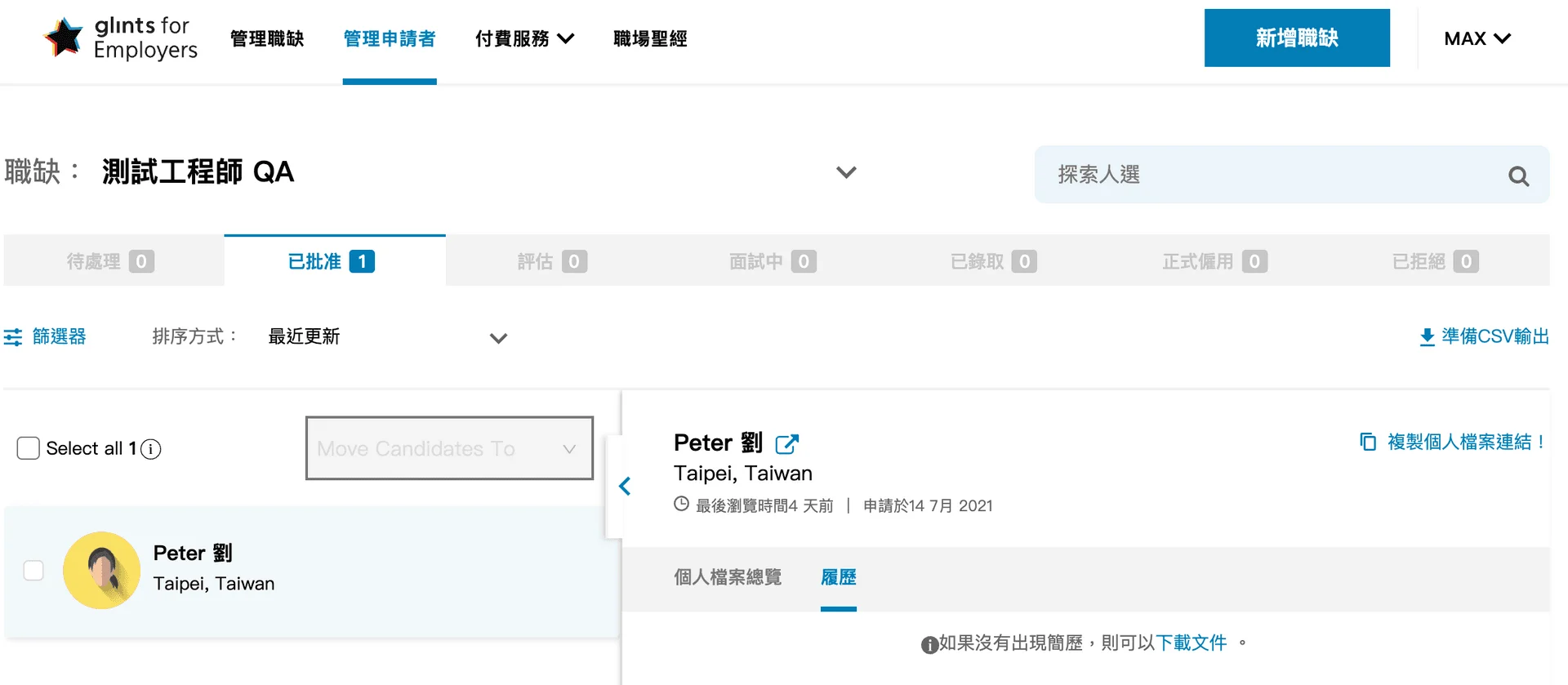
Glints has two roles: employee and employer. Anyone can create an employer account, but posting new jobs still requires verification. Employers get a portal to manage jobs and candidates:
Employees get a user id and a public profile page. Recruiters are managed through a separate internal-looking application on a subdomain.
Setup
The work needed nothing exotic: an employer account on the main site, a normal user account, and a browser. For the last finding I scanned subdomains of glints.com and read minified JavaScript with the Chrome DevTools search function. The first two vulnerabilities require an employer account, while the third works for anyone.
Finding it
1. Job application IDOR
The employer portal loads candidates through this API:
/api/recruiterats/jobApplications?where={"JobId": "55e137a1-f96e-4720-9b08-7eb2749e1557"}
Part of the response:
The response carries the applicant's name, email, phone and resume file name. The JobId is the only thing tying the query to a company, and it is public: it appears in the job page URL.
2. RSS feature IDOR
Glints had an RSS feed feature so users could connect job activity to Slack or other services:
The feed response contains the applicant's name, email and resume:
The feed URL is:
https://employers.glints.com/api/feed/jobs/{RSS_ID}/approved-candidates?UserId={companyOwnerId}
Forging it needs the correct RSS_ID for the job and the company owner's user id. The owner id is easy because company information is public. The RSS_ID is the interesting part.
3. User information exposure
After registering, every user has a public profile page:
https://glints.com/tw/profile/public/44007523-f7a8-411d-b2c4-57c68a976534
44007523-f7a8-411d-b2c4-57c68a976534 is my user id, and it is also shown in the URL. There is a second API for the profile:
https://glints.com/api/publicProfiles/44007523-f7a8-411d-b2c4-57c68a976534
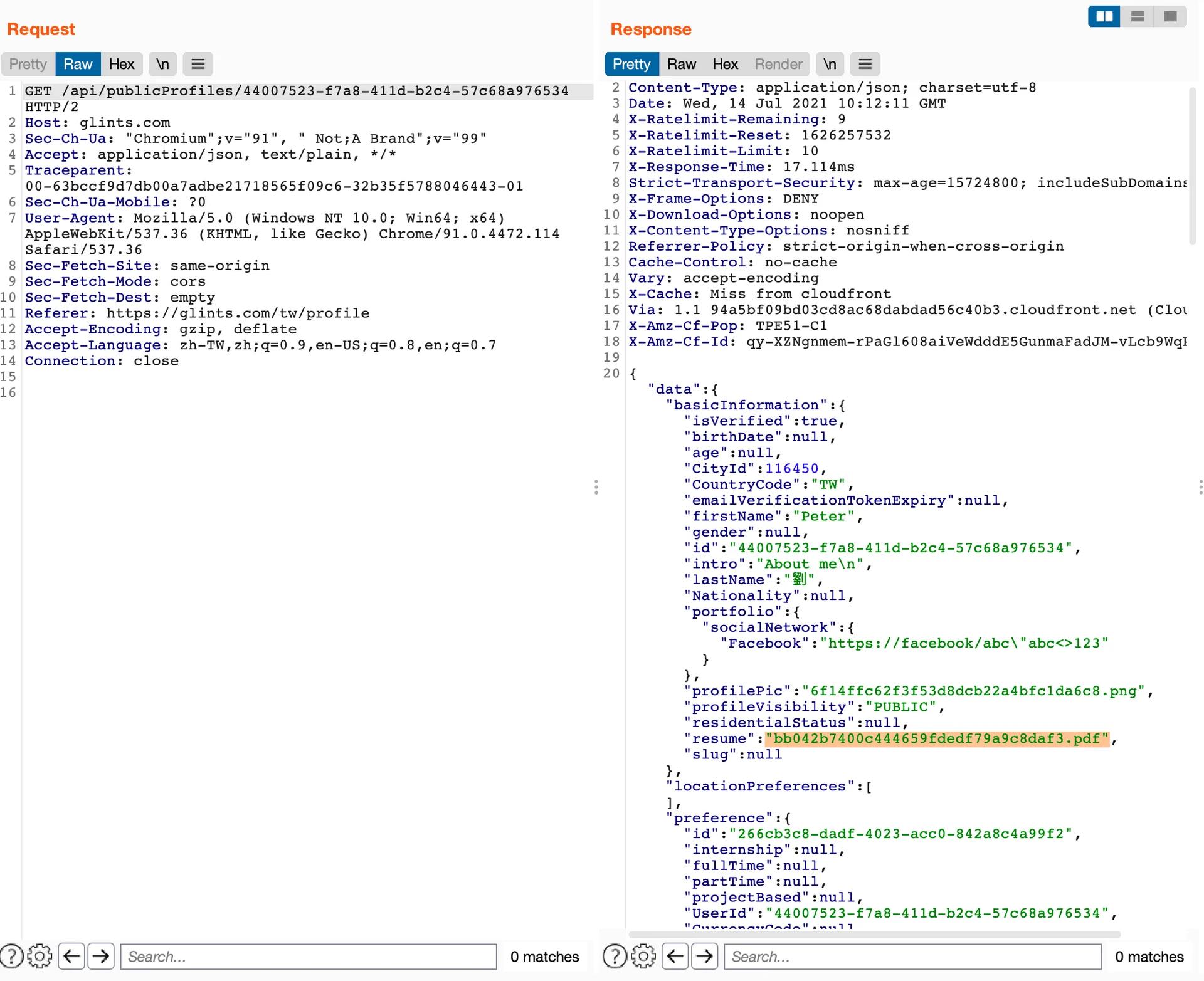
Sensitive fields such as phone and email are filtered out of this response, but one column was forgotten: resume. The field holds only the file name, for example badf34128adefqcxsq.pdf, and all resumes live in the same place:
https://glints-dashboard.s3.ap-southeast-1.amazonaws.com/resume/xxxxx.pdf
So knowing the file name is enough to download the file. A resume usually contains email, phone and sometimes a home address.
4. Recruiter information exposure
Scanning subdomains of glints.com turned up an interesting page:
https://superpowered.glints.com/

It requires a Google account with a certain suffix, so I could not log in. The JavaScript files are minified and hard to read, but Chrome DevTools search works on them. Searching for "query" was enough:
Exploitation
Step 1: swap the JobId
After seeing the job applications API, I did what any pentester would do: changed JobId to one belonging to another company. To my surprise, it worked:
Because job ids are public in job page URLs, an attacker can write a script that collects every job id on Glints and then pulls the personal data of every applicant.
Step 2: obtain the RSS_ID through Sequelize attributes
I guessed the backend used the Node.js ORM Sequelize, because I know the library and the query string naming convention looked like it. There is an API for listing a company's jobs:
https://employers.glints.tw/api/companies/03638b7f-2da0-4b68-9e92-1be9350600ba/jobs?where={"status":"open"}&include=jobSalaries,Groups,City,Country
I tried adding a few parameters. Most did nothing, but one important parameter worked: attributes. In Sequelize, attributes decides which columns come back, so attributes=id returns only the id field. I put rssId in the attribute field and it worked:
With that parameter the response gives the job id, the rss id and the company owner's id. Those three values are everything needed to query the RSS feed and read every applicant's data.
Step 3: from user id to resume file
Anyone can call the public profile API with a user id. The response hides phone and email but still returns the resume file name. Combining that name with the fixed S3 URL pattern downloads the resume itself.
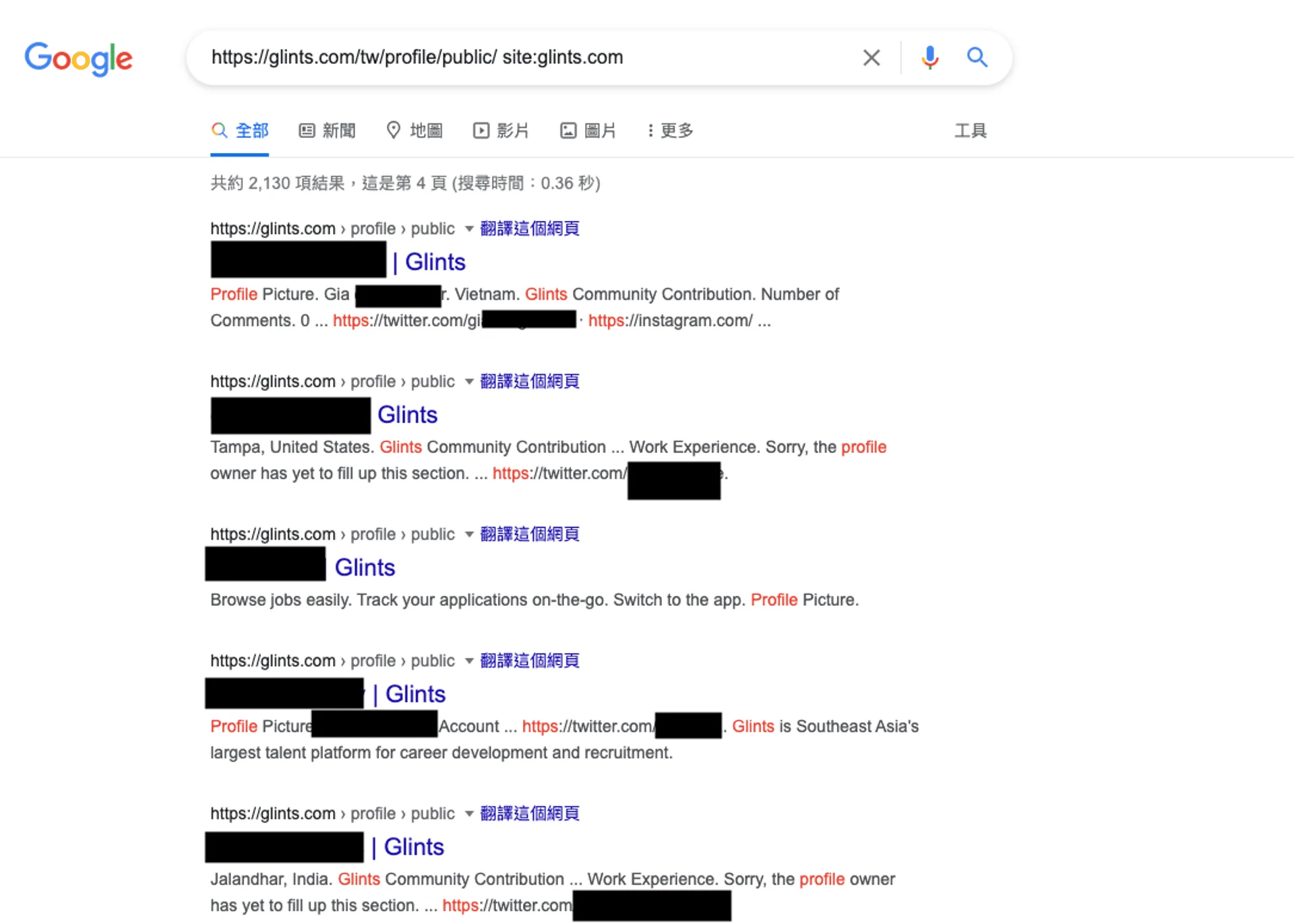
To get user ids in bulk, I used Google hacking. Every public profile page follows the same URL pattern, so this keyword finds many profile pages and their user ids:
inurl:profile/public site:glints.com
Then each user id is fed to the profile API to get the resume file name, and the file is fetched from S3.
Step 4: read the GraphQL query from the bundle
The DevTools search results show a GraphQL query called findRecruiters, and the parameters are in the source code as well:
query { findRecruiters(input:{}) { id, email, role, displayName, fullName, jobTitle, jobStatus team { labels } }}
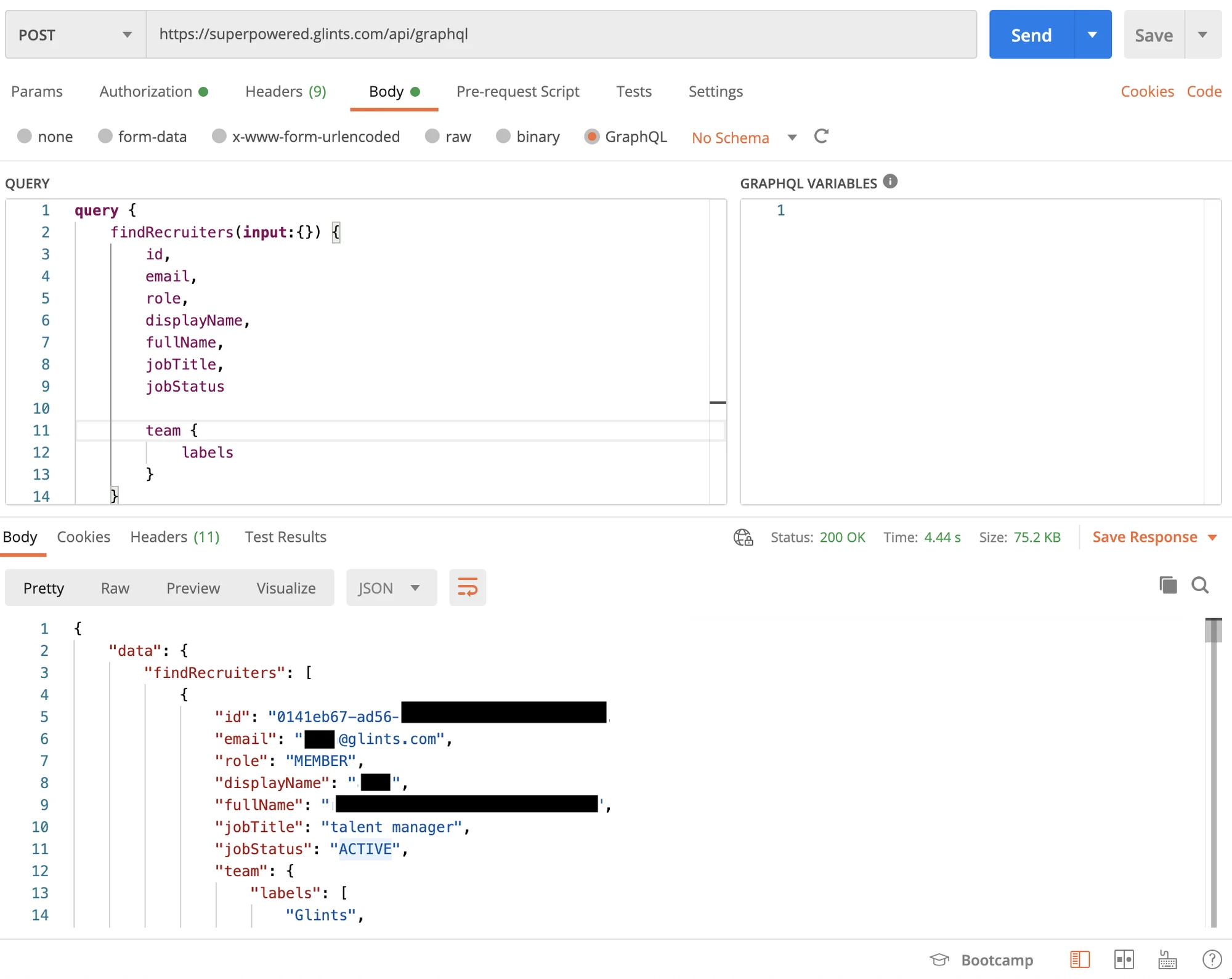
The response contains the name, job title, team and email of every single recruiter:
The query was reachable from the page's JavaScript, and after the fix a guest can no longer access it.
Root cause
All four issues are broken access control.
- The job applications endpoint trusted the
JobIdsupplied by the caller and never checked that the job belonged to the authenticated employer. The fix was to checkJobIdand implement correct access control. - The RSS feed endpoint was protected only by knowing two identifiers, the
RSS_IDand the owner's user id. Neither is a secret: the owner id is public company information, and theRSS_IDleaked through theattributesparameter on the jobs API, which let the caller choose which columns Sequelize returned. Forging the feed URL needed only the correct RSS_ID and the company owner's user id. - The public profile API filtered sensitive information such as phone and email but left out
resume. and resume files were stored in a single S3 location with a predictable URL, so the file name alone granted access. Knowing the file name was enough to download the file from the fixed S3 URL pattern. - The
findRecruitersGraphQL query was reachable from the page's JavaScript and returned recruiter data. The query had no access control; Glints later implemented it so a guest can no longer access the query.
Impact
With an employer account, an attacker could read the name, email, phone and resume file name of applicants to any company, for any job whose id could be collected from public job pages. Through the RSS feed, the same applicant data was reachable once the RSS_ID and owner id were obtained.
Without any account, an attacker could turn a user id into a resume file name and download the resume, which typically contains email, phone and sometimes address. User ids are discoverable at scale through search engines because of the uniform public profile URL.
The findRecruiters query returned the name, job title, team and email of every recruiter.
Fix
- Job applications: Glints fixed it by checking
JobIdand implementing correct access control. - RSS feed: Glints removed the feature entirely because of low usage.
- Public profile: Glints removed sensitive fields such as
resumefrom the response. - Recruiter query: Glints implemented access control, and a guest can no longer access the query.
Timeline
2021-07-09First vulnerability report2021-07-09Glints replied and said they were checking2021-07-13Glints confirmed the vulnerabilities and was working on the fix2021-07-14Second vulnerability report2021-07-20Glints replied that only one vulnerability was fixed, others still in progress2021-08-18I emailed Glints for a status update, no response2021-08-31I emailed again, no response2021-09-09Again, still no response2021-09-20I opened an issue on their bug bounty program repo, no response2021-10-04Glints replied to my email and said they would get back to me the next day, but I got no response2021-10-20I sent a follow-up email2021-10-26I tweeted about the vulnerability without details because it was still not fixed, then I got a response from a co-founder at Glints2021-10-27Glints asked me for payment details2021-11-11I received part of the bounty and emailed to ask about the status of the vulnerabilities2021-11-11Glints replied and confirmed that all issues were fixed2021-12-07I received the bounty in full
Variants to test
- Identifier swap on list endpoints. Take any endpoint that filters by an object id (
JobId,companyId,teamId) and substitute an id belonging to another tenant. A positive result is a response containing another organisation's records instead of an empty list or an authorisation error. - ORM attribute injection. On APIs whose query strings look like Sequelize, add
attributeswith a column that the UI never shows, such as an internal id or a feed token. A positive result is that the extra column appears in the JSON response. - Include injection. Similarly, add or extend
includewith related models and check whether associations that are not meant to be public come back. - Field filtering gaps on public profile APIs. Compare the public profile response against the full profile response and look for fields that should have been stripped, especially file names, storage keys and internal ids. A positive result is any field that maps to a downloadable object.
- Predictable object storage keys. When a response returns a bare file name, try the same name against the bucket URL pattern. A positive result is a direct download without credentials.
- Search engine enumeration. Run
inurl:queries against the target's public profile pattern to see how many ids are indexed. A large result set means ids are effectively public. - Front-end-only gates. When a page requires a specific login, search the minified bundles for GraphQL operation names and call them unauthenticated. A positive result is data returned to a guest session.

What happened, in plain words
Glints is a job search website based in Singapore, and it also has a team in Taiwan. In July 2021 I found that Glints runs a bug bounty program. A bug bounty program is a deal a company offers to outside people: if you find a security problem in their website and report it responsibly, they pay you a reward (called a bounty) instead of getting angry. So I spent some time looking at Glints, and in the end I found four security problems.
Together, those four problems could have let an attacker take every applicant's personal information (name, phone, birthday, resume and email) and every recruiter's personal information (name, job title, team name and email). In other words, an attacker could have taken the data of all users.
All four problems were the same kind of mistake: the website did not properly check who was allowed to see what. All four were rated high risk, and the total bounty was 1600 SGD (Singapore dollars).
Before going further, a few words about what a website like this actually is under the surface, because the whole story depends on it.
When you use a website, your browser (Chrome, Firefox, Safari) shows you pages: buttons, forms, pictures. Behind those pages, the browser is constantly sending small messages to the company's computers (the servers) and getting answers back. Those messages are called requests, and the answers are called responses. The address a request goes to is called an endpoint, and it usually returns data in a format called JSON, which is just text arranged in a structured way, a bit like a form with labelled boxes.
A useful everyday comparison: think of a restaurant. The menu and the dining room are the website you see. The kitchen is the server. The waiter who carries your order to the kitchen and brings the food back is the API (Application Programming Interface). You never walk into the kitchen yourself; you tell the waiter what you want, and the waiter brings it. When a security researcher wants to understand a website, they watch what the waiter is carrying, because that is where the real rules live.
Context
Glints has two kinds of accounts: employee (people looking for a job) and employer (companies looking for people). Anyone can create an employer account, but posting new jobs still requires verification. Employers get a portal (a private area of the website) to manage their jobs and the candidates who applied:
Employees get a user id and a public profile page. A user id is a unique label the website gives each account, a long string of letters and numbers, so the site can tell one person from another. Recruiters (the people at companies who hire) are managed through a separate application that looks internal, sitting on a subdomain. A subdomain is a part of a website address in front of the main name: in superpowered.glints.com, superpowered is the subdomain and glints.com is the main domain.
Setup
The work needed nothing exotic: an employer account on the main site, a normal user account, and a browser. For the last finding I scanned subdomains of glints.com and read minified JavaScript with the Chrome DevTools search function.
Two terms there. JavaScript is the programming language that runs in your browser and makes pages interactive; websites ship it as files, and those files are often minified, meaning all the spaces and line breaks are squeezed out to make the file smaller, which makes it hard for a human to read. Chrome DevTools is a panel built into the Chrome browser (you open it with a keyboard shortcut) that lets you inspect what a page is doing, including searching inside those JavaScript files.
The first two problems require an employer account, while the third works for anyone.
Finding it
1. Job application IDOR
The employer portal loads the list of candidates through this API:
/api/recruiterats/jobApplications?where={"JobId": "55e137a1-f96e-4720-9b08-7eb2749e1557"}
Line by line: /api/recruiterats/jobApplications is the endpoint, the address the browser asks for the list of job applications. The ? marks the start of the query string, extra information attached to the address, like writing a note on the outside of an envelope. where={"JobId": "55e137a1-f96e-4720-9b08-7eb2749e1557"} is that note: it says "give me the applications where the job id is this particular value". The value 55e137a1-f96e-4720-9b08-7eb2749e1557 is the id of one specific job posting.
Part of the response:
Line by line: the outer { and } wrap the whole answer. "candidate" is the label for the applicant's details, and everything inside its own braces belongs to that applicant. "id" is the applicant's user id. "profilePic" is the file name of their profile picture. "firstName" and "lastName" are their name. "email" and "phone" are their contact details. "resume" is the file name of their uploaded CV. "salaryExpectation" and "currencyCode" are empty (null means "nothing here"). "recentJob" holds their most recent job title. "lastSeen" is a timestamp of when they were last active. "country" and "city" are their location.
The response carries the applicant's name, email, phone and resume file name. The JobId is the only thing tying the query to a company, and it is public: it appears in the job page URL.
This is the moment to name the vulnerability class, because it is the heart of the whole story. IDOR stands for Insecure Direct Object Reference. It means the website lets you ask for a specific thing by its id, and it never checks whether that thing belongs to you. A comparison: imagine a hotel where every room key is just the room number written on a card. If the receptionist hands you the card for room 101 but never checks that you are the guest of 101, you can simply write 102 on it and walk into someone else's room. The id is the room number; the missing check is the bug.
2. RSS feature IDOR
Glints had an RSS feed feature so users could connect job activity to Slack or other services:
An RSS feed is a simple stream of updates in a standard format that other programs can subscribe to, so instead of you refreshing a page, a program reads the feed and tells you when something new appears. Here it let a company pipe new candidate activity into Slack, a workplace chat tool.
The feed response contains the applicant's name, email and resume:
The feed URL is:
https://employers.glints.com/api/feed/jobs/{RSS_ID}/approved-candidates?UserId={companyOwnerId}
Line by line: https://employers.glints.com is the server for employers. /api/feed/jobs/ is the path to the feed for a job. {RSS_ID} is a placeholder for the feed's own identifier, a value the site generates. /approved-candidates asks for the candidates who were approved. ?UserId={companyOwnerId} is the query string, and {companyOwnerId} is a placeholder for the user id of the person who owns the company account. The curly braces are not real characters you send; they mark where a real value goes.
Forging it needs the correct RSS_ID for the job and the company owner's user id. The owner id is easy because company information is public. The RSS_ID is the interesting part.
3. User information exposure
After registering, every user has a public profile page:
https://glints.com/tw/profile/public/44007523-f7a8-411d-b2c4-57c68a976534
Line by line: https://glints.com is the site, /tw/ is the Taiwan section, /profile/public/ is the public profile page, and 44007523-f7a8-411d-b2c4-57c68a976534 at the end is the user id of the person whose profile it is.
44007523-f7a8-411d-b2c4-57c68a976534 is my user id, and it is also shown in the URL. There is a second API for the profile:
https://glints.com/api/publicProfiles/44007523-f7a8-411d-b2c4-57c68a976534
Line by line: this is a different address, /api/publicProfiles/, which returns the profile as raw data (JSON) rather than as a web page. The same user id sits at the end, so this endpoint answers the question "give me the profile data for this user id".
Sensitive fields such as phone and email are filtered out of this response, but one column was forgotten: resume. The field holds only the file name, for example badf34128adefqcxsq.pdf, and all resumes live in the same place:
https://glints-dashboard.s3.ap-southeast-1.amazonaws.com/resume/xxxxx.pdf
Line by line: glints-dashboard.s3.ap-southeast-1.amazonaws.com is the address of an S3 bucket. S3 is Amazon's cloud file storage: think of it as a giant shared filing cabinet on the internet, where each company rents a drawer (a bucket) and puts files in it. /resume/ is a folder inside the drawer, and xxxxx.pdf is the file name. The xxxxx is a placeholder for whatever file name you have.
So knowing the file name is enough to download the file. A resume usually contains email, phone and sometimes a home address.
4. Recruiter information exposure
Scanning subdomains of glints.com turned up an interesting page:
https://superpowered.glints.com/
Line by line: this is a separate application living at the superpowered subdomain of glints.com. Scanning subdomains means trying a list of common names in front of the main domain to see which ones exist and answer.
It requires a Google account with a certain suffix, so I could not log in. The JavaScript files are minified and hard to read, but Chrome DevTools search works on them. Searching for "query" was enough:
Exploitation
Step 1: swap the JobId
After seeing the job applications API, I did what any pentester would do: changed JobId to one belonging to another company. To my surprise, it worked:
Why this step: the API took a job id from me and returned candidates for that job. If the site had checked that the job belonged to my employer account, swapping the id would have produced an error or an empty list. It produced another company's candidates instead, which proves the check was missing. Because job ids are public in job page URLs, an attacker can write a script that collects every job id on Glints and then pulls the personal data of every applicant. A script here just means a small program that repeats the same request automatically, thousands of times, instead of a person clicking by hand.
Step 2: obtain the RSS_ID through Sequelize attributes
I guessed the backend used the Node.js ORM Sequelize, because I know the library and the query string naming convention looked like it. An ORM (Object Relational Mapper) is a helper library that lets a programmer talk to a database using code instead of writing database language by hand; Sequelize is one such library for Node.js, a way of running JavaScript on the server. The query string in the URL looked like the style Sequelize uses, which was the clue.
There is an API for listing a company's jobs:
https://employers.glints.tw/api/companies/03638b7f-2da0-4b68-9e92-1be9350600ba/jobs?where={"status":"open"}&include=jobSalaries,Groups,City,Country
Line by line: https://employers.glints.tw is the employer server for Taiwan. /api/companies/03638b7f-2da0-4b68-9e92-1be9350600ba/jobs asks for the jobs of one company, identified by that long id. ?where={"status":"open"} is the filter: only jobs whose status is open. &include=jobSalaries,Groups,City,Country is a second instruction, joined with &, asking the server to also attach related information: salary details, groups, city and country. include is a Sequelize idea: it says "also bring along these related tables".
I tried adding a few parameters. Most did nothing, but one important parameter worked: attributes. In Sequelize, attributes decides which columns come back, so attributes=id returns only the id field. I put rssId in the attribute field and it worked:
Why this step: I needed the RSS_ID to build the feed URL, and it was not shown anywhere in the normal interface. By asking the jobs API to return a column the interface never displays, I got it. With that parameter the response gives the job id, the rss id and the company owner's id. Those three values are everything needed to query the RSS feed and read every applicant's data.
Step 3: from user id to resume file
Anyone can call the public profile API with a user id. The response hides phone and email but still returns the resume file name. Combining that name with the fixed S3 URL pattern downloads the resume itself.
To get user ids in bulk, I used Google hacking. Google hacking means using special search operators in Google to find pages that match a pattern, rather than searching for words. Every public profile page follows the same URL pattern, so this keyword finds many profile pages and their user ids:
inurl:profile/public site:glints.com
Line by line: inurl:profile/public tells Google to return only pages whose address contains the text profile/public. site:glints.com tells Google to look only inside glints.com. Together they list public profile pages, and each page's address ends with a user id.
Then each user id is fed to the profile API to get the resume file name, and the file is fetched from S3. Why this works: the profile API was supposed to hide private fields, and it did hide phone and email, but it forgot the resume file name. And because every resume sits in the same bucket under a predictable address, the file name alone is enough to download the file. Knowing the file name was enough to download the file from the fixed S3 URL pattern.
Step 4: read the GraphQL query from the bundle
The DevTools search results show a GraphQL query called findRecruiters, and the parameters are in the source code as well:
query { findRecruiters(input:{}) { id, email, role, displayName, fullName, jobTitle, jobStatus team { labels } }}
Line by line: GraphQL is a way for a website to ask a server for exactly the data it wants, described in a query language. query { opens the request. findRecruiters(input:{}) names the operation (find recruiters) and passes an empty set of inputs, meaning no filter at all. Inside the braces after it, the list of fields says what to return: id, email, role, displayName, fullName, jobTitle, jobStatus, and a nested team block with labels. In plain words: "give me every recruiter with all of these details".
The response contains the name, job title, team and email of every single recruiter:
The query was reachable from the page's JavaScript, and after the fix a guest can no longer access it. Authentication is the process of proving who you are, like showing a passport. The page asked for a Google login, but the query was visible in the JavaScript and after the fix a guest can no longer access it.
Root cause
All four issues are broken access control. Access control is the set of rules that decides who may see or do what. When it is broken, the site answers questions it should have refused.
- The job applications endpoint trusted the
JobIdsupplied by the caller and never checked that the job belonged to the authenticated employer. The fix was to checkJobIdand implement correct access control. - The RSS feed endpoint was protected only by knowing two identifiers, the
RSS_IDand the owner's user id. Neither is a secret: the owner id is public company information, and theRSS_IDleaked through theattributesparameter on the jobs API, which let the caller choose which columns Sequelize returned. Forging the feed URL needed only the correct RSS_ID and the company owner's user id. - The public profile API filtered sensitive information such as phone and email but left out
resume. and resume files were stored in a single S3 location with a predictable URL, so the file name alone granted access. (The key here just means the file's path inside the bucket.) - The
findRecruitersGraphQL query had no access control; Glints later implemented it so a guest can no longer access the query. The front end is the part that runs in your browser; the back end is the part on the server. A gate in the front end is like a sign on a door with no lock: it stops honest visitors, not anyone who walks around it.
Impact
With an employer account, an attacker could read the name, email, phone and resume file name of applicants to any company, for any job whose id could be collected from public job pages. Through the RSS feed, the same applicant data was reachable once the RSS_ID and owner id were obtained.
Without any account, an attacker could turn a user id into a resume file name and download the resume, which typically contains email, phone and sometimes address. User ids are discoverable at scale through search engines because of the uniform public profile URL.
The findRecruiters query returned the name, job title, team and email of every recruiter.
Fix
- Job applications: Glints fixed it by checking
JobIdand implementing correct access control. - RSS feed: Glints removed the feature entirely because of low usage.
- Public profile: Glints removed sensitive fields such as
resumefrom the response. - Recruiter query: Glints implemented access control, and a guest can no longer access the query.
Timeline
2021-07-09First vulnerability report2021-07-09Glints replied and said they were checking2021-07-13Glints confirmed the vulnerabilities and was working on the fix2021-07-14Second vulnerability report2021-07-20Glints replied that only one vulnerability was fixed, others still in progress2021-08-18I emailed Glints for a status update, no response2021-08-31I emailed again, no response2021-09-09Again, still no response2021-09-20I opened an issue on their bug bounty program repo, no response2021-10-04Glints replied to my email and said they would get back to me the next day, but I got no response2021-10-20I sent a follow-up email2021-10-26I tweeted about the vulnerability without details because it was still not fixed, then I got a response from a co-founder at Glints2021-10-27Glints asked me for payment details2021-11-11I received part of the bounty and emailed to ask about the status of the vulnerabilities2021-11-11Glints replied and confirmed that all issues were fixed2021-12-07I received the bounty in full
Variants to test
These are general patterns you can try on other sites, written so a beginner can follow the idea.
- Identifier swap on list endpoints. Take any endpoint that filters by an object id (
JobId,companyId,teamId) and substitute an id belonging to another tenant. A positive result is a response containing another organisation's records instead of an empty list or an authorisation error. - ORM attribute injection. On APIs whose query strings look like Sequelize, add
attributeswith a column that the UI never shows, such as an internal id or a feed token. A positive result is that the extra column appears in the JSON response. - Include injection. Similarly, add or extend
includewith related models and check whether associations that are not meant to be public come back. - Field filtering gaps on public profile APIs. Compare the public profile response against the full profile response and look for fields that should have been stripped, especially file names, storage keys and internal ids. A positive result is any field that maps to a downloadable object.
- Predictable object storage keys. When a response returns a bare file name, try the same name against the bucket URL pattern. A positive result is a direct download without credentials.
- Search engine enumeration. Run
inurl:queries against the target's public profile pattern to see how many ids are indexed. A large result set means ids are effectively public. - Front-end-only gates. When a page requires a specific login, search the minified bundles for GraphQL operation names and call them unauthenticated. A positive result is data returned to a guest session.
Glossary
- API: the set of addresses a website's pages use to ask the server for data, like a waiter carrying orders between you and the kitchen.
- Access control: the rules that decide who is allowed to see or do what on a site.
- Authentication: proving who you are, for example by logging in.
- Authorisation: what you are allowed to do once you are known.
- Back end: the part of a website that runs on the company's servers.
- Bug bounty program: a scheme where a company pays outsiders for responsibly reporting security problems.
- Bounty: the reward paid for a valid report.
- Chrome DevTools: a panel inside the Chrome browser for inspecting and searching a page's code and network traffic.
- Endpoint: a specific address on a server that accepts requests.
- Front end: the part of a website that runs in your browser.
- Google hacking: using special Google search operators such as
inurl:andsite:to find pages matching a pattern. - GraphQL: a query language that lets a client ask a server for exactly the fields it wants.
- IDOR (Insecure Direct Object Reference): a bug where a site lets you request an object by its id without checking that it belongs to you.
- JavaScript: the programming language that runs in browsers and makes pages interactive.
- JSON: a plain-text format for structured data, arranged as labelled fields.
- Minified: code with spaces and line breaks removed to shrink the file, making it hard to read.
- Node.js: a way of running JavaScript on a server.
- ORM (Object Relational Mapper): a library that lets code talk to a database without writing database language directly.
- Pentester: a person who tests systems for security problems, with permission.
- Query string: the part of a URL after the
?, carrying extra instructions. - Request: a message a browser sends to a server asking for something.
- Response: the server's answer to a request.
- RSS feed: a standard stream of updates that other programs can subscribe to.
- S3 bucket: a folder of files in Amazon's cloud storage service.
- Sequelize: a Node.js ORM whose query strings use parameters such as
where,includeandattributes. - Subdomain: a part of an address in front of the main domain, as in
superpowered.glints.com. - User id: a unique label a site gives each account.
- Vulnerability: a weakness in a system that can be used to break its security.