Confused Deputy: Google IdP Universal Account Takeover via Device Code Flow Hijacking
Google's OAuth device authorization flow allowed a sign-in session to be transferred between browsers via a URL, and the server did not bind the client_id and scope to the device_code. An attacker could craft a link that, when opened by a victim, silently issued an access token for an arbitrary Google client with elevated scopes, leading to account takeover.
 Published on weirdmachine64.github.io
This one started from setting up the YouTube app on my PS5. The device authorization grant (RFC 8628) it uses, the flow TVs, consoles, and CLIs rely on when they don't have a browser of their own, turned out to hide two stacked bugs in Google's implementation.
The full write-up lives on its author's site
It belongs to its author, so we link to it rather than copy it. The other two tabs are our own rewrites, checked against it.
Context
Google's implementation of the OAuth 2.0 device authorization grant (RFC 8628) is the flow behind "sign in on your TV" for smart TVs, games consoles and headless CLIs. The device has no comfortable browser, so it calls the authorization server directly, receives a secret device_code and a short user_code, shows the short code on screen, and asks the user to type it at google.com/device on any other browser. The device polls POST /token in the background; once the user finishes signing in and consenting on the second browser, the next poll returns an access token.
The design deliberately separates the device from the browser that authenticates. The only thing holding the model together is the assumption that the browser belongs to the person who owns the device. This write-up is about what happens when Google's implementation stops enforcing that assumption, and then stops binding the request to the client that made it.
Setup
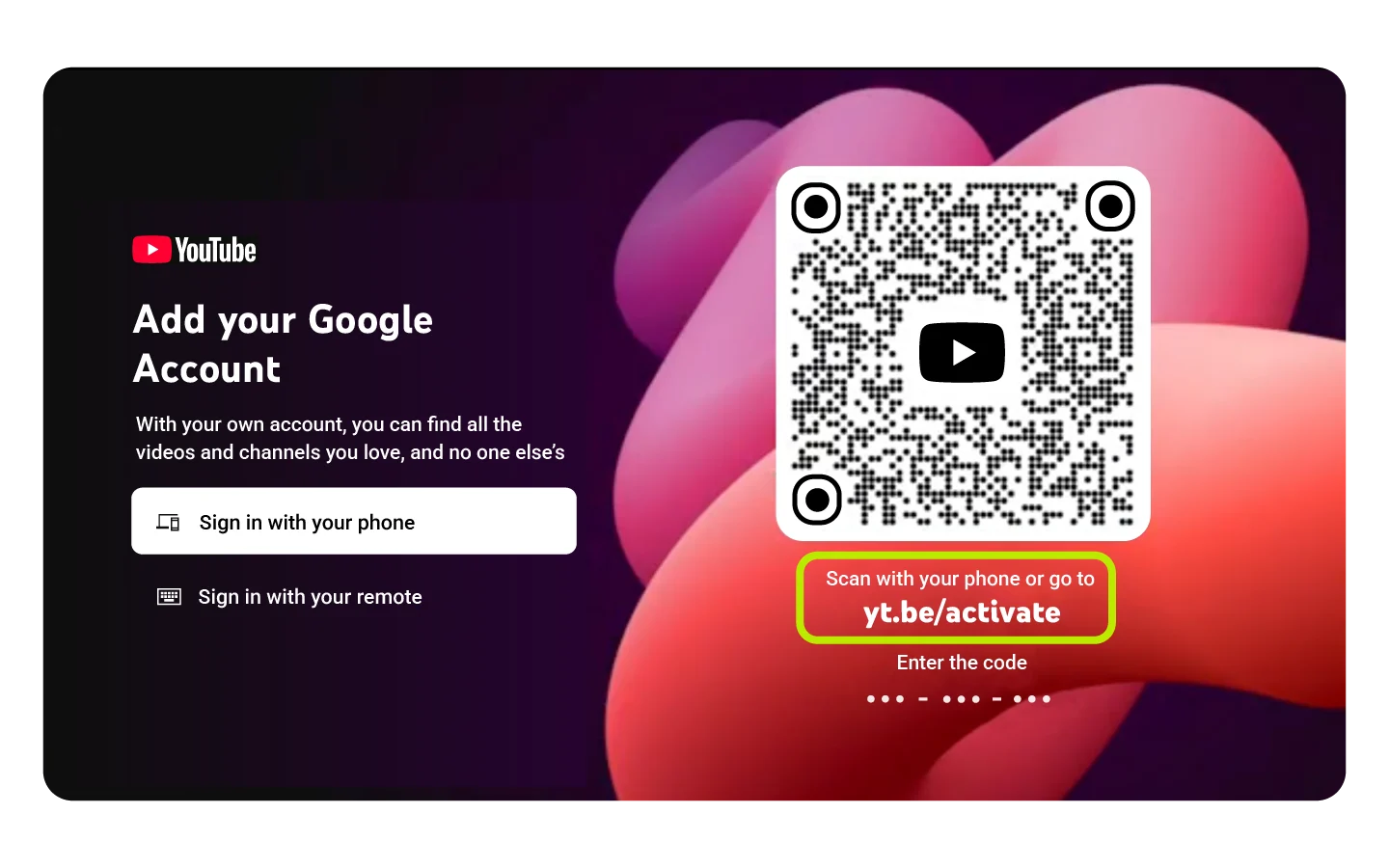
The starting point was ordinary: setting up the YouTube app on a PS5. The console has no keyboard, so it displayed a short user_code and asked for sign-in on a phone. The researcher typed the code into google.com/device, signed into Google, approved the consent screen, and the PS5 was logged in seconds later.
Behind that user experience, the flow is:
POST https://oauth2.googleapis.com/device/codereturns adevice_codeand auser_code.- The PS5 polls
POST https://oauth2.googleapis.com/tokenwith thatdevice_code. - The phone's browser walks through
https://accounts.google.com/o/oauth2/v2/auth?…to finalise consent after the code is typed and the user signs in. - The PS5's next poll returns an access token.
Finding it
The disconnect between where the password is typed and where the session lands is what prompted a closer look. The obvious question for any flow where state lives in a URL is what happens if the URL is simply moved to another browser. If the sign-in step for a device_code can be handed to someone else, whoever finishes that step ends up logged into the original device.
RFC 8628 §5.4 anticipates exactly this and tells implementers not to allow it: the security model depends on the user completing verification on a device they are not about to lose control of.
A first attempt started a fresh device flow on the PS5, walked through google.com/device on a laptop, and at the consent screen copied the resulting URL into a second browser. That failed outright: there was no session for the second browser to pick up.
But the device-code page asks for an email address before showing consent. Entering one forwards the browser to a different endpoint entirely: a challenge page at accounts.google.com/v3/signin/challenge/…, carrying a new parameter, TL=APouJz6T…. Sending that URL to a second browser worked. The second browser prompted a completely normal Google sign-in, and seconds after logging in, that account showed up on the PS5.
TL is an encrypted blob carrying the session state, practically certain to be the device_code or something that resolves to it, since it is the only thing left in the URL that could anchor the poll back to a specific device. That is the first vulnerability: the device-code sign-in session is transferable via URL, which RFC 8628 explicitly says it should not be. Send the link, get the account.
That is a real account takeover, but a narrow one. YouTube TV's scopes are capped by design, and that cap is the next wall.
Exploitation
Step 1: confirm the session is transferable
Start a device flow, reach the challenge page after entering an email address, and copy the challenge URL into a second browser. The second browser shows a normal Google sign-in; completing it satisfies the first device's poll. The URL carries the encrypted session state in TL:
accounts.google.com/v3/signin/challenge/…
  ?TL=APouJz6T…              <- encrypted session state
  &response_type=none
  &client_id=861556708454-…   <- YouTube TV
  &scope=…                    <- YouTube scopes
Two details matter. response_type=none means this is not a normal code or token redirect: nothing comes back to a callback at all. And there is no redirect_uri anywhere in the URL. The boundary OAuth normally relies on to pin where a grant goes is absent from this endpoint, because the grant never travels through the browser; it is delivered out-of-band over the device's /token poll.
The only thing anchoring the session is TL. client_id and scope are just along for the ride in the query string.
Step 2: understand the scope fence
Google fences the device flow to a short, deliberately low-risk scope allowlist. Per Google's own documentation: "This OAuth 2.0 flow supports a limited set of scopes." The complete list:
openid,email,profileyoutube,youtube.readonlydrive.appdata,drive.file(app-scoped Drive only, not full Drive)
No Gmail, no full Drive, no cloud-platform, no compute. The token obtained only worked against a YouTube TV internal API: enough to like a video or subscribe to a channel.
Step 3: swap client_id and scope
Keep TL, replace client_id with a different application, and observe which client the authorization server ends up authenticating. The researcher scripted device-code issuance, took the resulting URL, and changed client_id from YouTube TV to Google's own Cloud SDK client, with scope changed to cloud-platform, compute, appengine.admin.
The consent screen that came back said Google Cloud SDK, listing the elevated scopes. Approving it, the polling script, still polling with the original YouTube TV device_code, got back a token on its next call. Inspecting it: cloud-platform, compute, appengine.admin. Not YouTube.
That is the second vulnerability: the server never validates that the client_id and scope in the authorization URL match what the device_code was actually issued for. Combined with the transferable session, the authorization server issues tokens under one client's identity (Google Cloud SDK, or any other Google-registered client, first- or third-party) for a session that started under a completely different one.
Step 4: remove the click with prompt=none
The first report was rejected the next day, citing user interaction: the victim "consented." The consent screen is genuinely rendered by Google and the click is a genuine click, but the thing being consented to was shaped entirely by parameter substitution in a link the attacker built. The next step was removing the interaction.
OAuth's prompt parameter, set to none, tells the authorization server not to show any UI if the user has already granted the requested scopes to that client before. It is meant to be narrow, restricted to low-risk scopes like openid, email, profile, and gated on prior consent. In practice it is not narrow: "Sign in with Google" is everywhere, and most people have already granted openid email profile to many apps over the years.
Take the weaponised device-code URL, drop in Facebook's client_id (any site using "Sign in with Google" works the same way), set scope=openid email profile, and add prompt=none. The victim opens the link, and that is the only action required: no consent screen, no button to press. The browser silently completes the flow in the background, the polling script receives an id_token for that third-party application, and that token replays cleanly against the app's own "Sign in with Google" endpoint.
Step 5: check what the victim can see
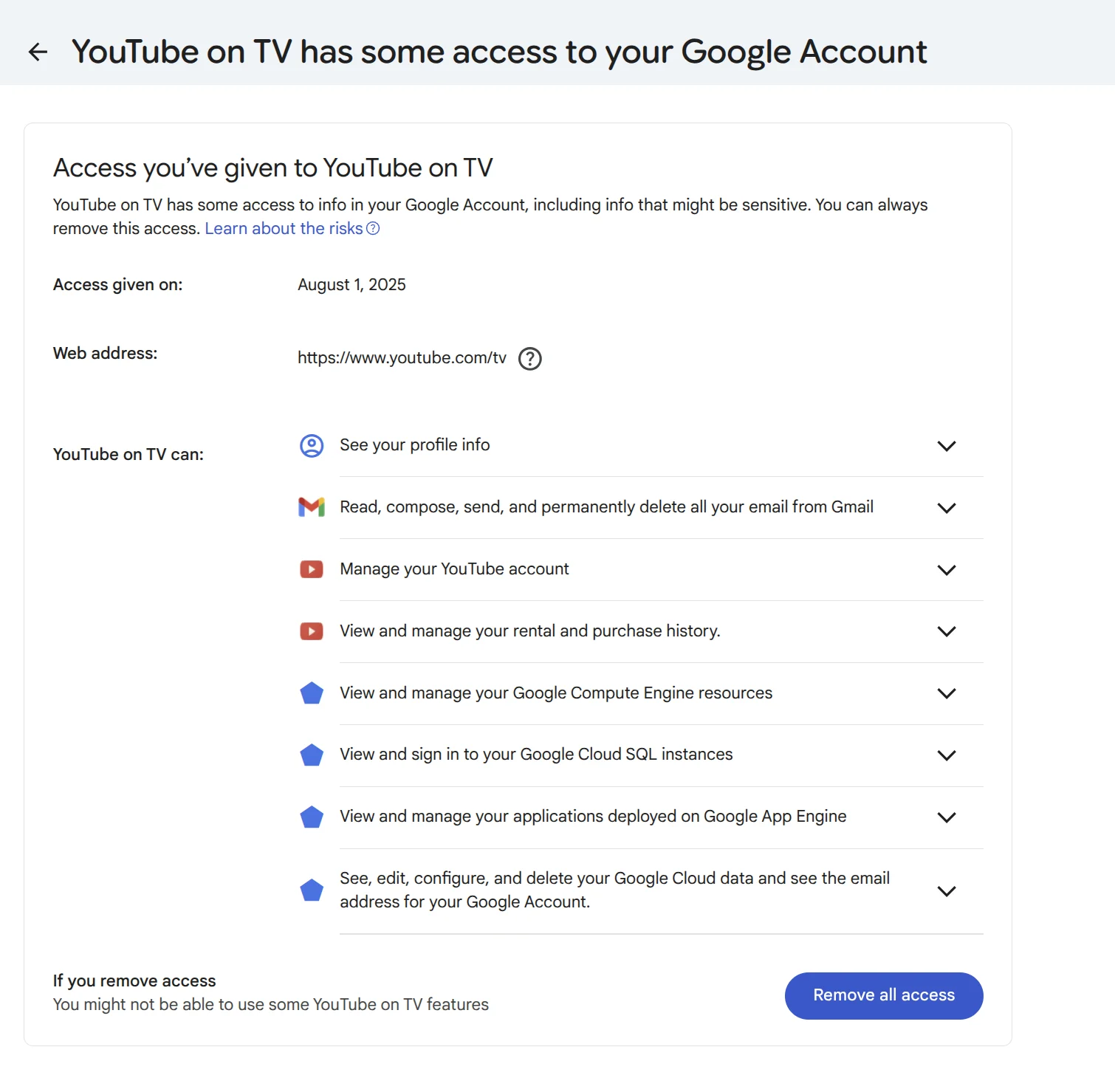
myaccount.google.com/connections shows the original client bound to the device_code, YouTube TV, never the substituted application. To find any trace, a victim would have to open the connections page, scroll to find "YouTube TV" among however many connected apps they have, click into it, click "see details" to expand the granted scopes, and then recognise that YouTube TV requesting cloud-platform / compute / appengine.admin is not normal. Five deliberate steps and a piece of domain knowledge very few people have.
There is also an implicit 2FA bypass. The victim goes through a completely ordinary Google sign-in, which already satisfies any 2FA they have configured. The token handoff to the attacker happens afterwards, over the device poll, with no further prompt. The high-risk action, an OAuth grant under an arbitrary client's identity, never trips a high-risk challenge, because as far as the authentication layer is concerned a user just logged in normally.
Step 6: extend the primitive
The same client_id/scope substitution keeps paying out against different corners of the Google ecosystem.
Persistent access via accounts.reauth: add that scope to the substitution and the resulting grant can refresh indefinitely, with no further victim interaction, a shoot-and-forget backdoor rather than a one-time token.
A Gmail backdoor via IMAP rather than the REST API: substituting a client_id allowed to request https://mail.google.com (Apple's iOS Mail client, for instance) gets a token scoped to full Gmail access. Hitting the Gmail REST API with it fails:
Gmail API has not been used in project 861556708454 before or it is disabled.
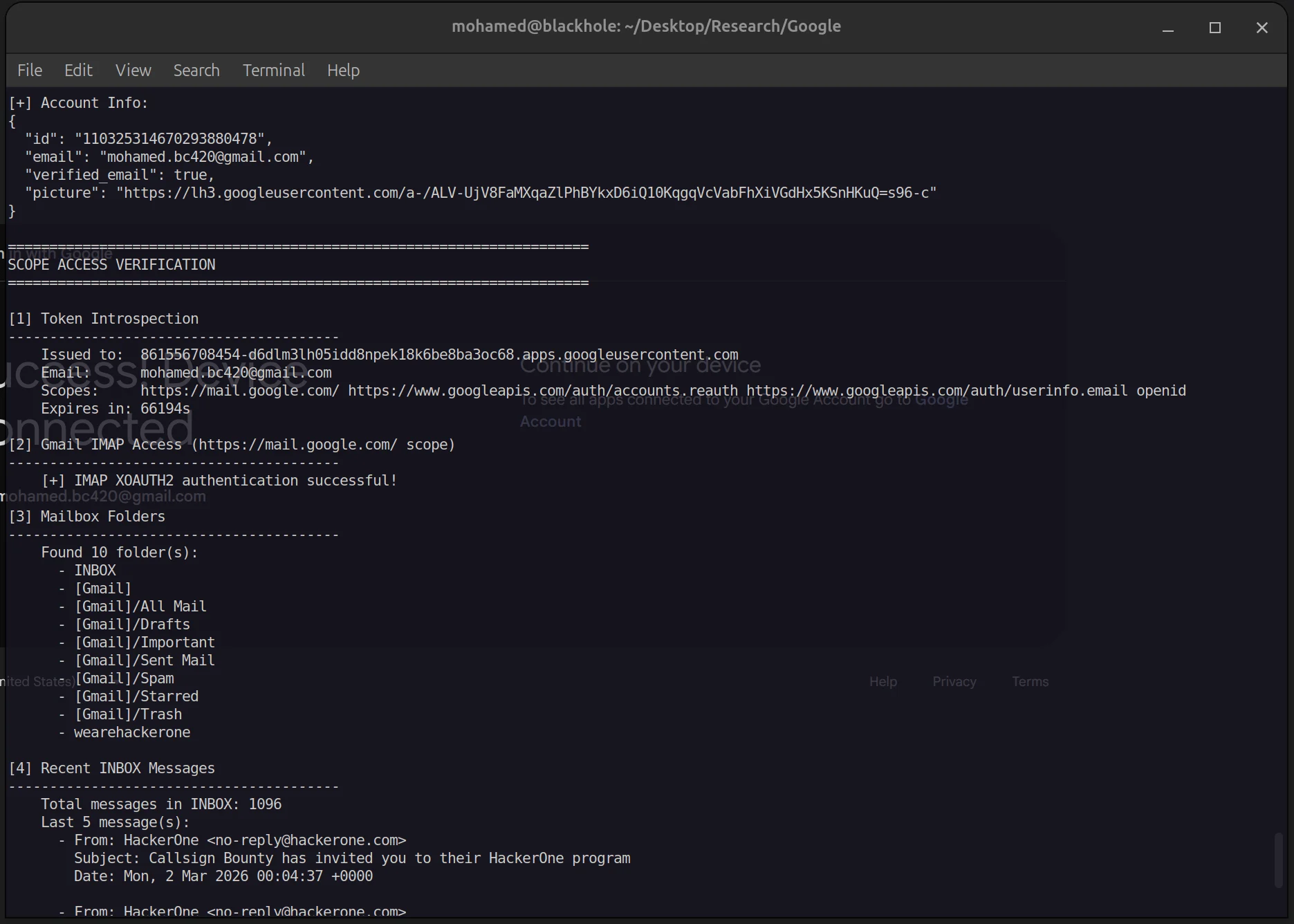
That project ID belongs to YouTube TV, and the original device-code client never had the Gmail API enabled. That is a project-level gate, not a token-level one, so it is worth checking whether there is another door into the same mailbox. Gmail's IMAP server supports OAuth via the XOAUTH2 SASL mechanism, using the exact same https://mail.google.com/ scope but going through imap.gmail.com:993 instead of the REST API's project-gated surface. It accepts the token without issue: full inbox access, with the same token the REST API had just rejected.
Root cause
Two design mistakes stack.
First, the session that anchors a device-code sign-in is fully transferable. The challenge URL carries the encrypted session state in TL, and any browser that opens it can complete the sign-in for the original device. RFC 8628 §5.4 explicitly warns against this.
Second, the authorization server never binds client_id and scope to the device_code server-side. Both are read from the query string at consent time, so they can be swapped after issuance. The absence of redirect_uri in this endpoint is not a weakness in itself, because the grant is delivered out-of-band over the device poll, but it means the usual OAuth boundary that pins a grant to a callback is not present to constrain the substitution.
Existing defences did not stop it because the consent screen is genuine, the sign-in is genuine, and the account activity page shows the original client. The prompt=none parameter, intended to be narrow and gated on prior consent for low-risk scopes, is broad in practice because so many users have already granted openid email profile to many applications.
Impact
An attacker who can get a victim to open a link can obtain an access token for an arbitrary Google-registered client, first- or third-party, under a session that started as YouTube TV. With prompt=none and a client the victim has already used, no click, consent screen or 2FA prompt appears, and there is almost no trace in the victim's account activity. The grant can be extended to persistent access with accounts.reauth, and to full Gmail access through IMAP XOAUTH2 with a client allowed to request https://mail.google.com/.
The reach is capped only by which scopes the substituted client is allowed to request. The silent variant relies on the victim having already granted those scopes to the chosen client.
Fix
Google marked the issue fixed on Mar 28, 2026, and rewarded $13,337 on Apr 2, 2026. The report's recommended mitigations, which have to happen server-side because a client application cannot check anything meaningful on its own, are:
- Keep
user_code,device_code, and any session reference that resolves to them out of URLs entirely. If a session cannot be copied into a different browser, it cannot be handed to a victim. - Bind
client_idandscopeto thedevice_codeat issuance time, server-side. At the consent step, look those values up from that binding instead of trusting the URL, and reject any mismatch. - On the consent screen, show device information (name, model) and require the user to actively confirm that device is the one in front of them.
Variants to test
- On other identity providers implementing RFC 8628, copy the challenge URL after entering an email address into a second browser. A positive result is the second browser completing sign-in and the first device's poll returning a token.
- On the same challenge URL, change
client_idto a different registered client andscopeto a higher-privilege set, keeping the session parameter. A positive result is a consent screen naming the new client with the new scopes, and the originaldevice_codepoll returning a token carrying those scopes. - Add
prompt=nonewithscope=openid email profileand a client the test account has already used. A positive result is anid_tokenfor that client with no consent screen and no interaction beyond opening the link. - Add
accounts.reauthto the substituted scope. A positive result is a grant that refreshes without further victim interaction. - Substitute a client allowed to request
https://mail.google.com/and try IMAP XOAUTH2 againstimap.gmail.com:993. A positive result is a successful authentication listing real folders and messages, even where the REST API rejects the same token on a project gate. - Check the account's connections page after a substitution. A positive result for the attacker is the page showing only the original client, with the substituted scopes visible only after expanding details.
What happened, in plain words
Imagine a hotel where you can check in at the front desk, and the receptionist hands you a key card. Now imagine that the key card can be copied by anyone who sees the number printed on it, and that the room number on the card can be changed after the fact so the card opens a different, much better room. That is roughly the shape of the bug described here, except the hotel is Google's sign-in system and the rooms are your Google account, your Gmail, and Google Cloud.
When you set up the YouTube app on a games console or a smart TV, the device has no comfortable keyboard. So Google uses a trick: the TV shows a short code on screen, you type that code into a web page on your phone, you sign in there, and the TV quietly becomes logged in. This is a standard, documented mechanism called the device authorization grant.
The researcher was setting up YouTube on a PlayStation 5 and found the flow intriguing, so started looking closer. Two separate mistakes in Google's implementation stacked together:
- The web page that finishes the sign-in for the device can be copied from one browser to another. Whoever opens that copied link and signs in ends up logged into the original device.
- The request that page carries says which application is asking and which permissions it wants, but the server never checks those two values against the code that started the whole thing. So they can be swapped for a different application and much bigger permissions.
Put those together, add a Google parameter called prompt=none that skips the consent screen for apps you have used before, and you get a link that, when a victim opens it, silently hands the attacker a working login token for an application of the attacker's choosing. No click, no consent screen, no two-factor prompt, and almost nothing visible in the victim's account activity.
It was closed twice as "won't fix", first citing social engineering and then calling it infeasible. After the researcher demonstrated a one-click version, it was reopened, accepted, fixed on 28 March 2026, and rewarded with $13,337 on 2 April 2026.
Below, each step is explained from scratch, including the vocabulary. If a word is unfamiliar, the glossary at the end defines every term used.
1. The basics: what OAuth is and why it exists
Before the bug, some groundwork. When you click "Sign in with Google" on some website, you are not giving that website your Google password. Instead, Google asks you whether you want to let that website see your name and email address, you click yes, and Google hands the website a small piece of data that proves you agreed. That piece of data is called a token.
A token is like a coat-check ticket. You hand in your coat, you get a ticket, and the ticket lets you collect the coat. The ticket is not the coat, and it does not let you into the cloakroom to take anything else. In the same way, a token is not your password, and it is supposed to be limited to exactly what you approved.
The system that manages this exchange is called OAuth 2.0. It has three parties in the simple case:
- The client: the website or app that wants access, for example a photo-printing service that wants to read your Google photos.
- The authorization server: Google, the party that actually knows who you are and decides what to hand out.
- The resource server: the place that holds your data, for example Gmail's servers, which accept a token and return your mail.
Each client has an identifier, called a client_id. It is a public string, not a secret, a bit like a company's registration number. Google uses it to know which application is asking.
Each client also asks for a list of scopes. A scope is a named permission, such as "read your email address" or "read and send your mail". Scopes are the fine print of the coat-check ticket: they say exactly what the token will be allowed to do.
Most OAuth flows assume the device asking for access has a web browser sitting right there, so the user can be bounced to Google, sign in, and be bounced back. The bouncing back happens through a redirect_uri, an address the client registers in advance and to which Google sends the result. Think of it as the return address on an envelope: Google will only deliver the result to an address the client has already declared, which stops an attacker from redirecting the result to themselves.
2. The device authorization grant, explained slowly
Some devices have no usable browser: a smart TV, a games console, a command-line tool on a server. For those, there is a separate mechanism, documented in a public standard called RFC 8628, whose full name is the OAuth 2.0 Device Authorization Grant. "RFC" stands for Request for Comments, which is how internet standards are published; the number is just its catalogue number.
The flow works like this:
- The device talks to the authorization server directly and asks for permission to start. It sends a request to
POST /device/codeand gets back two things: adevice_code, which is long and secret and stays on the device, and auser_code, which is short and meant to be read aloud or typed, likeABCD-EFGH. - The device shows the short
user_codeon screen and tells you to go to a web address on any other device. In Google's case that address isgoogle.com/device. - You open that address on your phone or laptop, type the short code, sign in to Google, and approve the request on a consent screen.
- Meanwhile, the device has been repeatedly asking the authorization server, "is it done yet?" This repeated asking is called polling, and it happens by sending
POST /tokenwith the secretdevice_code. Once you finish step 3, the next poll comes back with an access token.
The diagram shows the device authorization grant: the device gets a device_code and user_code, the user authenticates on a separate browser, and the device polls for a token.
The important design point is that the device and the browser doing the signing-in are deliberately two different pieces of hardware. That is the whole point: the TV has no keyboard, so the phone does the typing. The only thing that keeps this safe is the assumption that the browser belongs to the person who owns the device. If a stranger's browser can complete the sign-in for your device, the stranger's account ends up on your device, or your account ends up in the stranger's hands, depending on direction.
The standard itself is aware of this. Section 5.4 of RFC 8628 warns implementers not to let the sign-in step be moved to a browser the user does not control. Keep that warning in mind; it comes back later.
3. Setting up YouTube on a PS5
The story starts with something completely ordinary: setting up the YouTube app on a PlayStation 5 for the first time. The console has no keyboard, so it does the sensible thing. It shows a short user_code on screen and tells you to finish signing in on your phone.
The screen shows a QR code and a short code, with instructions to complete sign-in on a phone. The researcher typed the code into google.com/device, signed into Google, approved the consent screen, and a few seconds later the PS5 was logged in.
As a user, nothing felt unusual. But the flow itself is interesting: a screen with no keyboard asks you to authenticate on a completely separate device, and comes back logged in seconds later. That gap between where you type your password and where the session actually lands is what made the researcher look closer.
Behind the scenes, the sequence is:
POST https://oauth2.googleapis.com/device/codereturns adevice_codeand auser_code.- The PS5 polls
POST https://oauth2.googleapis.com/tokenwith thatdevice_code. - The phone's browser walks through
https://accounts.google.com/o/oauth2/v2/auth?…to finalise consent after the code is typed and the user signs in. - The PS5's next poll returns an access token.
Line by line:
- The first line is the device asking Google to start a sign-in.
oauth2.googleapis.comis Google's authorization server address. The answer contains the two codes described above. - The second line is the console repeatedly asking Google whether the sign-in has finished, using its secret
device_codeas proof that it is the device that started the flow. - The third line is the phone's browser visiting Google's sign-in page. The
?…at the end stands for a long list of parameters that the report does not spell out. - The fourth line is the payoff: the console's next question gets a token instead of a "not yet".
All of this is standard and correct. The interesting part is what that sign-in URL on the phone actually carries, and what happens if you do not treat it as disposable.
4. The transferable session
The obvious question with any flow where the state lives in a URL is: what happens if you simply move the URL? If the entire sign-in step for a device_code can be handed to someone else, then whoever finishes that step ends up logged into the original device, not their own.
A session here means the server's memory of an ongoing sign-in: which device started it, and how far along it is. If that memory is carried inside the URL itself, then copying the URL copies the session.
The researcher started a fresh device flow on the PS5, walked through google.com/device on a laptop, and at the consent screen copied the resulting URL into a second browser. That failed outright: there was no session for the second browser to pick up. So the naive version of the attack does not work.
But the device-code page asks for an email address before showing consent. Entering one forwards the browser to a different endpoint entirely: a challenge page at accounts.google.com/v3/signin/challenge/…, carrying a new parameter, TL=APouJz6T…. Sending that URL to a second browser worked. The second browser prompted a completely normal Google sign-in, and seconds after logging in, that account showed up on the PS5.
TL is an encrypted blob carrying the session state. "Encrypted" means the contents are scrambled so only the server can read them; you can copy the blob, but you cannot read or forge it. The researcher judged it practically certain to be the device_code, or something that resolves to it, because it is the only thing left in the URL that could tie the poll back to a specific device.
That is the first vulnerability: the device-code sign-in session is transferable via URL, which RFC 8628 explicitly says it should not be. Send the link, get the account.
A vulnerability is a flaw in a system that lets someone make it behave in a way its designers did not intend. Here the flaw is that a secret piece of state sits in a URL that can be copied and pasted anywhere.
That is a real account takeover, but a narrow one. YouTube TV's permissions are capped by design, and that cap is the next wall.
5. Breaking the scope fence
A YouTube TV account takeover is real, but Google fences the device flow to a short, deliberately low-risk scope allowlist. Per Google's own documentation: "This OAuth 2.0 flow supports a limited set of scopes." The complete list:
openid,email,profileyoutube,youtube.readonlydrive.appdata,drive.file(app-scoped Drive only, not full Drive)
What those mean in plain words:
openid,email,profileare the basic identity scopes: who you are, your email address, and your name and picture.youtubeandyoutube.readonlylet an app act on or read your YouTube account.drive.appdataanddrive.fileare narrow Drive permissions: an app's own hidden folder, and files the app itself created or that you picked for it. Neither gives access to your whole Drive.
No Gmail, no full Drive, no cloud-platform, no compute. The token obtained only worked against a YouTube TV internal API: enough to like a video or subscribe to a channel. An API (Application Programming Interface) is simply a set of addresses a program can call to make another program do something, like a service counter where you hand in a request and get an answer. The YouTube TV internal API is the counter that accepts YouTube actions.
So the researcher looked again at the transferable challenge URL:
accounts.google.com/v3/signin/challenge/…
  ?TL=APouJz6T…              <- encrypted session state
  &response_type=none
  &client_id=861556708454-…   <- YouTube TV
  &scope=…                    <- YouTube scopes
Line by line:
- The first line is the address of the challenge page, with
…standing for parts the report does not show. ?TL=APouJz6T…is the first parameter. The?marks the start of the parameter list,TLis the parameter's name, and the value after=is the encrypted session state. The<-arrow and the text after it are the researcher's annotation, not part of the URL.&response_type=noneis the second parameter. The&separates parameters.response_type=nonemeans this is not a normal code or token redirect: nothing comes back to a callback at all.&client_id=861556708454-…names the application asking, here YouTube TV. The number is the start of YouTube TV's client identifier.&scope=…lists the permissions requested, here the YouTube scopes.
Two details matter. First, response_type=none means there is no result delivered back through the browser. Second, there is no redirect_uri anywhere in the URL. The boundary OAuth normally relies on to pin where a grant goes is absent from this endpoint, because the grant never travels through the browser; it is delivered out-of-band over the device's /token poll. "Out-of-band" means through a separate channel: the browser is not the delivery van, the device's own polling is.
The only thing anchoring the session is TL. client_id and scope are just along for the ride in the query string. A query string is the part of a URL after the ?, made of name-value pairs; it is visible to anyone who sees the link and editable by anyone who copies it.
So the plan: keep TL, replace client_id with a different application, and observe which client the authorization server ends up authenticating.
The researcher scripted the device-code issuance, took the resulting URL, and changed client_id from YouTube TV to Google's own Cloud SDK client, with scope changed to cloud-platform, compute, appengine.admin. Those three scopes are far more powerful: cloud-platform covers Google Cloud services generally, compute covers virtual machines, and appengine.admin covers administering App Engine applications. The Cloud SDK is Google's command-line tool for developers, a first-party client.
The consent screen that came back said Google Cloud SDK, listing the elevated scopes. Approving it, the polling script, still polling with the original YouTube TV device_code, got back a token on its next call. Inspecting it: cloud-platform, compute, appengine.admin. Not YouTube.
That is the second vulnerability: the server never validates that the client_id and scope in the authorization URL match what the device_code was actually issued for. Combined with the transferable session, the authorization server issues tokens under one client's identity (Google Cloud SDK, or any other Google-registered client, first- or third-party) for a session that started under a completely different one.
A useful comparison: it is as if you asked a bank for a debit card limited to groceries, and the bank handed you a card that says "groceries" on the envelope but works on any account in the building, because nobody checked the envelope against the card inside.
6. From consent screen to one click
The researcher filed this as a report. It came back rejected the next day, citing user interaction: the victim "consented." In a narrow sense that is fair: the consent screen is genuinely rendered by Google, and the click is a genuine click. But the thing being consented to was shaped entirely by parameter substitution in a link the attacker built, and from the victim's side there is nothing to notice that is different from any other Google sign-in. Still, "user interaction" was the stated bar, so the next step was removing it.
OAuth has a prompt parameter for exactly the case of skipping the consent screen. Set to none, it tells the authorization server not to show any UI if the user has already granted the requested scopes to that client before. It is meant to be narrow, restricted to low-risk scopes like openid, email, profile, and gated on prior consent. "Gated on prior consent" means it only applies if you said yes to that same app before.
In practice it is not narrow at all. "Sign in with Google" is everywhere, and most people have already granted openid email profile to many apps over the years without thinking about it again. Every one of those apps is a candidate.
Take the weaponised device-code URL, drop in Facebook's client_id (any site using "Sign in with Google" works the same way), set scope=openid email profile, and add prompt=none. The victim opens the link, and that is the only action required: no consent screen, no button to press. The browser silently completes the flow in the background, the polling script receives an id_token for that third-party application, and that token replays cleanly against the app's own "Sign in with Google" endpoint.
An id_token is a small signed statement from Google saying "this person is who they claim to be, and here is their identifier for this app". It is the digital equivalent of a stamped letter of introduction. "Replays cleanly" means the app accepts it as a valid sign-in, because it is one: the token really was issued by Google for that app.
So the chain is: a link, opened by a victim who has ever used "Sign in with Google" with the chosen app, silently hands over a working sign-in token. No click, no consent screen, no two-factor prompt.
7. Why the victim never notices
The natural follow-up: surely something surfaces to the victim, a login alert, a new entry under connected apps, a two-factor prompt? It does not, and that is not incidental. Every signal that would normally catch this gets routed around by the shape of the device-code flow itself.
Audit trail pollution. myaccount.google.com/connections shows the original client bound to the device_code, YouTube TV, never the substituted application. To find any trace of the attack, a victim would have to open the connections page, scroll to find "YouTube TV" among however many connected apps they have, click into it, click "see details" to expand the granted scopes, and then recognise that YouTube TV requesting cloud-platform / compute / appengine.admin is not normal. Five deliberate steps and a piece of domain knowledge very few people have.
The screenshot shows the "YouTube on TV" entry expanded, with Gmail read, compose, send and delete, Cloud SQL, App Engine and Compute Engine listed under a client that is supposed to need only YouTube scopes.
Implicit two-factor bypass. The victim goes through a completely ordinary Google sign-in, which already satisfies any two-factor authentication they have configured. Two-factor authentication, or 2FA, is the second proof of identity beyond a password, usually a code from a phone. The token handoff to the attacker happens afterwards, over the device poll, with no further prompt. The high-risk action, an OAuth grant under an arbitrary client's identity, never trips a high-risk challenge, because as far as the authentication layer is concerned a user just logged in normally.
Stealth, solved. The remaining question was reach: how far the same substitution trick could be pushed past YouTube TV's own scopes.
8. Extending the primitive
Stealth is one axis; reach is the other. The same client_id and scope substitution keeps paying out against different corners of the Google ecosystem. A primitive in security writing is a small, reusable building block: once you can do one thing reliably, you look for everything else it unlocks.
Persistent access via accounts.reauth. Add that scope to the substitution and the resulting grant can refresh indefinitely, with no further victim interaction: a shoot-and-forget backdoor rather than a one-time token. "Refresh" means the token can be renewed when it expires, the way a season ticket can be renewed without buying a new one from scratch. A backdoor is a way back into an account that survives the original entry.
A Gmail backdoor via IMAP, not the REST API. Substituting a client_id that is allowed to request https://mail.google.com (Apple's iOS Mail client, for instance) gets a token scoped to full Gmail access. Hitting the Gmail REST API with it fails:
Gmail API has not been used in project 861556708454 before or it is disabled.
Line by line: this is an error message returned by Google. "Gmail API" is the programming interface for Gmail. "has not been used in project 861556708454" means the Google Cloud project with that number has never switched the Gmail API on. "before or it is disabled" means the same thing from the other side: either it was never enabled or it has been turned off. A project here is a container inside Google Cloud that holds settings and which APIs are switched on.
That project ID belongs to YouTube TV, and the original device-code client never had the Gmail API enabled. That is a project-level gate, not a token-level one, so it is worth checking whether there is another door into the same mailbox. Gmail's IMAP server supports OAuth via the XOAUTH2 SASL mechanism, using the exact same https://mail.google.com/ scope but going through imap.gmail.com:993 instead of the REST API's project-gated surface. It accepts the token without issue: full inbox access, with the same token the REST API had just rejected.
Some vocabulary here. IMAP is the older, standard protocol for reading mail from a mail server; mail apps have used it for decades. REST API is the modern web-based interface for the same data. SASL is a framework for plugging authentication methods into protocols like IMAP, and XOAUTH2 is the specific method that lets IMAP accept an OAuth token instead of a password. imap.gmail.com:993 is the mail server's address and port: the host name, then the numbered door to knock on.
The point is that the REST API was blocked by a setting on the project, not by the token itself. The token was fine; the front door was locked. IMAP is a different door into the same mailbox, and it accepted the same token.
End to end: a transferable session, plus unvalidated client_id and scope binding, plus prompt=none, equals a link that is invisible to the person who opens it and ends in a fully compromised account, Gmail included.
9. Disclosure timeline
A disclosure is the process of telling the vendor about a bug and, later, telling the public. A VRP, or Vulnerability Reward Program, is Google's bug bounty scheme: report a flaw, get paid if it is accepted. A PoC, or proof of concept, is a small demonstration that the bug really works, as opposed to a theoretical argument.
| Date | Event |
|---|---|
| Feb 25, 2026 | Report filed with Google VRP |
| Mar 2, 2026 | Closed: Won't Fix (Intended Behaviour), citing "social engineering" |
| Mar 2, 2026 | Pushed back same day |
| Mar 3, 2026 | Reopened, then closed again: Won't Fix (Infeasible) |
| Mar 3, 2026 | Countered with a prompt=none one-click PoC against Facebook's client_id |
| Mar 4, 2026 | Reopened a second time and accepted; bug filed with the product team |
| Mar 28, 2026 | Marked fixed |
| Apr 2, 2026 | Rewarded $13,337 |
The two rejections both leaned on the same argument: that tricking a user into approving an OAuth prompt is a social-engineering problem, not a vulnerability in Google's implementation. Social engineering means manipulating a person into doing something, rather than breaking the technology. That argument did not hold up on either pass. The first rejection ignored that this is the exact sign-in flow every Google user already knows, on accounts.google.com, arriving at an app that has no business holding cloud-platform or appengine.admin scopes doing exactly that. The second treated it as equivalent to installing a malicious OAuth app, which the prompt=none PoC against Facebook's client_id directly disproved: there was no prompt to approve, and no app to install; the victim only had to open a link.
10. Mitigations
A mitigation is a change that removes or reduces the flaw. For a flow that is explicitly designed to hand sign-in off to a second device, the fix has to happen server-side, since there is nothing meaningful a client application can check on its own. "Server-side" means on Google's own machines, where the decisions are actually made, rather than in the app or the browser, which the attacker controls.
- Keep
user_code,device_code, and any session reference that resolves to them out of URLs entirely. If a session cannot be copied into a different browser, it cannot be handed to a victim. - Bind
client_idandscopeto thedevice_codeat issuance time, server-side. At the consent step, look those values up from that binding instead of trusting the URL, and reject any mismatch. "Bind" means record them together on the server so they cannot be changed later without the server noticing. - On the consent screen, show device information (name, model) and require the user to actively confirm that device is the one in front of them.
11. Conclusion
The device authorization grant is a narrow, deliberately low-trust flow, right up until the authorization server treats "who is asking" and "what are they asking for" as details that only need to be true at the start of the flow, not checked again by the time consent is granted. Once the session itself turned out to be transferable across browsers, the missing binding between device_code and client_id and scope stopped being a narrow YouTube TV bug and became a way to mint tokens for any Google-registered client, first-party or third-party, capped only by which scopes that client happens to be allowed to request.
Glossary
- 2FA (two-factor authentication): a second proof of identity beyond a password, usually a code from a phone.
- API (Application Programming Interface): a set of addresses a program can call to make another program do something, like a service counter for software.
- Authorization server: the party that knows who you are and decides which tokens to hand out; here, Google.
- Backdoor: a way back into an account that survives the original entry.
- Bind: to record two values together on the server so they cannot be changed later without the server noticing.
- Client: the website or app that wants access to your data through OAuth.
client_id: the public identifier of an OAuth client, like a company registration number.- Consent screen: the page where Google asks whether you want to let an app have certain permissions.
- Device authorization grant: the OAuth mechanism (RFC 8628) for devices without a usable browser, where a short code is shown on the device and typed into a browser elsewhere.
device_code: the long, secret code a device keeps and uses to poll for its token.- Disclosure: the process of telling a vendor about a bug and, later, telling the public.
- Encrypted: scrambled so that only the intended party can read it.
- Gated on prior consent: only applies if you have already said yes to that same app before.
id_token: a small signed statement from Google saying who you are, used by apps to sign you in.- IMAP: the older standard protocol for reading mail from a mail server.
- Mitigation: a change that removes or reduces a flaw.
- OAuth 2.0: the system that lets an app access your data at another service without your password, by issuing limited tokens.
- Out-of-band: through a separate channel, not the one being used for the main conversation.
- PoC (proof of concept): a small demonstration that a bug really works.
- Polling: repeatedly asking a server "is it done yet?" until the answer changes.
- Primitive: a small, reusable building block that can be combined with others.
- Project: a container inside Google Cloud that holds settings and which APIs are switched on.
- Prompt parameter: an OAuth setting that controls whether the consent screen is shown;
prompt=noneskips it when the user has already granted those scopes to that client. - Query string: the part of a URL after the
?, made of name-value pairs, visible and editable by anyone who sees the link. redirect_uri: the return address a client registers in advance, to which the authorization server delivers the result.- Refresh: to renew a token when it expires, without starting over.
- REST API: the modern web-based interface for accessing data, as opposed to older protocols like IMAP.
- RFC 8628: the published standard that defines the OAuth 2.0 Device Authorization Grant.
- SASL: a framework for plugging authentication methods into protocols like IMAP.
- Scope: a named permission a client requests, such as "read your email address".
- Server-side: on the service's own machines, where the decisions are actually made.
- Session: the server's memory of an ongoing sign-in, including which device started it and how far along it is.
- Social engineering: manipulating a person into doing something, rather than breaking the technology.
- Token: a piece of data that proves you were granted access, like a coat-check ticket; it is not your password and is supposed to be limited to what you approved.
user_code: the short code shown on a device's screen for the user to type into a browser.- Vulnerability: a flaw that lets a system behave in a way its designers did not intend.
- VRP (Vulnerability Reward Program): a bug bounty scheme where a vendor pays for reports of flaws.
- XOAUTH2: the SASL method that lets IMAP accept an OAuth token instead of a password.