Hey Google Lets submit bug from Victim Account !
The bug report submission endpoint on bughunters.google.com trusted an email address supplied in the request, so changing it to another user's address caused the report to be filed under that victim's account. An attacker could submit bug reports as another user without authenticating as them.
 Published on virtuvil.medium.com
Let’s get started by explaining how I can submit a bug report using another user’s account without their authentication on bughunters.google.com.
The full write-up lives on its author's site
It belongs to its author, so we link to it rather than copy it. The other two tabs are our own rewrites, checked against it.
Context
Google runs a bug hunter portal at bughunters.google.com, where researchers submit vulnerability reports to Google's programmes. The portal is a normal authenticated web application: a researcher signs in, fills in a report, and the report is filed against their account. The report below is about the submission flow of that portal, not about the product being reported on. The researcher, Prasanth Elangovan (Virtuvil), was hunting on Google after seeing LinkedIn posts about large Google rewards, and found a privilege escalation on a Google domain after 7 to 8 hours of work. He then went to bughunters.google.com to file it, and the bug described here was found while filing that first report.

Setup
The only tool named in the report is Burp Suite, used as an intercepting proxy with Repeater. Two accounts are involved: the researcher's own account on bughunters.google.com, and a secondary email address that stands in for the victim. The report does not name the endpoint, the HTTP method, the parameter names, the headers or any version numbers, so none of those can be given here. The precondition is simply an authenticated session on the portal and the ability to capture the requests made while submitting a report.
Finding it
While writing the privilege escalation report on bughunters.google.com, the thought struck him that he had not checked the submission portal itself. He turned on Burp, submitted the privilege escalation report through the portal, and then reviewed every request and response captured from bughunters.google.com.

One of those requests caught his attention. The report shows the captured request but does not reproduce its contents in text, so the exact endpoint and parameters are not available here.
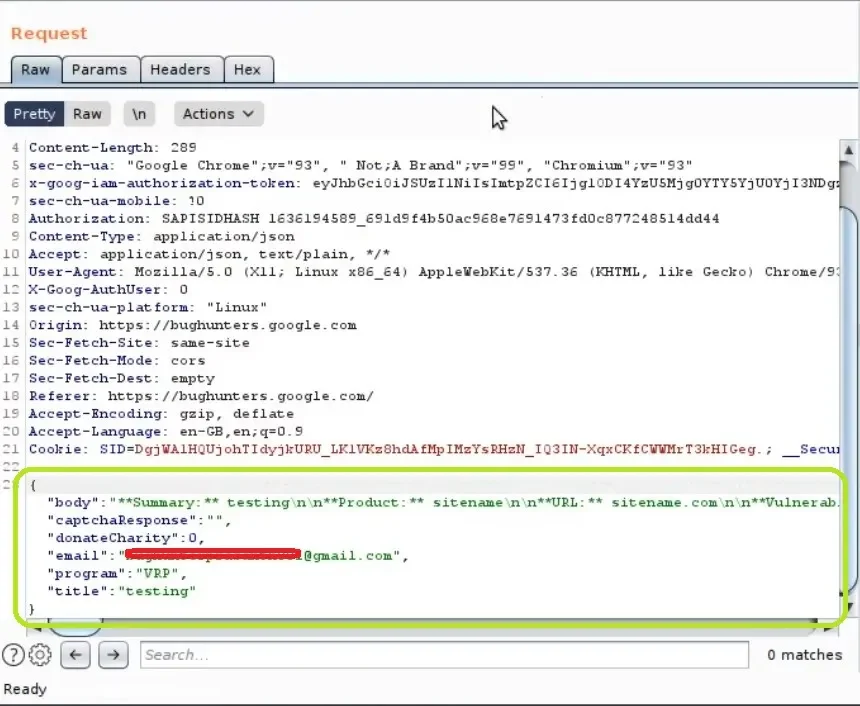

What drew his attention was the email address carried in the request. If the email address in the submission request identifies whose account the report is filed under, then changing it should file the report under a different account. That is the hypothesis he tested.
Exploitation
Step 1: capture the submission request
With Burp running as a proxy, he submitted the privilege escalation report through the normal portal UI and kept the resulting request and response history.
Step 2: send the request to Repeater and change the email address
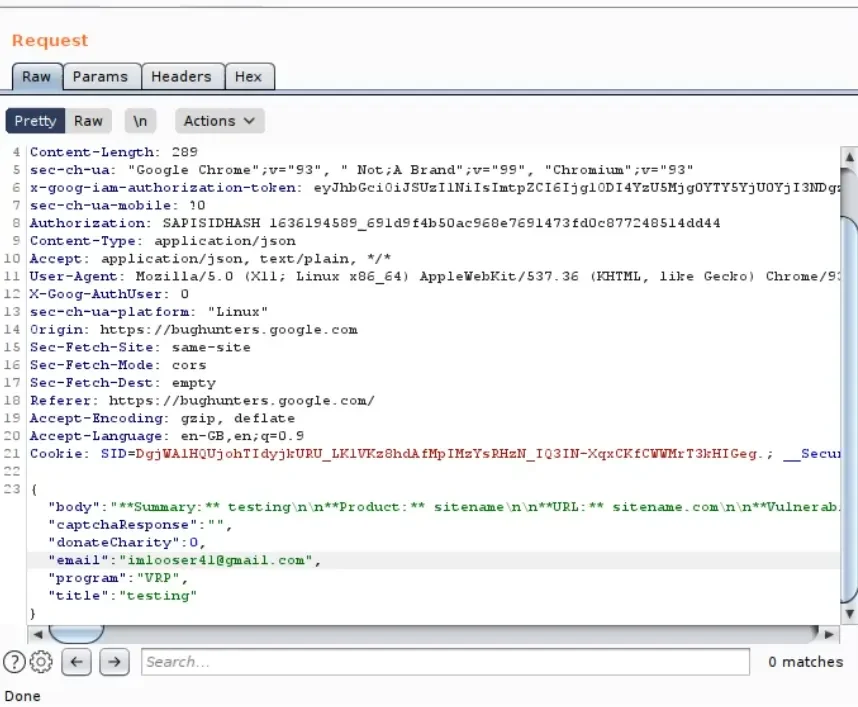
He sent the captured submission request to Burp Repeater and replaced the email address in it with [redacted]. In practice he used his own secondary email address as the victim, so the test did not touch a third party's account.
Step 3: observe the result
The modified request returned 200 OK, and the report was submitted to Google using the victim's account rather than his own.


Step 4: further modification of the request
He also states that HTML, content and text injection were possible by modifying other details of the same request. The report does not show those modified requests or their responses, so the exact fields and payloads are not available. He submitted the bug and waited.
Root cause
The submission request carries the reporter's email address as a client-controlled value, and changing it changed which account the report was filed under, rather than the identity being derived from the authenticated session. That is a classic IDOR: an object reference (here, the reporter identity) is taken from the request body rather than from server-side session state. The secondary claim, that other request details allowed HTML, content and text injection, suggests request fields are not adequately validated.
Impact
An authenticated user of bughunters.google.com could file a report under another person's email address without authenticating as that person. In the researcher's test the target was his own secondary address, and the result was a report attributed to that account. The report does not establish what an attacker could read or change on the victim's account beyond that attribution, nor whether the victim would be notified. The injection issue, if it held, would let an attacker place HTML, content or text through the same request. The report gives no severity or CVSS score.
Fix
The fix implied by the behaviour is to stop accepting the reporter identity from the request and to bind the submission to the authenticated session on the server, rejecting any request whose email does not match the session's user. The other request fields should be validated and encoded on output in the same change.
Outcome
The report was triaged by Google three to seven days after submission.
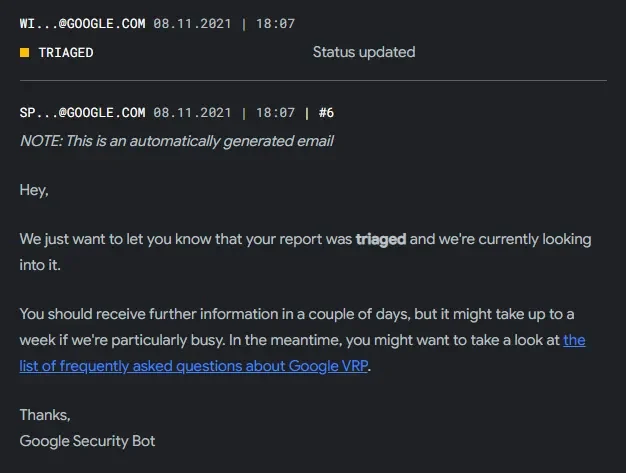

A few days later the update arrived: it was closed as a duplicate.



He notes that duplicates were common for him at that stage, with more than 100 at the start of his bug bounty work, and that he had received a duplicate from Google before.


The college fees were eventually paid from a $400 reward on another programme for a privilege escalation bug, not from this report.
Variants to test
- Change the email or user identifier in any authenticated submission or profile-update request and replay it. A positive result is a
200 OKwhere the resulting object is attributed to the other identity. - Try the same substitution on report comments, attachments and status changes, not just the initial submission. A positive result is a comment or attachment appearing under the victim's account.
- Test whether the server validates the email against the session at all by sending a syntactically valid but unregistered address. A positive result is acceptance of an address that belongs to no account.
- Modify other request fields with HTML and text payloads and check where they are rendered, both in the portal and in any notification email. A positive result is unencoded markup appearing in either place.
- Replay the captured request with the session cookie removed or replaced with another user's session. A positive result is the request succeeding without a matching session, which would show the identity check is absent rather than merely weak.
What happened, in plain words
A security researcher was using Google's bug report website, bughunters.google.com, to submit a report about a different security problem he had found. While filling in the form, he wondered whether the website itself had a flaw. He turned on a tool that lets you watch and change the data your browser sends to a website. After submitting his report normally, he looked at the requests his browser had made. One request contained his email address. He changed that email address to a different one (his own secondary email) and sent the request again. The website accepted it and filed the report under the other email address, without asking for that account's password. That appears to be the bug: the website accepted the email address from the request rather than tying it to the logged-in user. He reported it, Google triaged it a few days later, but then closed it as a duplicate. He did not receive a reward for this particular report; his college fees were paid from a different reward.
Introduction
Hello friends, this is Prasanth Elangovan (aka Virtuvil), a security researcher and ethical hacker from India. This is the story of how my bug bounty journey helped me pay for my college fees.
Let's start by explaining how I could submit a bug report using another user's account without their authentication on bughunters.google.com.
While scrolling through LinkedIn, I noticed many posts about people receiving huge Google rewards for their findings. So I decided to hunt on Google.
After spending 7-8 hours, I discovered a privilege escalation on a Google domain, and I made a report to submit via bughunters.google.com.
The thought "Harey bhai, why didn't you check bughunters.google.com?" suddenly occurred to me as I typed the report on bughunters.google.com.
What if we discovered a bug during the submission process? Come on! Just give it a shot.
Let's fire up Burp and then submit the privilege escalation bug. After submitting the report, I reviewed every request and response captured by Burp from bughunters.google.com.
One of those requests caught my attention. Here is what follows.
What if we changed the email address?
It's time to give it a shot! So I sent that request to Repeater and changed the email address to [redacted]. In this case, I used my secondary email address.
Guess what? I received 200 OK responses. And the bug was submitted to Google using the victim's account.
I got more excited! 😁
And here, HTML, content, and text injection are also possible by modifying the request's other details. So I quickly submitted the bug and waited for a response.
The status was updated three to seven days later. Yes! My report was triaged by Google.
Like everyone else, I was also expecting the reward. 😁
I received the update from Google after a few days. :(
Not again! I got another duplicate from Google.
Story behind this bug :)
I was studying M.Sc. cybersecurity in October 2021. On one Thursday, I received notice that I needed to pay third semester fees. There were only two months left to pay fees. I have some knowledge of networking and cloud-related technologies, so I started looking for different freelance jobs the day after I got the notification. :(
Even though I was a noob in the security field at the time, I was still doing bug bounties. At the beginning, I got 100+ duplicates. 😌
At the time, I received a duplicate from Google as well. It is common for me to receive duplicates and informative messages. 😐
But luckily, I received $400 from another program for discovering a privilege escalation bug and I paid my college fees without any delay. :)
Please DM if you have any questions.
I've written other articles as well. I will describe how I discovered a complete account takeover without user interaction (how I paid my final semester fees) and other bugs as well.
Always thanks to NithishKumar M and Vasanth GN.
Contact: LinkedIn.
Context
Google runs a bug hunter portal at bughunters.google.com, where researchers submit vulnerability reports to Google's programmes. The portal is a normal authenticated web application: a researcher signs in, fills in a report, and the report is filed against their account. The report below is about the submission flow of that portal, not about the product being reported on. The researcher, Prasanth Elangovan (Virtuvil), was hunting on Google after seeing LinkedIn posts about large Google rewards, and found a privilege escalation on a Google domain after 7 to 8 hours of work. He then went to bughunters.google.com to file it, and the bug described here was found while filing that first report.
Setup
The only tool named in the report is Burp Suite, used as an intercepting proxy with Repeater. Two accounts are involved: the researcher's own account on bughunters.google.com, and a secondary email address that stands in for the victim. The report does not name the endpoint, the HTTP method, the parameter names, the headers or any version numbers, so none of those can be given here. The precondition is simply an authenticated session on the portal and the ability to capture the requests made while submitting a report.
Finding it
While writing the privilege escalation report on bughunters.google.com, the thought struck him that he had not checked the submission portal itself. He turned on Burp, submitted the privilege escalation report through the portal, and then reviewed every request and response captured from bughunters.google.com.
One of those requests caught his attention. The report shows the captured request but does not reproduce its contents in text, so the exact endpoint and parameters are not available here.
What drew his attention was the email address carried in the request. If the email address in the submission request identifies whose account the report is filed under, then changing it should file the report under a different account. That is the hypothesis he tested.
Exploitation
Step 1: capture the submission request
With Burp running as a proxy, he submitted the privilege escalation report through the normal portal UI and kept the resulting request and response history.
Step 2: send the request to Repeater and change the email address
He sent the captured submission request to Burp Repeater and replaced the email address in it with [redacted]. In practice he used his own secondary email address as the victim, so the test did not touch a third party's account.
Step 3: observe the result
The modified request returned 200 OK, and the report was submitted to Google using the victim's account rather than his own.
Step 4: further modification of the request
He also states that HTML, content and text injection were possible by modifying other details of the same request. The report does not show those modified requests or their responses, so the exact fields and payloads are not available. He submitted the bug and waited.
Root cause
The submission request carries the reporter's email address as a client-controlled value, and the server appears to trust it when deciding which account the report belongs to, instead of deriving the identity from the authenticated session. That is a classic IDOR: an object reference (here, the reporter identity) is taken from the request body rather than from server-side session state. The secondary claim, that other request details allowed HTML, content and text injection, points to the same pattern: request fields are reflected or stored without adequate validation.
Impact
An authenticated user of bughunters.google.com could file a report under another person's email address without authenticating as that person. In the researcher's test the target was his own secondary address, and the result was a report attributed to that account. The report does not establish what an attacker could read or change on the victim's account beyond that attribution, nor whether the victim would be notified. The injection issue, if it held, would let an attacker place HTML, content or text through the same request. The report gives no severity or CVSS score.
Fix
The fix implied by the behaviour is to stop accepting the reporter identity from the request and to bind the submission to the authenticated session on the server, rejecting any request whose email does not match the session's user. The other request fields should be validated and encoded on output in the same change.
Outcome
The report was triaged by Google three to seven days after submission.
A few days later the update arrived: it was closed as a duplicate.
He notes that duplicates were common for him at that stage, with more than 100 at the start of his bug bounty work, and that he had received a duplicate from Google before.
The college fees were eventually paid from a $400 reward on another programme for a privilege escalation bug, not from this report.
Variants to test
- Change the email or user identifier in any authenticated submission or profile-update request and replay it. A positive result is a
200 OKwhere the resulting object is attributed to the other identity. - Try the same substitution on report comments, attachments and status changes, not just the initial submission. A positive result is a comment or attachment appearing under the victim's account.
- Test whether the server validates the email against the session at all by sending a syntactically valid but unregistered address. A positive result is acceptance of an address that belongs to no account.
- Modify other request fields with HTML and text payloads and check where they are rendered, both in the portal and in any notification email. A positive result is unencoded markup appearing in either place.
- Replay the captured request with the session cookie removed or replaced with another user's session. A positive result is the request succeeding without a matching session, which would show the identity check is absent rather than merely weak.
Glossary
- API: Application Programming Interface; a set of rules that lets one piece of software talk to another, like a waiter taking your order to the kitchen.
- Authenticated web application: a website that requires you to log in before you can use its features.
- Burp Suite: a tool that sits between your browser and a website, letting you see and change the data going back and forth.
- Cookie: a small piece of data a website stores in your browser to remember who you are between requests.
- CSRF: Cross-Site Request Forgery; an attack that tricks a logged-in user's browser into sending a request the user did not intend.
- CVSS: Common Vulnerability Scoring System; a standard way to rate the severity of a security flaw.
- Duplicate: a bug report that describes an issue someone else has already reported.
- Endpoint: a specific URL or address on a server where a particular function is available.
- HTML injection: inserting HTML code into a page so that it is interpreted as part of the page, potentially altering its appearance or behaviour.
- IDOR: Insecure Direct Object Reference; when a website uses a user-supplied value (like an email or ID) to decide which record to act on, without checking that the user is allowed to access that record.
- Intercepting proxy: a tool that captures and lets you modify network traffic between your browser and a server.
- Privilege escalation: a flaw that lets a user gain more permissions or access than they should have.
- Repeater: a Burp Suite tool that lets you send a single request repeatedly, with modifications, and see the response.
- Request: the message your browser sends to a server when you do something on a website.
- Response: the message a server sends back to your browser.
- Session: a period of interaction between a user and a website, during which the website remembers the user is logged in.
- Triaged: the process where a bug report is reviewed and confirmed as valid by the receiving organisation.
- 200 OK: an HTTP status code meaning the request succeeded.



