How I could have stolen your photos from Google
The author found three issues in Google products: a share-invite link that reflected a spoofable display name, Slides image endpoints that returned a direct image URL without checking that the caller owned the file, and a Photos partner-sharing flow whose request parameter could be decoded, edited and re-encoded to share a victim's photos with an attacker-chosen account. An attacker could trick a user into granting access to files or photos.
 Published on avatao.com
I’ve found my first bug accidentally by trying to share a Google Spreadsheet with a teacher. (Un)fortunately, I’ve sent the invite to his non-Gmail address and then e-mailed him the link.
The full write-up lives on its author's site
It belongs to its author, so we link to it rather than copy it. The other two tabs are our own rewrites, checked against it.
Context
This is a first-person account by Gergő Turcsányi, a software engineer at Avatao, of three bugs he found in Google products and reported through Google's bug bounty programme. The write-up covers a Google Sheets sharing feature, an image-rendering endpoint pair in Google Slides, and the partner-sharing flow in Google Photos. The target features are ordinary user-facing ones: sharing a document by email, inserting an image from Drive into a presentation, and automatically sharing photos with a partner account.

Setup
The researcher used two Google accounts of his own, which let him replay requests with a different session cookie. His tooling was deliberately minimal: the Chrome DevTools Network tab, the built-in "Copy as cURL" function, and a base64 decoder. He explicitly avoided automated scanners, reasoning that other hunters were already running them.
His stated method was to open DevTools on every Google product he could find, click every button, and read each request and response by hand:
for webapp in literally_every_online_google_product_I_have_found:
    devtools.open()
    devtools.select_tab('network')
    for button in webapp:
        button.click()
    for request, response in devtools.requests:
        request.analyze_manually()
        response.analyze_manually()
Finding it
Bug 1: invite spoofing in Sheets
The first bug was found by accident while sharing a spreadsheet with a teacher who did not have a Gmail address. When a user opens a document that has not been shared with them, Google shows an error with a Request access button. That button sends the owner an email containing a link of this shape:
https://docs.google.com/spreadsheets/d/cmFuZG9t_c3ByZWFkc2hlZXQ_aWQ/edit?usp=sharing_erp&userstoinvite=[redacted]
Opening that link as the owner loads the document and pops up a "Share with others" modal, prefilled with the address taken from the URL.
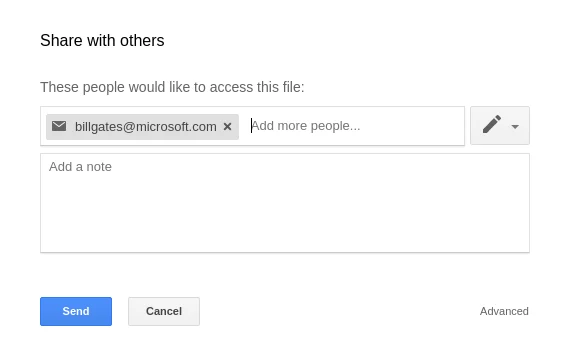
The researcher's first instinct was XSS, since user input was reflected into the DOM, but he dismissed it as unlikely to be unfound on Google. What caught his attention instead was the parameter name: userStoinvite rather than usertoinvite. The plural reading suggested the parameter could carry several invitees at once. Separating addresses with commas made them all appear in the form, the way a mail client accepts multiple recipients.
Bug 2: unauthenticated image rendering in Slides
After the first report he focused on Drive and the Docs family, because they are connected, popular and feature-rich. He noticed that Slides behaves like Docs and Sheets but in some cases uses different, possibly legacy, API endpoints. Inserting an image from Drive into a presentation triggered two requests:
curl 'https://docs.google.com/presentation/d/pReS3nTaT10N_1D/copyimages?id=[redacted]' --data 'photo=[redacted]'
{"[redacted]":"MDRjYWVhO-QtYjc0Ny00NDdkLWJlODctZ-VmNzVkOTI1YTkw"}
---
curl 'https://docs.google.com/presentation/d/pReS3nTaT10N_1D/renderdata?id=[redacted]' --data 'cosmoId=MDRjYWVhO-QtYjc0Ny00NDdkLWJlODctZ-VmNzVkOTI1YTkw'
{"r0":"https://lh6.googleusercontent.com/[redacted]"}
The first response maps the image ID to a second identifier, and that second value is passed as cosmoId in the second request. The second response contains a direct link to the image. Two endpoints for one image felt overcomplicated, which is what made him suspect legacy code worth probing.
Bug 3: the Photos partner flow
In May he returned to hunting and started with Google Photos, which he had skipped on his first run. The Network tab showed nothing notable, but the shared libraries feature, which automatically shares photos with a partner, looked promising. Setting up a partner means typing the partner's email address, after which a popup shows a Google sign-in screen. After entering credentials, the photos are shared and the user lands on a page with only a success message and a close button. The popup was too small to show the whole URL, so he copied it out:
// URL before login
https://accounts.google.com/signin/v2/sl/pwd?passive=801337085&osid=1&continue=https%3A%2F%2Fphotos.google.com%2Finitps%3Frequest%[redacted].
// URL after login
https://photos.google.com/initps?request=[redacted].
The continue parameter holds the second URL, encoded. The request value looked like random characters with a single dot at the end. The dot made no sense as padding unless it stood in for an equal sign, which would make the string valid base64 given the character set. He replaced it, decoded the result, and it worked:
[[null,"12587427591239"],null,"[redacted]",null,[2,null,"[redacted]"]]
Exploitation
Step 1: spoofing an invitee name
With the comma behaviour established, he tried supplying a display name alongside an address:
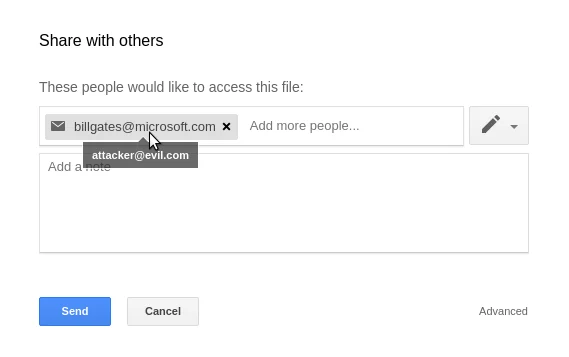
https://docs.google.com/spreadsheets/d/cmFuZG9t_c3ByZWFkc2hlZXQ_aWQ/edit?usp=sharing_erp&userstoinvite=Bill Gates<[redacted]>
The form showed the name instead of the address, and the real address appeared only on mouse hover.
Step 2: replaying Slides requests with another session
He copied the cURL commands from DevTools and replaced the Cookie header with cookies from a second session. The endpoints did not check authorisation, so any valid Google session cookie was enough to obtain a direct URL for any picture, provided the file ID was known. The practical limit is the ID itself: these are long, case-sensitive strings, which is why he could not construct a convincing attack scenario and why the bounty was comparatively low.
Step 3: rewriting the Photos request payload
He changed the email in the decoded structure to his own, left the other values untouched, base64 encoded the payload and swapped the trailing equal sign back to a dot. Opening the crafted URL and logging in with his second account shared that account's photos with the first account. No warning, notification or email was shown to the victim.
He notes that he did not test visiting the second URL directly. It is possible that no login is needed at all, since a GET request to that URL might be sufficient to share the photos.
Root cause
- Sheets: the invitee value from the URL was rendered into the sharing modal without restricting it to a bare address, so the display-name syntax was honoured and could be used to misrepresent who was being invited.
- Slides: the
copyimagesandrenderdataendpoints resolved an image ID to a direct URL without checking that the caller had access to the file. A valid session cookie was treated as sufficient authorisation. - Photos: the
requestparameter carried the whole partner-sharing instruction, including the target email, as client-supplied base64. The server acted on the client-supplied value after login.
Impact
- Sheets: an attacker who still holds a document URL after losing access can send a spoofed invite to a colleague, displaying a trusted name, and wait for that colleague to grant access. The report frames this as tricking inexperienced users.
- Slides: anyone with a valid Google session and a known file ID could obtain a direct image URL. The long, case-sensitive IDs limit mass exploitation.
- Photos: an attacker could cause a victim's photos to be shared with the attacker's account by getting the victim to open a crafted link and sign in, with no notification to the victim. Whether login is strictly required was not tested.
Fix
All three were fixed by Google. The report gives the fix dates but not the code changes: Sheets on 2018.01.16, Slides on 2018.01.16, Photos on 2018.08.22.
Variants to test
- Pluralised parameter names. Look for parameters whose names suggest batch handling (
userstoinvite,ids,emails). A positive result is that comma-separated values are all accepted and reflected. - Display-name syntax in reflected fields. Submit
Name<address>into any field that ends up in a sharing or invitation UI. A positive result is that the name is shown and the address hidden behind a hover. - Two-step render endpoints. When one response returns an identifier that feeds a second request, replay both with a different account's cookie. A positive result is a direct asset URL returned to an unauthorised session.
- Base64 with substituted padding. Where a parameter looks like base64 but ends in a dot or another stand-in for
=, decode it, modify a field, re-encode and restore the substitution. A positive result is that the server acts on the modified value. - Client-supplied action payloads. In flows that end in a state change (sharing, linking, inviting), check whether the target identity travels in the URL. A positive result is that changing it changes who receives the action, with no confirmation shown to the victim.




What happened, in plain words
A software engineer at Avatao, Gergő Turcsányi, found three security bugs in Google products and reported them through Google's bug bounty programme. A bug bounty programme is a scheme where a company pays people for reporting security flaws instead of punishing them. The three bugs were in Google Sheets (a spreadsheet app), Google Slides (a presentation app) and Google Photos (a photo storage and sharing app). All three involved ordinary features that millions of people use: sharing a document by email, putting a picture from your Drive into a presentation, and automatically sharing your photos with a partner account.
The first bug let someone send a fake-looking sharing invitation that showed a trusted person's name. The second let anyone with a valid Google login get a direct link to any picture, if they knew the picture's file ID. The third let an attacker make a victim's photos get shared with the attacker's account, with no warning to the victim. Google paid bounties of 500 USD, 500 USD and 3133.70 USD across the reports and fixed all three.
This article walks through each bug in the order the researcher found them, explains every technical idea from scratch, and shows the exact requests he used.
The tools and the method
The researcher used two Google accounts of his own. Having two accounts is important: it lets you log in as one person, then take a request that account made and replay it as the other person, to see what the second person is allowed to do. Think of it like having two keys to two different houses and trying your neighbour's key in your own lock to see if it opens.
His tools were deliberately simple:
- Chrome DevTools: a panel built into the Chrome browser. You open it with F12 or right-click then Inspect. The Network tab inside it lists every request the browser sends to a website and every response it gets back. A request is a message your browser sends to a server asking for something (a page, an image, an action). A response is the server's reply.
- Copy as cURL: a right-click option in the Network tab that turns a request into a
curlcommand.curlis a command-line tool for sending HTTP requests by hand, so you can change them and resend them outside the browser. - A base64 decoder: a tool (many websites offer one) that turns a base64 string back into readable text. Base64 is a way of writing any data using only letters, digits and a few symbols, so it can travel safely inside a URL or email. It is not encryption; anyone can decode it.
He avoided automated scanners (programs that try thousands of known attacks automatically), reasoning that other hunters were already running them and he wanted to try something different.
His stated method was to open DevTools on every Google product he could find, click every button, and read each request and response by hand:
for webapp in literally_every_online_google_product_I_have_found:
    devtools.open()
    devtools.select_tab('network')
    for button in webapp:
        button.click()
    for request, response in devtools.requests:
        request.analyze_manually()
        response.analyze_manually()
Line by line, in plain words:
for webapp in literally_every_online_google_product_I_have_found:means: for each Google website I have found, do the following. It is pseudocode, not real runnable code; it describes a loop.devtools.open()means: open the browser's developer tools on that site.devtools.select_tab('network')means: switch to the Network tab so every request is recorded.for button in webapp:andbutton.click()mean: click every clickable thing on the page, so the site sends as many different requests as possible.for request, response in devtools.requests:means: for each recorded request and its response, do the following.request.analyze_manually()andresponse.analyze_manually()mean: read them by eye, looking for anything odd.
It was long and boring. He spent afternoons and nights reading requests and responses with no success, trying things like looking at CSS and fonts, replaying requests with another account's cookies, and uploading SVG files to try XSS payloads. XSS (cross-site scripting) is a bug where an attacker gets their own JavaScript code to run inside someone else's page; it is one of the most famous web bug classes. Cookies are small pieces of data the browser stores for a site and sends back with every request; a session cookie is the one that proves you are logged in, so stealing or reusing it means acting as that user.
Finding it
Bug 1: invite spoofing in Sheets
The first bug was found by accident. He was trying to share a Google Spreadsheet with a teacher who did not have a Gmail address. When you open a Google document that has not been shared with you, Google shows an error message with a Request access button. That button sends the owner an email containing a link of this shape:
https://docs.google.com/spreadsheets/d/cmFuZG9t_c3ByZWFkc2hlZXQ_aWQ/edit?usp=sharing_erp&userstoinvite=[redacted]
Line by line:
https://docs.google.com/spreadsheets/d/is the address of a Google Sheets document. The long string after/d/is the document's ID, a unique label.cmFuZG9t_c3ByZWFkc2hlZXQ_aWQis that document ID. It looks like base64 but the report does not say what it decodes to./editis the page that opens the document for editing.?starts the query string, the part of a URL that carries extra values.usp=sharing_erpis one such value, a label Google uses internally.&separates one value from the next.userstoinvite=[redacted]is the interesting one: it tells Google which email address should be pre-filled in the sharing box. The nameuserstoinviteis a parameter, a named input in a URL or request.
Opening that link as the owner loads the document and pops up a "Share with others" modal, prefilled with the address taken from the URL.
His first instinct was XSS, because user input from the URL was being shown on the page. But he dismissed it: this is Google, and many smarter people are constantly trying to hack it, so an obvious XSS would already be found. What caught his attention instead was the parameter name: userStoinvite rather than usertoinvite. The plural reading ("users to invite") suggested the parameter could carry several invitees at once. Separating addresses with commas made them all appear in the form, the way a mail client accepts multiple recipients. This is parameter tampering: changing the value of a parameter to something the developer did not expect.
Bug 2: unauthenticated image rendering in Slides
After the first report he focused on Drive and the Docs family, because they are connected (Docs can see your files), popular (so a flaw matters), and full of features and settings. He noticed that Slides behaves like Docs and Sheets but in some cases uses different, possibly legacy, API endpoints. An API endpoint is a specific URL on a server that performs one action and returns data, rather than a whole web page. "Legacy" means old code that is still running, often written before modern security checks became standard.
Inserting an image from Drive into a presentation triggered two requests:
curl 'https://docs.google.com/presentation/d/pReS3nTaT10N_1D/copyimages?id=[redacted]' --data 'photo=[redacted]'
{"[redacted]":"MDRjYWVhO-QtYjc0Ny00NDdkLWJlODctZ-VmNzVkOTI1YTkw"}
---
curl 'https://docs.google.com/presentation/d/pReS3nTaT10N_1D/renderdata?id=[redacted]' --data 'cosmoId=MDRjYWVhO-QtYjc0Ny00NDdkLWJlODctZ-VmNzVkOTI1YTkw'
{"r0":"https://lh6.googleusercontent.com/[redacted]"}
Line by line:
curl 'https://docs.google.com/presentation/d/pReS3nTaT10N_1D/copyimages?id=[redacted]' --data 'photo=[redacted]'sends a request to thecopyimagesendpoint of a presentation whose ID ispReS3nTaT10N_1D. Theidin the URL and thephotoin the body are the same value, the image's ID.--datameans the value is sent in the request body, the part of a request that carries data, as opposed to the URL.{"[redacted]":"MDRjYWVhO-QtYjc0Ny00NDdkLWJlODctZ-VmNzVkOTI1YTkw"}is the response. It is JSON, a text format for structured data. It maps the image ID to a second identifier. So the server says: "for this image, here is another internal ID."---is just a separator between the two requests in the report.curl 'https://docs.google.com/presentation/d/pReS3nTaT10N_1D/renderdata?id=[redacted]' --data 'cosmoId=MDRjYWVhO-QtYjc0Ny00NDdkLWJlODctZ-VmNzVkOTI1YTkw'sends a second request to therenderdataendpoint, this time passing the second identifier ascosmoId.{"r0":"https://lh6.googleusercontent.com/[redacted]"}is the response: a direct link to the image ongoogleusercontent.com, Google's content-hosting domain.
The first response maps the image ID to a second identifier, and that second value is passed as cosmoId in the second request. The second response contains a direct link to the image. Two endpoints for one image felt overcomplicated, which is what made him suspect legacy code worth probing.
Bug 3: the Photos partner flow
In May he returned to hunting and started with Google Photos, which he had skipped on his first run. The Network tab showed nothing notable, but the shared libraries feature, which automatically shares photos with a partner, looked promising. Setting up a partner means typing the partner's email address, after which a popup shows a Google sign-in screen. After entering credentials, the photos are shared and the user lands on a page with only a success message and a close button. The popup was too small to show the whole URL, so he copied it out:
// URL before login
https://accounts.google.com/signin/v2/sl/pwd?passive=801337085&osid=1&continue=https%3A%2F%2Fphotos.google.com%2Finitps%3Frequest%[redacted].
// URL after login
https://photos.google.com/initps?request=[redacted].
Line by line:
// URL before loginis a comment, not part of the URL. It labels the first line.https://accounts.google.com/signin/v2/sl/pwdis Google's sign-in page.?passive=801337085&osid=1are two parameters the sign-in page uses; the report does not explain them.&continue=is the parameter that tells Google where to send you after you log in. Its value is URL-encoded: special characters are replaced by%codes so they can travel inside another URL.%3Ais:,%2Fis/,%3Fis?,%3Dis=.- The encoded value is the second URL,
https://photos.google.com/initps?request=..., so after login the browser goes to that address. // URL after loginlabels the second line.https://photos.google.com/initps?request=[redacted].is the page that actually performs the partner sharing. Therequestparameter carries the whole instruction, and its value ends with a dot.
The continue parameter holds the second URL, encoded. The request value looked like random characters with a single dot at the end. The dot made no sense as padding unless it stood in for an equal sign, which would make the string valid base64 given the character set. He replaced it, decoded the result, and it worked:
[[null,"12587427591239"],null,"[redacted]",null,[2,null,"[redacted]"]]
Line by line:
- The outer
[ ... ]is a JSON array, an ordered list of values. [null,"12587427591239"]is the first item: a small array containingnull(meaning "nothing") and a number written as text.nullis the second item."[redacted]"is the third item: the partner's email address, the one typed into the form. This is the value an attacker would change.nullis the fourth item.[2,null,"[redacted]"]is the fifth item: another small array with a number,null, and a base64-looking string.
So the whole partner-sharing instruction, including who the photos go to, was sitting in the URL as base64 that anyone could decode and edit.
Exploitation
Step 1: spoofing an invitee name
With the comma behaviour established, he tried supplying a display name alongside an address:
https://docs.google.com/spreadsheets/d/cmFuZG9t_c3ByZWFkc2hlZXQ_aWQ/edit?usp=sharing_erp&userstoinvite=Bill Gates<[redacted]>
Line by line:
- The URL is the same as before, except the value of
userstoinviteis nowBill Gates<[redacted]>. Bill Gatesis the display name, the friendly text shown in the sharing box.<[redacted]>is the real email address, wrapped in angle brackets, the same syntax email programs use for "Name <address>".
The form showed the name instead of the address, and the real address appeared only on mouse hover.
Why this matters: a user who receives the invitation sees a familiar, trusted name and may click without checking the hidden address. This is spoofing: making something look like it comes from someone it does not. The attack scenario the researcher describes:
- You no longer work for a company and your access to an important spreadsheet is revoked, but you still have the URL (for example in your browser history).
- You send a spoofed invite link to the secretary or accountant, with your ex-boss's email address in it.
- You wait until they open the link and give you access.
Timeline:
- 2017.10.03: bug reported
- 2017.10.03: bug verified by a security engineer (P4 to P3)
- 2017.10.10: 500 USD bounty awarded
- 2018.01.16: bug fixed
A priority rating like P4 or P3 is Google's internal way of ranking how serious a bug is; a lower number means more serious. A bounty is the money paid for the report.
Step 2: replaying Slides requests with another session
He copied the cURL commands from DevTools and replaced the Cookie header with cookies from a second session. The Cookie header is the part of an HTTP request that carries the session cookie, the proof of who is logged in. Replaying a request means sending the same request again, possibly with small changes, to see what happens.
The endpoints did not check authorisation, so any valid Google session cookie was enough to obtain a direct URL for any picture, provided the file ID was known. Authorisation is the check that asks "is this particular user allowed to do this particular thing?", as opposed to authentication, which only asks "who are you?". A missing authorisation check is often called IDOR (Insecure Direct Object Reference): the server takes an ID from the user and hands over the object without checking that the user owns it. Think of a hotel where showing any room key opens every door.
The practical limit is the ID itself: these are long, case-sensitive strings, which is why he could not construct a convincing attack scenario and why the bounty was comparatively low.
Timeline:
- 2017.11.27: bug reported
- 2017.12.09: bug verified by a security engineer (P3 to P1)
- 2018.01.09: 500 USD bounty awarded
- 2018.01.16: bug fixed
Step 3: rewriting the Photos request payload
He changed the email in the decoded structure to his own, left the other values untouched, base64 encoded the payload and swapped the trailing equal sign back to a dot. A payload here means the data carried inside the request, the request parameter's contents. Opening the crafted URL and logging in with his second account shared that account's photos with the first account. No warning, notification or email was shown to the victim.
He notes that he did not test visiting the second URL directly. It is possible that no login is needed at all, since a GET request to that URL might be sufficient to share the photos. A GET request is the simplest kind of HTTP request, the one your browser sends when you type an address or click a link; it just asks the server for something.
Timeline:
- 2018.05.12: bug reported
- 2018.05.14: bug verified by a security engineer (P4 to P2, P2 to P1)
- 2018.05.22: 3133.70 USD bounty awarded
- 2018.08.22: bug fixed
Root cause
- Sheets: the invitee value from the URL was rendered into the sharing modal without restricting it to a bare address, so the display-name syntax was honoured and could be used to misrepresent who was being invited.
- Slides: the
copyimagesandrenderdataendpoints resolved an image ID to a direct URL without checking that the caller had access to the file. A valid session cookie was treated as sufficient authorisation. - Photos: the
requestparameter carried the whole partner-sharing instruction, including the target email, as client-supplied base64. The server acted on the client-supplied value after login.
Impact
- Sheets: an attacker who still holds a document URL after losing access can send a spoofed invite to a colleague, displaying a trusted name, and wait for that colleague to grant access. The report frames this as tricking inexperienced users.
- Slides: anyone with a valid Google session and a known file ID could obtain a direct image URL. The long, case-sensitive IDs limit mass exploitation.
- Photos: an attacker could cause a victim's photos to be shared with the attacker's account by getting the victim to open a crafted link and sign in, with no notification to the victim. Whether login is strictly required was not tested.
Fix
All three were fixed by Google. The report gives the fix dates but not the code changes: Sheets on 2018.01.16, Slides on 2018.01.16, Photos on 2018.08.22.
Variants to test
- Pluralised parameter names. Look for parameters whose names suggest batch handling (
userstoinvite,ids,emails). A positive result is that comma-separated values are all accepted and reflected. - Display-name syntax in reflected fields. Submit
Name<address>into any field that ends up in a sharing or invitation UI. A positive result is that the name is shown and the address hidden behind a hover. - Two-step render endpoints. When one response returns an identifier that feeds a second request, replay both with a different account's cookie. A positive result is a direct asset URL returned to an unauthorised session.
- Base64 with substituted padding. Where a parameter looks like base64 but ends in a dot or another stand-in for
=, decode it, modify a field, re-encode and restore the substitution. A positive result is that the server acts on the modified value. - Client-supplied action payloads. In flows that end in a state change (sharing, linking, inviting), check whether the target identity travels in the URL. A positive result is that changing it changes who receives the action, with no confirmation shown to the victim.
The hardest part was not knowing what to look for, which is true in most other bug bounty programmes as well. The takeaway is not to limit yourself to specific vulnerabilities, like XSS or SQLi. SQLi (SQL injection) is a bug where user input is inserted into a database query and changes its meaning. Keep your eyes open and be creative.
Glossary
- API endpoint: a specific URL on a server that performs one action and returns data, rather than a whole web page.
- Authentication: the process of proving who you are, usually by logging in.
- Authorisation: the check that a logged-in user is allowed to perform a particular action or see a particular object.
- Base64: a way of writing any data using only letters, digits and a few symbols, so it can travel safely in a URL or email.
- Bounty: money paid by a company for a valid security report.
- Bug bounty programme: a scheme where a company pays people for reporting security flaws instead of punishing them.
- Cookie: a small piece of data the browser stores for a site and sends back with every request.
- cURL: a command-line tool for sending HTTP requests by hand.
- DevTools: the developer panel built into browsers such as Chrome, including a Network tab that records requests and responses.
- GET request: the simplest kind of HTTP request, sent when you type an address or click a link; it asks the server for something.
- IDOR (Insecure Direct Object Reference): a bug where the server takes an object ID from the user and hands over the object without checking that the user is allowed to see it.
- JSON: a text format for structured data, built from objects
{}, arrays[], strings and numbers. - Legacy code: old code that is still running, often written before modern security checks became standard.
- Parameter: a named input in a URL or request, such as
userstoinviteorrequest. - Parameter tampering: changing the value of a parameter to something the developer did not expect.
- Payload: the data carried inside a request, as opposed to the address it is sent to.
- Priority rating (P1 to P4): a company's internal ranking of how serious a bug is; a lower number means more serious.
- Query string: the part of a URL after
?that carries extra values, separated by&. - Replay: sending the same request again, possibly with small changes, to see what happens.
- Request: a message your browser sends to a server asking for something.
- Response: the server's reply to a request.
- Session cookie: the cookie that proves you are logged in; reusing it means acting as that user.
- Spoofing: making something look like it comes from someone it does not.
- SQLi (SQL injection): a bug where user input is inserted into a database query and changes its meaning.
- URL encoding: replacing special characters with
%codes so they can travel inside another URL. - XSS (cross-site scripting): a bug where an attacker gets their own JavaScript code to run inside someone else's page.



