Lock Screen Bypass Exploit of Android Devices (CVE-2022–20006)
A lock screen bypass on Android 10-12 allowed an attacker with physical access to switch to a guest profile and then rapidly tap the home button while selecting the locked target user, causing the target's home screen to appear for 5-30 seconds. During that window an attacker could change the lock screen setting, install a malicious APK, enable USB debugging, or create an admin account.
 Published on medium.com
Android devices have had multiple CVE findings through the past few years which enable an individual to bypass the lock screen and obtain unauthorized access or escalation of privilege. For example, CVE-2015–3860 is a previously identified CVE that utilizes the emergency dialer and camera processes to stage a buffer…
The full write-up lives on its author's site
It belongs to its author, so we link to it rather than copy it. The other two tabs are our own rewrites, checked against it.
Context
CVE-2022-20006 is a lock screen bypass in Android that abuses the operating system's multi-user feature. Android devices have seen several lock screen bypass CVEs over the years. The report cites CVE-2015-3860 as an earlier example, which used the emergency dialer and camera processes to stage a buffer overflow-like scenario on the PIN entry of the lock screen, crashing one or more processes associated with the lock screen to expose the owner's home screen.
CVE-2022-20006 is conceptually similar: it forces unexpected behaviour from processes that are not directly related to the lock screen but are reachable while the device is locked. Here those processes belong to the multi-user feature. That feature is intended for devices shared by several people: each user gets a profile with their own applications and configurations. The interesting behaviour sits in the transition between user profiles, and that transition is where the bug becomes exploitable.

Setup
The exploit requires the following conditions:
- Physical access to the device.
- Android version 10, 11 or 12 with security patch levels older than 5 June 2022.
- 3-button navigation, enabled via System > Accessibility > System Controls.
- The lock screen enabled via Settings > Screen Lock for the target user profile, with the screen lock set to anything other than None.
- The multi-user feature enabled via Settings > System > Multiple Users, with at least two users defined and enabled. One user must have a screen lock configured and serves as the target; for easier exploitation the author recommends the second user be a simple guest account with no lock screen.
The author tested the CVE personally on Google Pixel XL, Pixel 2 and Pixel 3 devices, plus a few emulated devices running Android 10 and Android 11. The exploit appeared easier on devices with lower-specification processors and RAM. Google confirmed the CVE applies to the Android OS rather than to the specific devices tested, and the author notes results may vary.
Finding it
The report notes that the multi-user feature behaves in an interesting way when transitioning between user profiles, and that transition is where the bug is made possible. The exploitation steps begin at the lock screen, where the notification tray is expanded and the user selection menu icon clicked. The target profile is protected by a screen lock. The procedure is to click the target user and simultaneously tap the home button rapidly and repeatedly; on success the target user's home screen is presented.
Exploitation
With the pre-requisites met, the exploit proceeds as follows.
Step 1: open the user selection menu from the lock screen
While at the lock screen, expand the notification tray and click the user selection menu icon.
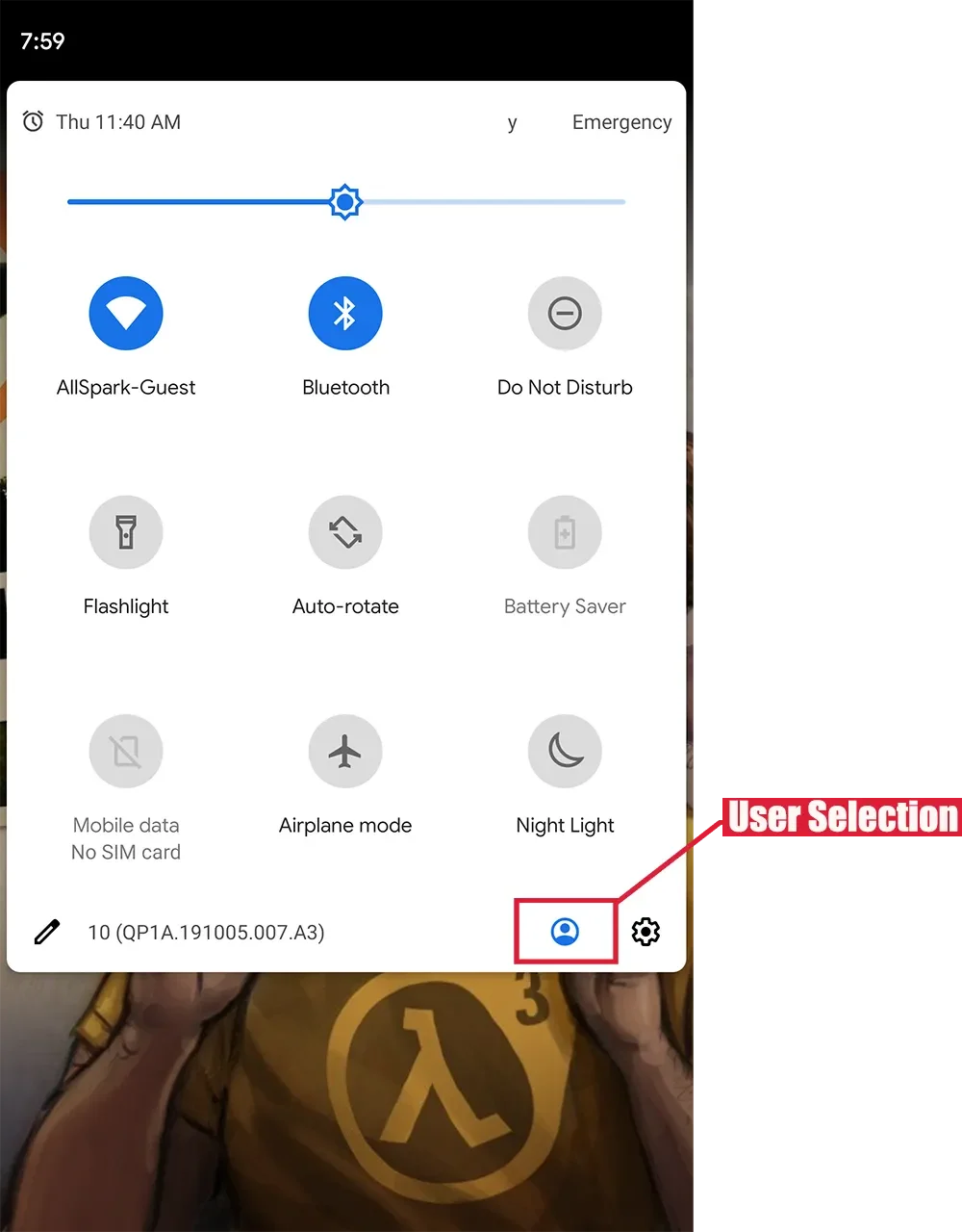
Expanded Notification Tray with User Selection Icon
Step 2: switch to an unlocked profile
Switch to an available unlocked or guest user profile.
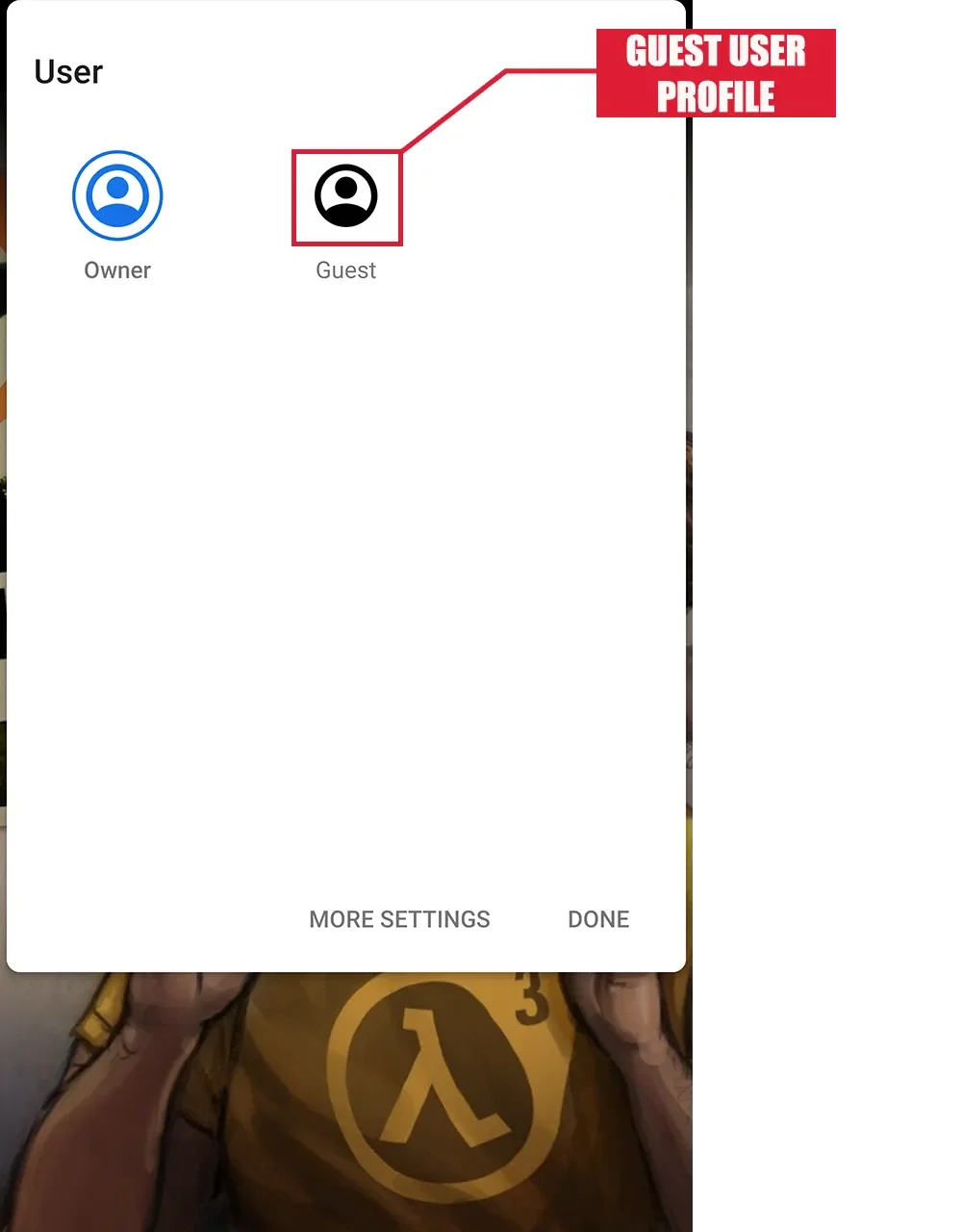
User Selection in Notification Tray
Step 3: identify the target
Once in the guest profile, open the user selection menu from the notification tray as in step one. Identify the target user profile, the one protected by the lock screen, but do not click the user icon until the next step.
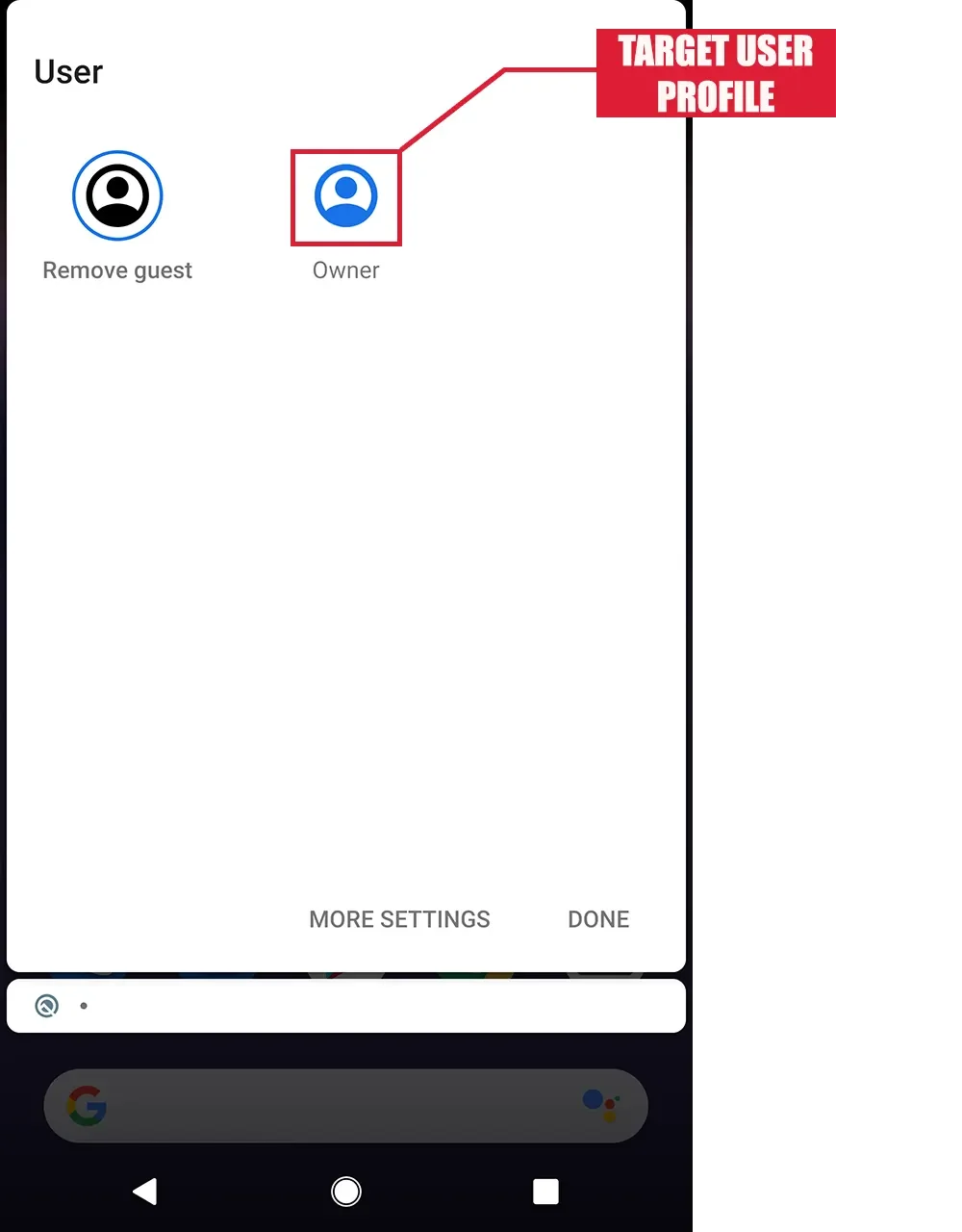
Target User Shown in User Selection Menu
Step 4: click the target and hammer the home button
Click the target user and simultaneously begin rapidly and repeatedly tapping the home button. The faster the repetition, the better.
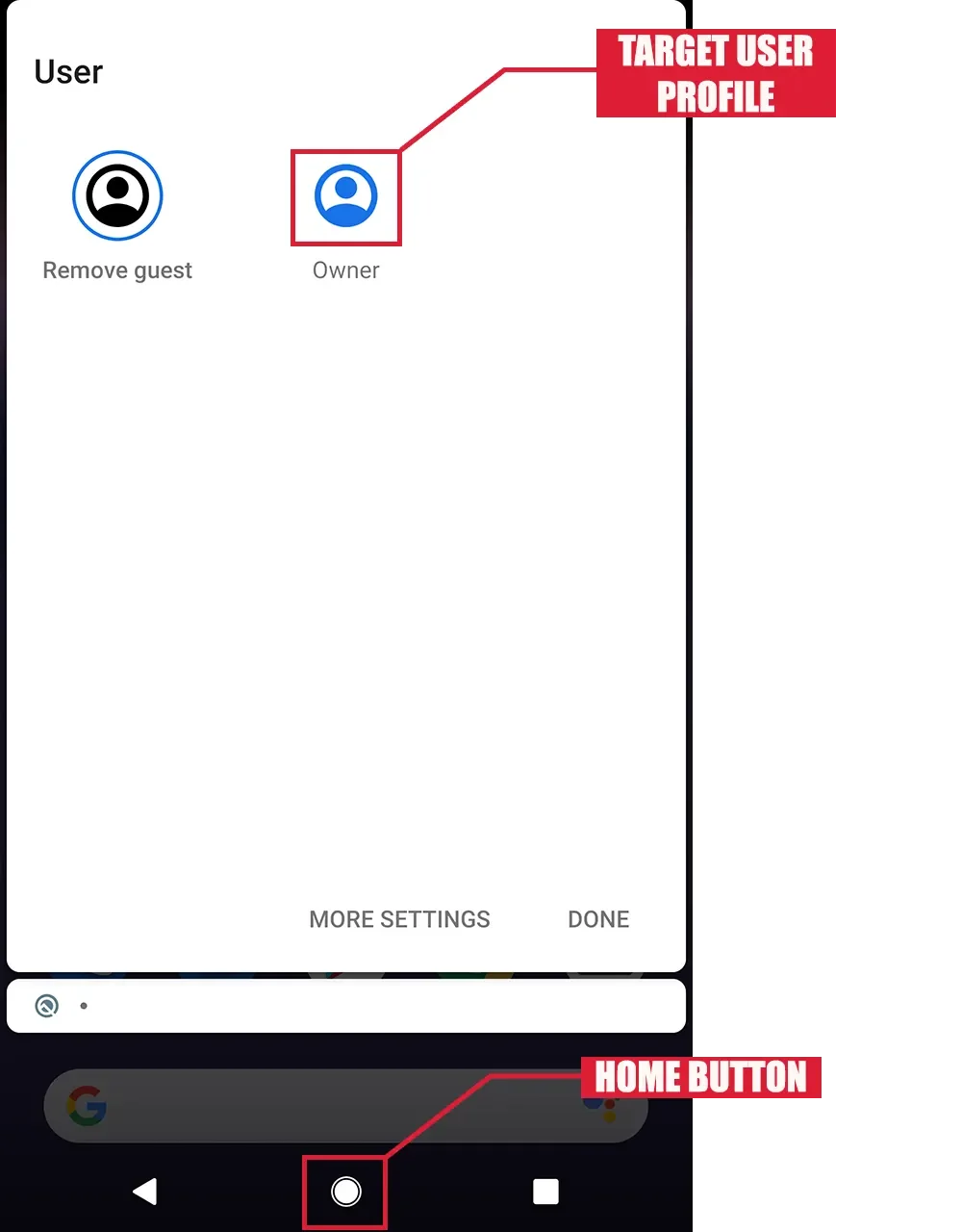
Target User Highlighter for Selection and Home Button Highlighted for Repetitive Input
Several things happen during this step:
- The screen appears frozen with the "switching to user" message, but with haptic feedback enabled the device vibrates with every press, as if it is still receiving and handling input. At some moment during the transition the vibration feedback stops; that is when you can stop pressing the home button.
- It may take two or three attempts of step 4 for the bypass to occur. After each attempt you will likely notice increased latency in input and in the transition to the target profile. You may also notice sensitive information now revealed in the lock screen notification tray.
- On success, the target user's home screen is presented and you can navigate and access anything in that profile for a limited time, typically 5 to 30 seconds, before the lock screen finally appears and locks you out of the profile.
Step 5: extend the window
Within the 5 to 30 second window it is difficult but possible to take further actions that yield unlimited access to the previously restricted profile. Examples given are changing the target user's screen lock setting, staging and installing a malicious APK under the target user profile, enabling Developer mode and USB debugging, and creating your own admin-privileged account.
Video demonstration
The author's screen recording shows a successful attempt at the 00:45 time mark, hosted at CVE-2022-20006.
Root cause
In the author's analysis, CVE-2022-20006 results from events stacking in a queue for processing on the main thread of Android's system UI. That event queue creates a type of race condition between events and impedes important security processes such as those associated with the lock screen Keyguard. Without prioritisation, events are handled as quickly as the processor can perform them, and do not appear to be processed first in, first out. Devices with lower CPU and RAM specifications exacerbate the processing issue, producing more significant windows of possible unauthorised access.
Impact
An attacker with physical access to a device meeting the pre-requisites can reach the target user's home screen and navigate and access anything in that profile for roughly 5 to 30 seconds before the lock screen returns. Within that window, the author states it is difficult but possible to obtain unlimited access, for example by changing the target user's screen lock, installing a malicious APK under the target profile, enabling Developer mode and USB debugging, or creating an admin-privileged account. The author notes that results may vary across devices.
Fix
Google published mitigations in the June 2022 Security Patch, giving priority to specific lock events to prevent the scenario. The patch is deployed through builds SQ3A.220605.009.A1 and SQ3A.220605.009.B1, depending on device model. Patch notes and update instructions are in the Android June 2022 Security Bulletin, and details of the mitigations implemented by Google's Android development team are in the Google Android GIT CVE-2022-20006 Mitigation.

What happened, in plain words
A security researcher named Joshua Nearchos found a way to get past the lock screen on some Android phones. The trick does not break the password or PIN itself. Instead it abuses a normal Android feature called multi-user, which lets one phone hold several separate profiles, each with its own apps and settings, like several people sharing one house but each with their own locked room.
The bug is tracked as CVE-2022-20006. A CVE is a public catalogue number given to a known security flaw so that everyone can refer to the same thing. The researcher showed that if you switch to a guest profile, then click the protected profile while rapidly and repeatedly tapping the home button, the phone can briefly show the protected profile's home screen without asking for its lock code, sometimes after two or three attempts. The window is short, roughly 5 to 30 seconds, but the researcher notes it can sometimes be stretched into lasting access.
Google published mitigations for it in the June 2022 Security Patch. The researcher tested it on Google Pixel XL, Pixel 2 and Pixel 3 phones and on a few emulated devices running Android 10 and Android 11.
Background: what a lock screen bypass is
A lock screen is the screen a phone shows when it is locked, asking for a PIN, pattern, password or fingerprint before it lets anyone in. A lock screen bypass is a flaw that lets someone get past that screen without knowing the code. It does not mean the code was guessed; it means the phone was tricked into skipping the check.
Android phones have had several of these over the years. The report mentions an earlier one, CVE-2015-3860, as an example. That flaw used the emergency dialer and the camera, two things you can normally reach from a locked phone, to set up something like a buffer overflow on the PIN entry screen. A buffer overflow is when a program is given more data than it set aside room for, so the extra data spills into places it should not go. In that case the spill crashed one or more processes tied to the lock screen, and the owner's home screen appeared. A process is simply a running program on the phone.
CVE-2022-20006 works on the same broad idea: it makes parts of the phone that are not the lock screen itself behave in an unexpected way, and those parts can be reached while the phone is locked. Here the parts belong to the multi-user feature.
What multi-user does
Multi-user is meant for a phone shared by several people. Each person gets a profile with their own apps, files and settings, kept apart from the others. On a family tablet, for example, a parent and a child can each have a profile. The interesting behaviour, according to the researcher, happens during the handover from one profile to another. That handover is where the bug lives.
Pre-requisites: what the phone needs before this works
The exploit only works when a set of conditions is met. Think of it like a lock that only opens if several other doors are already unlocked.
- Physical access to the device. Someone has to be holding the phone; this cannot be done remotely over the internet.
- Android version 10, 11 or 12, with security patch levels older than 5 June 2022. A security patch level is the date of the last security update the phone has received. Newer patches close the hole.
- 3-button navigation, enabled via System > Accessibility > System Controls. This is the navigation style with three on-screen buttons (back, home and recent apps) rather than swipe gestures.
- The lock screen must be enabled via Settings > Screen Lock for the target user profile, with the screen lock set to anything other than None. In other words, the profile you want to break into must actually be protected.
- The multi-user feature must be enabled via Settings > System > Multiple Users, with at least two users defined and enabled. One user must have a screen lock configured and serves as the target. For easier exploitation, the researcher recommends the second user be a simple guest account with no lock screen.
The researcher tested this personally on Google Pixel XL, Pixel 2 and Pixel 3 devices, plus a few emulated devices running Android 10 and Android 11. An emulated device is a phone simulated in software on a computer. The exploit appeared easier on devices with lower-specification processors and RAM. RAM is the phone's short-term working memory. Google confirmed the flaw applies to the Android operating system itself, not just to the devices tested, and the researcher notes results may vary.
Finding it: how the researcher spotted the weakness
The researcher noticed that the multi-user feature behaves oddly when switching between profiles. That switch can be reached from the lock screen: you can pull down the notification tray while the phone is locked, open the user selection menu from it, and pick a different profile. The notification tray is the panel that slides down from the top of the screen showing alerts and quick settings.
Because the target profile is protected by a lock screen, switching to it should not reveal anything inside it. The researcher found that hammering the home button during the switch changes that outcome. The home button is the one that normally takes you back to the home screen.
Exploitation: the steps, one at a time
With the pre-requisites met, the exploit runs as follows. There are no URLs, requests or code involved: this is a physical, hands-on sequence on the phone itself.
Step 1: open the user selection menu from the lock screen
While at the lock screen, expand the notification tray and click the user selection menu icon.
Expanded Notification Tray with User Selection Icon
Why this step: the notification tray is one of the few things Android lets you use while locked, so it is the doorway into the multi-user controls. The user selection icon is the small control that lists the profiles on the phone.
Step 2: switch to an unlocked profile
Switch to an available unlocked or guest user profile.
User Selection in Notification Tray
Why this step: the report recommends the second user be a simple guest account with no lock screen for easier exploitation. From inside that profile you can open the user selection menu again and choose the protected target profile.
Step 3: identify the target
Once in the guest profile, open the user selection menu from the notification tray as in step one. Identify the target user profile, the one protected by the lock screen, but do not click the user icon until the next step.
Target User Shown in User Selection Menu
Why this step: you need to know exactly which profile you are aiming at, and you need to be ready to start tapping the home button at the same moment you select it. Picking the target too early would start the switch before you are ready.
Step 4: click the target and hammer the home button
Click the target user and simultaneously begin rapidly and repeatedly tapping the home button. The faster the repetition, the better.
Target User Highlighter for Selection and Home Button Highlighted for Repetitive Input
Why this step: this is where the bypass occurs. The report's analysis is that events stack in a queue on the main thread of Android's system UI, creating a race condition that impedes lock screen processes.
Several things happen during this step:
- The screen appears frozen with the "switching to user" message, but with haptic feedback enabled the device vibrates with every press, as if it is still receiving and handling input. Haptic feedback is the small vibration the phone makes to confirm a touch. At some moment during the transition the vibration stops; that is when you can stop pressing the home button.
- It may take two or three attempts of step 4 for the bypass to occur. After each attempt you will likely notice increased latency in input and in the transition to the target profile. Latency means delay: the phone feels slower to respond. You may also notice sensitive information now revealed in the lock screen notification tray.
- On success, the target user's home screen is presented and you can navigate and access anything in that profile for a limited time, typically 5 to 30 seconds, before the lock screen finally appears and locks you out of the profile.
Step 5: extend the window
Within the 5 to 30 second window it is difficult but possible to take further actions that yield unlimited access to the previously restricted profile. The examples given are:
- changing the target user's screen lock setting;
- staging and installing a malicious APK under the target user profile. An APK is the installable file format for Android apps, so this means planting an app of your own;
- enabling Developer mode and USB debugging. Developer mode is a hidden settings menu for app development, and USB debugging lets a computer talk to the phone over a USB cable;
- creating your own admin-privileged account. An admin-privileged account is one with the highest level of control over the device.
Why this step matters: the bypass on its own gives only seconds of access. These actions are ways to turn those seconds into something lasting.
Video demonstration
The researcher's screen recording shows a successful attempt at the 00:45 time mark, hosted at CVE-2022-20006.
Root cause: why the trick works
In the researcher's analysis, CVE-2022-20006 comes from events stacking up in a queue for processing on the main thread of Android's system UI. The system UI is the part of Android that draws the status bar, notification tray, lock screen and similar on-screen elements. A thread is a single line of work inside a program; the main thread is the one that handles the interface, so if it is busy, everything on screen waits.
An everyday comparison: imagine one cashier serving a queue of customers. If a hundred people arrive at once, the cashier works through them as fast as possible, but not necessarily in the order they arrived. That event queue creates a type of race condition between events. A race condition is when the result depends on which of several things happens first, and the order is not properly controlled. Here the pile-up impedes important security processes such as those associated with the lock screen Keyguard. Keyguard is Android's internal name for the component that guards the lock screen.
Without prioritisation, events are handled as quickly as the processor can perform them, and do not appear to be processed first in, first out. First in, first out means handled in arrival order, like a fair queue. Devices with lower CPU and RAM specifications make the processing issue worse, producing more significant windows of possible unauthorised access, because a slower phone takes longer to clear the backlog.
Impact: what an attacker actually gets
An attacker with physical access to a device meeting the pre-requisites can reach the target user's home screen and navigate and access anything in that profile for roughly 5 to 30 seconds before the lock screen returns. Within that window, the researcher states it is difficult but possible to obtain unlimited access, for example by changing the target user's screen lock, installing a malicious APK under the target profile, enabling Developer mode and USB debugging, or creating an admin-privileged account. Results may vary across devices.
Fix: what Google changed
Google published mitigations in the June 2022 Security Patch, giving priority to specific lock events to prevent the scenario. A mitigation is a change that removes or reduces the risk. In plain terms, the fix makes the cashier serve the security-critical customers first instead of letting them wait behind the flood of home button presses.
The patch is deployed through builds SQ3A.220605.009.A1 and SQ3A.220605.009.B1, depending on device model. A build number identifies a specific version of the Android software shipped to a phone. Patch notes and update instructions are in the Android June 2022 Security Bulletin, and details of the mitigations implemented by Google's Android development team are in the Google Android GIT CVE-2022-20006 Mitigation.
These are follow-up ideas for anyone repeating the research, for example on other phones or Android versions:
Glossary
- Android: the operating system made by Google that runs on many phones and tablets.
- APK: the installable file format for Android apps.
- Buffer overflow: a flaw where a program is given more data than it reserved space for, so the extra data spills into memory it should not touch.
- Build number: an identifier for a specific version of the Android software shipped to a device.
- CVE: a public catalogue number assigned to a known security flaw so everyone can refer to the same issue.
- Developer mode: a hidden Android settings menu intended for app development.
- Emulated device: a phone simulated in software on a computer.
- Event queue: a line of pending actions waiting to be handled by a program.
- First in, first out: processing items in the order they arrived, like a fair queue.
- Guest profile: a user profile on Android with no lock screen, meant for temporary use.
- Haptic feedback: the small vibration a phone makes to confirm a touch.
- Home button: the navigation button that takes you back to the home screen.
- Keyguard: Android's internal name for the component that guards the lock screen.
- Latency: delay between an action and the response.
- Lock screen: the screen shown when a device is locked, asking for a PIN, pattern, password or fingerprint.
- Lock screen bypass: a flaw that lets someone get past the lock screen without knowing the code.
- Main thread: the single line of work inside a program that handles the user interface.
- Mitigation: a change that removes or reduces a security risk.
- Multi-user: an Android feature that lets one device hold several separate user profiles.
- Notification tray: the panel that slides down from the top of the screen showing alerts and quick settings.
- Physical access: being able to hold and touch the device itself.
- Process: a running program on a device.
- Profile: a separate user space on Android with its own apps, files and settings.
- Race condition: a flaw where the result depends on which of several things happens first, and that order is not properly controlled.
- RAM: a device's short-term working memory.
- Security patch level: the date of the last security update a device has received.
- System UI: the part of Android that draws the status bar, notification tray, lock screen and similar on-screen elements.
- Thread: a single line of work inside a program.
- USB debugging: an Android setting that lets a computer communicate with the phone over a USB cable.
- 3-button navigation: an Android navigation style using three on-screen buttons for back, home and recent apps.



