How often do we overlook vulnerabilities?
A GraphQL query used to assign reports to team members accepted a report ID from any program, not just the user's own, and returned the team members of that program. By adding parameters, the attacker could also obtain API identifiers and infer whether a hacker belonged to a program whose visibility was turned off.
 Published on medium.com
Hello Readers, “7/10 vulnerabilities are often overlooked by hackers.” -Aristotle. I don’t know if that’s true, I just made that up.
The full write-up lives on its author's site
It belongs to its author, so we link to it rather than copy it. The other two tabs are our own rewrites, checked against it.
Context
HackerOne has a feature that lets program managers assign a report to a team member of their choice. When a manager chooses to assign a report, the interface fetches the list of team members and groups in the program so the manager can pick one. That list is retrieved with a GraphQL query sent to the server.
The write-up is about what happens when the report identifier used in that query is not restricted to reports the caller owns.
Setup
The researcher had a report of their own in a program they owned, which gave them a report ID to work with. They also had a report in their inbox for a program they did not own, which supplied a report ID belonging to another program. No special tooling is described: the work was done by observing the GraphQL traffic the assignment feature generates and then editing the variables in that request.
Finding it
While looking at the assignment flow, the researcher saw the GraphQL query that fetches team members and groups for the team.
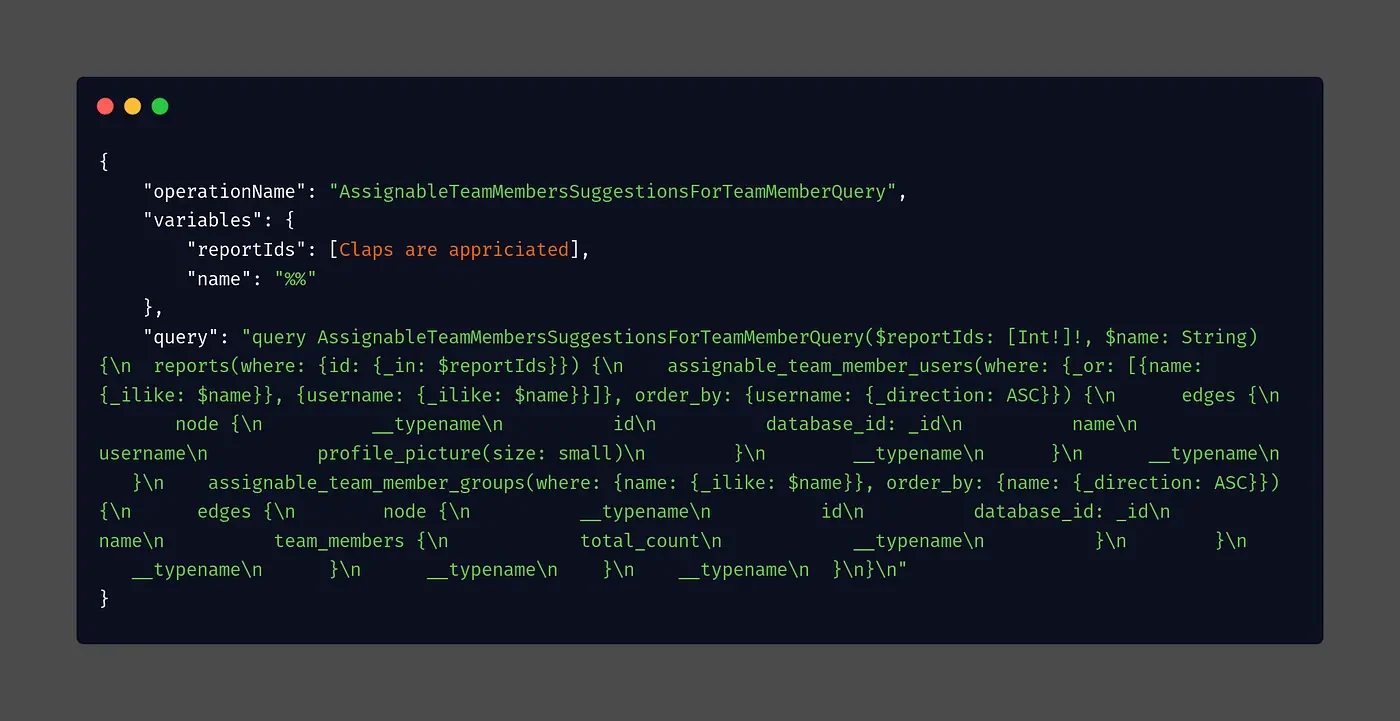
The reportIds variable in this mutation immediately caught their attention: it contained the report ID of the report in their own program that they were trying to assign a team member to. The identifier of the report being assigned was being sent by the client as a variable.
Exploitation
Step 1: Swap in a report ID from another program
The researcher went to their inbox, selected a report belonging to a program they did not own, copied its report ID, and pasted it into the reportIds value of the GraphQL mutation.
The response revealed all the team members of that program. This is the exact data returned for all team members:
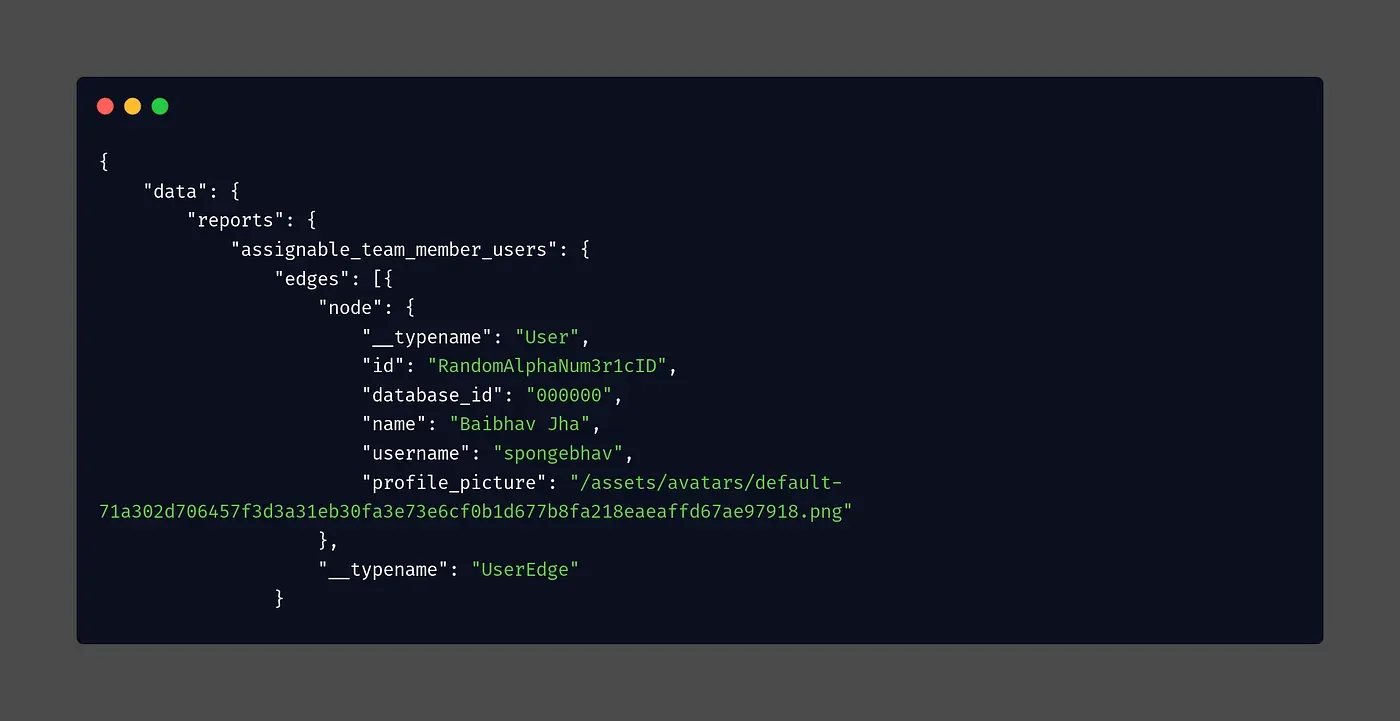
The researcher did not consider this data sensitive on its own, but the fact that the team members of any program could be disclosed still seemed worth reporting. The report was submitted and closed as a duplicate of an informative report; the researcher was added to the original report, and the original had been closed as informative for this reason:

Step 2: Brute-force the query parameters
Not satisfied, the researcher reasoned that with so much data being returned there must be at least something that was not already public. They began brute-forcing the query parameters to see whether more data could be extracted than what was already shown. The email parameter turned out to be valid. The researcher thought they had managed to reveal the email addresses of all team members for all programs, but that was not the case:
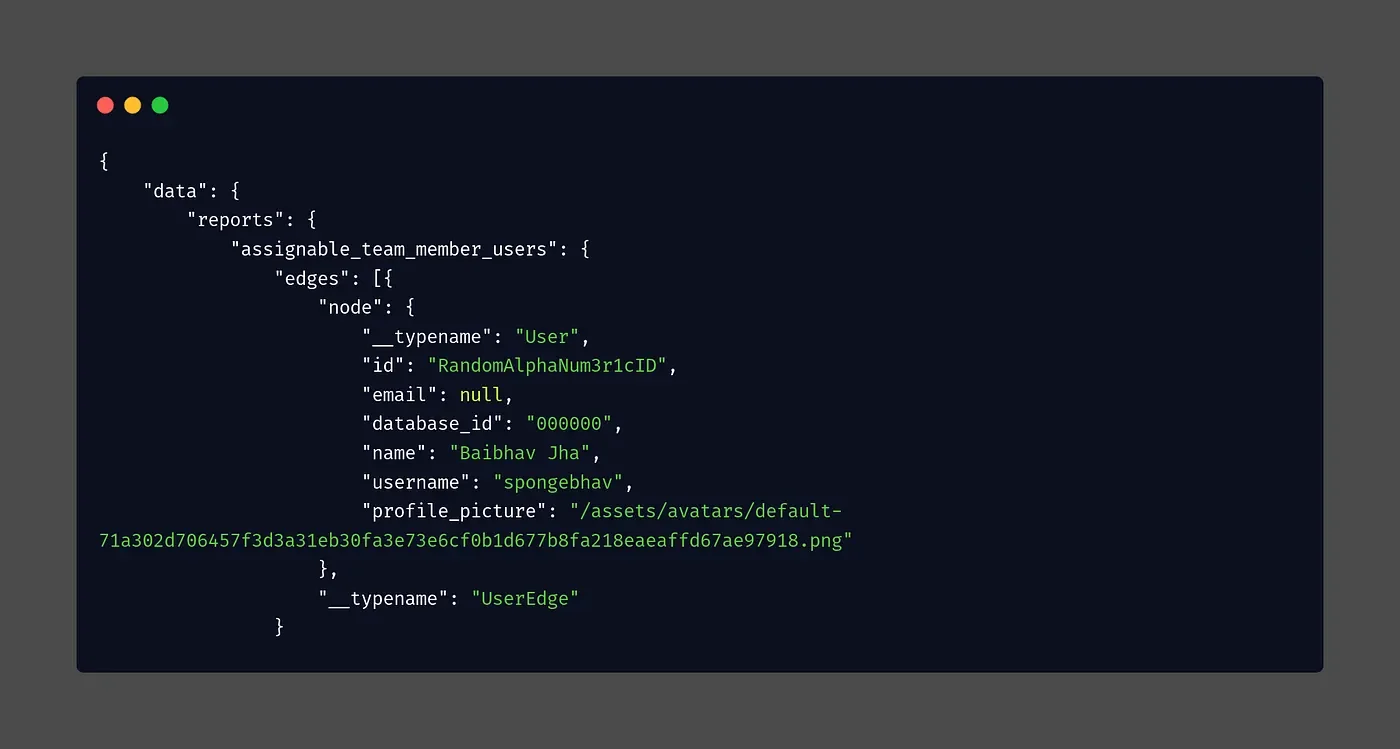
email was indeed a valid parameter, but its value came back as null for every program except the researcher's own program.
Step 3: Notice the null names
At this point the researcher did not want to dig further, but took a quick look at the information being received and started checking some profiles. For some profiles they got a page does not exist error. It did not take long to realise that the value for name was also null in exactly those profiles that could not be opened.
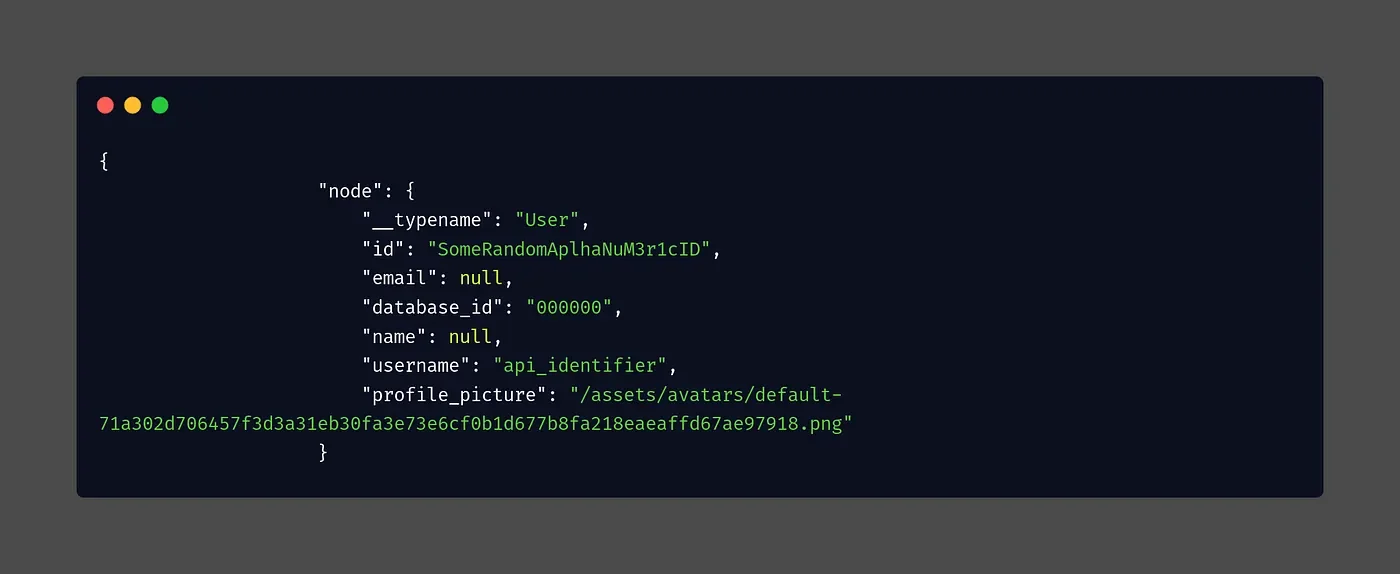
Switching back to the data for their own program, the researcher realised that these were actually API identifiers, and that most of them were not public. This became a new report: API identifiers are visible by default and can be queried for programs. The researcher did not report it immediately and decided to do so after finishing hunting.
Step 4: Check the program visibility setting
Going to profile -> edit profile -> Program preferences, the researcher noticed an option to turn off visibility for a program, so that it does not show on the profile that the user is part of that program.
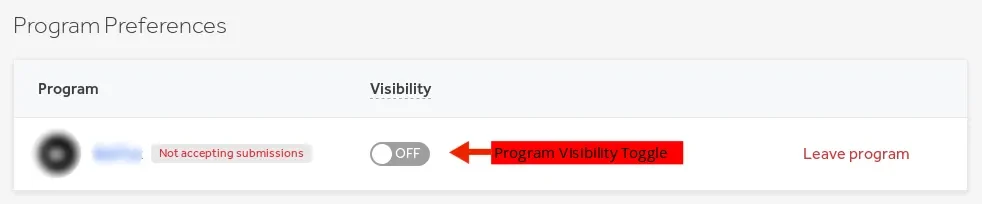
When this is turned on, the program is visible on the hacker's profile.
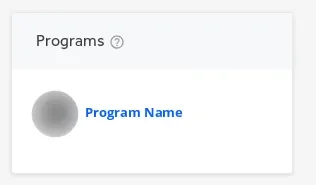
When turned off, it is not visible.
It did not take long to realise that this meant the researcher could also disclose whether a hacker belongs to a certain program, despite that hacker having turned program visibility off.
Step 5: Report again with both impacts
The researcher now had two impacts for the same information disclosure vulnerability and reported it again with the additional impacts they had discovered. The researcher reported it again with the additional impacts they had discovered:

Root cause
The assignment mutation takes the report identifier from the client as the reportIds variable and uses it to look up the team members and groups of the program that owns that report. The lookup is therefore an object-level authorisation failure: the server trusts a client-supplied identifier to select which program's data to return.
Because the same resolver accepts additional fields, the researcher could ask for fields such as email and name. Those fields were populated only for the caller's own program and returned null elsewhere, so some per-field restriction existed, but the API identifiers and the membership data itself were still returned for arbitrary programs. The program visibility preference hides a user's membership of a program on their profile, yet the same request could still reveal that membership.
Impact
An authenticated user could query the team members and groups of any program by supplying a report ID belonging to that program, including programs they are not part of. The response also exposed API identifiers that were mostly not public, and it revealed whether a given hacker belongs to a particular program even when that hacker has turned program visibility off. Email addresses were not disclosed for other programs: the email field returned null outside the caller's own program.
Fix
The write-up does not describe the fix that was applied.
Variants to test
- Take any GraphQL mutation or query that accepts an object identifier as a variable and substitute an identifier belonging to another tenant or user. A positive result is data from the other object coming back in the response.
- Add fields to the selection set one at a time (
email,name, and similar) and compare values between your own object and a foreign one. A positive result is a non-null value for a foreign object where you expectednull. - Look for privacy preferences in the UI, such as hiding membership or profile details, then query the same data through the API. A positive result is the hidden data still being returned by the API.
- Enumerate identifiers that appear in responses (API identifiers, slugs, numeric IDs) and check whether they resolve for objects you do not own. A positive result is a successful lookup of an object outside your scope.
What happened, in plain words
HackerOne is a website where security researchers report bugs to companies. Companies run "programs" on it, and each program has a team of people who handle the reports. A program manager can hand a report to a colleague, and to do that the website asks the server for the list of team members and groups in that program.
The researcher noticed that the request asking for that list contained the ID of the report being assigned. An ID is just a short label that identifies one specific thing, like a ticket number. The researcher replaced their own report's ID with the ID of a report from a program they did not own, and the server returned that other program's team members. The server returned that program's team members to someone outside that program.
The server used a label sent by the browser to decide whose team data to return. In security terms this is an information disclosure, meaning data that should not be visible to you becomes visible. It is an information disclosure: team data from another program was returned.
After the first report was closed as a duplicate of an existing informative report, the researcher kept digging. They found that extra fields could be requested, such as email and name, but those came back empty (null) for other programs. They then noticed that some profiles could not be opened, and worked out that the identifiers being returned were API identifiers, mostly not public. Finally they found a privacy setting that lets a user hide which programs they belong to, and realised the same request could reveal that hidden membership. The second report, with both impacts, was submitted.
Background you need first
A few ideas come up again and again below, so here they are from zero.
What an API is. Think of a restaurant. The menu and the waiter are the API: you do not walk into the kitchen yourself, you ask the waiter for a dish and the kitchen prepares it. On the web, an API is the set of requests a website's own pages send to its server to fetch or change data. Your browser is the customer, the server is the kitchen, and the requests are the orders.
What GraphQL is. GraphQL is a way of asking an API for data where you describe exactly which fields you want back, a bit like filling in a form that says "I would like the name, the email and the role, please". The request is called a query (when reading) or a mutation (when changing something). The values you supply, such as an ID, are called variables. Because the client chooses the fields and the values, a careless server can be talked into returning more than it should.
What a report ID is. Every report on HackerOne has a unique number or label. It is not a secret in itself, but it is the key that selects which report, and therefore which program, the server looks at.
What null means. null is programming for "nothing here". A field that comes back as null is present in the answer but empty.
What brute-forcing means here. Brute-forcing normally means trying many guesses automatically. In this write-up it means trying one field name after another in the request to see which ones the server accepts, for example adding email and seeing whether it comes back with a value instead of an error.
What an API identifier is. A short code the platform uses internally to refer to a program or a person. It is not the same as the public name you see on a profile page, and it is often not meant to be visible to outsiders.
The feature being abused
HackerOne lets a program manager assign a report to a team member of their choice. When the manager opens the assignment screen, the site needs to show a list of team members and groups to pick from, so it asks the server for that list.
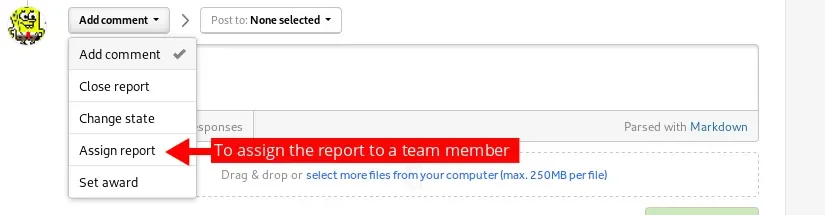
The screenshot shows the assignment interface where a manager picks who to assign the report to.
That list is fetched with a GraphQL query. The researcher watched the traffic the page generated and saw the request.
The screenshot shows the GraphQL request that fetches team members and groups for the team.
What matters in that request is the reportIds variable. It held the ID of the report the researcher was assigning in their own program. The browser was sending the report ID as a value it controlled, which is the first hint that the server might simply believe whatever value it receives.
Step 1: swap in a report ID from another program
The researcher went to their inbox, picked a report that belonged to a program they did not own, copied its report ID, and pasted it into the reportIds value of the GraphQL mutation in place of their own report's ID.
Why do this? Because if the server uses the ID to decide which program's team to look up, and never checks that the caller belongs to that program, then any valid report ID becomes a key to that program's team list. The inbox gave the researcher a supply of report IDs from programs they had no rights over.
The response came back with all the team members of that other program. This is the exact data returned for all team members:
The screenshot shows the response containing the team member data of the foreign program.
On its own the researcher did not think this data was sensitive, but the fact that the team members of any program could be disclosed still seemed worth reporting. The report was submitted and closed as a duplicate of an informative report. The researcher was added to the original report, and the original had been closed as informative for this reason:
The screenshot shows the reason the original report was closed as informative.
A duplicate means someone had already reported the same issue. Informative means the platform acknowledged the report but did not treat it as a security vulnerability worth a reward. Being added to the original report let the researcher see why, and it left them unsatisfied: so much data was coming back that surely some of it was not already public.
Step 2: brute-force the query parameters
With that thought, the researcher started trying extra field names in the request to see whether more data could be pulled out than what was already shown. In GraphQL you can ask for additional fields by name, so the experiment is simply to add a name and see whether the server accepts it or returns an error.
The email field turned out to be valid. The researcher thought they had managed to reveal the email addresses of all team members for all programs, but that was not the case:
The screenshot shows the response when the email field was requested.
email was indeed a valid field, but its value came back as null for every program except the researcher's own program. So the server did have some per-field restriction: it would answer the question, but only fill in the email when the caller was entitled to it. That is a useful lesson in itself. A field being accepted does not mean it returns data, and you have to compare what you get for your own objects with what you get for someone else's.
Step 3: notice the null names
At this point the researcher did not want to dig further, but took a quick look at the information being received and started checking some profiles. For some profiles they got a page does not exist error. It did not take long to realise that the value for name was also null in exactly those profiles that could not be opened.
The screenshot shows the page does not exist error and the corresponding null name.
Why does that matter? Because it links the data in the API response to real profile pages. If a name is empty, the profile page cannot be built, which tells you the value you are looking at is the identifier the site uses to find that profile.
Switching back to the data for their own program, the researcher realised that these were actually API identifiers, and that most of them were not public. That became a new report on its own: API identifiers are visible by default and can be queried for programs. The researcher did not report it immediately and decided to do so after finishing hunting.
Step 4: check the program visibility setting
Going to profile -> edit profile -> Program preferences, the researcher noticed an option to turn off visibility for a program, so that it does not show on the profile that the user is part of that program.
The screenshot shows the Program preferences page with the visibility option.
When this is turned on, the program is visible on the hacker's profile.
The screenshot shows a profile where the program is visible.
When turned off, it is not visible.
This is a privacy control: a user can decide that the world should not know they take part in a certain program. The researcher realised that the same request could still reveal that membership. In other words, the setting hides the information on the profile page, but the same request could still reveal that membership.
Step 5: report again with both impacts
The researcher now had two impacts for the same information disclosure vulnerability: team members and API identifiers of arbitrary programs could be read, and a user's hidden program membership could be revealed. They reported it again with the additional impacts they had discovered.
The screenshot accompanies the second report.
Why the bug existed
The assignment mutation takes the report identifier from the client as the reportIds variable and uses it to look up the team members and groups of the program that owns that report. The lookup is therefore an object-level authorisation failure: the server trusts a client-supplied identifier to select which program's data to return.
In everyday terms, the waiter takes your order slip, reads the table number you wrote on it yourself, and brings you the food meant for that table, without checking that you are sitting there.
Because the same resolver accepts additional fields, the researcher could ask for fields such as email and name. Those fields were populated only for the caller's own program and returned null elsewhere, so some per-field restriction existed, but the API identifiers and the membership data itself were still returned for arbitrary programs. The program visibility preference hides a user's membership of a program on their profile, yet the same request could still reveal that membership.
Impact
An authenticated user, meaning anyone with a normal logged-in account, could query the team members and groups of any program by supplying a report ID belonging to that program, including programs they are not part of. The response also exposed API identifiers that were mostly not public, and it revealed whether a given hacker belongs to a particular program even when that hacker has turned program visibility off. Email addresses were not disclosed for other programs: the email field returned null outside the caller's own program.
Fix
The write-up does not describe the fix that was applied.
Variants to test
If you want to look for similar problems yourself, these are the patterns to try. Each one is a small experiment you can run with a browser and its developer tools, which show you the requests a page makes.
- Take any GraphQL mutation or query that accepts an object identifier as a variable and substitute an identifier belonging to another tenant or user. A positive result is data from the other object coming back in the response.
- Add fields to the selection set one at a time (
email,name, and similar) and compare values between your own object and a foreign one. A positive result is a non-null value for a foreign object where you expectednull. - Look for privacy preferences in the UI, such as hiding membership or profile details, then query the same data through the API. A positive result is the hidden data still being returned by the API.
- Enumerate identifiers that appear in responses (API identifiers, slugs, numeric IDs) and check whether they resolve for objects you do not own. A positive result is a successful lookup of an object outside your scope.
Glossary
- API: the set of requests a website's pages use to talk to its server, like a waiter carrying orders between you and the kitchen.
- API identifier: a short internal code the platform uses to refer to a program or person, often not meant to be public.
- Authenticated user: someone logged in with a normal account.
- Broken access control: a bug where the server fails to check whether you are allowed to do or see something.
- Brute-forcing: trying many guesses, here trying field names one by one to see which the server accepts.
- Duplicate: a report of an issue that has already been reported.
- GraphQL: a way of asking an API for exactly the fields you want, using queries to read and mutations to change data.
- Informative: a report the platform acknowledges but does not treat as a security vulnerability worth a reward.
- Information disclosure: a bug where data that should not be visible to you becomes visible.
- Mutation: a GraphQL request that changes something on the server.
null: programming for "nothing here", an empty value.- Object-level authorisation failure: the server checks that you are logged in but not that you are allowed to touch this particular object, such as one program's team list.
- Program: a company's bug bounty or security page on HackerOne, with its own team and reports.
- Query: a GraphQL request that reads data.
- Report ID: the unique label of a report, used by the server to find it.
- Resolver: the part of a GraphQL server that produces the data for a field.
- Variable: a value supplied by the client in a GraphQL request, such as an ID.



