Host Header Injection - internal.qa.delivery.indrive.com
The server trusts the Host header and redirects to whatever host is supplied, so an attacker can craft a request that makes the site redirect to an arbitrary domain. This could be used to send users to a phishing site.

- Triaged in under an hour
- Fixed in 7 months
- Disclosed after 7 months
Summary by the program
The report
HTTP Host header attacks exploit vulnerable websites that handle the value of the Host header in an unsafe way. If the server implicitly trusts the Host header, and fails to validate or escape it properly, an attacker may be able to use this input to inject harmful payloads that manipulate server-side behavior.
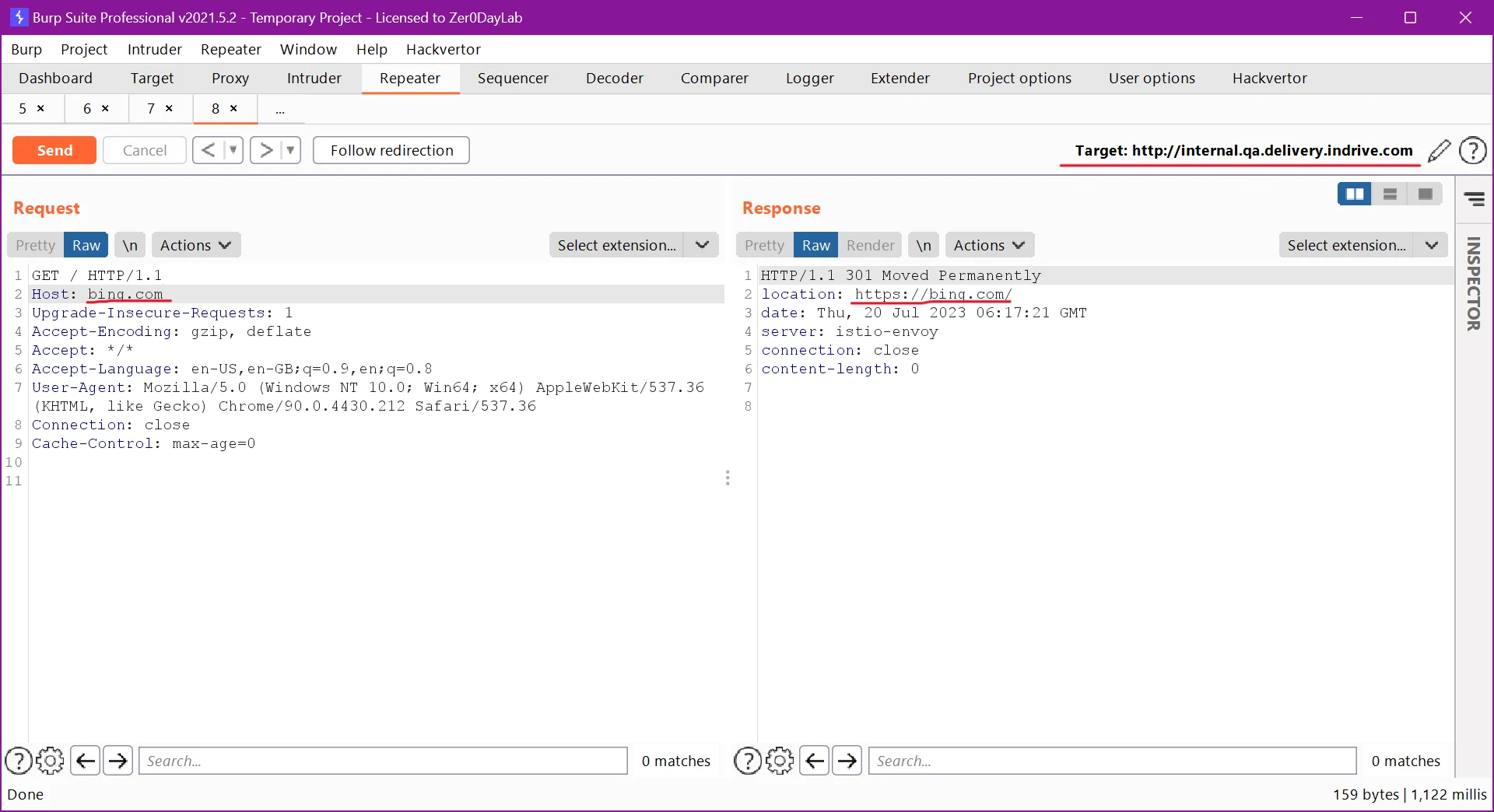
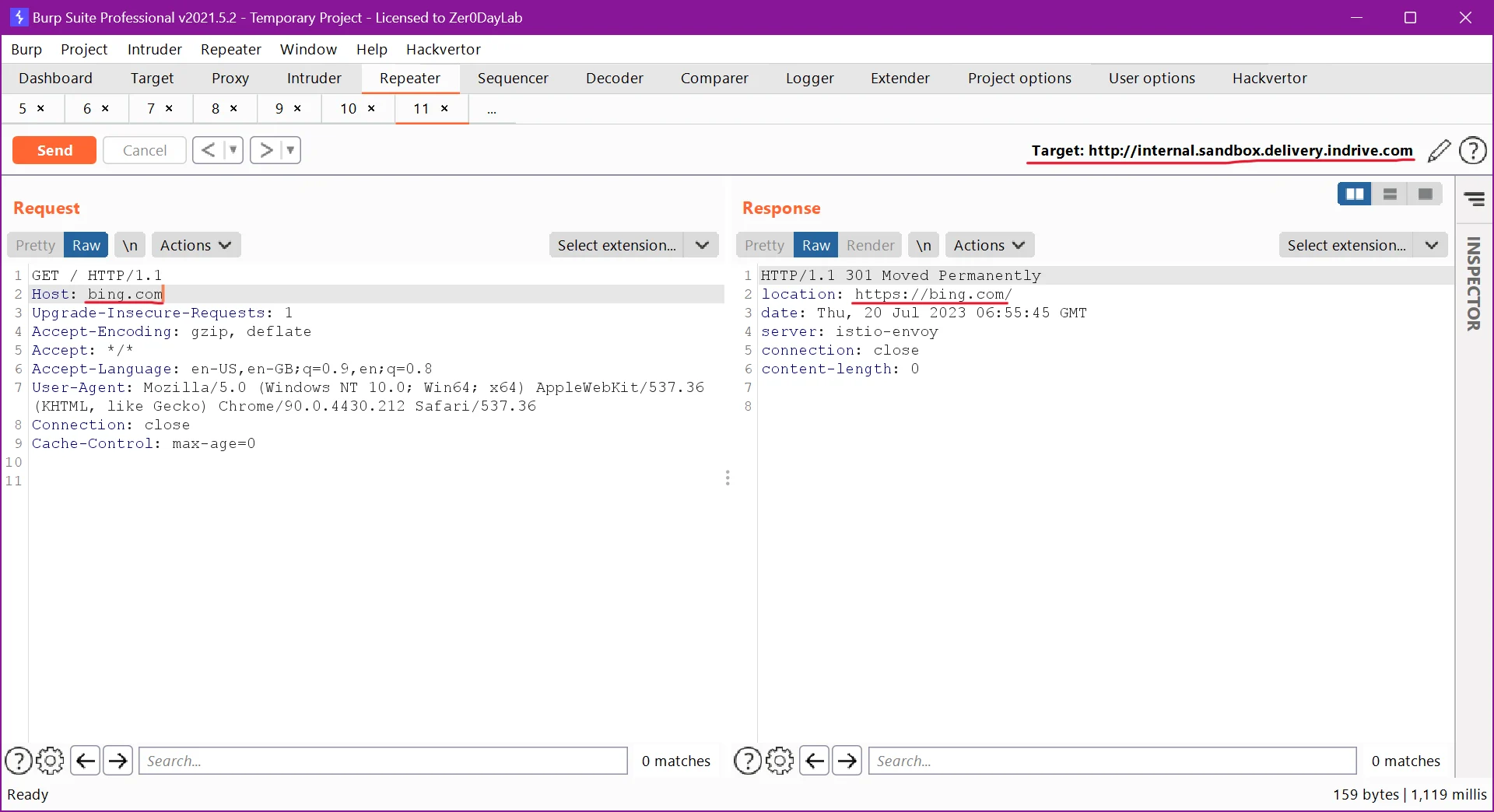
Found the host header injection of given URLs: https://internal.qa.delivery.indrive.com/ https://internal.sandbox.delivery.indrive.com/
Steps To Reproduce:
- Intercept the request in burp
- Change the host name to bing.com
Request: GET / HTTP/1.1 Host: bing.com Upgrade-Insecure-Requests: 1 Accept-Encoding: gzip, deflate Accept: / Accept-Language: en-US,en-GB;q=0.9,en;q=0.8 User-Agent: Mozilla/5.0 (Windows NT 10.0; Win64; x64) AppleWebKit/537.36 (KHTML, like Gecko) Chrome/90.0.4430.212 Safari/537.36 Connection: close Cache-Control: max-age=0
Response: HTTP/1.1 301 Moved Permanently location: https://bing.com/ date: Thu, 20 Jul 2023 06:24:26 GMT server: istio-envoy connection: close content-length: 0
Impact
An attacker can redirect users to malicious websites, which can lead to phishing attacks.
An attacker can create a valid webpage with malicious recommendations and the user believes the recommendation as it was from the valid website.
Attachments
Context
The target is inDrive's delivery platform, reachable on the *.indrive.com wildcard asset. Two hosts were involved: internal.qa.delivery.indrive.com and internal.sandbox.delivery.indrive.com. The report does not describe what these hosts serve in normal use; the only behaviour shown is that a request to the root path is answered with a redirect whose destination is taken from the request's Host header.
A Host header attack, as the report frames it, exploits a site that handles the value of the Host header unsafely. If the server implicitly trusts that header and does not validate or escape it, an attacker can inject values that change server-side behaviour. Here the observable effect is an open redirect driven entirely by the header.
Setup
The only tool named is Burp, used to intercept the request. No accounts, roles or special preconditions are described. The researcher's browser string in the captured request is Chrome 90 on Windows, but nothing in the report suggests that version matters.
Finding it
The researcher identified the two delivery hosts as reflecting the Host header into a redirect. The signal is simple: send a request with a Host value that is not the real hostname and watch the Location header follow it. The report does not say how the hosts were discovered during recon.
Exploitation
Step 1: Intercept the request
Capture a request to the target in Burp. The captured request is a plain GET / with the usual browser headers.
Step 2: Change the host name
The report's numbered list jumps from 1 to 3; the second step is the substitution itself. Replace the Host header value with bing.com:
GET / HTTP/1.1
Host: bing.com
Upgrade-Insecure-Requests: 1
Accept-Encoding: gzip, deflate
Accept: */*
Accept-Language: en-US,en-GB;q=0.9,en;q=0.8
User-Agent: Mozilla/5.0 (Windows NT 10.0; Win64; x64) AppleWebKit/537.36 (KHTML, like Gecko) Chrome/90.0.4430.212 Safari/537.36
Connection: close
Cache-Control: max-age=0
The only meaningful change is the Host line. Everything else is ordinary browser traffic, which shows that no special payload, encoding or extra header is needed.
Step 3: Read the response
HTTP/1.1 301 Moved Permanently
location: https://bing.com/
date: Thu, 20 Jul 2023 06:24:26 GMT
server: istio-envoy
connection: close
content-length: 0
The server answers with a 301 Moved Permanently and a location header of https://bing.com/, built from the injected Host value. The server: istio-envoy header indicates the response came through an Istio/Envoy proxy in front of the application. The body is empty (content-length: 0), so the whole effect is the redirect.
The report lists both hosts as affected:
https://internal.qa.delivery.indrive.com/
https://internal.sandbox.delivery.indrive.com/
Root cause
The application, or the layer terminating the request, constructs the redirect target from the client-supplied Host header without checking it against an allowlist of expected hostnames. Because the header is attacker-controlled, the redirect destination is too.
Why the existing defences did not stop it is not discussed in the report. The presence of istio-envoy shows a proxy is in the path, but nothing in the report says whether the proxy or the application performed the redirect.
Impact
The report lists two consequences:
- An attacker can redirect users to malicious websites, which can lead to phishing attacks.
- An attacker can create a valid-looking webpage with malicious recommendations, and the user believes the recommendation came from the valid website.
Both depend on a victim following a link that reaches the vulnerable host with a crafted Host value. The report does not demonstrate a scenario where an ordinary user's browser sends an arbitrary Host header, so the practical path to a victim is not shown. The program rated the issue low severity.
Fix
The general remedy for this class is to build redirects from a fixed, configured hostname or from a strict allowlist of known hosts, and to reject or ignore requests whose Host header is not in that list, rather than echoing the header into Location.
Variants to test
- Other hosts on the same wildcard. Send the same
GET /withHost: bing.comto other*.indrive.comnames. A positive result is a301/302whoselocationpoints at the injected host. - Different paths. Try paths other than
/on the two known hosts. A positive result is the same header-driven redirect from a path that is not the root. - Absolute-URL and port forms. Use
Hostvalues that include a port or a full URL form. A positive result is alocationthat reflects the injected value, which would show the validation is absent rather than merely narrow. - Password reset and email flows. Host header injection often surfaces where the application emails links. A positive result is a reset or confirmation link in the delivered message pointing at the injected host. The report does not test this.
- Caching. Check whether the redirect is cached by the proxy. A positive result is a cached response served to later visitors with the attacker's
location.
Hunting notes
This bug tends to hide on internal and QA hostnames that sit behind a shared proxy, exactly the kind of names in this report: internal.qa.* and internal.sandbox.*. During recon, look for hosts that answer with a redirect on the root path, then replay the request with a foreign Host value and compare the location header. A server: istio-envoy style header tells you a proxy is in front, which is worth testing because redirect logic is sometimes configured at that layer.
The researcher gave a minimal, reproducible request and the exact response, with the impact framed as phishing and trusted-site abuse. The program classified it as low severity, which fits a redirect that requires the attacker to control the request's Host header.
Attachments
The report includes a screen recording and two screenshots of the reproduction.
What happened, in plain words
A security researcher found that two of inDrive's internal delivery websites could be made to send visitors somewhere else, to any website the attacker chose. The trick did not need a password, a special account or any clever code. It only needed one small change to a normal web request: the part that tells the server which website name the visitor is asking for.
When that name was changed to bing.com, the server replied with a redirect, a message that means "go to this other address instead", pointing at https://bing.com/. The report lists two affected hosts. The program rated the issue low severity.
This kind of bug is called Host header injection. To understand it, you need to know what a request, a header and a redirect are, and those are explained below as they come up.
The target
The target is inDrive's delivery platform, reachable on the *.indrive.com wildcard asset. A wildcard asset means every hostname ending in .indrive.com is in scope, not just one. Two hosts were involved:
https://internal.qa.delivery.indrive.com/
https://internal.sandbox.delivery.indrive.com/
internal.qa and internal.sandbox are names that usually mark internal testing environments: places where a company tries out software before the public sees it. The report does not describe what these hosts serve in normal use. The only behaviour shown is that a request to the root path, the address ending in /, is answered with a redirect whose destination is taken from the request's Host header.
A Host header is a line in every web request that says which website name the browser is trying to reach. When you type https://internal.qa.delivery.indrive.com/ into your browser, the browser connects to a server and sends a request that includes Host: internal.qa.delivery.indrive.com. Servers often host many websites on one machine, so this line is how the server knows which one you want. Think of it like the name on an envelope: the postal service uses it to decide which door to deliver to.
A Host header attack, as the report frames it, exploits a site that handles the value of the Host header unsafely. If the server implicitly trusts that header and does not validate or escape it, an attacker can inject values that change server-side behaviour. Here the observable effect is an open redirect driven entirely by the header. An open redirect is a redirect that will send a visitor to any address the requester supplies, rather than only to addresses the site owner approves.
Setup
The only tool named is Burp, used to intercept the request. Burp is a program that sits between your browser and a website and lets you pause, read and edit the traffic before it is sent. Think of it as a post office worker who lets you open an envelope, change the letter inside and seal it again before it goes out.
No accounts, roles or special preconditions are described. The researcher's browser string in the captured request is Chrome 90 on Windows, but nothing in the report suggests that version matters. A browser string, also called a User-Agent, is a line of text a browser sends to identify itself; it is ordinary traffic, not part of the attack.
Finding it
The researcher identified the two delivery hosts as reflecting the Host header into a redirect. Reflecting means the server copies a value the client sent back into its own response. The signal is simple: send a request with a Host value that is not the real hostname and watch the Location header follow it. The Location header is the line in a redirect response that tells the browser where to go next.
The report does not say how the hosts were discovered during recon. Recon, short for reconnaissance, is the early stage of security testing where someone maps out which websites and services exist before trying anything.
Exploitation
Step 1: Intercept the request
Capture a request to the target in Burp. The captured request is a plain GET / with the usual browser headers. GET is the basic request method a browser uses to ask for a page, and / means the front page of the site. Intercepting is the step that matters: it gives you the raw request so you can edit it before it reaches the server.
Step 2: Change the host name
The report's numbered list jumps from 1 to 3; the second step is the substitution itself. Replace the Host header value with bing.com:
GET / HTTP/1.1
Host: bing.com
Upgrade-Insecure-Requests: 1
Accept-Encoding: gzip, deflate
Accept: */*
Accept-Language: en-US,en-GB;q=0.9,en;q=0.8
User-Agent: Mozilla/5.0 (Windows NT 10.0; Win64; x64) AppleWebKit/537.36 (KHTML, like Gecko) Chrome/90.0.4430.212 Safari/537.36
Connection: close
Cache-Control: max-age=0
Line by line:
GET / HTTP/1.1asks for the front page using version 1.1 of the HTTP protocol, the language browsers and servers use to talk.Host: bing.comis the changed line. It tells the server the visitor is asking forbing.com, even though the connection actually went to the inDrive host.Upgrade-Insecure-Requests: 1is a standard browser hint that the browser would prefer securehttpspages.Accept-Encoding: gzip, deflatesays the browser can accept compressed responses to save bandwidth.Accept: */*says the browser will accept any kind of content.Accept-Language: en-US,en-GB;q=0.9,en;q=0.8lists the languages the browser prefers, with English variants first.User-Agent: Mozilla/5.0 ...identifies the browser and operating system. This is the Chrome 90 on Windows string mentioned earlier.Connection: closeasks the server to close the connection after answering.Cache-Control: max-age=0asks that the response not be reused from a cache.
The only meaningful change is the Host line. Everything else is ordinary browser traffic, which shows that no special payload, encoding or extra header is needed. A payload here is simply the value the attacker puts in the header, in this case bing.com.
Step 3: Read the response
HTTP/1.1 301 Moved Permanently
location: https://bing.com/
date: Thu, 20 Jul 2023 06:24:26 GMT
server: istio-envoy
connection: close
content-length: 0
Line by line:
HTTP/1.1 301 Moved Permanentlyis the status line.301is the standard code for a permanent redirect: the server is telling the browser the page has moved and where to find it.location: https://bing.com/is the destination. It was built from the injectedHostvalue, which is the whole bug.date: Thu, 20 Jul 2023 06:24:26 GMTis when the server produced the response.server: istio-envoyindicates the response came through an Istio/Envoy proxy in front of the application. A proxy is a middle layer that receives requests and passes them on, like a receptionist who forwards calls. Istio and Envoy are names of such proxy software.connection: closeconfirms the connection will be closed after this response.content-length: 0says the body is empty, so the whole effect is the redirect. There is no page content at all, just the instruction to go elsewhere.
The report lists both hosts as affected:
https://internal.qa.delivery.indrive.com/
https://internal.sandbox.delivery.indrive.com/
Root cause
The application, or the layer terminating the request, constructs the redirect target from the client-supplied Host header without checking it against an allowlist of expected hostnames. An allowlist is a list of values that are explicitly permitted; anything not on the list is refused. Because the header is attacker-controlled, the redirect destination is too.
For example, whether the scheme is hardcoded to https and only the host is taken from the header is not shown. The response is consistent with the scheme being fixed and the hostname being copied verbatim. The scheme is the https part of an address, which says how to connect.
Why the existing defences did not stop it is not discussed in the report. The presence of istio-envoy shows a proxy is in the path, but nothing in the report says whether the proxy or the application performed the redirect.
Impact
The report lists two consequences:
- An attacker can redirect users to malicious websites, which can lead to phishing attacks. Phishing is when someone is tricked into visiting a fake site that looks real, usually to steal a password or payment details.
- An attacker can create a valid-looking webpage with malicious recommendations, and the user believes the recommendation came from the valid website.
Both depend on a victim following a link that reaches the vulnerable host with a crafted Host value. The report does not demonstrate a scenario where an ordinary user's browser sends an arbitrary Host header, so the practical path to a victim is not shown.
Fix
The general remedy for this class is to build redirects from a fixed, configured hostname or from a strict allowlist of known hosts, and to reject or ignore requests whose Host header is not in that list, rather than echoing the header into Location.
Variants to test
- Other hosts on the same wildcard. Send the same
GET /withHost: bing.comto other*.indrive.comnames. A positive result is a301or302whoselocationpoints at the injected host. A302is the temporary version of a redirect. - Different paths. Try paths other than
/on the two known hosts. A positive result is the same header-driven redirect from a path that is not the root. - Absolute-URL and port forms. Use
Hostvalues that include a port or a full URL form. A port is a numbered channel on a server, like an extension number in a phone system. A positive result is alocationthat reflects the injected value, which would show the validation is absent rather than merely narrow. - Password reset and email flows. Host header injection often surfaces where the application emails links. A positive result is a reset or confirmation link in the delivered message pointing at the injected host. The report does not test this.
- Caching. Check whether the redirect is cached by the proxy. A cache is a stored copy of a response kept to answer future requests faster. A positive result is a cached response served to later visitors with the attacker's
location.
Hunting notes
This bug tends to hide on internal and QA hostnames that sit behind a shared proxy, exactly the kind of names in this report: internal.qa.* and internal.sandbox.*. During recon, look for hosts that answer with a redirect on the root path, then replay the request with a foreign Host value and compare the location header. A server: istio-envoy style header tells you a proxy is in front, which is worth testing because redirect logic is sometimes configured at that layer.
The researcher gave a minimal, reproducible request and the exact response, with the impact framed as phishing and trusted-site abuse. The program classified it as low severity, which fits a redirect that requires the attacker to control the request's Host header.
Attachments
The report includes a screen recording and two screenshots of the reproduction.
Glossary
- Allowlist: a list of values that are explicitly permitted; anything not on the list is refused.
- Browser string (User-Agent): a line of text a browser sends to identify itself and its operating system.
- Burp: a tool that sits between a browser and a website so requests can be paused, read and edited.
- Cache: a stored copy of a response kept to answer future requests faster.
- GET: the basic request method a browser uses to ask for a page.
- Host header: the line in a web request that names the website the visitor is asking for.
- Host header injection: a bug where a server trusts the
Hostheader and uses it unsafely, letting an attacker change server-side behaviour. - HTTP: the language browsers and servers use to talk to each other.
- Istio/Envoy: names of proxy software that can sit in front of an application.
- Location header: the line in a redirect response that tells the browser where to go next.
- Open redirect: a redirect that will send a visitor to any address the requester supplies, not only approved ones.
- Payload: the value an attacker puts into a request, here
bing.com. - Phishing: tricking someone into visiting a fake site that looks real, usually to steal credentials or payment details.
- Port: a numbered channel on a server, like an extension number in a phone system.
- Proxy: a middle layer that receives requests and passes them on.
- Recon: the early stage of security testing where websites and services are mapped out.
- Reflecting: copying a value the client sent back into the server's response.
- Scheme: the
httpspart of an address, which says how to connect. - 301: the standard status code for a permanent redirect.
- 302: the standard status code for a temporary redirect.
- Wildcard asset: a scope rule covering every hostname under a domain, such as
*.indrive.com.





