Can access the job name, creator name and can report any draft/under review/rejected job
The job-reporting feature accepted a job identifier for unlisted jobs (draft, under review or rejected) and processed the report anyway. An attacker could report any unlisted job and then learn the job title, creator name and profile link from the resulting confirmation email and reports page.

- Triaged in 43 days
- Fixed in 53 days
- Paid in 49 days
- Disclosed after 56 days
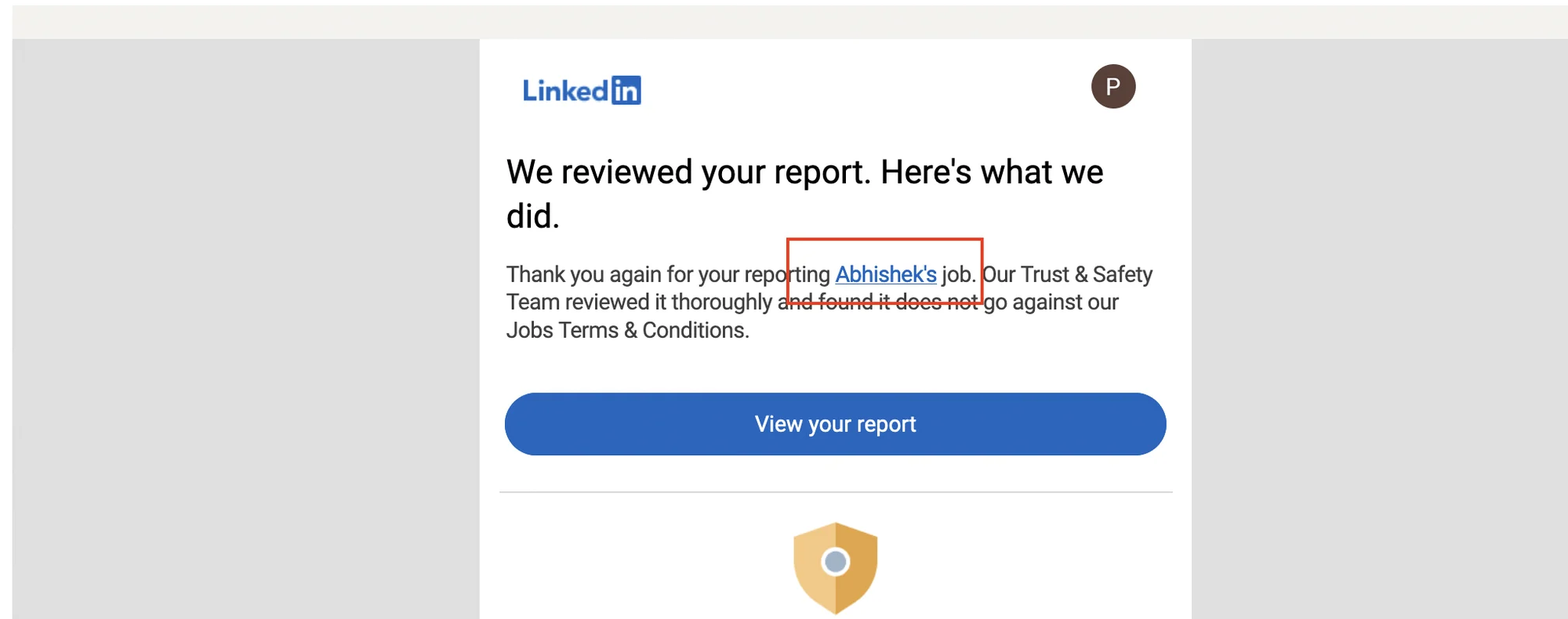
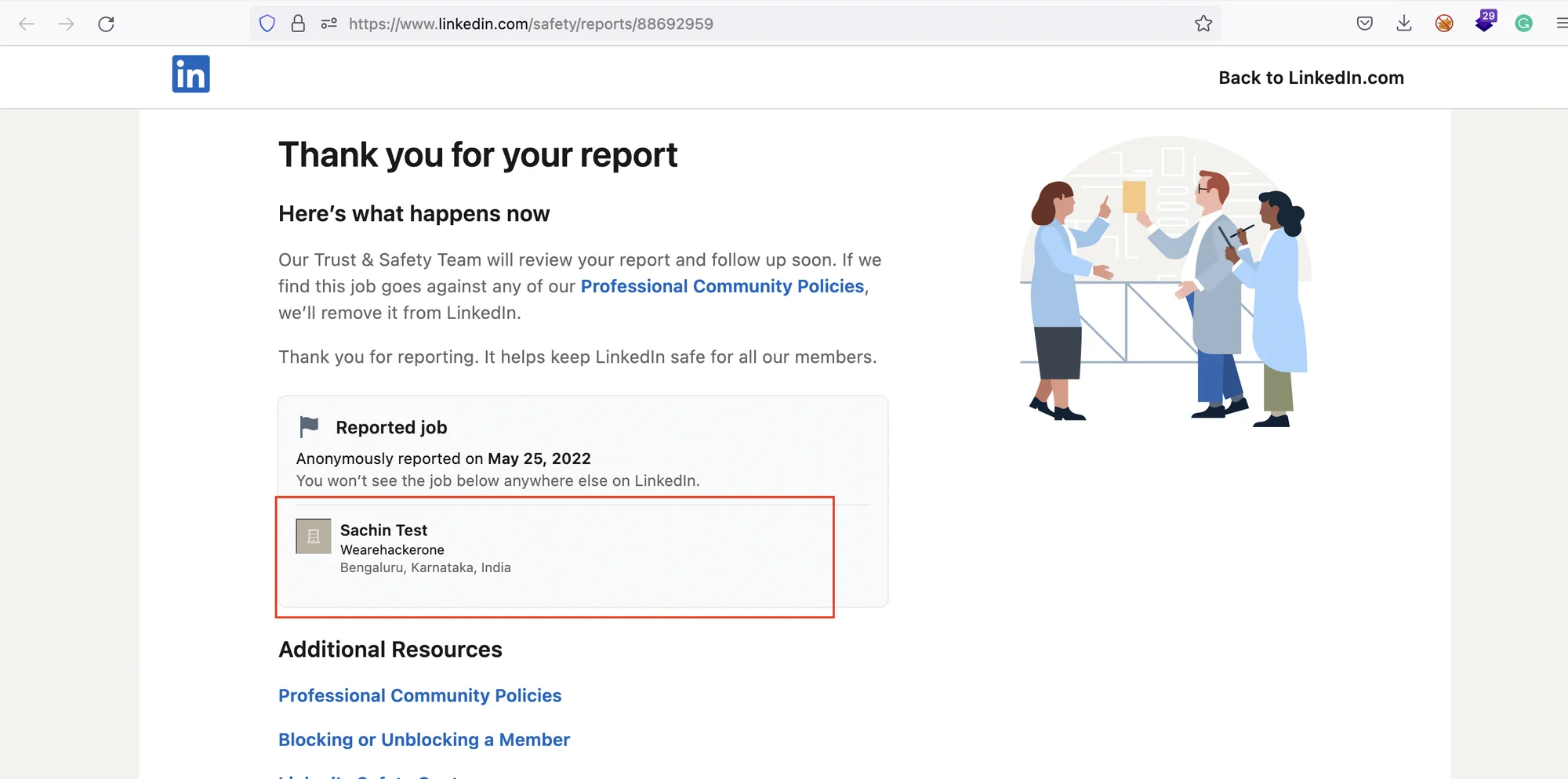
The application has a functionality using which a user can report a job if he found the job is misleading/spam or fraud. Using this feature, an attacker can do report any unlisted (draft/under review/rejected) job. After reporting the job the victim will receive an email from 'LinkedIn Trust & Safety Team' saying 'We reviewed your report. Here's what we did.' This also discloses the name of the user and his profile link who posted the job. Once you click on the 'view your report' button of the email, it will redirect you to the reports page at = 'https://www.linkedin.com/safety/reports/:reportId' This will disclose the name of the rejected/draft/under review job.
Steps to reproduce:
- Log in to an account and go to any posted job -
https://www.linkedin.com/jobs/view/3084381086/ - Now open any (rejected/draft or under review job using the job id) - https://www.linkedin.com/jobs/view/3086447496/. The application will give
Something went wrongerror message. - Report the posted job and intercept the vulnerable request.
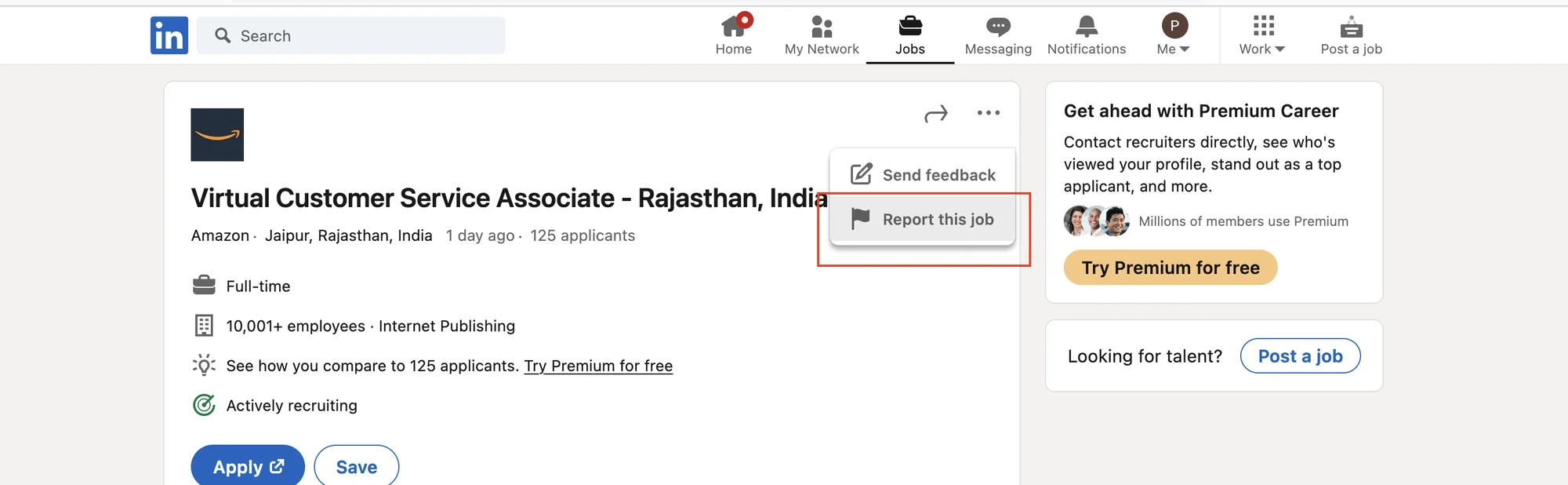
- Forward the job using the draft, rejected jobId - 3086447496. The report will get submitted without any error. And after some time (1hr) you will receive an email in the social tab of the email from
Linkedin Trust and Safety. This email includes the name of the job creator and his profile link and when u click on theView your Reportbutton. It will disclose the name of the job including the location.

###Vulnerable request:
POST /lite/flag-content?contentUrn=urn:li:jobPosting:3086455454&reason=OFFENSIVE&contentSource=JOBS_PREMIUM_OFFLINE&authorProfileId=0&trk=report-content HTTP/2
Host: www.linkedin.com
Cookie: XXX
User-Agent: Mozilla/5.0 (Macintosh; Intel Mac OS X 10.15; rv:100.0) Gecko/20100101 Firefox/100.0
Accept: */*
Accept-Language: en-US,en;q=0.5
Accept-Encoding: gzip, deflate
Csrf-Token: ajax:3198904967979491318
X-Isajaxform: 1
Origin: https://www.linkedin.com
Referer: https://www.linkedin.com/jobs/view/3084381086/?refId=%EF%BF%BD%2F%EF%BF%BD%21d%EF%BF%BD%27%EF%BF%BDe%1A_s%EF%BF%BD%16%EF%BF%BD%EF%BF%BD&trk=d_flagship3_company
Sec-Fetch-Dest: empty
Sec-Fetch-Mode: cors
Sec-Fetch-Site: same-origin
Content-Length: 0
Te: trailers
Impact
An attacker can report any unlisted job and can access the name of the creator, name of the job name of the company, etc details.
Context
LinkedIn's job listings include a reporting feature: a user who believes a job is misleading, spam or fraudulent can flag it, and the report goes to LinkedIn's Trust & Safety team. The feature is meant to work on jobs that are publicly visible.
The researcher found that the same feature could be pointed at jobs that are not publicly visible at all: drafts, jobs under review, and rejected jobs. Doing so both submitted a report against an unlisted job and, through the resulting email and reports page, disclosed information about that job and its creator.
The vulnerable endpoint is on www.linkedin.com, under the path /lite/flag-content, and the weakness is classified as an Insecure Direct Object Reference (IDOR), severity medium (CVSS 5.3).
Setup
Only a logged-in LinkedIn account is needed to reach the reporting feature. The researcher used Firefox 100.0 on macOS (Macintosh; Intel Mac OS X 10.15) and intercepted the report request with a proxy. Two job identifiers appear in the report: a public job at 3084381086, used as the normal starting point, and an unlisted job at 3086447496, used as the target. The vulnerable request itself references a third identifier, 3086455454, in its contentUrn parameter.
Finding it
The reporting flow is a normal user action: open a posted job, choose to report it, and the browser sends a request to /lite/flag-content carrying the job's URN. The job identifier in that request is supplied by the client. When an unlisted job is opened directly by its ID, the application refuses to render it and shows Something went wrong. But the reporting endpoint did not apply the same visibility check, so the same identifier could be replayed there.
Exploitation
Step 1: open a public job
Log in and go to any posted job:
https://www.linkedin.com/jobs/view/3084381086/
This is the legitimate job used to reach the report feature and capture its request.
Step 2: confirm the unlisted job is not viewable
Open a rejected, draft or under-review job by its ID:
https://www.linkedin.com/jobs/view/3086447496/
The application returns Something went wrong, confirming that the job is not meant to be visible to this user.
Step 3: report the public job and intercept
Submit the report on the public job and intercept the outgoing request. The captured request is shown below.
POST /lite/flag-content?contentUrn=urn:li:jobPosting:3086455454&reason=OFFENSIVE&contentSource=JOBS_PREMIUM_OFFLINE&authorProfileId=0&trk=report-content HTTP/2
Host: www.linkedin.com
Cookie: [redacted]
User-Agent: Mozilla/5.0 (Macintosh; Intel Mac OS X 10.15; rv:100.0) Gecko/20100101 Firefox/100.0
Accept: */*
Accept-Language: en-US,en;q=0.5
Accept-Encoding: gzip, deflate
Csrf-Token: [redacted]
X-Isajaxform: 1
Origin: https://www.linkedin.com
Referer: https://www.linkedin.com/jobs/view/3084381086/?refId=%EF%BF%BD%2F%EF%BF%BD%21d%EF%BF%BD%27%EF%BF%BDe%1A_s%EF%BF%BD%16%EF%BF%BD%EF%BF%BD&trk=d_flagship3_company
Sec-Fetch-Dest: empty
Sec-Fetch-Mode: cors
Sec-Fetch-Site: same-origin
Content-Length: 0
Te: trailers
The query string carries the report parameters:
contentUrn=urn:li:jobPosting:3086455454identifies the job being reported. This is the value the attacker controls.reason=OFFENSIVEis the report category.contentSource=JOBS_PREMIUM_OFFLINEdescribes the source of the content.authorProfileId=0is sent as zero.trk=report-contentis a tracking parameter.
The request is a POST with an empty body (Content-Length: 0). It carries the session cookie, a Csrf-Token in the ajax: form, X-Isajaxform: 1, and same-origin Origin and Referer headers pointing at the public job page.
Step 4: swap in the unlisted job ID and forward
Change the job identifier in contentUrn to the unlisted job, 3086447496, and forward the request. The report is accepted without any error, even though the job itself cannot be viewed. After some time (the researcher observed about one hour), an email arrives in the social tab of the mailbox, from Linkedin Trust and Safety, with the subject line We reviewed your report. Here's what we did.
That email contains the name of the job creator and a link to their profile. It also has a View your Report button. Clicking it redirects to the reports page:
https://www.linkedin.com/safety/reports/:reportId
That page discloses the name of the rejected, draft or under-review job, including its location.
Root cause
The reporting endpoint accepts a client-supplied job URN and acts on it without checking that the requesting user is allowed to see that job. The job view page enforces visibility and returns Something went wrong for unlisted jobs, but /lite/flag-content does not apply the same authorisation check. The request carries a CSRF token and same-origin headers, but the object reference is trusted as-is. This is a classic IDOR: the object reference is trusted as-is.
Impact
An attacker with any logged-in account can report any unlisted job, whether draft, under review or rejected. The report triggers a Trust & Safety email that discloses the job creator's name and profile link, and the linked reports page discloses the job's name and location. In the researcher's words, an attacker can access the name of the creator, the name of the job, the name of the company and similar details. The disclosure depends on the report being processed and the email being delivered, which the researcher observed taking about an hour.
Fix
The report does not describe a fix.
Variants to test
Hunting notes
The signal here was the contrast between the job view page returning Something went wrong and the flag endpoint accepting the same ID.
What happened, in plain words
LinkedIn lets people post job adverts. Some of those adverts are not visible to the public yet: they might be saved as a draft, waiting for LinkedIn to review them, or already rejected. If you try to open one of those hidden adverts by its address, LinkedIn refuses and shows an error.
LinkedIn also has a reporting button. If you think a job advert is misleading, spam or a scam, you can flag it, and the report goes to LinkedIn's Trust & Safety team. The reporting button could be pointed at the hidden adverts too. The report was accepted even though the job itself could not be viewed. Later, LinkedIn sent an email about the report, and that email, plus the page it linked to, revealed details of the hidden job and the person who created it.
The weakness has a name: an Insecure Direct Object Reference, or IDOR. It means the website takes an identifier that the user's browser sends (here, a job number) and acts on it without checking whether that user is allowed to touch the object it points to. The severity was rated medium, with a CVSS score of 5.3.
The pieces you need to know
Before the steps, a few everyday ideas. You do not need to be a programmer to follow them.
- A web request is the message your browser sends to a website when you click something. Think of it as an order slip you hand to a waiter: it says what you want and who you are.
- An endpoint is the specific address on the website that handles one kind of request, like a particular counter in a shop. Here the endpoint is
/lite/flag-content, which handles job reports. - An API is the set of these counters that a website offers to browsers and apps. You never see most of them; your browser uses them quietly in the background.
- A cookie is a small note the website gives your browser after you log in, and your browser shows it on every later request so the site knows it is still you. It works like a wristband at an event: show it and you get back in without proving who you are again.
- A CSRF token is a second, one-time-ish code the site puts in the page and expects back with certain requests. It proves the request came from a page the site itself served, not from a malicious site trying to act as you. CSRF stands for Cross-Site Request Forgery.
- A URN is just a long, formal name for an object.
urn:li:jobPosting:3086455454means "LinkedIn job posting number 3086455454". - A proxy is a tool that sits between your browser and the website and lets you pause a request, look at it, change it, and then send it on. Think of intercepting a letter, editing it, and posting it again.
- A POST request is a request that sends something to the site to create or change data, as opposed to simply asking to view a page.
- A query string is the part of a web address after the
?, made ofname=valuepairs joined by&. It is how the browser passes details along with the request. - A header is a labelled line in a request carrying extra information, such as who you are or what kind of reply you accept.
Setting the scene
The researcher used a normal logged-in LinkedIn account, Firefox 100.0 on macOS, and a proxy to pause and edit the report request. Two job numbers appear in the story: 3084381086, a normal public job used as the starting point, and 3086447496, a hidden job used as the target. The captured request itself mentions a third number, 3086455454, in its contentUrn value.
Step 1: open a public job
Log in and go to any posted job:
https://www.linkedin.com/jobs/view/3084381086/
This is an ordinary, visible job. The point of opening it is not to look at the advert but to reach the report button in the normal way, so the browser produces the normal report request that can then be captured.
Step 2: confirm the hidden job cannot be viewed
Open a rejected, draft or under-review job by its number:
https://www.linkedin.com/jobs/view/3086447496/
The application answers with Something went wrong. That error is the important part: it shows LinkedIn knows this job should not be shown to this user. It is the contrast with what happens later that makes the bug visible.
Step 3: report the public job and intercept the request
Now use the report button on the public job and pause the outgoing request with the proxy. The captured request looks like this.
POST /lite/flag-content?contentUrn=urn:li:jobPosting:3086455454&reason=OFFENSIVE&contentSource=JOBS_PREMIUM_OFFLINE&authorProfileId=0&trk=report-content HTTP/2
Host: www.linkedin.com
Cookie: [redacted]
User-Agent: Mozilla/5.0 (Macintosh; Intel Mac OS X 10.15; rv:100.0) Gecko/20100101 Firefox/100.0
Accept: */*
Accept-Language: en-US,en;q=0.5
Accept-Encoding: gzip, deflate
Csrf-Token: [redacted]
X-Isajaxform: 1
Origin: https://www.linkedin.com
Referer: https://www.linkedin.com/jobs/view/3084381086/?refId=%EF%BF%BD%2F%EF%BF%BD%21d%EF%BF%BD%27%EF%BF%BDe%1A_s%EF%BF%BD%16%EF%BF%BD%EF%BF%BD&trk=d_flagship3_company
Sec-Fetch-Dest: empty
Sec-Fetch-Mode: cors
Sec-Fetch-Site: same-origin
Content-Length: 0
Te: trailers
Line by line, in plain words:
POST /lite/flag-content?...is the request line.POSTsays data is being sent,/lite/flag-contentis the endpoint that handles reports, and everything after the?is the query string carrying the details.contentUrn=urn:li:jobPosting:3086455454names the job being reported. This is the value the attacker controls, and it is the heart of the bug.reason=OFFENSIVEis the category chosen for the report.contentSource=JOBS_PREMIUM_OFFLINEsays where the content came from.authorProfileId=0is sent as zero.trk=report-contentis a tracking label, used for statistics.Host: www.linkedin.comsays which website the request is for.Cookie: [redacted]is the login wristband. It is what makes the request come from a real, signed-in session.User-Agent: ...describes the browser and operating system that sent the request.Accept: */*says any kind of reply is fine.Accept-Language: en-US,en;q=0.5says the browser prefers English.Accept-Encoding: gzip, deflatesays the browser can accept compressed replies.Csrf-Token: [redacted]is the anti-forgery code described earlier.X-Isajaxform: 1is a custom header telling the site the request came from the page's background code rather than a full page load.Origin: https://www.linkedin.comandReferer: https://www.linkedin.com/jobs/view/3084381086/...say which page the request came from. Both point at the public job page.Sec-Fetch-Dest,Sec-Fetch-ModeandSec-Fetch-Siteare headers the browser adds to describe the context of the request;same-originmeans it is going to the same site.Content-Length: 0says there is no body: all the information is in the address itself.Te: trailersis a minor header about how the connection is handled.
The request is a POST with an empty body. Everything that matters is in the query string, which is exactly why it is easy to tamper with.
Step 4: swap in the hidden job number and forward
Change the job number in contentUrn to the hidden job, 3086447496, and send the request on. The report is accepted with no error, even though the job page itself refuses to show that job.
After some time, about an hour in the researcher's observation, an email arrives in the social tab of the mailbox. It is from Linkedin Trust and Safety and its subject is We reviewed your report. Here's what we did. The email contains the name of the job creator and a link to their profile. It also has a View your Report button. Clicking that button redirects to the reports page:
https://www.linkedin.com/safety/reports/:reportId
That page reveals the name of the rejected, draft or under-review job, including its location.
Why it works
The reporting endpoint takes the job number from the browser and acts on it without checking whether the person asking is allowed to see that job. The job view page does perform that check, which is why it answers Something went wrong. The report endpoint simply does not.
The cookie and CSRF token prove the request came from a genuine signed-in session, but they only answer the question "who is asking?". They say nothing about whether the object being acted on is one that person may access. Trusting the object reference as-is is the classic IDOR pattern.
What an attacker gets
Anyone with a logged-in account can report any hidden job, whether draft, under review or rejected. The report triggers a Trust & Safety email that reveals the creator's name and profile link, and the linked reports page reveals the job's name and location. In the researcher's words, an attacker can access the name of the creator, the name of the job, the name of the company and similar details. The disclosure depends on the report being processed and the email being delivered, which took about an hour in the researcher's observation.
How to fix it
The report does not describe a fix.
Other places to try the same idea
Notes for hunting
The signal here was the contrast between the job view page returning Something went wrong and the flag endpoint accepting the same ID.
Glossary
- API: the set of addresses a website offers to browsers and apps so they can ask for data or actions.
- Cookie: a small piece of data stored by your browser after you log in and sent with later requests so the site recognises your session.
- CSRF token: a code embedded in a page and expected back with certain requests, proving the request came from that site rather than a malicious one.
- CVSS: a standard scoring system for the severity of a security weakness; 5.3 is a medium score.
- Endpoint: the specific address on a website that handles one kind of request.
- Header: a labelled line in a web request or reply carrying extra information.
- IDOR (Insecure Direct Object Reference): a weakness where a site acts on an identifier supplied by the user without checking that the user is allowed to access the object it names.
- POST request: a request that sends data to the site to create or change something.
- Proxy: a tool that sits between your browser and a website so you can pause, inspect and edit requests.
- Query string: the
name=valuepairs after the?in a web address. - Session: the period during which a site remembers you as logged in, usually via a cookie.
- Trust & Safety team: the part of a company that handles reports of abusive or fraudulent content.
- URN: a long, formal name for an object, such as
urn:li:jobPosting:3086455454for a LinkedIn job posting. - User-Agent: a header describing the browser and operating system that sent the request.




