CVE-2020-0696 - Microsoft Outlook Security Feature Bypass Vulnerability
Microsoft Outlook for Mac improperly translates hyperlinks with file:/// schemes, causing email security systems to fail to recognise them as links and deliver them as clickable to Outlook for Windows users. An attacker could send spear-phishing emails with malicious links that bypass security filters and, when clicked, open the attacker's URL.
 Published on trustwave.com
Change theme to light
The full write-up lives on its author's site
It belongs to its author, so we link to it rather than copy it. The other two tabs are our own rewrites, checked against it.
Context
Microsoft Outlook is the mail client at the centre of this write-up, and the feature under scrutiny is how it turns a hyperlink in an email into something clickable for the recipient. The report describes a mismatch between two Outlook clients: a message composed in Microsoft Outlook for Mac and delivered to a victim using Microsoft Outlook for Windows. The vulnerability was assigned CVE-2020-0696 and described as a Microsoft Outlook security feature bypass.
The author frames the work as an investigation that started with a malware campaign, not with a code review. Several emails were getting past a specific email security system. No bypass technique was being used in the usual sense: the volume of spear-phishing emails meant the security system let some of them through. That prompted research into Outlook itself. The conclusion the author reaches is that the link parser on the email security system was weak: the problem is not detection evasion but the inability of the email security systems to identify emails that contain the crafted link.

Setup
The investigation was performed with trial accounts provided by multiple vendors, and the findings were reported responsibly. The vulnerability and the later mitigation bypass were both patched by Microsoft.
The clients involved are specific:
- The sender composes the message in Microsoft Outlook for Mac.
- The victim receives it in Microsoft Outlook for Windows.
- The crafted link only works when composed in Outlook for Mac, according to the investigation.
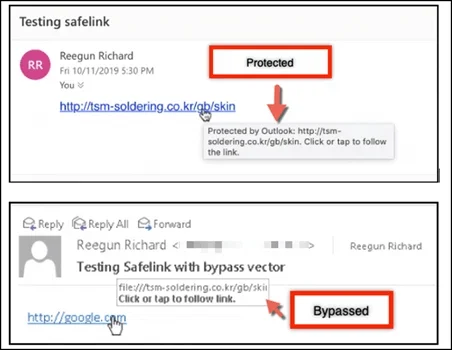
The first test was run against the Microsoft M365 security feature Safelink protection. The author then checked the same behaviour on multiple email security systems, confirmed the issue, and reported it.
Finding it
The observation that started the research was that a hyperlink could be written in a way that email security systems do not treat as a link at all. The author describes the vulnerable vector as a URL with a hyperlinked file:/// target:
http://trustwave.com with hyperlinked file:///malciouslink
When a message carrying that vector is sent, it is delivered to the victim's Outlook for Windows as file:///trustwave.com. When the recipient clicks it, the link translates to http://trustwave.com.
The reason this matters is how the security products inspect mail. Their detections are based on URL signatures, sandbox detonation, reputation and ML-based patterns. The crafted link file:///trustwave.com is not considered a link for analysis, so it is not considered a link for analysis. During transmission from sender to receiver, no email security system recognises the link, and it arrives at the victim as a clickable link.
Exploitation
Step 1: Compose in Outlook for Mac
Craft a new email from Microsoft Outlook for Mac.
Step 2: Add a visible URL
Type a URL:
http://legitimatelink
Step 3: Hyperlink it with a file URI
Make the visible URL hyperlinked with:
file:///malciouslink
The visible text and the actual target differ. The underlying target uses the file:/// scheme.
Step 4: Send
The email is sent normally.
Step 5: Delivery
The email bypasses the email security system and is received by the end user as a clickable link in Microsoft Outlook for Windows.
Step 6: The link as received
When the recipient inspects the received link, the hyperlink is:
file:///maliciouslink
Step 7: Click and translation
When the victim clicks, the translation from file:/// to http:// is handled by Outlook for Windows, and the link opens.
Other vectors found by fuzzing
After fuzzing, the author lists further vectors that were also vulnerable:
file:/maliciouslink
file:maliciouslink
\\maliciouslink
///maliciouslink
//maliciouslink
/maliciouslink
The author lists these as further vulnerable vectors found by fuzzing.
A short video demonstrates the bypass:
Root cause
The report attributes the behaviour to improper hyperlink translation in Microsoft Outlook for Mac. The Mac client accepts a hyperlink whose target uses the file:/// scheme and sends it on. The Windows client then translates that target into an http:// URL when the recipient clicks.
Because the target is not an http/https URL, the email security systems do not treat it as a link for analysis. The crafted link is not considered a link for analysis, so the message is delivered with the link intact and clickable. The author is explicit that this is not a detection bypass in the usual sense: the link parser of the email security systems simply cannot identify the emails containing the link.
Impact
An attacker who can send mail to a victim using Outlook for Windows can deliver a link that email security systems do not recognise as a link, and the victim receives it as a clickable link. The author demonstrated this against Microsoft M365 Safelink protection and confirmed it on multiple other email security systems. The conditions are narrow: the message must be crafted in Microsoft Outlook for Mac, and the recipient must use Microsoft Outlook for Windows. The author notes that the flood of spear-phishing emails in the original campaign meant some emails were allowed through by volume alone, which is the context in which the weakness was noticed.
Fix
The vulnerability was patched as CVE-2020-0696 in February 2020.
Bypass of CVE-2020-0696
The patch did not fully fix the original issue. As described in the report, after the patch, links with URI schemes trigger a warning popup, and :/ characters are stripped when the message is delivered to users. The author later found a way around that fix.
The new exploit vector is:
http:/://maliciouslink
The patch strips :/ from the link, so it is delivered to the user as:
http://maliciouslink
This bypasses Microsoft ATP Safelink and other email security products. Once the victim clicks, the link is converted automatically to http://maliciouslink and opens. Unlike the original issue, this variant can be exploited on both Windows and macOS Outlook clients.
Steps to reproduce the bypass:
- Craft a new email from Outlook for Mac.
- Type a URL
http://legitimatelink. - Make it hyperlinked with
http:/://maliciouslink. - Send.
- The email bypasses the security controls and is delivered to the end user as clickable in Microsoft Outlook for Windows.
This secondary bypass method was fixed by Microsoft during the summer of 2021. The new update makes the URL accessible or proxied through Safelinks.
Variants to test
:
- Scheme substitution on a hyperlink. Compose a message in one client with visible text
http://legitimatelinkand a hyperlink target offile:///maliciouslink, then deliver it to a different client. - Scheme variants. Try the fuzzed forms
file:/maliciouslink,file:maliciouslink,\\maliciouslink,///maliciouslink,//maliciouslinkand/maliciouslinkas hyperlink targets. - Patch-stripping patterns. Where a fix strips
:/, try targets such ashttp:/://maliciouslinkand observe whether the stripped result becomes a validhttp://URL at delivery. A positive result is the delivered link beinghttp://maliciouslinkand opening on click. - Cross-client matrix. Test composition in one client and receipt in another (Mac to Windows, Windows to Mac, and so on) for each vector.
- Gateway inspection check. For each accepted vector, confirm whether the secure email gateway detonated, rewrote or proxied the target.
What happened, in plain words
Imagine you post a letter, and the post office checks every envelope for dangerous contents. Now imagine you write the dangerous address in a way the post office's scanner does not recognise as an address at all, so it waves the letter through. The person who receives it, however, reads it perfectly well and follows the address. That is the shape of the bug described here.
Microsoft Outlook is an email program: the application you install on your computer to read and send mail. When someone sends you an email containing a link, Outlook shows that link as text you can click. Behind the visible text there is a hidden destination, the actual address the browser will open when you click. This write-up is about a mismatch in how two versions of Outlook handle that hidden destination: the Mac version (Outlook for Mac) and the Windows version (Outlook for Windows).
The problem was given an official identifier, CVE-2020-0696. A CVE is a public catalogue number for a known security flaw, so that everyone can refer to the same bug by the same name. Microsoft classified it as a security feature bypass: a flaw where a protection that is supposed to be there can be stepped around rather than broken.
The author did not start by reading code. The starting point was a malware campaign, meaning a run of malicious emails sent to many people. Several of those emails were getting past a particular email security system. An email security system (sometimes called a secure email gateway) is a filter that sits in front of a mailbox and inspects incoming mail before it reaches the person. Its detections are based on URL signatures, sandbox detonation, reputation and ML-based patterns.
What the author noticed was that no clever evasion trick was in play. The sheer number of spear-phishing emails (targeted phishing messages aimed at particular people) meant the filter let some through simply because of the volume. That prompted a closer look at Outlook itself. The conclusion: the part of the email security system that reads links, its link parser, was weak. A parser is the piece of software that takes a piece of text and works out its structure, in this case deciding what counts as a link. The issue is not about hiding from detection; it is that the security systems could not recognise the emails as containing a link in the first place.
Setting up the investigation
The research was done using trial accounts provided by several vendors, and the findings were reported responsibly. Responsible reporting means telling the vendor privately and giving them time to fix the problem before publishing details. Both the original vulnerability and the later attempt to get around the fix were patched by Microsoft. A patch is an update that repairs the flaw.
The players in the story are specific:
- The sender writes the message in Microsoft Outlook for Mac.
- The victim receives it in Microsoft Outlook for Windows.
- According to the investigation, the crafted link only works when it is composed in Outlook for Mac.
The first test was run against a Microsoft M365 security feature called Safelink protection. Microsoft M365 (Microsoft 365) is Microsoft's cloud service for email and office applications, and Safelink is its feature that checks links in email before letting the recipient click them. The author then repeated the test on several other email security systems, confirmed the same behaviour, and reported it.
Finding the weakness
The observation that started everything: a hyperlink can be written in a way that email security systems do not treat as a link at all. The author describes the vulnerable vector (the particular combination of inputs that triggers the bug) as a normal-looking web address whose hidden target uses a different scheme:
http://trustwave.com with hyperlinked file:///malciouslink
Line by line, in plain words:
http://trustwave.comis the text the reader sees.httpis the scheme, the prefix that tells a browser this is a web page address. It looks completely ordinary.file:///malciouslinkis the hidden destination attached to that text. Thefile:///scheme tells a computer to open a file stored locally on the machine rather than a web page. The spellingmalciouslinkis exactly as it appears in the report.
When a message carrying this vector is sent, it arrives at the victim's Outlook for Windows showing file:///trustwave.com. When the recipient clicks, the link is translated into http://trustwave.com and opens as a web page.
Why does this matter? Because of how the security products inspect mail. Their detection relies on four things: URL signatures (a list of known bad addresses), sandbox detonation (opening the link in an isolated fake computer to see what it does), reputation (how trustworthy the site is known to be) and ML-based patterns (machine learning models trained on past examples). The crafted link file:///trustwave.com is not considered a link for analysis, so it is not considered a link for analysis. During the journey from sender to receiver, no email security system recognises it as a link, and it lands in the inbox as something clickable.
Reproducing it, step by step
Step 1: Compose in Outlook for Mac
Create a new email in Microsoft Outlook for Mac. The choice of client matters: this is the half of the mismatch that produces the odd link.
Step 2: Add a visible URL
Type a web address into the message body:
http://legitimatelink
This is the text the recipient will see.
Step 3: Hyperlink it with a file URI
Select that text and attach a hidden destination to it:
file:///malciouslink
A URI (uniform resource identifier) is the general term for an address of something; a URL is the common kind of URI that points at a web page. Here the visible text and the actual target differ. A reader sees an ordinary http:// address. The underlying target uses the file:/// scheme instead.
Step 4: Send
The email is sent normally. Nothing special happens at this point from the sender's side.
Step 5: Delivery
The email gets past the email security system and is received by the end user as a clickable link in Microsoft Outlook for Windows.
Step 6: The link as received
When the recipient inspects the received link, the hyperlink is:
file:///maliciouslink
In other words, the hidden destination survived the trip unchanged.
Step 7: Click and translation
When the victim clicks, Outlook for Windows performs the translation from file:/// to http://, and the link opens. This automatic conversion happens when the victim clicks.
Other vectors found by fuzzing
Fuzzing means feeding a program many small variations of an input to see which ones behave unexpectedly. After fuzzing, the author lists further forms that were also vulnerable:
file:/maliciouslink
file:maliciouslink
\\maliciouslink
///maliciouslink
//maliciouslink
/maliciouslink
The author lists these as further vulnerable vectors found by fuzzing. The differences are in the number of slashes and the prefix, which is exactly the kind of detail a parser can trip over.
A short video demonstrates the bypass:
Why it works
The report puts the behaviour down to improper hyperlink translation in Microsoft Outlook for Mac. The Mac client accepts a hyperlink whose target uses the file:/// scheme and sends it on. The Windows client then translates that target into an http:// address when the recipient clicks.
Because the target is not an http or https address, the email security systems never treat it as a link for analysis. The crafted link is not considered a link for analysis, so the message is delivered with the link intact and clickable. The author is explicit that this is not a detection bypass in the usual sense: the link parser of the email security systems simply cannot identify the emails containing the link.
Who is affected
An attacker who can send mail to a victim using Outlook for Windows can deliver a link that email security systems do not recognise as a link, and the victim receives it as a clickable link. The author demonstrated this against Microsoft M365 Safelink protection and confirmed it on several other email security systems. The conditions are narrow: the message must be crafted in Microsoft Outlook for Mac, and the recipient must use Microsoft Outlook for Windows. The author also notes that the flood of spear-phishing emails in the original campaign meant some emails were allowed through by volume alone, which is the context in which the weakness was first noticed.
The fix, and getting around it
The vulnerability was patched as CVE-2020-0696 in February 2020.
Bypassing CVE-2020-0696
The patch did not fully fix the original issue. As the report describes, after the patch, links with URI schemes trigger a warning popup, and :/ characters are stripped when the message is delivered to users. Stripping means the software removes those characters from the link before handing it to the recipient. The author later found a way around that fix.
The new exploit vector is:
http:/://maliciouslink
Line by line:
http:is the start of a normal web address./:is the extra pair of characters inserted in the middle. The patch removes:/from links, so this pair is the bait.//maliciouslinkcompletes the address.
The patch strips :/ from the link, so it is delivered to the user as:
http://maliciouslink
In other words, the fix itself tidies the malformed address into a perfectly valid one. This gets around Microsoft ATP Safelink and other email security products. ATP stands for Advanced Threat Protection, Microsoft's name for the extra link and attachment checking in its mail service. Once the victim clicks, the link is converted automatically to http://maliciouslink and opens. Unlike the original issue, this variant can be exploited on both Windows and macOS Outlook clients.
Steps to reproduce the bypass:
- Craft a new email from Outlook for Mac.
- Type a URL
http://legitimatelink. - Make it hyperlinked with
http:/://maliciouslink. - Send.
- The email bypasses the security controls and is delivered to the end user as clickable in Microsoft Outlook for Windows.
This secondary bypass method was fixed by Microsoft during the summer of 2021. The new update makes the URL accessible or proxied through Safelinks. Proxied here means the link is rewritten so that it passes through Microsoft's checking service before the user reaches the real destination.
Variations worth testing
- Scheme substitution on a hyperlink. Compose a message in one client with visible text
http://legitimatelinkand a hyperlink target offile:///maliciouslink, then deliver it to a different client. - Scheme variants. Try the fuzzed forms
file:/maliciouslink,file:maliciouslink,\\maliciouslink,///maliciouslink,//maliciouslinkand/maliciouslinkas hyperlink targets. - Patch-stripping patterns. Where a fix strips
:/, try targets such ashttp:/://maliciouslinkand observe whether the stripped result becomes a validhttp://address at delivery. A positive result is the delivered link beinghttp://maliciouslinkand opening on click. - Cross-client matrix. Test composition in one client and receipt in another (Mac to Windows, Windows to Mac, and so on) for each vector.
- Gateway inspection check. For each accepted vector, confirm whether the secure email gateway detonated, rewrote or proxied the target.
Glossary
- CVE: a public catalogue number for a known security flaw, so everyone can refer to the same bug by the same name.
- Security feature bypass: a flaw where a protection that is supposed to be there can be stepped around rather than broken.
- Email security system / secure email gateway: a filter in front of a mailbox that inspects incoming mail before it reaches the person.
- Malware campaign: a run of malicious emails or software sent to many people.
- Spear-phishing: targeted phishing messages aimed at particular people.
- Parser: the piece of software that takes a piece of text and works out its structure, here deciding what counts as a link.
- Link parser: the part of an email security system that reads links and decides what to check.
- Hyperlink: text you can click that carries a hidden destination address.
- Scheme: the prefix of an address that says what kind of thing it points at, such as
httpfor a web page orfilefor a local file. - URI: uniform resource identifier, the general term for an address of something.
- URL: the common kind of URI that points at a web page.
file:///scheme: an address that tells a computer to open a file stored locally on the machine rather than a web page.- URL signature: a list of known bad addresses used for detection.
- Sandbox detonation: opening a link in an isolated fake computer to see what it does.
- Reputation: how trustworthy a site is known to be.
- ML-based patterns: machine learning models trained on past examples to spot suspicious content.
- Fuzzing: feeding a program many small variations of an input to see which ones behave unexpectedly.
- Vector: the particular combination of inputs that triggers a bug.
- Patch: an update that repairs a flaw.
- Stripping: removing certain characters from a link before handing it to the recipient.
- ATP (Advanced Threat Protection): Microsoft's name for the extra link and attachment checking in its mail service.
- Safelink / Safelinks: Microsoft's feature that checks links in email before the recipient clicks them.
- Proxied: the link is rewritten so it passes through a checking service before the user reaches the real destination.
- M365 (Microsoft 365): Microsoft's cloud service for email and office applications.
- Responsible reporting: telling the vendor privately and giving them time to fix the problem before publishing details.




