How I was able to down a service of Microsoft ? Denial of Service (DOS) Attack on Microsoft.
 Published on medium.com
Thank you for taking the time to read about “How I was able to down a service of Microsoft ? Denial of Service (DOS) Attack on Microsoft“
The full write-up lives on its author's site
It belongs to its author, so we link to it rather than copy it. The other two tabs are our own rewrites, checked against it.
Context
Microsoft's Biz4Afrika programme ran a chat service at https://biz4afrika.microsoft.com/chat. The feature is a web chat: a visitor opens the page and sends messages through it. The researcher's interest was in what happens when a client sends far more, or far larger, messages than a normal user would.
A denial-of-service (DoS) attack, as the report defines it, is an attack meant to shut down a machine or network, making it inaccessible to its intended users, either by flooding the target with traffic or by sending it information that triggers a crash. The variant found here is application level: the abuse happens inside a normal application request rather than at the network layer.

Setup
The report does not describe any account, role or registration step. The only tooling named is Burp Suite, used through its Repeater and Intruder tabs, plus a second browser used to check whether the service was still usable. The target is the public chat page, so the precondition is simply that the chat can be reached and that a message can be submitted.
Finding it
The researcher first tried some possible attacks against the chat and found a "no rate limit" issue. That alone was not treated as the finding.

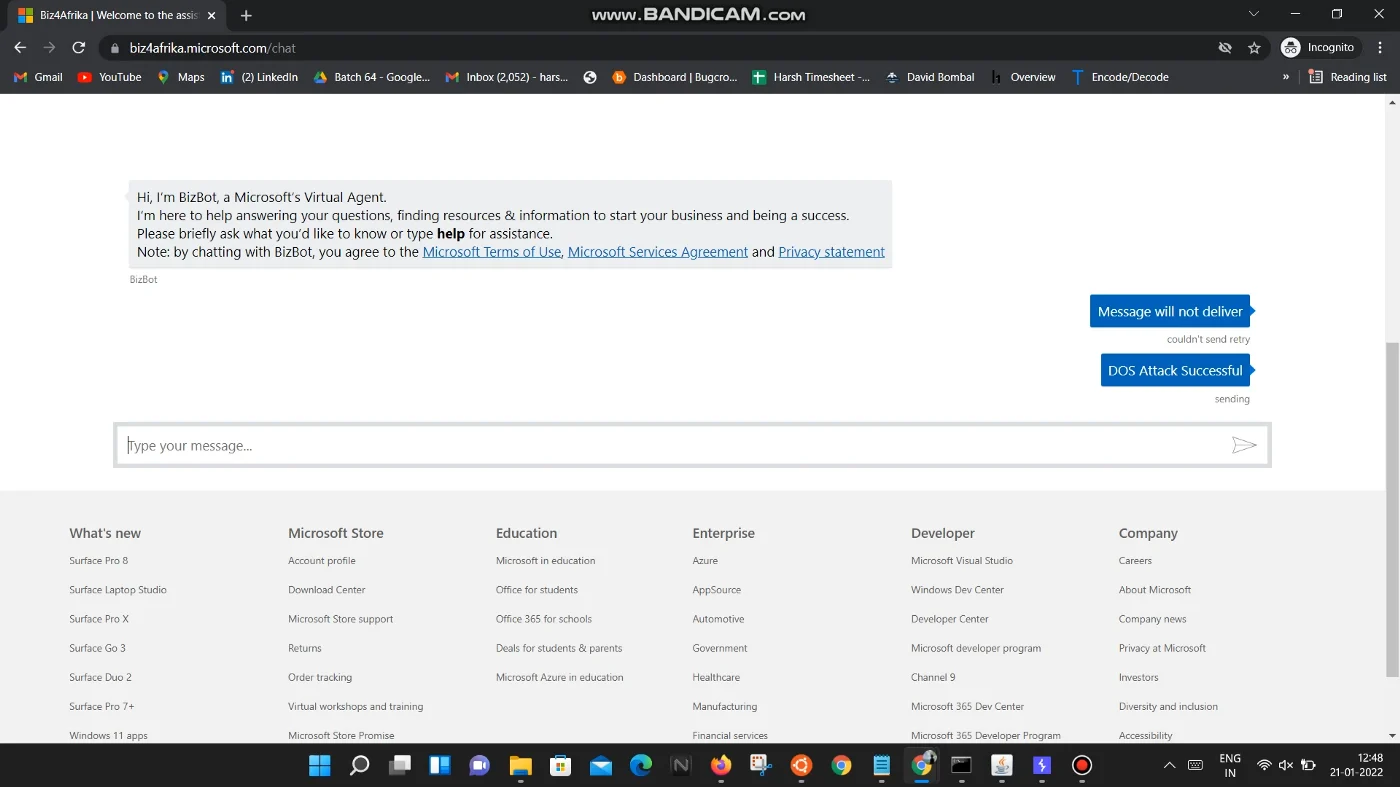
After a tea break, the next idea was to send a long string payload as the chat message. The message was not delivered.
That failure was the interesting signal. The message was not delivered.
Exploitation
Step 1: send a long string message and inspect the response
The researcher opened Burp Suite, captured the chat message request, and analysed it in the Repeater tab. The response was a 502 Bad Gateway status code.
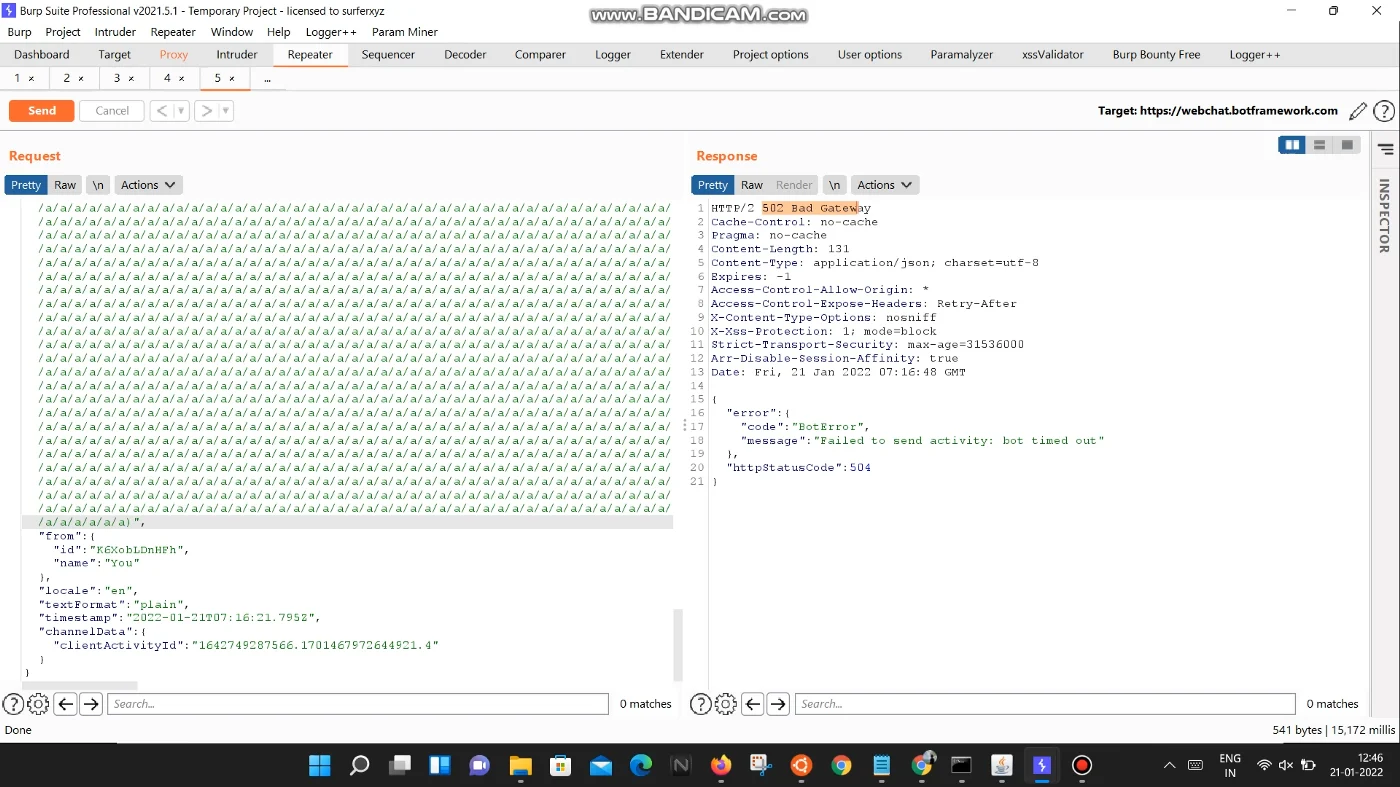
A 502 is returned by a gateway or proxy when the upstream server it forwards to gives an invalid response. The report does not include the raw request, so the exact parameter carrying the message is not shown here.
Step 2: repeat the request through Intruder
With the request confirmed to produce a 502, the researcher sent it to the Intruder tab and started the attack for multiple times, that is, repeated the same request at volume.
Step 3: verify the effect from a separate client
While the attack was running, the researcher opened https://biz4afrika.microsoft.com/chat in another browser and tried to send a message. The message was not delivered. The message was not delivered in the other browser.
The researcher then stopped the attack immediately and reported the vulnerability to Microsoft.
A video proof of concept accompanies the write-up:
Root cause
The report notes a "no rate limit" issue and that a long string payload produced a 502 Bad Gateway response, but it does not state a root cause.
Impact
A visitor to the public chat page could make the chat service unavailable to other users by repeating the message request at volume. The researcher demonstrated this against a second browser session: messages stopped being delivered while the attack ran.
Fix
Microsoft fixed the issue: the bug was reported on 21 January 2022 and fixed on 2 March 2022. The reward was a Hall of Fame entry in the Security Researcher Acknowledgments for Microsoft Online Services, and the bounty was out of scope.
Variants to test
- Oversized message bodies on other chat or comment endpoints. Send a single very long string as the message field and watch the status code. A positive result is a
5xx(for example502) from the gateway where a4xxvalidation error would be expected. - Repeated identical requests with no throttling. Replay the same valid request at volume and check for
429or equivalent. A positive result is that no rate limiting appears and a second client's requests start failing. - Cross-client confirmation. Always verify from a separate browser or session, as the researcher did, so that a failure local to the attacking connection is not mistaken for a service outage.
- Boundary probing of message length. Increase the payload length gradually to find the point where the upstream starts returning
5xx, which indicates where input handling breaks down. - Other public Microsoft chat or form endpoints. Apply the same two checks (long payload, repeated request) to similar public-facing services, looking for the same combination of no rate limit and upstream failure.
What happened, in plain words
A security researcher found a chat page that Microsoft ran as part of its Biz4Afrika programme, at https://biz4afrika.microsoft.com/chat. The page lets a visitor type a message and send it. He found that a very long message was not delivered, and that repeating the request made the chat stop delivering messages in another browser. In other words, he could make the chat unavailable to other people by using the public page.
That kind of attack is called a denial-of-service attack, usually shortened to DoS. The report defines it like this: a Denial-of-Service (DoS) attack is an attack meant to shut down a machine or network, making it inaccessible to its intended users. DoS attacks accomplish this by flooding the target with traffic, or sending it information that triggers a crash.
A simple comparison: imagine a single shop assistant at a counter. If one customer keeps asking questions non-stop, the assistant never gets to serve anyone else. The shop is still open, the door is unlocked, but nobody else can actually buy anything. That is what happened here, except the shop assistant is a web server and the endless questions are repeated chat messages.
The particular flavour found here is called application level DoS. That means the abuse happens inside a normal request that the application is designed to accept (a chat message), rather than by attacking the network itself.
The pieces you need to know before the story
Before walking through the steps, here are the basic ideas the write-up relies on. If you already know them, skip ahead.
- A web page and a web server. When you open a page in your browser, your browser sends a request over the internet to a computer called a server. The server sends back the page. Every button you press and every form you submit is another request.
- A chat service. The page at
https://biz4afrika.microsoft.com/chatis a chat: you type text into a box, press send, and the text is delivered somewhere. Behind the page, the server receives your message and passes it on. The report does not describe any account, role or registration step. - A request. A request is the package your browser sends to the server. It contains the address of the page, the data you typed, and some technical details. Tools like Burp Suite let you look at that package, change it, and send it again as many times as you like.
- A status code. Every response from a server starts with a three-digit number that says, in shorthand, what happened.
200means fine.404means not found.500-series numbers mean the server had a problem. You will see502in this story. - A rate limit. A rate limit is a rule that says "you may only do this X times per minute". Think of a bouncer who lets people into a club one at a time; without the bouncer, a crowd can push through all at once. A chat with no rate limit will accept as many messages as you can send, as fast as you can send them.
- Burp Suite. A tool used by security researchers. It sits between your browser and the server, so you can see and edit requests. Two of its features appear here: Repeater, which lets you send one request again and again and look at each response, and Intruder, which sends the same request many times automatically.
- A payload. In this context, the payload is simply the content you put into the message field. A "long string payload" is a message made of a very long run of characters.
Finding it
The researcher was exploring Microsoft services and came across the chat page at https://biz4afrika.microsoft.com/chat. He tried some possible attacks against it, and what he noticed first was a "no rate limit" issue: nothing appeared to stop a client from submitting requests repeatedly. On its own, that was not treated as the finding. Lots of sites accept repeated requests; the question is whether anything bad happens when they do.
So he took a tea break and thought about what to try next. The next idea was to send a long string payload as the chat message. The message was not delivered.
That failure was the interesting signal. Normally, if you type something too long into a form, the site should politely refuse it: "your message is too long". Here, the message simply did not arrive. The message was not delivered. The difference matters: a clean rejection is the site doing its job, while a struggle is the site failing at its job.
Exploitation
Step 1: send a long string message and inspect the response
To understand what was happening, the researcher opened Burp Suite, captured the request that the chat page sends when you submit a message, and analysed it in the Repeater tab. Repeater is the part of Burp that lets you take one request, send it, read the response, tweak it, and send it again, all without touching the browser. The response he got was a 502 Bad Gateway status code.
What does 502 Bad Gateway mean? Large websites rarely have one single computer answering you. Usually there is a front-door computer (called a gateway or proxy) that receives your request and passes it to a back-room computer (the upstream server) that does the actual work. A 502 means the front door asked the back room for an answer and the back room gave back something invalid, or nothing usable. In everyday terms: the receptionist asked the person in the back office, and the person in the back office either did not answer or answered with nonsense, so the receptionist tells you "sorry, something went wrong back there".
A 502 is returned by a gateway or proxy when the upstream server it forwards to gives an invalid response. The report does not include the raw request, so the exact parameter carrying the message is not shown here. In plain words: we know the message field was involved, but the write-up does not print the exact request body.
Step 2: repeat the request through Intruder
With the request confirmed to produce a 502, the researcher sent it to the Intruder tab and started the attack for multiple times. Intruder is the part of Burp that takes one request and fires it off over and over automatically. "For multiple times" means exactly that: the same request, repeated at volume, rather than a single carefully crafted one.
Why do this? Because one bad request that produces a 502 is a bug, but a stream of them is a potential outage. If the back-room server is already failing on each request, hammering it with more of the same keeps it in the failing state. The goal of this step was to see whether the failure would spill over to other users.
Step 3: verify the effect from a separate client
While the attack was running, the researcher opened https://biz4afrika.microsoft.com/chat in another browser and tried to send a message. The message was not delivered. The message was not delivered in the other browser.
That last point is the important one. If the researcher had only tested in the same browser he was attacking from, he could not tell whether the chat was broken for everyone or just for him. A second browser is a clean, independent visitor. When that visitor also cannot send a message, the service itself is down, not just the attacker's connection.
The researcher then stopped the attack immediately and reported the vulnerability to Microsoft. Stopping as soon as the point is proven is the right behaviour: the goal is to demonstrate the problem, not to keep a real service offline.
A video proof of concept accompanies the write-up:
Why it worked
The report notes a "no rate limit" issue and that a long string payload produced a 502 Bad Gateway response, but it does not state a root cause.
A comparison: a restaurant with no limit on how many orders one table can place, combined with a kitchen that panics when it receives an unusual order. Either problem alone might be survivable. Together, one customer can keep the kitchen in a state of panic and nobody else gets served.
Who was affected
A visitor to the public chat page could make the chat service unavailable to other users by repeating the message request at volume. The researcher demonstrated this against a second browser session: messages stopped being delivered while the attack ran.
What Microsoft did
Microsoft fixed the issue. The bug was reported on 21 January 2022 and fixed on 2 March 2022. The reward was a Hall of Fame entry in the Security Researcher Acknowledgments for Microsoft Online Services, and the bounty was out of scope. "Out of scope" means the programme had decided in advance that this kind of issue would not be paid a cash bounty, even though it was accepted and fixed.
Things worth trying on other services
These are the same checks the researcher used, written so you can apply them elsewhere. Only test services you are allowed to test; the researcher was working within Microsoft's programme.
- Oversized message bodies on other chat or comment endpoints. Send a single very long string as the message field and watch the status code. A positive result is a
5xx(for example502) from the gateway where a4xxvalidation error would be expected. In plain words: the site should say "that is too long", not fall over. - Repeated identical requests with no throttling. Replay the same valid request at volume and check for
429or equivalent.429is the status code for "too many requests", the polite way of saying "slow down". A positive result is that no rate limiting appears and a second client's requests start failing. - Cross-client confirmation. Always verify from a separate browser or session, as the researcher did, so that a failure local to the attacking connection is not mistaken for a service outage.
- Boundary probing of message length. Increase the payload length gradually to find the point where the upstream starts returning
5xx, which indicates where input handling breaks down. Think of it as finding the exact weight at which a shelf starts to bend. - Other public Microsoft chat or form endpoints. Apply the same two checks (long payload, repeated request) to similar public-facing services, looking for the same combination of no rate limit and upstream failure.
Glossary
- Application level DoS: a denial-of-service attack carried out through normal application requests (such as a chat message) rather than by attacking the network directly.
- Backend / upstream server: the computer behind the front door that does the actual processing of a request.
- Burp Suite: a tool that sits between your browser and a server so you can inspect, edit and resend requests.
- Denial-of-Service (DoS): an attack meant to shut down a machine or network, making it inaccessible to its intended users, by flooding it with traffic or sending it information that triggers a crash.
- Endpoint: a specific address or feature on a server that accepts requests, such as the chat message submission.
- Gateway / proxy: the front-door computer that receives requests and forwards them to the upstream server.
- Hall of Fame: a public acknowledgement list where a company credits researchers who reported valid issues.
- Intruder: the Burp Suite feature that sends the same request many times automatically.
- Out of scope: a category of issue that a bug bounty programme has decided in advance will not be paid a cash reward.
- Payload: the content you put into a request field, here the text of the chat message.
- Rate limit: a rule limiting how many requests a client may make in a given period.
- Repeater: the Burp Suite feature that lets you send one request repeatedly and inspect each response.
- Request: the package your browser sends to a server, containing the address, the data and technical details.
- Resource exhaustion: a failure where a program runs out of memory or processing capacity.
- Status code: a three-digit number in a server response summarising what happened, such as
200(fine),404(not found),429(too many requests) or502(bad gateway). 502 Bad Gateway: a status code returned by a gateway or proxy when the upstream server it forwards to gives an invalid response.- Unauthenticated: without logging in; available to anyone.
- Unhandled exception: a situation where a program hits something it did not plan for and stops instead of handling it gracefully.
- Validation: the checks a site performs on input to decide whether to accept or reject it, such as refusing a message that is too long.


