Taking Over Files in a chat —IDOR in Microsoft Teams
The Microsoft Teams file upload endpoint accepted user-supplied identifiers for the file's item ID, thread ID, and display name without verifying ownership, allowing an attacker to change the ownership, content, or delete other users' uploaded files. The attacker could also target files in different chats by altering the thread ID.

Out of curiosity, I started looking into the file uploading process in the browser version of Microsoft Teams. Found a couple of IDORs in a single endpoint and some leaks in another.
The full write-up lives on its author's site
It belongs to its author, so we link to it rather than copy it. The other two tabs are our own rewrites, checked against it.
Context
Microsoft Teams, in its browser version, lets users upload files into a chat. When a file is uploaded, the client issues a couple of requests: one that PUTs the data related to the uploaded file, and another that retrieves information about the files available in a chat. The write-up focuses on two endpoints of that flow and on the parameters they carry, and shows that a user could delete what other users upload, give arbitrary ownership, and even change the content of any file being uploaded, that is, a full takeover.
The two endpoints are:
- Endpoint A, responsible for PUTing the data related to the uploaded file:
PUT https://emea.ng.msg.teams.microsoft.com/v1/users/ME/conversations/<thread_id>/messages
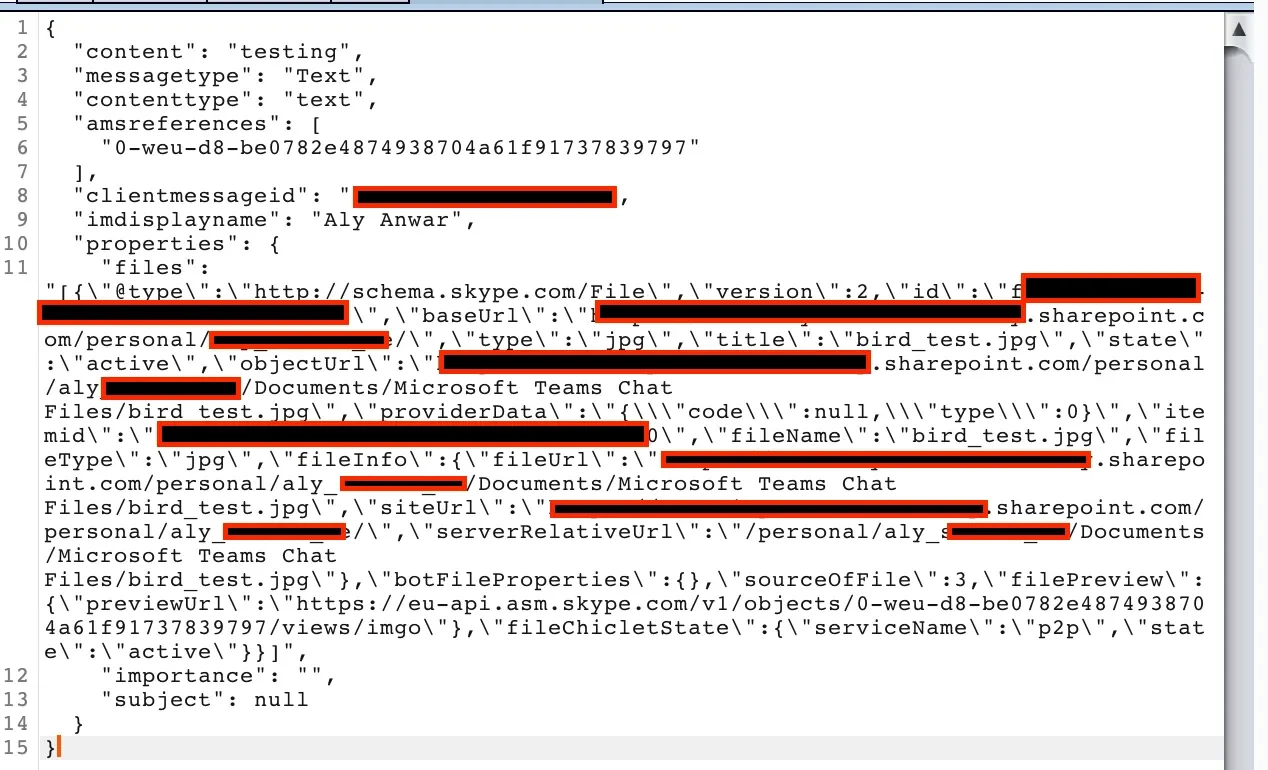
This endpoint request contains some interesting params such as:
imidisplayname -> the sender nameitemid -> the referenced ID for the uploaded image/filefileUrl -> the content of the file (a sharepoint link)content -> the message linked to the uploaded file
- Endpoint B, responsible for retrieving info related to the available files in a chat:
POST https://eu-prod.asyncgw.teams.microsoft.com/msgsearch/v1/query
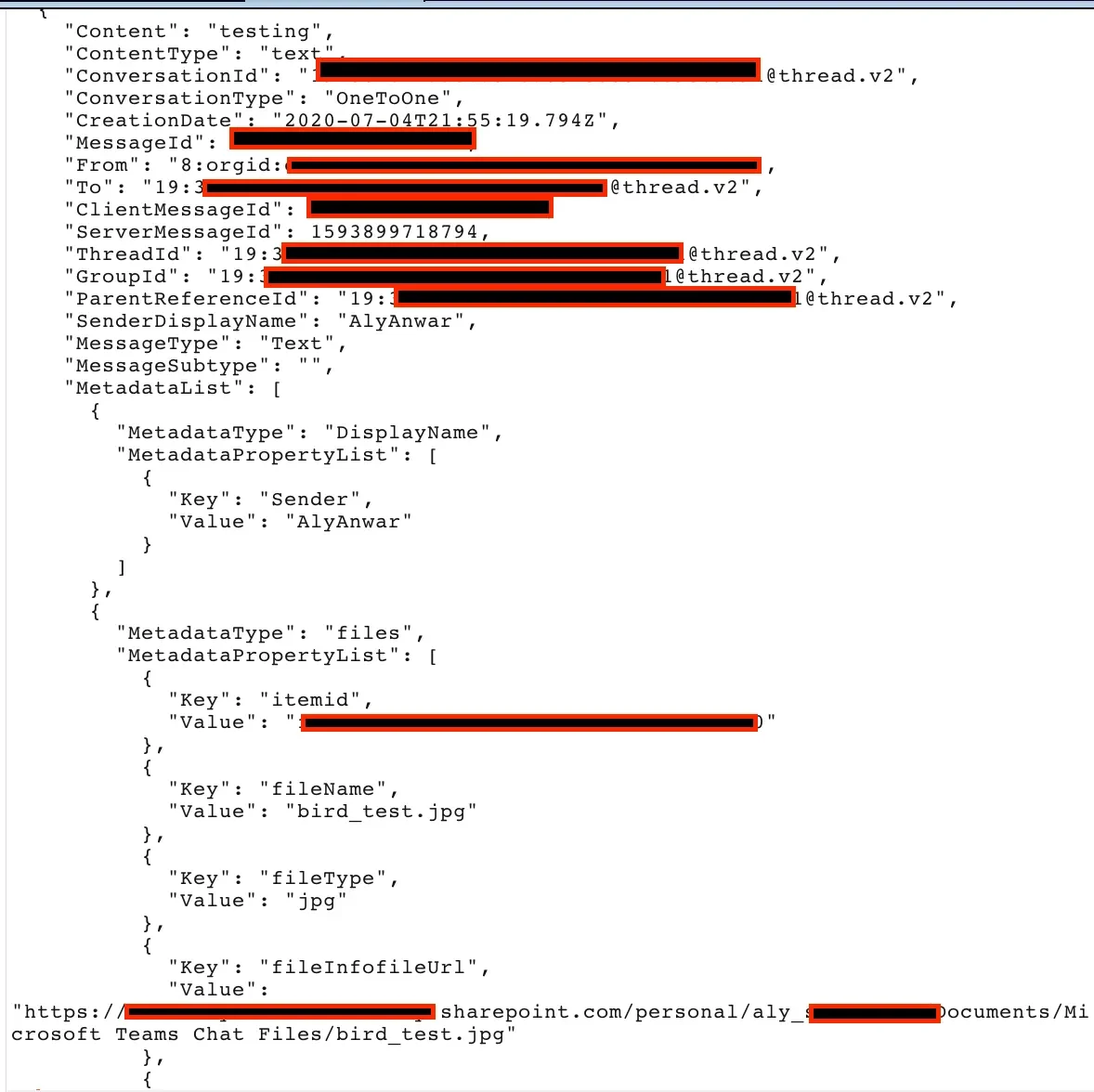
This endpoint response contains some interesting params such as:
ThreadId -> the referenced ID for the messaging threaditemid -> the referenced ID for the uploaded image/file
Setup
The researcher started out of curiosity, looking into the file uploading process in the browser version of Microsoft Teams. The write-up does not describe any special accounts, roles, tools or versions beyond that: the work is done against the web application, using the requests the client itself issues when a file is uploaded, and the two endpoints above. The scenarios involve a chat where the attacker uploads files and a different chat where another user, referred to as "Greg xxx", has uploaded a file.
Finding it
The starting point was the upload flow itself. Looking at what the client sends, the researcher noticed that Endpoint A carries parameters that reference the uploaded file, notably imidisplayname, itemid, fileUrl and content, and that Endpoint B returns identifiers for the same objects, notably ThreadId and itemid. The identifiers are supplied by the client, and the write endpoint acts on whatever object they point to.
Exploitation
Step 1: Change file ownership (self)
Status: Unpatched, this still works as of the day of this writing.
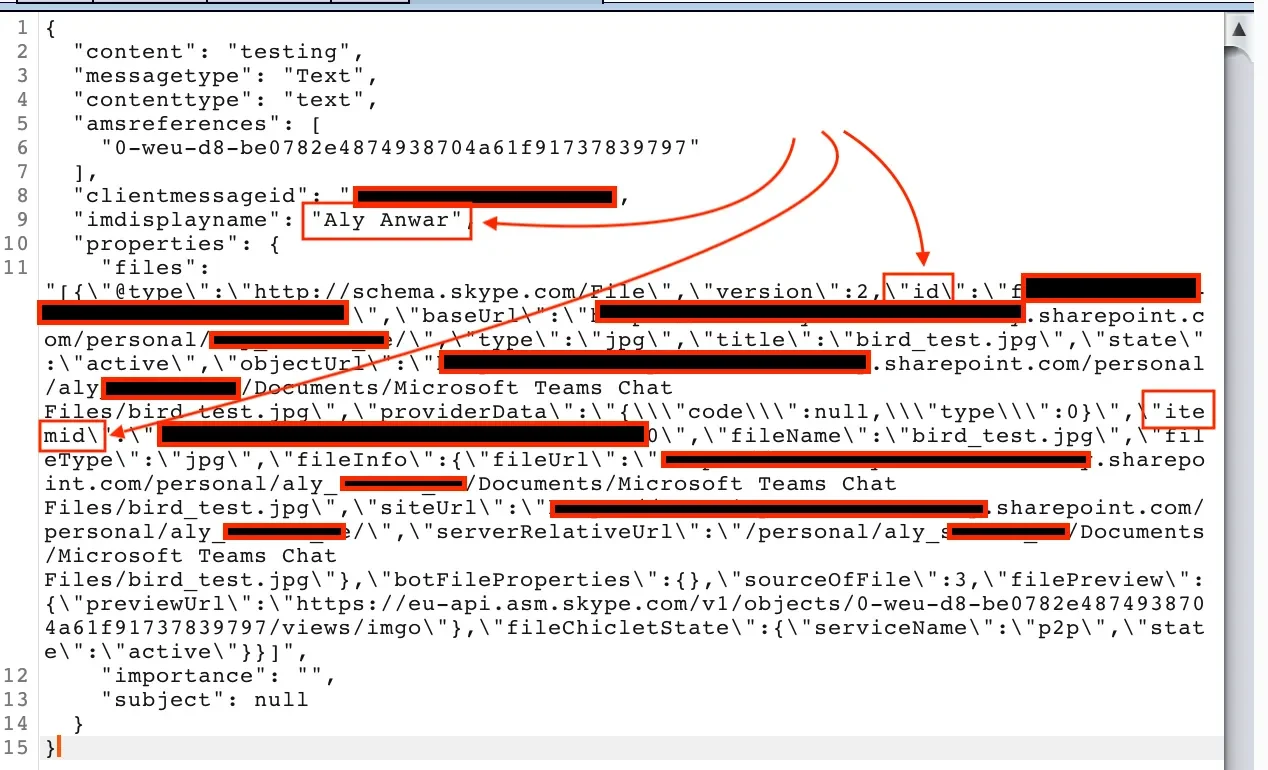
From Endpoint A, the focus is on the imidisplayname param:
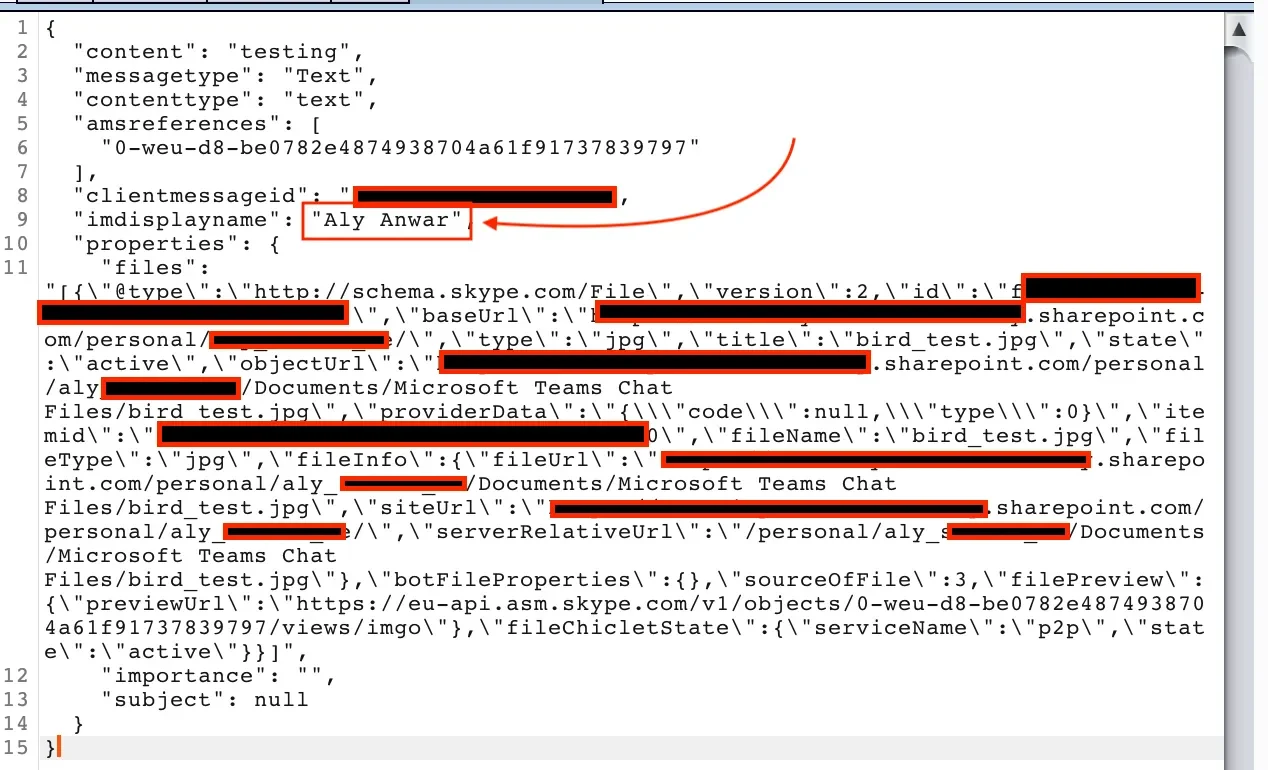
This value is reflected in the file details in the chat:
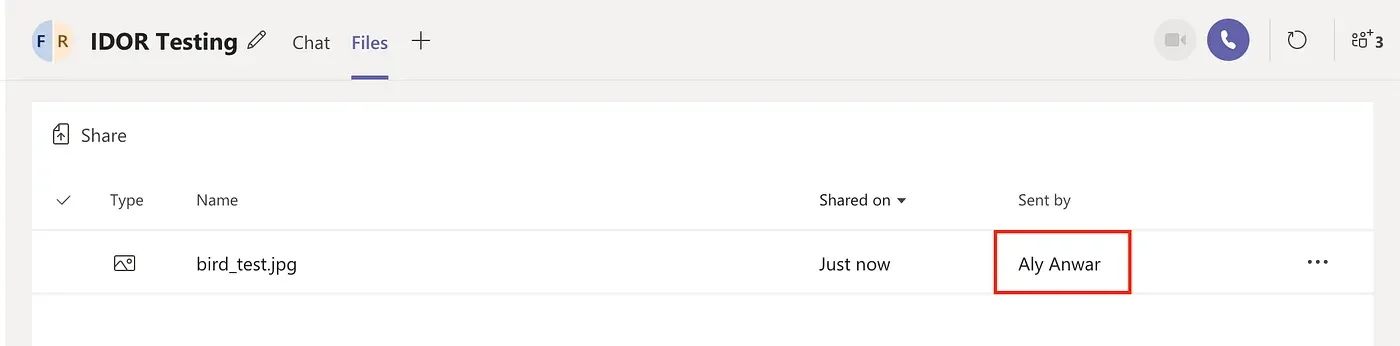
Changing this value to anything will be successful:
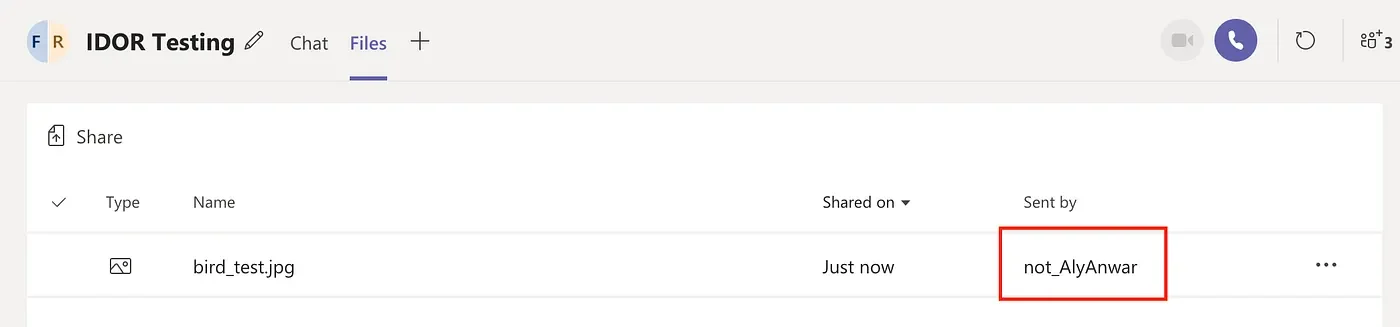
To confirm that the value is also changed for the referenced object, checking Endpoint B shows that it has been changed successfully:
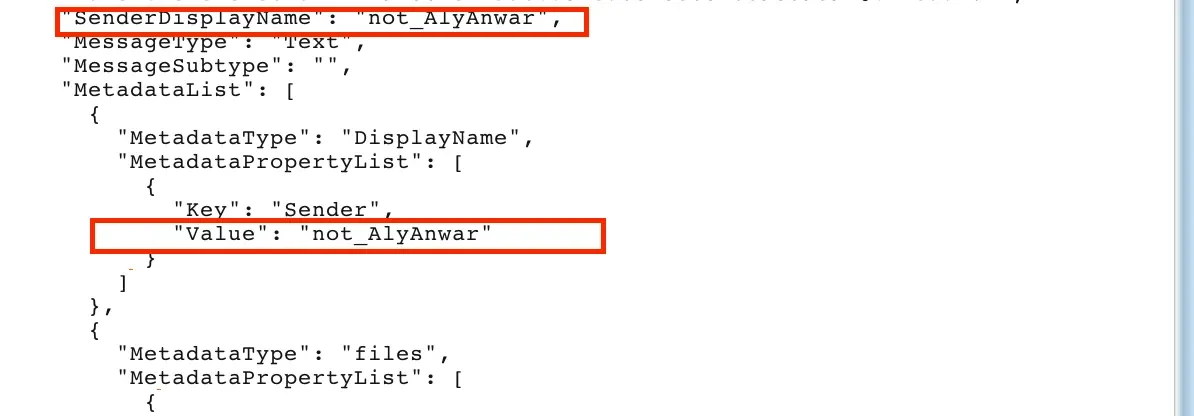
In other words, the display name attached to the uploaded file is taken from the request and stored against the referenced object, and the change is visible both in the chat and through the search endpoint.
Step 2: Change file ownership (others' files)
Status: patched.
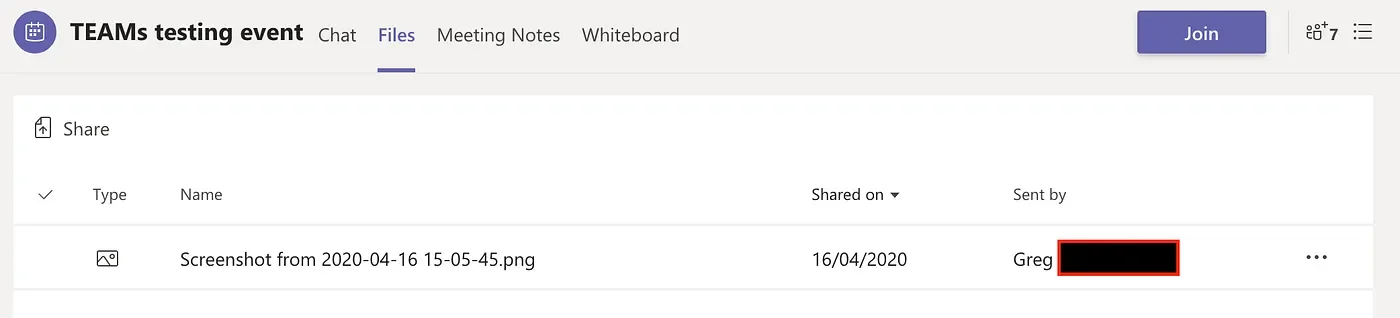
Checking other users' uploaded files for a different chat in the web application, only 1 file uploaded by user "Greg xxx" is visible:
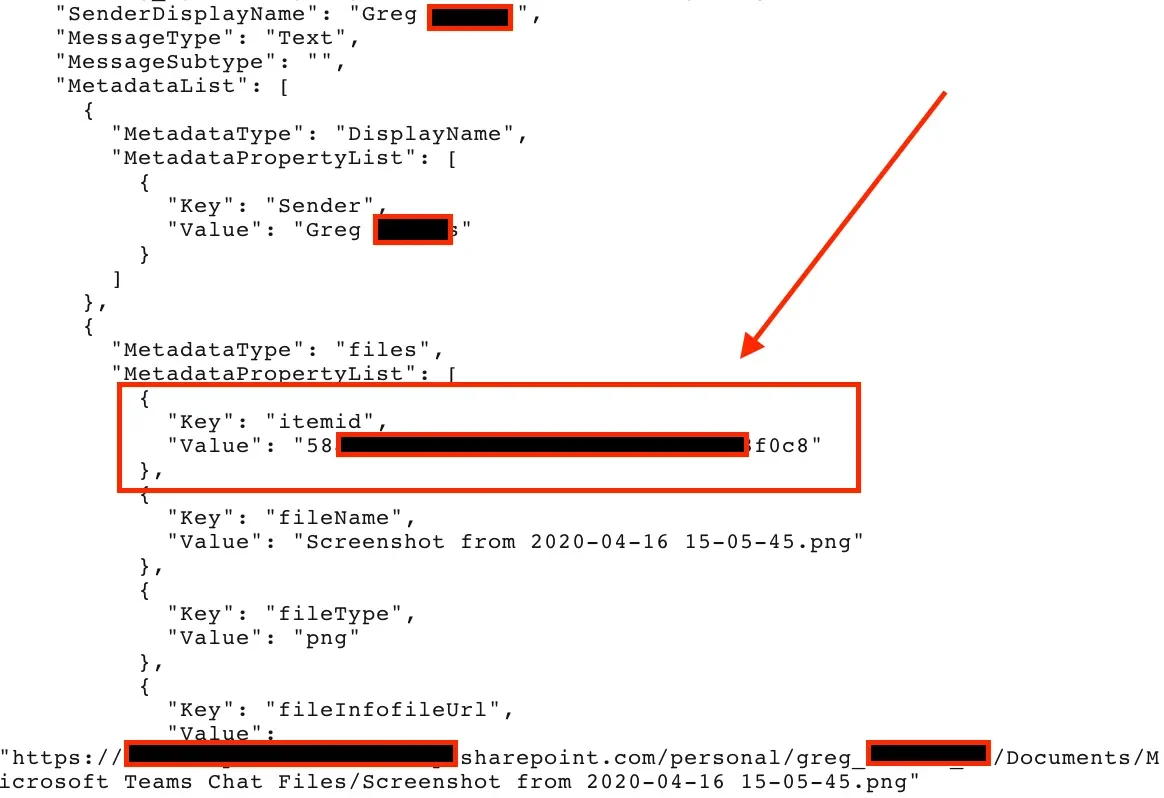
Via Endpoint B, the itemid for this file can be retrieved:
From Endpoint A, a similar request is crafted but with the grabbed values for id and itemid. Those two params are the ones responsible for referencing the uploaded file, as mentioned earlier.
The change takes place, and moreover the file itself has been overridden: no other files appear on the list except the attacker's file:
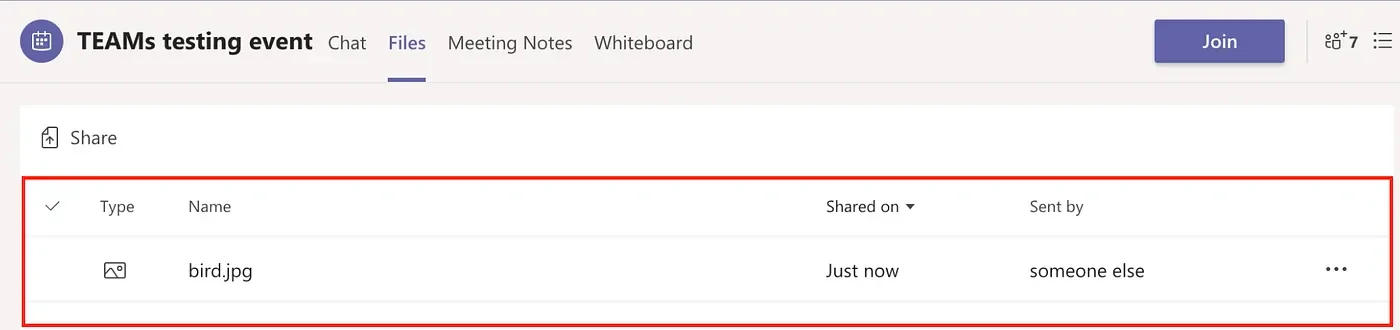
So by supplying another user's id and itemid in the PUT to Endpoint A, the attacker's data replaces the victim's file entry, and the victim's file no longer appears in the list.
Step 3: Takeover files (same chat)
Status: patched.
As shown in the previous scenario, this was already caused accidentally when attempting to change the file owner (display name).
To clarify, notice the fileurl variable, which basically fetches the file content whenever the image is being loaded:
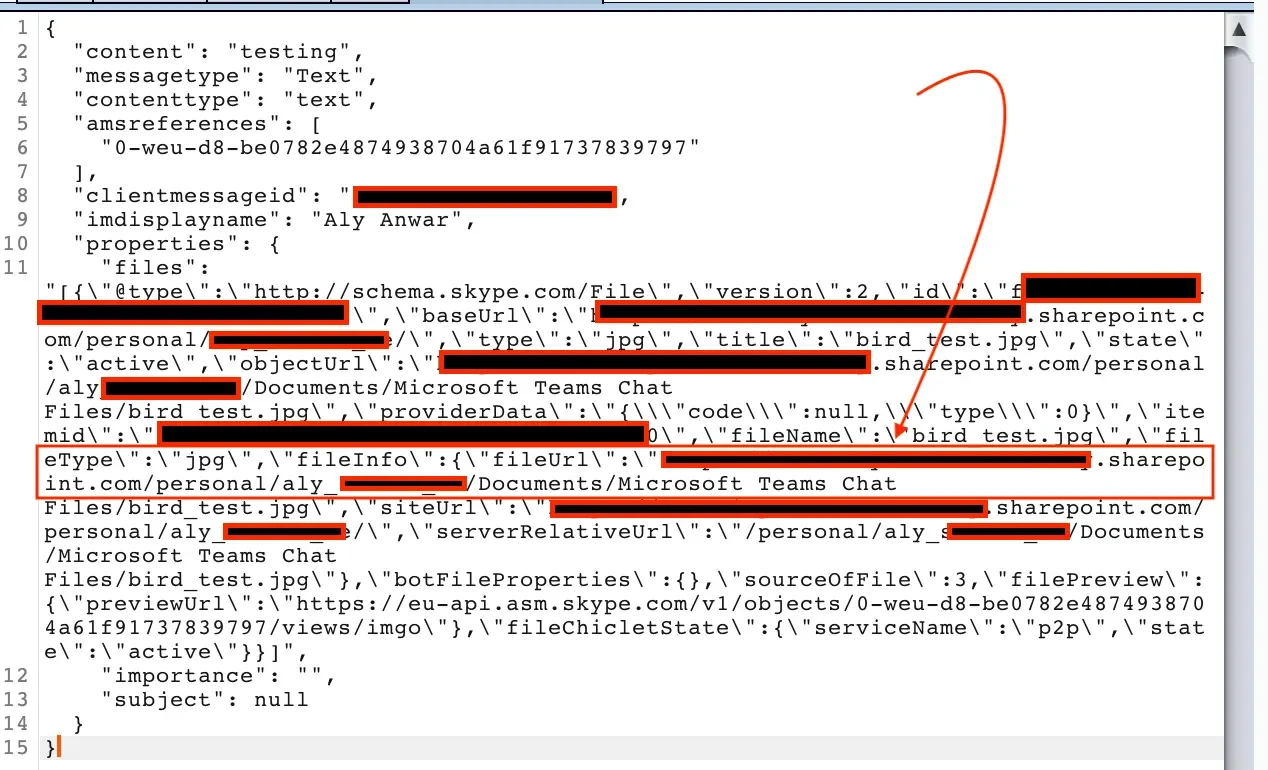
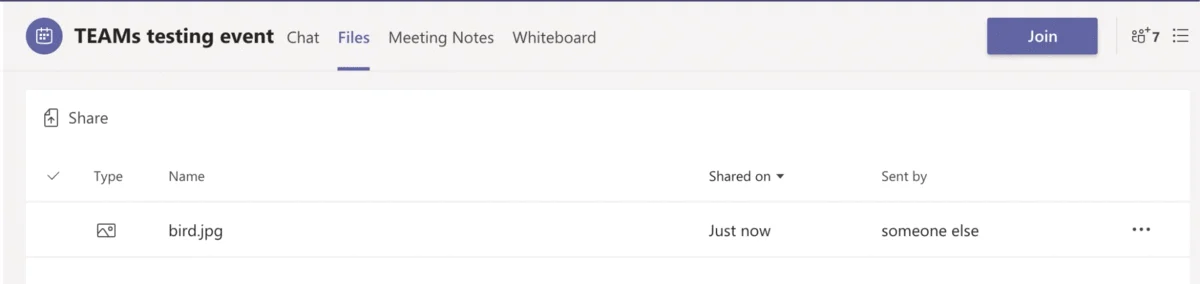
Submitting the PUT request of Endpoint A with a new fileUrl value and the itemid of the other user's uploaded file makes the application override this file with the new data. At this point file deletion, as well as changing file content, is possible:
Step 4: Takeover files (different chat)
Status: patched.
From Endpoint B, among the details of the uploaded file there is a ThreadID value:
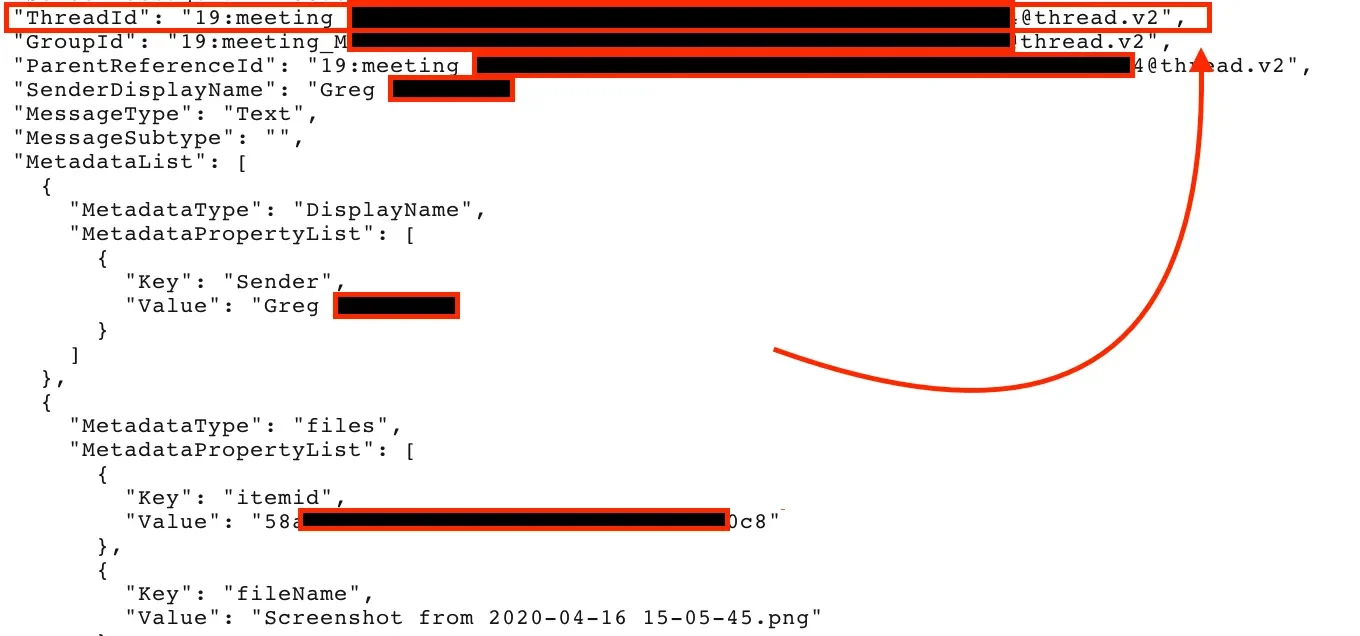
Via Endpoint A, changing the <thread_id> to this value allows all the previously mentioned scenarios to be performed for other chats as well.
PUT https://emea.ng.msg.teams.microsoft.com/v1/users/ME/conversations/<thread_id>/messages
Root cause
The PUT to Endpoint A accepts the identifiers that reference the uploaded file (id, itemid, and the <thread_id> in the path) from the client, and the application acts on whatever object those identifiers point to. There is no check, as far as the write-up shows, that the referenced file belongs to the requesting user or to a chat the user is entitled to modify. The same applies to the values carried in the request: imidisplayname is stored and reflected, and fileUrl is used to fetch the file content when the image is loaded, so a new fileUrl combined with another user's itemid overrides that file with the new data. The search endpoint (Endpoint B) supplies the identifiers needed to target other users' files and other threads, which makes the missing ownership check on the write path the decisive weakness. The report does not describe the server-side code or the exact implementation gap.
Impact
A user can delete what other users upload, give arbitrary ownership, and even change the content of any file being uploaded, that is, full takeover. The scenarios cover files in the same chat and, by changing the <thread_id>, files in different chats.
Fix
The write-up records the status of each scenario rather than the code change: changing file ownership on one's own files was still unpatched at the time of writing, while changing ownership of others' files, takeover within the same chat, and takeover across chats were patched. The clarification given for the rejection of the report states that altering the value of the message.properties.file property for another user is not considered a security risk. The write-up records the status of each scenario rather than the code change.
Variants to test
- Client-supplied object identifiers on write endpoints. Take any PUT or POST that references an object by an identifier taken from the request (message id, file id, thread id) and substitute an identifier belonging to another user. A positive result is that the response confirms the change and the object is altered for the other user.
- Display or metadata fields reflected from the request. Change a name or label field such as
imidisplaynameand then read the object back through a separate search or listing endpoint. A positive result is that the new value is stored against the referenced object and returned by the second endpoint. - Content pointers such as
fileUrl. Replace the URL that the application fetches when rendering the file with one you control, while keeping another user'sitemid. A positive result is that the victim's file is overridden with your content, or disappears from the list. - Thread or container identifiers in the path. Move the same request to a
<thread_id>obtained from a search endpoint for a chat you are not a member of. A positive result is that the same modification succeeds in the other chat. - Cross-endpoint identifier harvesting. Use a search or listing endpoint to collect identifiers (
ThreadId,itemid) for objects you can see but do not own, then replay them on the write endpoint. A positive result is that the write succeeds against an object you were only able to read about.
What happened, in plain words
Microsoft Teams is a chat application. In its browser version you can upload files into a chat, and when you do, your browser quietly sends a few messages to Microsoft's servers. Those messages are the instructions that make the upload happen.
A security researcher looked at those instructions out of curiosity. He found that some of them contain identifiers, which are short codes that tell the server which file or which chat you mean. By swapping in someone else's codes, a user could take over files that were not theirs: delete them, claim them as their own, or replace their contents.
This kind of flaw is called an IDOR, short for Insecure Direct Object Reference. The name sounds complicated, but the idea is simple. Imagine a cloakroom where you hand in your coat and get a ticket with a number on it. If the attendant hands you any coat whose number you ask for, without checking that the ticket is really yours, you can walk off with anyone's coat. An IDOR is exactly that: the application uses a number or code you supply to look up an object, and never checks that the object is yours.
This article walks through the researcher's four attack scenarios in the order he presented them, explains each request in plain words, and then covers how the report was handled.
Background: what the browser sends when you upload a file
When you upload a file to a Microsoft Teams chat, a couple of requests will be issued. A request is a message your browser sends to a server, a bit like posting a letter with an address on it and asking for something in return. The researcher focused on 2 main endpoints.
An endpoint is simply a specific address on a server that accepts a particular kind of request, like a specific counter in a large office building. You go to the counter that deals with your business.
The first one is Endpoint A, responsible for PUTing the data related to the uploaded file:
PUT https://emea.ng.msg.teams.microsoft.com/v1/users/ME/conversations/<thread_id>/messages
Line by line:
PUTis the type of request. Different request types mean different things:GETusually means "give me something",POSTusually means "here is some data, process it", andPUTusually means "store this data at this address". Here the browser is telling the server to store the details of the file being uploaded.https://emea.ng.msg.teams.microsoft.comis the server being talked to. Thehttpspart means the conversation is encrypted, so nobody in between can read it./v1/users/ME/conversations/<thread_id>/messagesis the path, the part that says which thing on that server you mean.MEis a placeholder for the logged-in user.<thread_id>is a placeholder for the identifier of the chat thread. The angle brackets are not typed literally; they mark a spot where a real value goes.messagesat the end says we are dealing with messages in that conversation.
This endpoint request contains some interesting params such as:
imidisplayname -> the sender nameitemid -> the referenced ID for the uploaded image/filefileUrl -> the content of the file (a sharepoint link)content -> the message linked to the uploaded file
A param, short for parameter, is a named piece of information sent along with a request, like the fields you fill in on a form. The block above lists four of them, each with an arrow pointing to what it means:
imidisplaynameis the sender name, the label shown next to the file.itemidis the referenced ID for the uploaded image or file. An ID is just a unique code that identifies one particular object, the way a passport number identifies one person.fileUrlis the content of the file, given as a SharePoint link. SharePoint is Microsoft's file storage service; a URL is a web address, so this parameter points at where the actual file lives.contentis the message linked to the uploaded file.
The second one is Endpoint B, responsible for retrieving info related to the available files in a chat:
POST https://eu-prod.asyncgw.teams.microsoft.com/msgsearch/v1/query
Line by line:
POSTis the request type. Here it is used to send a search query to the server.https://eu-prod.asyncgw.teams.microsoft.comis a different server from Endpoint A. Teams is built from many services, each with its own address./msgsearch/v1/queryis the path, and the wordquerytells you this is the search service.
This endpoint response contains some interesting params such as:
ThreadId -> the referenced ID for the messaging threaditemid -> the referenced ID for the uploaded image/file
A response is what the server sends back. This one contains two useful pieces of information:
ThreadIdis the referenced ID for the messaging thread, in other words the code for the chat itself.itemidis the referenced ID for the uploaded image or file, the same kind of code as in Endpoint A.
So Endpoint A is the write side: it stores file details. Endpoint B is the read side: it tells you what files exist and gives you their codes. The read side hands out the codes the write side accepts, and reusing them on the write side affected other users' files.
The attack scenarios
1. Changing the file owner name on your own file
Status: Unpatched, this still works as of the day of this writing.
From Endpoint A, the researcher focused on the imidisplayname param:
This value is reflected in the file details in the chat:
"Reflected" means the value you send comes back and is displayed. The screenshot shows the name appearing next to the file in the chat, which tells you the server is storing whatever you send rather than a fixed value.
Changing this value to anything will be successful:
To confirm that the value is also changed for the referenced object, checking Endpoint B shows that it has been changed successfully:
Why this step matters: before attacking someone else's file, the researcher first proved that the field is fully under the sender's control. He changed it, saw the change in the chat, then asked the search endpoint for the file again and saw the new value there too. Checking Endpoint B showed the value had also changed for the referenced object. A change that only appears in your own browser would be harmless.
2. Changing the owner name on someone else's file
Status: patched.
Now the researcher looked at another user's files. Checking other users' uploaded files for a different chat in the web application, only 1 file uploaded by user "Greg xxx" is visible:
Via Endpoint B, the itemid for this file can be retrieved:
This is the cloakroom moment. The search endpoint happily tells him the code of a file that belongs to someone else. Reading that code is not the problem by itself; the problem comes next, when the write endpoint accepts it.
From Endpoint A, a similar request is crafted but with the grabbed values for id and itemid. Those two params are the ones responsible for referencing the uploaded file, as mentioned earlier.
Why this step was taken: the researcher reused his own working upload request, which he knew the server accepted, and replaced only the two codes that say which file is meant. The request was crafted with the grabbed values for id and itemid, and the change took place.
The change takes place, and moreover the file itself has been overridden: no other files appear on the list except the attacker's file:
So by supplying another user's id and itemid in the PUT to Endpoint A, the attacker's data replaces the victim's file entry, and the victim's file no longer appears in the list. The victim's file did not just get renamed; it was replaced.
3. Taking over files in the same chat
Status: patched.
As shown in the previous scenario, this was already caused accidentally when attempting to change the file owner, meaning the display name.
To clarify, notice the fileurl variable, which basically fetches the file content whenever the image is being loaded:
A variable is a named slot that holds a value. Here fileurl holds the web address the application visits to get the actual file contents. When the chat displays the image, it follows that address and loads whatever is there.
Submitting the PUT request of Endpoint A with a new fileUrl value and the itemid of the other user's uploaded file makes the application override this file with the new data. At this point file deletion, as well as changing file content, is possible:
Why this is worse than a rename: the display name is only a label, but fileUrl decides what the file actually is. If you can point someone else's file entry at content you control, then when other people in the chat open that file they see your content instead of the original. The researcher notes that file deletion, as well as changing file content, is possible at this point.
4. Taking over files in a different chat
Status: patched.
From Endpoint B, among the details of the uploaded file there is a ThreadID value:
Via Endpoint A, changing the <thread_id> to this value allows all the previously mentioned scenarios to be performed for other chats as well.
PUT https://emea.ng.msg.teams.microsoft.com/v1/users/ME/conversations/<thread_id>/messages
Line by line, this is the same request as before, but the <thread_id> placeholder in the path is now filled with a chat identifier taken from the search endpoint, including chats the attacker is not part of. The path is the part of the address that says which conversation to act on, so changing it moves the whole attack into another conversation. Changing the <thread_id> to this value allows all the previously mentioned scenarios to be performed for other chats as well.
Why it worked
The PUT to Endpoint A accepts the identifiers that reference the uploaded file, namely id, itemid and the <thread_id> in the path, from the client, and the application acts on whatever object those identifiers point to. There is no check, as far as the write-up shows, that the referenced file belongs to the requesting user or to a chat the user is entitled to modify.
The same applies to the values carried in the request. imidisplayname is stored and reflected, and fileUrl is used to fetch the file content when the image is loaded, so a new fileUrl combined with another user's itemid overrides that file with the new data. The search endpoint, Endpoint B, supplies the identifiers needed to target other users' files and other threads, which makes the missing ownership check on the write path the decisive weakness.
In plain terms: the write endpoint acted on whatever file the supplied identifiers pointed to. The report does not describe the server-side code or the exact implementation gap. An authorisation check is the server-side decision about whether this particular user is allowed to do this particular thing. Doing it only in the browser is useless, because the browser belongs to the attacker and can be made to send anything.
Impact
A user can delete what other users upload, give arbitrary ownership, and even change the content of any file being uploaded, that is, full takeover. The scenarios cover files in the same chat and, by changing the <thread_id>, files in different chats.
Fix
The write-up records the status of each scenario rather than the code change: changing file ownership on one's own files was still unpatched at the time of writing, while changing ownership of others' files, takeover within the same chat, and takeover across chats were patched.
The clarification given for the rejection of the report states that altering the value of the message.properties.file property for another user is not considered a security risk.
The write-up records the status of each scenario rather than the code change.
Variants to test
If you want to look for the same kind of mistake elsewhere, these are patterns worth trying. Each one is a small experiment with a clear pass or fail.
- Client-supplied object identifiers on write endpoints. Take any PUT or POST that references an object by an identifier taken from the request, such as a message id, file id or thread id, and substitute an identifier belonging to another user. A positive result is that the response confirms the change and the object is altered for the other user.
- Display or metadata fields reflected from the request. Change a name or label field such as
imidisplaynameand then read the object back through a separate search or listing endpoint. A positive result is that the new value is stored against the referenced object and returned by the second endpoint. - Content pointers such as
fileUrl. Replace the URL that the application fetches when rendering the file with one you control, while keeping another user'sitemid. A positive result is that the victim's file is overridden with your content, or disappears from the list. - Thread or container identifiers in the path. Move the same request to a
<thread_id>obtained from a search endpoint for a chat you are not a member of. A positive result is that the same modification succeeds in the other chat. - Cross-endpoint identifier harvesting. Use a search or listing endpoint to collect identifiers such as
ThreadIdanditemidfor objects you can see but do not own, then replay them on the write endpoint. A positive result is that the write succeeds against an object you were only able to read about.
Reporting timeline
The researcher reported the issue and then had a long exchange with the programme. The dates and outcomes are as follows.
- 28 April 2020: reported.
- 29 April 2020: rejected because it was considered a "social engineering" or "man in the middle" attack.
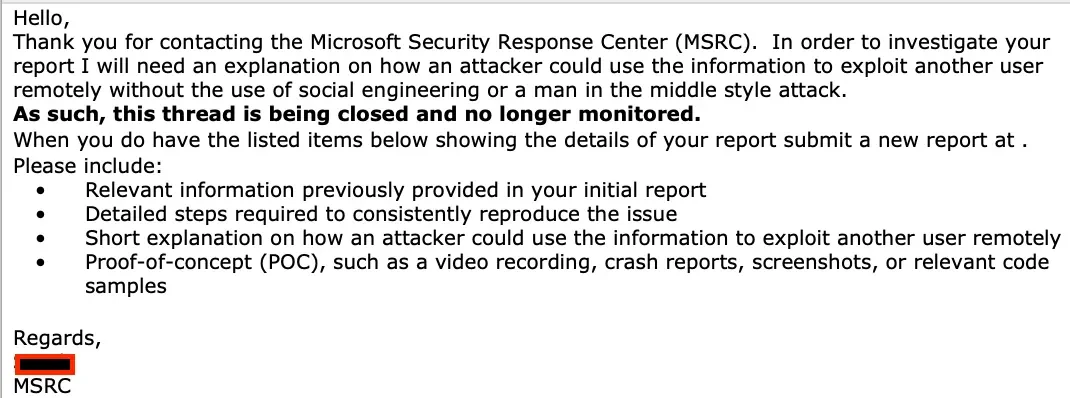
A man-in-the-middle attack is one where an attacker sits between two parties and interferes with their traffic. The researcher's finding was not that; it was the server accepting codes it should have checked. The report was re-reported the same day with tackling the mentioned points.
- 29 April 2020: re-reported with tackling the mentioned points.
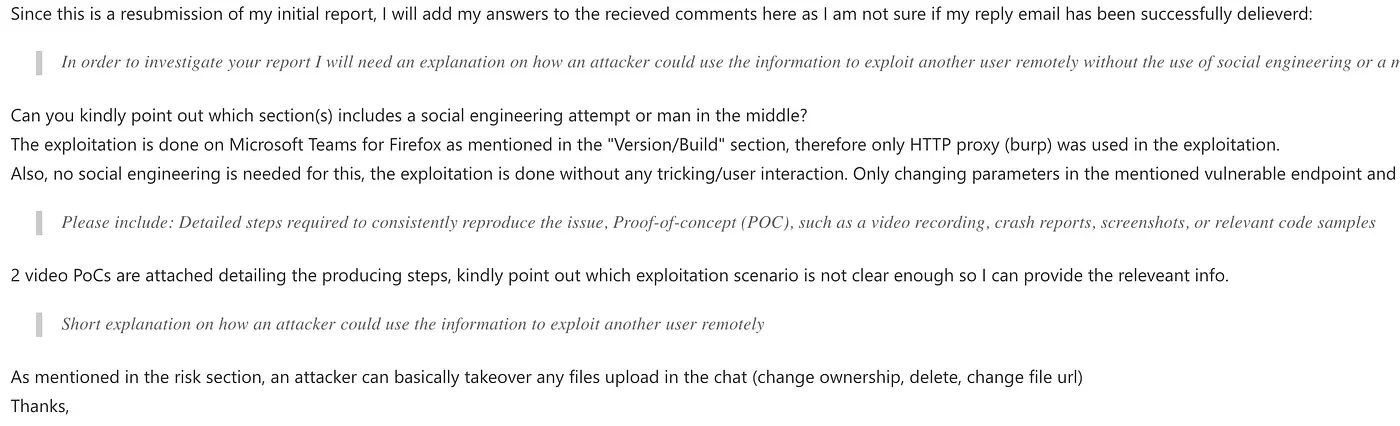
One month later he had not received anything, so he asked for an update.
- 20 May 2020: update.

- 2 June 2020: rejected because "it does not meet the bar for servicing". The researcher notes that he had 0 views on his 2 PoC videos after being asked to re-upload them. A PoC, or proof of concept, is a demonstration that the problem is real, usually a short recording showing the steps working.
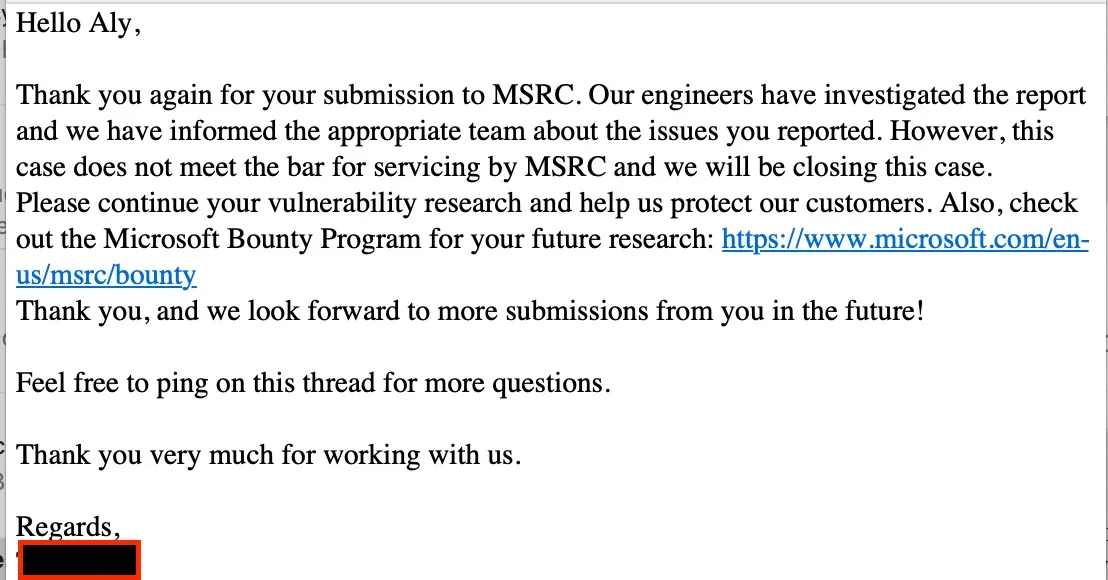
- 16 June 2020: clarification for the rejection of the report.
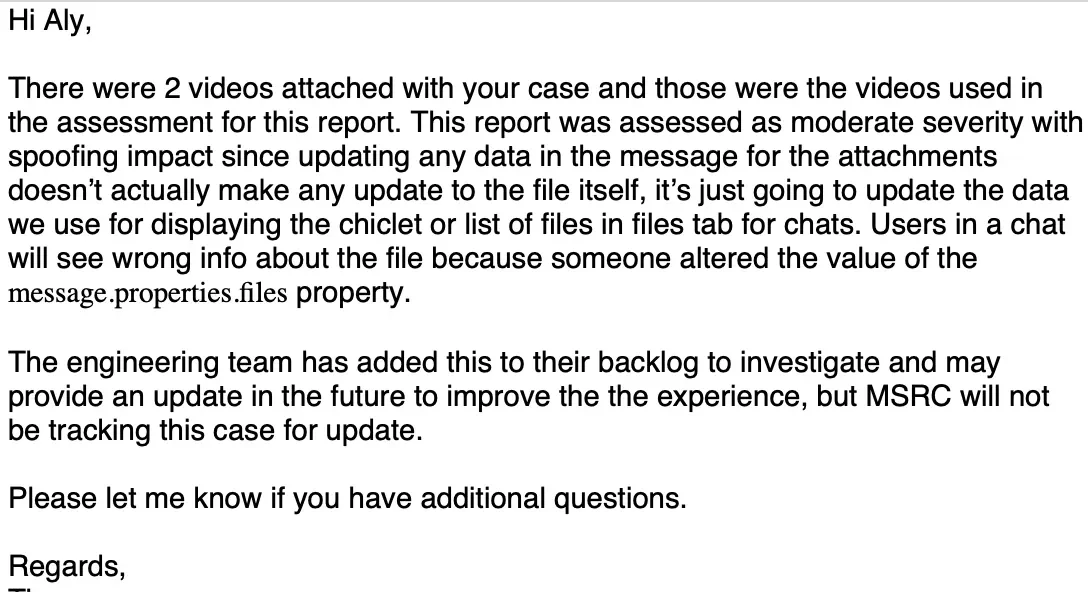
The clarification's summary is: altering the value of the message.properties.file property for another user is not considered a security risk.
- 29 June 2020: public disclosure permission granted. Public disclosure means the researcher is allowed to publish the details, which is why this write-up exists.
Glossary
- API: a defined set of addresses and rules that one piece of software uses to talk to another, like a service counter with specific forms to fill in.
- Authorisation check: a server-side decision about whether this user is allowed to perform this action on this object.
- Client: the software on your side, here the browser version of Teams, which sends requests to the server.
- Endpoint: a specific address on a server that accepts a particular kind of request.
- GET: a request type normally used to ask the server for something.
- HTTPS: the encrypted version of the protocol used to fetch web pages, so the conversation cannot be read in transit.
- ID: a unique code that identifies one particular object.
- IDOR (Insecure Direct Object Reference): a flaw where the application looks up an object using a code supplied by the user and does not check that the object belongs to that user.
- Man-in-the-middle attack: an attack where someone sits between two parties and interferes with their traffic.
- Parameter (param): a named piece of information sent with a request, like a field on a form.
- Path: the part of a web address that says which thing on the server you mean.
- PoC (proof of concept): a demonstration that a problem is real, often a short recording of the steps.
- POST: a request type normally used to send data to the server for processing.
- Public disclosure: permission, or the act of making details of a reported issue public.
- PUT: a request type normally used to tell the server to store data at a given address.
- Reflected: a value you send that comes back and is displayed by the application.
- Request: a message your browser sends to a server asking it to do something.
- Response: what the server sends back after a request.
- SharePoint: Microsoft's file storage service, used here to hold the actual uploaded file.
- Thread: a conversation in a chat application; its identifier is the
ThreadIdor<thread_id>. - URL: a web address, such as the one in
fileUrlthat points at the file content. - Variable: a named slot that holds a value, such as
fileurlholding the address of the file.



