Access control missing while viewing the attachments in the "All boards"
Attachment files on task cards were reachable through a URL containing only a sequential numeric identifier, with no check that the requester owned the card. Any logged-in user could open another user's attachment by changing that number, and the predictable sequence made bulk enumeration feasible.

- Triaged in 20 hours
- Fixed in 42 days
- Paid in 42 days
- Disclosed after 3 months
The vulnerability lies in the "view attachment" of the tasks . When a user uploads the file to the Task, the attachment is given a numeric number and is increased +1 on further uploads. It is easy for any user to view and download all the files uploaded to the tasks by any user. The access is not controlled with the session or csrf token.
Steps to Reproduce:
- Connect to the server login with user A and visit the webpage. I used the provider "us.cloudamo.com"
- Visit https://us.cloudamo.com/apps/deck and create a task.
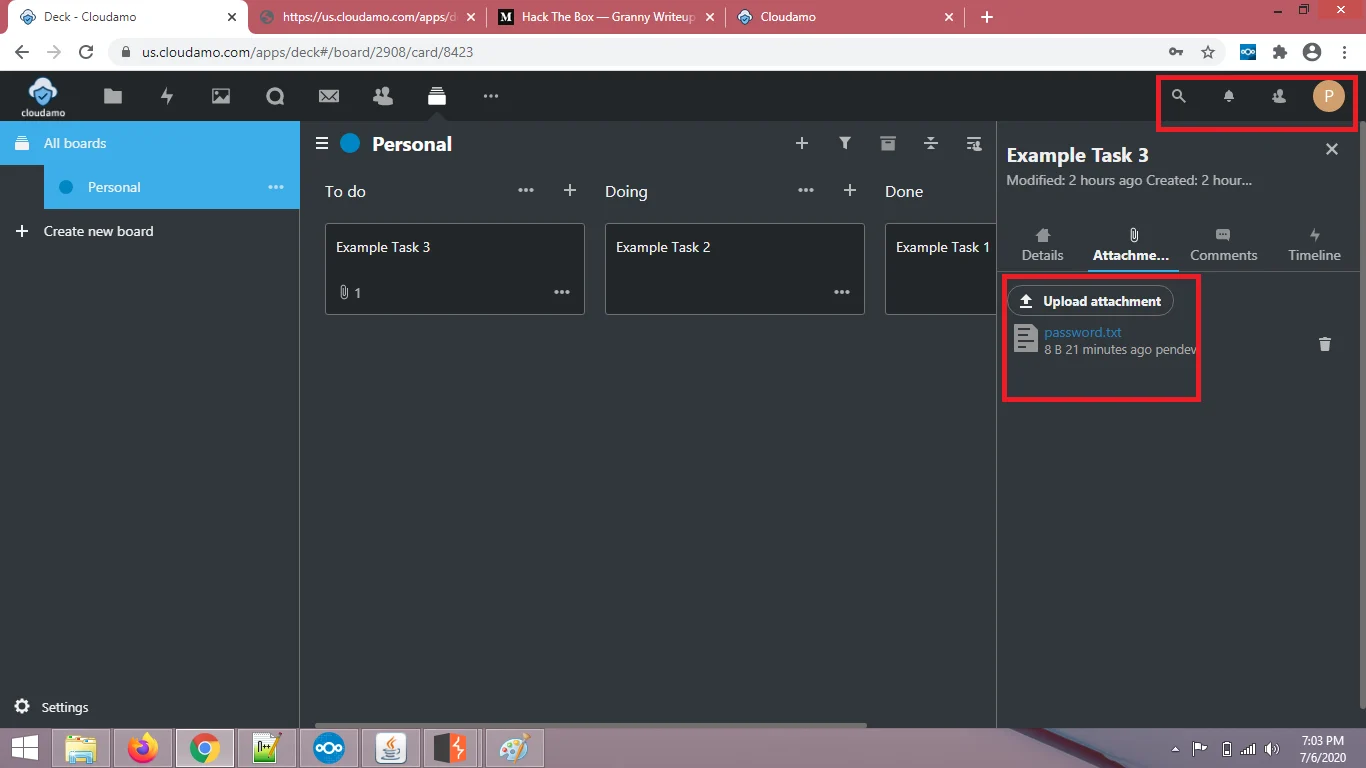
- Upload any file to the attachments and capture the request. The request will looks like "https://us.cloudamo.com/apps/deck/cards/8420/attachment/30" where 30 is the ID of the uploaded attachment.
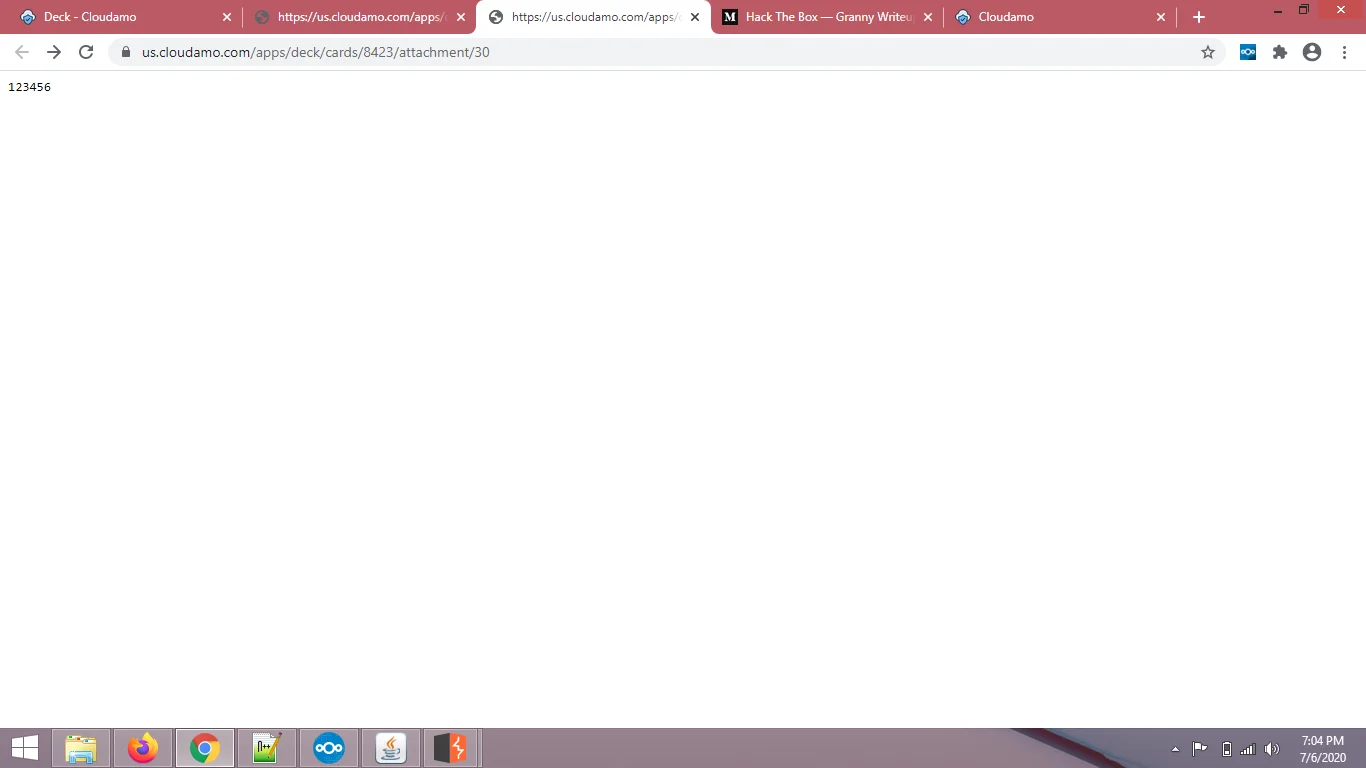
- Login with user B and access the URL and you should be able to view the attachment of user A.
- Since the attachment IDs are numerical number with poor entropy can be easily brute-forced and one can get all the uploaded attachments by all the users of the particular provider.
Impact
Unauthorized user can view and download the files of other users. This may leak the sensitive information of users.
Attachments
Context
Nextcloud is a self-hosted collaboration platform, and Deck is its kanban-style task board app. Tasks (cards) on a board can carry file attachments, and the report concerns the "view attachment" path of that feature: the endpoint a user hits to open or download a file that was uploaded to a card.
The researcher found that this endpoint did not tie the requested attachment to the requesting session. Any authenticated user could open an attachment belonging to another user's task simply by knowing, or guessing, its numeric identifier.
Setup
- Two accounts, referred to as user A and user B, on the same Nextcloud instance.
- The instance used in the report was a hosted provider,
us.cloudamo.com, running the Deck app at/apps/deck. - No special tooling is described beyond a browser and an intercepting proxy to capture the upload request.
The precondition is simply that at least one other user has uploaded a file to a task on the same instance.
Finding it
While looking at the attachment handling of Deck tasks, the researcher noticed that every uploaded file is assigned a numeric identifier, and that the number is incremented by one for each further upload. The identifier is therefore sequential and has very low entropy.
More importantly, the request that serves the attachment did not appear to check who was asking. The researcher's summary is that access is not controlled with the session or CSRF token, so the endpoint returns the file to whoever requests the right URL.
Exploitation
Step 1: log in as user A
Connect to the server and log in as user A, then visit the web interface. The report used the provider us.cloudamo.com.
Step 2: create a task
Visit the Deck app and create a task:
https://us.cloudamo.com/apps/deck
Step 3: upload a file and capture the request
Upload any file to the task's attachments and capture the resulting request. The request looks like this:
https://us.cloudamo.com/apps/deck/cards/8420/attachment/30
Here 8420 is the card identifier and 30 is the identifier of the uploaded attachment. That trailing number is the only thing that selects which file is returned.
Step 4: fetch the attachment as user B
Log in as user B and access the same URL. User B is able to view the attachment that user A uploaded. The report states that access is not controlled with the session or CSRF token, so user B is served the file uploaded by user A.
Step 5: enumerate
Because attachment identifiers are plain sequential numbers with poor entropy, they can be brute-forced. By walking the identifier space, an attacker can retrieve every attachment uploaded by every user of that provider.
Root cause
The attachment endpoint addresses files by a sequential numeric identifier, and the report states that access is not controlled with the session or CSRF token. Authorisation is effectively delegated to the URL: if you know the number, you get the file.
Because the identifier is not scoped per user or per board and is incremented by one on each upload, the missing check is compounded by predictability. The report states that access is not controlled with the session or CSRF token; The report states that access is not controlled with the session or CSRF token.
Impact
An unauthorised user can view and download files uploaded by other users. As the report puts it, this may leak sensitive information of users. The report says that by brute-forcing the IDs one can get all the uploaded attachments by all the users of the particular provider.
The report was rated medium severity with a CVSS score of 6.5, classified as an insecure direct object reference, and paid a bounty of 150 USD.
Fix
The report does not describe the fix that was applied. What the endpoint needs is a server-side authorisation check on every attachment request: resolve the attachment to its card and board, and confirm that the current session's user has read access to that board before returning the file. Relying on unguessable identifiers alone would not be sufficient either, given that the identifiers are sequential.
Variants to test
- Other Deck endpoints keyed by numeric ID. Try card, board, comment and attachment paths with identifiers belonging to a second account. A positive result is any response containing the other account's data.
- Attachment download versus preview. Test both the inline view and the download path; one may enforce the check while the other does not.
- Deleted or moved cards. Request an attachment ID whose card has been deleted or moved to a board the attacker cannot see. A positive result is the file still being served.
- Other Nextcloud apps with file references. Look for apps that expose files by sequential IDs rather than by path with an ownership check.
- Unauthenticated access. Repeat the request without a session cookie. A positive result is the file being returned to an anonymous client.
Hunting notes
This kind of bug tends to hide in secondary features that reference stored objects by a database ID: attachment handlers, preview and thumbnail endpoints, export and share links. During recon, look for URLs with a bare incrementing integer as the last path segment, and compare the IDs created by two separate accounts to see whether they share one sequence. If they do, the missing authorisation check is usually one request away.
The impact case here was straightforward to demonstrate: create a file as one user, fetch it as another, and show the file contents coming back.
What happened, in plain words
Nextcloud is a piece of software you install on your own server to share files, calendars and chat with a group of people. It is often described as a do-it-yourself alternative to services like Google Drive or Dropbox. One of the optional apps you can add to Nextcloud is called Deck. Deck is a kanban board: a page with columns such as "To do", "Doing" and "Done", and cards that move between those columns. Each card is a task, and each task can have files attached to it, for example a document or a screenshot.
The researcher found a problem in the part of Deck that opens those attached files. When you click an attachment, your browser asks the server for a specific address, and that address ends in a number. The number identifies the file. The report says access to the file is not controlled with the session or CSRF token, so another user could open the same address.
So if you had an account on the same Nextcloud server, you could take the address of a file that belonged to somebody else, change the number at the end, and download their file. Because the numbers are handed out in order, one after another, you did not even need to know a real address in advance: you could simply try every number in turn.
This kind of mistake has a name: an insecure direct object reference, usually shortened to IDOR. The idea is that the server uses something the user supplies (here, a number in the address) to pick which record in its database to return, and trusts that number instead of checking whether this particular user is allowed to see that record. A simple everyday comparison: a hotel where the receptionist gives you a key with the room number on it, and any key opens any door as long as the number on it is correct. The lock exists, but it does not check who you are.
The setup
To show the problem, the researcher needed two ordinary user accounts on the same Nextcloud server. The report calls them user A and user B. User A is the victim: the person who uploads a private file. User B is the attacker: the person who should not be able to see it.
The server used in the report was not a private test machine but a hosting provider, us.cloudamo.com, with the Deck app reachable under /apps/deck.
No special software is described beyond a normal browser and a tool that lets you look at, and pause, the requests the browser sends to the server. Such a tool is often called an intercepting proxy. Think of it as a pause button on the conversation between your browser and the website, so you can read exactly what your browser is asking for before the answer comes back.
The only precondition is that at least one other person on the same server has uploaded a file to a task. If nobody has uploaded anything, there is nothing to find.
Finding it
While looking at how Deck handles attachments, the researcher noticed two things.
First, every uploaded file gets a number, and each new upload gets the next number. If one file is number 30, the next one is 31, then 32, and so on. In security terms the numbers are sequential and have very low entropy. Entropy here just means unpredictability: a long random string is hard to guess, while 30, 31, 32 is trivial to guess. It is the difference between a combination lock with three dials and a row of numbered pigeonholes.
Second, and more seriously, the request that delivers the file did not seem to check who was asking. The researcher's own summary is that access is not controlled with the session or CSRF token. Two terms are worth unpacking here.
A session is how a website remembers that you are logged in. When you sign in, the server gives your browser a small piece of data, usually stored in a cookie, and your browser sends it back with every later request. The server looks at it and says "ah, this is user A". If a request is served without the server consulting that session to decide whether you may have the file, then being logged in as anybody at all is enough.
A CSRF token is a second, extra value that a website puts into forms and actions to make sure the request really came from its own pages and not from a malicious page that tricked your browser. It protects against a different kind of attack (cross-site request forgery), but it is also a sign that the server is validating the request. The report says neither the session nor the CSRF token is used to control access here, which in plain words means the server made no per-user decision at all before handing over the file.
Exploitation
The researcher then demonstrated the problem step by step.
Step 1: log in as user A
Connect to the server and sign in as user A, then open the web interface. The report used the provider us.cloudamo.com. The point of this step is to have a normal, legitimate account from which to upload a file, exactly as any real user would.
Step 2: create a task
Open the Deck app and create a task:
https://us.cloudamo.com/apps/deck
This is simply the address of the Deck app on that server. Opening it in the browser shows the boards, and from there you can add a card. A task is needed because attachments live on tasks: there is no other place in Deck to put a file.
Step 3: upload a file and capture the request
Upload any file to the task's attachments, and capture the request that the browser sends while doing so. The request looks like this:
https://us.cloudamo.com/apps/deck/cards/8420/attachment/30
Reading this address from left to right: https://us.cloudamo.com is the server; /apps/deck says we are inside the Deck app; /cards/8420 names one particular card, the task that was just created; /attachment/30 names one particular file attached to it. So 8420 is the card's identifier and 30 is the uploaded file's identifier. The trailing number is the only part that decides which file comes back. Capturing the request is how the researcher learned the shape of the address and which number belonged to the file: you cannot guess the exact format reliably just by clicking around, but you can read it once you watch the traffic.
Step 4: fetch the attachment as user B
Now sign in as user B and open the very same address. User B can view the file that user A uploaded. The report states that access is not controlled with the session or CSRF token, so user B can view the file uploaded by user A. This is the heart of the bug: the same address works for a different person.
Step 5: enumerate
Because the file numbers are plain consecutive integers, they can be brute-forced. Brute-forcing means trying every possibility in turn instead of being clever: here, requesting 1, then 2, then 3, and so on. By walking through the numbers, an attacker can collect every attachment uploaded by every user of that provider. No leaked link is needed, and no knowledge of who uploaded what: the numbers do the work.
Root cause
The attachment address selects files by a number that counts up with every upload, and the report states that access is not controlled with the session or CSRF token. Authorisation, meaning the decision about what a given user is allowed to do, is effectively left to the address itself: if you know the number, you get the file.
Two weaknesses combine here. The number increases by one on each upload, so it is predictable. The missing check is the real bug; the predictability is what makes it easy to exploit at scale. The report states that access is not controlled with the session or CSRF token, which in practice means the request carries no per-user authorisation decision at all, so the usual session-based defences never come into play.
Impact
An unauthorised user can view and download files uploaded by other users. As the report puts it, this may leak sensitive information of users. The report says that by brute-forcing the IDs one can get all the uploaded attachments by all the users of the particular provider.
The report was rated medium severity with a CVSS score of 6.5, classified as an insecure direct object reference, and paid a bounty of 150 USD. CVSS is a standard scoring system for the seriousness of a security flaw, and a bounty is a payment a company makes to someone who reports a valid problem to it.
Fix
The report does not describe the fix that was applied. What the endpoint needs is a server-side authorisation check on every attachment request: resolve the attachment to its card and board, and confirm that the current session's user has read access to that board before returning the file. Relying on unguessable identifiers alone would not be sufficient either, given that the identifiers are sequential.
Variants to test
Once you know the pattern, it is worth looking for the same mistake elsewhere.
- Other Deck endpoints keyed by numeric ID. Try card, board, comment and attachment paths with identifiers belonging to a second account. A positive result is any response containing the other account's data.
- Attachment download versus preview. Test both the inline view and the download path; one may enforce the check while the other does not.
- Deleted or moved cards. Request an attachment ID whose card has been deleted or moved to a board the attacker cannot see. A positive result is the file still being served.
- Other Nextcloud apps with file references. Look for apps that expose files by sequential IDs rather than by path with an ownership check.
- Unauthenticated access. Repeat the request without a session cookie. A positive result is the file being returned to an anonymous client.
Hunting notes
This kind of bug tends to hide in secondary features that reference stored objects by a database ID: attachment handlers, preview and thumbnail endpoints, export and share links. During recon, meaning the early exploration of a target, look for URLs with a bare incrementing integer as the last path segment, and compare the IDs created by two separate accounts to see whether they share one sequence. If they do, the missing authorisation check is usually one request away.
The impact case here was straightforward to demonstrate: create a file as one user, fetch it as another, and show the file contents coming back.
Glossary
- Nextcloud: self-hosted software for sharing files and collaborating, installed on your own server.
- Deck: a Nextcloud app that provides kanban boards with columns and cards.
- Card / task: a single item on a Deck board, which can carry file attachments.
- Attachment: a file uploaded to a card.
- Endpoint: a specific address on a server that performs a specific action when requested.
- IDOR (insecure direct object reference): a flaw where the server picks a record using an identifier supplied by the user without checking that this user may see that record.
- Identifier / ID: a number or string that names one particular record, such as a card or a file.
- Entropy: unpredictability; low entropy means easy to guess, like consecutive numbers.
- Sequential: following one after another, 30, 31, 32, with no gaps or randomness.
- Brute-force / enumerate: trying every possible value in turn to find the ones that work.
- Session: the server's way of remembering that you are logged in, usually via a cookie sent with each request.
- Cookie: a small piece of data a website stores in your browser and gets back on later requests.
- CSRF token: an extra value added to requests to prove they came from the site's own pages, protecting against cross-site request forgery.
- Authorisation: the decision about what a logged-in user is allowed to access.
- Authentication: proving who you are, for example by logging in.
- Server-side check: a validation performed by the server, which the user cannot bypass by editing the page in the browser.
- Intercepting proxy: a tool that sits between browser and server so you can read and pause requests.
- Recon: the exploration phase of security testing, where you map out what a target offers.
- CVSS: a standard scoring system for the severity of a security flaw.
- Bounty: a payment made by a company for a valid security report.
- Severity: a rating of how serious a flaw is, here medium.


