Open redirect on "Unsupported browser" warning
The UnsupportedBrowser.vue component decodes a base64-encoded redirect_url query parameter and redirects the user without validating the URL. An attacker could craft a link that redirects a victim from the legitimate domain to an attacker-controlled site.
 Originally disclosed on HackerOne
- Disclosed after 45 days
Summary by the program
Security advisory at https://github.com/nextcloud/security-advisories/security/advisories/GHSA-h353-vvwv-j2r4
The report
Hello team, The below mentioned source code is using a unsanitized URL redirection mechanism which will cause open redirection vulnerability
			const urlParams = new URLSearchParams(window.location.search)
			if (urlParams.has('redirect_url')) {
				const redirectPath = Buffer.from(urlParams.get('redirect_url'), 'base64').toString() || '/'
				window.location = redirectPath
				return
			}
The UnsupportedBrowser.vue component used to display a message to users of unsupported browsers. If the user's browser is unsupported, it will display a message with an icon and a button to continue browsing with the unsupported browser.The script checks if there is a query parameter called redirect_url in the query string. If the parameter is present, it decodes the value of the parameter from base64 and then redirects the user to the decoded URL and it does not validate the decoded URL or check whether it is a trusted URL before redirecting the user. This makes it possible for an attacker to construct a malicious URL that includes the redirect_url parameter and a URL of their choice. When a user clicks on the link, the script will decode the value of the redirect_url parameter and redirect the user to the attacker's URL
#Vulnerable Source Permalink: https://github.com/nextcloud/server/blob/master/core/src/views/UnsupportedBrowser.vue#L140-#L146
#Mitigation:
- Use any functions that check if the input of the
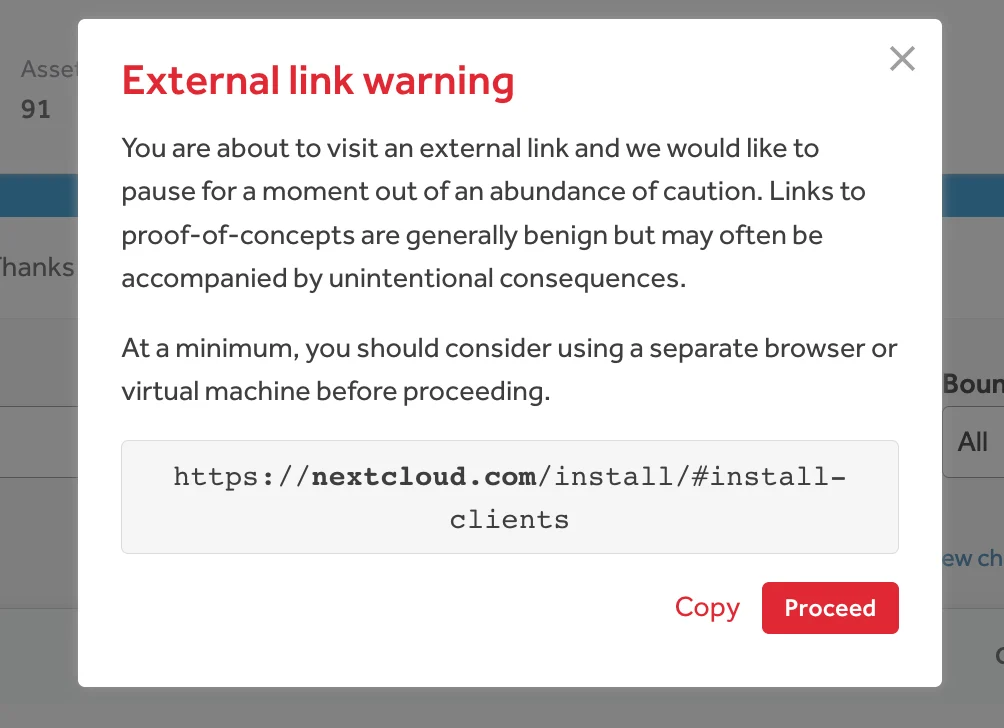
redirect_urlparameter and ensure that it is a trusted URL before redirecting the user. - Add a Link warning popup like hackerone do, proceed redirection only when user accept the conditions, example like this:
Impact
If the app does not validate untrusted user input, an attacker could supply a URL that redirects an unsuspecting victim from a legitimate domain to an attacker's site.
Context
Nextcloud is a self-hosted file sync and collaboration platform. The affected asset is the nextcloud/server repository, and the vulnerable feature is the "Unsupported browser" warning: a Vue component, UnsupportedBrowser.vue, that is shown to visitors whose browser the server considers unsupported. The component displays a message with an icon and a button that lets the user continue browsing with the unsupported browser anyway.
Before rendering that message, the component runs a small piece of client-side logic that looks for a redirect_url query parameter and, if present, sends the browser to the URL encoded in it. That redirect is the subject of the report: the decoded value is used as a navigation target without any validation.
Setup
No accounts, roles, tooling or version numbers are described in the report. The only precondition that matters is reachable from the code itself: the victim has to load a URL that reaches the UnsupportedBrowser.vue component, i.e. a page where the unsupported-browser warning is displayed, carrying a redirect_url parameter in the query string.
Finding it
The researcher points at the following source code, which is the redirect logic in the component:
			const urlParams = new URLSearchParams(window.location.search)
			if (urlParams.has('redirect_url')) {
				const redirectPath = Buffer.from(urlParams.get('redirect_url'), 'base64').toString() || '/'
				window.location = redirectPath
				return
			}
The component's purpose is benign: if the user's browser is unsupported, it shows a message with an icon and a button to continue browsing with that browser. The script, however, checks whether a query parameter named redirect_url exists in the query string. If it does, it base64-decodes the value and assigns the result to window.location, redirecting the user to the decoded URL. The decoded URL is never validated, and there is no check that it is a trusted URL before the redirect happens.
That is what made it look wrong: a parameter fully controlled by whoever crafts the link becomes the browser's next destination, with no allow-list or same-origin restriction in between.
Exploitation
Step 1: craft a link with a base64-encoded target
An attacker constructs a URL that includes the redirect_url parameter whose value is the base64 encoding of a URL of their choice. The report does not include a concrete example URL or payload, only the mechanism: the value is base64, and it is decoded with Buffer.from(..., 'base64').toString().
Step 2: get the victim to open it
When a user clicks the link, the page loads the UnsupportedBrowser.vue component, the script reads redirect_url from window.location.search, decodes it, and assigns the decoded string to window.location.
Step 3: the browser leaves the legitimate domain
The victim is redirected from the legitimate Nextcloud domain to the attacker's site. Because the redirect originates from a genuine Nextcloud page, the link the victim clicked can point at the trusted domain, which is what makes the trick work socially.
Root cause
The mistake is in the client-side redirect in UnsupportedBrowser.vue: the value of redirect_url is taken from the query string, base64-decoded, and used directly as a navigation target. There is no validation of the decoded URL and no check that it belongs to a trusted set of destinations. The || '/' fallback only covers an empty decode result; it does not constrain where a non-empty value can point. Existing defences did not stop it because the redirect is performed entirely in the browser by the component's own script, so nothing on the server side inspects the destination.
Impact
As the report puts it: if the app does not validate untrusted user input, an attacker could supply a URL that redirects an unsuspecting victim from a legitimate domain to an attacker's site. The victim has to click an attacker-supplied link that reaches the unsupported-browser warning with the crafted parameter. The report does not describe any further use of the redirect, such as credential phishing chains or token leakage; the stated impact is the redirection itself.
Fix
The report proposes two mitigations:
- Use functions that check the input of the
redirect_urlparameter and ensure it is a trusted URL before redirecting the user. - Add a link warning popup, in the style of the interstitial HackerOne shows, and proceed with the redirection only when the user accepts the conditions. The screenshot below is the example the researcher gives for that pattern:
The report does not state which of these was implemented. It does reference a published security advisory for the issue, GHSA-h353-vvwv-j2r4, in the Nextcloud security-advisories repository.
Variants to test
- Other client-side redirect parameters. Look for components that read a query parameter and assign it to
window.location,location.hreforlocation.replace. A positive result is a parameter whose decoded or raw value can be set to an external origin and the browser actually navigates there. - Encoded redirect values. The same pattern with base64, URL encoding or double encoding. A positive result is that the decoded value is used as the destination without an origin check.
- Warning and interstitial pages. Unsupported-browser notices, maintenance pages, language-selection pages and consent screens often carry a "continue to" parameter. A positive result is a redirect off-site from a page hosted on the trusted domain.
- Fallback handling. Check what happens with an empty or malformed value; in this code an empty decode falls back to
/, which shows the fallback exists but does not validate non-empty input.
Hunting notes
This kind of bug hides in small pieces of front-end glue: components that exist to move the user somewhere else, such as browser warnings, error pages and post-login or post-logout landing pages. During recon, the signal is a query parameter whose name suggests a destination (redirect_url, return, next, continue) being consumed by client-side JavaScript rather than by the server. Reading the component source, as the researcher did here by linking the exact lines in UnsupportedBrowser.vue, is usually enough to confirm whether the value is validated before it reaches window.location. The report ties the unvalidated parameter directly to a navigation sink on a page served from the legitimate domain.
What happened, in plain words
Nextcloud is a piece of software that organisations install on their own servers to share files and work on documents together. One of its pages is a warning screen: if you visit a Nextcloud site with a browser the server thinks is too old or too unusual, the page tells you so and offers a button to carry on anyway. That page is built with a component called UnsupportedBrowser.vue. A component, in the Vue framework, is a self-contained piece of a web page: its own layout, its own text, its own little script.
Before the warning is drawn, that component's script looks at the address bar for a parameter called redirect_url. A query parameter is the part of a web address after a question mark, made of name and value pairs, like ?colour=blue. If redirect_url is there, the script decodes its value and sends the browser to whatever address comes out. It never checks where that address points. So anyone who can get a victim to open a link can put their own site in that parameter, and the victim, starting from a genuine Nextcloud page, ends up on the attacker's page. That is an open redirect: a redirect that will send people anywhere, not just to places the site trusts.
The researcher reported it to the Nextcloud program on HackerOne. The report links a security advisory, GHSA-h353-vvwv-j2r4, in the Nextcloud security-advisories repository on GitHub.
Setup
The report describes no accounts, roles, tools or version numbers. The only thing that has to be true is visible in the code itself: the victim must load a page where the unsupported-browser warning appears, and that page's address must carry a redirect_url parameter. Nothing else is needed to make the redirect happen.
Finding it
The researcher quoted the piece of the component that does the redirect:
			const urlParams = new URLSearchParams(window.location.search)
			if (urlParams.has('redirect_url')) {
				const redirectPath = Buffer.from(urlParams.get('redirect_url'), 'base64').toString() || '/'
				window.location = redirectPath
				return
			}
Line by line:
const urlParams = new URLSearchParams(window.location.search)takes the query string of the current address, the part after the?, and turns it into an object that can be asked questions about parameters.window.location.searchis simply the browser's way of exposing that part of the address to JavaScript.if (urlParams.has('redirect_url')) {asks whether a parameter namedredirect_urlis present. If it is not, the whole block is skipped and the warning page behaves normally.const redirectPath = Buffer.from(urlParams.get('redirect_url'), 'base64').toString() || '/'reads the parameter's value, treats it as base64 text and decodes it back into an ordinary string. Base64 is a way of writing any text using only letters, digits and a couple of symbols, so it can travel safely inside a web address; it is not encryption and anyone can reverse it. The|| '/'part means: if the decoded result is empty, use/(the site's home page) instead.window.location = redirectPathtells the browser to navigate to that string. This is the moment the browser leaves the current page.returnstops the rest of the script from running, since the page is about to be replaced anyway.
The component's real job is harmless: show a message with an icon and a button so the visitor can continue with the unsupported browser. The problem is the extra logic above. The decoded value goes straight into window.location with no validation and no check that it is a trusted address. Whoever writes the link controls the destination completely.
That is why it looked wrong: a value chosen by an outsider becomes the browser's next stop, with no allow-list (a list of permitted destinations) and no same-origin restriction (a rule that the destination must belong to the same site) in between.
Exploitation
Step 1: craft a link with a base64-encoded target
The attacker builds a web address that includes redirect_url, whose value is the base64 encoding of a URL of their choosing. The report gives no concrete example URL or payload, only the mechanism: the value is base64, and it is decoded with Buffer.from(..., 'base64').toString().
Step 2: get the victim to open it
When the victim clicks the link, the page loads the UnsupportedBrowser.vue component. The script reads redirect_url from window.location.search, decodes it, and assigns the result to window.location.
Step 3: the browser leaves the legitimate domain
The victim is sent from the genuine Nextcloud domain to the attacker's site. The trick works socially because the link the victim clicked starts with the trusted domain, so it looks legitimate in a message or on a page. A domain is the part of an address that identifies the site, such as the organisation's Nextcloud hostname.
Root cause
The mistake sits in the client-side redirect in UnsupportedBrowser.vue. Client-side means the code runs in the visitor's own browser, not on the server. The value of redirect_url is taken from the query string, base64-decoded, and used directly as a navigation target. There is no validation of the decoded URL and no check that it belongs to a trusted set of destinations. The || '/' fallback only handles an empty decode result; it does nothing to limit where a non-empty value can point. Existing defences did not catch it because the redirect is performed entirely in the browser by the component's own script, so nothing on the server side ever inspects the destination.
Impact
In the report's words: if the app does not validate untrusted user input, an attacker could supply a URL that redirects an unsuspecting victim from a legitimate domain to an attacker's site. The victim has to click an attacker-supplied link that reaches the unsupported-browser warning with the crafted parameter. The report does not describe any further use of the redirect, such as credential phishing chains or token leakage; the stated impact is the redirection itself.
Fix
The report proposes two mitigations:
- Use functions that check the input of the
redirect_urlparameter and make sure it is a trusted URL before redirecting the user. - Add a link warning popup, in the style of the interstitial page HackerOne shows, and only proceed with the redirect when the user accepts the conditions. The screenshot below is the example the researcher gives for that pattern:
The report does not state which of the two mitigations was implemented. It does reference the published security advisory for the issue, GHSA-h353-vvwv-j2r4, in the Nextcloud security-advisories repository.
Variants to test
- Other client-side redirect parameters. Look for components that read a query parameter and assign it to
window.location,location.hreforlocation.replace. A positive result is a parameter whose decoded or raw value can be set to an external origin and the browser actually navigates there. - Encoded redirect values. The same pattern with base64, URL encoding or double encoding. A positive result is that the decoded value is used as the destination without an origin check.
- Warning and interstitial pages. Unsupported-browser notices, maintenance pages, language-selection pages and consent screens often carry a "continue to" parameter. A positive result is a redirect off-site from a page hosted on the trusted domain.
- Fallback handling. Check what happens with an empty or malformed value; in this code an empty decode falls back to
/, which shows the fallback exists but does not validate non-empty input.
Hunting notes
This kind of bug hides in small pieces of front-end glue: components that exist to move the user somewhere else, such as browser warnings, error pages and post-login or post-logout landing pages. Front-end means the part of the software that runs in the browser. During recon, the signal is a query parameter whose name suggests a destination (redirect_url, return, next, continue) being consumed by client-side JavaScript rather than by the server. Reading the component source, as the researcher did here by linking the exact lines in UnsupportedBrowser.vue, is usually enough to confirm whether the value is validated before it reaches window.location. The report ties the unvalidated parameter directly to a navigation sink on a page served from the legitimate domain. A sink is the place in code where a value finally has an effect, here the line that changes the browser's address.
Glossary
- Nextcloud: self-hosted software for file sync and collaboration, installed on an organisation's own server.
- Repository: a project's collection of source code and its history, here
nextcloud/serveron GitHub. - Vue: a JavaScript framework for building web interfaces out of reusable components.
- Component: a self-contained piece of a web page with its own layout and script, such as
UnsupportedBrowser.vue. - Query parameter: a name and value pair after the
?in a web address, like?colour=blue. - Query string: everything in an address after the
?, made of query parameters. window.location: the browser object holding the current address; assigning to it makes the browser navigate.window.location.search: the part of the current address that holds the query string.- Base64: an encoding that writes any text using only letters, digits and a few symbols so it can travel inside an address; it is reversible by anyone and is not encryption.
Buffer.from(..., 'base64').toString(): JavaScript that decodes base64 text back into an ordinary string.- Open redirect: a redirect that sends visitors to any address supplied by the link, rather than only to trusted ones.
- Validation: checking that input meets rules before using it, for example that a destination is on a trusted list.
- Allow-list: a list of permitted values, here permitted redirect destinations.
- Same-origin restriction: a rule that a destination must belong to the same site as the page doing the redirect.
- Client-side: code that runs in the visitor's browser rather than on the server.
- Domain: the part of an address that identifies the site.
- Origin: the combination of scheme, domain and port that identifies where a page came from.
- Sink: the place in code where a value finally takes effect, such as the line that changes the browser's address.
- Interstitial page: a warning or confirmation page shown between the link and the destination.
- CVSS: a standard scoring system for the severity of a security issue.
- Bounty: a payment made by a program to a researcher for a valid report.
- Security advisory: a published notice describing a fixed vulnerability, here GHSA-h353-vvwv-j2r4.
- Recon: the information-gathering phase of security testing, looking for interesting pages and parameters.




