None permission staff member can identify installed application and products attached to it
A staff member with no permissions could query a Shopify app delivery endpoint with a product ID and learn whether the Digital Downloads app was installed on the store and which products had attachments configured. This leaked store configuration information to a user who should not have been able to see it.

- Triaged in 3 days
- Fixed in 8 days
- Paid in 8 days
- Disclosed after 8 days
Summary by the program
@sreeju_kc found that the endpoint at https://delivery.shopifyapps.com/products/ID returned the product title of products with attachments that did not belong to the current shop. We resolved this issue by only displaying the product title when the product belongs to the current shop.
As the scope was limited to stores with the Digital Downloads app installed and products with attachments, we awarded our minimum bounty for non-core IDOR/Information Disclosure, $500.
The report
Hello, To see if a store has application installed and which products its configured the staff member should have application permission otherwise nothing is visible but i found a way that let none permission staff member to identify if the store has installed Digital Downloads and if the application configured on a particular products.
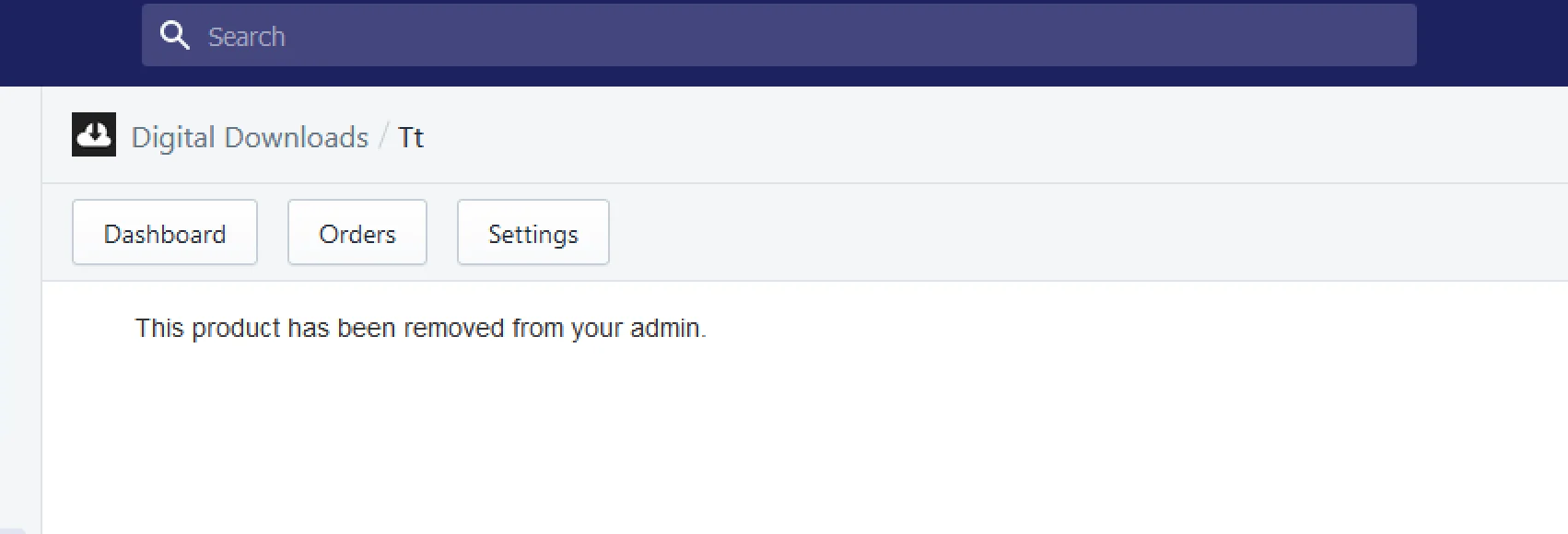
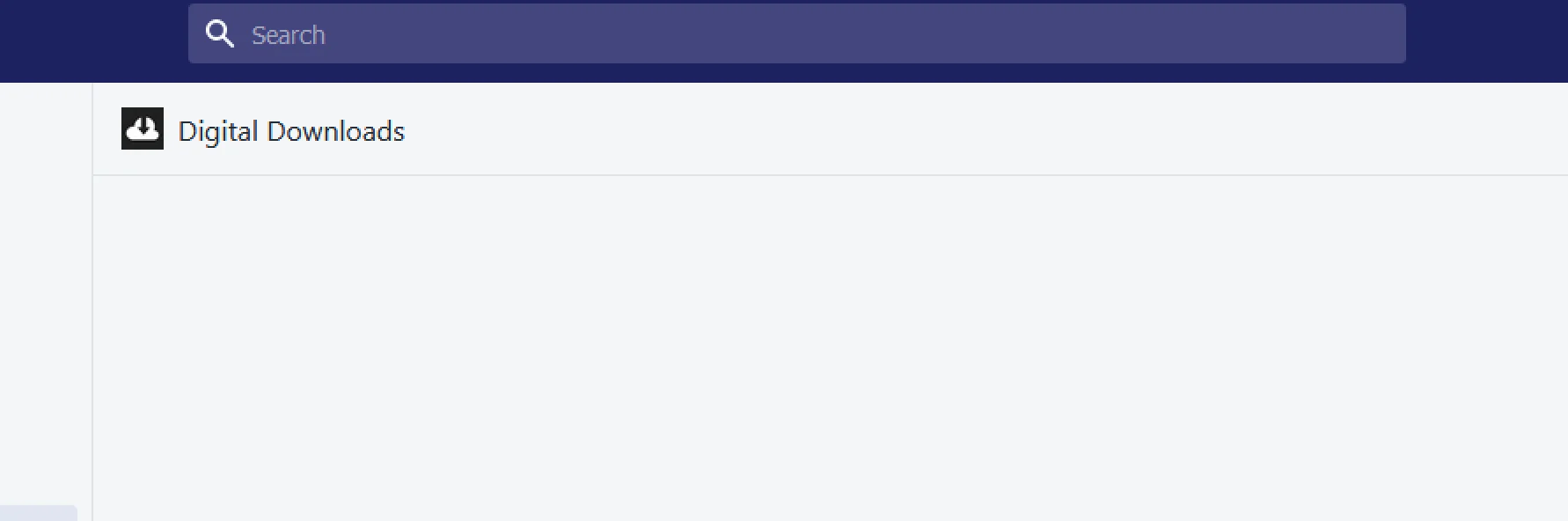
POC: 1)Create two user A and B, login to A and create a store, test.myshopify.com 2)Add user B as staff member to test.myshopify.com with no permission. 3)From user A, go test.myshopify.com and create two product called Tt and PP 4)Install Digital Downloads for this store and configure Tt to this app. 5)Login back to user B and create an independent store, test100.myshopify.com and install Digital Downloads on this store. 6)Now go to user A store (test.myshopfy.com) and click app and click Digital downlands and right click on the product, you will get below urli https://delivery.shopifyapps.com/products/3785077260000 7)Copy paste to this url from user B account (login as user B) and you can see that a message as below. Digital Downloads/Tt This indicate that Digital Downloads is installed on test.myshopfy.com store (which this user has 0 permission) and configured on the product Tt. 8)If you user the same url with PP product id, nothing is shown
User B can get products ids via source page of user A store as user B is staff member even though none permission
view-source:https://test.myshopify.com/products/tt
<script id="__st">var __st={"a":2616790000,"offset":-14400,"reqid":"fff-bbb-ccc-bbb-qqq","pageurl":"test-myshopify.com\/products\/tt","u":"184d9400000a","p":"product","rtyp":"product","rid":3785077260000};</script>Impact
This is an information disclosure, none permission member staff should not know which application is installed and what product is configured for this application.
Please find the screen shots
Attachments
Context
Shopify stores can install apps, and some apps attach themselves to individual products. The Digital Downloads app is one of these: when it is configured on a product, the store owner sees the app's view of that product. Access to an app and to the products it is configured on is meant to be governed by staff permissions. A staff member without the relevant application permission should not be able to see whether an app is installed or which products it is configured on.
The report describes a way for a staff member with no permissions at all to learn both of those things. The mechanism is an endpoint on the app delivery host:
https://delivery.shopifyapps.com/products/ID
When called with the ID of a product that has an attachment, the endpoint returned the product title, even when the product belonged to a different shop from the one the caller was working in.
Setup
The researcher used two accounts and two stores:
- User A owns a store,
test.myshopify.com. - User B is added to
test.myshopify.comas a staff member with no permissions. - User B also owns an independent store,
test100.myshopify.com.
Both stores have the Digital Downloads app installed. The precondition for the disclosure is that the target store has Digital Downloads installed and has at least one product configured with an attachment in that app.
Finding it
The starting observation is about intended behaviour: to see whether a store has an app installed, and which products it is configured on, a staff member should hold the application permission. Without it, nothing should be visible. The researcher found that the app delivery endpoint did not enforce that boundary, and that it would answer for products outside the caller's own shop.
Exploitation
Step 1: create the stores and the staff member
User A creates test.myshopify.com. User B is added to that store as a staff member with no permission. User B separately creates test100.myshopify.com.
Step 2: create products and configure the app
From user A, two products are created in test.myshopify.com, called Tt and PP. Digital Downloads is installed on the store and Tt is configured to the app. PP is left unconfigured.
Step 3: install the app on the second store
User B logs in and installs Digital Downloads on test100.myshopify.com as well.
Step 4: obtain the product URL
Still as user A, open the store, click the app, click Digital Downloads, and right-click the product. The link exposed is:
https://delivery.shopifyapps.com/products/3785077260000
The numeric segment is the product ID. The researcher notes that user B can obtain product IDs from the source of user A's storefront, because user B is a staff member even without permissions. The storefront source contains a script block with the product metadata:
<script id="__st">var __st={"a":2616790000,"offset":-14400,"reqid":"fff-bbb-ccc-bbb-qqq","pageurl":"test-myshopify.com\/products\/tt","u":"184d9400000a","p":"product","rtyp":"product","rid":3785077260000};</script>
The rid field is the product ID, matching the ID in the delivery URL.
Step 5: request the product from the other account
Logged in as user B, paste the URL into the browser. The response shows:
Digital Downloads/Tt
This tells user B two things about test.myshopify.com, a store where they hold zero permissions: that Digital Downloads is installed, and that it is configured on the product Tt.
Step 6: confirm the negative case
Using the same URL with the ID of the PP product, nothing is shown.
The two screenshots accompany the proof of concept and show the results described above.
Root cause
The endpoint at https://delivery.shopifyapps.com/products/ID looked up a product by ID and returned its title without checking that the product belonged to the shop of the requesting session. This is an IDOR: the object identifier is supplied by the client and the authorisation check on ownership is missing. The program's own summary confirms the fix: the product title is now only displayed when the product belongs to the current shop.
The delivery endpoint did not check that the product belonged to the requesting shop. A staff member with no permissions could still reach it, and the only thing standing between them and another shop's product title was the product ID, which the storefront source discloses to staff members regardless of permissions.
Impact
A staff member with no permissions on a store can determine whether Digital Downloads is installed on that store and which products have attachments configured in it. The disclosure is limited to the product title and the fact of configuration; the report does not describe any further data being returned. The program scoped the issue to stores with the Digital Downloads app installed and products with attachments, and awarded the minimum bounty for non-core IDOR and information disclosure, $500, at low severity.
Fix
The program resolved the issue by only displaying the product title when the product belongs to the current shop.
- Enumerate product IDs against the delivery endpoint from a session in a different shop. A positive result is a product title returned for an ID that does not belong to your shop.
- Test the negative case with IDs of products that exist but have no attachment. A difference in response between configured and unconfigured products confirms the endpoint leaks configuration state, not just titles.
- Look for other app delivery hosts and paths that take a bare object ID, such as product, order or file identifiers, and repeat the cross-shop request. A positive result is any object data returned for an ID outside your shop.
- Harvest IDs from storefront source, where the
__stscript exposesrid, and feed them to the endpoint. A positive result is a title matching the product on the storefront page. - Repeat with a staff account that has no permissions, rather than an unrelated account, to confirm the permission boundary is bypassed rather than merely an authentication check.
Hunting notes
The signal during recon is an app whose UI links out to a host like delivery.shopifyapps.com with a numeric object ID in the path, combined with storefront source that exposes the same IDs in the __st script. If a low-privilege staff account can read those IDs, the only remaining question is whether the delivery endpoint checks ownership.
The researcher showed impact by demonstrating both the positive case, a title returned for another shop's configured product, and the negative case, nothing returned for an unconfigured product, which together prove that installation and configuration state leak.
What happened, in plain words
Shopify is a platform for building online shops. A shop owner can add extra features to their shop by installing apps, a bit like adding extensions to a browser. One of these apps is called Digital Downloads. When the owner sets it up on a particular product, that product is configured with the app.
A shop can also have staff members: other people who help run it. The owner decides what each staff member is allowed to see and do. If a staff member is not given permission to use an app, they should not be able to tell whether that app is installed, nor which products it is set up on.
The researcher found that a staff member with no permissions at all could still learn both of those things. The trick was a web address on a separate Shopify server that hands out app content. When you ask that address for a product by its number, it answered with the product's name, even if the product belonged to a completely different shop from the one you were logged into.
This kind of mistake has a name: an IDOR, short for Insecure Direct Object Reference. Imagine a hotel where every room key is just a number printed on a card, and the front desk never checks that the room is yours. You ask for room 412 and the door opens, because the only thing the lock looks at is the number. Here the "number" is a product ID in a web address, and the server never checked that the product belonged to your shop.
Shopify fixed it by only showing the product name when the product belongs to the shop you are currently working in. Because the issue only affected shops with the Digital Downloads app installed and products with attachments, the program paid its minimum reward for this kind of bug: 500 US dollars, at low severity.
The pieces you need to understand first
Before walking through the steps, here are the ideas the report relies on, explained from scratch.
- A store (shop): one Shopify shop, reachable at an address like
your-store.myshopify.com. Each shop has its own products, its own staff and its own installed apps. - A product: an item for sale in a shop, with a name (title) and an internal number (product ID). The ID is what computers use to refer to the product; the title is what humans read.
- An app: an add-on installed into a shop. Digital Downloads is one: it attaches downloadable files to products.
- A staff member and permissions: a person invited to help run a shop. The owner ticks boxes to say what the staff member may access. "No permission" means every box is unticked.
- An endpoint: a specific web address on a server that does one job when you request it. Think of it as a service counter with a label: you go to that address, hand over some information, and get an answer back. The endpoint in this report is on a host called
delivery.shopifyapps.com, a separate server from the shop itself. - An API: the general name for endpoints that programs (and browsers) talk to in order to fetch or change data, as opposed to pages meant for humans to read. The delivery endpoint is effectively a small API that returns a product title.
- A session: the server's memory of who you are while you are logged in. When you log in, the server gives your browser a small piece of data (often called a cookie) that it checks on every later request. That is how it knows which shop you belong to. In this report, the important question is whether the endpoint used that session to decide which shop's products you may see.
- A URL and its path: a web address like
https://delivery.shopifyapps.com/products/3785077260000has a host (delivery.shopifyapps.com) and a path (/products/3785077260000). The last part of the path is the product ID. Because the ID sits in the address, the person making the request chooses it. That is exactly the situation where an ownership check is needed. - Viewing page source: every web page your browser shows is built from text (HTML) that the browser receives. Right-clicking and choosing to view the source, or typing
view-source:before an address, lets you read that text. Pages often contain hidden data blocks that scripts use, and those blocks can reveal internal numbers. - Information disclosure: a bug where something that should be secret or restricted becomes visible to someone who should not see it. Here the leaked information is small (a product title and the fact that an app is configured), which is why it was rated low.
- IDOR (Insecure Direct Object Reference): an information disclosure caused by the server trusting an identifier supplied by the user (a product ID, an order number, a file name) without checking that this user is allowed to access that particular object. The hotel key comparison above is the everyday version.
The setup
The researcher used two accounts and two shops, so that one person could act as an outsider while the other owned the target shop.
- User A owns a shop,
test.myshopify.com. - User B is added to
test.myshopify.comas a staff member with no permissions. - User B also owns a separate shop,
test100.myshopify.com.
Both shops have the Digital Downloads app installed. That matters: the leak only happens when the target shop has the app installed and at least one product set up with an attachment in it. If either condition is missing, there is nothing for the endpoint to reveal.
Finding it
The starting point is what should happen. To see whether a shop has an app installed, and which products it is set up on, a staff member is supposed to hold the application permission. Without it, nothing should be visible.
The researcher found that the app delivery endpoint did not enforce that rule. It would answer questions about products that did not belong to the shop of the person asking.
Exploitation, step by step
Step 1: create the shops and the staff member
User A creates test.myshopify.com. User B is added to that shop as a staff member with no permission. Separately, user B creates their own shop, test100.myshopify.com.
Why this step: you need a target shop (A's) and a person with no rights in it (B) to prove that the permission boundary is being crossed. Giving B their own shop means B can be logged in normally while poking at A's shop.
Step 2: create products and configure the app
From user A's account, two products are created in test.myshopify.com, called Tt and PP. Digital Downloads is installed on the shop, and Tt is set up with the app. PP is deliberately left without an attachment.
Why this step: you need one product that is configured (to see whether its name leaks) and one that is not (to see whether the endpoint stays silent). The pair lets you show that the endpoint reveals configuration state, not just names.
Step 3: install the app on the second shop
User B logs in and installs Digital Downloads on test100.myshopify.com too.
Step 4: obtain the product URL
Still as user A, open the shop, click the app, click Digital Downloads, and right-click the product. The link that is exposed is:
https://delivery.shopifyapps.com/products/3785077260000
Line by line:
https://means the request is encrypted in transit.delivery.shopifyapps.comis the host: a separate Shopify server that serves app content, not the shop's own address./products/is the path that selects the "look up a product" behaviour.3785077260000is the product ID. It is the only thing that says which product you want, and it is chosen by whoever types the address.
The researcher notes that user B can obtain product IDs from the source of user A's shop pages, because user B is a staff member even without permissions. The page source contains a script block with product details:
<script id="__st">var __st={"a":2616790000,"offset":-14400,"reqid":"fff-bbb-ccc-bbb-qqq","pageurl":"test-myshopify.com\/products\/tt","u":"184d9400000a","p":"product","rtyp":"product","rid":3785077260000};</script>
What this block is, in plain words: a <script> tag is a piece of code embedded in the page. This one stores a bundle of facts about the page in a variable called __st. Reading the fields:
ais a number identifying the shop.offsetis a time-zone offset.reqidis an identifier for the request.pageurlis the address of the page you are on, here thettproduct page.uis an identifier for the visitor.psays what kind of page it is (product).rtypsays what kind of record is being shown (product).ridis the record's ID, and it matches the number in the delivery URL above.
So the product ID is not a secret at all: it is printed in the page source that any staff member can open. The only remaining question is whether the delivery endpoint checks who is asking.
Step 5: request the product from the other account
Logged in as user B, paste the URL into the browser. The response shows:
Digital Downloads/Tt
This is the app's name, a slash, and the product's title. It tells user B two things about test.myshopify.com, a shop where they hold zero permissions: that Digital Downloads is installed there, and that it is set up on the product Tt. Neither fact should have been visible to them.
Step 6: confirm the negative case
Using the same URL with the ID of the PP product, nothing is shown.
The two screenshots accompany the proof of concept and show the results described above.
Why it worked
The endpoint at https://delivery.shopifyapps.com/products/ID looked up a product by its ID and returned the title without checking that the product belonged to the shop of the requesting session. That is the IDOR: the identifier comes from the client, and the ownership check is missing. The program's own summary confirms the fix: the product title is now only displayed when the product belongs to the current shop.
The delivery endpoint did not check that the product belonged to the requesting shop. This delivery endpoint is a separate surface, and it did not repeat the ownership check. A staff member with no permissions could still reach it, and the only thing between them and another shop's product title was the product ID, which the shop's own pages hand out to staff members regardless of permissions.
Impact
A staff member with no permissions on a shop can work out whether Digital Downloads is installed there and which products have attachments set up. The leak is limited to the product title and the fact of configuration; the report does not describe any further data being returned. The program limited the issue to shops with the Digital Downloads app installed and products with attachments, and paid the minimum reward for non-core IDOR and information disclosure, 500 US dollars, at low severity.
The fix
The program resolved the issue by only displaying the product title when the product belongs to the current shop.
If you want to look for similar bugs yourself, these are the directions the report suggests. Each one is a small experiment with a clear pass or fail.
- Try product IDs against the delivery endpoint from a session in a different shop. A positive result is a product title coming back for an ID that does not belong to your shop.
- Test the negative case with IDs of products that exist but have no attachment. A difference in the response between configured and unconfigured products confirms the endpoint leaks configuration state, not just titles.
- Look for other app delivery hosts and paths that take a bare object ID, such as product, order or file identifiers, and repeat the cross-shop request. A positive result is any object data returned for an ID outside your shop.
- Collect IDs from shop page source, where the
__stscript exposesrid, and feed them to the endpoint. A positive result is a title matching the product on the page. - Repeat with a staff account that has no permissions, rather than an unrelated account, to confirm the permission boundary is bypassed rather than merely an authentication check.
Hunting notes
During recon, the signal is an app whose interface links out to a host like delivery.shopifyapps.com with a numeric object ID in the path, combined with shop page source that exposes the same IDs in the __st script. If a low-privilege staff account can read those IDs, the only remaining question is whether the delivery endpoint checks ownership.
The researcher showed impact by demonstrating both the positive case, a title returned for another shop's configured product, and the negative case, nothing returned for an unconfigured product. Together they prove that installation and configuration state leak.
Glossary
- API: a set of web addresses that programs talk to in order to fetch or change data, rather than pages designed for people to read.
- App: an add-on installed into a shop that adds features, such as Digital Downloads.
- Attachment: a downloadable file that the Digital Downloads app associates with a product.
- Cookie: a small piece of data a website stores in your browser so it can recognise you on later requests.
- Cross-shop request: a request made from a session in one shop that asks about data belonging to another shop.
- Digital Downloads: a Shopify app that attaches downloadable files to products.
- Endpoint: a specific web address on a server that performs one job when requested.
- Host: the part of a web address that names the server, for example
delivery.shopifyapps.com. - HTML: the text format web pages are written in; your browser turns it into what you see.
- IDOR (Insecure Direct Object Reference): a bug where the server trusts an identifier supplied by the user without checking that this user may access that object.
- Information disclosure: a bug where information that should be restricted becomes visible to someone who should not see it.
- Negative case: a test where the expected answer is "nothing", used to show that a result only appears under specific conditions.
- Path: the part of a web address after the host, for example
/products/3785077260000. - Permission: a setting that says what a staff member is allowed to see or do in a shop.
- Product ID: the internal number that identifies a product, used by computers instead of the product's name.
- Product title: the human-readable name of a product.
- Proof of concept (POC): a set of steps that reliably demonstrates a bug.
- Request: a message your browser sends to a server asking for something.
- Response: what the server sends back.
- Session: the server's memory of who you are while logged in, usually carried by a cookie.
- Severity: a rating of how serious a bug is; here, low.
- Shop page source: the HTML text a browser receives for a page, which can be viewed with
view-source:or the browser's developer tools. - Staff member: a person invited to help run a shop, with permissions chosen by the owner.
- URL: a web address.
__stscript: a block of code embedded in Shopify shop pages that stores facts about the page, including the product ID in itsridfield.



