Notification request disclose private information about other myshopify accounts
The notification creation feature in Shopify admin allowed an attacker to change a user ID parameter to that of another store's staff member, causing the system to display that victim's first name, last name, and email address. An attacker could enumerate Shopify customers and obtain their personal information for targeted attacks.

- Triaged in 5 days
- Fixed in 5 months
- Paid in 5 months
- Disclosed after 5 months
Hello Attacker, using notification feature in Admin panel, can successfully disclose\enumerate Shopify customers and retrieve their user-id, first+last name and email address. Last part of information is most avluble piece of information, since it can be used to conduct targeted attack on Shopify customers [via email] to infect end-user machines and\or gain access to Shopify accounts. ##POC
- Login as Attacker to evilshop.myshopify.com/admin
- Go to Settings/Notifications/Order notifications" and create new notification for Stuff member. Choose Yourself
- Capture request and see new notification created.
- In captured request, alter order_subscription%5Border_subscription_type%5D value
in this case Attacker replace his ID with victim ID 5. Attacker observe "evilshop.myshopify.com/admin/Settings/Notifications/Order notifications"
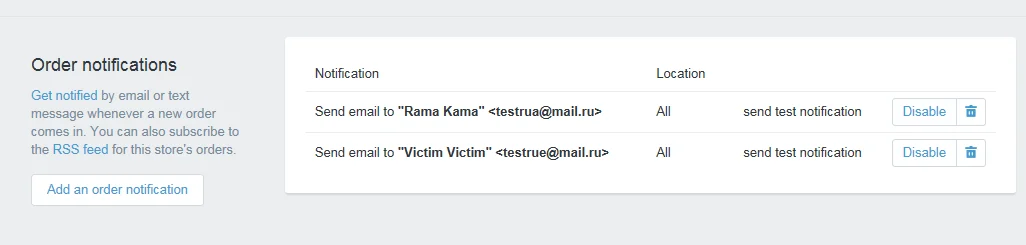
5.1 In case User ID is not registered\valid - another Notification showed in list with Attacker UserID. 5.2 In case User ID is registered\valid - in list of Notifications appear new Victim "Stuff member" , with First + Last name and email address, as registered in Victim profile in his settings.
##On screenshot attached: Rama Kama is Attacker and owner of this store, and Victim is owner of totally different store, which ID was spoofed to system.
#Request example:
POST /admin/order_subscriptions HTTP/1.1 Accept: text/html, application/xhtml+xml, application/xml X-Requested-With: XMLHttpRequest Content-Type: application/x-www-form-urlencoded; charset=UTF-8 X-XHR-Referer: https://testrua7.myshopify.com/admin/settings/notifications X-CSRF-Token: f25hau8h3JWDKUqYJvG2sYPAUMXDsieiueb5dr4GsUU= Referer: https://testrua7.myshopify.com/admin/settings/notifications Accept-Language: en-US Accept-Encoding: gzip, deflate User-Agent: Mozilla/5.0 (Windows NT 6.1; Trident/7.0; rv:11.0) like Gecko Host: testrua7.myshopify.com Content-Length: 258 DNT: 1 Connection: Keep-Alive Cache-Control: no-cache Cookie: __utma=1.2093583371.1428608245.1429207096.1429250267.13; __utmz=1.1428609079.2.2.utmcsr=cio|utmccn=welcome_online|utmcmd=email|utmcct=log_in_store_btn; _ga=GA1.2.2093583371.1428608245; __mmapiwsid=30D865E4-E464-11E4-91DC-547B559CF7BD:8f1edbf6d83d5ddc80b7a3d442de809495f02f1b; __utmb=1.47.10.1429250656; _gat=1; __utmc=1; _secure_admin_session_id=a5dcb62e34ad0ccde4c785efe915374e; request_method=GET
utf8=%E2%9C%93&authenticity_token=f25hau8h3JWDKUqYJvG2sYPAUMXDsieiueb5dr4GsUU%3D&order_subscription%5Border_subscription_type%5D=user-7837569&order_subscription%5Blocation_id%5D=&order_subscription%5Baddress%5D=&order_subscription%5Bprovider%5D=&_method=post
Attachments
Not written yet. The AI write-up for this report has not been written yet. The Original tab links to the source.
How it worked
Root cause
Likely the application failed to verify that the user ID in the notification request belonged to the authenticated store, allowing cross-tenant access to user details.
Impact
An attacker could enumerate Shopify customers and obtain their user ID, name and email, enabling targeted email attacks or account compromise.
What the attacker needed
A Shopify store account with admin access
How it was found
- Log in as an attacker to the admin panel of a Shopify store.
- Go to Settings/Notifications/Order notifications and create a new notification for a staff member, choosing yourself.
- Capture the request that creates the notification.
- In the captured request, change the order_subscription_type value from your own user ID to a victim's user ID.
- Observe the notifications list: if the ID is valid, the victim's first name, last name, and email address appear as a new staff member.
Explained by bugbounty.wiki with AI from the original and checked against quotes from it; it can still be wrong. Read the original before relying on a detail.
Not written yet. The AI write-up for this report has not been written yet. The Original tab links to the source.
When you create a notification for a staff member, the request includes a number that identifies that person. The system did not check that the number belonged to someone in your own store. By changing the number to someone else's, the system showed that person's name and email address, even though they were from a different store.
What is Account takeover?
Getting into someone else's account through a flaw in sign-in, password reset, second factor, single sign-on or session handling.