Open Redirect login account
A Slack workspace login URL accepted a redirect parameter that sent the user to an arbitrary external site after authentication. An attacker could use this to send victims to a phishing page that appears to come from a trusted login flow.
 Originally disclosed on HackerOne
- Fixed in 2 days
- Paid in 2 days
- Disclosed after 2 months
An open redirect is an application that takes a parameter and redirects a user to the parameter value without any validation. This vulnerability is used in phishing attacks to get users to visit malicious sites without realizing it.
###Reproduction Instructions
go to www.[TEAM].slack.com/?redir=llink?url=https://twitter.com/ log in your account on this link then redirect to twitter,google and any webiste you want.
###Proof of concept:
https://asdasda.slack.com/?redir=llink?url=https://twitter.com/
Regards, Jayson Zabate
Attachments
What the report shows
This is a report against Slack, filed on HackerOne by jaysonzabate and disclosed on 25 August 2014. It describes an open redirect on the Slack login flow. The report was paid a bounty of 100.00 USD. No severity rating or CVSS score is given.
The researcher's explanation is the standard definition of the bug class: an application takes a parameter and redirects the user to that parameter's value without validation, which phishing attacks abuse to send users to malicious sites without them realising.
Reproduction steps
The steps, as written in the report:
- Go to
www.[TEAM].slack.com/?redir=llink?url=https://twitter.com/. - Log in to the account on that link.
- The browser is then redirected to Twitter, Google or any website the attacker chooses.
The proof of concept uses a placeholder team subdomain:
https://asdasda.slack.com/?redir=llink?url=https://twitter.com/
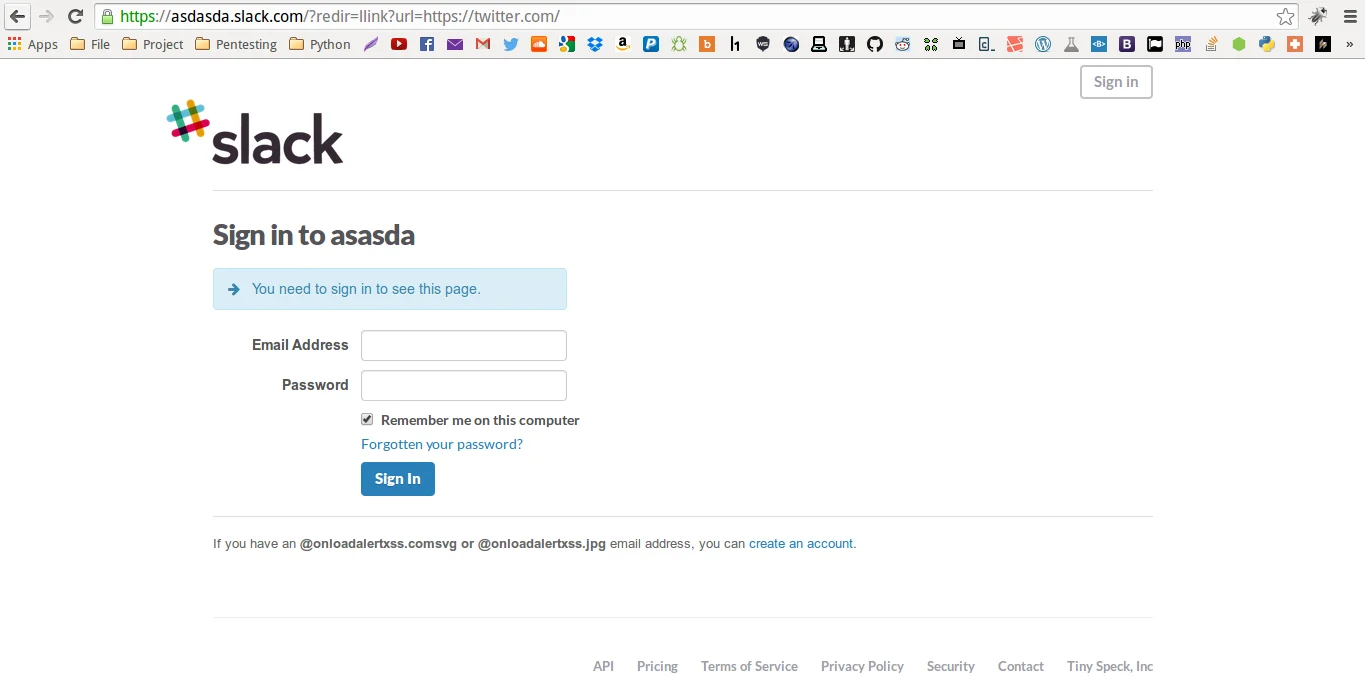
The report includes one screenshot of the result:
The report does not describe a fix, and it does not give a severity rating.
Root cause
The redir parameter on the team login page appears to decide where the user is sent after authentication, and the report shows no validation of its value. The value in the report is itself a nested URL: llink?url=https://twitter.com/. The value in the report is itself a nested URL, but the report gives no detail on how the server handles it. The report does not show the server-side code, so this is an inference from the behaviour it describes.
Impact
An attacker can craft a Slack login URL that, after the victim authenticates, sends them to a site the attacker controls. Because the link begins on the legitimate Slack domain and passes through a real login, the victim has little reason to suspect the final destination. The report frames the impact as phishing: getting users to visit malicious sites without realising it. It does not claim account takeover, credential theft or any other outcome.
How this kind of bug works
Open redirects arise wherever an application lets user input decide a navigation target. Typical sources are a redirect, next, return, continue or url query parameter, a hidden form field, or a path segment used after login, logout or an email confirmation. The application builds a Location header, a meta refresh or a client-side navigation from that value without checking it.
The danger is trust transitivity. Users and mail filters trust the domain in the link, and the redirect happens after the trusted domain has already been visited. Attackers use this for phishing landing pages, OAuth token or authorization code leakage when the redirect target is part of a flow, and bypassing allowlists that only check the first hop.
Defences are straightforward in principle: never redirect to a raw user-supplied URL. Instead, accept only relative paths, or map an opaque key to a server-side table of allowed destinations, or validate the target against a strict allowlist of hosts and schemes. Reject values with a scheme or host, and be careful with parsing tricks such as //evil.example, backslashes, encoded characters, and nested URLs of the kind shown in this report.
How to test for it
- Map every place the application sends the browser somewhere after an action: login, logout, registration, password reset, email verification, SSO callbacks, language selection and error pages.
- Note each parameter that looks like a destination. Watch the address bar and the
Locationresponse header as you change it. - Replace the value with an external URL on a domain you control, then with variants: a scheme-relative form, an encoded form, a value with extra path segments, and a nested URL inside another parameter.
- A positive result is a response that sends the browser off-site, or a page that navigates there after a delay or a script runs.
- Confirm in a clean browser profile so cached redirects and extensions do not mislead you.
Common false positives: the application shows an interstitial warning page before leaving, the redirect only fires for allowlisted hosts, or the parameter is ignored and the destination is fixed. A redirect that only works with JavaScript you injected yourself is not the same bug. Also check whether the redirect requires authentication, since that changes how you demonstrate it.
How it is fixed
Use relative paths only, or an allowlist of exact hosts and schemes checked after full URL parsing. Do not trust the first component of a nested or double-encoded value. Where a destination must be flexible, store it server-side and pass an identifier. Add a warning interstitial for any off-site navigation from a trusted flow, and log redirect targets so abuse can be detected.
Hunting notes
These bugs cluster around authentication and account flows, because those flows need to return the user somewhere afterwards. Login pages with a redir, next or return parameter are prime candidates, as are OAuth and SSO callbacks, invite and email confirmation links, and multi-tenant subdomains where the same code serves many teams.
Recon signals: parameters whose names suggest navigation, responses containing Location headers built from query strings, and client-side code that reads a query parameter and assigns it to window.location. Test the parameter both before and after authentication, since the redirect may only trigger on the post-login step.
To make a report land, show the full request and response or a short screen recording of the browser leaving the trusted domain, state clearly what the victim sees, and tie it to a concrete abuse case such as phishing. Keep the payload minimal and reproducible, and avoid claiming impact the evidence does not support.
What happened, in plain words
Slack is a workplace chat service. Each company that uses it gets its own address, something like yourteam.slack.com, and people sign in on that address. This report, filed on HackerOne by jaysonzabate and disclosed on 25 August 2014, shows that the sign-in page could be told where to send you once you had logged in, and it would obey without checking whether that destination was trustworthy. The report was paid a bounty of 100.00 USD. No severity rating or CVSS score is given.
A redirect is simply a server telling your browser "the page you asked for is over there, go to this other address instead". It is like a receptionist pointing you to a different office. An open redirect is when the application lets whoever writes the link choose that other address, with no validation. The researcher's own definition in the report says exactly this: the application takes a parameter and redirects a user to the parameter value without any validation, and phishing attacks use it to get users to visit malicious sites without realising it.
Why does that matter? Because the link a victim clicks starts on the real Slack domain. They see a genuine Slack login page, they type their real password into it, and only afterwards does the browser leave for somewhere else. The trust earned by the Slack name is carried over to whatever page comes next.
Reproduction steps
The steps, as written in the report:
- Go to
www.[TEAM].slack.com/?redir=llink?url=https://twitter.com/. - Log in to the account on that link.
- The browser is then redirected to Twitter, Google or any website the attacker chooses.
[TEAM] stands for the company's own subdomain, the part of the address that identifies their Slack workspace. The interesting part is the query string, everything after the ?. A query string is the list of settings a page receives in its address, written as name=value pairs. Here the page is handed a setting called redir, short for redirect, whose value is llink?url=https://twitter.com/. That value is itself a small address with its own url setting pointing at Twitter. So the destination is buried one level deep inside another parameter.
The proof of concept uses a made-up team name in place of a real one:
https://asdasda.slack.com/?redir=llink?url=https://twitter.com/
Read it piece by piece: https:// is the scheme, the protocol the browser uses; asdasda.slack.com is the host, the server being visited; / is the path, the page requested; and everything after ? is the query string carrying the redir value. Nothing in that address is unusual to a casual eye, which is the whole point.
The report includes one screenshot of the result:
Why the steps matter
Step 1 matters because the attacker only has to get the victim to click a link. Step 2 matters because the redirect happens after a real login on the Slack domain. Step 3 matters because the destination is chosen by the person who wrote the link, not by Slack. The report does not describe a fix, and it does not give a severity rating.
What the report does not claim
The report frames the impact as phishing: getting users to visit malicious sites without realising it. It does not claim account takeover, credential theft or any other outcome, and it does not show the server-side code, so any explanation of the underlying mistake is an inference from the behaviour described.
In general, how this kind of bug works
Open redirects appear wherever an application lets user input decide where the browser goes next. Common hiding places are query parameters named redirect, next, return, continue or url, hidden form fields, and pieces of the path used after login, logout or an email confirmation. The application then builds a Location header (the instruction a server sends to tell the browser to load a different address), a meta refresh (an HTML tag that reloads a page after a delay), or a script that navigates, all from that unchecked value.
The danger is borrowed trust. People and email filters trust the domain printed in a link, and the redirect only happens after the trusted domain has already been visited. Attackers use this for phishing landing pages, for leaking OAuth tokens or authorisation codes when the redirect target is part of a sign-in flow, and for slipping past allowlists that only inspect the first hop.
Defences are simple in principle. Never redirect to a raw user-supplied address. Accept only relative paths, meaning destinations inside the same site, or map a meaningless key to a server-side table of allowed destinations, or check the target against a strict allowlist of hosts and schemes. Reject values that contain a scheme or a host of their own, and be careful with parsing tricks such as //evil.example, backslashes, encoded characters, and nested addresses of the kind shown in this report.
How to test for it
- Map every place the application sends the browser somewhere after an action: login, logout, registration, password reset, email verification, single sign-on callbacks, language selection and error pages.
- Note each parameter that looks like a destination. Watch the address bar and the
Locationresponse header as you change it. - Replace the value with an external address on a domain you control, then with variants: a scheme-relative form, an encoded form, a value with extra path segments, and a nested address inside another parameter.
- A positive result is a response that sends the browser off-site, or a page that navigates there after a delay or once a script runs.
- Confirm in a clean browser profile so cached redirects and extensions do not mislead you.
Common false positives: the application shows a warning page before leaving, the redirect only fires for allowlisted hosts, or the parameter is ignored and the destination is fixed. A redirect that only works with JavaScript you injected yourself is not the same bug. Also check whether the redirect requires authentication, since that changes how you demonstrate it.
How it is fixed
Use relative paths only, or an allowlist of exact hosts and schemes checked after fully parsing the address. Do not trust the first component of a nested or double-encoded value. Where a destination must be flexible, store it on the server and pass an identifier instead. Add a warning page for any off-site navigation out of a trusted flow, and log redirect targets so abuse can be detected.
Where to look
These bugs cluster around authentication and account flows, because those flows need to return the user somewhere afterwards. Login pages with a redir, next or return parameter are prime candidates, as are single sign-on callbacks, invite and email confirmation links, and multi-tenant subdomains where the same code serves many teams. Signals worth watching: parameter names that suggest navigation, responses whose Location header is built from the query string, and client-side code that reads a query parameter and assigns it to window.location. Test the parameter both before and after authentication, since the redirect may only trigger on the post-login step.
To make a report land, show the full request and response or a short screen recording of the browser leaving the trusted domain, state clearly what the victim sees, and tie it to a concrete abuse case such as phishing. Keep the payload minimal and reproducible, and avoid claiming impact the evidence does not support.
Glossary
- Open redirect: a flaw where an application sends the browser to an address supplied by the user without checking it.
- Redirect: a server instruction telling the browser to load a different address instead of the one requested.
- Parameter: a named setting passed to a page, usually in the address after a
?, written asname=value. - Query string: the part of an address after the
?that carries parameters. - Scheme: the first part of an address, such as
https, that says which protocol to use. - Host: the server named in an address, such as
asdasda.slack.com. - Path: the part of an address after the host that names the page, such as
/. - Subdomain: a prefix on a domain that identifies a separate space, such as a company's own Slack workspace.
- Phishing: tricking someone into visiting a fake or malicious site, often by making the link look trustworthy.
- Location header: the response header a server uses to tell the browser where to go next.
- Meta refresh: an HTML tag that makes a page reload or navigate after a delay.
- Allowlist: a list of values that are explicitly permitted, with everything else rejected.
- Relative path: a destination inside the same site, without its own scheme or host.
- Scheme-relative: an address beginning with
//that borrows the current page's scheme but names a different host. - OAuth: a standard that lets a site obtain limited access to your account on another service, usually via a redirect back to the requesting site.
- Authorisation code: a short-lived value handed back during an OAuth flow that can be exchanged for access.
- Single sign-on (SSO): signing in once with one account to reach several services.
- Multi-tenant: one system serving many separate organisations, each with its own subdomain.
- False positive: a test result that looks like a bug but is not one.
- CVSS: a standard scoring system for rating the severity of a vulnerability.
- Bounty: a payment made by a company to a researcher who reports a valid security issue.






