How I Found an Insecure Direct Object Reference in TikTok
The TikTok Now app's privacy modification endpoint did not verify that the memory belonged to the requesting user, allowing an attacker to change another user's memory visibility from 'Friends' to 'Everyone'. The attacker could then view private memories that were previously restricted to friends.

In this article, I am going to share my experience of finding an Insecure Direct Object Reference (IDOR) vulnerability in TikTok while participating in their bug bounty program.
The full write-up lives on its author's site
It belongs to its author, so we link to it rather than copy it. The other two tabs are our own rewrites, checked against it.
Context
TikTok runs a bug bounty program, and while browsing its page the author noticed that a new scope had been added: a new app called "TikTok Now". The app lets users share "memories", which are videos or photos that the user has uploaded, with other users. A memory carries a privacy setting; "Friends" means that only followers that you follow back can view it, and "Everyone" makes it visible more widely.
The author's goal was to view other users' private memories, which they describe as one of the most impactful security issues they can think of for this app because it affects users across the platform.
Setup
The work was done on an old Android device with the TikTok Now app installed, with Burp running as an intercepting proxy. Two accounts were used: the author's own account, referred to as the "attacker" account, and a second, newly created account whose memory served as the target. The captured requests show the app identifying itself as app_name=TikTok%20Now, version_name=1.2.3, version_code=10203, on os_version=11, device_type=IN2023, device_brand=OnePlus, os_api=30, dpi=450, resolution=1080*2125, over ac=wifi on the googleplay channel.
During the first hour the author used no security tools at all: since the app was new, they learned and played with all of its features and wrote down potential scenarios to try later.
Finding it
The first step was to create a new memory and set its privacy to "Friends". The author then changed the privacy setting from "Friends" to "Everyone" and captured the request in Burp:
POST /unification/privacy/item/modify/visibility/v1?carrier_region=&manifest_version_code=-1&_rticket=1665657797313&app_language=en&ac=wifi&device_id=7151368204245353990&iid=7153930339445278470&os_version=11&channel=googleplay&version_code=10203&device_type=IN2023&language=en&resolution=1080*2125&update_version_code=-1&app_name=TikTok%20Now&cdid=ffdd5c09-b345-4860-ab4a-460218871241&version_name=1.2.3&os_api=30&device_brand=OnePlus&ssmix=a&device_platform=android&dpi=450&aid=385522 HTTP/2Host: api16-normal-c-alisg.tiktokv.comCookie: ...........Content-Length: 35Content-Type: application/x-www-form-urlencoded; charset=UTF-8User-Agent: Accept-Encoding: gzip, deflateaweme_id=71539436394863*****&type=1
The aweme_id parameter is the ID of the memory, and the type parameter indicated the option the author wanted to change for that memory, in this case to "Everyone". The request is a form-encoded POST to the visibility modification endpoint on api16-normal-c-alisg.tiktokv.com.
Seeing an object identifier sent by the client in a state-changing request, the author started to think about IDOR: whether it would be possible to use this action on the aweme_id of a memory that does not belong to them.
Exploitation
Step 1: create a target memory
The author created a new account and uploaded a private memory with it, then retrieved the aweme_id of that memory. With the target's aweme_id in hand, the attacker account could attempt to use it.
Step 2: replay the request with the victim's identifier
The same request was sent again, this time with the target account's aweme_id:
POST /unification/privacy/item/modify/visibility/v1?carrier_region=&manifest_version_code=-1&_rticket=1665657797313&app_language=en&ac=wifi&device_id=7151368204245353990&iid=7153930339445278470&os_version=11&channel=googleplay&version_code=10203&device_type=IN2023&language=en&resolution=1080*2125&update_version_code=-1&app_name=TikTok%20Now&cdid=ffdd5c09-b345-4860-ab4a-460218871241&version_name=1.2.3&os_api=30&device_brand=OnePlus&ssmix=a&device_platform=android&dpi=450&aid=385522 HTTP/2Host: api16-normal-c-alisg.tiktokv.comCookie: ...........Content-Length: 35Content-Type: application/x-www-form-urlencoded; charset=UTF-8User-Agent: Accept-Encoding: gzip, deflateaweme_id=TARGET-AWEME_ID&type=1
The only change is the body: aweme_id=TARGET-AWEME_ID&type=1. The server answered with 200 OK and a success message. The attacker account had changed the privacy setting of a memory it did not own.
Step 3: confirm the effect
Browsing the target profile from the attacker account, the author could view the target's memory even though the two accounts were not friends. The privacy setting of the target's memory had been changed from "Friends" to "Everyone".
Step 4: obtaining the identifier
At this point the author considered the finding high severity, because an attacker could view and modify the privacy settings of a user's private memories. The limit is that the aweme_id of these memories is not guessable, so the value has to be obtained somehow before the vulnerability can be exploited.
With the attacker account, the author searched for the victim's username and browsed their profile. Since the victim's memory privacy was set to "Friends", the app displayed the message You can view after you become friends.
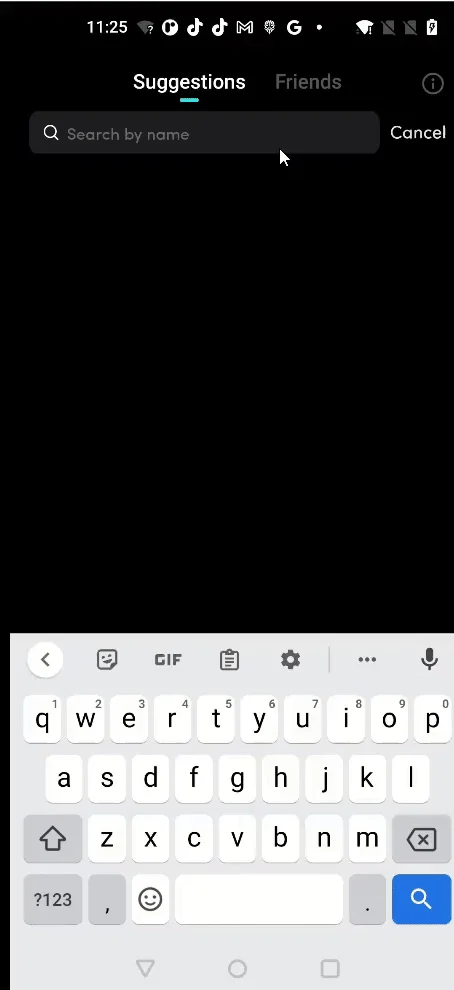
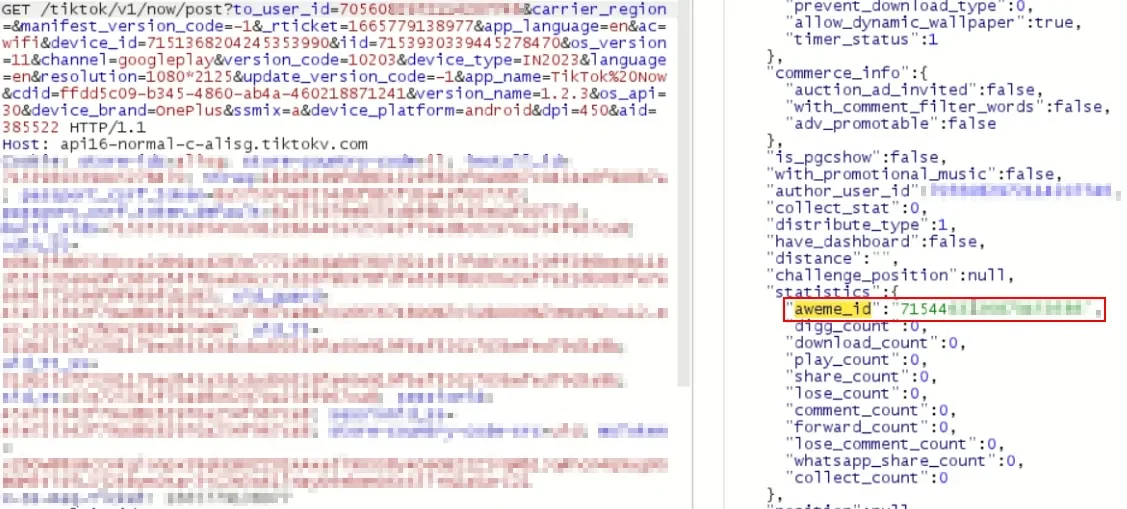
Despite that message, the response of the API call made when browsing the user profile exposed the private memory's aweme_id. That was exactly the information needed to complete the attack.
The flow
- Browse the profile of the person you are interested in.
- Obtain their private
aweme_idmemory from the response. - Send the vulnerable request using the obtained
aweme_id. - The private memory of the person you are interested in is now public.
Root cause
The visibility modification endpoint acted on an aweme_id supplied by the client that belonged to another account. The profile browsing API response exposed the private memory's aweme_id even though the app said the memory was not accessible.
Impact
An attacker who obtains another user's aweme_id can change that memory's privacy setting from "Friends" to "Everyone". The attack requires knowing the victim's aweme_id, which is not guessable, but the profile browsing API discloses it. The author initially rated this as potentially high severity because both viewing and modifying the privacy settings of private memories is possible. The report was triaged, awarded 5500 USD and resolved; the timeline given is: reported 13 October, triaged 17 October, awarded 19 October, resolved 25 October.
Fix
The report does not describe the change that was made. A fix would need server-side authorisation on the visibility endpoint and removal of private memory identifiers from profile responses.
Variants to test
- On any app with per-object privacy toggles, capture the request that changes visibility and swap the object identifier for one belonging to a second account. A positive result is a success response and the object becoming visible to the attacker.
- Browse a profile whose content is restricted and inspect the API response for identifiers of the restricted objects. A positive result is an identifier appearing in the response despite a UI message denying access.
- Try the same identifier substitution on other state-changing endpoints that take an object ID, such as delete, edit or share actions. A positive result is the action succeeding on an object the attacker does not own.
- Check whether identifiers are sequential or otherwise predictable, which would remove the need for the disclosure step. A positive result is a neighbouring identifier resolving to another user's object.
What happened, in plain words
A security researcher found a way to take a photo or video that another person had marked as private on TikTok's companion app, TikTok Now, and make it public, without that person's permission. The trick relied on two mistakes in how the app's servers behaved. First, the server that changes a memory's privacy setting acted on an identifier sent by the phone that belonged to someone else. Second, the response of the API call made when browsing the profile exposed the private memory's identifier, even though the app said the memory was not accessible. Put the two together and an attacker who obtains the identifier could make a stranger's private memory visible. The researcher reported it, it was resolved, and the researcher was paid 5,500 US dollars.
This article walks through the same story for someone who has never done security work before. Every technical word is explained the first time it appears, and every request is shown exactly as it was captured, followed by a plain-language reading of what each part does.
The background: what a bug bounty program is
Many large companies run what is called a bug bounty program. It is a public invitation: if you find a security flaw in our product and tell us about it privately, we will pay you a reward, called a bounty, and we will not take legal action against you for poking around. Researchers browse these programs looking for interesting targets. The researcher in this story had looked at TikTok's program page many times.
A program page lists its scope, which is the set of products and websites that are fair game. One day the researcher noticed that a new scope had been added: TikTok had released a new app called TikTok Now.
A brand-new app is attractive to a researcher because it has had less time to be tested by other people. The researcher turned on an old Android phone, installed the app, and started exploring.
What the app does
TikTok Now lets people share memories. A memory is simply a video or a photo that the user has uploaded. Each memory has a privacy setting attached to it, which decides who is allowed to see it. Two of those settings matter here:
- Friends: only people who follow you and whom you follow back can see the memory. In other words, a two-way connection is required.
- Everyone: the memory is visible much more widely.
The researcher's goal was to find a way to view other people's private memories. They describe this as one of the most impactful security issues they could think of for this app, because it would affect users across the whole platform, not just one person.
The first hour: no tools at all
For the first hour the researcher did not use any security tools. Because the app was new, they focused on learning and playing with every feature it offered, and wrote down potential scenarios to try later. This is a normal first step: you cannot find a flaw in a feature you do not understand. Think of it like reading the rules of a board game before trying to find a loophole in them.
The tools: a proxy and two accounts
The work was done on an old Android device with the TikTok Now app installed, with Burp running as an intercepting proxy. A proxy is a middleman. Normally your phone talks directly to the company's server. With an intercepting proxy, the phone is configured to send all its traffic through a program on your computer first, and that program can pause each message, show it to you, and let you edit it before passing it on. Burp Suite is a well-known program for doing exactly this. It is how a researcher sees the hidden messages that an app sends, which are normally invisible to the user.
Two accounts were used:
- The researcher's own account, called the attacker account.
- A second, newly created account, whose memory served as the target or victim.
Having two accounts is essential. You need one account to perform the attack and a separate account to be attacked, so that you can prove the attack crossed an account boundary rather than just acting on your own data.
The captured requests show the app identifying itself to the server with a number of details: app_name=TikTok%20Now, version_name=1.2.3, version_code=10203, on os_version=11, device_type=IN2023, device_brand=OnePlus, os_api=30, dpi=450, resolution=1080*2125, over ac=wifi on the googleplay channel. These are just labels the app attaches so the server knows which app, version and phone it is talking to. They are not the interesting part, but they appear in the captured request, so they are shown.
The idea: an API and an identifier
When you tap a button in a mobile app, the app does not usually load a new web page. Instead it sends a short message to the company's server and gets a short answer back. That style of communication is called an API, which stands for Application Programming Interface. A useful everyday comparison: a restaurant. You do not walk into the kitchen and cook; you tell the waiter what you want, the waiter carries the order to the kitchen, and the kitchen sends back a plate. The API is the waiter and the kitchen door. The app on your phone is you at the table, and the server is the kitchen.
Each message to an API has a few parts:
- A method and a path, which say what kind of action you want and on what.
POSTmeans "I am sending data and asking you to change something". - Query parameters, the
name=valuepairs after a?in the address, which carry extra details. - Headers, small labelled lines of metadata such as who you are and what format you are sending.
- A body, the actual data of the request.
One header deserves its own explanation: the cookie. When you log in, the server gives your app a long random string and the app sends it back with every later request. That string is proof that you are already logged in, so you do not have to type your password every time. It works like a wristband at an event: you show your ticket once at the door, get a wristband, and after that the wristband is enough to get back in. Anyone who steals the wristband can pretend to be you, which is why cookies are sensitive. In the captured requests below the cookie value is shown only as dots, because it is a secret.
Now the key concept of this whole story: the object identifier. Servers store millions of memories. To tell them apart, each one gets a unique ID, a long number. In this app that ID is called the aweme_id. When the app wants to change the privacy of a memory, it tells the server which memory by sending its aweme_id. The server is supposed to check two things: is this person logged in, and does this person own this memory? Here the second check was missing.
That class of mistake has a name: Insecure Direct Object Reference, or IDOR. It means the server takes an identifier that the client (your phone) supplies and acts on the object it points to, without checking that you are allowed to touch that object. The everyday comparison: a hotel where the receptionist hands you a key with the room number on it, and the door lock only checks that the key is a valid hotel key, not that it is the key to that particular room. Try a different room number and the door opens.
Finding it: capturing the privacy change
The first step was to create a new memory and set its privacy to "Friends". The researcher then changed the privacy setting from "Friends" to "Everyone" and captured the request in Burp. The request looked like this:
POST /unification/privacy/item/modify/visibility/v1?carrier_region=&manifest_version_code=-1&_rticket=1665657797313&app_language=en&ac=wifi&device_id=7151368204245353990&iid=7153930339445278470&os_version=11&channel=googleplay&version_code=10203&device_type=IN2023&language=en&resolution=1080*2125&update_version_code=-1&app_name=TikTok%20Now&cdid=ffdd5c09-b345-4860-ab4a-460218871241&version_name=1.2.3&os_api=30&device_brand=OnePlus&ssmix=a&device_platform=android&dpi=450&aid=385522 HTTP/2Host: api16-normal-c-alisg.tiktokv.comCookie: ...........Content-Length: 35Content-Type: application/x-www-form-urlencoded; charset=UTF-8User-Agent: Accept-Encoding: gzip, deflateaweme_id=71539436394863*****&type=1
Reading it piece by piece:
POSTis the method: this request asks the server to change something./unification/privacy/item/modify/visibility/v1is the path. In plain words: "modify the visibility of an item". Thev1at the end is just a version number for the endpoint.- Everything from
carrier_region=up toaid=385522is the query string, a long list ofname=valuepairs. Most of them are app and device details: language, operating system version, screen resolution, and so on. They are the app's way of describing itself. HTTP/2is the version of the web protocol being used.Host: api16-normal-c-alisg.tiktokv.comsays which server the request is addressed to. This is the API server, not the website you see in a browser.Cookie: ...........is the login wristband described above. The dots stand in for the real value, which is a secret.Content-Length: 35says the body is 35 bytes long.Content-Type: application/x-www-form-urlencoded; charset=UTF-8says the body is formatted asname=valuepairs, the same style as the query string.User-Agent:andAccept-Encoding: gzip, deflateare headers that were present but whose values are not shown in the capture.- The last line is the body:
aweme_id=71539436394863*****&type=1. Theaweme_idis the ID of the researcher's own memory. Thetypeparameter says which option they want to set, in this case "Everyone". The asterisks hide the end of the real number.
So the whole request says: "I am logged in, and I want to change the visibility of memory number 71539436394863... to option 1, which means Everyone."
Seeing an object identifier sent by the client in a request that changes something, the researcher started to think about IDOR: could this same action be performed on the aweme_id of a memory that does not belong to them? That is the question that defines this whole class of bug. The server has been told which object to act on; the only question is whether it checks who is asking.
Exploitation
Step 1: create a target memory
The researcher created a new account and uploaded a private memory with it, then retrieved the aweme_id of that memory. With the target's aweme_id in hand, the attacker account could attempt to use it. This is the controlled experiment: instead of attacking a real stranger, you attack your own second account, so you can see exactly what happens and prove the result without harming anyone.
Step 2: replay the request with the victim's identifier
The same request was sent again, this time with the target account's aweme_id:
POST /unification/privacy/item/modify/visibility/v1?carrier_region=&manifest_version_code=-1&_rticket=1665657797313&app_language=en&ac=wifi&device_id=7151368204245353990&iid=7153930339445278470&os_version=11&channel=googleplay&version_code=10203&device_type=IN2023&language=en&resolution=1080*2125&update_version_code=-1&app_name=TikTok%20Now&cdid=ffdd5c09-b345-4860-ab4a-460218871241&version_name=1.2.3&os_api=30&device_brand=OnePlus&ssmix=a&device_platform=android&dpi=450&aid=385522 HTTP/2Host: api16-normal-c-alisg.tiktokv.comCookie: ...........Content-Length: 35Content-Type: application/x-www-form-urlencoded; charset=UTF-8User-Agent: Accept-Encoding: gzip, deflateaweme_id=TARGET-AWEME_ID&type=1
Compare this with the first request. Everything is identical except the body: aweme_id=TARGET-AWEME_ID&type=1. The cookie is still the attacker's cookie, so the server knows perfectly well who is asking. The only thing that changed is which memory the request points at. This is called replaying a request with a modified value, and it is the core move of IDOR testing.
The server answered with 200 OK and a success message. 200 OK is the standard code a web server sends to mean "done, no problem". The attacker account had changed the privacy setting of a memory it did not own.
Step 3: confirm the effect
Browsing the target profile from the attacker account, the researcher could view the target's memory even though the two accounts were not friends. The privacy setting of the target's memory had been changed from "Friends" to "Everyone". This confirmation step matters: a success message from the server is a strong hint, but seeing the actual effect with your own eyes is the proof.
Step 4: obtaining the identifier
At this point the researcher considered the finding high severity, because an attacker could view and modify the privacy settings of a user's private memories. But there was a limit: the aweme_id of these memories is not guessable. It is a long number, so you cannot simply try 1, 2, 3 until you hit someone's memory. Before the vulnerability could be exploited against a real person, the value had to be obtained somehow. This is the difference between a bug that is real and a bug that is practical, and it is why the next step matters so much.
With the attacker account, the researcher searched for the victim's username and browsed their profile. Since the victim's memory privacy was set to "Friends", the app displayed the message You can view after you become friends.
That message is the app telling you, in plain words, that you are not allowed to see this content. It is the visible face of an access control rule. The question the researcher then asked was: does the server behind the app actually enforce that rule, or does the app merely hide the content on screen while the server still sends it?
Despite that message, the response of the API call made when browsing the user profile exposed the private memory's aweme_id. That was exactly the information needed to complete the attack.
The lesson here is one that applies to every app you will ever test: the screen is not the security boundary. The app on your phone is a program running on a device you control, and it can only hide things from you. The real decision about who may see what has to be made on the server. If the server sends the data and the app chooses not to display it, then anyone who can look at the raw traffic, as this researcher could through the proxy, can read it anyway.
The flow
Putting it all together, the attack is four steps:
- Browse the profile of the person you are interested in.
- Obtain their private
aweme_idmemory from the response. - Send the vulnerable request using the obtained
aweme_id. - The private memory of the person you are interested in is now public.
Notice that neither step requires any special tool beyond a proxy and an account. The first two steps are just looking at what the server sends back. The third is a copy of a normal request with one value swapped. The fourth is the consequence.
Why it worked
The visibility modification endpoint acted on an aweme_id supplied by the client that belonged to another account. In the hotel comparison: the door lock checks that you have a valid key, but not that the key is for this room.
The profile browsing API response exposed the private memory's aweme_id even though the app said the memory was not accessible. Two separate mistakes, each harmless on its own, combine into a complete attack: one hands you the key, the other opens the door.
Impact
An attacker who obtains another user's aweme_id can change that memory's privacy setting from "Friends" to "Everyone". The attack requires knowing the victim's aweme_id, which is not guessable, but the profile browsing API discloses it. The researcher initially rated this as potentially high severity because both viewing and modifying the privacy settings of private memories is possible.
The report was triaged, awarded 5,500 US dollars and resolved. Triaged means the company's security team reviewed the report and confirmed it was a genuine issue worth working on. The timeline given is: reported 13 October, triaged 17 October, awarded 19 October, resolved 25 October. The public report is at HackerOne report 1733627.
The fix
The report does not describe the change that was made. In general terms, a fix would need server-side authorisation on the visibility endpoint: before applying the change, the server should check that the authenticated user owns the aweme_id in question. And private memory identifiers should be removed from profile responses returned to users who are not permitted to view the memory. Authorisation is the process of deciding whether a logged-in user is allowed to do a particular thing; it is different from authentication, which is only about proving who you are. The bug here was a failure of authorisation, not authentication: the server knew exactly who the attacker was.
Variants to test
Once you understand the shape of this bug, you can look for it elsewhere. These are the same ideas generalised:
- On any app with per-object privacy toggles, capture the request that changes visibility and swap the object identifier for one belonging to a second account. A positive result is a success response and the object becoming visible to the attacker.
- Browse a profile whose content is restricted and inspect the API response for identifiers of the restricted objects. A positive result is an identifier appearing in the response despite a UI message denying access.
- Try the same identifier substitution on other state-changing endpoints that take an object ID, such as delete, edit or share actions. A positive result is the action succeeding on an object the attacker does not own.
- Check whether identifiers are sequential or otherwise predictable, which would remove the need for the disclosure step. A positive result is a neighbouring identifier resolving to another user's object.
Glossary
- API: the set of messages an app uses to ask a server to do things and get answers back; the waiter between your phone and the company's computers.
- Attacker account: the account the researcher controls and uses to perform the attack.
- Authentication: proving who you are, usually by logging in.
- Authorisation: deciding whether a user who is already identified is allowed to perform a particular action on a particular object.
aweme_id: the unique identifier the app uses for a memory; the object identifier in this story.- Body: the part of a request that carries the actual data being sent.
- Bounty: the reward a company pays for a valid security report.
- Bug bounty program: a company's public offer to pay researchers who privately report security flaws in its products.
- Burp: a program that sits between your phone and the internet, letting you pause, read and edit the traffic.
- Cookie: a secret string your app receives at login and sends with later requests to prove it is still you; like a wristband at an event.
- Endpoint: a specific address on a server that performs a specific action, such as the visibility modification endpoint.
- Friends (privacy setting): a memory setting meaning only people you follow and who follow you back can view it.
- Header: a labelled line of metadata in a request or response, such as
HostorContent-Type. - HTTP/2: a version of the protocol browsers and apps use to talk to web servers.
- IDOR (Insecure Direct Object Reference): a flaw where the server acts on an object identifier supplied by the client without checking that the client is allowed to access that object.
- Intercepting proxy: a proxy that can pause and show each message, so you can read and modify it.
- Memory: a video or photo uploaded to TikTok Now.
- Method: the word at the start of a request, such as
POST, saying what kind of action is wanted. - Object identifier: the unique value that names a particular item stored on a server, such as one memory.
- Path: the part of the address that names the action, such as
/unification/privacy/item/modify/visibility/v1. - Privacy setting: the per-memory rule deciding who may view it.
- Proxy: a middleman that traffic passes through.
- Query parameters: the
name=valuepairs after a?in an address, carrying extra details. - Replay: sending a captured request again, usually with one value changed.
- Response: the answer the server sends back, including a status code such as
200 OK. - Scope: the list of products and websites a bug bounty program covers.
- Severity: how serious a flaw is judged to be, often rated low, medium, high or critical.
- Target (or victim) account: the second account whose data the researcher tries to reach.
- Triaged: reviewed by the company's security team and confirmed as a genuine issue.
typeparameter: in this request, the value saying which privacy option to apply, here "Everyone".- 200 OK: the standard status code meaning the server completed the request successfully.




