IDOR Leads To Leak Any Uber Eats Restaurant Analytics

The Uber Eats Restaurant web application at https://restaurant.uber.com/ is using GraphQL. Back in March, I was doing a collaboration on a Uber report withSifat Bhai.
The full write-up lives on its author's site
It belongs to its author, so we link to it rather than copy it. The other two tabs are our own rewrites, checked against it.
Context
Uber Eats Restaurant is the web dashboard that restaurant owners use to manage their store. It lives at https://restaurant.uber.com/ and is built on GraphQL. One of its features is Analytics, where a store owner can see the restaurant's analytics for the last 12 months: sales, orders, ticket size, top-selling items and similar figures. The analytics page is served at a URL of this shape:
https://restaurant.uber.com/v2/home/{locationUUIDs}/analytics/sales
Behind that page, several GraphQL requests pull the data and the front end parses it into a readable view. Each of those requests carries a locationUUIDs parameter, for example:
"locationUUIDs":["0292a209-df33-496b-b65b-192c86603d48"]}
Here 0292a209-df33-496b-b65b-192c86603d48 is the locationUUIDs value of the researcher's own test account.
Setup
- A valid restaurant account on the Uber Eats Restaurant dashboard, used to log in normally and complete authentication.
- Burp Suite, configured as the browser's proxy, with Intercept OFF so that traffic flows through while the Match and Replace rules rewrite it.
- The identifier of a second restaurant (
locationUUIDs) to use as the target.
Finding it
The starting point was a collaboration on an Uber report with Sifat. On that engagement Sifat found an IDOR in GraphQL that leaked data belonging to other restaurants, but the leaked data did not contain anything sensitive enough to justify a report. The researcher decided to look at the same functionality himself.
Looking at the Analytics page, he noticed that every GraphQL request behind it contains the locationUUIDs parameter with his own test account's value. When he changed that value to another account's locationUUIDs, the server responded with JSON data in the body. The response was not properly readable in that raw form, and to read it the data has to be parsed through the webpage.
Exploitation
Step 1: Rewrite the identifier in Burp
To get the data parsed by the page, he used Burp Suite's Match and Replace option:
- In Burp go to Proxy => Options => Match and Replace.
- Click on Add and set up a rule where Match is his own restaurant's
locationUUIDsand Replace is any other restaurant'slocationUUIDs.
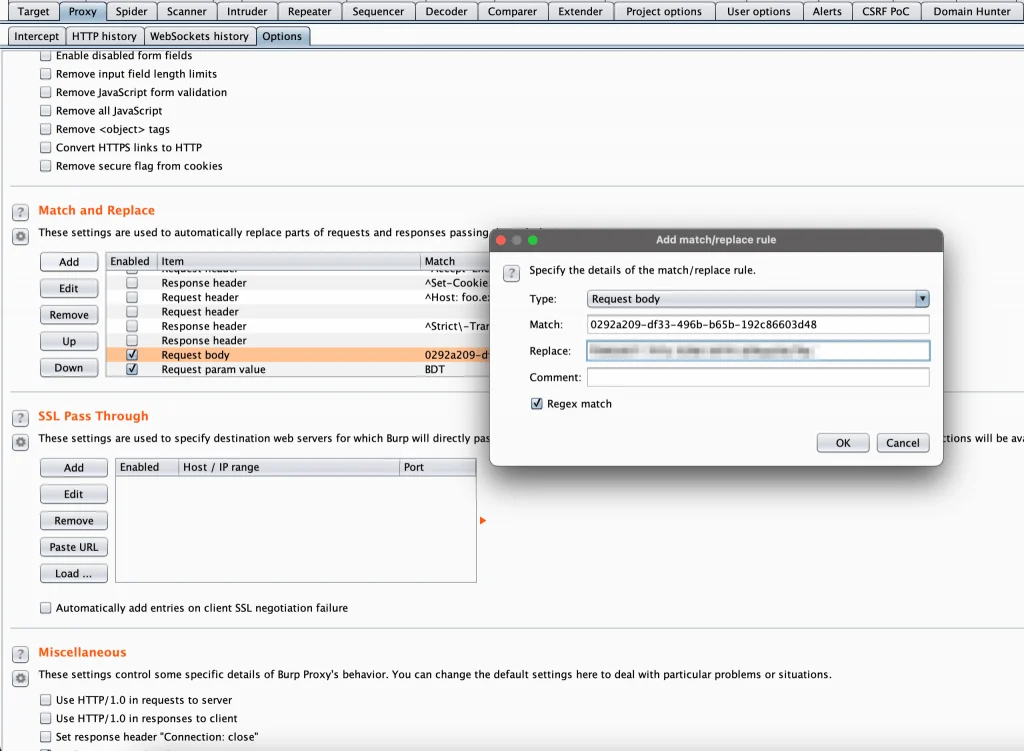
The screenshot shows the Match and Replace rule with his own location UUID as the match value and the target restaurant's UUID as the replacement.
- He added a second rule to change the currency from BDT to USD, so that all analytics come back in USD.
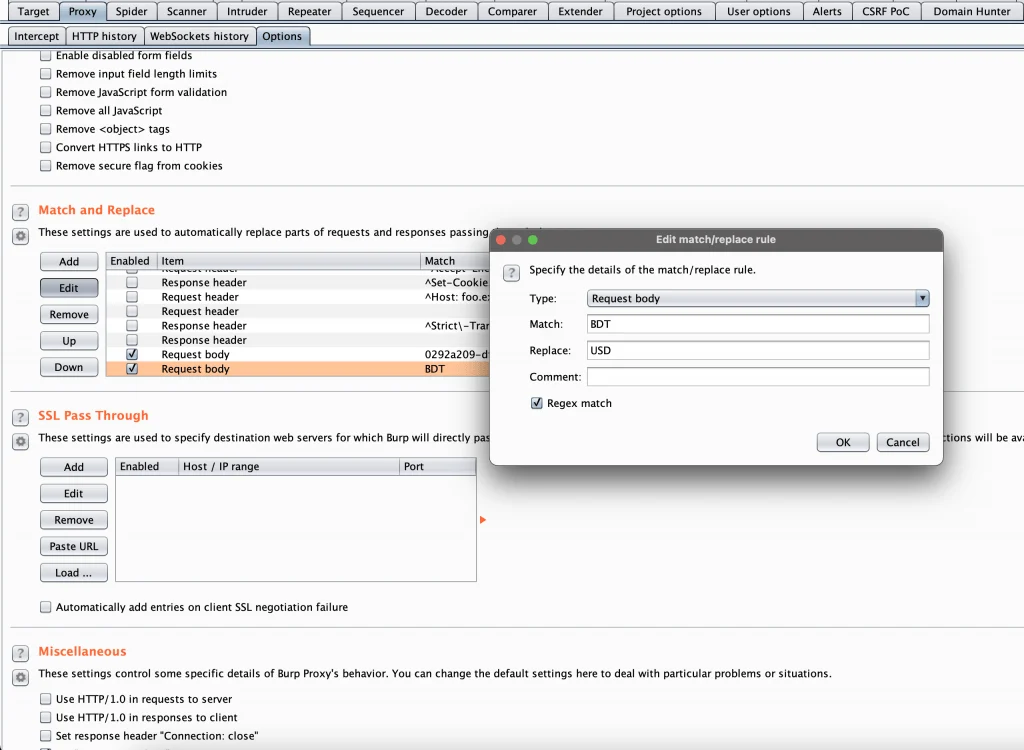
The second screenshot shows that currency rule.
Step 2: Log in and proxy the browser
- Visit https://restaurant.uber.com and log in using a valid restaurant account username and password, completing proper authentication.
- Set up Burp Suite with that browser and keep Intercept OFF.
Step 3: Request the victim's analytics page
Visit:
https://restaurant.uber.com/v2/home/{victims_locationUUIDs}/analytics/sales
All requests from the browser go through Burp, the Match and Replace rule swaps every locationUUIDs parameter value, and the data is parsed into a readable view on that webpage.
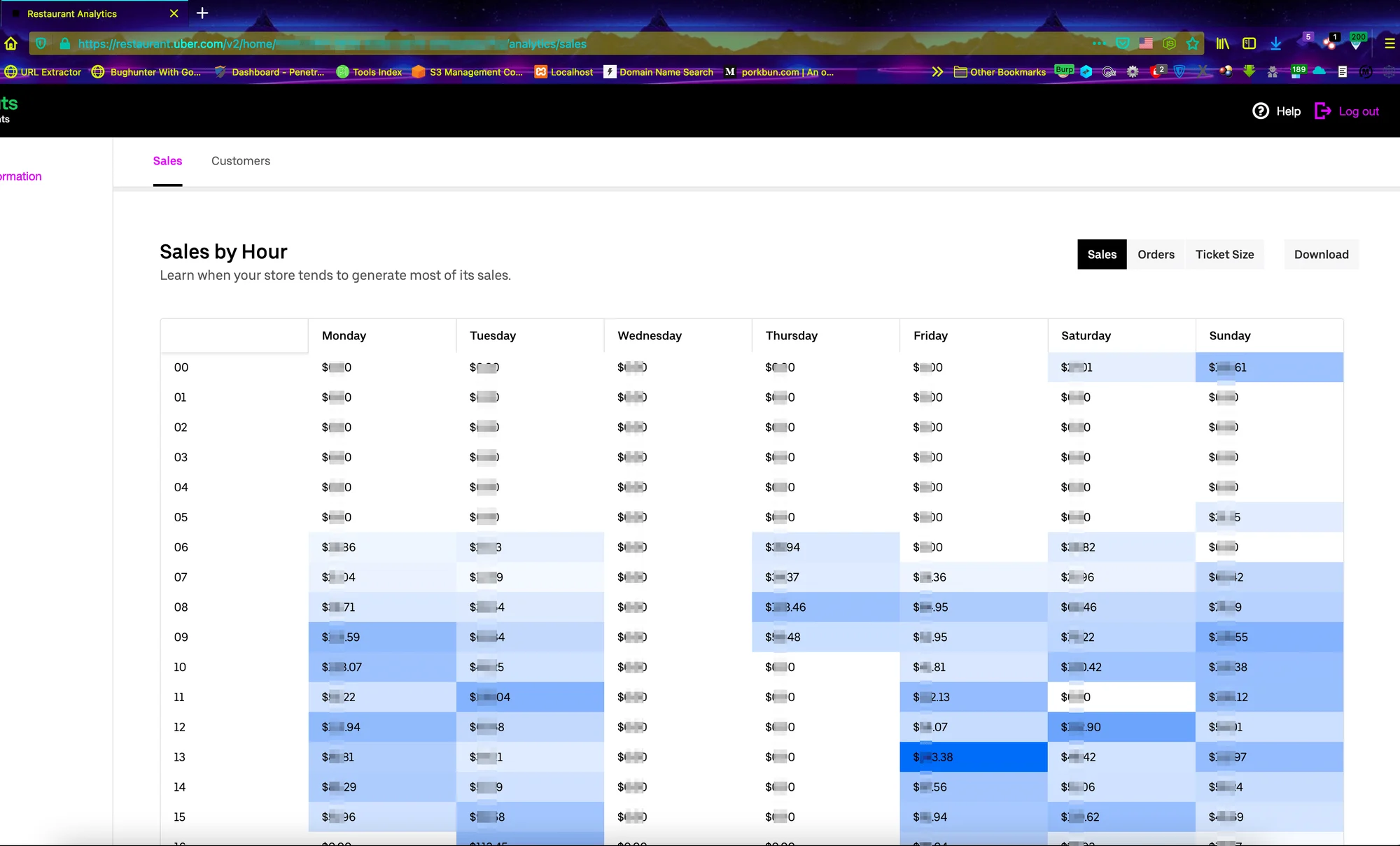
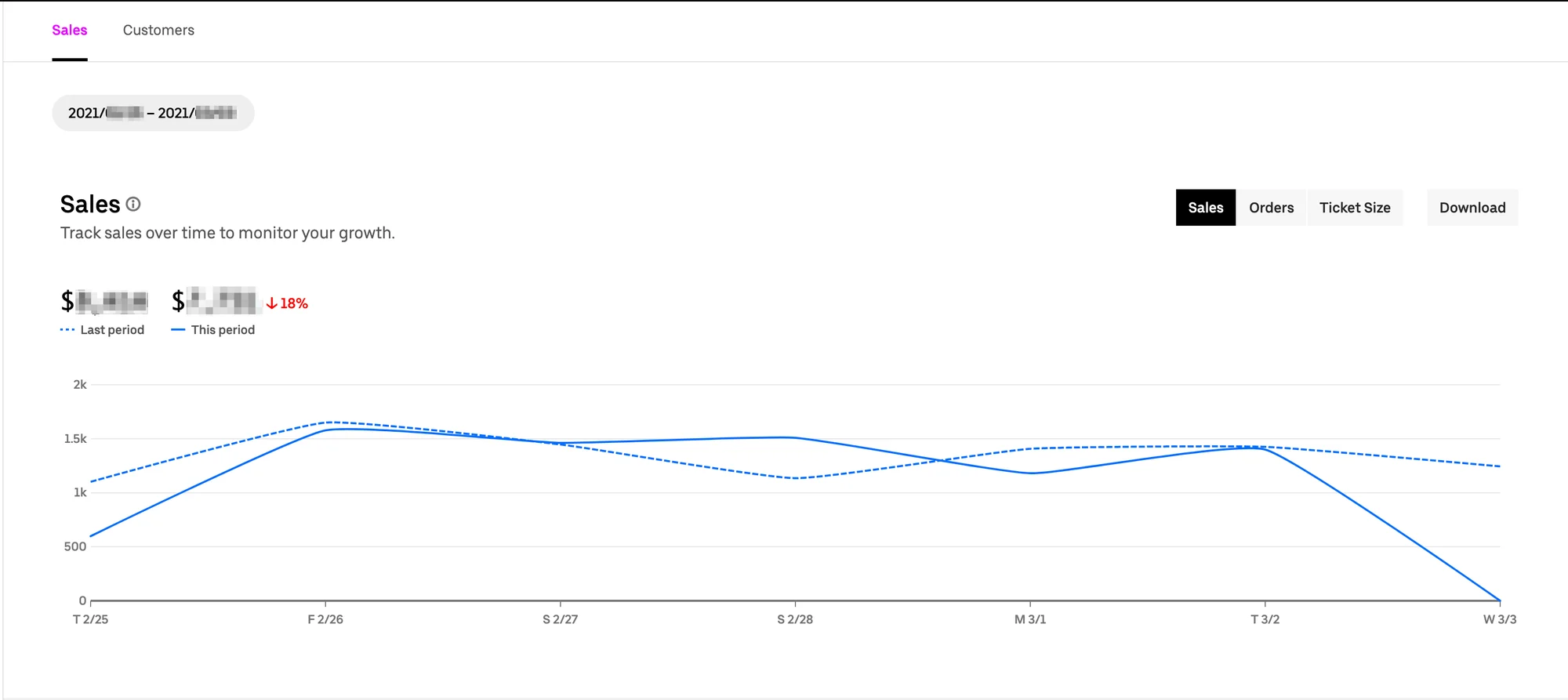
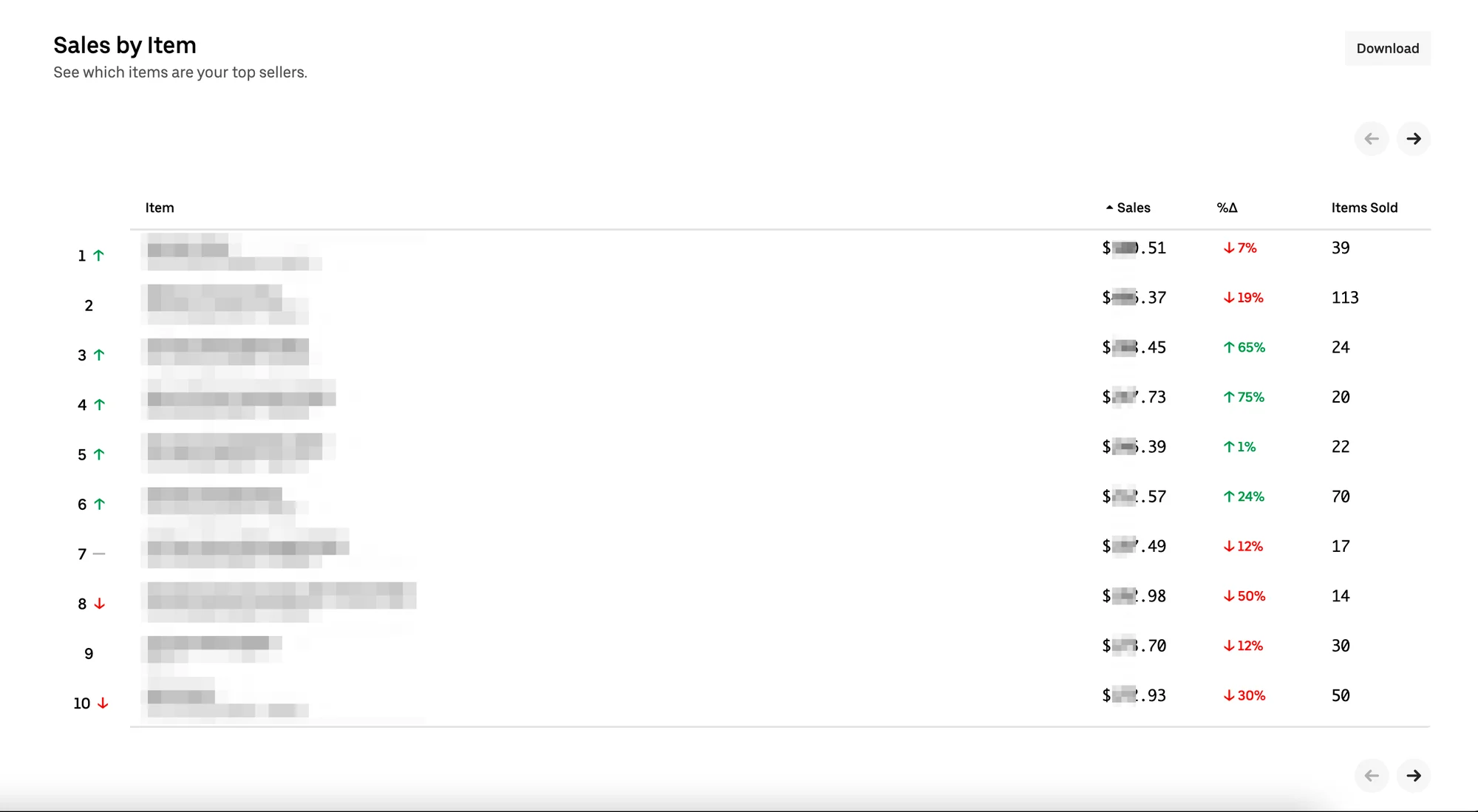
The screenshots show the analytics page rendering the other restaurant's data: the sales view and the sales-by-item breakdown.
Root cause
The analytics GraphQL requests accept a locationUUIDs value supplied by the client and return the analytics for that location. The server does not check that the authenticated user is authorised for the requested location, so any valid restaurant account can ask for another restaurant's data by changing the identifier. The front end then parses whatever comes back, which is why rewriting the value in transit is enough to display the victim's analytics in a normal, readable page. The report does not describe the server-side implementation, so the exact place where the authorisation check is missing is not stated.
Impact
An attacker can access all analytics of a restaurant, which includes the ability to:
- Choose a date range to see that date range's analytics.
- View orders analytics and, by clicking Download, download a CSV copy.
- Track orders placed over time to monitor a restaurant's popularity.
- Track ticket size over time to see whether a restaurant is receiving larger orders.
- Learn when a target store tends to generate most of its sales.
- Learn when customers tend to place the most orders in a target restaurant.
- Learn when customers tend to place the largest orders in a target restaurant.
- See which items are a restaurant's top sellers.
To exploit a stored value, an attacker only needs the locationUUIDs parameter value. The researcher also showed the Uber Security team a promising way to fuzz the value for any restaurant.
The vulnerability was reported in report #1116387 under the Uber Bug Bounty Program and a $2,000 bounty was rewarded.
Fix
The report does not describe the fix that was applied. The change needed is an authorisation check on the server: for every analytics request, verify that the authenticated user is permitted to access the requested locationUUIDs before returning any data, rather than trusting the identifier supplied by the client.
Variants to test
- Other GraphQL fields taking a location identifier. Look for queries and mutations that accept a location or store identifier and return data for it. A positive result is data for a location your account does not own coming back in the response.
- Batched or aliased identifiers. Send several location identifiers in one request, or repeat the same field under different aliases with different identifiers. A positive result is any entry in the response that belongs to another account.
- Identifier formats. Try the UUID in different shapes (bare, quoted, inside an array, with extra entries) to see whether the check is applied to only one form. A positive result is a response that differs from the expected authorisation error for a foreign location.
- Other dashboard sections. Apply the same substitution to endpoints beyond analytics, such as orders or menu management, wherever a location identifier appears. A positive result is another restaurant's records being returned or modified.
- Currency and locale parameters. As in this report, change secondary parameters such as currency alongside the identifier to see whether the response is transformed for the victim's data. A positive result is the victim's figures rendered in your chosen currency.
What happened, in plain words
A security researcher found a way to see the private sales figures of any restaurant on Uber Eats, using nothing more than a normal restaurant owner account and a tool that sits between the browser and the website. The website trusted a number that the browser sent it (an identifier for a restaurant) without checking whether the person asking actually owned that restaurant. By swapping his own restaurant's identifier for someone else's, the researcher could make the site display another restaurant's analytics: sales, orders, top-selling items and more. He reported it to Uber's bug bounty programme and was paid $2,000.
This article walks through the whole thing slowly, assuming you have never done security testing before. You only need to be comfortable using a browser.
Background: the product and the feature
Uber Eats Restaurant is the web dashboard that restaurant owners use to manage their store. It lives at https://restaurant.uber.com/. Think of it as the back office of a restaurant: the owner logs in and sees their own orders, menu and statistics.
One of its features is Analytics, where a store owner can see the restaurant's figures for the last 12 months: sales, orders, average order size (called ticket size), top-selling items and similar numbers. The analytics page is served at a URL of this shape:
https://restaurant.uber.com/v2/home/{locationUUIDs}/analytics/sales
Read that URL as a sentence: "go to the home area, for the restaurant whose identifier is {locationUUIDs}, and show its sales analytics". The curly braces are a placeholder, not literal characters: in a real URL they are replaced by an actual identifier.
What an API and GraphQL are
When you open a web page, your browser does not receive the finished page from one single request. Modern sites are built like a restaurant where the waiter takes your order to the kitchen: the page you see is the dining room, and behind it the browser sends many small requests to the server asking for data, then draws the result on screen. Those data requests go to an API (Application Programming Interface), which is simply a defined way for one program to ask another for information.
GraphQL is one particular style of API. Instead of many fixed addresses, GraphQL has a single address and the browser sends a description of exactly which pieces of data it wants. The server answers with JSON, a text format for structured data that looks like a set of labelled boxes, for example "name": "value".
On the analytics page, several GraphQL requests pull the data and the front end (the part of the website running in your browser) parses it into a readable view: tables, charts and totals. Each of those requests carries a locationUUIDs parameter, for example:
"locationUUIDs":["0292a209-df33-496b-b65b-192c86603d48"]}
Line by line:
"locationUUIDs"is the name of the field. The plural "UUIDs" suggests it can hold more than one identifier.:separates the name from its value.["0292a209-df33-496b-b65b-192c86603d48"]is the value: a list (the square brackets) containing one string (the quotes).- The string itself is a UUID (Universally Unique Identifier): a long random-looking code used to name something without collisions. Here it names a restaurant location.
- The trailing
}closes the surrounding JSON object that the report excerpted.
In this example, 0292a209-df33-496b-b65b-192c86603d48 is the locationUUIDs value of the researcher's own test account. Think of it as the restaurant's identifier, used by the site to know which restaurant's data to fetch.
What an IDOR is
IDOR stands for Insecure Direct Object Reference. It is a fancy name for a simple mistake: a website lets you name an object (a record, a file, an account) directly in a request, and then hands it over without checking that the object belongs to you.
An everyday comparison: imagine a hotel where room keys are numbered, and the reception desk gives you any key you ask for as long as you say a room number, without checking that you are staying in that room. The key number is the "direct object reference"; the missing check is what makes it "insecure".
In this case the "object" is a restaurant's analytics, and the "reference" is the locationUUIDs value.
Setup: what you need before starting
- A valid restaurant account on the Uber Eats Restaurant dashboard, used to log in normally and complete authentication. Authentication means proving who you are, usually with a username and password; the site then remembers you, often with a cookie or token, which is a small piece of data your browser stores and sends back with every request so the server knows it is still you.
- Burp Suite, a tool that sits between your browser and the website. It works as a proxy: instead of your browser talking directly to the server, it talks to Burp, and Burp forwards the traffic and can read or change it on the way. Think of it as a post office clerk who can open every letter, read it, rewrite a word and send it on.
- The identifier of a second restaurant (
locationUUIDs) to use as the target. The report does not say how this identifier was obtained.
Finding it
The starting point was a collaboration on an Uber report with Sifat. On that engagement Sifat found an IDOR in GraphQL that leaked data belonging to other restaurants, but the leaked data did not contain anything sensitive enough to justify a report. The researcher decided to look at the same functionality himself.
Looking at the Analytics page, he noticed that every GraphQL request behind it contains the locationUUIDs parameter with his own test account's value. This is the key observation: the browser is telling the server which restaurant's data it wants, and the server believes it.
When he changed that value to another account's locationUUIDs, the server responded with JSON data in the body. In other words, the server did not refuse: it returned the other restaurant's analytics. But the response was not properly readable in that raw form, and to read it the data has to be parsed through the webpage. The response was not properly readable in that raw form, and to read it the data has to be parsed through the webpage.
Exploitation
Step 1: Rewrite the identifier in Burp
To get the data parsed by the page, he used Burp Suite's Match and Replace option. This is a feature that watches every request passing through the proxy and automatically swaps one piece of text for another. It is like a spell-checker that silently corrects a word in every letter before it is sent.
- In Burp go to Proxy => Options => Match and Replace.
- Click on Add and set up a rule where Match is his own restaurant's
locationUUIDsand Replace is any other restaurant'slocationUUIDs.
The screenshot shows the Match and Replace rule with his own location UUID as the match value and the target restaurant's UUID as the replacement. In plain terms: "wherever my restaurant's identifier appears in a request, put the victim's identifier there instead".
- He added a second rule to change the currency from BDT to USD, so that all analytics come back in USD.
The second screenshot shows that currency rule. Why bother?
Step 2: Log in and proxy the browser
- Visit https://restaurant.uber.com and log in using a valid restaurant account username and password, completing proper authentication.
- Set up Burp Suite with that browser and keep Intercept OFF.
Intercept OFF means Burp does not stop each request and wait for you to approve it. With interception on, you would have to click "forward" for every single request, which is impractical on a page that fires dozens of them. With it off, traffic flows through automatically and only the Match and Replace rules quietly rewrite it.
Step 3: Request the victim's analytics page
Visit:
https://restaurant.uber.com/v2/home/{victims_locationUUIDs}/analytics/sales
Here {victims_locationUUIDs} is a placeholder for the target restaurant's identifier. You are logged in as yourself, but you are asking the site for the analytics page of a different restaurant.
All requests from the browser go through Burp, the Match and Replace rule swaps every locationUUIDs parameter value, and the data is parsed into a readable view on that webpage.
You end up looking at another restaurant's analytics inside the ordinary interface.
The screenshots show the analytics page rendering the other restaurant's data: the sales view and the sales-by-item breakdown.
Root cause
The analytics GraphQL requests accept a locationUUIDs value supplied by the client and return the analytics for that location. The server does not check that the authenticated user is authorised for the requested location, so any valid restaurant account can ask for another restaurant's data by changing the identifier. The front end then parses whatever comes back, which is why rewriting the value in transit is enough to display the victim's analytics in a normal, readable page. The report does not describe the server-side implementation, so the exact place where the authorisation check is missing is not stated.
In everyday terms: the server checks that you are a logged-in restaurant owner, but not that you are this restaurant's owner. Authentication (who you are) was in place; authorisation (what you are allowed to see) was missing.
Impact
An attacker can access all analytics of a restaurant, which includes the ability to:
- Choose a date range to see that date range's analytics.
- View orders analytics and, by clicking Download, download a CSV copy.
- Track orders placed over time to monitor a restaurant's popularity.
- Track ticket size over time to see whether a restaurant is receiving larger orders.
- Learn when a target store tends to generate most of its sales.
- Learn when customers tend to place the most orders in a target restaurant.
- Learn when customers tend to place the largest orders in a target restaurant.
- See which items are a restaurant's top sellers.
A CSV is a plain text file where each line is a row of a table, with values separated by commas; it opens in any spreadsheet program. Downloading one means the attacker can take the victim's figures away and analyse them offline.
To exploit a stored value, an attacker only needs the locationUUIDs parameter value. The researcher also showed the Uber Security team a promising way to fuzz the value for any restaurant. Fuzzing means trying many variations of an input automatically to see which ones the server accepts; here it would mean trying identifiers until one belonging to another restaurant is found.
The vulnerability was reported in report #1116387 under the Uber Bug Bounty Program and a $2,000 bounty was rewarded. A bug bounty programme is a scheme where a company pays researchers who report security problems responsibly instead of exploiting them.
Fix
The change needed is an authorisation check on the server: for every analytics request, verify that the authenticated user is permitted to access the requested locationUUIDs before returning any data, rather than trusting the identifier supplied by the client.
In the hotel comparison: the reception desk should check not only that you are a guest, but that the room number you are asking about is the room you are staying in.
Variants to test
Once you understand the pattern, you can look for the same mistake elsewhere. These are ideas for further testing, not things the report says were found:
- Other GraphQL fields taking a location identifier. Look for queries and mutations that accept a location or store identifier and return data for it. A positive result is data for a location your account does not own coming back in the response.
- Batched or aliased identifiers. Send several location identifiers in one request, or repeat the same field under different aliases with different identifiers. A positive result is any entry in the response that belongs to another account.
- Identifier formats. Try the UUID in different shapes (bare, quoted, inside an array, with extra entries) to see whether the check is applied to only one form. A positive result is a response that differs from the expected authorisation error for a foreign location.
- Other dashboard sections. Apply the same substitution to endpoints beyond analytics, such as orders or menu management, wherever a location identifier appears. A positive result is another restaurant's records being returned or modified.
- Currency and locale parameters. As in this report, change secondary parameters such as currency alongside the identifier to see whether the response is transformed for the victim's data. A positive result is the victim's figures rendered in your chosen currency.
Glossary
- API: a defined way for one program to ask another for data, like a menu of requests a service accepts.
- Authentication: proving who you are, usually with a username and password.
- Authorisation: deciding what a proven user is allowed to see or do.
- Bug bounty programme: a scheme where a company pays researchers who report security problems responsibly.
- Burp Suite: a tool that sits between your browser and a website as a proxy, letting you read and modify traffic.
- Cookie: a small piece of data a site stores in your browser and receives back on each request, often used to remember that you are logged in.
- CSV: a plain text file of table rows with values separated by commas, openable in a spreadsheet.
- Fuzzing: automatically trying many variations of an input to find one the server accepts.
- GraphQL: a style of API where the client describes exactly which data it wants in one request.
- IDOR (Insecure Direct Object Reference): a flaw where a site lets you name a record directly in a request and returns it without checking it belongs to you.
- Intercept: a proxy setting that pauses each request so you can inspect or change it before it is sent.
- JSON: a text format for structured data made of names and values.
- Match and Replace: a Burp feature that automatically swaps one piece of text for another in every request passing through.
- Parameter: a named value sent with a request, such as
locationUUIDs. - Proxy: an intermediary that forwards traffic between your browser and a server.
- Token: a piece of data, similar to a cookie, that proves your session to the server.
- UUID (Universally Unique Identifier): a long random-looking code used to name something uniquely.