A 400 Is Not a Dead End — My First Bug Bounty (€250)
A multi-tenant SaaS platform used a path parameter for object lookup that was not normalised before validation, allowing a user from one tenant to read another tenant's private rule definitions and metadata. The authorisation check read the company ID from the URL while the lookup read the unnormalised path from the query string, so a traversal sequence bypassed tenant isolation.

Bug Bounty
The full write-up lives on its author's site
It belongs to its author, so we link to it rather than copy it. The other two tabs are our own rewrites, checked against it.
Context
The target is a multi-tenant SaaS platform for e-commerce feed management, referred to throughout as app.redacted.com. Every customer company gets its own tenant, and no tenant should ever see another one's data.
The feature at the centre of the story is automation rules: the platform lets you build rules of the form "if item matches X, then set title to Y". The set to value field is user-controlled text that the server later runs against your whole product feed. Rules are stored server-side and can be read back through the API, which exposes endpoints such as /body (the full rule definition, every condition and value), /meta (resource name and internal user ID) and /versions (version history and creator name).
The author went looking for server-side template injection in that value field and found none. What paid was a cross-tenant path traversal in the shared resolver that turns a client-supplied relative_entity_path into a storage location.
Setup
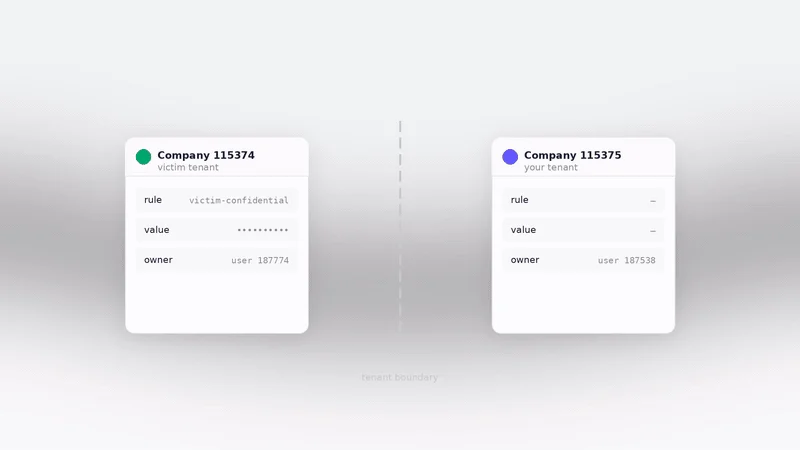
The researcher needed two tenants that share nothing, so that any cross-tenant read would be unambiguous and could not be dismissed as intended sharing behaviour. Two sign-ups were made:
| Tenant | Company ID | Role in the test |
|---|---|---|
| A | 115374 |
victim |
| B | 115375 |
attacker |
The two companies have no common user, no invite and no shared project. The victim tenant owns a rule resource with ID 12225249 inside a rule group with ID 28132172, under project 396367. The victim tenant's project is 396367, and the company segment in the URL is the part that changes between the two tenants.
No specific tooling is named beyond reading the JavaScript bundle and inspecting requests, with Burp history mentioned as where the rule-listing response had been sitting.
Finding it
The hunt started on the set to value field of automation rules, which the server executes against the product feed. The researcher threw the usual SSTI probes at it:
{{7*7}}        →  {{7*7}}
<%= 7*7 %>     →  <%= 7*7 %>
${7*7}         →  ${7*7}
[title]        →  [title]
Every payload came back byte-identical. To rule out the engine simply ignoring the input, the researcher checked /preview and /counts and confirmed the server really was transforming items: it ran the input, it just did not evaluate it. No SSTI.
Before closing the tab, the researcher went back to read the JavaScript bundle to understand how rules were built, and found this:
{
  action: "create_image_...",
  value: {
    resource_id: <id>,
    entity_path: "companies/" + companyId   // 👀
  }
}
A server-side path, assembled in the browser, from a variable the user controls. In the actual API requests the same idea appears as relative_entity_path.
Exploitation
Step 1: confirm that traversal is accepted at all
The first test used a limits endpoint, which only reports the plan's quotas, as a harmless place to see whether ../ was accepted:
- A, own path
projects/396367/master_rules→200 - B, same path, own company →
200 - B,
relative_entity_path=../115374/projects/...→200, so../was accepted - B,
limitsunder A's company in the URL →403
The traversal was accepted with no normalisation. But the response was static plan configuration, number_of_resources: 100 and max_sections: 10, the same bytes for every user on the platform regardless of the path sent. Traversal that leaks public constants is not a bug, so this was not reported. The researcher wrote a note instead: the path is not validated, and if any endpoint uses this parameter to read a real resource, that is cross-tenant access.
Step 2: learn the valid path shape from a 400
The endpoint that returns real content is /body. The researcher first pointed it at their own rule in their own company, to learn what a valid relative_entity_path looks like, and started guessing:
GET /api/companies/115374/resources/rules/12225249/body ?relative_entity_path=rules/28132172
{"error": "resource_wrong_entity_path"}
A 400, repeatedly. In this request 12225249 is the resource ID and 28132172 is the rule-group ID; the API keeps them separate, which is why both keep turning up.
The important part is what the error says. The server did not say forbidden and did not say not found. It said the path was wrong, which means it was resolving a path, had an opinion about the correct shape, and the guess was simply not right yet. A 403 means stop; a 400 that names its complaint means keep going.
The correct shape turned out to be projects/{project_id}/master_rules/{rule_group_id}, and the rule-listing response the researcher had already pulled earlier contained both IDs. It had been in the Burp history the whole time.
Step 3: prove the lock works before picking it
Before demonstrating the break, the researcher proved there was something to break, by trying to reach A's rule 12225249 as B through both routes the application actually offers.
Route 1, asking for the victim's company directly in the URL:
GET /api/companies/115374/resources/rules/12225249/body
→ 403. The URL company segment is properly authorised.
Route 2, own company in the URL, victim's resource ID, no ../:
GET /api/companies/115375/resources/rules/12225249/body ?relative_entity_path=projects/396367/master_rules/28132172
→ 400 resource_wrong_entity_path. The entity path is genuinely validated against the resource, so a plain ID swap gets nowhere. Both refusals are the application working correctly, which is what makes the next step interesting.
Step 4: add one ../
With the company in the URL still the attacker's, so authorisation passes, one traversal segment is enough:
GET /api/companies/115375/resources/rules/12225249/body?format=0 &relative_entity_path=../115374/projects/396367/master_rules/28132172
HTTP/2 200
{"sections":[{"actions":[
  {"action":"set","field":"title","value":"VICTIM-CONFIDENTIAL-VALUE"}]}]}
Another company's private rule, returned to a total stranger.
Step 5: other routes and other resource types
It was not just one route:
/bodyreturned the full rule definition./metareturned the resource name and the victim's internal user ID.
The researcher then tried a completely different resource type, image templates, and it behaved the same way. There /versions also returned 200, handing over the victim's version history and creator name, even though that same sub-route is 403-gated on rules. Two different resource types with one broken resolver is what indicated the flaw lives in the shared path resolver rather than in any single endpoint, and that a route-level fix would have missed half of it.
Root cause
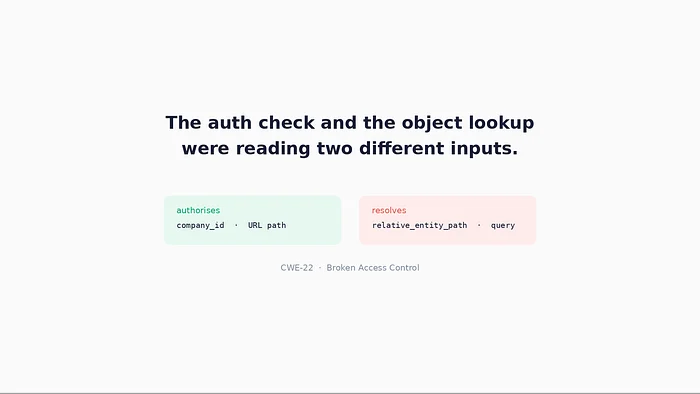
The authorisation check and the object lookup read two different inputs:
- Auth reads
company_idfrom the URL, and correctly blocks cross-tenant access. - The lookup reads
relative_entity_pathfrom the query string, and resolves it without normalising.
The server asks whether the user is allowed in company 115375, says yes, then hands a string the user controls to a resolver that walks straight out of 115375 into 115374. The path is validated, which is what the 400 proves, but it is validated before normalising. Because the impact lands outside the scope the check was defending, the vector carries Scope: Changed.
The author's classification: CVSS 6.4 · Medium · CWE-22 · A01:2025 Broken Access Control.
Impact
An authenticated user of one tenant can read another tenant's private automation rules, including their conditions and values, and can read resource metadata including the victim's internal user ID. Against image templates, the same technique exposes version history and the creator's name. The two tenants share nothing, so the read cannot be explained as intended sharing. The bounty was accepted as Medium for €250.
Fix
The recommendation is to normalise the path first, then check that the resolved path still sits inside the caller's tenant root, and to do it in the shared resolver rather than per route. For defenders, log the authorised tenant ID and the resolved tenant ID as separate fields and alert when they disagree, which catches this regardless of the encoding trick used to get there.
Variants to test
The general pattern is an endpoint where authorisation reads one input and the object lookup reads a different one. Wherever those two inputs are separate, you can usually satisfy the first and abuse the second.
- Two identifiers in one request. Look for a tenant or organisation ID in the URL path plus any path, key, ref or slug in the query string or body.
- Names that sound like paths. Try
entity_path,resource_ref,key,prefix,scope,parent, anything the client assembles. - Read the JavaScript bundles. Look for paths being built client-side, as in
"companies/" + companyId. - Errors that are specific. A generic
400is a wall; a400that names a field is a specification. - Check what actually came back. Half of the "traversal works" moments resolve to static configuration nobody cares about, as with
limitshere. - Test every sub-route and every resource type.
/body,/metaand/versionsbehaved differently on rules and on image templates. - Always use two real tenants that share nothing. No invite, no common user, no shared project, otherwise triage will close it as intended sharing behaviour.
What happened, in plain words
A security researcher went looking for one specific kind of bug in a web application and found none of it. While reading the application's own code in the browser, they noticed a different weakness, followed it patiently, and ended up reading another company's private data. The company that runs the application paid €250 for the report.
The lesson of the story is not really about the bug. It is about how to read what a server tells you when it says no. A refusal that explains itself is not a wall; it is a set of instructions.
This article walks through the whole thing from zero. You only need to know how to use a browser. Every technical word is explained the first time it appears, and there is a glossary at the end.
The product, and why it has tenants
The target is a multi-tenant SaaS platform for e-commerce feed management. Unpack that:
- SaaS means software as a service: one company runs the software, and many other companies log in and use it over the internet, like Gmail or Dropbox.
- Multi-tenant means each customer company gets its own separate walled-off space inside that one system. That space is called a tenant. Think of an office building with many rented floors: everyone uses the same lifts and the same front door, but each company's floor is locked to everyone else.
- E-commerce feed management means the product helps shops prepare the big lists of products (the "feed") that they send to marketplaces and shopping sites. A shop might have thousands of items, each with a title, a price, a description and so on.
The whole promise of a multi-tenant system is that no tenant can ever see another tenant's data. If that promise breaks, it is a serious bug. In this article the application is called app.redacted.com; the real name has been removed.
The feature: automation rules
The part of the product at the centre of the story is automation rules. The platform lets a customer write rules of the form "if an item matches X, then set its title to Y". For example: if a product is in the shoes category, set its title to start with "Sale".
The field where you type Y is called set to value. It is ordinary text that you, the customer, control. Later, the server takes that text and applies it to your whole product feed.
That is interesting to a security researcher because of a bug class called server-side template injection, usually shortened to SSTI. Here is the idea in everyday terms. Some web systems use templates: text files with blanks in them, where the server fills in the blanks before showing the page. A template might contain a marker like {{7*7}}, and the server is supposed to replace that marker with the result of the sum, 49. If a system lets a user put their own marker into a place that later gets processed as a template, the user can make the server calculate things, and sometimes make it run commands. That is SSTI: your text stops being text and starts being instructions.
So the set to value field looked like a perfect place to try it. The researcher's plan was to type template markers into it and see whether the server evaluated them.
Part 1: The hunt that went nowhere
The researcher sent the usual SSTI test strings into the set to value field:
{{7*7}}        →  {{7*7}}
<%= 7*7 %>     →  <%= 7*7 %>
${7*7}         →  ${7*7}
[title]        →  [title]
Line by line:
{{7*7}}is a marker used by several template systems. If the server evaluated it, the answer would come back as49. It came back exactly as typed.<%= 7*7 %>is the marker style used by template systems in the Ruby and ASP family. Same result: unchanged.${7*7}is the marker style used in Java and JavaScript template systems. Unchanged.[title]is a placeholder style used by some feed and mail-merge tools. Unchanged.
The arrow in each line shows what came back. "Byte-identical" means the response contained exactly the same characters that were sent, not a single one changed.
A careless tester would stop there and conclude the field is safe. A careful one asks a second question: is the server ignoring my text, or is it processing my text and simply not treating it as a template? Those are very different situations. To find out, the researcher checked two other parts of the application, /preview and /counts. /preview shows what the rule would do to your items, and /counts reports how many items a rule would affect. Both confirmed the server really was transforming items: the rule ran, the input was used. It just was not evaluated as code.
So there was no SSTI. Dead end.
But before closing the tab, the researcher did something that turned out to matter more than the whole hunt: they opened the JavaScript bundle. When you load a modern web application, your browser downloads a package of JavaScript files. JavaScript is the programming language that runs in your browser and makes the page interactive. The bundle is that code, and anyone can read it: in most browsers you can open the developer tools and look at the files the page loaded.
Inside the bundle was this snippet:
{
  action: "create_image_...",
  value: {
    resource_id: <id>,
    entity_path: "companies/" + companyId   // 👀
  }
}
Line by line:
action: "create_image_..."names an action the application can perform. The...means the name was shortened in the write-up.value: { ... }is the bundle of settings that goes with that action.resource_id: <id>is a placeholder for the identifier of some stored object. An ID is just a unique number a database gives to each record, like a ticket number.entity_path: "companies/" + companyIdis the important line. It builds a text path by gluing the wordcompanies/onto a company ID. The// 👀is the researcher's own comment, marking the spot that caught their eye.
Why does that matter? Because it shows the browser assembling a path. A path is the address of something inside a storage system, written as words separated by slashes, like companies/115375/rules. The report describes this as a server-side path, meaning the server will take this text and use it to find stored data. And the piece being glued in, companyId, is a value that comes from the user's own session.
In plain terms: the browser was building the address of a storage location out of a value the user controls, and sending it to the server. If the server trusts that address without checking it, a user can write a different address.
When the researcher looked at the actual requests the application sends, the same idea appeared under the name relative_entity_path. A request is the message your browser sends to a server when you click something or a page loads; a response is the server's reply. You can see both in the browser's developer tools, under the Network tab.
Part 2: Traversal works, and it is completely useless
Before going further, two concepts.
An API (application programming interface) is the set of addresses a web application uses behind the scenes to fetch and change data. When you click a button, the page usually does not reload; it quietly sends a request to an API address and puts the answer on screen. API addresses look like /api/companies/115375/resources/rules/12225249/body. Each part between slashes is a piece of information: which company, which kind of resource, which specific resource, and which view of it.
Path traversal is the bug class the researcher was about to find. In a file system or a storage system, .. means "go up one level". So ../ inside a path means "leave the current folder and step into the one above". If a program takes a path from the user and follows it without checking, a user can write ../ to climb out of the area they are allowed to be in and into someone else's. Think of a hotel key card that opens your own room; path traversal is slipping a note under the door that says "actually, room 214" and having the lock believe it.
The parameter name relative_entity_path practically announces it: relative means it is interpreted from some starting point, and anything relative can be made to point elsewhere.
To test this properly, the researcher needed two tenants. If you only have one account, you cannot tell whether you are seeing your own data or someone else's. So they signed up twice:
| Tenant | Company ID | Role in the test |
|---|---|---|
| A | 115374 |
victim |
| B | 115375 |
attacker |
The two companies share nothing: no common user account, no invitation between them, no shared project. That matters because many products have a legitimate sharing feature, and a tester who uses two accounts that are linked will be told by the security team that the access was intended. Two genuinely separate tenants make the result unambiguous.
The victim tenant owns a rule with resource ID 12225249, inside a rule group with ID 28132172, under project 396367. A project here is a container inside a tenant, and a rule group is a container inside a project that holds related rules. The API keeps these identifiers separate, which is why several different numbers appear in the requests below.
The first test used a limits endpoint. An endpoint is one specific API address that does one job. This one only reports the plan's quotas, meaning how many resources and sections your subscription allows. It was chosen precisely because it is boring: if something leaks there, no real data is exposed, so it is a safe place to find out whether ../ is accepted at all.
The results, as tenant B (the attacker):
- A, own path
projects/396367/master_rules→200 - B, same path, own company →
200 - B,
relative_entity_path=../115374/projects/...→200, so../was accepted - B,
limitsunder A's company in the URL →403
What the numbers mean. HTTP status codes are three-digit numbers a server sends with every response to summarise what happened. 200 means OK, here is your data. 403 means forbidden, I know who you are but you are not allowed. 400 means bad request, I could not understand what you asked. 404 means not found. 500 means the server broke.
So: when B asked for its own data, 200. When B put ../115374/ into the path parameter, the server still said 200, which means it accepted the climb out of B's own area and did not clean up the path. Normalisation is the cleaning-up step: a careful program rewrites a/b/../c into a/c before using it, which removes the climb. Here there was no normalisation. But when B simply put A's company in the URL, the server said 403, correctly refusing.
At this point a beginner might file a report. The researcher did not, and the reason is the most useful habit in the whole article: they looked at what actually came back. The limits response contained static plan configuration, number_of_resources: 100 and max_sections: 10, the same bytes for every user on the platform no matter what path was sent. Those are public constants, the same for everyone, like the opening hours printed on a shop door.
Traversal that leaks public constants is not a bug. It is a party trick. Nothing private was exposed, so there was nothing to report.
Instead the researcher wrote a note: the path is not validated, and if any endpoint uses this parameter to read a real resource, that is cross-tenant access. That note is the whole finding. The only remaining job was to find the endpoint.
Part 3: The 400 that told me everything
The endpoint that returns real content is /body, which gives the full definition of a rule: every condition and every value. That is real, private data.
The researcher first pointed it at their own rule in their own company. Nothing sneaky yet: the goal was simply to learn what a valid relative_entity_path looks like, because the server clearly expected a particular shape and guessing blind is slow. So they started guessing:
GET /api/companies/115374/resources/rules/12225249/body ?relative_entity_path=rules/28132172
{"error": "resource_wrong_entity_path"}
Line by line:
GETis the HTTP method, the verb of the request.GETmeans "give me something". Other common verbs arePOST(create),PUT(replace) andDELETE(remove)./api/companies/115374/resources/rules/12225249/bodyis the address. Reading it left to right: this is an API call, for company115374, about a resource of typerules, specifically rule12225249, and we want itsbody.?relative_entity_path=rules/28132172is the query string. Everything after the?is a list of named values sent along with the address, separated by&when there are several. Here the name isrelative_entity_pathand the value is a guess at a path.- The response is JSON, a text format for structured data. Curly braces hold an object, and
"error": "resource_wrong_entity_path"says the field namederrorhas the valueresource_wrong_entity_path. In plain words: the path you gave points at the wrong kind of thing.
That 400 came back again and again. Two different numbers appear in the request, and that is not a mistake: 12225249 is the resource ID and 28132172 is the rule-group ID. The API keeps them separate, which is why both keep turning up.
The important part is what the error says. The server did not say forbidden. It did not say not found. It said the path was wrong, which means it was resolving a path, it had an opinion about the correct shape, and the guess was simply not right yet. A 403 means stop. A 400 that names its complaint means keep going.
The correct shape turned out to be projects/{project_id}/master_rules/{rule_group_id}, where the curly braces are placeholders for the two IDs. And both of those IDs were already in the researcher's hands: the rule-listing response they had pulled earlier contained them. It had been sitting in their Burp history the whole time. Burp is a widely used tool that records every request and response that passes through it, so you can scroll back through what you already did. The information was there; the researcher just had not looked.
Part 4: Proving the lock actually works before picking it
Before showing a break, you have to show there was something to break. If the endpoint were simply unprotected, the finding would be boring: an open door, not a picked lock. So the researcher, as tenant B, tried to reach tenant A's rule 12225249 through both routes the application actually offers.
Route 1: ask for the victim's company directly in the URL.
GET /api/companies/115374/resources/rules/12225249/body
This is the obvious attack: put the other company's ID in the address and ask for its rule. The answer was 403. The company segment in the URL is properly authorised: the server checks that the logged-in user belongs to company 115374, sees that B does not, and refuses. That is the application working correctly.
Route 2: own company in the URL, victim's resource ID, no ../.
GET /api/companies/115375/resources/rules/12225249/body ?relative_entity_path=projects/396367/master_rules/28132172
Here the URL names B's own company, so the authorisation check passes. But the resource ID is A's, and the path parameter points at A's project and rule group. The answer was 400 resource_wrong_entity_path. The entity path is genuinely validated against the resource: the server noticed that the path and the resource did not belong together and refused. So a plain ID swap gets nowhere.
Both refusals are the application working correctly. That is exactly what makes the next step interesting: the lock is real, and it is about to be picked.
Part 5: Booom
Now add exactly one ../. The company in the URL stays the attacker's, so the authorisation check still passes. The path parameter, however, climbs out of B's company and into A's:
GET /api/companies/115375/resources/rules/12225249/body?format=0 &relative_entity_path=../115374/projects/396367/master_rules/28132172
Line by line:
- The URL still says
companies/115375, which is B's own company. The authorisation check reads this and is satisfied. ?format=0is a query parameter asking for a particular output format. It is not the interesting part.&relative_entity_path=../115374/projects/396367/master_rules/28132172is the second query parameter. It starts with../, which means "go up one level", and then names company115374, project396367and rule group28132172. The server resolves this path without normalising it, so it walks straight out of B's area and into A's.
The response:
HTTP/2 200
{"sections":[{"actions":[
  {"action":"set","field":"title","value":"VICTIM-CONFIDENTIAL-VALUE"}]}]}
Line by line:
HTTP/2 200is the status line.HTTP/2is the version of the protocol used for the conversation, and200means OK.- The JSON body is the rule definition.
sectionsis a list, each section hasactions, and the action shown says: set the fieldtitleto the valueVICTIM-CONFIDENTIAL-VALUE. That value is the victim's private rule content, returned to a total stranger.
And it was not just one route:
/bodyreturned the full rule definition./metareturned the resource name and the victim's internal user ID.
A user ID is the internal number a system uses to identify a person. It is not usually shown in the interface, but it is useful to an attacker because it can be used in further requests.
The researcher then tried a completely different resource type, image templates, and it behaved the same way. There, /versions also returned 200, handing over the victim's version history and the creator's name, even though that same sub-route is 403-gated on rules. "Gated" means protected by a permission check that returns 403 when you are not allowed.
Two different resource types with one broken resolver is the clue that matters. It told the researcher the flaw lives in the shared path resolver, the single piece of code that turns a path into a storage location for every resource type, rather than in any single endpoint. A fix applied route by route would have missed half of it.
Why it happened
The whole root cause in one line: the authorisation check and the object lookup were reading two different inputs.
- The authorisation check reads
company_idfrom the URL. It correctly blocks cross-tenant access, which is why route 1 gave403. - The object lookup reads
relative_entity_pathfrom the query string. It resolves that path without normalising it.
So the server asks "is this user allowed in company 115375?", gets yes, and then hands a string the user controls to a resolver that walks straight out of 115375 into 115374. The path is validated, which is what the 400 proves. It is just validated before normalising, so the check and the use disagree about what the path means.
Because the impact lands outside the scope the check was defending, the vector carries Scope: Changed. In the CVSS scoring system, which rates the severity of vulnerabilities, Scope: Changed means the effect crosses a security boundary, here from one tenant into another.
The author's classification: CVSS 6.4 · Medium · CWE-22 · A01:2025 Broken Access Control. Unpacking that:
- CVSS 6.4 is the numeric severity score, on a scale where 0 is harmless and 10 is catastrophic. 6.4 sits in the middle band.
- Medium is the label for that band.
- CWE-22 is the catalogue number for path traversal in the Common Weakness Enumeration, a standard list of bug types.
- A01:2025 Broken Access Control refers to the top category in the OWASP Top Ten, a widely used list of the most common web application security risks. Broken access control means the system fails to enforce who is allowed to do what.
The fix, and what defenders should log
The recommendation is to normalise the path first, then check that the resolved path still sits inside the caller's tenant root, and to do it in the shared resolver rather than per route. In everyday terms: clean up the address before you check it, then confirm the cleaned address is still inside the building you are allowed in, and do that check in the one place every resource type passes through.
For defenders, log the authorised tenant ID and the resolved tenant ID as separate fields, and alert when they disagree. Logging means writing events to a file or system that can be searched later. If the tenant you were allowed to touch and the tenant you actually touched are recorded side by side, a mismatch stands out immediately, whatever encoding trick was used to get there.
Impact
An authenticated user of one tenant can read another tenant's private automation rules, including their conditions and values, and can read resource metadata including the victim's internal user ID. Against image templates, the same technique exposes version history and the creator's name.
The two tenants share nothing, so the read cannot be explained as intended sharing. The bounty was accepted as Medium for €250.
Three things the researcher took from this
- A dead end is not a wasted day. The SSTI did not exist, but proving that put the researcher in the JavaScript bundle, and the bundle had the parameter.
- A
200is not a finding. Traversal worked onlimitsin the first hour. It was worthless. Always check what came back, not just the status code. - Read your errors.
resource_wrong_entity_pathwas not the application blocking the researcher. It was the application explaining how it worked.
How to spot this in your own hunting
The specific bug was traversal. The pattern is much bigger: find an endpoint where authorisation reads one input and the object lookup reads a different one. Wherever those two inputs are separate, you can usually satisfy the first and abuse the second.
- Two identifiers in one request. Look for a tenant or organisation ID in the URL path plus any path, key, ref or slug in the query string or body.
- Names that sound like paths. Try
entity_path,resource_ref,key,prefix,scope,parent, anything the client assembles. - Read the JavaScript bundles. Look for paths being built client-side, as in
"companies/" + companyId. - Errors that are specific. A generic
400is a wall; a400that names a field is a specification. - Check what actually came back. Half of the "traversal works" moments resolve to static configuration nobody cares about, as with
limitshere. - Test every sub-route and every resource type.
/body,/metaand/versionsbehaved differently on rules and on image templates. - Always use two real tenants that share nothing. No invite, no common user, no shared project, otherwise triage will close it as intended sharing behaviour.
Glossary
- API: the set of addresses a web application uses behind the scenes to fetch and change data, usually returning JSON rather than a web page.
- Authorisation check: the part of a server that decides whether the logged-in user is allowed to do the thing they are asking for.
- Automation rule: a saved instruction of the form "if an item matches X, then set Y", applied to a product feed.
- Broken access control: a bug class where the system fails to enforce who is allowed to do what; the top category of the OWASP Top Ten.
- Burp: a tool that records every request and response passing through it, so you can review what you already sent.
- Byte-identical: exactly the same characters, not one changed.
- Cross-tenant: reaching data that belongs to a different customer company inside the same multi-tenant system.
- CVSS: a standard scoring system that rates vulnerability severity from 0 to 10.
- CWE-22: the catalogue number for path traversal in the Common Weakness Enumeration, a standard list of bug types.
- Endpoint: one specific API address that performs one job.
- Entity path / relative entity path: the text path the application builds to locate a stored object;
relativemeans it is interpreted from a starting point, so it can be made to point elsewhere. - GET: the HTTP method meaning "give me something".
- HTTP method: the verb of a request, such as GET, POST, PUT or DELETE.
- HTTP status code: the three-digit number a server sends with every response:
200OK,400bad request,403forbidden,404not found,500server error. - ID: a unique number a database gives to each record, like a ticket number.
- JavaScript bundle: the package of JavaScript files a web application downloads into your browser; anyone can read it in the browser's developer tools.
- JSON: a text format for structured data, using curly braces for objects and square brackets for lists.
- Logging: writing events to a file or system that can be searched later.
- Multi-tenant: one system serving many customer companies, each with its own walled-off space.
- Normalisation: rewriting a path into a standard form, for example turning
a/b/../cintoa/c, before using it. - OWASP Top Ten: a widely used list of the most common web application security risks.
- Path: the address of something inside a storage system, written as words separated by slashes.
- Path traversal: a bug where a user-supplied path containing
../climbs out of the area they are allowed to reach and into someone else's. - Project: a container inside a tenant that holds related resources.
- Query string: the part of a URL after the
?, holding named values separated by&. - Request / response: the message your browser sends to a server, and the server's reply.
- Rule group: a container inside a project that holds related rules.
- SaaS: software as a service; one company runs the software and many others use it over the internet.
- Scope: Changed: a CVSS setting meaning the effect of a vulnerability crosses a security boundary, here from one tenant into another.
- Server-side template injection (SSTI): a bug where user text is processed as a template, so the user's text becomes instructions the server executes.
- Shared path resolver: the single piece of code that turns a path into a storage location for every resource type.
- Tenant: one customer company's walled-off space inside a multi-tenant system.
- User ID: the internal number a system uses to identify a person, usually not shown in the interface.
- Version history: the record of past versions of a stored object, including who created them.