A $5000 IDOR…
The customer support chat API authorised requests using only the email parameter, so an attacker could change it to another user's email to read and send messages and upload or download files in that user's conversations. The author also found that removing the id and user_hash parameters still returned a valid response.

Without wasting your precious time, the vulnerability which rewarded me the bounty was aCritical Idorwhich lead to broken access control to read messages, send messages, download all files of any user with the customer support.
The full write-up lives on its author's site
It belongs to its author, so we link to it rather than copy it. The other two tabs are our own rewrites, checked against it.
Context
The target is a customer support chat feature. Any user can open the support chat box and send a message to the support team. The feature is backed by an API that accepts a message and returns the stored message in the response. The researcher describes the bug as a critical IDOR leading to broken access control: reading messages, sending messages and downloading all files of any user within customer support. The platform records the asset as medium.com and the bounty as USD 5000, disclosed on 16 April 2019.
Setup
The report does not describe any special accounts, roles, tools or versions. The only precondition is an ordinary user session that can send a message through the customer support chat box, plus the ability to intercept and modify the resulting request.
Finding it
The researcher started from the request the browser generates when a message is sent in the support chat box. That request carries several parameters, including id, user_hash, email and anonymous_id, and the message body in text. The request carried an id parameter and a user_hash parameter, and the researcher tested the parameters one at a time.
Exploitation
Step 1: capture the send-message request
Sending a message in the support chat box generated the following request:
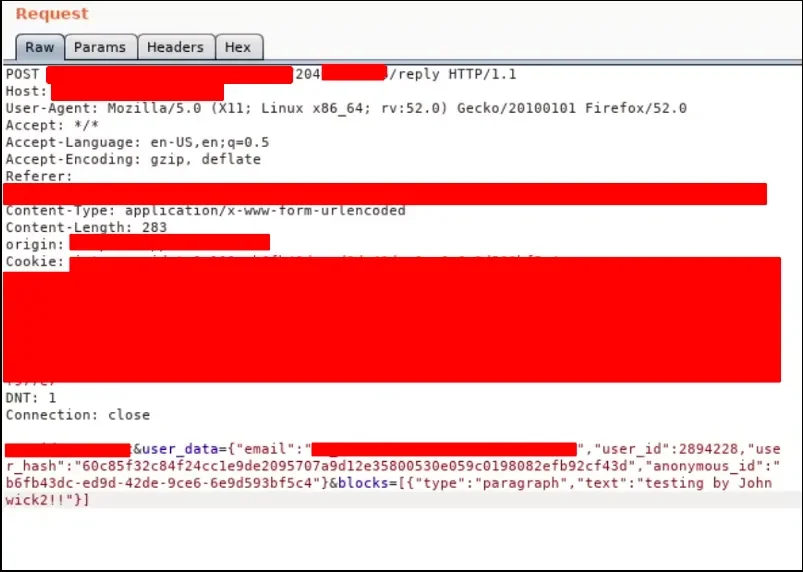
The message sent was testing by john wick2!, and it goes in the text parameter. The response from the server was:
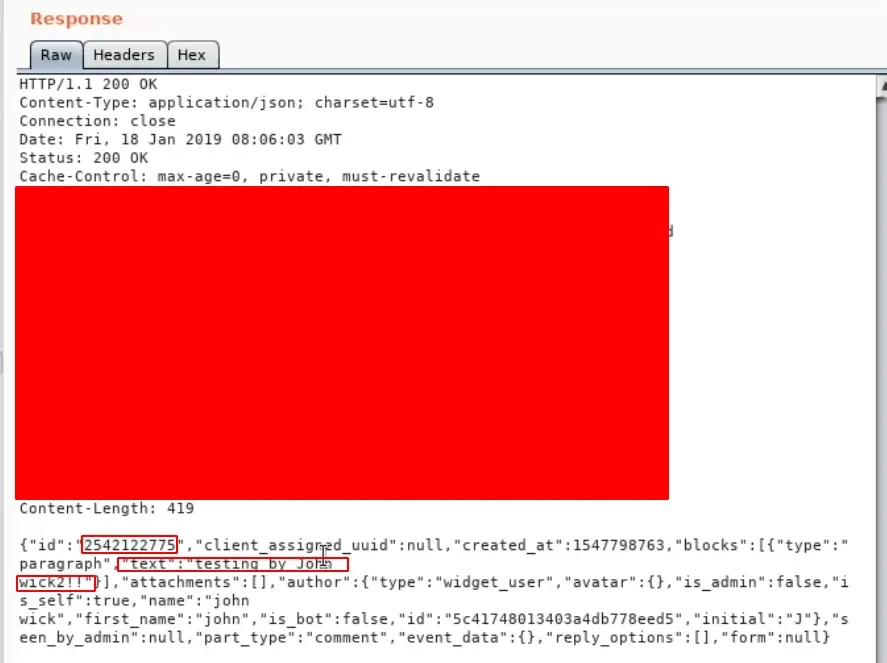
The sent message was reflected back in the response sent by the server, which confirms the request was accepted and gives a baseline for what a valid response looks like.
Step 2: change the id parameter (Test Case-I)
The obvious test is to change the id parameter to another user's id. The server returned the following response:
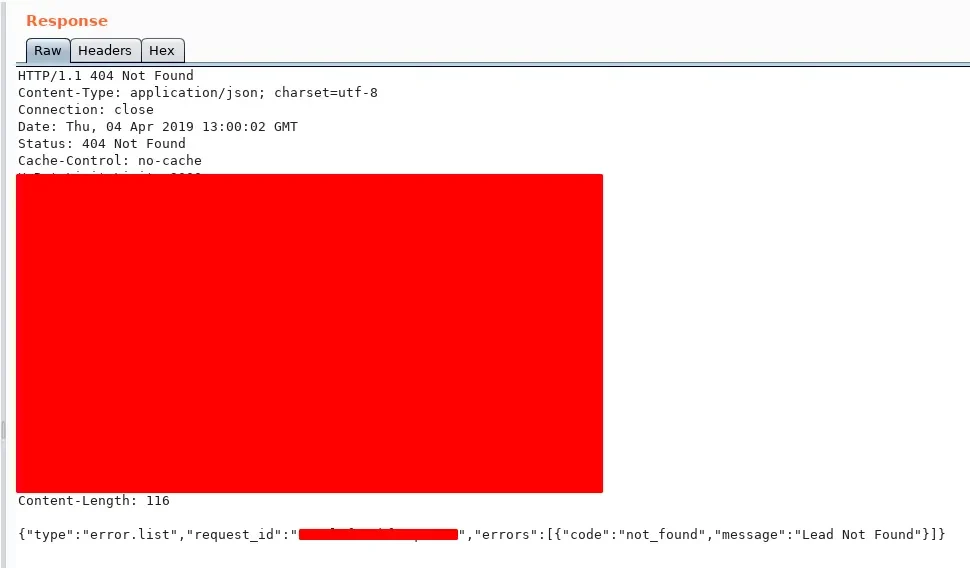
This is the default IDOR test, and here it produced an error response.
Step 3: remove the hash value (Test Case-II)
Next, the id parameter was left unchanged and the hash value was removed from the user_hash parameter. The response was:
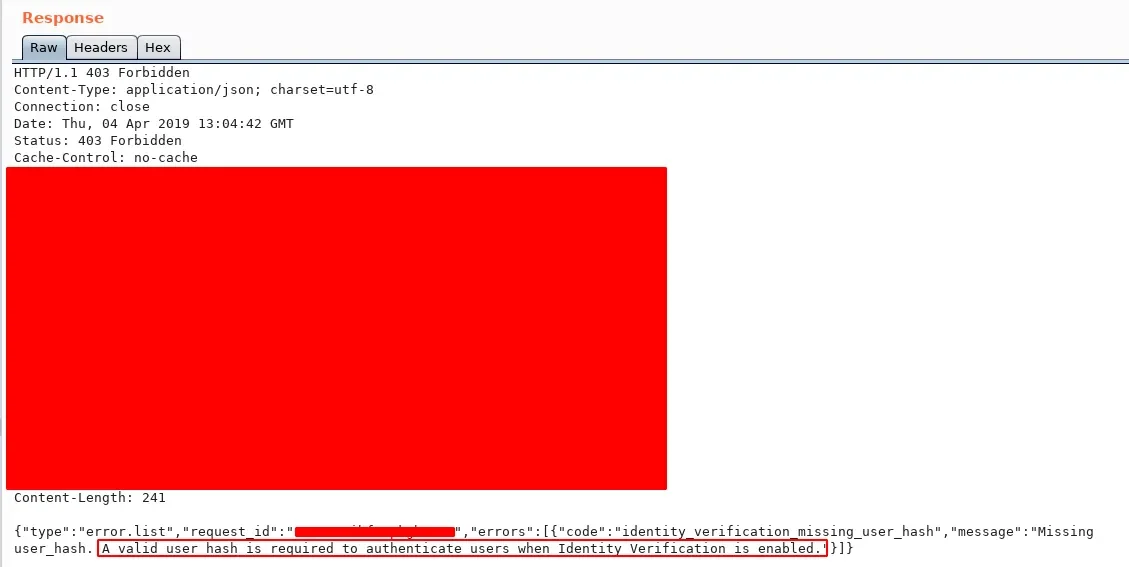
This shows that the user hash value is mapped to the user id and that the hash is mandatory, at least until the actual IDOR was found.
Step 4: remove both id and user_hash (Test Case-III)
With the values of both id and user_hash removed, the server returned the same error as in the previous figure, the invalid user hash response.
Step 5: null out anonymous_id (Test Case-IV)
Only two parameters remained: email and anonymous_id. The value of anonymous_id was set to null, and the server returned:
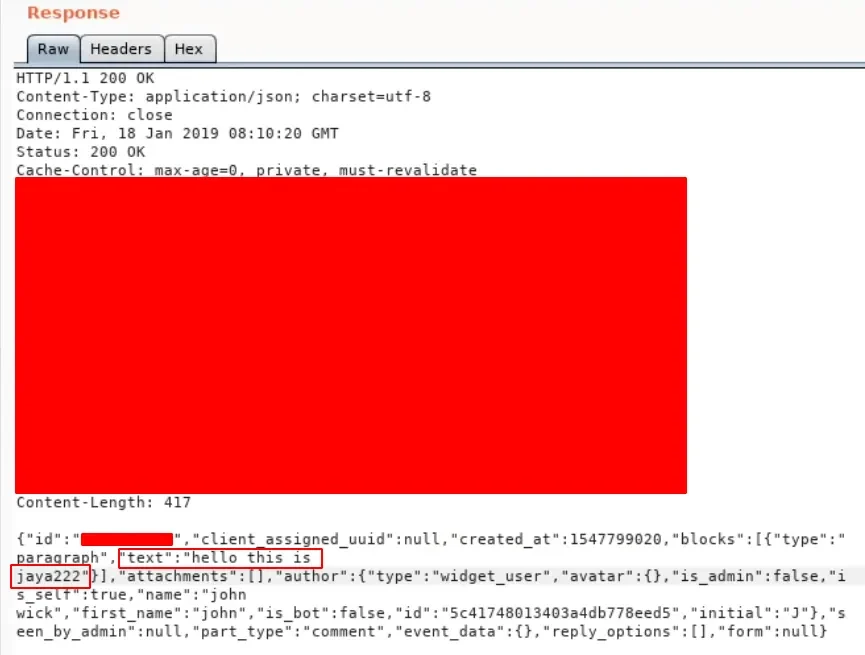
This was the IDOR. Removing the values of all parameters except email produced a valid response from the server. The application only verifies the email id of the user and returns the valid response.
Step 6: swap the email address
With only email being checked, changing the email parameter to another user's email address returns that user's data. The request and response are shown below:
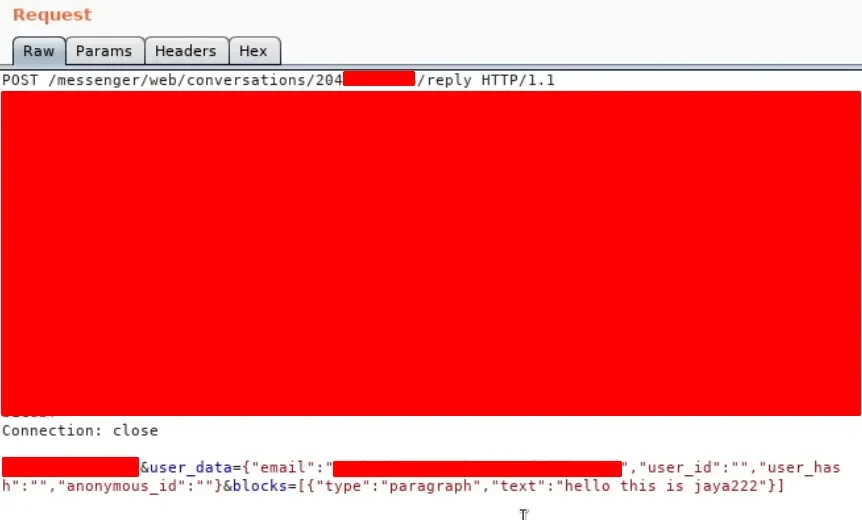
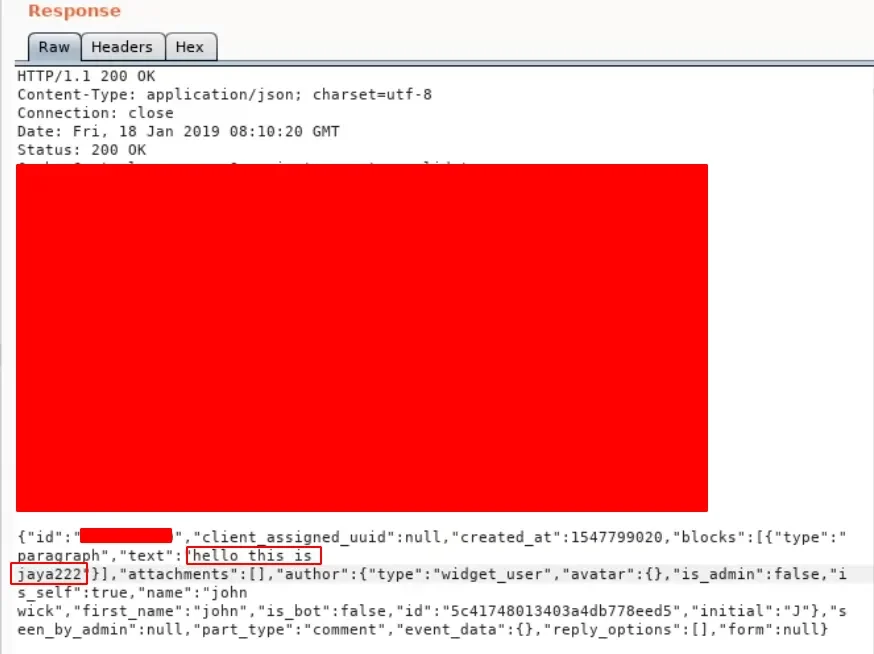
With this, the researcher could read and send messages in another user's conversation, and upload or download files. To enumerate conversations, the post URL was shortened to:
/messages/web_v1/conversations_parent
The server responds with all the conversation ids. Appending a conversation id returns that conversation:
/messages/web_v1/conversations_parent/[conversation-id]
Root cause
The application only verifies the email parameter. The id and user_hash parameters appear to be validated when present, which is why tampering with id or stripping user_hash produced errors, but the server does not require them. When every parameter except email is emptied, the request still passes and the server returns data for whichever email address is supplied. In other words, the object reference is the email address, and the server returns data for whichever email is supplied. The report describes the application as misconfigured; the exact code path is not shown.
Impact
An attacker who knows a victim's email address can read and send messages in that user's conversation, and upload or download files, through the customer support feature. The report does not state how email addresses would be obtained, nor whether the endpoint was reachable without any authenticated session.
Fix
Variants to test
- Remove parameters one at a time from an authenticated request and watch for a valid response where an error is expected. A positive result is a normal response body with the removed parameter absent.
- Replace a numeric
idwith an email address, username or other identifier in the same parameter. A positive result is another user's data returned. - Set optional parameters such as
anonymous_idto null while keeping the identity parameter. A positive result is a valid response rather than a validation error. - Shorten a nested resource URL to its parent collection, as with
/messages/web_v1/conversations_parent, and check whether it lists ids belonging to other users. A positive result is a list of conversation ids not owned by the session. - Append an id obtained from that listing to the child URL and check whose data comes back. A positive result is a conversation belonging to a different user.
What happened, in plain words
A security researcher found a bug in a customer support chat feature. The chat lets any logged-in user send a message to the support team. Behind the chat box there is a small web service (an API) that receives the message and stores it. The researcher discovered that this service only verified the email address in the request. By changing that email address to someone else's, he could read and send messages in that person's conversation, and upload or download files. The platform records the asset as medium.com and the bounty as USD 5000, disclosed on 16 April 2019.
This kind of bug is called an IDOR, short for Insecure Direct Object Reference. The name sounds complicated, but the idea is simple. Imagine a hotel where the receptionist hands you a key card with your room number on it, and the door lock only checks that the number on the card matches the door. If you scratch out "204" and write "312", the lock opens room 312 for you, because nobody checks that room 312 is actually yours. In web applications, the "room number" is a value in the request, such as a user id, an email address or a file name, and the bug is that the server trusts whatever value the client sends instead of checking it against the logged-in user.
A few words you will meet throughout this article:
- An API (Application Programming Interface) is the part of a website that the browser talks to behind the scenes. When you click "send" in a chat box, the page does not reload; it quietly sends a small message to the server and gets a small answer back. That small message is the API request.
- A request is that message from your browser to the server. It contains a URL (where it goes), a method (what it wants to do, such as send or fetch), and a set of parameters (named values, like
email=[redacted]). - A response is the server's answer, usually in a format called JSON, which is just structured text that the page can read.
- A session is how the server remembers that you are logged in. After you log in, the server gives your browser a cookie or token, a long random string that your browser sends with every request. The server looks at it and says "ah, this is the user who logged in earlier".
- Broken access control means the server does not properly check whether the person making a request is allowed to do what they are asking. IDOR is one common form of it.
- Intercepting a request means catching it between your browser and the server so you can look at it and change it before it is sent. People usually do this with a proxy tool, but the idea is the same as opening a letter, editing it, and sealing it again.
Setting the scene
The target is the customer support chat feature. Any user can open the support chat box and send a message to the support team. The feature is backed by an API that accepts a message and returns the stored message in the response. The researcher describes the bug as a critical IDOR leading to broken access control: reading messages, sending messages and downloading all files of any user within customer support.
The report does not describe any special accounts, roles, tools or versions. The only precondition is an ordinary user session that can send a message through the customer support chat box, plus the ability to intercept and modify the resulting request. In other words, you do not need to be an administrator or know anything secret to start. You need to be a normal user and to be able to see and edit what your browser sends.
Finding it
The researcher started from the request the browser generates when a message is sent in the support chat box. That request carries several parameters, including id, user_hash, email and anonymous_id, and the message body in text. The request carried an id parameter and a user_hash parameter, and the researcher tested the parameters one at a time.
Why start there? Because an id is exactly the kind of value that identifies "whose" data this is. If the server trusts the id from the request, changing it is the classic first test.
Exploitation
Step 1: capture the send-message request
Sending a message in the support chat box generated the following request:
The image shows the request that the browser sent when a message was submitted in the support chat box.
The message sent was testing by john wick2!, and it goes in the text parameter. The response from the server was:
The image shows the server's answer to that request.
The sent message was reflected back in the response sent by the server, which confirms the request was accepted and gives a baseline for what a valid response looks like.
A baseline matters. Before you change anything, you want to see what a normal, successful exchange looks like, so that later you can tell the difference between "the server accepted this" and "the server refused this". Here the server echoed the text back, which is a clear sign of success.
Step 2: change the id parameter (Test Case-I)
The obvious test is to change the id parameter to another user's id. The server returned the following response:
The image shows the error the server returned when the id was swapped for another user's id.
This is the default IDOR test, and here it produced an error response. Many people stop at this point and conclude the feature is safe. The researcher did not.
Step 3: remove the hash value (Test Case-II)
Next, the id parameter was left unchanged and the hash value was removed from the user_hash parameter. The response was:
The image shows the server complaining that the user hash is invalid.
This shows that the user hash value is mapped to the user id and that the hash is mandatory, at least until the actual IDOR was found. In plain terms, the server seemed to be saying: "the id and the hash must belong together, and you cannot just drop the hash". That looks like a solid defence. But it is worth asking a different question: what happens if you drop the id as well?
Step 4: remove both id and user_hash (Test Case-III)
With the values of both id and user_hash removed, the server returned the same error as in the previous figure, the invalid user hash response.
So removing the pair together did not help either. The server still complained about the hash. At this point two parameters were left to try: email and anonymous_id.
Step 5: null out anonymous_id (Test Case-IV)
Only two parameters remained: email and anonymous_id. The value of anonymous_id was set to null, and the server returned:
The image shows a valid response from the server, which the researcher marked as the IDOR.
This was the IDOR. Removing the values of all parameters except email produced a valid response from the server. The application only verifies the email id of the user and returns the valid response.
Think about what just happened. The id and the user_hash were checked when present, but the server did not require them. When they were present, the server checked them and complained if they were wrong. When they were absent, the server simply did not check them at all, and fell back to the one parameter that was still there: email. The lock on the door was real, but the door had a second handle with no lock on it.
Step 6: swap the email address
With only email being checked, changing the email parameter to another user's email address returns that user's data. The request and response are shown below:
The image shows the request with the email address changed to another user's.
The image shows the server returning that other user's data.
With this, the researcher could read and send messages in another user's conversation, and upload or download files. To enumerate conversations, the post URL was shortened to:
/messages/web_v1/conversations_parent
This is a URL path. Reading it from left to right: /messages/ is the part of the site that deals with messages, web_v1 looks like a version label for the API, and conversations_parent is the name of a collection, meaning "the list of all conversations". By requesting this address, the researcher asked the server for the list rather than for one specific conversation.
The server responds with all the conversation ids. Appending a conversation id returns that conversation:
/messages/web_v1/conversations_parent/[conversation-id]
Here [conversation-id] is a placeholder for one of the ids from the list. If the list contained, say, an id for a conversation, putting that id at the end of the URL asks for that one conversation. Because the email parameter decided whose data was returned, the list and the individual conversations belonged to whichever user's email was supplied.
Root cause
The application only verifies the email parameter. The id and user_hash parameters appear to be validated when present, which is why tampering with id or stripping user_hash produced errors, but the server does not require them. When every parameter except email is emptied, the request still passes and the server returns data for whichever email address is supplied. In other words, the object reference is the email address, and the server returns data for whichever email is supplied. The report describes the application as misconfigured; the exact code path is not shown.
To go back to the hotel comparison: the receptionist does check the key card, but only if you show one. If you walk up and simply say a room number, you get the key. The fix in real life would be to check the guest list against the logged-in person, not against the number written on the card.
Impact
An attacker who knows a victim's email address can read and send messages in that user's conversation, and upload or download files, through the customer support feature. The report does not state how email addresses would be obtained, nor whether the endpoint was reachable without any authenticated session.
Email addresses are not usually secret. People share them, they appear in address books, and they are often guessable from a name and a company domain. That is what makes this bug serious: the "key" is something many people already know about you.
Fix
In everyday terms: the server should look at the cookie or token that proves who is logged in, and only ever return that person's data, no matter what email address appears in the request.
Variants to test
If you want to try this kind of thinking on a system you are allowed to test, here are the same ideas written as a checklist. Each one says what to do and what a positive result looks like.
- Remove parameters one at a time from an authenticated request and watch for a valid response where an error is expected. A positive result is a normal response body with the removed parameter absent.
- Replace a numeric
idwith an email address, username or other identifier in the same parameter. A positive result is another user's data returned. - Set optional parameters such as
anonymous_idto null while keeping the identity parameter. A positive result is a valid response rather than a validation error. - Shorten a nested resource URL to its parent collection, as with
/messages/web_v1/conversations_parent, and check whether it lists ids belonging to other users. A positive result is a list of conversation ids not owned by the session. - Append an id obtained from that listing to the child URL and check whose data comes back. A positive result is a conversation belonging to a different user.
The wider lesson from the report is that an error message is not proof of safety. The first test failed, and many people would have stopped there. The researcher kept going, removing one value after another, until the server stopped complaining and started answering. It is also worth remembering that an object reference does not have to be a number. Here it was an email address, and that was enough.
Glossary
- API: the part of a website that the browser talks to behind the scenes, sending and receiving small structured messages instead of full pages.
- Access control: the rules that decide who is allowed to do what. Broken access control means those rules are missing or can be bypassed.
- Baseline: a normal, successful request and response captured before testing, used for comparison later.
- Broken access control: a weakness where the server does not properly check whether the person making a request is allowed to perform it.
- Collection: a URL path that represents a list of items, such as all conversations, rather than one specific item.
- Cookie: a small piece of data your browser stores for a site and sends back with each request, often used to remember that you are logged in.
- Endpoint: a specific address on a server that accepts requests, such as the messages API path.
- Enumerate: to list items one by one, for example collecting all conversation ids from a listing.
- Hash: a short value derived from other data, used here as a kind of check value tied to a user id.
- IDOR (Insecure Direct Object Reference): a bug where the server lets you access someone else's data by changing an identifier in the request, because it does not check that the object belongs to you.
- Intercept: to catch a request between the browser and the server so it can be inspected or modified.
- JSON: a structured text format commonly used for API requests and responses.
- Null: an empty or absent value, meaning "nothing here".
- Parameter: a named value sent with a request, such as
email=[redacted]. - Proxy: a tool that sits between your browser and the server and lets you see and edit the traffic.
- Request: the message your browser sends to the server, containing a URL, a method and parameters.
- Response: the server's answer to a request.
- Session: the server's memory of who is logged in, usually carried by a cookie or token.
- Token: a long random string, similar to a cookie, that proves your identity to the server.
- URL: the address of a resource on the web, made of a host and a path.
- Validation: checking that a value is present and well formed before using it.



