Account Hijack using Authorization bypass $$$$
The application's activity reporting feature did not verify the old password when resetting it, and the endpoint lacked proper authorization checks, allowing an attacker to reset any user's password by manipulating the URL path. This led to full account takeover.
 Published on medium.com
Bhavesh Thakur
The full write-up lives on its author's site
It belongs to its author, so we link to it rather than copy it. The other two tabs are our own rewrites, checked against it.
Context
The target was a web application with a profile section that shows an end user's account activity. The activity feed listed actions already performed on the account, such as password reset, image upload and first name update. Clicking an activity showed the date, IP address, information about the action performed and an activity ID. The feature also offered a link to report an activity as suspicious, and that report flow included options to reset the password and to log out from all devices.
The author frames the bug as a broken authorization problem: the application identified the logged-in user correctly but failed to check whether that user was allowed to act on a given activity record. The same module also failed to validate the old password, and the two weaknesses combined into a full account takeover.
Setup
The report does not describe the tooling, the number of accounts or any software versions. The only precondition visible in the text is that the researcher had more than one account: one account was used to send the malicious request, and a second account was the victim whose activity ID was targeted. The activity IDs were numerical, which the author notes explicitly.
Finding it
While reviewing the activity feed, the researcher noticed that each activity carried an ID and that the URL for an activity looked like this:
https://example.com/account/activities/
The actual request and its response are shown in the write-up.
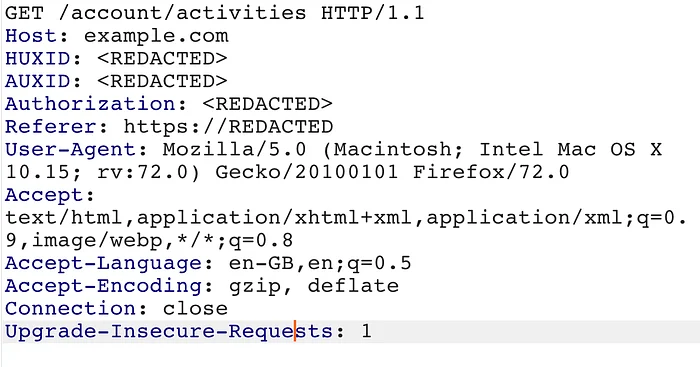
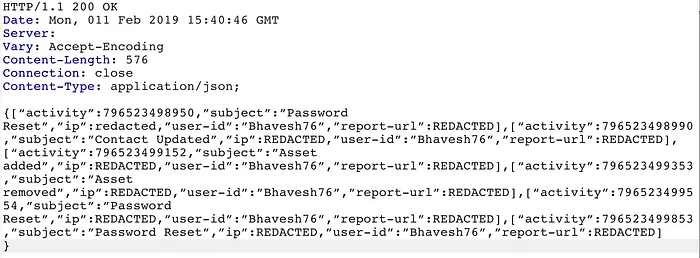
Looking at the response, the researcher saw that every activity had an ID, and that the IDs were numerical only. The response also contained a link to report the activity if it was found suspicious. Following that link led to a flow with an option to reset the password and an option to log out from all devices.
The report request itself behaved strangely.
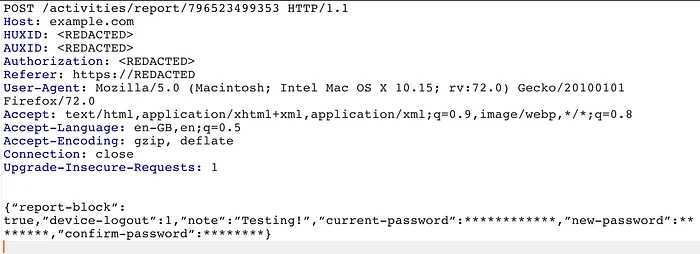
Sending the original request invalidated the current session immediately. The researcher then repeated the same activity but changed the parameter report-block to false. Nothing happened: the session stayed valid, yet the response was identical to the previous one. To check what had actually occurred, the researcher logged out and logged in again, and the login succeeded. The initial conclusion was that report-block controlled the behaviour, so setting it to false meant the server did not act on the request even though the response looked the same.
Then the researcher noticed that the account activity now showed a password reset.
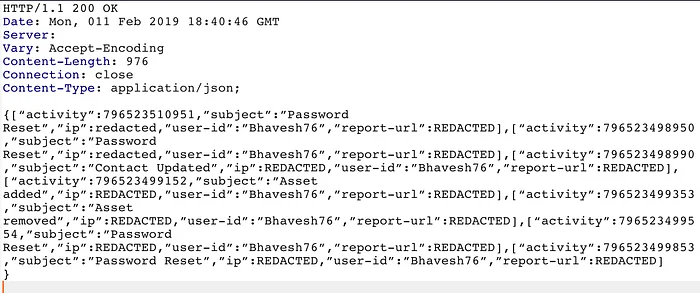
According to the application, the password had been changed, even though no current password had been entered while reporting. Repeating the action confirmed it: the report module was not verifying the old password at all. On its own this was a low severity finding.
Brute forcing the report ID returned a 403 response, so guessing another user's activity was not possible that way.
Exploitation
Step 1: Map the headers
The report request carried three headers containing random IDs. The researcher removed the Authorization header and sent the request; the application immediately threw an error, so that header was essential. The researcher then removed HUXID and AUXID and sent the request again.
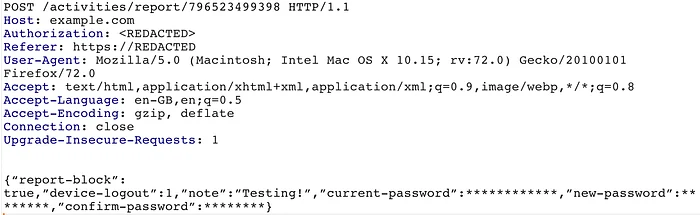
The server still answered with 403.
Step 2: Tamper with the URL
With the headers gone as an avenue, the researcher turned to the URL. Removing the report ID from the request produced the following response.
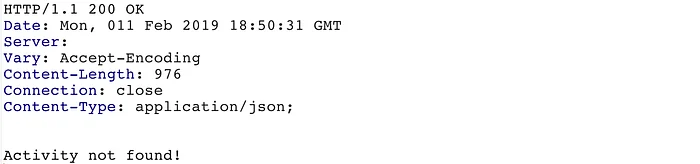
Multiple attempts to bypass the restriction failed until the researcher appended a path traversal segment to the original URL, pointing at the activity ID of another account.
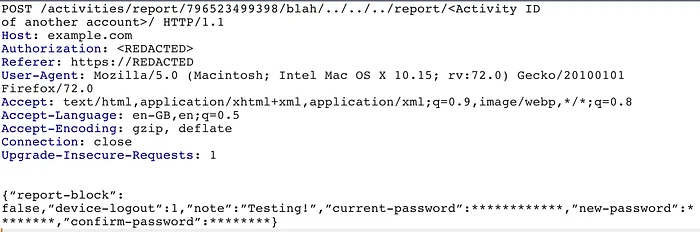
The payload appended to the original URL was:
blah/../../../report/<activity id of another account>/
The server returned 200 OK. The researcher then tried to log in to the other account with the newly set password and succeeded.
Step 3: Confirm
The behaviour was verified multiple times with the same result. A video proof of concept was recorded and the issue was reported. The vendor patched it within three days and paid a bounty in four figures.
Root cause
The author names two flaws: improper validation of the old password in the report module, and an authorization bypass through URL manipulation. The report endpoint accepted a password change without asking for the current password, and appending a traversal segment pointing at another account's activity ID returned 200 OK. The Authorization header was required, and removing the other two ID headers still produced a 403. The exact server-side implementation is not described in the report.
Impact
An authenticated attacker could take over any end user's account, provided the attacker knew or could obtain that user's activity ID. The IDs were numerical, but direct brute forcing of the report ID returned 403, so the report does not show a way to enumerate them. With a valid ID, the attacker sets a new password through the report flow and logs in as the victim.
Fix
The vendor patched the issue within three days. Based on the two flaws, the fix would need to enforce that the authenticated user owns the activity being reported, normalise and reject traversal sequences in the path, and require the current password before any password change.
Variants to test
- On any feature that acts on a numerical object ID, replace the ID with one belonging to a second account and check whether the response differs from the owner's. A positive result is a 200 with the other account's data or a state change on that account.
- Append traversal segments such as
blah/../../../<endpoint>/<id>/to endpoints that take an ID in the path. A positive result is a 200 where the plain request returned 403. - Remove optional-looking ID headers one at a time while keeping the
Authorizationheader, and note which combination still authorises the request. A positive result is a request that succeeds without the per-object headers. - Submit a password reset or report action without the current password field. A positive result is a successful password change and a matching entry in the activity log.
- Toggle boolean parameters such as
report-blockbetweentrueandfalseand compare side effects, not just response bodies. A positive result is a state change that occurs regardless of the flag's value.
What happened, in plain words
A security researcher found a way to take over any user's account on a website. The site had a page where you could see everything that had happened on your account: password resets, profile picture uploads, name changes and so on. Each of those entries had a number attached to it, an activity ID. Next to each entry there was a link to report the activity as suspicious, and that report flow offered to reset your password and to log you out of all devices.
Two mistakes combined into a serious problem. First, the report flow changed your password without ever asking for your current password. Second, the server did not check that the activity you were reporting actually belonged to you. By crafting a URL in a particular way, the researcher could point the report at somebody else's activity ID, set a new password on that person's account, and then log in as them.
The researcher reported it, the company fixed it within three days, and paid a bounty in four figures.
Before going further, a few words on the two ideas at the centre of this story, because they are easy to mix up.
Authentication is the site working out who you are. Logging in with a username and password is authentication. Authorization is the site working out what you are allowed to do once it knows who you are. The author uses two everyday comparisons. In a company, two employees can both get into the office (authentication), but neither may open the other's locker or read the other's salary slip (authorization). On a driving licence, your photograph proves who you are (authentication) and the list of vehicle categories on it says what you may drive (authorization).
A vulnerability is a flaw in the site that lets someone do something they should not be allowed to do. Here, the flaw was in the authorization checks: the site knew perfectly well who was making the request, but never asked whether that person was allowed to touch the record being acted on.
The background concepts, from zero
How a site remembers you: cookies and tokens
A web page is delivered over HTTP, and HTTP has no memory. Each request arrives at the server as if for the first time; the server does not automatically know that the request came from the same person who logged in a minute ago. To bridge that gap, the server hands your browser a small piece of data at login time and your browser sends it back with every subsequent request. That piece of data is what tells the server "this is still the same logged-in user".
The author lists the common mechanisms:
- HTTP Basic Authentication: the username and password are sent in an HTTP header, encoded in base64. Base64 is not encryption; it is just a way of writing data using a limited set of characters, and anyone can decode it. So the credentials travel essentially in plain text and can be picked up by someone eavesdropping on the connection (a man-in-the-middle attack). Encrypting the data would help, but then the server has to decrypt every single request, which costs speed.
- Digest Authentication: the password is not sent directly. Instead it is fed into a hash function (MD5, combined with a one-time value called a nonce) and the result is sent. A hash is a one-way scramble: easy to compute from the input, impractical to reverse. This scheme is still open to brute force attacks (trying many passwords) and to MD5 collision attacks (two different inputs producing the same hash).
- Cookies: when you log in, the server creates a session cookie in your browser. Because HTTP is stateless, that cookie has to be sent with every request. The server checks it, and if it is valid it knows who you are. This is the mechanism most websites use.
- Bearer Tokens: after you provide correct credentials, the server generates a token and your browser sends that token with every request. Whoever holds the token is treated as the user, which is why it is called a bearer token: the bearer is the owner.
Knowing who the user is does not answer what they may do. That second question needs authorization checks, and the author lists three common ways of carrying the answer around:
- JWT (JSON Web Token): a way of transmitting information as a JSON object (a structured text format of labelled values) that is digitally signed. It can be signed with a shared secret or with a public/private key pair using the RSA algorithm. A JWT has three parts, the header, the payload and the signature. The header and payload are base64 encoded and joined with a period, and the result is signed, giving the shape
[HEADER].[CLAIMS].[SIGNATURE]. The header holds metadata such as the token type and the signing algorithm. - OAuth: a delegation protocol. It lets separate services grant each other access to a user's resources without sharing the user's original login credentials.
- SAML (Security Assertion Mark-up Language): a framework for authorization between two parties, a Service Provider and an Identity Provider. The Identity Provider authenticates the user, and the Service Provider trusts that statement to make authorization decisions. The exchange happens through digitally signed XML documents.
You do not need to memorise all of this to follow the story. The point is that a site has to do two separate jobs, identify you and check your permissions, and getting the first one right does not automatically get the second one right.
What the target was
A web application with a profile section. In that profile there was a page listing the account's activity: password resets, image uploads, first name updates and similar events. Clicking an activity showed the date, the IP address (the network address the action came from), information about what was done, and an activity ID. The page also offered a link to report an activity as suspicious, and that report flow included an option to reset the password and an option to log out from all devices.
An API endpoint is simply a URL on the server that accepts a request and does something in response. The activity page was backed by such an endpoint, and the report link was backed by another one. When you click around a website, your browser is quietly sending these requests; the researcher's skill is in looking at them directly and changing them.
The setup
The report does not describe which tools were used, how many accounts existed or any software versions. The one thing visible in the text is that the researcher had more than one account: one account sent the malicious request, and a second account was the victim whose activity ID was targeted. The activity IDs were numerical, which the author points out explicitly.
Finding it
While looking through the activity feed, the researcher noticed that each activity carried an ID, and that the URL for an activity looked like this:
https://example.com/account/activities/
This is the address of the page that lists activities. The example.com part is a placeholder for the real site's name. The /account/activities/ part is the path, the part of the URL that tells the server which feature you want.
The actual request and its response are shown in the write-up.
The first image shows the request the browser sent when an activity was opened; the second shows what the server sent back. Looking at the response, the researcher saw that every activity had an ID, and that the IDs were numerical only. The response also contained a link to report the activity if it was found suspicious. Following that link led to a flow with an option to reset the password and an option to log out from all devices.
Why does this matter? Because a numerical ID is easy to change. If the server trusts whatever number arrives in the request, an attacker may be able to use a number that is not theirs.
The report request itself behaved strangely.
This image shows the request that the report link produced. Sending the original request invalidated the current session immediately: the researcher was thrown out and had to log in again.
The researcher then repeated the same activity but changed the parameter report-block to false. A parameter is a named value sent along with a request, like a setting on a form. Nothing happened: the session stayed valid, yet the response was identical to the previous one. To check what had actually occurred, the researcher logged out and logged in again, and the login succeeded. The initial conclusion was that report-block controlled the behaviour, so setting it to false meant the server did not act on the request even though the response looked the same.
Then the researcher noticed that the account activity now showed a password reset.
This image shows the activity log with the new password reset entry. According to the application, the password had been changed, even though no current password had been entered while reporting. Repeating the action confirmed it: the report module was not verifying the old password at all. On its own this was a low severity finding, because normally you can only do it to your own account, and changing your own password without typing the old one is not much of an attack.
Brute forcing the report ID returned a 403 response. Brute forcing means trying many values in sequence, hoping one works. A 403 is the HTTP status code for "forbidden": the server understood the request but refused to carry it out. So guessing another user's activity number directly was not possible that way.
Exploitation
Step 1: Map the headers
A header is a labelled line of extra information attached to a request, separate from the URL and the body. Think of an envelope: the address is the URL, and the headers are the notes written on the outside, such as who sent it and what kind of contents it holds. The report request carried three headers containing random IDs. The researcher removed the Authorization header and sent the request; the application immediately threw an error, so that header was essential. The Authorization header is the one that carries proof of who you are, so it makes sense that removing it breaks the request.
The researcher then removed HUXID and AUXID and sent the request again.
This image shows the request with those two headers taken out. The idea was to find out which headers the server actually relies on. If the server only needs Authorization, then the other two are decoration, and the researcher can stop worrying about them. The server still answered with 403, so removing them did not open a door.
Step 2: Tamper with the URL
With the headers gone as an avenue, the researcher turned to the URL. Removing the report ID from the request produced the following response.
This image shows what the server said when the ID was missing: it refused the request.
Multiple attempts to bypass the restriction failed until the researcher appended a path traversal segment to the original URL, pointing at the activity ID of another account.
This image shows the successful request. The payload appended to the original URL was:
blah/../../../report/<activity id of another account>/
Line by line, in plain words:
blah/is a made-up folder name. It does not need to exist. It is there so the next part has something to climb out of.../means "go up one folder". In a file path,../takes you from the current folder to its parent. Three of them in a row climb up three levels.report/is the name of the feature the request is aimed at.<activity id of another account>is the victim's activity number, the value the attacker is not supposed to be able to use.- The trailing
/closes the path.
Path traversal is the name for this trick. The server is supposed to look only inside a particular folder for the requested thing. By inserting ../ sequences, the request climbs out of that folder and lands somewhere else. It is like being told "fetch the file from room 5" and replying "room 5, then up the stairs, then into room 9 instead". If the building's guard only checks that you entered through the front door and never checks which room you actually walked into, the trick works.
The server returned 200 OK. 200 is the status code for success. The researcher then tried to log in to the other account with the newly set password and succeeded.
Step 3: Confirm
The behaviour was verified multiple times with the same result. A video proof of concept was recorded and the issue was reported. The vendor patched it within three days and paid a bounty in four figures.
Root cause
The author names two flaws: improper validation of the old password in the report module, and an authorization bypass through URL manipulation.
The report endpoint accepted a password change without asking for the current password. Normally, a password change form asks for the old password so that someone who briefly gets hold of your open session cannot silently lock you out. Here that check was missing.
The server also resolved the activity ID from a path that could be traversed out of the intended location, so a request from one account could act on another account's activity. The Authorization header was checked, but the ownership of the target activity was not. Removing the other two ID headers still produced a 403, while the traversal succeeded. The exact server-side implementation is not described in the report.
Impact
An authenticated attacker could take over any end user's account, provided the attacker knew or could obtain that user's activity ID. The IDs were numerical, but direct brute forcing of the report ID returned 403, so the report does not show a way to enumerate them. With a valid ID, the attacker sets a new password through the report flow and logs in as the victim.
Fix
The vendor patched the issue within three days. Based on the two flaws, the fix would need to enforce that the authenticated user owns the activity being reported, normalise and reject traversal sequences in the path, and require the current password before any password change.
Variants to test
If you want to look for similar problems on sites you are allowed to test, these are the patterns worth trying:
- On any feature that acts on a numerical object ID, replace the ID with one belonging to a second account and check whether the response differs from the owner's. A positive result is a 200 with the other account's data or a state change on that account.
- Append traversal segments such as
blah/../../../<endpoint>/<id>/to endpoints that take an ID in the path. A positive result is a 200 where the plain request returned 403. - Remove optional-looking ID headers one at a time while keeping the
Authorizationheader, and note which combination still authorises the request. A positive result is a request that succeeds without the per-object headers. - Submit a password reset or report action without the current password field. A positive result is a successful password change and a matching entry in the activity log.
- Toggle boolean parameters such as
report-blockbetweentrueandfalseand compare side effects, not just response bodies. A positive result is a state change that occurs regardless of the flag's value.
Glossary
- API endpoint: a URL on a server that accepts a request and performs an action or returns data in response.
- Authentication: the process of proving who you are, for example by logging in with a username and password.
- Authorization: the process of deciding what an already identified user is allowed to do.
- Authorization header: the HTTP header that carries proof of the user's identity with a request.
- Base64: an encoding that rewrites data using a limited character set. It is not encryption and anyone can decode it.
- Bearer token: a token that grants access to whoever presents it, without any further proof of identity.
- Broken access control: a class of vulnerability where the site fails to check whether a user is permitted to perform an action or reach a resource.
- Brute forcing: trying many possible values in sequence until one works.
- Cookie: a small piece of data stored by the browser and sent back to the server with each request, commonly used to keep a user logged in.
- Digest Authentication: an authentication scheme that sends a hash of the password rather than the password itself.
- Hash function: a one-way mathematical scramble that turns input into a fixed-length value that cannot practically be reversed.
- Header: a labelled line of extra information attached to an HTTP request or response.
- HTTP: the protocol browsers and servers use to exchange web pages and data. It is stateless, meaning each request is independent.
- HTTP Basic Authentication: an authentication scheme that sends the username and password in a header, base64 encoded.
- Identity Provider / Service Provider: in SAML, the party that authenticates the user and the party that trusts that authentication to grant access.
- JSON: a structured text format of labelled values, widely used to exchange data between programs.
- JWT (JSON Web Token): a signed token made of a header, a payload and a signature, used to carry identity or permission information.
- Man-in-the-middle attack: an attack where someone secretly sits between two parties and reads or alters their traffic.
- MD5: an old hash algorithm, now considered weak and open to collision attacks.
- Nonce: a value used once, added to a calculation so that the result cannot be reused.
- OAuth: a delegation protocol that lets services access a user's resources without sharing the user's password.
- Parameter: a named value sent with a request, like a setting on a form.
- Path traversal: a technique that uses
../sequences in a path to climb out of the intended folder and reach something else. - Payload: the part of a request that carries the actual data or the malicious input.
- RSA: a public-key encryption algorithm that uses a public and a private key.
- SAML: a framework for exchanging authentication and authorization information between two parties using signed XML documents.
- Session: the period during which a server treats repeated requests as coming from the same logged-in user.
- Status code: a three-digit number in an HTTP response saying how the request went, such as 200 for success and 403 for forbidden.
- Vulnerability: a flaw in a system that allows someone to do something they should not be able to do.
- XML: a structured text format for marking up data with tags.


