Adventures Into The MeowCorp Bug Bounty Program
The write-up lists four separate findings against a bug bounty target: an exposed version-control config file that led to a root shell, source-code reconnaissance that exposed a network file share and an employee container-registry account, internet-wide scanning that exposed a production database, and a server-side request forgery that yielded cloud secrets. An attacker could read sensitive data and gain command execution on the affected systems.
 Published on tnirmal.com.np
The original lives on tnirmal.com.np
We do not hold its text, so we link to it rather than copy it. The other two tabs are our own rewrites, checked against it.
What the report shows
The write-up covers a bug bounty program run under the name MeowCorp, and the researcher, Nirmal Thapa, groups the work into four findings. The report itself is mostly a set of screenshots under each heading: the prose is thin, and the text does not give the program's scope, the bounty amounts, the severity ratings or the fixes. What follows is only what the headings and the surrounding text establish.
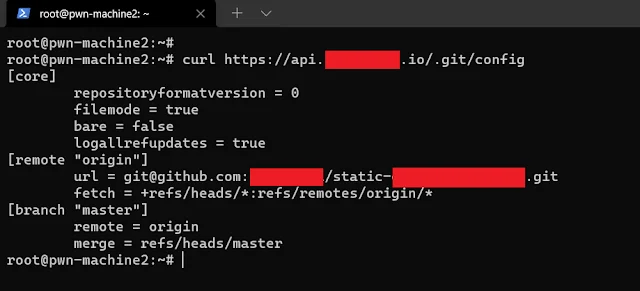
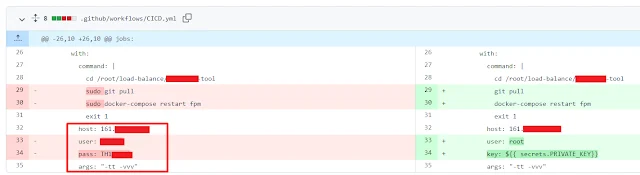
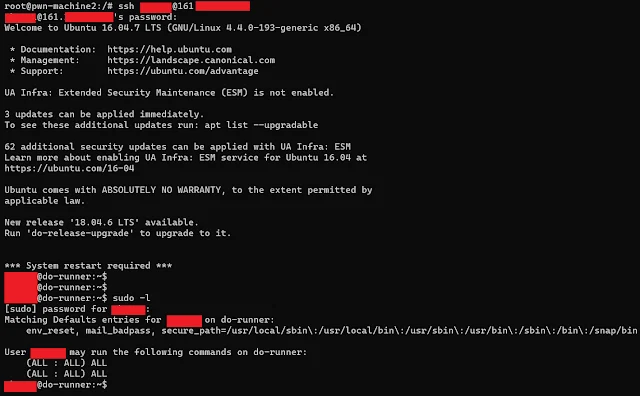
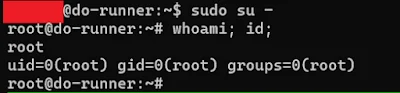
#1 /.git/config file to root shell
The first finding is titled /.git/config file to root shell. The title points to an exposed Git configuration file on a web server that led all the way to a root shell. The report does not describe the request used to fetch the file, the contents of the configuration, or the steps between the exposed file and the shell.
#2 Github Recon, NFS share, and access to employee's Dockerhub account
The second finding combines three threads: reconnaissance on GitHub, an NFS share, and access to an employee's DockerHub account. The heading is the only description of the chain; the report does not say which repository or account was involved, what the NFS share exposed, or how the DockerHub access was obtained.
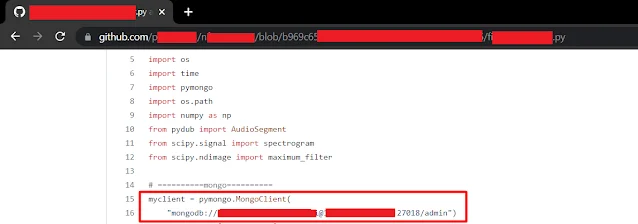


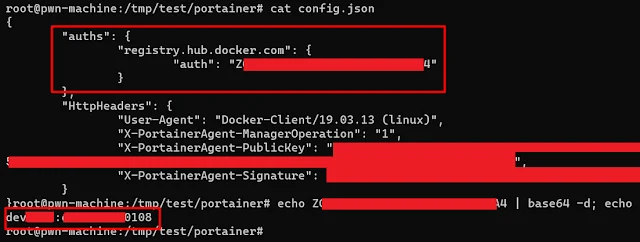
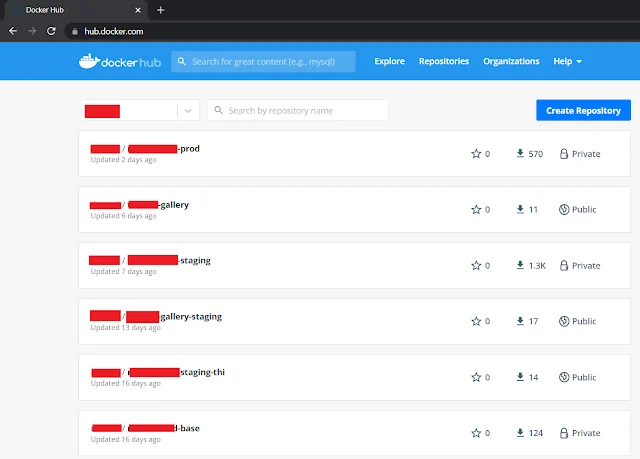
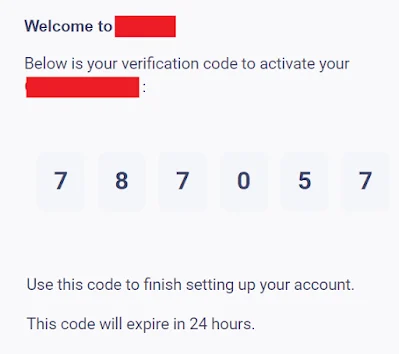
#3 Shodan recon and access to prod MySQL database
The third finding starts from Shodan reconnaissance and ends with access to a production MySQL database.
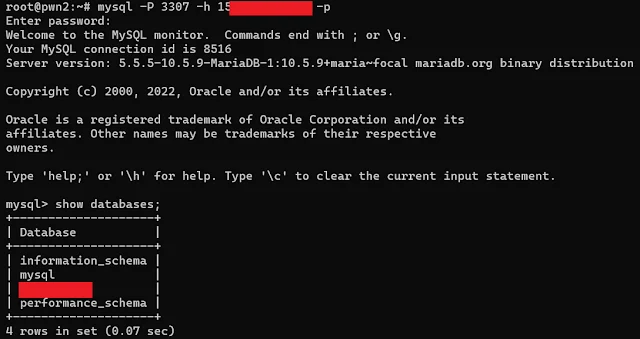

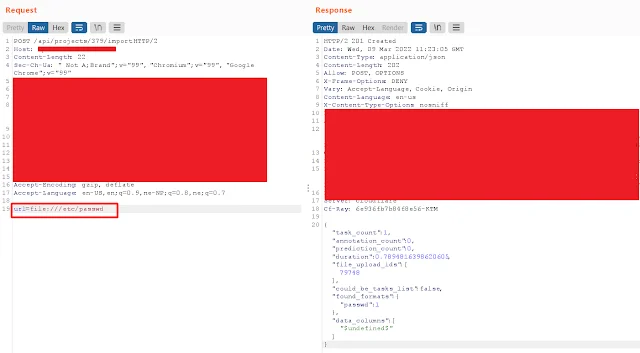
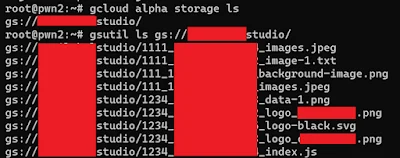
#4 SSRF and GCP secrets
The fourth finding is titled SSRF and GCP secrets.

Root cause
The report does not analyse causes. The report does not analyse causes; the headings alone do not establish what went wrong in each case.
Impact
The titles claim serious outcomes: a root shell, access to an employee's DockerHub account, access to a production MySQL database, and GCP secrets via SSRF. Each of these would be serious, because they cross from a web-facing service into infrastructure and data. The text gives no statement of what data was actually read, so the practical impact on MeowCorp's users and systems is not established.
How this kind of bug works
Exposed version control directories are a deployment mistake. When a site is published by copying a working tree that still contains .git, the server will happily serve /.git/config, /.git/HEAD and the object files, and a visitor can reconstruct the source. The configuration file often names remotes, and the objects can contain credentials that were committed and later removed but never purged from history.
Secret sprawl is the common thread in the second and fourth findings. Developers push tokens to repositories, mount internal shares on build hosts, and reuse the same credentials across personal and corporate accounts. A single leaked token can open a container registry, a cloud project or a database.
Exposed database services are usually a network boundary failure: a service bound to a public interface, a firewall rule that is too broad, or a default password that was never changed. Shodan and similar engines index these services continuously, so exposure is discovered by others quickly.
Server-side request forgery happens when an application takes a URL from the user and fetches it from the server's network position. If the fetch is not restricted, the attacker can aim it at internal addresses, including cloud metadata endpoints, and read the responses the application returns.
How to test for it
- Request
/.git/HEADand/.git/configon every host and path in scope. A positive result is a200with Git content rather than a custom 404 page. A common false positive is a catch-all route that returns the same page for every path; compare against a random path. - Search public code hosting for the organisation's name, domains and employee handles, then review commit history for removed secrets. A positive result is a live token, not a placeholder or an example key.
- Query internet-wide scan engines for the organisation's netblocks and certificate names, looking for database and administrative ports. Confirm exposure with a benign connection and never run queries against production data.
- For SSRF, find parameters that accept URLs (image imports, webhooks, PDF renderers, link previews) and point them at a host you control first, to confirm the server makes the request. Then try internal addresses and cloud metadata paths. A positive result is content from the internal service appearing in the response; a false positive is an error page that merely echoes your URL.
How it is fixed
Remove .git and other development artefacts from deployed trees and block dotfiles at the web server. Rotate any secret found in history and purge it from the repository. Restrict databases and shares to private networks, require strong unique credentials, and audit firewall rules. For SSRF, validate URLs against an allowlist, resolve and check the destination address before connecting, block link-local and metadata ranges, and disable redirects or re-validate after each hop.
Hunting notes
These bugs hide at the edges of scope: staging hosts, old subdomains, build servers and anything that was stood up quickly. Recon signals include directory listings, /.git and /.svn responses, repository names matching the target, and scan-engine hits on the organisation's address space. To get a report accepted, show the smallest step that proves the exposure, stop before touching real data, and describe the boundary you crossed. A screenshot of a shell or a database prompt is persuasive, but a clear reproduction path matters more.
What happened, in plain words
This is a write-up by Nirmal Thapa about a bug bounty program run under the name MeowCorp. A bug bounty program is an arrangement where an organisation invites outside researchers to look for security weaknesses in its systems and report them, often for a reward. The researcher groups the work into four findings. The report is mostly screenshots under each heading, so the text gives the titles and very little else: it does not state the program's scope, the bounty amounts, the severity ratings or the fixes.
#1 /.git/config file to root shell
The first finding is titled /.git/config file to root shell. Git is a version control system: a tool developers use to keep a history of changes to their code. A project managed with Git normally has a hidden folder called .git inside it, holding that history and the project's settings. If a website is published by copying the whole project folder, .git can end up on the public web server, where anyone can download it.
The title says this exposed configuration file led all the way to a root shell, though the report gives no details. A shell is a text interface for giving commands to a computer; root is the all-powerful administrator account on a Linux system. So the claim is that a downloadable settings file ended in full control of the server. The report does not describe the request used to fetch the file, what the configuration contained, or the steps between the file and the shell.
#2 Github Recon, NFS share, and access to employee's Dockerhub account
The second finding combines three threads. GitHub is a public website where developers store and share code. Recon, short for reconnaissance, means gathering information about a target before attacking it, much like looking at a building from the street before trying the doors. NFS (Network File System) is a way for computers, usually on the same internal network, to share folders as if they were local. DockerHub is an online library where developers publish and download container images, which are packaged bundles of software and its settings.
#3 Shodan recon and access to prod MySQL database
Shodan is a search engine for internet-connected devices and services: instead of indexing web pages, it records what is listening on public addresses. MySQL is a widely used database, a system for storing and querying structured data such as user records. Prod means production, the live system real users depend on, as opposed to a test copy.
The third finding starts from Shodan reconnaissance and ends with access to a production MySQL database.
#4 SSRF and GCP secrets
SSRF stands for server-side request forgery. A request is a message a browser or program sends to a server asking for something, such as a page or an image. In SSRF, the application itself is tricked into sending a request to a destination the attacker chooses, from the server's own network position, which may reach places the attacker cannot. GCP is Google Cloud Platform, Google's cloud computing service, and secrets are the passwords, keys and tokens that grant access to it.
The fourth finding is titled SSRF and GCP secrets.
In general, how this kind of bug works
Exposed version control directories are a deployment mistake. When a site is published by copying a working folder that still contains .git, the server will happily serve /.git/config, /.git/HEAD and the object files, and a visitor can reconstruct the source. The configuration file often names remotes, and the objects can contain credentials that were committed and later removed but never purged from history.
Secret sprawl is the common thread in the second and fourth findings. Developers push tokens to repositories, mount internal shares on build hosts, and reuse the same credentials across personal and corporate accounts. A single leaked token can open a container registry, a cloud project or a database.
Exposed database services are usually a network boundary failure: a service bound to a public interface, a firewall rule that is too broad, or a default password that was never changed. Shodan and similar engines index these services continuously, so exposure is discovered by others quickly.
Server-side request forgery happens when an application takes a URL from the user and fetches it from the server's network position. If the fetch is not restricted, the attacker can aim it at internal addresses, including cloud metadata endpoints, and read the responses the application returns.
In general, how to test for it
- Request
/.git/HEADand/.git/configon every host and path in scope. A positive result is a200with Git content rather than a custom 404 page. A common false positive is a catch-all route that returns the same page for every path; compare against a random path. - Search public code hosting for the organisation's name, domains and employee handles, then review commit history for removed secrets. A positive result is a live token, not a placeholder or an example key.
- Query internet-wide scan engines for the organisation's netblocks and certificate names, looking for database and administrative ports. Confirm exposure with a benign connection and never run queries against production data.
- For SSRF, find parameters that accept URLs (image imports, webhooks, PDF renderers, link previews) and point them at a host you control first, to confirm the server makes the request. Then try internal addresses and cloud metadata paths. A positive result is content from the internal service appearing in the response; a false positive is an error page that merely echoes your URL.
In general, how it is fixed
Remove .git and other development artefacts from deployed trees and block dotfiles at the web server. Rotate any secret found in history and purge it from the repository. Restrict databases and shares to private networks, require strong unique credentials, and audit firewall rules. For SSRF, validate URLs against an allowlist, resolve and check the destination address before connecting, block link-local and metadata ranges, and disable redirects or re-validate after each hop.
In general, where to look
These bugs hide at the edges of scope: staging hosts, old subdomains, build servers and anything that was stood up quickly. Recon signals include directory listings, /.git and /.svn responses, repository names matching the target, and scan-engine hits on the organisation's address space. To get a report accepted, show the smallest step that proves the exposure, stop before touching real data, and describe the boundary you crossed. A screenshot of a shell or a database prompt is persuasive, but a clear reproduction path matters more.
Glossary
- Bug bounty program: an arrangement where an organisation invites outside researchers to find and report security weaknesses, often for a reward.
- Git: a version control system that records the history of changes to code.
.gitdirectory: the hidden folder inside a Git project that holds its history and settings.- Root shell: a command-line session with full administrator rights on a Linux system.
- GitHub: a public website for storing and sharing code.
- Reconnaissance (recon): gathering information about a target before attacking it.
- NFS (Network File System): a way for computers to share folders over a network as if they were local.
- DockerHub: an online library of container images.
- Container image: a packaged bundle of software and its settings.
- Shodan: a search engine that indexes internet-connected devices and services.
- MySQL: a widely used database system for storing and querying structured data.
- Production (prod): the live system that real users depend on.
- Request: a message sent to a server asking for something, such as a page or an image.
- SSRF (server-side request forgery): tricking an application into sending a request to a destination the attacker chooses, from the server's network position.
- GCP (Google Cloud Platform): Google's cloud computing service.
- Secrets: passwords, keys and tokens that grant access to systems.
- Token: a string of characters that acts like a key, proving identity or granting access.
- Metadata endpoint: an internal address in a cloud environment that returns information and credentials about the running server.
- Firewall: a filter that controls which network traffic is allowed in or out.
- Allowlist: a list of destinations that are explicitly permitted, with everything else refused.
- False positive: a result that looks like a finding but is not a real one.



