Apple Safari & Microsoft Edge Browser Address Bar Spoofing - Writeup
Both Safari and Edge could be made to show a different address in the address bar than the page actually loaded, so a user could believe they were on a trusted site while viewing attacker content. An attacker could use this to make a phishing page look like the real site.
 Published on rafaybaloch.com
The original lives on rafaybaloch.com
We do not hold its text, so we link to it rather than copy it. The other two tabs are our own rewrites, checked against it.
What the report shows
The write-up covers address bar spoofing in two browsers: Microsoft Edge, tracked as CVE-2018-8383, and Apple Safari, tracked as CVE-2018-4307.
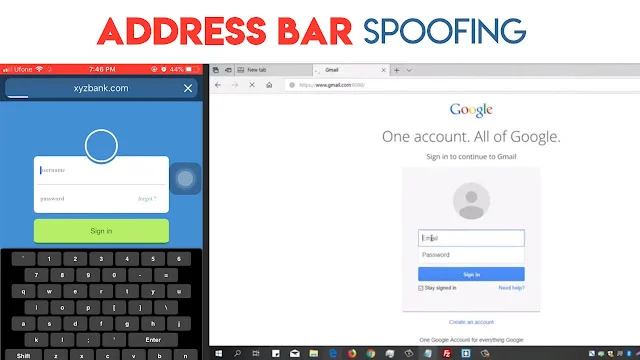
The published text is very short. It has an introduction and a technical details section, then a heading for each browser with a placeholder for the reproduction steps. The Edge section is followed by a "Steps to Reproduce" heading, but no steps are written under it. The Safari section contains two pieces of media and no written explanation.
Edge Browser Address Bar Spoofing (CVE-2018-8383)
Steps to Reproduce
Safari Address Bar Spoofing (CVE-2018-4307)

Root cause
Address bar spoofing of this kind is likely caused by the browser's UI failing to keep the displayed origin in sync with the document that is actually loaded, for example during a navigation, a redirect or a change to the document's location, so the address bar keeps showing one origin while another document is rendered. That is a general explanation of the bug class, not something the report asserts.
Impact
The bug class matters because a spoofed address bar undermines the one signal users are taught to trust for origin: a victim who sees a familiar host in the bar may enter credentials or read content believing it comes from that site.
How this kind of bug works
Browsers separate the document from the chrome that displays its URL. The address bar is meant to reflect the origin of the currently committed document, and the browser updates it on navigation, on history changes and on redirects. Spoofing appears when that synchronisation breaks: the rendered document and the displayed URL diverge, even briefly.
Common triggers include races between a navigation and a script-driven change to the document, popup and window handling where the opener's URL is shown for a different document, redirects that complete after the bar has been painted, and error or interstitial pages that render attacker-influenced content under a trusted URL. The window of exposure can be short, which is why proof often relies on video rather than a static screenshot.
Defences are structural: the browser must derive the displayed origin from the committed document and never from anything the page controls, re-check it after every navigation state change, and avoid painting content before the URL is final. User interfaces that render remote content inside chrome, such as error pages, need strict isolation from page-supplied strings.
How to test for it
- Identify surfaces where the URL and the rendered document can drift: redirects, meta refresh, history manipulation,
window.openand popups, form targets, downloads, error pages and full-screen or kiosk modes. - For each surface, load a page on a host you control and try to make the browser display a different origin in the bar while your content stays visible. Vary timing: navigate during load, interrupt a redirect, and change location from script at different points.
- Test both a fast and a slow network profile, since races often only appear under latency.
- Record the screen. A positive result is a frame where the address bar shows origin A while content you control from origin B is rendered and interactive.
- Check whether the divergence survives user interaction, such as a click or a scroll, or disappears immediately. A momentary flash that no user could act on is usually not accepted.
Common false positives: the bar showing a URL during a pending navigation that never commits, browser UI that intentionally shows a search term rather than a URL, and screenshots taken mid-transition where the page has not painted yet. Confirm with video and repeat runs before reporting.
How it is fixed
Hunting notes
This class hides in the seams between navigation and rendering: redirect chains, script-driven location changes, popups, and any feature where the browser renders remote content in its own UI. Recon signals include recently changed navigation code, new interstitial or error experiences, and browser release notes mentioning URL display or origin handling.
Impact is best shown with a clear video: a trusted origin in the bar, attacker-controlled content rendered, and a demonstrated action a victim could take, such as submitting credentials.
What happened, in plain words
This write-up is about a trick called address bar spoofing. The address bar is the strip at the top of your browser where the site's address (its URL) is shown. People are taught to check it before typing a password or trusting a page. Address bar spoofing means the browser shows one address in that strip while actually displaying a page from somewhere else. The page looks like it comes from a site you trust, but it does not.
A CVE is a public catalogue number given to a known security flaw so people can refer to it unambiguously.
The published text is very short. It has an introduction and a technical details section, then a heading for each browser with a placeholder for the reproduction steps. The Edge section is followed by a "Steps to Reproduce" heading, but no steps are written under it. The Safari section contains two pieces of media and no written explanation.
Edge Browser Address Bar Spoofing (CVE-2018-8383)
Steps to Reproduce
Safari Address Bar Spoofing (CVE-2018-4307)
Root cause
Address bar spoofing of this kind is likely caused by the browser's interface failing to keep the displayed origin in sync with the document that is actually loaded, for example during a navigation, a redirect or a change to the document's location, so the address bar keeps showing one origin while another document is rendered. That is a general explanation of the bug class, not something the report asserts.
Impact
The bug class matters because a spoofed address bar undermines the one signal users are taught to trust for origin: a victim who sees a familiar host in the bar may enter credentials or read content believing it comes from that site.
How this kind of bug works
In general, browsers separate the document from the chrome that displays its URL. The address bar is meant to reflect the origin of the currently committed document, and the browser updates it on navigation, on history changes and on redirects. Spoofing appears when that synchronisation breaks: the rendered document and the displayed URL diverge, even briefly.
Common triggers include races between a navigation and a script-driven change to the document, popup and window handling where the opener's URL is shown for a different document, redirects that complete after the bar has been painted, and error or interstitial pages that render attacker-influenced content under a trusted URL. The window of exposure can be short, which is why proof often relies on video rather than a static screenshot.
Defences are structural: the browser must derive the displayed origin from the committed document and never from anything the page controls, re-check it after every navigation state change, and avoid painting content before the URL is final. User interfaces that render remote content inside chrome, such as error pages, need strict isolation from page-supplied strings.
How to test for it
- Identify surfaces where the URL and the rendered document can drift: redirects, meta refresh, history manipulation,
window.openand popups, form targets, downloads, error pages and full-screen or kiosk modes. - For each surface, load a page on a host you control and try to make the browser display a different origin in the bar while your content stays visible. Vary timing: navigate during load, interrupt a redirect, and change location from script at different points.
- Test both a fast and a slow network profile, since races often only appear under latency.
- Record the screen. A positive result is a frame where the address bar shows origin A while content you control from origin B is rendered and interactive.
- Check whether the divergence survives user interaction, such as a click or a scroll, or disappears immediately. A momentary flash that no user could act on is usually not accepted.
Common false positives: the bar showing a URL during a pending navigation that never commits, browser UI that intentionally shows a search term rather than a URL, and screenshots taken mid-transition where the page has not painted yet. Confirm with video and repeat runs before reporting.
How it is fixed
Hunting notes
This class hides in the seams between navigation and rendering: redirect chains, script-driven location changes, popups, and any feature where the browser renders remote content in its own UI. Recon signals include recently changed navigation code, new interstitial or error experiences, and browser release notes mentioning URL display or origin handling.
Impact is best shown with a clear video: a trusted origin in the bar, attacker-controlled content rendered, and a demonstrated action a victim could take, such as submitting credentials.
Glossary
- Address bar: the strip at the top of a browser that shows the address (URL) of the page you are viewing.
- URL: the address of a page or resource on the web, such as the host name and path.
- Origin: the combination of scheme, host and port that identifies where a page comes from; browsers use it to decide what a page is allowed to do.
- Address bar spoofing: showing one address in the bar while a page from a different place is actually displayed.
- CVE: a public catalogue number assigned to a known security flaw.
- Browser: the program you use to view web pages, such as Edge or Safari.
- Document: the web page content the browser has loaded and is rendering.
- Chrome (browser UI): the parts of the browser around the page itself, such as the address bar, tabs and menus.
- Navigation: moving from one page to another, for example by clicking a link or typing an address.
- Redirect: a server or page instruction that sends the browser to a different address than the one requested.
- Race condition: a situation where the outcome depends on the exact timing of two things happening.
- Popup: a new browser window opened by a page, often through
window.open. - Interstitial page: a page the browser shows between steps, such as a warning or error screen.
- Committed document: the page the browser has actually accepted and is displaying, as opposed to one still loading.
- False positive: a result that looks like a bug but is not one.
- Regression test: an automated check that a fixed bug stays fixed.
- Recon: the early information-gathering stage of security testing.
- Credentials: the username and password (or similar) used to log in to an account.
- Severity rating / CVSS score: standard ways of expressing how serious a flaw is.
- Bounty: a payment some organisations make to people who report security flaws to them.





