Authentication Bypass lead to Account Takeover via IDOR
A profile-update API endpoint accepted a client-supplied sequential account ID and never checked that the logged-in user owned that ID. By swapping in another user's ID, an attacker could overwrite the victim's name and email, and then take over the account through password resets.

medium.com
Published on medium.com
Idor
The full write-up lives on its author's site
It belongs to its author, so we link to it rather than copy it. The other two tabs are our own rewrites, checked against it.
Context
The target was a web application with an ordinary signup flow: a new user fills in their details, submits, and is placed straight into the application. The researcher, Abhishek, describes himself as a cyber security researcher and bug bounty hunter at Bugcrowd with over five years of experience. The feature at the centre of the report is the profile-update endpoint, which changes account details such as name and email address. The report does not name the application or the program.
The write-up is framed around account takeover reached through the password reset path: if an attacker can change the email address on someone else's account, they control where that account's password resets are delivered.
Setup
The researcher used Burp Suite, working through its history and then replaying requests in Repeater. Two accounts were needed:
- Account A, the researcher's own account, created through the normal signup flow.
- Account B, a second throwaway account, used as the victim.
No special role, privilege or configuration is described. The precondition is simply that both accounts exist and that the tester can authenticate as one of them.
Finding it
The first pass was conventional: XSS, CSRF, SSRF and a pile of other small probes were thrown at the application, and all came back quiet. The researcher then slowed down and went through the entire Burp Suite history endpoint by endpoint, looking specifically at the API authentication and authorization layer.
Buried in a profile-update request, the request and response bodies carried sensitive account information, and among it a plain, sequential database ID. That is the observation that mattered: a raw numeric identifier that the client sends and the server accepts.
Exploitation
Step 1: collect two identifiers
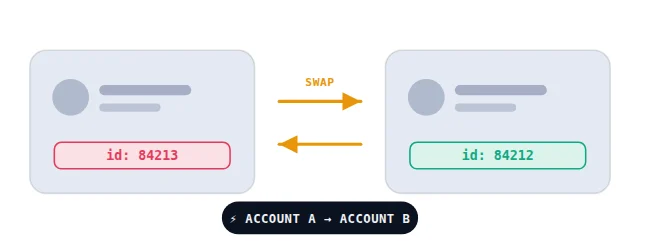
The researcher created a second throwaway account, hit the same profile endpoint with it, and recorded its database ID. The two IDs were five-digit numbers one digit apart, with no hashing, obfuscation or randomness: 84213 next to 84212.
Step 2: swap the identifier
Account A's profile-update request was taken and its database ID replaced with Account B's, then sent. The request as shown in the report:
POST /api/v2/profile/update HTTP/1.1Authorization: Bearer <account-A-token>Content-Type: application/json
The request is authenticated with Account A's bearer token, so the server sees a valid, logged-in user. The body carries the identifier that decides which account is updated:
{ "accountId": 84213, // account A (mine) "accountId": 84212, // account B (victim) ← swapped "email": "[redacted]", "name": "Abhishek"}
The body in the report shows two accountId lines, one for each account, with the victim's marked as swapped. The email field is set to the attacker's address, and name to the attacker's name.
The image shows the request in Burp Suite Repeater, with the identifiers redacted.
Step 3: the result
Account B's name, email and profile data were overwritten. Because the email address was among the overwritten fields, the researcher now controlled password resets for that account. The report describes this as one click, with zero clicks from the victim.
Root cause
The report calls this a textbook Insecure Direct Object Reference (IDOR), also known as Broken Object Level Authorization (BOLA) in API terminology. The server checked that a valid, logged-in user made the request, but never checked whether that specific user owned the account ID they sent. Authentication passed; authorization was never asked.
The report's checklist also warns against exposing raw, sequential numeric database IDs in requests or responses.
Impact
An authenticated attacker can overwrite another user's profile data, including the email address, by changing the identifier in a profile-update request. Taking over the email address means controlling password resets for that account, which is account takeover. The victim does not need to interact. The report does not state how many accounts were affected or whether the issue was limited to particular account types.
The bounty is described only as not disclosed.
Fix
The report gives a developer checklist rather than describing a deployed patch:
- Never expose raw, sequential numeric database IDs in requests or responses. Use UUIDs or opaque, non-guessable tokens instead.
- Enforce object-level authorization on every request, server-side, every time. Confirm that the logged-in user owns the resource ID they are sending, not merely that they are logged in.
- Never trust client-supplied identifiers. Derive who is being updated from the authenticated session, not from a field the client can edit.
- Log and alert on cross-account access patterns: one account touching another account's ID should be treated as a serious signal.
The closing image is captioned "Thanks for $$$$".
Variants to test
- Swap the identifier in any profile or account update call. Send your own authenticated request with another account's ID in the body. A positive result is a response confirming the change and the other account's data actually changing.
- Try the identifier in the URL path as well as the body. If the endpoint accepts
/profile/update/<id>, substitute a neighbouring ID. A positive result is a successful update of an account you do not own. - Change the email field to an address you control. A positive result is a password reset for the victim account arriving at your address.
- Enumerate neighbouring sequential IDs. If IDs are small integers, walk the range with your own token. A positive result is any response that returns or modifies another user's data.
- Test read endpoints with the same swap. Profile, settings and account-detail GETs often share the same weak authorization. A positive result is another user's data in the response body.
- Check whether the server derives identity from the token or the body. Send a request where the body ID and the token belong to different accounts. A positive result is the server acting on the body ID.
What happened, in plain words
A security researcher found a way to take over other people's accounts on a website. The site let people sign up, and once you were signed in you could edit your profile: your name, your email address and so on. The problem was that the profile-update request contained a number identifying which account was being changed, and the server trusted that number without checking whether the person sending the request actually owned that account.
So the researcher created two accounts, looked at the number each one used, and simply put the second account's number into the first account's request. The server accepted it and overwrote the second account's details, including its email address. Once you control the email address on an account, you control where its password reset emails go, which means you can take the account over. The victim never had to click anything.
This article walks through the same story from the beginning, explaining every term as it comes up, so you can follow it even if you have never done security testing before.
The setup: what the researcher was looking at
The application
The target was a web application with an ordinary signup flow. You fill in your details, press submit, and you are placed straight into the application, already signed in. Nothing about that flow looked unusual.
The feature at the centre of the report is the profile-update endpoint. An endpoint is simply a specific address on a server that does one job. Think of a large office building: the building is the application, and each endpoint is a service window. One window handles signups, another handles password resets, another handles saving your profile. When your browser saves your profile, it is sending a message to the profile-update window.
The report does not name the application or the bug bounty program it was reported through.
The researcher
The author introduces himself as Abhishek, a cyber security researcher and bug bounty hunter at Bugcrowd with over five years of experience. A bug bounty program is an arrangement where a company invites outside researchers to look for security problems in its systems and pays for valid reports, instead of relying only on its own staff.
The tools
The researcher used Burp Suite. Burp Suite is a program that sits between your browser and the website you are visiting, like a recording machine placed on a phone line. Every request your browser sends and every response the server sends back passes through it, and Burp keeps a copy. That copy is called the history. Burp also has a component called Repeater, which lets you take one recorded request, edit it by hand, and send it again as many times as you like, seeing the server's answer each time. This is how you test an idea without having to click through the website over and over.
The two accounts
Two accounts were needed:
- Account A, the researcher's own account, created through the normal signup flow.
- Account B, a second throwaway account, used as the victim.
No special role, privilege or configuration is described. The only precondition is that both accounts exist and that the tester can sign in as one of them. Using two accounts you control is standard practice: you never touch a real person's account while testing, you attack your own second account and observe what happens.
The goal
The write-up is framed around account takeover reached through the password reset path. Account takeover means one person gaining control of another person's account. The route here is the email address: when you forget your password, most sites send a reset link to the email address on file. If an attacker can change the email address on someone else's account to their own, then the next password reset for that account lands in the attacker's inbox. The attacker sets a new password and is in.
Finding it
The first pass
The first attempt was conventional. The researcher threw the usual suspects at the application: XSS, CSRF, SSRF and a pile of other small probes. All came back quiet.
A quick word on those three, since they come up everywhere:
- XSS (Cross-Site Scripting) is when a site lets an attacker slip their own code into a page that other people view, so the code runs in those visitors' browsers.
- CSRF (Cross-Site Request Forgery) is when a malicious site tricks your browser into sending a request to another site where you are already signed in, using your existing login.
- SSRF (Server-Side Request Forgery) is when an attacker can make the server itself send a request to an address of the attacker's choosing, often to reach internal systems that outsiders cannot reach directly.
None of them worked here. That is normal. Most testing sessions end with nothing, and the skill is in what you do next.
Slowing down
Instead of chasing flashy payloads, the researcher went methodical: scrolling through the entire Burp Suite history, endpoint by endpoint, specifically hunting for weak spots in the API authentication and authorization layer.
Two terms need unpacking here.
An API (Application Programming Interface) is the set of endpoints a program uses to talk to a server. When you use a website, your browser is constantly calling these endpoints behind the scenes: one to load your profile, one to save it, one to fetch a list of items. Think of a restaurant. The menu and the waiter are the API: you do not walk into the kitchen yourself, you ask through a defined channel, and the kitchen decides what to send back.
Authentication and authorization sound similar but answer different questions:
- Authentication asks: who are you? Proving you are logged in.
- Authorization asks: are you allowed to do this? Being logged in does not mean you may touch everything.
A useful comparison is a hotel. Authentication is showing your key card at the door and being let into the building. Authorization is whether your card opens room 214 or only room 118. A hotel that lets anyone with any valid card into any room has an authentication system but no authorization.
That gap is where the real problems usually hide, and it is exactly what the researcher was looking for.
The observation
Buried in a profile-update request, the request and response bodies carried sensitive account information. The request body is the part of the message your browser sends that carries the actual data, as opposed to the headers, which carry metadata like the address and the format. The response body is the data the server sends back.
Among that data was a plain, sequential database ID. A database ID is the number a database uses internally to tell one record from another, the way a filing cabinet numbers its folders. Sequential means the numbers are handed out in order: 84212, then 84213, then 84214. If you know one, you can guess the next.
That was the observation that mattered: a raw numeric identifier that the client sends and the server accepts. The client is your browser, or Burp acting as your browser. If the client decides which account gets updated, and the server simply believes it, there is a problem waiting to be found.
Exploitation
Step 1: collect two identifiers
The researcher created a second throwaway account, hit the same profile endpoint with it, and recorded its database ID. The two IDs were five-digit numbers one digit apart, with no hashing, obfuscation or randomness: 84213 next to 84212.
Why this step matters: to prove that the server does not check ownership, you need two identifiers that you are allowed to see, one belonging to each of your accounts. If the numbers were long random strings, guessing someone else's would be impractical. Because they are small consecutive integers, the next valid identifier is trivially guessable. Hashing, in this context, would mean turning the number into something that looks random and cannot be reversed; obfuscation would mean disguising it. Neither was done.
Step 2: swap the identifier
The researcher took Account A's profile-update request and replaced its database ID with Account B's, then sent it. Here is the request as shown in the report:
POST /api/v2/profile/update HTTP/1.1Authorization: Bearer <account-A-token>Content-Type: application/json
Line by line:
POST /api/v2/profile/update HTTP/1.1is the first line of an HTTP request. HTTP is the language browsers and servers use to exchange messages.POSTis the method, meaning "I am sending data for you to act on", as opposed toGET, which means "give me something"./api/v2/profile/updateis the path, the address of the endpoint inside the site.HTTP/1.1is the version of the protocol being used.Authorization: Bearer <account-A-token>is a header, a labelled line of metadata. This one carries the credential proving who is making the request. A token is a long string the server gave you when you signed in, and your browser sends it with every request so the server knows it is you. Bearer means "whoever holds this string is treated as the owner", like a coat-check ticket: the server does not ask for your name, it just checks the ticket. The placeholder<account-A-token>stands for Account A's real token, which is not shown in the report.Content-Type: application/jsontells the server what format the body is in. JSON is a simple text format for structured data, made of names and values in curly braces, and it is the standard way APIs exchange data.
The important point: the request is authenticated with Account A's bearer token, so the server sees a valid, logged-in user. Nothing about the credential is forged. The attack does not need to break the login at all.
The body carries the identifier that decides which account is updated:
{ "accountId": 84213, // account A (mine) "accountId": 84212, // account B (victim) ← swapped "email": "[redacted]", "name": "Abhishek"}
Line by line:
- The outer
{and}mark the start and end of a JSON object, a bundle of named values. "accountId": 84213is the field that says which account this update applies to. Here it is the researcher's own account, Account A."accountId": 84212is the same field with the victim's number. The body in the report shows twoaccountIdlines, one for each account, with the victim's marked as swapped. In the actual request only one value is sent, the swapped one."email": "[redacted]"sets the account's email address to the attacker's address. This is the field that turns a profile edit into an account takeover, because password resets follow the email address."name": "Abhishek"sets the display name to the attacker's name.- The
//comments are notes in the report explaining each line; they are not part of the data sent.
The image shows the request in Burp Suite Repeater, with the identifiers redacted. Repeater is the part of Burp where you paste a captured request, edit it, and press send, so you can watch exactly what the server replies to each variation.
Step 3: the result
Account B's name, email and profile data were overwritten. Because the email address was among the overwritten fields, the researcher now controlled password resets for that account. The report describes this as one click, with zero clicks from the victim.
Zero clicks matters. Many attacks need the victim to open a link or visit a page. Here the victim did nothing at all, was not even aware, and their account details changed anyway.
Why this happens
The report calls this a textbook Insecure Direct Object Reference (IDOR), also known as Broken Object Level Authorization (BOLA) in API terminology.
An object here means a specific record on the server: this user's account, that order, that invoice. A direct object reference is when the client sends the object's identifier directly, as a plain value, and the server uses it. It becomes insecure when the server does not check that the person asking is allowed to touch that particular object.
A comparison: a cloakroom where you hand in your coat and get a numbered ticket. If the attendant hands out coats to anyone who says a number, without checking the ticket, then anyone can walk off with anyone's coat by trying numbers. The attendant is doing authentication, checking that you are a customer, but not authorization, checking that this coat is yours.
That is exactly what happened. The server checked that a valid, logged-in user made the request, but never checked whether that specific user owned the account ID they sent. Authentication passed; authorization was never asked.
The report's checklist also warns against exposing raw, sequential numeric database IDs in requests or responses.
Impact
An authenticated attacker can overwrite another user's profile data, including the email address, by changing the identifier in a profile-update request. Taking over the email address means controlling password resets for that account, which is account takeover. The victim does not need to interact.
The report does not state how many accounts were affected or whether the issue was limited to particular account types. The bounty is described only as not disclosed.
Fix it before I find it
The report gives a developer checklist rather than describing a deployed patch:
- Never expose raw, sequential numeric database IDs in requests or responses. Use UUIDs or opaque, non-guessable tokens instead. A UUID is a long identifier that looks random, so knowing one tells you nothing about the next.
- Enforce object-level authorization on every request, server-side, every time. Confirm that the logged-in user owns the resource ID they are sending, not merely that they are logged in.
- Never trust client-supplied identifiers. Derive who is being updated from the authenticated session, not from a field the client can edit. In plain terms: the server should look up who you are from your token and update that account, ignoring any account number the browser sends.
- Log and alert on cross-account access patterns. One account touching another account's ID should be treated as a serious signal, not a footnote. Logging means keeping a record of what happened; alerting means telling someone when something suspicious appears in that record.
The closing image is captioned "Thanks for $$$$".
Variants to test
If you want to look for the same class of bug yourself, these are the variations worth trying. Each one lists what a positive result looks like, so you know when you have found something rather than guessing.
- Swap the identifier in any profile or account update call. Send your own authenticated request with another account's ID in the body. A positive result is a response confirming the change and the other account's data actually changing.
- Try the identifier in the URL path as well as the body. If the endpoint accepts
/profile/update/<id>, substitute a neighbouring ID. A positive result is a successful update of an account you do not own. - Change the email field to an address you control. A positive result is a password reset for the victim account arriving at your address.
- Enumerate neighbouring sequential IDs. If IDs are small integers, walk the range with your own token. A positive result is any response that returns or modifies another user's data.
- Test read endpoints with the same swap. Profile, settings and account-detail GETs often share the same weak authorization. A positive result is another user's data in the response body.
- Check whether the server derives identity from the token or the body. Send a request where the body ID and the token belong to different accounts. A positive result is the server acting on the body ID.
Glossary
- Account takeover: gaining control of another person's account, here by changing the email address so password resets go to the attacker.
- API (Application Programming Interface): the set of endpoints a program uses to talk to a server, like a menu and waiter between you and the kitchen.
- Authentication: proving who you are, for example by signing in.
- Authorization: whether a signed-in user is allowed to perform a particular action on a particular object.
- Bearer token: a credential string sent in a request header; whoever holds it is treated as its owner, like a coat-check ticket.
- BOLA (Broken Object Level Authorization): the API-world name for the same flaw as IDOR, where object-level permission checks are missing.
- Bug bounty program: an arrangement where a company pays outside researchers for valid security reports.
- Burp Suite: a tool that sits between browser and server, records requests and responses, and lets you edit and resend them.
- Client: the program making the request, normally your browser.
- CSRF (Cross-Site Request Forgery): tricking a victim's browser into sending a request to a site where they are already signed in.
- Database ID: the number a database uses internally to identify a record.
- Endpoint: a specific address on a server that performs one job.
- GET: an HTTP method meaning "give me something".
- Header: a labelled line of metadata in an HTTP request or response, such as the credential or the data format.
- HTTP: the language browsers and servers use to exchange messages.
- IDOR (Insecure Direct Object Reference): when the client sends an object's identifier directly and the server does not check that the requester owns that object.
- JSON: a text format for structured data made of names and values in curly braces.
- Object: a specific record on the server, such as one user's account.
- POST: an HTTP method meaning "I am sending data for you to act on".
- Repeater: the Burp Suite component where you edit a captured request and resend it.
- Request body: the part of a request carrying the actual data, as opposed to the headers.
- Response body: the data the server sends back.
- Sequential: handed out in order, so one value lets you guess the next.
- SSRF (Server-Side Request Forgery): making the server send a request to an address of the attacker's choosing.
- Token: a long string issued at sign-in and sent with each request to identify the user.
- UUID: a long, random-looking identifier that reveals nothing about other identifiers.
- XSS (Cross-Site Scripting): slipping attacker code into a page that other visitors view, so it runs in their browsers.



