Authorization Bypass (IDOR) in WPGraphQL
WPGraphQL mapped the trash post status to only require the edit_posts capability, so an authenticated Author or Contributor could read the full content of other users' trashed posts. This bypassed WordPress's intended authorization boundary.

medium.com
Published on medium.com
Cve
The full write-up lives on its author's site
It belongs to its author, so we link to it rather than copy it. The other two tabs are our own rewrites, checked against it.
Context
WPGraphQL exposes a WordPress site's content through GraphQL. Posts are queried through a posts field that accepts a where argument, and one of the filters available there is status. The status filter is how a client asks for posts in a particular state, such as drafts, pending posts, future posts or trashed posts.
Because WordPress itself restricts who may see posts in each of those states, the GraphQL layer has to map every status to the capability a user needs before the query is allowed to return matching posts. This report is about a mistake in that mapping for one specific status: TRASH.
Setup
The issue affects authenticated users only. The researcher used two accounts:
- An account with the Administrator role.
- An account with the Author or Contributor role.
The proof of concept was run with curl against the GraphQL endpoint, authenticating with an application password, and the report also shows the request in Caido. The report does not give plugin versions, WordPress versions or the exact target used.
Finding it
While auditing the WPGraphQL source code, the researcher looked at how post statuses are mapped to the capabilities they require. The mapping was inconsistent:
- Draft, pending and future posts correctly require
edit_others_posts, which prevents a low-privileged user from viewing other users' content in those states. - The trash status falls back to requiring only
edit_posts.
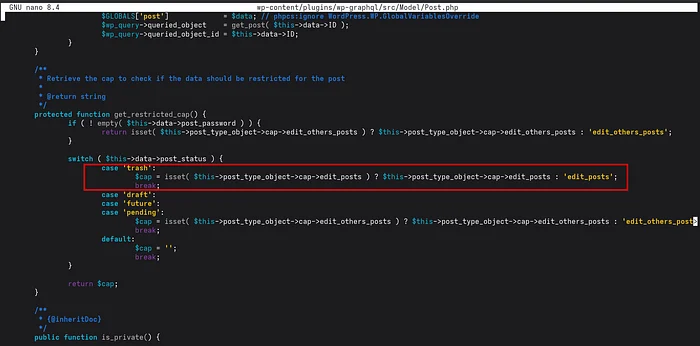
The image shows the vulnerable source code, where the trash status is handled with the weaker capability check.
That difference matters because edit_posts is held by Authors and Contributors, while edit_others_posts is not. The check therefore lets a low-privileged user past a boundary that WordPress core enforces: Authors and Contributors should not be able to read the full restricted content of other users.
Exploitation
Step 1: Create the two accounts
Create one account with the Administrator role and another with the Author or Contributor role.
Step 2: Create and trash a post as the Administrator
Using the Administrator account, create a post and move it to the trash. The post now has the TRASH status.
Step 3: Query trashed posts as the low-privileged user
Log in as the Author or Contributor and send a GraphQL query asking for posts with status TRASH:
curl -X POST "<TARGET>" \ -H "Authorization: Basic <APPLICATION PASSWORD>" \ -H "Content-Type: application/json" \ --data '{"query":"query GetTrashedPosts { posts(where: { status: TRASH }) { nodes { id title content status } } }"}'
The request posts a JSON body to the GraphQL endpoint. The Authorization header carries the low-privileged user's application password as a Basic credential, and Content-Type: application/json tells the server the body is JSON. The query itself, GetTrashedPosts, selects posts filtered by where: { status: TRASH } and asks for id, title, content and status on each node.
Because the trash status is only gated by edit_posts, the Author or Contributor passes the check and the response contains the full content of the Administrator's trashed post, including the content field. The report also shows the request in Caido.
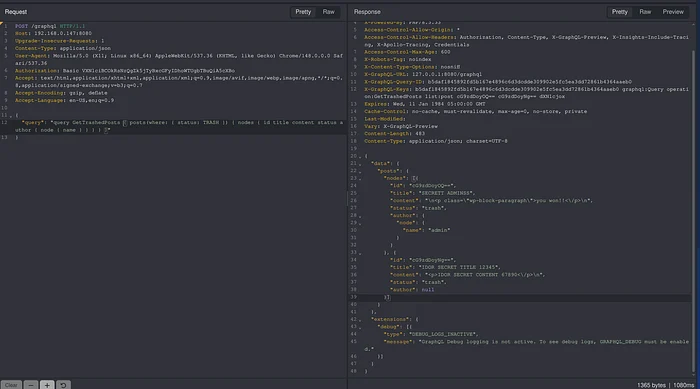
The image shows the proof of concept in Caido.
Root cause
The capability mapping for post statuses is not uniform. Draft, pending and future posts are guarded by edit_others_posts, but the trash status falls back to edit_posts. Since Authors and Contributors have edit_posts, the GraphQL resolver returns trashed posts belonging to other users, bypassing the WordPress core authorization logic that is meant to keep that content restricted.
Impact
An authenticated user with the Author or Contributor role can query and read the full details of trashed posts belonging to other authors or high-privilege users. This violates the expected WordPress authorization boundary. The report does not describe any further impact beyond reading that content.
Fix
The GitHub advisory GHSA-rq5q-mc8v-w8pq is referenced for details.
Variants to test
- Query other restricted statuses (
DRAFT,PENDING,FUTURE) with an Author or Contributor account. A positive result is any post belonging to another user being returned; the report says these are correctly protected, so a hit would indicate a different mapping problem. - Try the same
status: TRASHquery with other low-privileged roles and with users who have no publishing rights. A positive result is trashed content from another user appearing in the response. - Check other GraphQL fields that expose posts, such as single-post lookups by ID, with the ID of a trashed post owned by another user. A positive result is the full content of that trashed post being returned.
- Test other status values or filters that map to capabilities in the same code path. A positive result is any status that returns another user's content without
edit_others_posts.
What happened, in plain words
A website built on WordPress can be extended with a plugin called WPGraphQL. That plugin adds a second way for programs to talk to the site, alongside the normal web pages a person sees in a browser. The researcher found that this second way had a gap in its permission checks: a user with a modest role, such as Author or Contributor, could read the full text of posts that another user had thrown in the bin (the "trash"). In WordPress, Authors and Contributors are not supposed to read the full restricted content of other users. The researcher reported it as an authorization bypass, also called an IDOR (Insecure Direct Object Reference), and it was published as a security advisory with the identifier GHSA-rq5q-mc8v-w8pq.
To follow the rest of this article you only need to know how to use a browser and a computer. Every technical word is explained where it first appears, and there is a glossary at the end.
The pieces involved
WordPress and roles
WordPress is a system for publishing content on the web. People who log in to it have a role, and the role decides what they are allowed to do. Two of the roles matter here:
- Administrator: the person in charge. Can do everything, including reading and deleting anyone's content.
- Author and Contributor: more limited users. They can write their own posts, but they are not supposed to read the private or deleted content of other people.
Each role comes with a set of capabilities, which are named permissions such as edit_posts ("may edit posts") or edit_others_posts ("may edit posts belonging to other people"). Think of capabilities as keys on a keyring: the Administrator holds every key, an Author holds a few, and the code is supposed to check for the right key before opening each door.
Posts and their status
A post is a piece of content on the site. Every post has a status that says where it is in its life:
DRAFT: being written, not published yet.PENDING: waiting for someone to review it.FUTURE: scheduled to appear later.TRASH: deleted by its owner, sitting in the bin.
A draft, a pending post or a future post belonging to someone else is private. So is a trashed post. WordPress itself enforces that privacy on its normal pages.
GraphQL and WPGraphQL
An API (Application Programming Interface) is a way for one program to ask another program for data, without a human clicking around. A useful comparison is a restaurant: you do not walk into the kitchen, you give the waiter an order, and the kitchen sends back exactly the dish you asked for.
GraphQL is a style of API where the client writes a query describing exactly which fields it wants, and the server answers with those fields. WPGraphQL is the plugin that adds such a GraphQL API to a WordPress site. In WPGraphQL, posts are fetched through a field called posts, and that field accepts an argument called where that lets the client filter which posts it wants. One of the filters inside where is status, so a client can say "give me the posts whose status is TRASH".
Because WordPress restricts who may see posts in each status, the GraphQL layer has to translate every status into the capability a user must hold before the query is allowed to return matching posts. This report is about a mistake in that translation for one status: TRASH.
Setting up the test
The issue only affects users who are logged in, so the researcher used two accounts:
- An account with the Administrator role.
- An account with the Author or Contributor role.
The proof of concept was run with curl, a command-line tool for sending web requests, against the GraphQL endpoint, authenticating with an application password. The report also shows the request in Caido. The report does not give plugin versions, WordPress versions or the exact target used.
Finding the flaw
While auditing the WPGraphQL source code, the researcher looked at how post statuses are mapped to the capabilities they require. The mapping was inconsistent:
- Draft, pending and future posts correctly require
edit_others_posts, which prevents a low-privileged user from viewing other users' content in those states. - The trash status falls back to requiring only
edit_posts.
The image shows the vulnerable source code, where the trash status is handled with the weaker capability check.
That difference matters because edit_posts is held by Authors and Contributors, while edit_others_posts is not. The check therefore lets a low-privileged user past a boundary that WordPress core enforces: Authors and Contributors should not be able to read the full restricted content of other users.
Exploitation
Step 1: Create the two accounts
Create one account with the Administrator role and another with the Author or Contributor role. Two accounts are needed because the whole point is to show what a low-privileged user can reach that belongs to a high-privileged one. With a single account you could not tell whether a permission check was missing or simply not needed.
Step 2: Create and trash a post as the Administrator
Using the Administrator account, create a post and move it to the trash. The post now has the TRASH status. This gives us a piece of private content to try to reach from the other account.
Step 3: Query trashed posts as the low-privileged user
Log in as the Author or Contributor and send a GraphQL query asking for posts with status TRASH:
curl -X POST "<TARGET>" \ -H "Authorization: Basic <APPLICATION PASSWORD>" \ -H "Content-Type: application/json" \ --data '{"query":"query GetTrashedPosts { posts(where: { status: TRASH }) { nodes { id title content status } } }"}'
Line by line:
curl -X POST "<TARGET>":curlis the command-line tool that sends web requests.-X POSTsays the request uses the POST method, which is how you send data to a server rather than just asking for a page.<TARGET>is a placeholder for the address of the GraphQL endpoint; the real address is not given in the report.-H "Authorization: Basic <APPLICATION PASSWORD>":-Hadds a header, which is extra information attached to a request. TheAuthorizationheader is where a client proves who it is.Basicis a simple scheme that carries a username and password together, and<APPLICATION PASSWORD>is a placeholder for the low-privileged user's application password. An application password is a password WordPress generates for a program to use, so the person's normal login password is not typed into scripts.-H "Content-Type: application/json": this header tells the server that the body of the request is formatted as JSON, a text format for structured data that both sides can read.--data '...': this is the body of the request. It contains a JSON object with one key,query, whose value is the GraphQL query text.- The query itself,
GetTrashedPosts, selectspostsfiltered bywhere: { status: TRASH }and asks forid,title,contentandstatuson each node.GetTrashedPostsis just a name for the query.nodesis the list of matching posts, and the four field names say which details to return for each one: its identifier, its title, its full body text and its status.
Because the trash status is only gated by edit_posts, the Author or Contributor passes the check and the response contains the full content of the Administrator's trashed post, including the content field.
The image shows the proof of concept in Caido.
Why it works
The capability mapping for post statuses is not uniform. Draft, pending and future posts are guarded by edit_others_posts, but the trash status falls back to edit_posts. Since Authors and Contributors have edit_posts, the GraphQL resolver returns trashed posts belonging to other users, bypassing the WordPress core authorization logic that is meant to keep that content restricted.
In plain terms: the door for drafts, pending and future posts is locked with a key that only administrators hold. The door for trashed posts was accidentally locked with a key that ordinary authors also hold, so they can open it. This kind of mistake, where a program hands out an object that belongs to someone else because it does not check ownership properly, is what people call an IDOR (Insecure Direct Object Reference).
Impact
An authenticated user with the Author or Contributor role can query and read the full details of trashed posts belonging to other authors or high-privilege users. This violates the expected WordPress authorization boundary. The report does not describe any further impact beyond reading that content.
Fix
The GitHub advisory GHSA-rq5q-mc8v-w8pq is referenced for details.
Variants to test
If you want to explore similar ground on a site you are allowed to test, these are the directions the finding suggests:
- Query other restricted statuses (
DRAFT,PENDING,FUTURE) with an Author or Contributor account. A positive result is any post belonging to another user being returned; the report says these are correctly protected, so a hit would indicate a different mapping problem. - Try the same
status: TRASHquery with other low-privileged roles and with users who have no publishing rights. A positive result is trashed content from another user appearing in the response. - Check other GraphQL fields that expose posts, such as single-post lookups by ID, with the ID of a trashed post owned by another user. A positive result is the full content of that trashed post being returned.
- Test other status values or filters that map to capabilities in the same code path. A positive result is any status that returns another user's content without
edit_others_posts.
Glossary
- API: a way for one program to ask another program for data, like ordering from a menu instead of entering the kitchen.
- Application password: a password WordPress generates for a program to use, separate from the person's normal login password.
- Authorization: the process of deciding whether a user is allowed to do or see something.
- Authorization bypass: a flaw that lets someone do or see something they should not be allowed to.
- Basic (authentication): a simple scheme where a username and password are sent together in a request header to prove identity.
- Caido: a tool for capturing, inspecting and replaying web requests.
- Capability: a named permission in WordPress, such as
edit_postsoredit_others_posts. - Contributor: a WordPress role that can write posts but has limited rights over other people's content.
- Author: a WordPress role that can write and manage its own posts but not other people's.
- Administrator: the WordPress role with every permission.
curl: a command-line tool for sending web requests.- Endpoint: the address a program sends its requests to.
- GraphQL: a style of API where the client writes a query naming exactly the fields it wants.
- Header: extra information attached to a web request, such as who is making it or what format the body uses.
- IDOR (Insecure Direct Object Reference): a flaw where a program returns an object belonging to someone else because it does not check ownership properly.
- JSON: a text format for structured data, made of keys and values.
- Node: in a GraphQL response, one item in a list of results.
- Plugin: an add-on that extends what a WordPress site can do.
- POST: an HTTP method used to send data to a server.
- Post: a piece of content on a WordPress site.
- Query: the text a client sends to a GraphQL API describing the data it wants.
- Resolver: the part of a GraphQL server that fetches the data for a field.
- Role: a named set of capabilities given to a WordPress user.
- Status: the state of a post, such as draft, pending, future or trash.
- Trash: the state of a post that its owner has deleted but not permanently removed.
- WPGraphQL: a WordPress plugin that adds a GraphQL API to a site.
- WordPress: a system for publishing content on the web.


