Bounty for an Out-of-Scope Vulnerability
The password change API accepted a new password longer than the 12-character limit enforced only in the browser, because the server did not validate the length itself. An attacker could bypass the front-end restriction by sending requests directly to the API, though the report only tested a slightly longer value and did not demonstrate real harm.
 Published on medium.com
Bug Bounty
The full write-up lives on its author's site
It belongs to its author, so we link to it rather than copy it. The other two tabs are our own rewrites, checked against it.
Context
APIs sit behind most of the operations a modern web application performs: authentication, password changes, data processing. Front-end code often enforces input restrictions, but that enforcement lives in the browser and can be bypassed by anyone who talks to the backend directly. When an API does not validate its input, client-side checks become cosmetic, and the API itself becomes the primary attack surface.
This write-up is about a password change feature on a target application. The feature is the standard one: the user supplies a new password and the application sends it to the backend. The front end restricted the password length to 12 characters.
Setup
The report does not describe the program, the target's identity, the account type used, or any software versions. The only tool named is Burp Suite, used to intercept the password change request before it reached the server.
Finding it
While testing the password change functionality, the researcher noticed that the front end restricted the password length to 12 characters. That raised the obvious question: is this validation enforced only in the browser, or does the backend validate it as well? Client-side restrictions should never be trusted, so the next step was to check what the server would accept.
Exploitation
Step 1: Capture a legitimate request
The researcher entered a password within the allowed limit and intercepted the request with Burp Suite before it reached the server. The intercepted request contained a parameter similar to:
{

“new_password”: “Password123”

}
This is the body of the password change request, with the new password carried in the new_password field. The value shown is a normal password within the 12 character limit.
Step 2: Modify the value past the limit
Instead of forwarding the request as-is, the researcher changed the value of new_password. Rather than the allowed 12 characters, the password length was increased to 20 characters, and the request was forwarded.
Step 3: Observe the response
The server accepted the request and responded with a 2xx Success response. This confirmed that the backend API was not enforcing the same password length restriction implemented on the front end.
Responsible testing
At that point the researcher knew that sending an extremely large payload could consume additional server resources or even cause service degradation. Rather than attempting a full Denial of Service, testing was limited to a password length of 20 characters, only slightly above the intended limit. The test demonstrated the missing validation without pushing the server towards resource exhaustion.
Root cause
The issue was missing server-side input validation. The application relied on client-side validation to enforce password length and did not validate the same constraint on the backend. Anyone could bypass the UI restrictions by interacting directly with the API, which made the API the primary attack surface.
Impact
The direct consequence is that the password length policy the application presents to users is not actually enforced. An attacker who can reach the API directly can set a password that violates the constraint. The report frames the wider risk in terms of resource consumption: an extremely large payload could consume additional server resources or cause service degradation, which is why the researcher deliberately stopped at 20 characters. The report does not claim that a full denial of service was achieved or demonstrated.
Fix
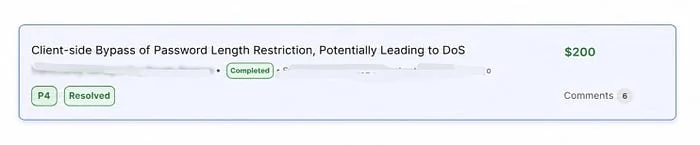
The report does not describe a specific code change. The security team reviewed the findings and acknowledged the issue; the report was accepted because it highlighted an important security weakness in the API implementation, even though the bounty amount was relatively small.
Variants to test
- Other length-limited fields. Apply the same approach to any field where the UI imposes a maximum: usernames, display names, email local parts, search terms, free-text comments. A positive result is a 2xx response that stores or processes a value longer than the UI allows.
- Minimum length and complexity rules. Try a password below the stated minimum, or one that omits a required character class, and see whether the backend accepts it. A positive result is a successful password change that violates the stated policy.
- Other client-side checks. Look for fields where the browser restricts format, character set or numeric range, and send values outside those bounds directly to the API. A positive result is acceptance of a value the UI would have blocked.
- Boundary probing before going large. Increase the value only slightly past the limit first, as was done here with 20 characters against a 12 character limit, and only escalate carefully if the application shows signs of strain. A positive result at the first step is a 2xx response with the oversized value accepted.
What happened, in plain words
A security researcher was testing a website's "change password" feature. The website's form only let you type a password of up to 12 characters. The researcher wondered whether that limit was real, or whether it was just a rule the web page showed in your browser. So they caught the message the browser sends to the website's server, changed the password to something 20 characters long, and sent it on. The server accepted it. That proved the server was not checking the length at all: only the page in the browser was. The researcher reported it, the security team acknowledged the issue, and the report was accepted with a relatively small bounty.
This article walks through that story from the beginning, explaining every piece as it comes up. You only need to know how to use a browser.
Background: what an API is, and why the server must check things
When you fill in a form on a website and press a button, your browser does not do the work itself. It sends a message to a computer somewhere else, called a server, and the server does the work: it checks your password, saves your new one, and sends back an answer. The part of the server that receives these messages and carries out these operations is called an API (Application Programming Interface). You can think of the API as the counter staff at a bank: your browser is you at the window, the API is the person who takes your form and acts on it, and the server's database is the back office where records are kept.
Modern web applications depend on APIs for critical operations: logging in, changing passwords, processing data. The report makes a point that matters for everything below: front-end applications often enforce input restrictions, but real security must always be implemented on the server side.
Here is the everyday comparison. A form on a web page that says "password must be 12 characters or fewer" is like a sign on the bank counter saying "please write neatly". It is a request, not a lock. Anyone who walks past the counter and hands a form straight to the back office skips the sign entirely. The front end is everything that runs in your browser: the page, the form, the little warning that appears when you type too much. The back end is everything that runs on the server. If the API fails to validate user input, attackers can bypass client-side checks and interact directly with backend endpoints, making proper server-side validation a fundamental part of API security.
Validation simply means checking that what someone sent makes sense and is allowed: not too long, not too short, the right kind of characters. Client-side validation happens in your browser. Server-side validation happens on the server. Only the second one is a real defence, because the first one runs on a machine the attacker controls.
Background: the out-of-scope problem
Most bug bounty programs explicitly mark Denial of Service (DoS) vulnerabilities as Out of Scope, so many researchers ignore anything that resembles resource exhaustion.
Two terms to unpack. A bug bounty program is a scheme run by a company that pays people for finding and reporting security problems in its products. Each program has scope: a list of what is fair game. Anything not on the list is out of scope, and reports about it are usually closed without payment. A Denial of Service attack is one where the attacker does not steal anything but instead makes a service stop working, typically by flooding it with so much work that it cannot answer normal users. Think of a shop with one till: if someone stands at the till asking an endless series of pointless questions, real customers never get served. Because DoS reports are usually out of scope, researchers tend to skip anything that looks like it might exhaust a server's resources.
However, while testing a target application, the researcher noticed something interesting during the password change functionality. The front end restricted the password length to 12 characters. That raised a simple question: is this validation enforced only in the browser, or is the backend validating it as well? The report states plainly that client-side restrictions should never be trusted.
Why does the length limit matter at all? Because a password field with no upper limit is a place where someone could send an enormous value. If the server tries to process something huge, it may use extra memory or processing power. That is the resource-exhaustion angle, and it is exactly the kind of thing that sits near the out-of-scope DoS line. The researcher's question was therefore not just academic: it decided whether there was a real weakness here at all.
Setup
The report does not describe the program, the target's identity, the account type used, or any software versions. The only tool named is Burp Suite, used to intercept the password change request before it reached the server.
What is Burp Suite? It is a program that sits between your browser and the website, like a postal worker who is allowed to open every letter you send, read it, change it, and then seal it up again and deliver it. Normally your browser sends a request and the server answers, and you see only the answer. With an intercepting proxy, the request pauses on the way out and you can look at it and edit it before it continues. This is the central tool of web security testing, because it lets you send things a browser would never let you type.
Finding it
While testing the password change functionality, the researcher noticed that the front end restricted the password length to 12 characters. That raised the obvious question: is this validation enforced only in the browser, or does the backend validate it as well? Client-side restrictions should never be trusted, so the next step was to check what the server would accept.
The reasoning is worth spelling out, because it is the heart of the whole article. A rule that lives in the page can only stop someone who uses the page. The page is just text and code delivered to your browser; your browser is a machine you control. Anyone can use a tool like Burp Suite to build a request by hand, and that request never passes through the page's checks. So the only question that matters is what the server does when the request arrives.
Exploitation
Step 1: Capture a legitimate request
The researcher entered a password within the allowed limit and intercepted the request with Burp Suite before it reached the server. The intercepted request contained a parameter similar to:
{

“new_password”: “Password123”

}
Line by line, in plain words:
- The outer
{and}are curly braces. They mark the start and end of a bundle of data. This bundle format is called JSON (JavaScript Object Notation), and it is just a way of writing labelled values as text. “new_password”is the label, called a parameter or field name. It tells the server which piece of information is being supplied: here, the new password.- The colon
:separates the label from its value. “Password123”is the value itself, a normal password within the 12 character limit.
Why capture a normal request first? Because you want to change as little as possible. If you start from a request the application itself produced, you know the format, the field names and the surrounding details are correct. You then alter one value and see what happens. Changing one thing at a time is how you learn which change caused which result.
Step 2: Modify the value past the limit
Instead of forwarding the request as-is, the researcher changed the value of new_password. Rather than the allowed 12 characters, the password length was increased to 20 characters, and the request was forwarded.
"Forwarding" means letting the paused request continue on to the server. The edit is small on purpose: the same request, the same field, one longer value. If the server had a length check, this request would be rejected. If it does not, the request will succeed, and that difference is the whole test.
Step 3: Observe the response
The server accepted the request and responded with a 2xx Success response. This confirmed that the backend API was not enforcing the same password length restriction implemented on the front end.
A response is the server's reply. 2xx is a family of status codes, the three-digit numbers servers use to summarise what happened. Codes starting with 2 mean success: the server understood the request and carried it out. Codes starting with 4 mean the request was refused, for example because it was malformed or not allowed. So a 2xx here means the server took the 20 character password and treated it as perfectly fine. The browser's rule had been bypassed, and the server had no rule of its own.
Responsible testing
At that point the researcher knew that sending an extremely large payload could consume additional server resources or even cause service degradation. Rather than attempting a full Denial of Service, testing was limited to a password length of 20 characters, only slightly above the intended limit.
A payload is the data you send in a request, in this case the password value. The reasoning is the same as testing whether a bridge holds weight: you do not drive the heaviest lorry you can find over it first. You add a little weight, see whether it holds, and stop. Going from 12 to 20 characters proves the check is missing. Sending megabytes would prove nothing extra about the validation, and could slow or break a service real people are using. The test demonstrated the missing validation without pushing the server towards resource exhaustion.
Root cause
The issue was missing server-side input validation. The application relied on client-side validation to enforce password length and did not validate the same constraint on the backend. Anyone could bypass the UI restrictions by interacting directly with the API, which made the API the primary attack surface.
Root cause means the underlying reason the problem exists, as opposed to the symptom you happened to observe. Here the symptom is "a 20 character password was accepted"; the root cause is "the server never checks length". Attack surface means all the places an attacker can send input to. If the browser is the only place a rule exists, the API is where an attacker goes, because the browser's rule does not travel with a hand-built request.
Impact
The direct consequence is that the password length policy the application presents to users is not actually enforced. An attacker who can reach the API directly can set a password that violates the constraint. The report frames the wider risk in terms of resource consumption: an extremely large payload could consume additional server resources or cause service degradation, which is why the researcher deliberately stopped at 20 characters. The report does not claim that a full denial of service was achieved or demonstrated.
Impact means what harm the weakness could actually cause. Be precise here: the report shows a policy that is not enforced, and it points at a possible resource problem if someone sent something enormous. It does not show a service being taken down.
Fix
In everyday terms: keep the sign on the counter, but also tell the person at the counter to check the form. The security team reviewed the findings and acknowledged the issue; the report was accepted because it highlighted an important security weakness in the API implementation, even though the bounty amount was relatively small.
Variants to test
Once you understand the pattern, you can look for it elsewhere. The idea is always the same: find a rule the page enforces, then send a request that breaks the rule and see whether the server cares.
- Other length-limited fields. Apply the same approach to any field where the UI imposes a maximum: usernames, display names, email local parts, search terms, free-text comments. A positive result is a 2xx response that stores or processes a value longer than the UI allows.
- Minimum length and complexity rules. Try a password below the stated minimum, or one that omits a required character class, and see whether the backend accepts it. A positive result is a successful password change that violates the stated policy.
- Other client-side checks. Look for fields where the browser restricts format, character set or numeric range, and send values outside those bounds directly to the API. A positive result is acceptance of a value the UI would have blocked.
- Boundary probing before going large. Increase the value only slightly past the limit first, as was done here with 20 characters against a 12 character limit, and only escalate carefully if the application shows signs of strain. A positive result at the first step is a 2xx response with the oversized value accepted.
Glossary
- API: the part of a server that receives requests from applications and carries out operations such as logging in or changing a password.
- Back end: the code and systems that run on the server, out of sight of the user.
- Bug bounty program: a scheme where a company pays people for reporting security problems in its products.
- Burp Suite: a tool that sits between browser and server, letting you pause, read and edit requests before they are sent.
- Client-side validation: checks performed in the user's browser, which an attacker can skip by building requests by hand.
- Denial of Service (DoS): an attack that aims to make a service stop working, often by exhausting its resources.
- Front end: the part of an application that runs in the browser: pages, forms and their checks.
- Impact: the harm a weakness could actually cause.
- JSON: a text format for writing labelled values in bundles, used for request bodies.
- Out of scope: not covered by a bug bounty program's rules, so usually not eligible for a reward.
- Parameter: a named field in a request, such as
new_password. - Payload: the data sent inside a request.
- Response: the server's reply to a request, including a status code.
- Root cause: the underlying reason a problem exists, as opposed to the symptom observed.
- Server: the remote computer that stores data and performs the application's operations.
- Server-side validation: checks performed on the server, which an attacker cannot bypass from the browser.
- Status code: a three-digit number in a response summarising the outcome; 2xx means success, 4xx means the request was refused.
- Validation: checking that input is allowed and sensible, for example that a password is not too long.


