Breaking a Healthcare Web App: Penetration Testing & Attack Chaining on NileCare
The NileCare healthcare web app had multiple vulnerabilities, including IDOR, stored XSS, CSRF, predictable password-reset tokens, and business logic flaws. An attacker could access other users' medical reports, take over accounts, book appointments for free, and manipulate loyalty points.
 Published on medium.com
Cybersecurity
The full write-up lives on its author's site
It belongs to its author, so we link to it rather than copy it. The other two tabs are our own rewrites, checked against it.
Context
NileCare is a healthcare web application that combines clinical workflows with patient-facing features: appointment booking, lab test ordering with discount codes, medical reports, a patient profile, a loyalty currency called Health Points, and a hidden administrator portal. The assessment was the final project of the author's penetration testing internship with Tips Hindawi and Edrak For AI, carried out as a team effort with Shatter Team (Omar Samir, Aya Walid and Ziad Amin); the team placed first. This write-up covers only the vulnerabilities the author investigated, tested and documented himself.
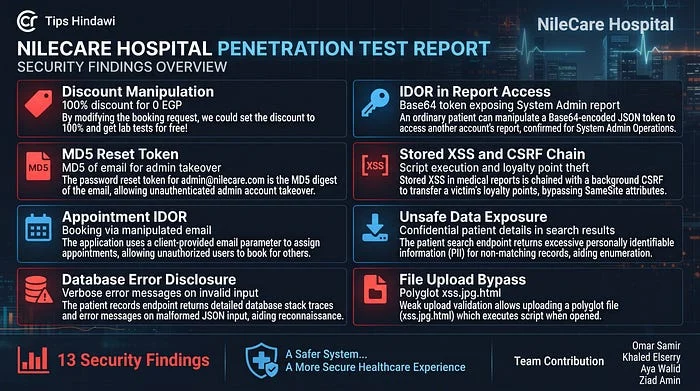
The features examined here are the ones a normal patient uses: POST /book for appointments, POST /lab-tests/book for lab tests, GET /api/v1/reports/view?token=... and POST /api/v1/reports/create for medical reports, /forgot-password and /reset-password for account recovery, POST /profile for profile management, POST /transfer for points, GET /api/v1/doctors/{id}/slots for slot lookup, /reports/upload-attachment for attachments, and /admin_portal_temp_secure_9203 for the administrator login.
Setup
No specific versions or tooling list is given beyond Burp Suite, which is used to intercept and forward requests. Testing was done from authenticated patient sessions, with a simulated mail inbox ([Lab Mail Server - Simulated Inbox]) for the password-reset flow. The admin account referenced throughout is [redacted].
Finding it
The findings came from walking through the application's normal workflows and looking at what the client controls. Booking forms carried identity fields (name, email, phone, doctor_id, date, time, notes) in the body; the lab booking form carried pricing fields (test_id, discount_pct, discount_code); report links carried a Base64 token; the reset link carried a token; the profile form carried email, full_name, phone and password; the slot lookup carried the doctor ID in the path. In each case the question was whether the server re-derived the value from the session and its own data, or trusted what the browser sent.
Exploitation
1. IDOR in appointment booking
The POST /book request included user-controlled booking fields in the body: name, email, phone, doctor_id, date, time and notes. Changing email from the authenticated user's address to another user's email (such as [redacted] or [redacted]) and forwarding the request caused the backend to process the booking without checking whether the active session was authorised to book on behalf of that email.
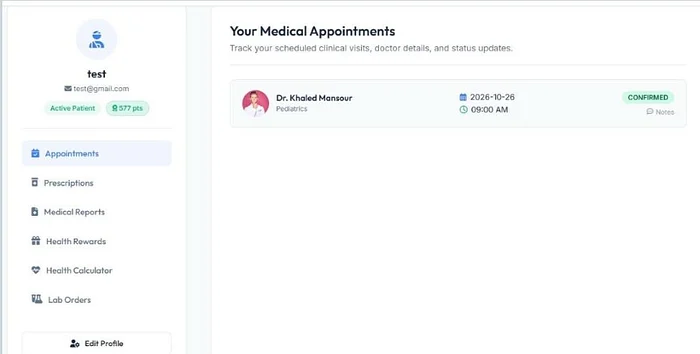
Appointments were therefore scheduled directly into other users' accounts (CWE-639).
2. A 100% discount
The lab booking page displayed the discount code nilecare10, intended to apply a 10% discount, reducing an 800 EGP test such as Chest X-Ray (Digital) to 720 EGP. After selecting the test and applying the code, the POST /lab-tests/book request was intercepted in Burp Suite. The form-encoded body (application/x-www-form-urlencoded) sent client-controlled pricing parameters directly to the server, including test_id=5, discount_pct and discount_code=nilecare10. The server trusted discount_pct from the body instead of looking up the authoritative rate for nilecare10 on the backend.
Setting discount_pct to 100 and forwarding the request made the booking succeed for 0 EGP.
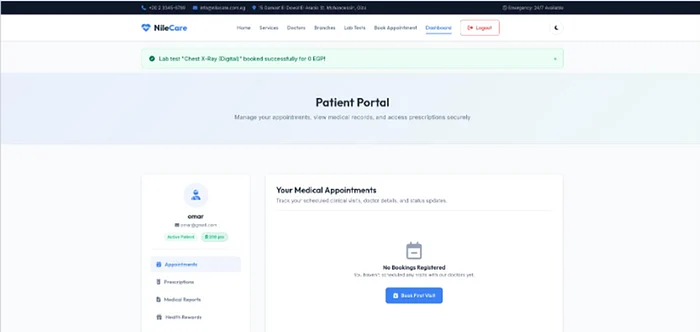
In Lab Orders the 800 EGP test was stored with a -100% discount, 0 EGP paid and status Scheduled. Trusting client-supplied discount percentages or prices in business workflows is CWE-840.
3. Reading another user's report
Medical reports were loaded through GET /api/v1/reports/view?token=.... Decoding the Base64 token parameter revealed a plain JSON object of object identifiers rather than an encrypted payload or a cryptographically signed token such as a signed JWT, starting from {"user_id": 1, "report_id": 1} in the example flow. Base64 is only an encoding, so the client could decode the JSON, change the identifiers, re-encode to Base64 and URL-encode if needed before sending the request.
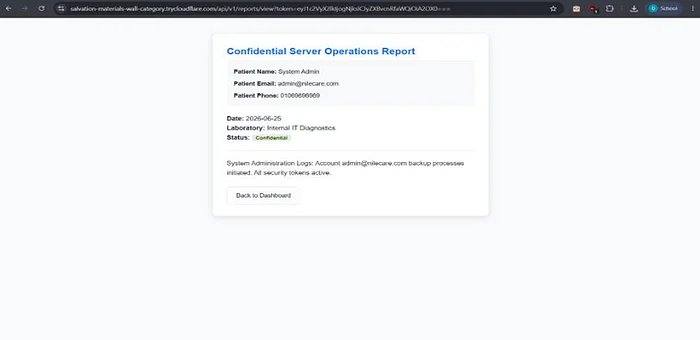
Changing both user_id and report_id to 69 and requesting the modified URL while logged in as an ordinary patient returned the Confidential Server Operations Report belonging to System Admin ([redacted]). The backend trusted the identifiers inside the decoded token without verifying whether the authenticated session owned or had permission to access that report (CWE-639 / CWE-472).
4. Predictable password-reset tokens
While inspecting /forgot-password, the author found [redacted] exposed in the HTML <input> placeholder attribute. Submitting that address triggered a password-reset link in the simulated inbox view ([Lab Mail Server - Simulated Inbox]) containing a /reset-password?token=... URL. The token turned out to be a deterministic unsalted MD5 hash of the email address:
MD5("[redacted]") = [redacted]
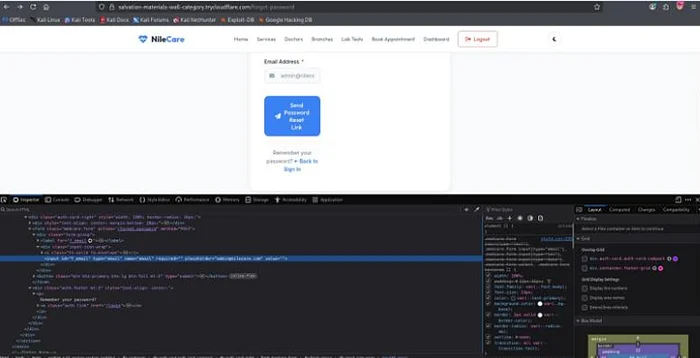
Because the token is derived predictably from a known address rather than generated with a CSPRNG (such as 32 random bytes bound to a single request, with short expiration and single-use invalidation), anyone who knows the target address can compute the token without mailbox access and take over the account (CWE-640).
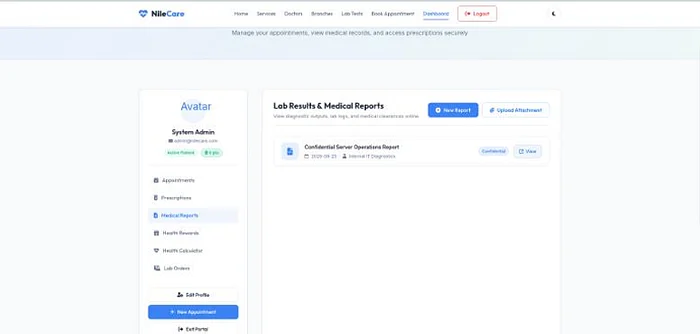
5. Stored XSS in medical reports
Creating a report via New Report accepts Report Title, Laboratory / Facility, Report Status and Report Details / Content (POST /api/v1/reports/create), and these are rendered when viewing the report (GET /api/v1/reports/view). Submitting the following payload across Report Title, Laboratory / Facility and Report Details / Content, leaving Report Status as Normal, showed the payload as literal text in the Lab Results & Medical Reports listing, while opening the report via View executed the JavaScript under the application's origin.
<script>alert(1)</script>
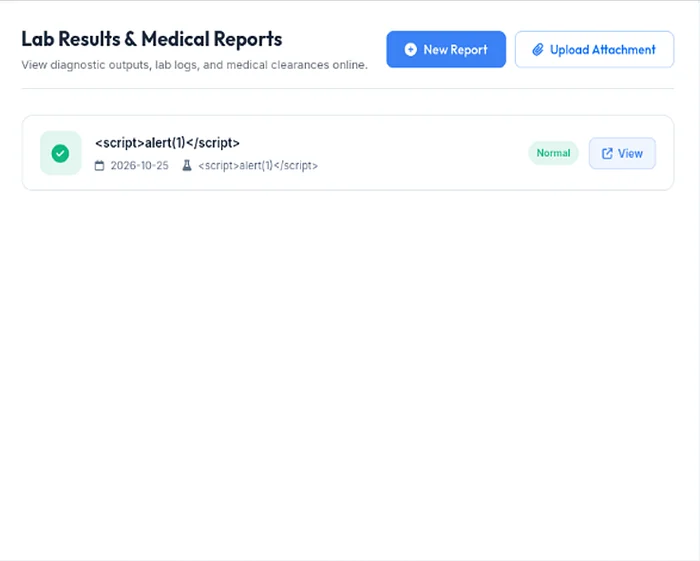
The report list displayed the payload as text. Clicking View executed the script.
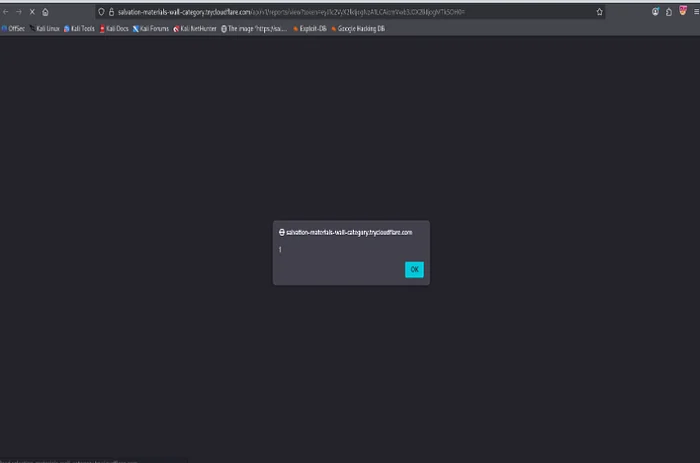
Because the three fields were submitted together, the exact vulnerable field or combination was not isolated, and cross-user execution was confirmed when another user opened the report (CWE-79).
6. CSRF in profile updates
The profile update workflow (POST /profile) allowed changing account details including email, full_name, phone and password, without an anti-CSRF token, Origin/Referer validation, or SameSite session cookie protection strong enough to block cross-site form submissions.
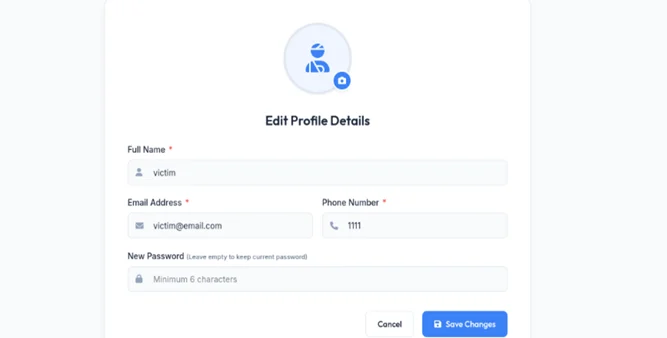
Hosting an HTML page with an auto-submitting form containing document.forms[0].submit() caused an authenticated victim's browser to send the request with their session cookie when visiting the page:
<form method="POST" action=".../profile">
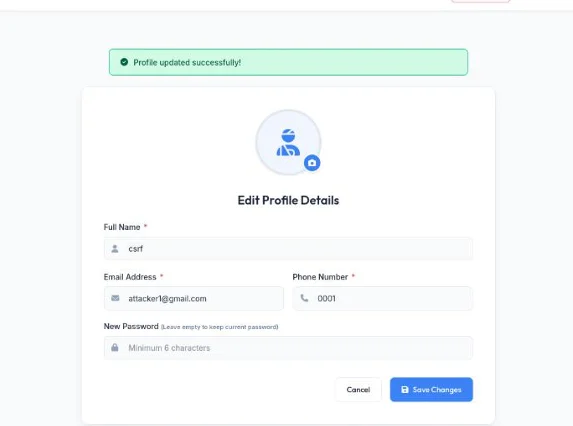
In the test flow the victim's profile details were updated to attacker-controlled values ([redacted], csrf, 0001), which could enable account takeover (CWE-352).
7. IDOR via unsigned Base64 token in medical reports
Medical report access through GET /api/v1/reports/view?token=... passed a Base64-encoded JSON payload containing user_id and report_id. GET /api/v1/reports/view?token=... passed a Base64-encoded JSON payload containing user_id and report_id, for example {"user_id": 1140, "report_id": 3951} or {"user_id": 1492, "report_id": 7605}.
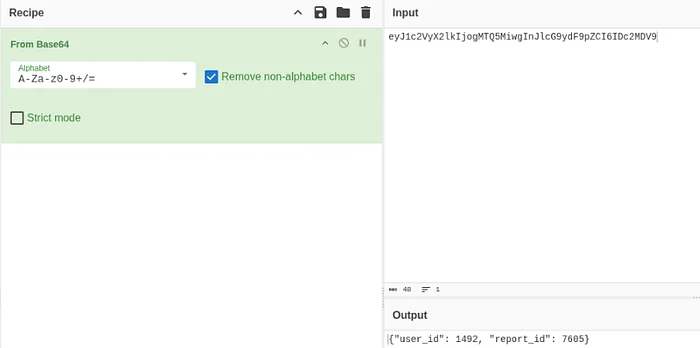
Because the token was neither encrypted nor cryptographically signed like a JWT, decoding it, editing user_id or report_id and re-encoding to Base64 allowed requesting another user's report while logged into a different session. The victim generated a report accessed via a URL containing an unsigned Base64 token with the victim's IDs (user_id: 1140, report_id: 3951).
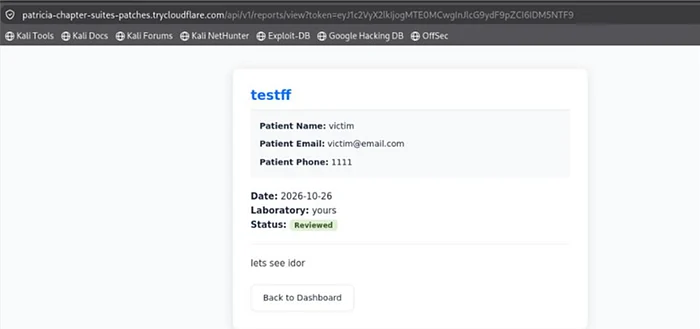
The attacker navigated to the modified URL. The server blindly trusted the tampered token and returned the victim's medical report to the attacker's browser, even though the attacker's session cookie belonged to a completely different user.
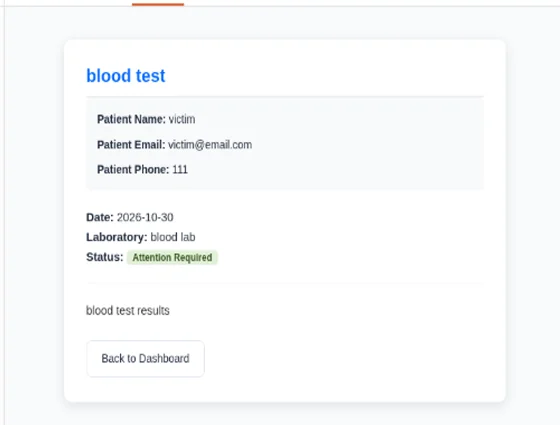
Sensitive medical report data belonging to other patients was exposed (CWE-639 / CWE-472).
8. Unvalidated doctor ID in slots and booking
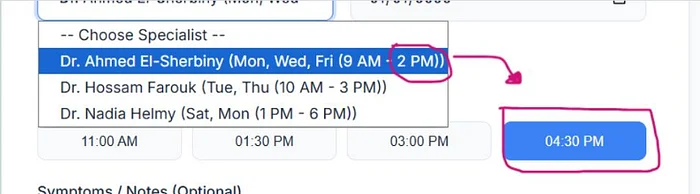
Available appointment slots were loaded via GET /api/v1/doctors/{id}/slots, with {id} supplied by the client. Replacing a valid doctor ID (1) with a nonexistent ID (99) still returned available time slots (such as 04:30 PM), and proceeding with POST /book using doctor_id=99 completed the booking rather than rejecting the invalid identifier (CWE-639 / missing server-side validation).
- Navigate to the doctor appointment booking page and select a doctor with available appointment slots displayed between 9:00 AM and 2:00 PM.

- Forward the modified request and observe that the application returns an available appointment slot at 4:30 PM despite the supplied doctor ID being nonexistent.

9. Balance manipulation in points transfer
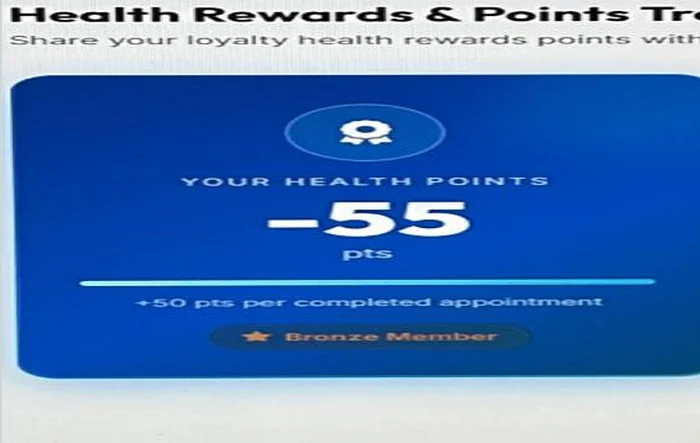
Sending multiple transfer requests in rapid succession to the loyalty health points endpoint (POST /transfer) showed that balance checks did not properly prevent transfers beyond the available balance. The sender's Health Points balance dropped into negative territory (observed at -55 pts in the test), while the recipient accumulated more points than the sender originally held (CWE-840).
10. Improper date validation in booking
In POST /book, the date parameter was intercepted and changed from a valid date (2027-01-01) to alphabetic text (test). The server accepted the malformed value and created the appointment record instead of rejecting invalid input (CWE-20).

11. User enumeration on the admin login portal
On the hidden admin login endpoint /admin_portal_temp_secure_9203, submitting a valid admin email with an incorrect password returned an explicit message in both the UI and the HTML response:
Valid admin email verified, but the password provided is incorrect!
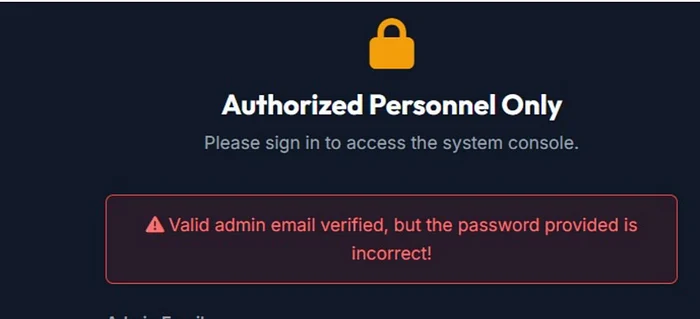
This observable response discrepancy (CWE-204) lets an attacker confirm valid administrator emails without knowing their passwords, making targeted brute-force, credential stuffing or phishing easier.
12. Stored XSS via filter bypass in profile name
In Patient Profile Management (POST /profile), submitting the following in Full Name was altered by a filter to <>('1')</>, indicating an incomplete filter rather than safe output encoding:
<script>alert('1')</script>
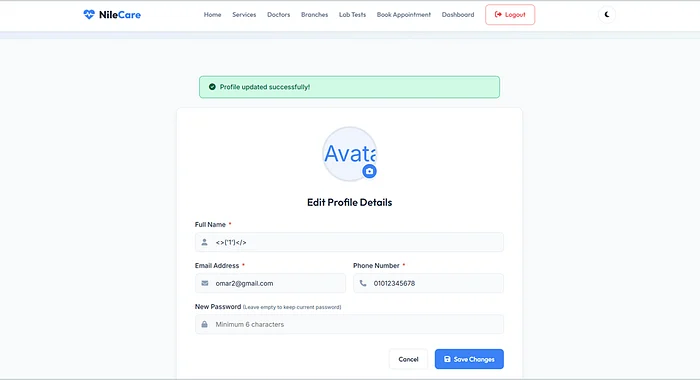
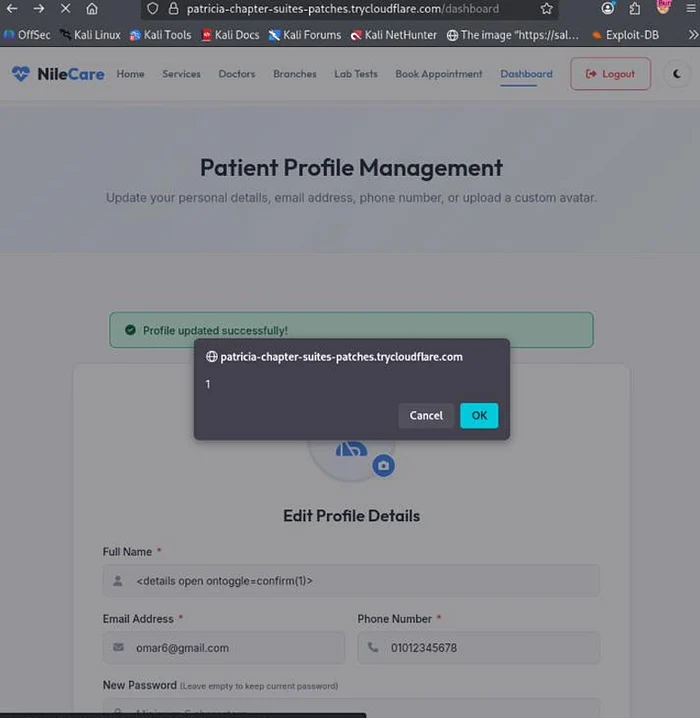
Submitting the following bypassed that filtering and triggered confirm(1) when viewing the profile/dashboard page (CWE-79):
<details open ontoggle=confirm(1)>
In the tested scenario execution was confirmed on the test account, rated Informational / 0.0 self-XSS in the report unless cross-user impact is demonstrated.
13. File upload bypass via polyglot leading to Stored XSS
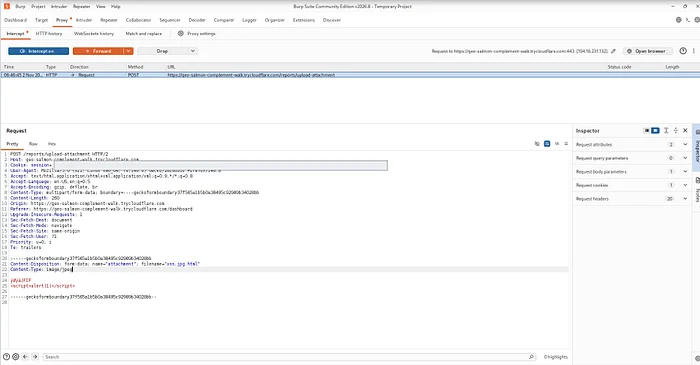
Uploading a file named xss.jpg.html to /reports/upload-attachment with Content-Type: image/jpeg and JPEG magic bytes (\xff\xd8\xff\xe0...) followed by <script>alert(1)</script> was accepted by the server. The check looked at a substring or prefix rather than validating the final extension and parsing the file as a genuine image. The uploaded file was served from a same-origin path (/static/uploads/attachments/xss.jpg.html) and executed alert(1) when opened (CWE-434 / CWE-79).

Root cause
Across the findings the same pattern recurs: the server treats client-supplied values as authoritative. Identity fields (email in booking, user_id in the report token) are not checked against the session; pricing (discount_pct) is not looked up from the server-side catalogue; the doctor ID and the booking date are not validated against real records and formats; the reset token is derived deterministically from a public value instead of a CSPRNG; the profile endpoint has no anti-CSRF token, no Origin/Referer check and no SameSite protection; and the points transfer lacks atomic balance checks, so rapid requests overdraw the balance. On the output side, report fields and the profile name are rendered without context-aware encoding, and the upload check inspects a substring or prefix rather than the final extension and the actual image content. The admin login returns a distinct message for a valid email with a wrong password, which is a response discrepancy rather than a missing control.
Impact
An authenticated patient could book appointments into other users' accounts, obtain lab tests for 0 EGP, read other users' medical reports including a Confidential Server Operations Report belonging to System Admin, take over the admin account through a computable reset token, execute JavaScript in another user's session through stored XSS in reports, change a victim's profile details (including password) through CSRF, book against nonexistent doctors, push a Health Points balance negative while the recipient gains more than the sender held, create appointments with malformed dates, and confirm valid administrator emails. The profile-name XSS was confirmed only on the test account and was rated Informational / 0.0 self-XSS unless cross-user impact is demonstrated. The upload bypass executes alert(1) when the uploaded file is opened from the same-origin path.
Fix
- Derive the acting user's identity from the authenticated session rather than trusting a client-supplied
emailor user identifier. - Calculate totals from trusted server-side catalogue prices and promotion rules instead of
discount_pctor prices in the request. - Verify ownership and permissions against the authenticated session and the database record, not client-supplied token IDs, and use signed tokens or non-sequential identifiers such as UUIDs.
- Generate reset tokens with a CSPRNG (such as 32 random bytes bound to a single request, with short expiration and single-use invalidation).
- Apply proper output encoding or safe template escaping on the rendering sink, with allowlist-based sanitisation if rich text is needed, instead of raw HTML rendering.
- Add anti-CSRF tokens (such as
Flask-WTFCSRFProtect),SameSite=LaxorStricton session cookies, andOrigin/Refererverification. - Validate server-side that
doctor_idexists and that the chosen slot belongs to that doctor, on both slot lookup and final booking submission. - Enforce balance checks and atomic database transactions with concurrency controls so rapid requests cannot overdraw or push balances below zero.
- Apply strict server-side date format, calendar validity and scheduling-rule checks before storing bookings.
- Return a generic login error (such as
"Invalid admin email or password"), keep response timing consistent, and enforce rate limiting and lockouts. - Treat Full Name as plain text with context-aware output encoding rather than blacklist filtering, across all rendering views.
- For uploads, use strict allowlists of final extensions, parse the file as a genuine image, serve uploads from a separate or non-executable origin or with
Content-Disposition: attachmentandX-Content-Type-Options: nosniff, and enforce authorisation checks on retrieval.
Variants to test
- Change identity fields in any booking or order body (
email,user_id,phone) and see whether the record lands in another account. - Decode any Base64
tokenparameter; if it is JSON with IDs, edit and re-encode it and check whether another user's record is returned. - Request a password reset for a known address and check whether the token is a hash of the address, a timestamp or otherwise predictable.
- Submit a benign script payload in every free-text field of a multi-field form and open the record from a second account to confirm cross-user execution.
- Host an auto-submitting form against profile, email-change and password-change endpoints and check whether the change is applied without a token.
- Replace path IDs with nonexistent values and see whether the API still returns data or accepts a booking.
- Send rapid repeated transfers and check whether the balance can go negative or the recipient can gain more than the sender held.
- Replace a date parameter with alphabetic text and see whether the record is created.
- Submit a valid admin email with a wrong password and compare the response with an invalid email.
- Upload a file with a double extension and image magic bytes followed by script, then open it from the served path.
What happened, in plain words
NileCare is a website for a healthcare company. Patients use it to book appointments with doctors, order lab tests (like a chest X-ray), read their medical reports, edit their profile, and collect a loyalty currency called Health Points. There is also a hidden login page for administrators.
A team of testers was given permission to try to break this website, as the final project of a penetration testing internship with Tips Hindawi and Edrak For AI. The team was called Shatter Team (Omar Samir, Aya Walid and Ziad Amin) and it placed first. This write-up covers only the problems the author himself investigated, tested and documented.
What they found, in one sentence: the website often believed whatever the visitor's browser sent it, instead of checking things for itself. That let a normal patient book appointments into someone else's account, get lab tests for free, read other people's medical reports (including a confidential report belonging to the System Admin), take over the admin account, run JavaScript in another user's browser, change a victim's profile and password, book with a doctor who does not exist, push a points balance below zero, create appointments with a nonsense date, and confirm which admin email addresses are real.
Before the findings, a few words that come up constantly.
- A web application is a program you use through your browser. Your browser asks the server for pages and data, and the server answers.
- An API (Application Programming Interface) is the part of the server that answers requests with raw data rather than pretty pages. Think of it as the kitchen: the page you see is the plated dish, the API is where the order goes. Requests to an API usually look like
POST /bookorGET /api/v1/reports/view?token=.... - A request is one message your browser sends to the server.
GETmeans "give me something",POSTmeans "here is data, do something with it". - A parameter is a named value inside a request, like
email=...ordate=.... - A session is how the site remembers you are logged in. After you log in, the server gives your browser a session cookie, a small piece of text that your browser sends back with every request. It works like a wristband at an event: show it and you are let in without showing your ID again.
- A token is a value that stands in for something else, often an identity or a permission. A report link might carry a token that says "this is report number X for user Y".
- Base64 is a way of writing any data using only letters, digits and a couple of symbols, so it can travel safely in a URL. It is not encryption: anyone can decode it, like unwrapping a parcel.
- Burp Suite is a tool that sits between your browser and the website. It lets you pause a request, read it, change it, and then send it on. That is what "intercept and forward" means throughout.
- IDOR (Insecure Direct Object Reference) means the site lets you reach someone else's record just by changing an identifier (a number or ID) in the request, because it never checks that the record belongs to you.
- XSS (Cross-Site Scripting) means getting your own JavaScript code to run inside another user's browser on the site's pages.
- CSRF (Cross-Site Request Forgery) means tricking a logged-in user's browser into sending a request the user did not intend, using the login they already have.
- CWE numbers are catalogue entries for classes of weakness, like a library classification for bugs.
The features that were examined
These are the ordinary patient features, each with the request that drives it:
| Feature | Request |
|---|---|
| Booking a doctor appointment | POST /book |
| Booking a lab test | POST /lab-tests/book |
| Viewing a medical report | GET /api/v1/reports/view?token=... |
| Creating a medical report | POST /api/v1/reports/create |
| Forgot password | /forgot-password |
| Reset password | /reset-password |
| Editing your profile | POST /profile |
| Transferring Health Points | POST /transfer |
| Looking up a doctor's free slots | GET /api/v1/doctors/{id}/slots |
| Uploading a report attachment | /reports/upload-attachment |
| Admin login | /admin_portal_temp_secure_9203 |
How the testing was set up
The write-up does not list versions or a full toolset beyond Burp Suite, which was used to intercept and forward requests. Testing was done while logged in as a normal patient, with a simulated mail inbox ([Lab Mail Server - Simulated Inbox]) for the password-reset flow. The administrator account referenced throughout is [redacted].
How the problems were found
The approach was simple to describe: walk through the normal workflows like a patient would, and look at everything the browser is allowed to decide. Booking forms carried identity fields (name, email, phone, doctor_id, date, time, notes). The lab booking form carried pricing fields (test_id, discount_pct, discount_code). Report links carried a Base64 token. The reset link carried a token. The profile form carried email, full_name, phone and password. The slot lookup carried the doctor ID in the path.
For each one the question was the same: does the server work the value out again from your session and its own records, or does it simply believe what the browser sent? A useful comparison is a bank teller. If you hand over a withdrawal slip that says "pay me 1,000", a good teller checks your account and the bank's rules. A bad teller just pays what the slip says. Most of the findings below are bad-teller moments.
The findings
1. Booking an appointment into someone else's account (IDOR)
The booking request POST /book carried user-controlled fields in its body: name, email, phone, doctor_id, date, time and notes. The tester changed email from the logged-in user's address to another user's email (such as [redacted] or [redacted]) and forwarded the request. The backend processed the booking without checking whether the active session was allowed to book on behalf of that email.
So appointments were scheduled directly into other users' accounts (CWE-639). The fix is for the server to take the acting user's identity from the session, not from an email field the browser supplied.
2. A 100% discount
The lab booking page showed the discount code nilecare10, meant to take 10% off, turning an 800 EGP test such as Chest X-Ray (Digital) into 720 EGP. The tester selected the test, applied the code, and intercepted the POST /lab-tests/book request in Burp Suite.
The form-encoded body (application/x-www-form-urlencoded) sent pricing parameters straight from the browser, including test_id=5, discount_pct and discount_code=nilecare10. Instead of looking up the real discount rate for nilecare10 on the server, the server trusted discount_pct from the body.
Setting discount_pct to 100 and forwarding the request made the booking succeed for 0 EGP.
In Lab Orders the 800 EGP test was stored with a -100% discount, 0 EGP paid and status Scheduled. Trusting client-supplied discount percentages or prices in business workflows is CWE-840. The everyday comparison: a shop assistant who reads the price off the label you wrote yourself.
3. Reading another user's report
Medical reports were loaded through GET /api/v1/reports/view?token=.... Decoding the Base64 token parameter revealed a plain JSON object of identifiers, not an encrypted payload and not a cryptographically signed token such as a signed JWT. The example flow started from {"user_id": 1, "report_id": 1}. JSON is just a text format for structured data, like a labelled form. Base64 is only an encoding, so the client could decode the JSON, change the identifiers, re-encode to Base64 and URL-encode if needed before sending the request.
Changing both user_id and report_id to 69 and requesting the modified URL while logged in as an ordinary patient returned the Confidential Server Operations Report belonging to System Admin ([redacted]). The backend trusted the identifiers inside the decoded token without checking whether the logged-in session owned or had permission to access that report (CWE-639 / CWE-472).
4. Predictable password-reset tokens
While inspecting /forgot-password, the tester found [redacted] exposed in the HTML <input> placeholder attribute. A placeholder is the grey hint text inside an empty box; it is visible to anyone who opens the page. Submitting that address triggered a password-reset link in the simulated inbox view ([Lab Mail Server - Simulated Inbox]) containing a /reset-password?token=... URL.
Checking how the token was generated showed it was a deterministic unsalted MD5 hash of the email address:
MD5("[redacted]") = [redacted]
A hash is a one-way fingerprint of some input: the same input always gives the same output, and you cannot turn the output back into the input. MD5 is an old hashing algorithm. Unsalted means no random extra value was mixed in. Deterministic means it always produces the same result for the same input. So anyone who knows the email address can compute the token themselves, without ever seeing the email.
A safe reset token should instead come from a CSPRNG (a cryptographically secure random number generator), such as 32 random bytes tied to a single request, with a short expiry and single-use invalidation. Because this token was derived predictably from a known address, anyone who knows the target address can compute the token without mailbox access and take over the account (CWE-640).
5. Stored XSS in medical reports
Creating a report via New Report accepts Report Title, Laboratory / Facility, Report Status and Report Details / Content (POST /api/v1/reports/create), and these are rendered when viewing the report (GET /api/v1/reports/view). "Rendered" means turned into the page you see. "Stored" XSS means the malicious input is saved on the server and shown to whoever opens the record later.
Submitting the following payload across Report Title, Laboratory / Facility and Report Details / Content, leaving Report Status as Normal, showed the payload as literal text in the Lab Results & Medical Reports listing, while opening the report via View executed the JavaScript under the application's origin.
<script>alert(1)</script>
Line by line: <script> opens a script block in HTML. alert(1) is a built-in browser function that pops up a box showing 1. </script> closes the block. If the site puts this text into a page as HTML instead of as plain text, the browser runs it. "Under the application's origin" means it runs as if it were part of NileCare itself, so it can do anything a NileCare page could do in that browser.
The report list displayed the payload as text. Clicking View executed the script.
Because the three fields were submitted together, the exact vulnerable field or combination was not isolated, and cross-user execution was confirmed when another user opened the report (CWE-79). The fix is proper output encoding or safe template escaping where the report is displayed, with allowlist-based sanitisation if rich text is genuinely needed, instead of raw HTML rendering.
6. CSRF in profile updates
The profile update workflow (POST /profile) allowed changing account details including email, full_name, phone and password, without an anti-CSRF token, Origin/Referer validation, or SameSite session cookie protection strong enough to block cross-site form submissions.
A few terms: an anti-CSRF token is a secret value embedded in a form that the server checks before accepting the change, so a form built by someone else cannot include it. Origin and Referer are headers the browser sends saying where the request came from; the server can refuse requests from other sites. SameSite is a cookie setting that stops the browser sending the session cookie on requests started by other sites.
Hosting an HTML page with an auto-submitting form containing document.forms[0].submit() caused an authenticated victim's browser to send the request with their session cookie when visiting the page:
<form method="POST" action=".../profile">
Line by line: <form> starts a form. method="POST" says the form sends data as a POST request. action=".../profile" says where it sends it. document.forms[0].submit() is JavaScript that submits the first form on the page automatically, so the victim does not have to click anything. Because the victim's browser attaches their session cookie automatically, the server thinks the victim made the change.
In the test flow the victim's profile details were updated to attacker-controlled values ([redacted], csrf, 0001), which could enable account takeover (CWE-352).
7. IDOR via unsigned Base64 token in medical reports
Medical report access through GET /api/v1/reports/view?token=... passed a Base64-encoded JSON payload containing user_id and report_id. GET /api/v1/reports/view?token=... passed a Base64-encoded JSON payload containing user_id and report_id, for example {"user_id": 1140, "report_id": 3951} or {"user_id": 1492, "report_id": 7605}.
Because the token was neither encrypted nor cryptographically signed like a JWT, decoding it, editing user_id or report_id and re-encoding to Base64 allowed requesting another user's report while logged into a different session. A JWT (JSON Web Token) is a token format that can carry a cryptographic signature, so the server can tell whether anyone changed it. This token had no signature, so nothing could tell.
The victim generated a report accessed via a URL containing an unsigned Base64 token with the victim's IDs (user_id: 1140, report_id: 3951).
The attacker navigated to the modified URL. The server blindly trusted the tampered token and returned the victim's medical report to the attacker's browser, even though the attacker's session cookie belonged to a completely different user.
Sensitive medical report data belonging to other patients was exposed (CWE-639 / CWE-472). The fix is to check ownership and permissions on the server against the logged-in session and the database record, not against IDs the client supplied, and to use signed tokens or non-sequential identifiers such as UUIDs.
8. Unvalidated doctor ID in slots and booking
Available appointment slots were loaded via GET /api/v1/doctors/{id}/slots, with {id} supplied by the client. Replacing a valid doctor ID (1) with a nonexistent ID (99) still returned available time slots (such as 04:30 PM), and proceeding with POST /book using doctor_id=99 completed the booking rather than rejecting the invalid identifier (CWE-639 / missing server-side validation).
- Navigate to the doctor appointment booking page and select a doctor with available appointment slots displayed between 9:00 AM and 2:00 PM.
- Forward the modified request and observe that the application returns an available appointment slot at 4:30 PM despite the supplied doctor ID being nonexistent.
The backend needs strict server-side validation to confirm that doctor_id exists and that the chosen slot belongs to that doctor, on both slot lookup and final booking submission.
9. Balance manipulation in points transfer
Sending multiple transfer requests in rapid succession to the loyalty health points endpoint (POST /transfer) showed that balance checks did not properly prevent transfers beyond the available balance. The sender's Health Points balance dropped into negative territory (observed at -55 pts in the test), while the recipient accumulated more points than the sender originally held (CWE-840).
Sending several transfer requests in rapid succession showed that balance checks did not properly prevent transfers beyond the available balance. The fix is to enforce balance checks and use atomic database transactions with concurrency controls, so rapid requests cannot overdraw or push a balance below zero.
10. Improper date validation in booking
In POST /book, the date parameter was intercepted and changed from a valid date (2027-01-01) to alphabetic text (test). The server accepted the malformed value and created the appointment record instead of rejecting invalid input (CWE-20).
Strict server-side checks of date format, calendar validity and scheduling rules are needed before storing bookings.
11. User enumeration on the admin login portal
On the hidden admin login endpoint /admin_portal_temp_secure_9203, submitting a valid admin email with an incorrect password returned an explicit message in both the UI and the HTML response:
Valid admin email verified, but the password provided is incorrect!
Line by line: this is the exact text the server sent back. It tells the visitor that the email exists and only the password was wrong. A message like "invalid email or password" would not reveal which part was wrong.
This observable response discrepancy (CWE-204) lets an attacker confirm valid administrator emails without knowing their passwords, making targeted brute-force, credential stuffing or phishing easier. Brute force means trying many passwords; credential stuffing means trying username and password pairs leaked elsewhere; phishing means tricking someone into giving up their login. The fix is a generic error message (such as "Invalid admin email or password"), consistent response timing, and rate limiting or lockouts.
12. Stored XSS via filter bypass in profile name
In Patient Profile Management (POST /profile), submitting the following in Full Name was altered by a filter to <>('1')</>, indicating an incomplete filter rather than safe output encoding:
<script>alert('1')</script>
Line by line: this is the same idea as before, but the popup shows the text '1' instead of the number 1. The filter removed the word script and the angle brackets around it, leaving <>('1')</>, which does nothing. That is a blacklist approach: block known bad words. It is fragile, because there are many other ways to run code.
Submitting the following bypassed that filtering and triggered confirm(1) when viewing the profile/dashboard page (CWE-79):
<details open ontoggle=confirm(1)>
Line by line: <details> is a normal HTML element that can expand and collapse. open makes it start expanded. ontoggle is an event attribute that fires when the element opens or closes. confirm(1) is a browser function that shows an OK/Cancel box. No script word appears, so the blacklist did not catch it.
In the tested scenario execution was confirmed on the test account, rated Informational / 0.0 self-XSS in the report unless cross-user impact is demonstrated. Self-XSS means the code only ran in the account that typed it, so it does not yet prove harm to anyone else.
The fix is to treat Full Name as plain text with proper context-aware output encoding, not blacklist filtering, across all rendering views.
13. File upload bypass via polyglot leading to Stored XSS
Uploading a file named xss.jpg.html to /reports/upload-attachment with Content-Type: image/jpeg and JPEG magic bytes (\xff\xd8\xff\xe0...) followed by <script>alert(1)</script> was accepted by the server.
A few terms: magic bytes are the first few bytes of a file that identify its real format; JPEG files start with \xff\xd8\xff. Content-Type is a header saying what kind of file the browser thinks it is sending. A polyglot file is one that can be read as more than one format at once. A double extension like xss.jpg.html is a name that ends in .html, so a server may treat it as a web page, while the middle part suggests an image.
The check looked at a substring or prefix rather than validating the final extension and parsing the file as a genuine image. The uploaded file was served from a same-origin path (/static/uploads/attachments/xss.jpg.html) and executed alert(1) when opened (CWE-434 / CWE-79). "Same-origin" means it was served from the same site, so the browser treated it as part of NileCare.
The fix is a strict allowlist of final extensions, actually parsing the file as an image, serving uploads from a separate or non-executable origin or with Content-Disposition: attachment and X-Content-Type-Options: nosniff, and enforcing authorisation checks when the file is retrieved.
The common thread
Across the findings the same pattern recurs: the server treats values supplied by the client as authoritative. Identity fields (email in booking, user_id in the report token) are not checked against the session. Pricing (discount_pct) is not looked up from the server-side catalogue. The doctor ID and the booking date are not validated against real records and formats. The reset token is derived deterministically from a public value instead of a CSPRNG. The profile endpoint has no anti-CSRF token, no Origin/Referer check and no SameSite protection. The points transfer lacks atomic balance checks, so rapid requests overdraw the balance. On the output side, report fields and the profile name are rendered without context-aware encoding, and the upload check inspects a substring or prefix rather than the final extension and the actual image content. The admin login returns a distinct message for a valid email with a wrong password, which is a response discrepancy rather than a missing control.
What an attacker could have done
An authenticated patient could book appointments into other users' accounts, obtain lab tests for 0 EGP, read other users' medical reports including a Confidential Server Operations Report belonging to System Admin, take over the admin account through a computable reset token, run JavaScript in another user's session through stored XSS in reports, change a victim's profile details (including password) through CSRF, book against nonexistent doctors, push a Health Points balance negative while the recipient gained more than the sender held, create appointments with malformed dates, and confirm valid administrator emails. The profile-name XSS was confirmed only on the test account and was rated Informational / 0.0 self-XSS unless cross-user impact is demonstrated. The upload bypass executes alert(1) when the uploaded file is opened from the same-origin path.
How to fix it
- Derive the acting user's identity from the authenticated session rather than trusting a client-supplied
emailor user identifier. - Calculate totals from trusted server-side catalogue prices and promotion rules instead of
discount_pctor prices in the request. - Verify ownership and permissions against the authenticated session and the database record, not client-supplied token IDs, and use signed tokens or non-sequential identifiers such as UUIDs.
- Generate reset tokens with a CSPRNG (such as 32 random bytes bound to a single request, with short expiration and single-use invalidation).
- Apply proper output encoding or safe template escaping where data is displayed, with allowlist-based sanitisation if rich text is needed, instead of raw HTML rendering.
- Add anti-CSRF tokens (such as
Flask-WTFCSRFProtect),SameSite=LaxorStricton session cookies, andOrigin/Refererverification. - Validate server-side that
doctor_idexists and that the chosen slot belongs to that doctor, on both slot lookup and final booking submission. - Enforce balance checks and atomic database transactions with concurrency controls so rapid requests cannot overdraw or push balances below zero.
- Apply strict server-side date format, calendar validity and scheduling-rule checks before storing bookings.
- Return a generic login error (such as
"Invalid admin email or password"), keep response timing consistent, and enforce rate limiting and lockouts. - Treat Full Name as plain text with context-aware output encoding rather than blacklist filtering, across all rendering views.
- For uploads, use strict allowlists of final extensions, parse the file as a genuine image, serve uploads from a separate or non-executable origin or with
Content-Disposition: attachmentandX-Content-Type-Options: nosniff, and enforce authorisation checks on retrieval.
Things worth trying on other sites
- Change identity fields in any booking or order body (
email,user_id,phone) and see whether the record lands in another account. - Decode any Base64
tokenparameter; if it is JSON with IDs, edit and re-encode it and check whether another user's record is returned. - Request a password reset for a known address and check whether the token is a hash of the address, a timestamp or otherwise predictable.
- Submit a harmless script payload in every free-text field of a multi-field form and open the record from a second account to confirm cross-user execution.
- Host an auto-submitting form against profile, email-change and password-change endpoints and check whether the change is applied without a token.
- Replace path IDs with nonexistent values and see whether the API still returns data or accepts a booking.
- Send rapid repeated transfers and check whether the balance can go negative or the recipient can gain more than the sender held.
- Replace a date parameter with alphabetic text and see whether the record is created.
- Submit a valid admin email with a wrong password and compare the response with an invalid email.
- Upload a file with a double extension and image magic bytes followed by script, then open it from the served path.
Glossary
- API: the part of a server that answers requests with raw data rather than full web pages.
- Anti-CSRF token: a secret value placed in a form and checked by the server, so forms built by other sites cannot be accepted.
- Atomic transaction: a database operation that either completes fully or not at all, so two requests cannot both act on the same old value.
- Base64: an encoding that turns any data into letters, digits and a few symbols so it can travel in URLs; not encryption.
- Blacklist filter: a defence that blocks known bad words or patterns, which can often be bypassed.
- Brute force: trying many passwords or values until one works.
- Burp Suite: a tool that sits between browser and server to intercept, read, change and forward requests.
- Content-Type: a header saying what kind of data a request or response carries.
- Cookie: a small piece of text a site stores in your browser and receives back on each request; a session cookie identifies your login.
- Credential stuffing: trying username and password pairs leaked from other sites.
- CSRF (Cross-Site Request Forgery): tricking a logged-in user's browser into sending a request the user did not intend.
- CSPRNG: a random number generator designed to be unpredictable, used for security tokens.
- CWE: a catalogue of weakness classes, each with a number.
- Deterministic: always producing the same output for the same input.
- Double extension: a filename with two extensions, like
xss.jpg.html, which can be interpreted differently by different checks. - GET / POST: HTTP methods; GET asks for data, POST sends data for the server to act on.
- Hash: a one-way fingerprint of data; the same input always gives the same output.
- IDOR (Insecure Direct Object Reference): reaching another user's record by changing an identifier because the server does not check ownership.
- JSON: a text format for structured data, like a labelled form.
- JWT (JSON Web Token): a token format that can carry a cryptographic signature so tampering can be detected.
- Magic bytes: the first bytes of a file that identify its real format.
- MD5: an old hashing algorithm.
- Origin / Referer: headers telling the server where a request came from.
- Parameter: a named value in a request, like
email=.... - Phishing: tricking someone into giving up their login or other secrets.
- Polyglot file: a file that can be read as more than one format at once.
- Race condition: a flaw where several requests arriving almost together get past a check before any of them updates the data.
- Rendered: turned into the page the browser displays.
- Request: one message from browser to server.
- Same-origin: served from the same site, so the browser treats it as part of that site.
- SameSite: a cookie setting that limits when the browser sends the cookie on requests started by other sites.
- Self-XSS: script that only runs in the account that entered it, with no proven effect on other users.
- Session: how a site remembers you are logged in, usually via a session cookie.
- Stored XSS: script saved on the server and run in the browser of whoever opens the record later.
- Token: a value standing in for an identity or permission.
- Unsalted: a hash computed without a random extra value mixed in, so it is easy to reproduce.
- UUID: a long, hard-to-guess identifier.
- Web application: a program used through a browser, where the browser talks to a server.
- XSS (Cross-Site Scripting): getting your own JavaScript to run inside another user's browser on a site's pages.



