Broken Access Control in a Study Platform’s Class Materials API When “Delete My Own Stuff” Became “D
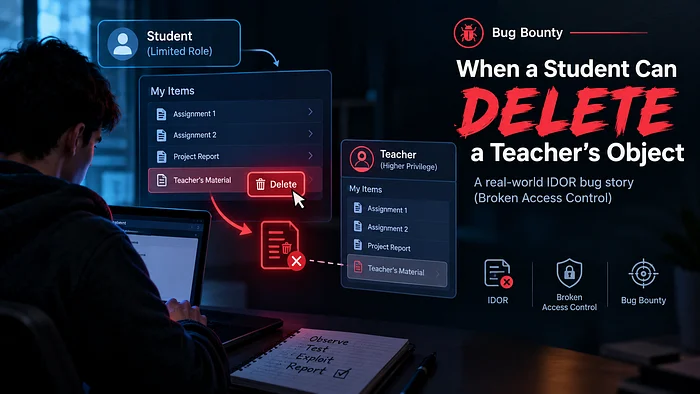
A class-materials delete endpoint checked only that a student was a member of the class with delete rights, not that the student owned the specific set being deleted. A student could therefore delete a study set added by the teacher, removing the class's access to it.
 Published on medium.com
Bug Bounty
The full write-up lives on its author's site
It belongs to its author, so we link to it rather than copy it. The other two tabs are our own rewrites, checked against it.
Context
The target is a study platform that the author refers to only as "the Platform", with the real name withheld per responsible disclosure norms. The feature in question is class study materials: teachers curate a class's sets and practice tests, and they can optionally enable a setting that lets class members (students) add and remove sets as well. The author's framing is that the setting is meant to let study groups self-organise, and the question he set out to answer was whether "remove sets" means "remove sets you added" or just "remove sets, full stop."
Setup
The test needed very little: two browser profiles, one holding a Teacher account and one holding a Student account, both enrolled in the same class. With an intercepting proxy running, the student removed a set he had added himself. The teacher account was used to add an official study set to the class materials, and the author noted its setId together with the class's classId. The student account then joined the class.
Finding it
The author started from the legitimate path. As the student, he removed a set that he himself had added as a student, with the proxy running, purely to see what a normal delete request looked like. The request went to a class-sets endpoint under /webapi/x.x/ and carried a JSON body naming both the set and the class:
The response confirmed the deletion in the platform's own envelope format:
{"responses":[{"models":{"classSet":[{"setId":<ID>,"isDeleted": true,...}]}}]}
Nothing was wrong at this point: a student cleaning up a set they added is exactly what the feature promises. The author then took the same request and swapped in the setId of the teacher's set.
Exploitation
Step 1: replay the same request with the teacher's set ID
The author took the exact same request, from the same student session, and changed only the setId to the one the teacher had added, a set the student had no relationship to whatsoever:
Everything else stayed identical: same endpoint, same method, same student cookie, same classId. The only variable was which set the body pointed at.
Step 2: read the response
The server accepted it:
HTTP/2 200 OK{ "responses": [{ "models": { "classSet": [{ "setId": <TEACHER_SET_ID>, "classId": <CLASS_ID>, "isDeleted": true, "lastModified": 1780871388 }] } }]}
200 OK and isDeleted: true for the teacher's set. The server never asked whether this student had actually added that set. It checked that the student was a member of the class with delete rights, and then removed a resource belonging to someone else.
Root cause
The endpoint validated membership but never validated ownership. The author describes it as the classic confusion between "can this user delete sets in this class" and "can this user delete this specific set": the object-level check is missing, so the class-level permission is treated as sufficient for every object in the class. The optional "allow members to manage sets" setting makes it tempting to call the behaviour working as intended. The report does not describe the server-side code, so the exact location of the missing check is not shown.
Impact
The author is explicit about the limits: this is not an account takeover and it does not leak PII. It is an authorisation gap at the object level. The student cannot read the teacher's private data, but can unilaterally sever the link between the teacher's set and the class. Three consequences are called out:
- Premium access is revoked mid-class. On platforms like this, materials a teacher adds often unlock premium study modes for the whole class for free. Deleting the link makes that access quietly disappear until someone notices and re-adds it.
- No skill is required. There is no guessing and no brute force: set and class IDs are visible to any class member just by using the feature normally, so this is a one-request bug.
- It hides behind a feature setting. The teacher opted in to letting students manage sets, which makes it tempting to call the behaviour working as intended. The author argues the intent was almost certainly "manage the sets you added", not "manage anyone's".
Fix
The report gives recommendations rather than describing a deployed patch:
- Check ownership, not just membership. Before honouring a delete, verify that the requesting user either originally added that specific
setIdor holds an admin/teacher role on theclassId. - Separate the permission model. "Can add/remove sets" and "can remove any set in this class" should be two distinct privilege levels, not one toggle.
- Test the inverse case. If the "allow members to manage sets" setting is disabled, does the endpoint still accept the request? If it does, that is the clearest signal that the check is missing entirely rather than scoped wrongly.
- Log and alert on cross-user deletions. A student deleting a set they did not add is a meaningfully different event from deleting their own, and is worth flagging even if policy allows it.

What happened, in plain words
A study platform lets a teacher put study material into a class: sets, practice tests, the usual. The teacher can also switch on a setting that lets the students in the class add and remove sets themselves, so a study group can organise its own material without asking the teacher every time.
The question the researcher asked was simple: when a student removes a set, does the platform check that the set is one the student added, or does it just check that the student is allowed to remove sets in that class at all?
The answer was the second one. A student could take a normal request that removed their own set, change one number in it to point at a set the teacher had added, and the platform deleted the teacher's set. The student never had any relationship with that set. The platform checked that the student belonged to the class and had delete rights, but never checked who owned the thing being deleted.
This kind of mistake has a name: broken access control, and more specifically an object-level authorisation gap, often called IDOR (Insecure Direct Object Reference). The rest of this article explains each piece from scratch.
The product and the feature
The target is a study platform that the author refers to only as "the Platform", with the real name withheld per responsible disclosure norms. Responsible disclosure means a researcher tells the company about a bug and gives it time to fix it before naming it publicly.
The feature in question is class study materials. A teacher curates a class's sets and practice tests. The teacher can optionally enable a setting that lets class members (students) add and remove sets as well. The author's framing is that the setting is meant to let study groups self-organise, and the question he set out to answer was whether "remove sets" means "remove sets you added" or just "remove sets, full stop."
Think of it like a shared kitchen shelf. The teacher puts the class's ingredients on the shelf. The teacher says "you can also add and remove things from this shelf." The reasonable reading is that you can remove what you put there. The bug is that the platform read it as "you can remove anything on the shelf."
Setting up the test environment
The test needed very little: two browser profiles, one holding a Teacher account and one holding a Student account, both enrolled in the same class. With an intercepting proxy running, the student removed a set he had added himself.
A few of those terms deserve a plain explanation.
- Browser profile: a separate space in a browser with its own cookies and logins. Two profiles let you be logged in as two different people at the same time, in two windows, without logging in and out.
- Intercepting proxy: a tool that sits between your browser and the website. Every request your browser sends passes through it, and you can read it, change it, and send it again. It is like a mail room that opens every letter, lets you read it, and lets you post a modified copy.
- Request: the message your browser sends to a website when you click something. It says what you want (for example, "delete this set") and carries proof of who you are.
- Cookie: a small piece of text the website stored in your browser after you logged in. Your browser sends it back with every request so the site knows it is still you. It works like a wristband at an event: you show it at the door and you get in without showing your ID again.
The teacher account was used to add an official study set to the class materials, and the author noted its setId together with the class's classId.
setId: the unique number that identifies one particular study set. Like a barcode on one specific box.classId: the unique number that identifies one particular class. Like the room number of one classroom.
These IDs matter because they are the only things in the request that say which set and which class are involved. The student account then joined the class.
How the vulnerability was found
The author started from the legitimate path. As the student, he removed a set that he himself had added as a student, with the proxy running, purely to see what a normal delete request looked like. The idea is to learn the shape of a correct request before changing anything: if you do not know what normal looks like, you cannot spot what is abnormal.
The request went to a class-sets endpoint under /webapi/x.x/ and carried a JSON body naming both the set and the class:
Line by line:
DELETE /webapi/x.x/class-sets HTTP/2is the request line.DELETEis the method: it tells the server "remove something"./webapi/x.x/class-setsis the address of the feature that handles class sets.HTTP/2is the version of the language the browser and server use to talk. An API (Application Programming Interface) is simply the set of addresses and rules a website's own pages use to talk to its server; here,/webapi/...is that API.Host: [redacted]names the website being talked to. It is redacted here to keep the platform anonymous.Cookie: [session cookies — redacted]is the proof of who is asking. The session cookie is what makes the server treat this as the student's request. It is redacted because anyone holding it could act as that student.Content-Type: application/jsonsays the body is written in JSON, a simple text format for structured data: curly braces for an object, square brackets for a list, and"name": valuepairs.{"data":[{"setId":<STUDENT_OWNED_SET_ID>,"classId":<CLASS_ID>}]}is the body. It says: indata, there is a list with one item; that item names a set (setId) and a class (classId). The angle-bracket placeholders stand for the real numbers, which are not published.
The response confirmed the deletion in the platform's own envelope format:
{"responses":[{"models":{"classSet":[{"setId":<ID>,"isDeleted": true,...}]}}]}
Line by line:
"responses"is a list of answers, one per item the request asked about."models"holds the resulting objects."classSet"is the link between a set and a class, and it contains thesetIdandisDeleted: true, meaning the platform reports the set as deleted. The...stands for fields the report does not show.
Nothing was wrong at this point: a student cleaning up a set they added is exactly what the feature promises. The author then took the same request and swapped in the setId of the teacher's set.
In plain terms: the request says "delete set 123" and shows a wristband that says "I am a student in this class". Nothing in it says "and set 123 is mine". If the server only reads the wristband, it will delete whatever number you write.
Exploiting the vulnerability
Step 1: replay the same request with the teacher's set ID
The author took the exact same request, from the same student session, and changed only the setId to the one the teacher had added, a set the student had no relationship to whatsoever:
Everything else stayed identical: same endpoint, same method, same student cookie, same classId. The only variable was which set the body pointed at. Changing one variable at a time is deliberate: if the result changes, you know exactly what caused it.
Step 2: read the response
The server accepted it:
HTTP/2 200 OK{ "responses": [{ "models": { "classSet": [{ "setId": <TEACHER_SET_ID>, "classId": <CLASS_ID>, "isDeleted": true, "lastModified": 1780871388 }] } }]}
Line by line:
HTTP/2 200 OKis the status line.200is the standard code for "it worked". A refusal would normally come back as403(forbidden) or401(not logged in)."responses"is again the list of answers."models"holds the resulting objects."classSet"is the link between the set and the class, and it now names the teacher'ssetIdand the sameclassId."isDeleted": trueis the platform saying the set is deleted."lastModified": 1780871388is a timestamp for when the record last changed, in the Unix format that counts seconds since 1 January 1970.
200 OK and isDeleted: true for the teacher's set. The server never asked whether this student had actually added that set. It checked that the student was a member of the class with delete rights, and then removed a resource belonging to someone else.
Why it happens
The endpoint validated membership but never validated ownership. The author describes it as the classic confusion between "can this user delete sets in this class" and "can this user delete this specific set": the object-level check is missing, so the class-level permission is treated as sufficient for every object in the class. The optional "allow members to manage sets" setting makes it tempting to call the behaviour working as intended. The report does not describe the server-side code, so the exact location of the missing check is not shown.
A useful comparison is a hotel. "This guest may enter rooms on the third floor" is a broad permission. "This guest may enter room 312" is a specific one. If the door only checks the first, any guest on the third floor can open any door on it.
Why this actually matters
The author is explicit about the limits: this is not an account takeover and it does not leak PII. An account takeover is when an attacker gains control of someone else's account. PII (personally identifiable information) is data that identifies a real person, such as a name, address or phone number. Neither happened here. It is an authorisation gap at the object level. The student cannot read the teacher's private data, but can unilaterally sever the link between the teacher's set and the class. Three consequences are called out:
- Premium access is revoked mid-class. On platforms like this, materials a teacher adds often unlock premium study modes for the whole class for free. Deleting the link makes that access quietly disappear until someone notices and re-adds it.
- No skill is required. There is no guessing and no brute force: set and class IDs are visible to any class member just by using the feature normally, so this is a one-request bug. Brute force means trying many values until one works; here nothing has to be guessed.
- It hides behind a feature setting. The teacher opted in to letting students manage sets, which makes it tempting to call the behaviour working as intended. The author argues the intent was almost certainly "manage the sets you added", not "manage anyone's".
How to fix this
The report gives recommendations rather than describing a deployed patch:
- Check ownership, not just membership. Before honouring a delete, verify that the requesting user either originally added that specific
setIdor holds an admin/teacher role on theclassId. - Separate the permission model. "Can add/remove sets" and "can remove any set in this class" should be two distinct privilege levels, not one toggle.
- Test the inverse case. If the "allow members to manage sets" setting is disabled, does the endpoint still accept the request? If it does, that is the clearest signal that the check is missing entirely rather than scoped wrongly.
- Log and alert on cross-user deletions. A student deleting a set they did not add is a meaningfully different event from deleting their own, and is worth flagging even if policy allows it.
Conclusion
No stolen credentials, no admin panel, no exotic GraphQL trickery, just one JSON field that pointed somewhere it shouldn't have been allowed to point. It's a good reminder that "the user has permission to perform this action" and "the user has permission to perform this action on this specific object" are two different questions, and APIs that only ask the first one are an IDOR waiting to happen.
Until the next one… bye
Glossary
- API: the set of addresses and rules a website's pages use to talk to its server, for example the
/webapi/...paths here. - Account takeover: an attack in which someone gains control of another person's account.
- Authorisation: deciding whether a logged-in user is allowed to do a particular thing.
- Broken access control: a class of bug where the server does not properly check whether the user is allowed to do what they are asking.
- Brute force: trying many possible values until one works.
classId: the unique number identifying one class on the platform.- Cookie: a small piece of text stored in your browser after login and sent back with each request so the site recognises you.
- Cross-user deletion: deleting something that belongs to a different user.
DELETE: the HTTP method that asks a server to remove something.- Endpoint: one specific address on a server that handles one kind of request, such as
/webapi/x.x/class-sets. - HTTP/2: the version of the protocol browsers and servers use to exchange requests and responses.
- IDOR (Insecure Direct Object Reference): a bug where a request names an object by its ID and the server does not check that the caller is allowed to touch that particular object.
- Intercepting proxy: a tool placed between browser and website that lets you read, change and resend requests.
- JSON: a text format for structured data using braces, brackets and
"name": valuepairs. - Membership check: verifying that the user belongs to a group, such as a class.
- Object-level authorisation: verifying that the user is allowed to act on this specific object, not just on objects of that kind in general.
- Ownership check: verifying that the user is the one who created or owns the specific object.
- PII (personally identifiable information): data that identifies a real person, such as a name, address or phone number.
- Premium access: paid features or content, here unlocked for a class by material the teacher adds.
- Request: the message a browser sends to a server asking it to do something.
- Response: the message a server sends back, including a status code and usually a body.
- Responsible disclosure: telling a company about a bug and giving it time to fix it before publishing details.
- Session cookie: the cookie that proves which logged-in user is making a request.
setId: the unique number identifying one study set on the platform.- Status code: the three-digit number at the start of a response, such as
200for success or403for forbidden. - Unix timestamp: a time written as the number of seconds since 1 January 1970.



