Bug Hunting #1
A coffee shop mobile app returned one-time passwords in plaintext in server responses and failed to validate requests on the server, so removing the user identifier from a request returned every user's profile data. An attacker could take over accounts, elevate their role, and read or modify other customers' personal data.

medium.com
Published on medium.com
Bug Bounty
The full write-up lives on its author's site
It belongs to its author, so we link to it rather than copy it. The other two tabs are our own rewrites, checked against it.
Context
This is a write-up of a first bug hunting session against a coffee shop mobile app, published by the_phreak on Medium on 14 August 2026. The app handles user accounts: signup and login are verified with a one time password sent to the user's phone number, user profiles are identified by UUID, and profiles hold names, emails, phone numbers, order history and locations.
The researcher found three issues in the same session: the OTP returned in plaintext in the server response, missing server side validation that let requests through without cookies or tokens and allowed role elevation, and full user enumeration by removing the UUID from a profile request. The report does not name the app, the program or the vendor, and gives no versions, endpoints or parameter names.
Setup
The report does not describe the tooling or the accounts used. The work involved intercepting traffic and modifying requests. No proxy, platform or device is named.
Finding it
The researcher started at the signup and login flow. The app sends a one time password to verify the phone number, and the OTP came back in plaintext in the server response. That leak suggested more would follow, so the testing continued into request validation and profile access.
Exploitation
Step 1: OTP leak
During signup or login the app sends an OTP to verify the phone number. The OTP was returned in plaintext in the server response.
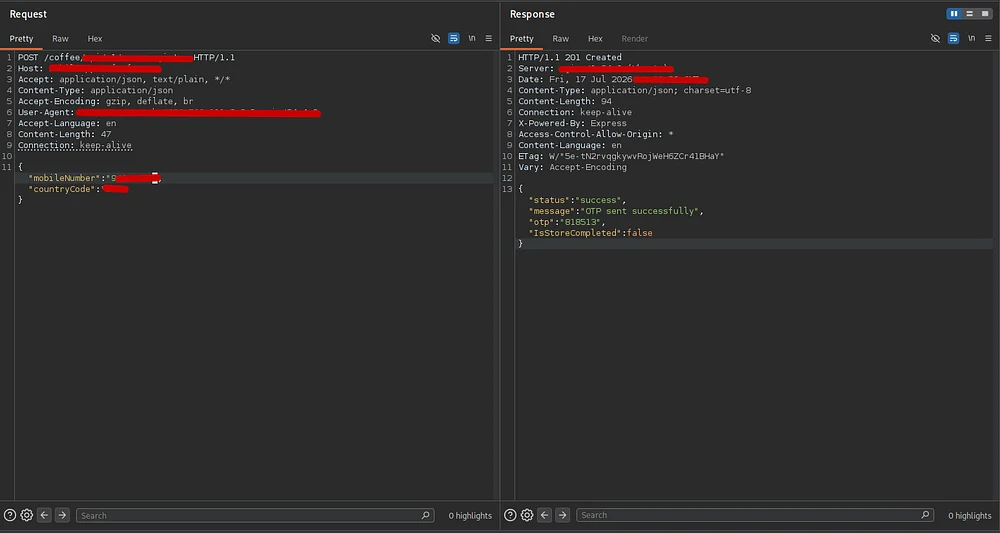
The screenshot shows the request on the left and the server response on the right, with the OTP in plaintext in the response.
An attacker who can intercept traffic can capture the OTP and verify or log in from any phone number that is registered. That enables account takeover or fraudulent signups.
Step 2: No server side validation
The app accepted client side changes without verifying them on the server. The researcher could modify requests, change data, elevate the user role and reach restricted functions. Even with cookies and tokens deleted, the app still processed the requests.
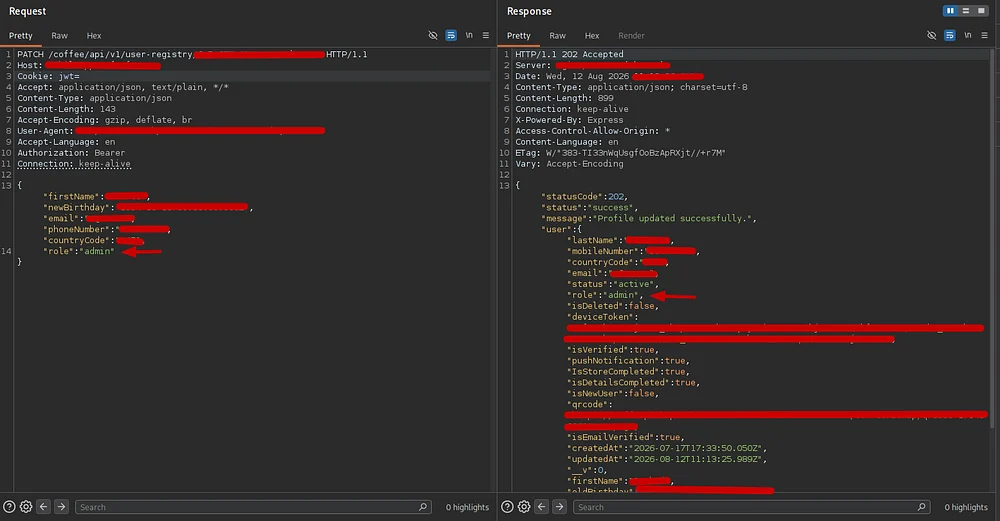
With the cookies or token removed, the app still retrieved data and made changes to it. There was no authentication at all on those requests. The researcher notes that authentication is what tells the server what a user can and cannot access, for example when looking at other users' details.
Step 3: Full user enumeration via UUID
User profiles were identified by UUID. Manipulating and enumerating the UUIDs did not work. The researcher then deleted the UUID entirely from the request.

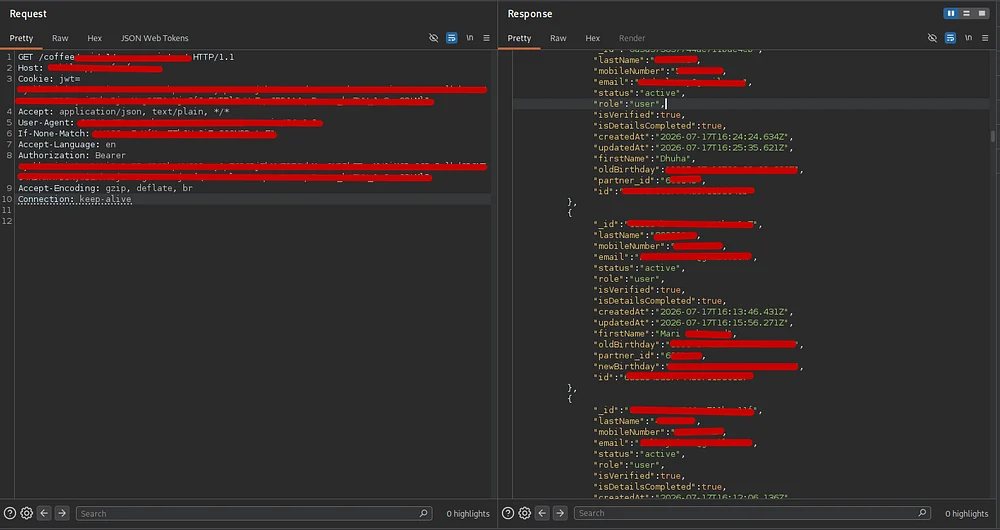
With the UUID removed, every user in the system appeared: names, emails, phone numbers, order history and locations. The researcher could view and modify any profile.

Root cause
The OTP leak means the value meant for the SMS or push channel is also present in the response, so anyone who can see the response sees the secret.
The other two findings point at the same design gap. The server trusted client supplied state, including the role, and did not require authentication on the data requests. Deleting the UUID returned every profile, and the caller could also modify them.
Impact
With the OTP leak, an attacker intercepting traffic can take over any registered phone number's account or create fraudulent signups.
With the missing validation, an attacker can bypass all client side restrictions, elevate a regular user to admin, and make changes without authentication.
With the UUID removal, the whole customer base is exposed: names, emails, phone numbers, order history and locations, and any profile can be modified. The researcher notes this is full exposure of customer PII, violates privacy laws such as GDPR, and enables identity theft, phishing and targeted attacks.
Fix
For the OTP leak: never return the OTP in the response, send it only via SMS or push notification, and implement rate limiting and OTP expiration.
For the missing validation: validate every request server side, never trust client input, and implement proper session management and role based access control.
For the enumeration: require authentication for all data requests, validate that users can only access their own data, and implement proper authorisation checks, not just authentication.
Variants to test
- OTP in response bodies: submit a signup or login and inspect the full response, including nested JSON and headers, for the code. A positive result is the OTP appearing anywhere the client can read it.
- Requests without cookies or tokens: replay authenticated requests with the session material stripped. A positive result is the server still returning data or applying changes.
- Role fields in requests: change the role value in a profile update or token payload. A positive result is the server accepting the elevated role.
- Removing the object identifier: delete the UUID or ID parameter from profile requests. A positive result is a list of other users' records instead of an error.
- Identifier tampering: swap in another user's UUID. A positive result is reading or modifying that user's profile.
What happened, in plain words
A security researcher spent a session testing a mobile app for a coffee shop. The app lets people create an account and log in, and user profiles hold names, emails, phone numbers, order history and locations. The researcher found three separate problems in that one session, and this article walks through each of them in the order they were found.
The three problems are:
- The app sent the one time password (a short code used to prove you own a phone number) back in the server's reply, in plain text, where an attacker intercepting the traffic could read it.
- The app trusted whatever the phone sent it. It did not check on the server whether the request was allowed, so requests still worked after the login cookies and tokens were removed, and a normal user could be turned into an admin.
- User profiles were looked up by a long random identifier called a UUID. When the researcher deleted that identifier from the request entirely, the server returned every user's profile instead of an error.
Before going further, a few words that come up constantly.
What an API is. Think of a restaurant. You (the app on your phone) do not walk into the kitchen. You tell the waiter what you want, the waiter takes the order to the kitchen, and the kitchen sends back a plate. An API is that waiter: a defined way for one piece of software to ask another piece of software for something and get an answer back. The app on your phone is the customer, the company's server is the kitchen, and the API is the set of requests and replies in between.
What a request and a response are. A request is the message the app sends to the server: "log me in", "show me my profile". A response is the message the server sends back: "here is your data", "wrong password", "done". Both are just text travelling over the network, and both can be read and edited by anyone who can sit between the phone and the server.
What a cookie or token is. After you log in, the server needs a way to recognise you on the next request, because the web has no memory of its own. It hands your app a small piece of text, a cookie or a token, which the app attaches to every later request like a wristband at an event. The server checks the wristband and knows who you are. If someone else gets your wristband, they can pretend to be you. If you take the wristband off, the server should refuse to serve you.
What a UUID is. UUID stands for Universally Unique Identifier. It is a long string of letters and numbers, for example something like 550e8400-e29b-41d4-a716-446655440000, generated so that no two are ever the same. Systems use them as labels for records, because a label like "user 17" is easy to guess and a UUID is not.
What enumeration means. Enumeration is walking through a list of possible values one by one to see which ones exist. If profiles were numbered 1, 2, 3, you could try each number and collect every profile. UUIDs are designed to make that impractical, because there are far too many to try.
What server side validation means. The app on your phone runs on your device, which you control. Anything it checks can be changed by you. Server side validation means the server repeats the important checks itself, on its own machine, instead of trusting what the phone claims. A bouncer who checks your ticket at the door is server side validation. A sign on the door saying "members only" that nobody enforces is not.
What authentication and authorisation mean. Authentication is proving who you are, like showing your passport. Authorisation is what you are then allowed to do, like a passport not granting you the right to enter every room in the building. They are different questions, and a system can get one right and the other wrong.
What account takeover is. Account takeover means someone else gains control of your account: they can read your data, change it, or act as you. It is the worst ordinary outcome of a login flaw.
What PII is. Personally Identifiable Information is any data that can identify a real person: name, email, phone number, home address, purchase history. Leaking it is a privacy problem and, in many countries, a legal one.
Finding 1: OTP leak
When you sign up or log in, the app sends a one time password (OTP) to verify your phone number. You type the code back into the app, and the server checks it. The point of the code is that only someone holding your phone can read it.
In this app, the server also wrote the OTP into its response to the app, in plain text. The code was not hidden, encoded or masked. It was simply there in the reply.
The screenshot shows the researcher's request on the left and the server's response on the right. The response contains the OTP in plain text.
Why this matters: anyone who can see the traffic between the phone and the server can read the code. That means anyone who can intercept the traffic between the phone and the server can read the code. With the code in hand, they can complete verification or log in as any phone number that is registered. That is account takeover, and it also allows fraudulent signups: creating accounts that pass verification without owning the phone number.
The researcher's own words on seeing it: the leak suggested there would be more, so the testing continued.
The fix the researcher recommends:
- Never return the OTP in the response.
- Send it only via SMS or push notification.
- Implement rate limiting and OTP expiration.
Rate limiting means capping how many times someone can try, so guessing becomes impractical. Expiration means the code stops working after a short time, so a captured code is useless later.
Finding 2: No server side validation
The second problem was that the app accepted changes made on the phone without checking them on the server. The researcher could modify requests, change data, raise their own user role, and reach functions that should have been restricted.
Even with the cookies and tokens deleted, the app still processed the requests. In other words, the server did not ask for the wristband at all.
With the cookies or token removed, the app still retrieved data and made changes to it. There was no authentication on those requests. The researcher points out that authentication is what tells the server what a user can and cannot access, for example when looking at other users' details.
Why this matters: if the server trusts whatever the phone sends, then anyone can send anything. A regular user can become an admin simply by changing a value in the request. And with no authentication, anyone at all can read and change data, logged in or not.
The fix the researcher recommends:
- Validate every request server side.
- Never trust client input.
- Implement proper session management and role based access control.
Session management means the server keeps track of who is logged in and invalidates that when they log out or the session expires. Role based access control means each account has a role (user, admin) and the server checks that role before every action.
Finding 3: Full user enumeration via UUID
User profiles were identified by UUID. The researcher first tried manipulating and enumerating the UUIDs, and nothing worked.
Then the researcher tried deleting the UUID from the request entirely.
With the UUID removed, every user in the system appeared: names, emails, phone numbers, order history and locations. The researcher could view and modify any profile.
Why this matters: this is full exposure of customer PII. It violates privacy laws such as GDPR, and it enables identity theft, phishing and targeted attacks. Phishing means using the leaked details to craft convincing fake messages. Targeted attacks means using knowledge of a specific person to go after them.
The fix the researcher recommends:
- Require authentication for all data requests.
- Validate that users can only access their own data.
- Implement proper authorisation checks, not just authentication.
That last point is the key one. Authentication asks "who are you?". Authorisation asks "are you allowed to see this particular record?". The server here did neither.
Why these three belong together
The OTP leak means a value meant for the SMS channel was also present in the API response, so anyone who can see the response sees the secret.
The other two findings point at the same design gap. The server trusted state supplied by the client, including the role, and did not require authentication on the data requests. Deleting the UUID returned every profile, and the caller could also modify them. The report does not show the code, so the exact implementation is not visible.
What an attacker could do with each
| Finding | What an attacker gets |
|---|---|
| OTP leak | Take over any registered phone number's account, or create fraudulent signups |
| No server side validation | Bypass all client side restrictions, elevate a regular user to admin, make changes without authentication |
| UUID removal | The whole customer base: names, emails, phone numbers, order history, locations, and the ability to modify any profile |
The report does not say whether any of the fixes were applied.
Things worth trying on a similar app
These are the same ideas generalised, so you can recognise them elsewhere. Only test systems you are authorised to test.
- OTP in response bodies. Submit a signup or login and inspect the full response, including nested JSON and headers, for the code. A positive result is the OTP appearing anywhere the client can read it.
- Requests without cookies or tokens. Replay authenticated requests with the session material stripped. A positive result is the server still returning data or applying changes.
- Role fields in requests. Change the role value in a profile update or token payload. A positive result is the server accepting the elevated role.
- Removing the object identifier. Delete the UUID or ID parameter from profile requests. A positive result is a list of other users' records instead of an error.
- Identifier tampering. Swap in another user's UUID. A positive result is reading or modifying that user's profile.
Glossary
- API: the defined set of requests and replies that lets one piece of software ask another for data or actions, like a waiter carrying orders between you and the kitchen.
- Account takeover: gaining control of someone else's account, letting you read, change or act as them.
- Authentication: proving who you are, for example by logging in.
- Authorisation: what you are allowed to do once you are identified, for example which records you may read.
- Client: the software on your side, here the mobile app on the phone.
- Client side validation: checks performed by the app on your device, which you can change or bypass.
- Cookie: a small piece of text the server gives your app after login so it can recognise you on later requests.
- Enumeration: trying possible values one by one to discover which records exist.
- Expiration (of an OTP): the code stops being accepted after a set time.
- GDPR: the European data protection law that sets rules on handling personal data.
- JSON: a common text format for structured data in API requests and responses.
- OTP (one time password): a short code sent to your phone to prove you own that number, valid for one use.
- Phishing: fake messages crafted to trick someone into revealing information or clicking something harmful.
- PII (Personally Identifiable Information): data that can identify a real person, such as name, email, phone number or address.
- Rate limiting: capping how many requests or attempts are allowed in a period, so guessing becomes impractical.
- Request: the message the app sends to the server asking for something.
- Response: the message the server sends back.
- Role based access control: giving each account a role and checking that role before every action.
- Server: the machine that holds the data and decides what to return.
- Server side validation: checks the server performs itself, rather than trusting what the client claims.
- Session management: how the server tracks who is logged in and when that login ends.
- Token: a piece of text, similar in purpose to a cookie, that the app attaches to requests to prove who it is.
- UUID (Universally Unique Identifier): a long random string used as a label for a record, designed so it cannot be guessed.
- Vulnerability: a weakness in a system that someone can use to do something the designers did not intend.



