Business Logic Vulnerabilities via Unrestricted GraphQL API Mutations Allow Bypass of Platform Restrictions and Logic
A legacy GraphQL mutation for creating messages was still reachable on the main domain even though the chat feature had moved to a third-party service that enforced the platform's rules. By calling that mutation directly, the author created chats beyond the daily limit, added several users to one chat, and messaged a system-blocked user.

Bug Bounty
The full write-up lives on its author's site
It belongs to its author, so we link to it rather than copy it. The other two tabs are our own rewrites, checked against it.
Context
The target was a platform whose users communicate through chats and composed emails. The chat and messaging feature was hosted on a separate subdomain that did not use GraphQL at all; it relied on traditional request and response mechanisms. The main domain, by contrast, exposed a GraphQL API used by other features.
The application enforced several business rules on communication:
- A user may interact with only one other user per chat or email. Group chats and adding multiple users to a single conversation are not permitted.
- Communication with system-blocked users is prevented. If a user has been blocked by the system, no chat or email can be created with them and no form of interaction is allowed.
- A daily communication limit: each user may create or send only two chats, messages or emails per day. Exceeding it produces a warning such as:
You are only allowed to send 2 messages per day. Please try again later.
Creating two or more chats per day, or creating group chats by adding two or more users, required a premium plan. Free or regular users could not exceed the allowed number of chats or group chats.
Once a chat exists, any message or comment sent inside it triggers a notification for the other user, delivered both in the application and by email.
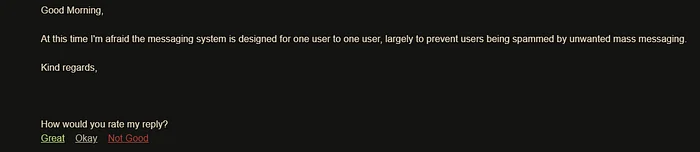
One-to-one user messaging restriction
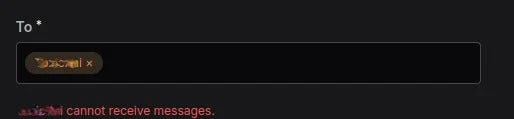
Interaction restrictions with users blocked by the system
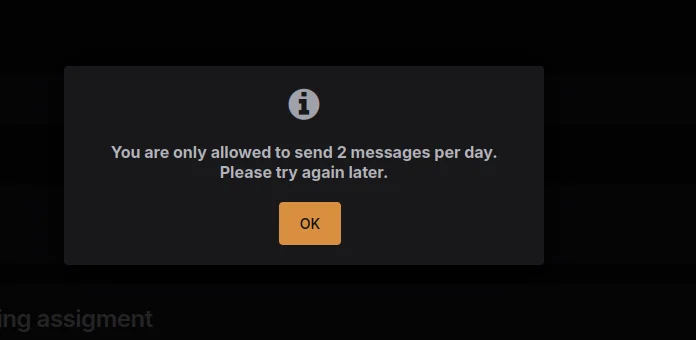
Time-based message restriction
The researcher's goal was not to break an individual control but to manipulate the application's intended logic so that the system would approve an action it should normally deny.
Setup
Three separate test user accounts were created, each logged in using a different browser:
| Account | Role in the test |
|---|---|
| User1 | Sender, the account whose restrictions were bypassed |
| User2 | Normal recipient |
| User3 | A user blocked by the system |
User1 already had an active chat, and later a second conversation with User2, bringing User1 to the daily limit of two conversations. The race condition test used Burp Repeater. The researcher also had an API documentation PDF, found during earlier reconnaissance, that listed all GraphQL queries and mutations used by the system together with the features they supported.
Finding it
Direct manipulation of the chat and messaging requests failed. Adding User3 to an existing conversation was blocked by strict server-side validation, and creating a conversation with the system-blocked User3 was equally impossible. After User1 reached two conversations, a third attempt triggered the time-based restriction, and race condition attacks, rate-limit bypass attempts and other request manipulations against the chat subdomain all failed.
While reviewing the API documentation again, the researcher noticed a mutation with the operation name createMsg. Two questions followed: was the mutation still active, and could it be used to create a modified GraphQL request that bypassed the existing limitations?
The chat functionality lived on a subdomain without GraphQL, which suggested that GraphQL might have been introduced earlier and later replaced, leaving some mutations unused but still reachable. The support team, contacted through the Contact Us page, explained that the chat and messaging functionality was managed by a third-party service, which is why the chat system had strict validations: those controls were enforced externally by the provider. The integration had been introduced only a few years earlier. That raised the key hypothesis: executing the GraphQL createMsg mutation directly, without triggering the backend checks tied to the third-party service, might succeed and bypass the restrictions.
Exploitation
Step 1: capture a GraphQL request on the main domain
The researcher navigated to the main domain and captured a request from a feature that used a GraphQL mutation, choosing updateBio for the test. The mutation body of that request was then replaced with the mutation body of createMsg. The modified request looked like this:
POST /api/graphql HTTP/2Host: example.comCookie: cookie and other auth related tokens User-Agent: Mozilla/5.0 (Windows NT 10.0; Win64; x64) AppleWebKit/537.36 (KHTML, like Gecko) Chrome/[redacted] Safari/537.36 Edg/134.0.0.0Accept: */*Accept-Language: en-US,en;q=0.5Accept-Encoding: gzip, deflate, brReferer: https://www.example.com/Content-Type: application/jsonContent-Length: 178Origin: https://www.example.comSec-Fetch-Dest: emptySec-Fetch-Mode: corsSec-Fetch-Site: same-siteTe: trailers{"query":"\n mutation createMsg(\r\n $to: [Int!]!,\r\n $title: String!,\r\n $body: String!\r\n) {\r\n createMsg(\r\n to: $to,\r\n title: $title,\r\n body: $body\r\n ) {\r\n success\r\n }\r\n}\n ","variables":{ "to":[ 9878786], "title":"regarding assignment", "body":"hello members"},}
The request was sent from User1's account, which had already reached the daily limit of two messages and could not normally create a third chat. The variables section carried the target user's ID in to and the message content in title and body. The mutation declares $to as [Int!]!, an array of integers, and selects only the success field in the response.
Step 2: send the crafted request
The server and backend executed the operation successfully without performing any of the usual checks, and returned 200 OK:
{"data": {"createMsg": {"success": true}}}
Logging back into User1's account and navigating to the chat and messaging subdomain confirmed that a third chat had actually been created. The "2 messages per day" restriction had been bypassed, even though the chat subdomain did not directly use GraphQL APIs: the backend still processed the request.
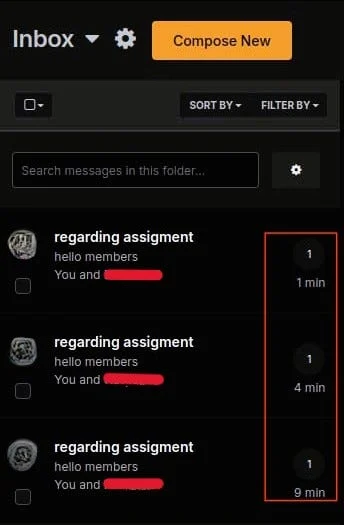
The time-based restriction was successfully bypassed.
Step 3: add multiple users, including a blocked one
Inspecting the request body showed that the to variable accepted an array of values, so multiple user IDs could be supplied at once. The request was modified to add User2 (userId: 5678) and User3 (userId: 0933), the latter being system-blocked, into the to array:
"to": [5678, 0933, otherUserId]
This modified GraphQL request also returned 200 OK. Checking User1's account immediately afterwards confirmed that a new chat had been created with a new chat ID, containing three users: User1, User2 and User3. Two more restrictions had fallen:
- the restriction allowing only one user per chat was bypassed;
- the restriction preventing interaction with a system-blocked user was bypassed.
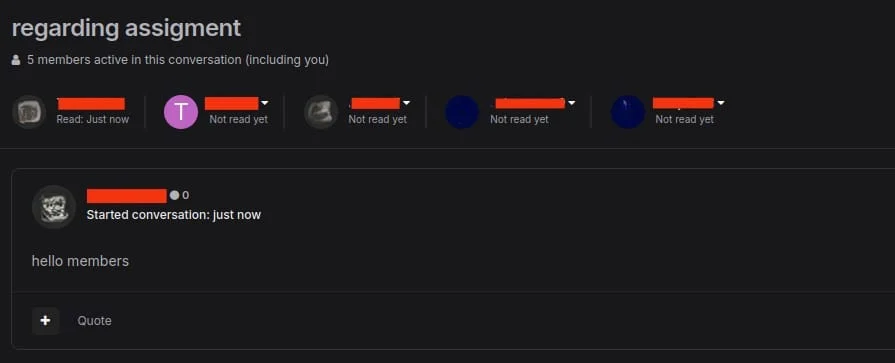
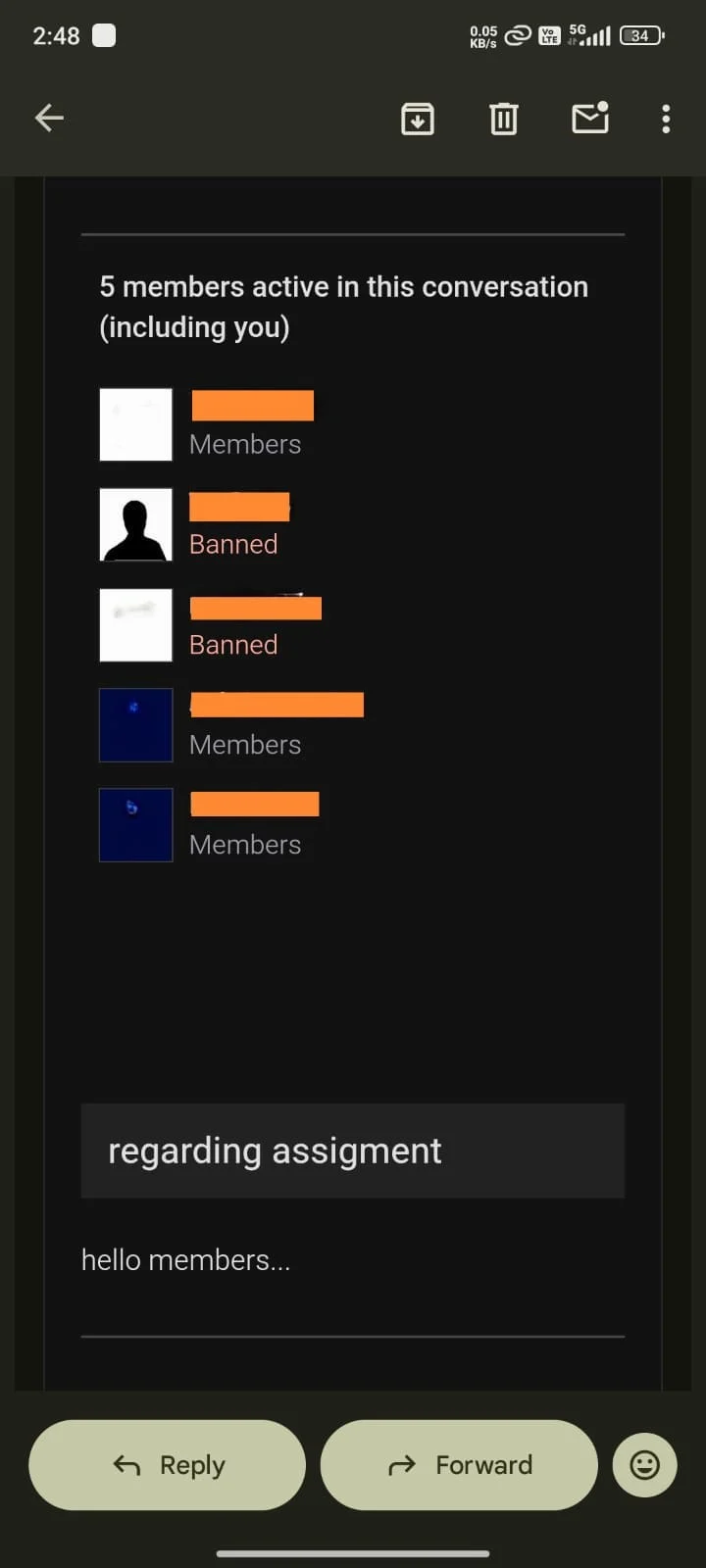
Furthermore, this bypass made it possible to interact with system-blocked users.*
Step 4: race the notification logic
Because every created chat or message generates a notification in the recipient's account and inbox, the researcher tested a race condition. The modified GraphQL request was sent to Burp Repeater approximately 20 times, then all 20 requests were grouped and executed in parallel.
For each user ID supplied in the variables, the recipient received around 20 notification emails simultaneously, a notification flooding attack. This confirmed that there were no rate-limiting or race-condition protections applied to this GraphQL mutation. Both User1 (sender) and User2 (receiver) ended up with approximately 20 chat messages and conversations created at once.
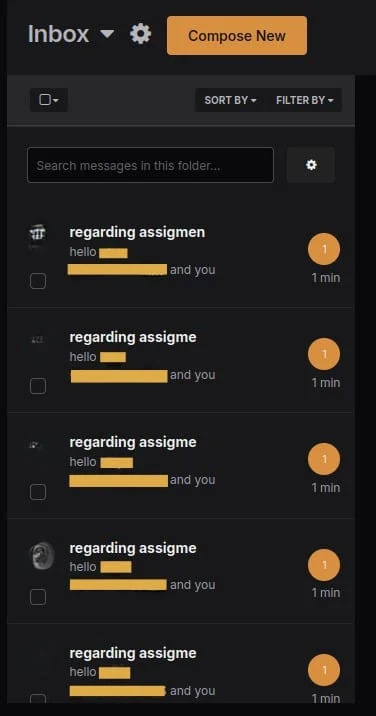
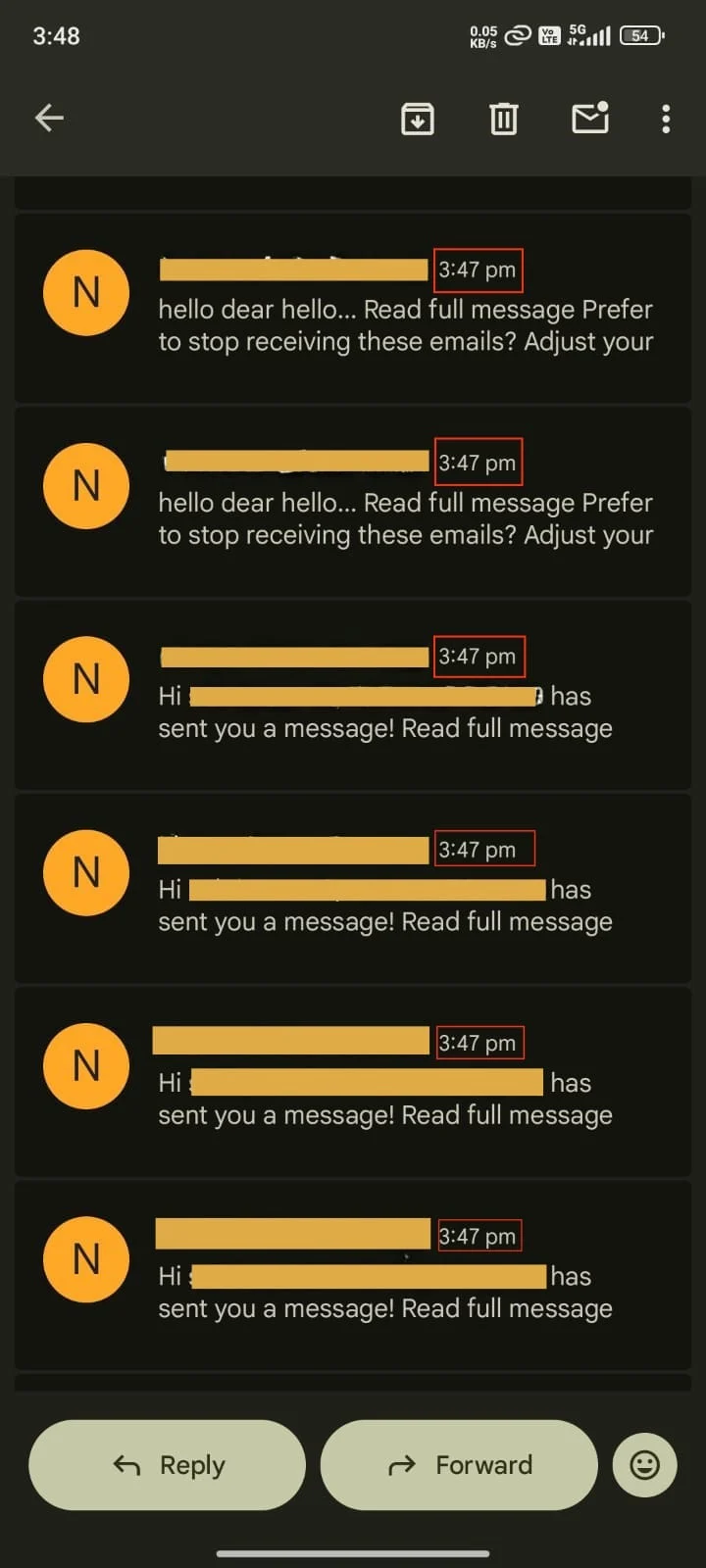
Race-Condition Example
Root cause
The chat and messaging functionality was managed by a third-party service, which is why the chat system had strict validations. The GraphQL createMsg mutation on the main domain, possibly left over from an earlier GraphQL-based implementation, still reached the backend and created chats without going through those third-party checks. The mutation accepted an array of recipient IDs and had no rate limiting or race-condition protection on notification generation. The GraphQL mutation reached the backend without the third-party checks.
Impact
An authenticated user could bypass the platform's communication restrictions: create more than the two permitted chats or messages per day, create group conversations with multiple users, and interact with users blocked by the system. Because each creation triggers in-app and email notifications, parallel requests produced around 20 notification emails per recipient in a single burst, a notification flooding attack against the recipient's inbox. The researcher reported the issue to the technical team and was rewarded with a bounty.
Fix
The report does not describe the remediation the platform applied. Based on the root cause, the createMsg mutation should either be removed if unused, or routed through the same validation as the third-party chat service: enforce the one-recipient rule, reject blocked users, apply the daily limit server-side, and add rate limiting and concurrency controls to notification generation.
Variants to test
- Orphaned mutations from a replaced backend. Look for API documentation or JavaScript bundles listing mutations whose features now live on another subdomain or provider. Send each mutation directly to the GraphQL endpoint with a valid session and see whether it returns
200 OKwith a success payload. - Array-typed recipient fields. Where a mutation takes
[Int!]!or similar, supply several IDs, including one belonging to a blocked or otherwise restricted account, and check whether a conversation is created with all of them. - Daily-limit bypass through a second path. Reach the limit on the normal UI, then replay the mutation and verify on the feature's own subdomain whether a new object exists.
- Notification flooding. Send the same mutation around 20 times in parallel from Repeater and count the emails or in-app notifications received per recipient; a positive result is a burst of notifications with no throttling.
- Third-party integration gaps. When support confirms a feature is handled by an external provider, test whether the main application's API can still write to the same data store without the provider's checks.
What happened, in plain words
A security researcher found a way to get around three rules that a website had put in place to control how its users talk to each other. The website let people send private chats and emails to one another, but it had limits: you could only talk to one person at a time, you could not talk to someone the system had blocked, and you could only send two messages a day.
The researcher discovered that an older, forgotten part of the website's plumbing, a GraphQL API, still accepted a command to create a message. That command ran without the usual checks. By sending it directly, the researcher created a third chat on a day when only two were allowed, put three people in one chat, included a blocked user, and then fired the same request twenty times at once so that the recipient's inbox filled with notification emails.
This is called a business logic vulnerability. The word "logic" here means the rules a business decides on, like "only two messages a day". The website's code was not crashing or leaking passwords; it was simply letting someone do something the rules said should be impossible, because one path into the system forgot to check the rules.
Let me walk through it from the beginning, explaining each piece as it comes up.
The product and its rules
The target was a platform where users communicate through chats and composed emails. Think of it like a messaging app inside a website: you pick a person, write something, and they get it.
The chat and messaging feature lived on a separate subdomain. A subdomain is the part of a web address before the main name, for example chat.example.com versus www.example.com. Websites often split features across subdomains, the way a company might have one building for sales and another for support.
That chat subdomain did not use GraphQL at all. It relied on traditional request and response mechanisms. The main domain, by contrast, exposed a GraphQL API used by other features. We will explain GraphQL shortly, but the important point for now is that the website had two different front doors, and the rules were only being enforced at one of them.
The application enforced several business rules on communication:
- A user may interact with only one other user per chat or email. Group chats and adding multiple users to a single conversation are not permitted.
- Communication with system-blocked users is prevented. If a user has been blocked by the system, no chat or email can be created with them and no form of interaction is allowed.
- A daily communication limit: each user may create or send only two chats, messages or emails per day. Exceeding it produces a warning such as:
You are only allowed to send 2 messages per day. Please try again later.
That warning is just text the website shows on screen when you try to go past the limit. It is the website telling you, politely, that the rule exists.
Creating two or more chats per day, or creating group chats by adding two or more users, required a premium plan. Free or regular users could not exceed the allowed number of chats or group chats. In other words, the restrictions were also a way of selling upgrades: pay, and the limits go away.
Once a chat exists, any message or comment sent inside it triggers a notification for the other user, delivered both in the application and by email. A notification is the little alert that says "you have a new message". The email version means the website also sends a real email to the recipient's inbox.
One-to-one user messaging restriction
Interaction restrictions with users blocked by the system
Time-based message restriction
The researcher's goal was not to break an individual control but to manipulate the application's intended logic so that the system would approve an action it should normally deny. That distinction matters. Breaking a lock with a hammer is one thing; convincing the door to open because it thinks you are the owner is another. The second is what happened here.
Some background before the steps
Before going further, a few concepts need explaining, because the rest of the story depends on them.
What is an API? An API (Application Programming Interface) is the set of doors and windows a website offers to programs, as opposed to the doors and windows it offers to people clicking with a mouse. When you click a button in a browser, the browser sends a request to the website's API behind the scenes. Think of a restaurant: the menu is the API, the kitchen is the server, and you are the customer. You do not walk into the kitchen; you order from the menu, and the kitchen prepares it. An API is the menu of things a program is allowed to ask for.
What is GraphQL? GraphQL is a particular style of API. Instead of many separate addresses for many separate actions, GraphQL has one address (often something like /api/graphql) and you send it a query describing exactly what you want. A query is a piece of text in a special format. When you want to change something rather than just read it, GraphQL calls it a mutation. So a mutation is a GraphQL request that creates, updates or deletes data. The name is dramatic, but it just means "change".
What is a cookie or token? When you log in to a website, the website gives your browser a small piece of data, called a cookie or token, that proves who you are. Your browser sends it back with every request. It is like a wristband at a festival: you show it at the gate, and staff let you in without asking for your ID again. If someone else gets your wristband, they can pretend to be you. That is why cookies and tokens are sensitive and should never be shared.
What is a request? Every time your browser does something on a website, it sends a request: a message with a method (like GET to read or POST to send data), an address, some headers (extra information like your browser type and cookies), and sometimes a body (the actual data). The website replies with a response, which includes a status code. 200 OK means "done, no problem".
What is server-side validation? Validation is checking that data makes sense before acting on it. Server-side means the check happens on the website's own computers, not in your browser. Browser-side checks are easy to bypass because you control your browser; server-side checks are the real gatekeepers. When the report says the chat system had "strict server-side validation", it means the website's computers were properly checking the rules before creating chats.
What is a race condition? Imagine two people trying to book the last seat on a flight at the same moment. Each one checks "is there a seat?" and both see yes, and both book it. The system was not designed for two things happening at exactly the same time. A race condition is a flaw where sending many requests simultaneously causes the system to do more than it should, because the checks and the actions get tangled up. Sending twenty requests in parallel is a way of testing for this.
What is rate limiting? Rate limiting is a rule that says "you can only do this so many times per minute". It protects against floods, whether accidental or malicious. If a website has no rate limiting on notifications, someone can trigger thousands of emails at once.
What is an intercepting proxy? A tool that sits between your browser and the website and lets you see and edit requests before they are sent. Burp Suite is a popular one, and Burp Repeater is a part of it that lets you take one request and send it again and again, with edits. Think of it as a pause button and an edit box for web traffic.
What is reconnaissance? Reconnaissance (often shortened to recon) is the information-gathering phase. Before attacking anything, you look around: read documentation, inspect what the website loads, see what addresses exist. It is the equivalent of casing a building before figuring out how to get in, except here it is done with permission as part of a bug bounty programme.
What is a bug bounty? A bug bounty is a programme where companies pay researchers for finding and reporting security problems responsibly, instead of suing them. The researcher here reported the issue and was rewarded with a bounty.
Setup
Three separate test user accounts were created, each logged in using a different browser:
| Account | Role in the test |
|---|---|
| User1 | Sender, the account whose restrictions were bypassed |
| User2 | Normal recipient |
| User3 | A user blocked by the system |
Why three browsers? Because a website usually only lets one account be logged in per browser at a time. Using separate browsers keeps each account's cookie separate, so the researcher can switch between them without logging in and out constantly. It is like having three different phones, one for each identity.
User1 already had an active chat, and later a second conversation with User2, bringing User1 to the daily limit of two conversations. This is deliberate: the researcher wanted User1 to be at the limit so that any further chat would prove the limit had been bypassed.
Requests were captured and replayed with an intercepting proxy; the race condition test used Burp Repeater. The researcher also had an API documentation PDF, found during earlier reconnaissance, that listed all GraphQL queries and mutations used by the system together with the features they supported. That PDF is the equivalent of finding the restaurant's full menu, including dishes no longer served but still listed.
Finding it
Direct manipulation of the chat and messaging requests failed. Adding User3 to an existing conversation was blocked by strict server-side validation, and creating a conversation with the system-blocked User3 was equally impossible. After User1 reached two conversations, a third attempt triggered the time-based restriction, and race condition attacks, rate-limit bypass attempts and other request manipulations against the chat subdomain all failed.
In plain terms: the researcher tried the obvious things first. Change the request, add another user, try to sneak past the limit. The chat subdomain's server-side checks held firm. This is actually good news for the website, and frustrating for the researcher.
While reviewing the API documentation again, the researcher noticed a mutation with the operation name createMsg. Two questions followed: was the mutation still active, and could it be used to create a modified GraphQL request that bypassed the existing limitations?
An operation name in GraphQL is just a label for the request, like the subject line of an email. createMsg clearly means "create message". Seeing it in the documentation raised the possibility that this old command still worked, even though the chat feature had moved elsewhere.
The chat functionality lived on a subdomain without GraphQL, which suggested that GraphQL might have been introduced earlier and later replaced, leaving some mutations unused but still reachable. This is a common pattern in software: features get rebuilt, but old code is not always removed. Think of a house where the old front door was bricked up but the key still works in the lock, and the lock is still connected to the hallway.
The support team, contacted through the Contact Us page, explained that the chat and messaging functionality was managed by a third-party service, which is why the chat system had strict validations: those controls were enforced externally by the provider. A third-party service is another company's software that the website uses instead of building it themselves. The integration had been introduced only a few years earlier.
That raised the key hypothesis: executing the GraphQL createMsg mutation directly, without triggering the backend checks tied to the third-party service, might succeed and bypass the restrictions. In other words, if the rules live in the third-party service, the old GraphQL command might reach the backend without them.
Exploitation
Step 1: capture a GraphQL request on the main domain
The researcher navigated to the main domain and captured a request from a feature that used a GraphQL mutation, choosing updateBio for the test. updateBio is a feature for editing your profile biography, a harmless action. The point was to get a working GraphQL request with a valid cookie, then swap out the body.
The mutation body of that request was then replaced with the mutation body of createMsg. The modified request looked like this:
POST /api/graphql HTTP/2Host: example.comCookie: cookie and other auth related tokens User-Agent: Mozilla/5.0 (Windows NT 10.0; Win64; x64) AppleWebKit/537.36 (KHTML, like Gecko) Chrome/[redacted] Safari/537.36 Edg/134.0.0.0Accept: */*Accept-Language: en-US,en;q=0.5Accept-Encoding: gzip, deflate, brReferer: https://www.example.com/Content-Type: application/jsonContent-Length: 178Origin: https://www.example.comSec-Fetch-Dest: emptySec-Fetch-Mode: corsSec-Fetch-Site: same-siteTe: trailers{"query":"\n mutation createMsg(\r\n $to: [Int!]!,\r\n $title: String!,\r\n $body: String!\r\n) {\r\n createMsg(\r\n to: $to,\r\n title: $title,\r\n body: $body\r\n ) {\r\n success\r\n }\r\n}\n ","variables":{ "to":[ 9878786], "title":"regarding assignment", "body":"hello members"},}
Let us go through this line by line, because it is the heart of the attack.
POST /api/graphql HTTP/2is the first line.POSTmeans "I am sending data"./api/graphqlis the address of the GraphQL endpoint.HTTP/2is the version of the web protocol being used. In the original, the headers are all run together on one line because of how the text was copied; in a real request each header sits on its own line.Host: example.comtells the server which website this request is for. Servers often host many websites, so this is how the request is routed.Cookie: cookie and other auth related tokensis the wristband from earlier. This is where the login proof goes. In a real request this would be a long string of characters, and it is sensitive.User-Agent: Mozilla/5.0 (Windows NT 10.0; Win64; x64) AppleWebKit/537.36 (KHTML, like Gecko) Chrome/[redacted] Safari/537.36 Edg/[redacted]tells the server what browser is being used. Servers sometimes behave differently for different browsers.Accept: */*means "I will accept any kind of response".Accept-Language: en-US,en;q=0.5says the preferred language is US English.Accept-Encoding: gzip, deflate, brsays the browser can handle compressed responses, which saves bandwidth.Referer: https://www.example.com/says which page the request came from. Some servers check this.Content-Type: application/jsonsays the body is in JSON format. JSON is a way of writing data as text, using curly braces and quotes, like{"name": "value"}.Content-Length: 178says how many bytes the body is. If this is wrong, the server may reject the request.Origin: https://www.example.comsays which site the request originated from. This is used for security checks around cross-site requests.Sec-Fetch-Dest: empty,Sec-Fetch-Mode: cors,Sec-Fetch-Site: same-siteare hints the browser adds about the context of the request.same-sitemeans the request is going to the same site it came from.Te: trailersis a lesser-used header about how the connection handles trailing data.- The body starts with
{"query":"...and contains two parts:queryandvariables. Thequerypart is the GraphQL text, and thevariablespart supplies the actual values.
Inside the query, the escaped characters \n and \r\n are newlines and carriage returns. If we unescape them for readability, the query is:
mutation createMsg(
  $to: [Int!]!,
  $title: String!,
  $body: String!
) {
  createMsg(
    to: $to,
    title: $title,
    body: $body
  )  {
    success
  }
}
This says: define a mutation called createMsg that takes three inputs. $to is [Int!]!, which means an array of integers, and the exclamation marks mean "required, not null". An array is a list, like a shopping list with several items. $title and $body are String!, meaning required text. Then call createMsg with those inputs, and ask the server to return only the success field. Asking for only success keeps the response small and simple.
The variables part is { "to":[ 9878786], "title":"regarding assignment", "body":"hello members"}. Here to is a list with one number, 9878786, which is the target user's ID. The title and body are the message content. The trailing comma after the closing brace is tolerated by many JSON parsers even though strict JSON does not allow it.
The request was sent from User1's account, which had already reached the daily limit of two messages and could not normally create a third chat. The variables section carried the target user's ID in to and the message content in title and body. The mutation declares $to as [Int!]!, an array of integers, and selects only the success field in the response.
Why this step? Because the researcher needed a request that the server would accept as a normal GraphQL call, with a valid cookie, and then change only the part that says what to do. The cookie proves who you are; the query says what you want. By keeping the cookie and swapping the query, the researcher is still User1, but now asking for a different action.
Step 2: send the crafted request
The server and backend executed the operation successfully without performing any of the usual checks, and returned 200 OK:
{"data": {"createMsg": {"success": true}}}
This response is JSON. data is the standard top-level field in a GraphQL response. Inside it, createMsg is the result of the mutation, and success: true means the server says it worked. There is no error, no warning, no "you have reached your limit". Just success.
Logging back into User1's account and navigating to the chat and messaging subdomain confirmed that a third chat had actually been created. The "2 messages per day" restriction had been bypassed, even though the chat subdomain did not directly use GraphQL APIs: the backend still processed the request.
The time-based restriction was successfully bypassed.
Why check the chat subdomain? Because the response from the GraphQL call only says "success". To be sure the chat really exists, you look where chats are shown to users. This is the difference between trusting a receipt and checking that the parcel arrived.
Step 3: add multiple users, including a blocked one
Inspecting the request body showed that the to variable accepted an array of values, so multiple user IDs could be supplied at once. The request was modified to add User2 (userId: 5678) and User3 (userId: 0933), the latter being system-blocked, into the to array:
"to": [5678, 0933, otherUserId]
This is a small but crucial change. Instead of one number in the list, there are now several. The square brackets [ ] denote a list. The values 5678 and 0933 are user IDs. otherUserId is a placeholder for any further ID.
Why does this matter? Because the rule said one recipient per chat. If the server accepts a list with several IDs, the rule is not being enforced on this path. And because one of those IDs belongs to a blocked user, the block rule is also not being enforced.
This modified GraphQL request also returned 200 OK. Checking User1's account immediately afterwards confirmed that a new chat had been created with a new chat ID, containing three users: User1, User2 and User3. Two more restrictions had fallen:
- the restriction allowing only one user per chat was bypassed;
- the restriction preventing interaction with a system-blocked user was bypassed.
Furthermore, this bypass made it possible to interact with system-blocked users.*
Step 4: race the notification logic
Because every created chat or message generates a notification in the recipient's account and inbox, the researcher tested a race condition. The modified GraphQL request was sent to Burp Repeater approximately 20 times, then all 20 requests were grouped and executed in parallel.
Sending in parallel means all twenty go out at almost the same instant, rather than one after another. If the server has a check like "has this user already sent a notification recently?", parallel requests can all pass the check before any of them updates the record. This is the race condition from earlier.
For each user ID supplied in the variables, the recipient received around 20 notification emails simultaneously, a notification flooding attack. This confirmed that there were no rate-limiting or race-condition protections applied to this GraphQL mutation. Both User1 (sender) and User2 (receiver) ended up with approximately 20 chat messages and conversations created at once.
Race-Condition Example
Why does this matter beyond the annoyance of extra emails? It also shows the mutation had no throttling at all, which makes it a useful tool for anyone wanting to abuse the platform.
Root cause
The chat and messaging functionality was managed by a third-party service, which is why the chat system had strict validations. The GraphQL createMsg mutation on the main domain, possibly left over from an earlier GraphQL-based implementation, still reached the backend and created chats without going through those third-party checks. The mutation accepted an array of recipient IDs and had no rate limiting or race-condition protection on notification generation. The GraphQL mutation reached the backend without the third-party checks.
In everyday terms: the bouncer was standing at the front door, but the old side door was still unlocked and led to the same room.
Impact
An authenticated user could bypass the platform's communication restrictions: create more than the two permitted chats or messages per day, create group conversations with multiple users, and interact with users blocked by the system. Because each creation triggers in-app and email notifications, parallel requests produced around 20 notification emails per recipient in a single burst, a notification flooding attack against the recipient's inbox. The researcher reported the issue to the technical team and was rewarded with a bounty.
"Authenticated" means logged in. So this was not something an anonymous stranger could do; you needed an account.
Fix
The report does not describe the remediation the platform applied. Based on the root cause, the createMsg mutation should either be removed if unused, or routed through the same validation as the third-party chat service: enforce the one-recipient rule, reject blocked users, apply the daily limit server-side, and add rate limiting and concurrency controls to notification generation.
In plain words: either brick up the old side door, or put the same bouncer in front of it. And add a limit on how many notifications can be sent in a short time, so that parallel requests cannot flood an inbox.
Variants to test
If you are learning and want to look for similar issues on programmes you are authorised to test, here are the patterns to look for.
- Orphaned mutations from a replaced backend. Look for API documentation or JavaScript bundles listing mutations whose features now live on another subdomain or provider. Send each mutation directly to the GraphQL endpoint with a valid session and see whether it returns
200 OKwith a success payload. A JavaScript bundle is the collection of code files a website sends to your browser; you can view them in your browser's developer tools. - Array-typed recipient fields. Where a mutation takes
[Int!]!or similar, supply several IDs, including one belonging to a blocked or otherwise restricted account, and check whether a conversation is created with all of them. - Daily-limit bypass through a second path. Reach the limit on the normal UI, then replay the mutation and verify on the feature's own subdomain whether a new object exists.
- Notification flooding. Send the same mutation around 20 times in parallel from Repeater and count the emails or in-app notifications received per recipient; a positive result is a burst of notifications with no throttling.
- Third-party integration gaps. When support confirms a feature is handled by an external provider, test whether the main application's API can still write to the same data store without the provider's checks.
A word of caution: only do this on programmes that explicitly allow it, and only with accounts you own. Testing without permission is not research; it is unauthorised access.
Glossary
- API: the set of addresses and rules a program uses to talk to a website, like a restaurant menu for software.
- Array: an ordered list of values, written with square brackets, for example
[5678, 0933]. - Authenticated: logged in, with a valid session proving who you are.
- Bug bounty: a programme where companies pay researchers for responsibly reporting security problems.
- Burp Repeater: a tool that lets you take a captured web request and send it again, with edits, as many times as you like.
- Business logic vulnerability: a flaw where the website lets you do something its own rules say you should not be able to do, because a check is missing or can be avoided.
- Cookie: a small piece of data your browser stores and sends back to a website, often used to prove you are logged in.
- Endpoint: a specific address on a server that accepts requests, such as
/api/graphql. - GraphQL: a style of API where you send one request describing exactly what you want, using queries to read and mutations to change data.
- Header: extra information attached to a web request or response, such as the browser type or the cookie.
- HTTP/2: a version of the protocol browsers and servers use to exchange web requests and responses.
- Intercepting proxy: a tool that sits between your browser and a website so you can see and edit the traffic.
- JSON: a text format for data using curly braces, quotes and commas, widely used in web APIs.
- Mutation: a GraphQL request that creates, updates or deletes data.
- Notification: an alert telling a user something happened, such as a new message, shown in the app or sent by email.
- Operation name: a label given to a GraphQL request, like a subject line, for example
createMsg. - Parallel requests: several requests sent at almost the same moment rather than one after another.
- Query: a GraphQL request that reads data, or more generally a request for information.
- Race condition: a flaw where doing several things at the same instant causes the system to behave incorrectly, because checks and actions overlap.
- Rate limiting: a rule limiting how many times an action can be performed in a period of time.
- Reconnaissance: the information-gathering phase before testing, such as reading documentation and inspecting what a website loads.
- Request: a message a browser or program sends to a server, containing a method, address, headers and sometimes a body.
- Response: the server's reply to a request, including a status code such as
200 OK. - Server-side validation: checking data on the website's own computers rather than in the user's browser, so the check cannot be bypassed by editing the browser.
- Status code: a number in a response indicating the outcome, such as
200 OKfor success. - Subdomain: a part of a web address before the main name, such as
chatinchat.example.com. - Third-party service: software run by another company that a website uses instead of building the feature itself.
- Token: a piece of data, similar to a cookie, that proves your identity or grants access to an API.
- Variables: the section of a GraphQL request that supplies the actual values used by the query or mutation.