Bypassing a Creation Limit on Free Accounts: A Race Condition Vulnerability in Bug Bounty Program
A race condition in the note creation process allowed a free account to create more than the intended limit of three active notes. An attacker could bypass the free account restriction and access additional features without paying.

medium.com
Published on medium.com
Hacking
The full write-up lives on its author's site
It belongs to its author, so we link to it rather than copy it. The other two tabs are our own rewrites, checked against it.
Context
The target in this write-up is a self-hosted bug bounty program. The program later reported the finding as a duplicate. The application described is a "notes" application, which the author says was not exactly the company's business; the write-up was made generic to protect confidentiality. The product feature involved is the creation of notes on a free account, which is limited to 3 active notes.

The author frames the issue with a general definition of race conditions: a race condition occurs when multiple processes or threads try to access or modify the same resource at the same time, and the outcome depends on the order in which they execute. If an attacker can control that order, they may gain unauthorised access or perform unintended actions. Such vulnerabilities appear in systems that do not properly handle synchronisation or locking mechanisms.
Summary
A race condition was found in redacted.com in the notes creation process. It allows a user to create more than the intended limit of 3 active notes on a free account.
Setup
The only precondition is a free user account. The tool used is the Burp Turbo Intruder extension, linked in the report to its BApp Store page. No versions are given.
Finding it
The researcher logged in with a free account, went to the notes creation page and created 2 notes. The user was then unable to create more than 3 active notes on a free account. The creation request was sent to Burp Turbo Intruder.
Exploitation
Step 1: Log in with a free account
Log in with a free user account.
Step 2: Open the notes creation page
Navigate to the notes creation page and start creating a new note.
Step 3: Create 2 notes
Create 2 notes.
Step 4: Observe the limit
The user is not able to create more than 3 active notes on a free account.
Step 5: Send the creation request to Turbo Intruder
Send the request that creates a note to Burp Turbo Intruder and use the following script:
def queueRequests(target, wordlists): engine = RequestEngine(endpoint=target.endpoint, concurrentConnections=30, requestsPerConnection=100, pipeline=False ) for i in range(30): engine.queue(target.req, target.baseInput, gate='race1')engine.complete(timeout=60)def handleResponse(req, interesting): table.add(req)
The script builds a request engine with 30 concurrent connections and 100 requests per connection, with pipelining disabled. It queues 30 copies of the captured request on the gate race1, then completes with a timeout of 60. The handler adds every response to the results table.
Step 6: Start the attack
Start the attack in Turbo Intruder.
Step 7: Browse the new notes
All new notes can then be browsed, and their names and templates changed.
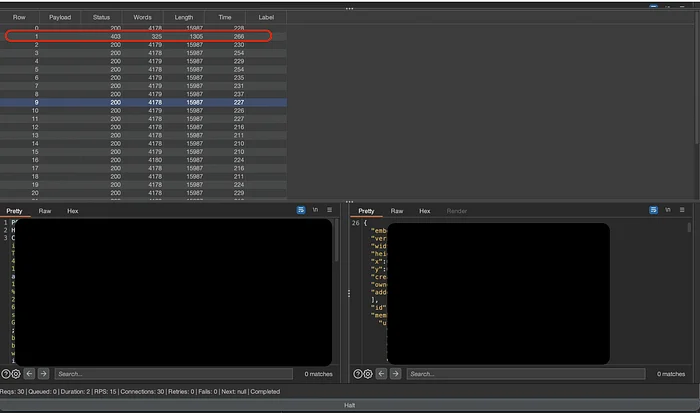
The results were very good: very few HTTP 403 status codes were returned, while all 200 codes indicated the correct creation of the note.
Root cause
The report attributes the issue to missing synchronisation or locking mechanisms and recommends adding them. The report does not describe the server-side implementation, so the exact check that races is not shown.
Impact
A user can bypass the intended limitations of a free account and gain access to additional features without upgrading to a paid account. According to the report, this could lead to financial loss for the company. The impact applies to free accounts on the affected notes creation feature.
Fix
The report recommends that the company implement proper synchronisation and locking mechanisms in the notes creation process, so that only one note creation request can be processed at a time per account. This prevents race conditions and ensures the intended limitations of a free account are enforced. The report does not say whether a fix was deployed.
Variants to test
What happened, in plain words
A security researcher found a way to get around a limit on a free account. The application in the report is a "notes" app: a place where a user can create notes, give them names and pick templates. On a free account, the app is supposed to allow only 3 active notes at a time. The researcher showed that by sending many "create a note" requests at almost the same moment, a free user could end up with more than 3 notes.
The trick relies on a race condition. The report gives a definition worth reading slowly:
A race condition vulnerability occurs when multiple processes or threads are trying to access or modify the same resource at the same time, and the outcome of the program depends on the order in which these processes are executed. In a race condition, if an attacker can control the order of execution, they may be able to exploit the vulnerability to gain unauthorized access or perform unintended actions. This vulnerability can occur in software systems that do not properly handle synchronization or locking mechanisms, which can lead to unexpected behaviour or security issues.
In everyday terms: imagine a nightclub with one bouncer who checks a list and then lets people in. If ten people push through the door at the exact same instant, the bouncer may look at the list ten times before writing anyone down, and all ten get in even though only three were allowed. The list is the limit, the bouncer is the check, and the crowd is the burst of requests. The problem is not that the check is missing; it is that the check and the "write the name down" step are not done as one indivisible action.
The researcher reported this to a self-hosted bug bounty program. A bug bounty program is a scheme where a company invites outside people to look for security problems and report them, sometimes for a reward. The program replied that the report was a duplicate, meaning someone else had already reported the same issue. The researcher still published the write-up because the attack is interesting and because limits on free accounts and trial periods are very common.
The notes app is not exactly the company's real business. The write-up was made generic to protect confidentiality, so the company and the real product are hidden behind a simple example.
Summary
A race condition was found in redacted.com, in the process that creates notes. It lets a user create more than the intended limit of 3 active notes on a free account.
The pieces you need to know
Before following the steps, here are the ideas the report uses, explained from zero.
- A web request. When you click a button in a browser, the browser sends a message to a server and the server sends one back. The message going out is a request; the message coming back is a response. The response carries a status code, a three-digit number that says how it went.
200means "OK, done".403means "forbidden, you are not allowed". - An API. An API is the set of addresses and rules a program uses to talk to a server behind the scenes. The notes page in your browser is a friendly front end; underneath, it calls an API such as "create a note" or "list my notes". Tools can call the same API directly, without the browser.
- A session. After you log in, the server needs to recognise you on every later request. It usually does this with a cookie or a token: a small piece of data your browser stores and sends back with each request, like a wristband you get at an event so staff know you already paid. The report does not show any cookie or token values.
- Burp. Burp Suite is a tool that sits between your browser and the server so you can look at, change and replay requests. Burp Turbo Intruder is an extension for Burp, linked in the report to its BApp Store page, that sends many requests very fast and at the same time. That speed and simultaneity is exactly what a race condition needs.
- Concurrency. Doing several things at once rather than one after another. A connection is one channel to the server; concurrent connections means several channels open at the same time.
- Pipelining. Sending several requests down one connection without waiting for each answer first. The script turns it off.
- A gate. In Turbo Intruder, a gate is a named waiting point. Requests queued on the same gate are held back and then released together, so they hit the server as close to simultaneously as possible.
- A timeout. A maximum time to wait before giving up. Here it is 60.
No versions of any tool are given in the report.
Setup
The only precondition is a free user account. The only tool named is the Burp Turbo Intruder extension.
Finding it
The researcher logged in with a free account, opened the notes creation page and created 2 notes. At that point the user could not create more than 3 active notes on a free account: the limit was real. The request that creates a note was sent to Burp Turbo Intruder.
Exploitation
Step 1: Log in with a free account
Log in with a free user account. This gives you the same starting position as any ordinary free user, and it gives your requests a valid session so the server treats them as yours.
Step 2: Open the notes creation page
Navigate to the notes creation page and start creating a new note.
Step 3: Create 2 notes
Create 2 notes. Create 2 notes.
Step 4: Observe the limit
The user is not able to create more than 3 active notes on a free account. This confirms the rule the app intends to enforce, and it is the behaviour the attack will try to break.
Step 5: Send the creation request to Turbo Intruder
Send the request that creates a note to Burp Turbo Intruder and use the following script:
def queueRequests(target, wordlists): engine = RequestEngine(endpoint=target.endpoint, concurrentConnections=30, requestsPerConnection=100, pipeline=False ) for i in range(30): engine.queue(target.req, target.baseInput, gate='race1')engine.complete(timeout=60)def handleResponse(req, interesting): table.add(req)
Line by line, in plain words:
def queueRequests(target, wordlists):starts a function that Turbo Intruder calls to prepare the attack.targetis the request you captured;wordlistsis where payload lists would go, unused here.engine = RequestEngine(endpoint=target.endpoint, concurrentConnections=30, requestsPerConnection=100, pipeline=False )creates the engine that will send the requests. It points at the same endpoint as your captured request, opens 30 concurrent connections, allows 100 requests per connection, and disables pipelining.for i in range(30):repeats the next line 30 times, so 30 copies of the request are prepared.engine.queue(target.req, target.baseInput, gate='race1')puts each copy of the request into the queue on the gate namedrace1. Because they share a gate, they are released together rather than one by one.engine.complete(timeout=60)releases the gate and waits for the run to finish, giving up after 60.def handleResponse(req, interesting):starts the function that runs for every response that comes back.table.add(req)adds each response to the results table so you can read the status codes afterwards.
Step 6: Start the attack
Start the attack in Turbo Intruder. The 30 queued requests are released at once and the responses are collected in the table.
Step 7: Browse the new notes
All new notes can then be browsed, and their names and templates changed.
The results were very good: very few HTTP 403 status codes were returned, while all 200 codes indicated the correct creation of the note. Very few 403 responses were returned, and all 200 codes indicated the note was created.
Root cause
The report attributes the issue to missing synchronisation or locking mechanisms and recommends adding them. "Atomically" means as one indivisible step: check the count and record the new note in a single action that nothing else can slip into. The report does not describe the server-side implementation, so the exact check that races is not shown. "Serialising" means making the creations for one account happen one after another instead of side by side.
Impact
A user can bypass the intended limitations of a free account and gain access to additional features without upgrading to a paid account. According to the report, this could lead to financial loss for the company. The impact applies to free accounts on the affected notes creation feature.
Fix
The report recommends that the company implement proper synchronisation and locking mechanisms in the notes creation process, so that only one note creation request can be processed at a time per account. This prevents race conditions and ensures the intended limitations of a free account are enforced.
Variants to test
Glossary
- API: the set of addresses and rules a program uses to talk to a server behind the scenes.
- Atomic: done as one indivisible step, so nothing else can happen in the middle.
- Bug bounty program: a scheme where a company invites outside people to find and report security problems, sometimes for a reward.
- Burp Suite: a tool that sits between your browser and a server so you can inspect, change and replay requests.
- Burp Turbo Intruder: a Burp extension that sends many requests very fast and at the same time.
- Concurrent connections: several channels to the server open at the same time.
- Cookie: a small piece of data your browser stores and sends back with each request, often used to recognise your session.
- Duplicate: a report of an issue that someone else has already reported.
- Endpoint: the specific address a request is sent to.
- Gate: in Turbo Intruder, a named waiting point; requests queued on the same gate are released together.
- HTTP 200: a status code meaning the request succeeded.
- HTTP 403: a status code meaning the request was refused as not allowed.
- Locking: a mechanism that stops two processes from using the same resource at the same time.
- Race condition: a flaw where the result depends on the order in which simultaneous actions happen, so a check can be bypassed by timing.
- Request: the message a browser or tool sends to a server.
- Response: the message the server sends back.
- Serialising: making actions happen one after another instead of side by side.
- Session: the state that lets a server recognise you across many requests after you log in.
- Status code: a three-digit number in a response saying how the request went.
- Synchronisation: coordinating simultaneous actions so they do not interfere with each other.
- Timeout: a maximum time to wait before giving up.
- Token: a piece of data, similar in role to a cookie, that proves who you are on later requests.
- Trial period: a limited-time free use of a paid product.



