Bypassing an IDOR A couple of times — $$$$
A user profile API endpoint returned other users' data when the numeric user ID in the path was changed, and the author found two successive ways to bypass the access check. This leaked personal information such as first name, last name, display name and email address of arbitrary users.
 Published on medium.com
This writeup is about an IDOR, I’ma share How I was able to find and bypass an IDOR twice which leaked users PII.
The full write-up lives on its author's site
It belongs to its author, so we link to it rather than copy it. The other two tabs are our own rewrites, checked against it.
Context
The target was a web application for sharing projects and ideas, described in the report as being more like a forum. Users can register and log in, reply to posts and projects, and each user has a profile. A profile supports reading, updating and deleting information such as first name and email, and every user has a numeric ID. The profile settings page lives at /profile/settings, and loading it causes the browser to call an API endpoint under /api/v4/user/.
The researcher had already reported some low severity bugs in this application, and chose to test it deeply because it was old and large.
Setup
The only tooling mentioned is Burp, which the researcher turned on before navigating to the profile settings page. The work was done against a logged-in account whose numeric user ID was 22652. The requests shown use HTTP/2 over TLS, with the Host, Cookie and Referer values redacted in the report, and a Firefox 122 user agent on Windows. No other accounts, roles or versions are described.
Finding it
Visiting /profile/settings sent a request to /api/v4/user/22652, the researcher's own ID in the path:
The response returned the user object for that ID:
HTTjP/2 200 OKServer: nginxDate: Wed, 07 Feb 2024 00:19:56 GMTContent-Type: application/jsonVary: Accept-EncodingExpires: Thu, 19 Nov 1981 08:52:00 GMTCache-Control: no-store, no-cache, must-revalidatePragma: no-cacheStrict-Transport-Security: max-age=31536000;preloadReferrer-Policy: strict-origin-when-cross-origin{"id":22652,"isMe":true,"created":{"date":"2023-11-23 08:24:19.000000","timezone_type":3,"timezone":"Europe\/Berlin"},"updated":{"date":"2024-02-07 01:15:33.000000","timezone_type":3,"timezone":"Europe\/Berlin"},"deleted":null,"inactive":null,"isEmployee":false,"meta":{"language":"en","model":"User","modelnameIndex":{"User":[""]}}}
A numeric identifier in the path, with the object returned straight from it, is the classic shape of an IDOR candidate, so the researcher tried a series of manipulations:
- Changing the ID to another ID.
- Changing the API version, for example
/api/v1/user/1. - Adding an extension to the end of the user ID, for example
/api/v4/user/1.json. - Sending the request without an ID, for example
/api/v4/user/. - Sending the request without an ID using the plural form, for example
/api/v4/users/. - Replacing the ID with an asterisk, for example
/api/v4/user/*. - Path traversal, for example
/api/v4/user/22652/../1. - Sending a
pageorpageSizeparameter, for example/api/v4/user/?page=1, which the researcher notes worked a few times.
Two error responses came back during this probing. A forbidden response:
HTTP/2 403 ForbiddenServer: nginxDate: Wed, 07 Feb 2024 00:43:39 GMTContent-Type: text/html; charset=UTF-8Vary: Accept-EncodingExpires: Thu, 19 Nov 1981 08:52:00 GMTCache-Control: no-store, no-cache, must-revalidatePragma: no-cacheStrict-Transport-Security: max-age=31536000;preloadReferrer-Policy: strict-origin-when-cross-origin{"errors":{"status":403,"title":"Forbidden"},"data":[]}
And a not found response:
Exploitation
Step 1: change the request method
After a few hours the researcher returned to the same endpoint and started playing with request methods:
- Changing the method to POST produced no 404.
- Changing the method to PATCH produced a 500 error code.

Step 2: PUT with a method override
The next attempt was a PUT request with a _method parameter in the body set to PATCH:
PUT /api/v4/user/1 HTTP/2Host: redactedCookie: redcatedUser-Agent: Mozilla/5.0 (Windows NT 10.0; Win64; x64; rv:122.0) Gecko/20100101 Firefox/122.0Accept: application/json, text/plain, */*Accept-Language: en-US,en;q=0.5Accept-Encoding: gzip, deflateReferer: redactedX-Requested-With: XMLHttpRequestSec-Fetch-Dest: emptySec-Fetch-Mode: corsSec-Fetch-Site: same-originTe: trailersContent-Length: 12_method=PATCH
This returned another user's object, but inconsistently: sometimes the response was a 500 error.
HTTP/2 500 Internal Server ErrorContent-Length: 97Cache-control: no-cacheContent-type: text/html<html><body><h1>500 Internal Server Error</h1></body></html>
Sometimes it was a 200 with the user information:
HTTP/2 200 OKServer: nginxDate: Wed, 07 Feb 2024 19:23:18 GMTContent-Type: application/jsonVary: Accept-EncodingExpires: Thu, 19 Nov 1981 08:52:00 GMTCache-Control: no-store, no-cache, must-revalidatePragma: no-cacheStrict-Transport-Security: max-age=31536000;preloadReferrer-Policy: strict-origin-when-cross-origin{"id":1,"isMe":false,"created":{"date":"2010-06-01 18:00:01.000000","timezone_type":3,"timezone":"Europe\/Berlin"},"updated":{"date":"2022-05-31 18:54:41.000000","timezone_type":3,"timezone":"Europe\/Berlin"},"deleted":null,"inactive":null,"isEmployee":false,"meta":{"language":"de","model":"User","modelnameIndex":{"User":[""]}}}
Step 3: add the include parameter to leak PII
The base object was not enough information, so the researcher dug into the application and found a parameter called include that accepts values such as firstname, lastname and email. When it is used, the response contains those fields for the current user, for example firstname,lastname,displayName,email,image,isMe. The request became:
And the response carried the personal data:
Step 4: the triager cannot reproduce it
The researcher reported it in this form. The next day the triager said he was not able to reproduce the vulnerability: it was no longer working and he was getting 401 unauthorized.

Step 5: resend the PUT with an empty body
The researcher tried again. He does not know why it happened, but when he removed the whole body and sent the PUT request with nothing in it, the request went through:

Step 6: the fix, and a new request shape
After a long time the researcher was testing the same subdomain and returned to the same API endpoint. He asked himself whether the old IDOR still worked (no) and whether any of the bypasses worked (no).
He then changed the profile firstname to see what the request looked like:
The interesting part was that this is the same PUT request, but the ID is now set with the id parameter in the body, which suggested a bypass was possible. Two attempts failed:
- Changing the ID to another ID returned 403.
- HTTP parameter pollution, for example
id=22652&id=1, returned 403.
Step 7: body and path are both processed
After hours of testing the researcher discovered that the request takes and processes both the body and the path. As an example, this request would change his firstname and also respond with his email, which normally does not happen:
Step 8: own ID in the path, victim ID in the body
The final request sends the researcher's own user ID in the path, /api/v4/user/22652, and the victim's ID in the request body:
It worked. The researcher notes that he had to remove firstname because it would return a 403.
HTTP/2 200 OKServer: nginxDate: Thu, 08 Feb 2024 19:08:52 GMTContent-Type: application/jsonVary: Accept-EncodingExpires: Thu, 19 Nov 1981 08:52:00 GMTCache-Control: no-store, no-cache, must-revalidatePragma: no-cacheStrict-Transport-Security: max-age=31536000;preloadReferrer-Policy: strict-origin-when-cross-origin{"id":22651,"firstname":"","lastname":"","displayName":"","email":"","isMe":false,"created":{"date":"2023-11-23 02:32:16.000000","timezone_type":3,"timezone":"Europe\/Berlin"},"updated":{"date":"2023-11-23 02:32:48.000000","timezone_type":3,"timezone":"Europe\/Berlin"},"deleted":null,"inactive":null,"isEmployee":false,"meta":{"language":"de","model":"User","modelnameIndex":{"User":[""]}}}

Root cause
The report does not describe the server-side code, so the following is inferred from behaviour. The report does not describe the server-side code. One possible explanation is that the request is authorised against the path identifier while the returned object is selected by the body id, but the report does not confirm this. The two identifiers are never checked against each other, so a request that is authorised for one user returns another user's record. The include parameter then controls which fields are serialised into the response, which is what turns a bare user object into a leak of first name, last name, display name and email.
The responses were inconsistent, and the researcher says he does not know why removing the body made the request succeed.
Impact
An authenticated user could read the profile data of other users by ID, including first name, last name, display name and email when the include parameter listed them. The researcher describes the leak as users' PII.
Fix
Based on the behaviour, the fix should be to derive the target user from the authenticated session or from the path identifier only, and to reject any request where the body id differs from the authorised user.
Variants to test
- Send a PUT or PATCH to a user endpoint with your own ID in the path and another ID in the body, and add
?include=with fields such asemail. A positive result is a 200 containing the other user's fields. - Try the same split between path and body on other verbs and endpoints, for example
POST /api/v4/user/withid=<victim>. A positive result is a created or updated object belonging to another user. - Add
_method=PATCHor_method=PUTto a PUT body and repeat the request several times. A positive result is a 200 with another user's object where the plain method returns 403 or 404. - Remove the request body entirely and resend the same PUT. A positive result is a 200 where the request with a body failed.
- Try HTTP parameter pollution in the body, for example
id=<own>&id=<victim>, and in the query string. A positive result is a response for the victim's ID. - Try the
includeparameter with different field lists on endpoints that return your own object. A positive result is extra fields such as email appearing in the response. - Try the enumeration tricks listed in the report against other numeric-ID endpoints: version changes,
.jsonsuffixes,*, path traversal, andpageorpageSizeparameters. A positive result is any response containing an object that is not yours.
Timeline
| Date | Event |
|---|---|
| Feb 8, 2024 | Reported |
| Mar 4, 2024 | 2000 USD bounty rewarded |
What happened, in plain words
A security researcher found a bug in a website where people share projects and ideas, a site that works a bit like a forum. On that site every user has a profile, and every profile has a number attached to it, called an ID. The bug let one logged-in user ask the site for another user's profile and get back personal details such as first name, last name, display name and email address. This kind of bug is called an IDOR, short for Insecure Direct Object Reference: the site takes a number from the user and uses it to look up a record directly, without checking that the person asking is allowed to see that record. Think of a hotel where the receptionist hands you the key to room 22652 because you asked for it, without ever checking that you are the guest in that room.
The researcher found the bug, reported it, was told it could no longer be reproduced, found a way to make it work again, and later, after the site was fixed, found another bypass. The report was rewarded with a 2000 USD bounty. The timeline at the end of the report gives two dates: reported on 8 February 2024, bounty paid on 4 March 2024.
The target and the tools
The application is described in the report as a web application for sharing projects and ideas, more like a forum. People can register and log in, reply to posts and projects, and each user has a profile. A profile supports reading, updating and deleting information such as first name and email, and every user has a numeric ID. The profile settings page lives at /profile/settings, and simply opening it makes the browser call an API endpoint under /api/v4/user/.
A few words that come up constantly from here on:
- API: the part of a website that the page talks to behind the scenes, exchanging data instead of pretty pages. When you open your profile settings, the page does not contain your name and email in its HTML; it asks the API for them and fills them in. An API is like the kitchen of a restaurant: you (the page) place an order, the kitchen (the API) sends back a plate of data.
- Endpoint: one specific address on that API, for example
/api/v4/user/22652. It is the equivalent of one particular counter in the kitchen. - Request: the message your browser sends to ask for something. It has a method (a verb saying what you want to do), a path (which endpoint), headers (extra information) and sometimes a body (data you attach).
- Response: the message the server sends back, usually with a status code (a three-digit number saying how it went) and a body (the data).
- Cookie: a small piece of data the site stores in your browser after you log in, and which your browser sends back with every request so the site knows who you are. It works like a wristband at a festival: you show it at the gate and you are let in without showing your ticket again.
- Burp: a tool that sits between your browser and the website and lets you read, pause and edit every request and response. It is like a recording machine on the phone line between you and the site.
The researcher had already reported some low severity bugs in this application, and chose to test it deeply because it was old and large. Old and large means lots of features and lots of code written over the years, which is where mistakes tend to hide.
The only tooling mentioned is Burp, which the researcher turned on before navigating to the profile settings page. The work was done against a logged-in account whose numeric user ID was 22652. The requests shown use HTTP/2 over TLS, with the Host, Cookie and Referer values redacted in the report, and a Firefox 122 user agent on Windows. No other accounts, roles or versions are described.
Finding it
Visiting /profile/settings sent a request to /api/v4/user/22652, the researcher's own ID in the path:
Line by line:
GET /api/v4/user/22652 HTTP/2is the request line.GETis the method used to read something without changing it./api/v4/user/22652is the path: version 4 of the API, theuserresource, and the number22652.HTTP/2is the version of the protocol used to speak to the server.Host: redactedis the site's domain name, hidden in the report.Cookie: redactedis the login wristband, also hidden. Without it the server would not know who is asking.User-Agent: Mozilla/5.0 (Windows NT 10.0; Win64; x64; rv:122.0) Gecko/20100101 Firefox/122.0tells the server which browser sent the request: Firefox 122 on 64-bit Windows.Accept: application/json, text/plain, */*says the browser is happy to receive JSON (a text format for structured data), plain text, or anything else.Accept-Language: en-US,en;q=0.5says the browser prefers English.Accept-Encoding: gzip, deflatesays the browser can accept compressed responses.Referer: https://redactedsays which page the request came from, hidden here.X-Requested-With: XMLHttpRequestis a header many JavaScript libraries add to mark a request as coming from script rather than a page navigation.Sec-Fetch-Dest: empty,Sec-Fetch-Mode: cors,Sec-Fetch-Site: same-originare modern browser headers describing what kind of request this is and that it goes to the same site.Te: trailerssays the client can accept trailing headers at the end of the response.
The response returned the user object for that ID:
HTTjP/2 200 OKServer: nginxDate: Wed, 07 Feb 2024 00:19:56 GMTContent-Type: application/jsonVary: Accept-EncodingExpires: Thu, 19 Nov 1981 08:52:00 GMTCache-Control: no-store, no-cache, must-revalidatePragma: no-cacheStrict-Transport-Security: max-age=31536000;preloadReferrer-Policy: strict-origin-when-cross-origin{"id":22652,"isMe":true,"created":{"date":"2023-11-23 08:24:19.000000","timezone_type":3,"timezone":"Europe\/Berlin"},"updated":{"date":"2024-02-07 01:15:33.000000","timezone_type":3,"timezone":"Europe\/Berlin"},"deleted":null,"inactive":null,"isEmployee":false,"meta":{"language":"en","model":"User","modelnameIndex":{"User":[""]}}}
Line by line:
HTTjP/2 200 OKis the status line.200 OKmeans the request succeeded. (The protocol token is garbled in the report asHTTjP/2; it is the HTTP/2 status line.)Server: nginxsays the web server software is nginx.Date: Wed, 07 Feb 2024 00:19:56 GMTis when the server answered.Content-Type: application/jsonsays the body is JSON.Vary: Accept-Encodingtells caches that the response depends on the compression the client accepts.Expires: Thu, 19 Nov 1981 08:52:00 GMTis a date in the past, a common trick to say the response is already expired.Cache-Control: no-store, no-cache, must-revalidateandPragma: no-cachetell browsers and proxies not to keep a copy.Strict-Transport-Security: max-age=31536000;preloadtells the browser to always use HTTPS for this site for a year.Referrer-Policy: strict-origin-when-cross-originlimits how much of the referring page is shared with other sites.- The body is a JSON object.
"id":22652is the user's number."isMe":truesays this record belongs to the person asking.createdandupdatedhold timestamps with a timezone.deletedandinactiveare null, meaning empty.isEmployeeis false.metaholds small extras such as the language and the internal model name.
A numeric identifier in the path, with the object returned straight from it, is the classic shape of an IDOR candidate. The number is right there in the address, and the server seems to use it directly to fetch a record. The obvious question is: what happens if I change the number? So the researcher tried a series of manipulations:
- Changing the ID to another ID. The simplest test: ask for someone else's number.
- Changing the API version, for example
/api/v1/user/1. Older versions of an API sometimes lack checks added later. - Adding an extension to the end of the user ID, for example
/api/v4/user/1.json. Some servers treat the.jsonsuffix differently and route the request to a different handler. - Sending the request without an ID, for example
/api/v4/user/. Maybe the server falls back to listing users. - Sending the request without an ID using the plural form, for example
/api/v4/users/. A plural resource often means a collection, and collections sometimes return everything. - Replacing the ID with an asterisk, for example
/api/v4/user/*. A wildcard might mean all users to some routers. - Path traversal, for example
/api/v4/user/22652/../1. The..means go up one level, so the path may be normalised to/api/v4/user/1after any check on the original string has already passed. - Sending a
pageorpageSizeparameter, for example/api/v4/user/?page=1, which the researcher notes worked a few times. Pagination parameters suggest the endpoint can return lists, and lists can contain other people's records.
Two error responses came back during this probing. A forbidden response:
HTTP/2 403 ForbiddenServer: nginxDate: Wed, 07 Feb 2024 00:43:39 GMTContent-Type: text/html; charset=UTF-8Vary: Accept-EncodingExpires: Thu, 19 Nov 1981 08:52:00 GMTCache-Control: no-store, no-cache, must-revalidatePragma: no-cacheStrict-Transport-Security: max-age=31536000;preloadReferrer-Policy: strict-origin-when-cross-origin{"errors":{"status":403,"title":"Forbidden"},"data":[]}
Line by line:
HTTP/2 403 Forbiddenmeans the server understood the request but refused to allow it. This is the healthy answer when you ask for someone else's record.- The headers repeat the same security and caching settings as before.
- The body is a small JSON error object:
"status":403,"title":"Forbidden", and an emptydataarray.
And a not found response:
Line by line:
HTTP/2 404 Not Foundmeans there is nothing at that address, at least as far as the server is concerned.Content-Security-Policy: redactedis a header that restricts what a page may load; its value is hidden here.X-Content-Type-Options: nosniffstops the browser from guessing a different content type than the one declared.X-Download-Options: noopenis an old Internet Explorer setting about downloaded files.X-Permitted-Cross-Domain-Policies: nonerestricts cross-domain policy files.X-Powered-By: redactedwould normally reveal the framework; it is hidden.X-Xss-Protection: 1; mode=blockis a legacy browser filter setting.- The body is
{"errorCode":"redacted"}, a generic error code.
Notice the difference between the two: 403 means "not allowed", 404 means "not here". Both are refusals, but they come from different layers of the application, and that difference matters later.
Accessing users PII (bypass)
PII stands for Personally Identifiable Information: data that identifies a specific person, such as a name or an email address. The goal of the attack is to make the API return that data for someone other than the logged-in user.
After a few hours the researcher returned to the same endpoint and started playing with request methods. The method is the verb at the start of the request: GET reads, POST usually creates, PUT usually replaces, PATCH usually updates part of something, DELETE removes. Different verbs often reach different code on the server, and that code may have different checks.
- Changing the method to POST produced no 404.
- Changing the method to PATCH produced a 500 error code. A 500 means the server hit an unexpected error while handling the request, which is a sign that the request reached code that was not written to expect it.
The next attempt was a PUT request with a _method parameter in the body set to PATCH:
PUT /api/v4/user/1 HTTP/2Host: redactedCookie: redcatedUser-Agent: Mozilla/5.0 (Windows NT 10.0; Win64; x64; rv:122.0) Gecko/20100101 Firefox/122.0Accept: application/json, text/plain, */*Accept-Language: en-US,en;q=0.5Accept-Encoding: gzip, deflateReferer: redactedX-Requested-With: XMLHttpRequestSec-Fetch-Dest: emptySec-Fetch-Mode: corsSec-Fetch-Site: same-originTe: trailersContent-Length: 12_method=PATCH
Line by line:
PUT /api/v4/user/1 HTTP/2sends a PUT to user number 1, which is not the researcher's own ID.- The headers are the same as before, with the cookie and referer hidden.
Content-Length: 12says the body is 12 bytes long.- The body is
_method=PATCH. This is a convention used by some frameworks: the real HTTP method is PUT, but the framework reads_methodand treats the request as a PATCH. It exists because old browsers could not send PATCH directly. The effect here is that the request arrives as PUT, passes whatever check applies to PUT, and is then handled as PATCH.
This returned another user's object, but inconsistently: sometimes the response was a 500 error.
HTTP/2 500 Internal Server ErrorContent-Length: 97Cache-control: no-cacheContent-type: text/html<html><body><h1>500 Internal Server Error</h1></body></html>
Line by line:
HTTP/2 500 Internal Server Errormeans the server crashed while handling the request.Content-Length: 97is the size of the body.Cache-control: no-cacheandContent-type: text/htmldescribe the body.- The body is a minimal HTML page with the heading
500 Internal Server Error.
Sometimes it was a 200 with the user information:
HTTP/2 200 OKServer: nginxDate: Wed, 07 Feb 2024 19:23:18 GMTContent-Type: application/jsonVary: Accept-EncodingExpires: Thu, 19 Nov 1981 08:52:00 GMTCache-Control: no-store, no-cache, must-revalidatePragma: no-cacheStrict-Transport-Security: max-age=31536000;preloadReferrer-Policy: strict-origin-when-cross-origin{"id":1,"isMe":false,"created":{"date":"2010-06-01 18:00:01.000000","timezone_type":3,"timezone":"Europe\/Berlin"},"updated":{"date":"2022-05-31 18:54:41.000000","timezone_type":3,"timezone":"Europe\/Berlin"},"deleted":null,"inactive":null,"isEmployee":false,"meta":{"language":"de","model":"User","modelnameIndex":{"User":[""]}}}
Line by line:
HTTP/2 200 OKmeans success.- The headers are the usual set.
- The body is user number 1's record.
"id":1and"isMe":falseare the key parts: this is not the researcher's own account. The account was created in 2010 and last updated in 2022, and its language is German.
So the method override worked, but only sometimes. The researcher says he does not know why the results varied.
Adding the include parameter
The base object was not enough information, so the researcher dug into the application and found a parameter called include that accepts values such as firstname, lastname and email. When it is used, the response contains those fields for the current user, for example firstname,lastname,displayName,email,image,isMe. A parameter is a piece of data attached to the request, either in the query string after a ? or in the body. The include parameter is like asking a shop assistant to also put the receipt and the warranty card in the bag: by default you get the product, with include you get extra fields.
The request became:
Line by line:
- The path is still
/api/v4/user/1, someone else's ID. ?include=firstname%2Clastname%2CdisplayName%2Cemail%2Cimage%2CisMeis the query string.%2Cis the URL encoding of a comma, so the value is the listfirstname,lastname,displayName,email,image,isMe. The server is being asked to include those fields in the answer.- The rest of the headers are unchanged, and the body is still
_method=PATCHwithContent-Length: 12.
And the response carried the personal data:
Line by line:
HTTP/2 200 OKagain.- The body now has
firstname,lastname,displayNameandemailfields, all shown asredactedin the report because they are personal data.imageis null.isMeis false, so this is another user's data. - The
metablock now also mentionsUserBadge, a small extra that appears when the include list asks for more fields.
This is the leak: another user's name and email address, returned to an account that should not see them.
The triager cannot reproduce it
The researcher reported it in this form. A triager is the person on the bug bounty platform who first checks a report before passing it to the company. The next day the triager said he was not able to reproduce the vulnerability: it was no longer working and he was getting 401 unauthorized. A 401 means "you are not authenticated": the server did not accept the caller's identity at all. So between the researcher's test and the triager's test, the behaviour had changed.
Resending the PUT with an empty body
The researcher tried again. He does not know why it happened, but when he removed the whole body and sent the PUT request with nothing in it, the request went through:
Line by line:
- The request line and path are the same as the working one:
PUT /api/v4/user/1with theincludelist. - The headers are the same, but there is no
Content-Lengthand no body at all. The_method=PATCHline is gone.
Line by line:
HTTP/2 200 OKand the same personal fields as before, for user 1, withisMefalse.
So the same leak came back with an empty body. The researcher never established why.
Bypassing the bypass
After a long time the researcher was testing the same subdomain and returned to the same API endpoint. A subdomain is a part of a domain, for example shop.example.com under example.com. He asked himself whether the old IDOR still worked (no) and whether any of the bypasses worked (no). The site had been fixed, at least against everything found so far.
He then changed the profile firstname to see what the request looked like. This is a normal user action: edit your own profile, watch what the browser sends.
Line by line:
PUT /api/v4/user/ HTTP/2has no ID in the path at all. The path ends at the resource name.Content-Type: application/x-www-form-urlencoded;charset=UTF-8says the body is in the same format as a web form submission:key=valuepairs joined by&.Content-Length: 25is the body size.Origin: redactedsays which site the request came from, hidden here.- The body is
id=22652&firstname=testaq: the user's own ID and a new first name. So the ID is now in the body, not in the path.
The interesting part was that this is the same PUT request, but the ID is now set with the id parameter in the body, which suggested a bypass was possible. If the server trusts the body ID for choosing the record, maybe it can be pointed at someone else. Two attempts failed:
- Changing the ID to another ID returned 403.
- HTTP parameter pollution, for example
id=22652&id=1, returned 403. HTTP parameter pollution means sending the same parameter twice with different values. Different parts of the server may pick different copies: one layer might check the firstidand another might use the last. It is like writing two different addresses on one envelope and hoping the sorting office and the postman read different lines.
Body and path are both processed
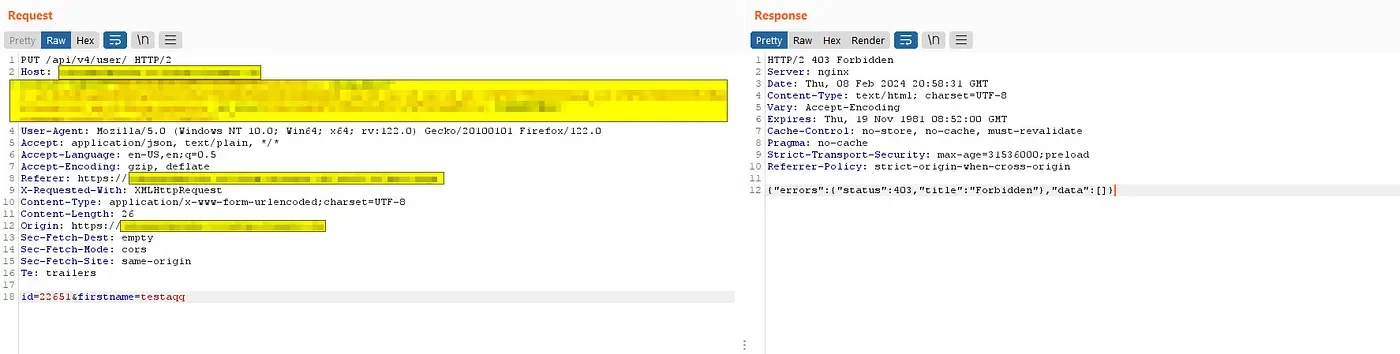
After hours of testing the researcher discovered that the request takes and processes both the body and the path. As an example, this request would change his firstname and also respond with his email, which normally does not happen:
Line by line:
PUT /api/v4/user/?include=emailhas no ID in the path, and asks for theemailfield to be included.- The headers are the form-encoded set from the profile edit.
Content-Length: 26is the body size.- The body is
id=22652&firstname=testaqq: the user's own ID and a new first name.
The point is that the query string (include=email) and the body (id=...&firstname=...) are both read and acted on by the same request. That is unusual enough to be worth exploiting: if the server reads the ID from one place for the permission check and from another place for the lookup, the two can be made to disagree.
Own ID in the path, victim ID in the body
The final request sends the researcher's own user ID in the path, /api/v4/user/22652, and the victim's ID in the request body:
Line by line:
PUT /api/v4/user/22652puts the researcher's own ID in the path, the ID the server will check permission against.?include=firstname%2Clastname%2CdisplayName%2Cemail%2CisMeasks for the personal fields in the answer.- The headers are the form-encoded set.
Content-Length: 8is the size of the body.- The body is
id=22651, the victim's ID. This is the ID the server will use to choose which record to load.
It worked. The researcher notes that he had to remove firstname because it would return a 403. In other words, the body contained only the id parameter; the researcher says he had to remove firstname because it would return a 403.
HTTP/2 200 OKServer: nginxDate: Thu, 08 Feb 2024 19:08:52 GMTContent-Type: application/jsonVary: Accept-EncodingExpires: Thu, 19 Nov 1981 08:52:00 GMTCache-Control: no-store, no-cache, must-revalidatePragma: no-cacheStrict-Transport-Security: max-age=31536000;preloadReferrer-Policy: strict-origin-when-cross-origin{"id":22651,"firstname":"","lastname":"","displayName":"","email":"","isMe":false,"created":{"date":"2023-11-23 02:32:16.000000","timezone_type":3,"timezone":"Europe\/Berlin"},"updated":{"date":"2023-11-23 02:32:48.000000","timezone_type":3,"timezone":"Europe\/Berlin"},"deleted":null,"inactive":null,"isEmployee":false,"meta":{"language":"de","model":"User","modelnameIndex":{"User":[""]}}}
Line by line:
HTTP/2 200 OKmeans success.- The body is user 22651's record, with
isMefalse. The name and email fields are present but empty in this particular account, which still proves the record was returned.
Why it works
The report does not describe the server-side code, so the following is inferred from behaviour. The report does not describe the server-side code. One possible explanation is that the request is authorised against the path identifier while the returned object is selected by the body id, but the report does not confirm this. The two identifiers are never checked against each other, so a request that is authorised for one user returns another user's record. The include parameter then controls which fields are serialised into the response, which is what turns a bare user object into a leak of first name, last name, display name and email.
The responses were inconsistent, and the researcher says he does not know why removing the body made the request succeed.
Impact
An authenticated user could read the profile data of other users by ID, including first name, last name, display name and email when the include parameter listed them. The researcher describes the leak as users' PII.
Fix
Based on the behaviour, the fix should be to derive the target user from the authenticated session or from the path identifier only, and to reject any request where the body id differs from the authorised user.
Variants to test
- Send a PUT or PATCH to a user endpoint with your own ID in the path and another ID in the body, and add
?include=with fields such asemail. A positive result is a 200 containing the other user's fields. - Try the same split between path and body on other verbs and endpoints, for example
POST /api/v4/user/withid=<victim>. A positive result is a created or updated object belonging to another user. - Add
_method=PATCHor_method=PUTto a PUT body and repeat the request several times. A positive result is a 200 with another user's object where the plain method returns 403 or 404. - Remove the request body entirely and resend the same PUT. A positive result is a 200 where the request with a body failed.
- Try HTTP parameter pollution in the body, for example
id=<own>&id=<victim>, and in the query string. A positive result is a response for the victim's ID. - Try the
includeparameter with different field lists on endpoints that return your own object. A positive result is extra fields such as email appearing in the response. - Try the enumeration tricks listed in the report against other numeric-ID endpoints: version changes,
.jsonsuffixes,*, path traversal, andpageorpageSizeparameters. A positive result is any response containing an object that is not yours.
Timeline
| Date | Event |
|---|---|
| Feb 8, 2024 | Reported |
| Mar 4, 2024 | 2000 USD bounty rewarded |
Glossary
- API: the part of a website that pages talk to behind the scenes, exchanging data rather than pages.
- Endpoint: one specific address on an API, such as
/api/v4/user/22652. - Request: the message a browser sends to a server, made of a method, a path, headers and sometimes a body.
- Response: the message a server sends back, with a status code and usually a body.
- Method (HTTP verb): the word at the start of a request saying what you want, such as GET to read, POST to create, PUT to replace, PATCH to update, DELETE to remove.
- Status code: a three-digit number in a response saying how it went, such as 200 for success, 401 for not authenticated, 403 for forbidden, 404 for not found, 500 for a server error.
- Header: an extra line of information in a request or response, such as
Content-TypeorCookie. - Body: the data attached to a request or returned in a response.
- Query string: the part of a URL after a
?, holding parameters such as?include=email. - Parameter: a named piece of data sent with a request, in the query string or in the body.
- Cookie: a small piece of data stored in the browser after login and sent back with each request so the server knows who you are.
- Session: the server-side record of a logged-in user, identified by the cookie.
- JSON: a text format for structured data, using braces, quotes and colons.
- URL encoding: writing special characters in a URL as
%plus a code, for example%2Cfor a comma. - HTTP/2: a version of the protocol browsers and servers use to talk to each other.
- TLS / HTTPS: the encryption layer that protects traffic between browser and server.
- Burp: a tool that sits between browser and server and lets you read and edit requests and responses.
- IDOR: Insecure Direct Object Reference, a bug where a site uses an identifier supplied by the user to fetch a record without checking that the user is allowed to see it.
- PII: Personally Identifiable Information, data that identifies a specific person, such as a name or email address.
- Enumeration: trying identifiers one after another, such as 1, 2, 3, to collect records.
- Path traversal: using
..in a path to move up a level, for example/api/v4/user/22652/../1. - Method override: a convention where a request carries a parameter such as
_method=PATCHso the framework treats it as a different method than the one in the request line. - HTTP parameter pollution: sending the same parameter twice with different values, hoping different parts of the server read different copies.
- Triager: the person on a bug bounty platform who first checks a report before passing it to the company.
- Bug bounty: a programme where companies pay researchers for reporting security bugs.
- Bounty: the money paid for a valid report.
- Subdomain: a part of a domain, such as
shopinshop.example.com. - User agent: a header telling the server which browser and operating system sent the request.
- Referer: a header telling the server which page the request came from.
- Origin: a header telling the server which site a request came from.
- nginx: a common web server software.
- Redacted: hidden or removed from a report, usually to protect secrets or personal data.



