Bypassing Organization-Wide 2FA Enforcement with a Single API Request
An organisation could enforce mandatory 2FA for all members, but the backend did not enforce this requirement on API requests. An administrator who had never enabled 2FA could call the access-control endpoint directly and switch off organisation-wide 2FA enforcement, letting every member in without 2FA.
 Published on medium.com
Bugbounty Writeup
The full write-up lives on its author's site
It belongs to its author, so we link to it rather than copy it. The other two tabs are our own rewrites, checked against it.
Context
The target is a web application that offers organisations a security setting: an organisation owner or administrator can require every member of the organisation to enable two-factor authentication on their own account before they are allowed to access the organisation. The report describes the feature as follows:
- Organisation owners can enable or disable mandatory 2FA.
- Administrators can also manage this setting.
- Members must enable 2FA on their personal accounts before accessing the organisation.
The intent is straightforward: once an organisation turns the setting on, nobody should reach its resources without 2FA. The front end enforces this by blocking the dashboard and showing a message telling the user to enable 2FA first. The question the researcher asked was whether the backend enforced the same rule.
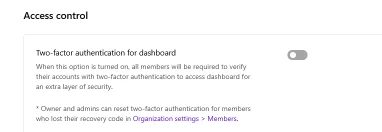
The screenshot shows the organisation-level setting that owners and administrators use to require 2FA for all members.
Setup
The researcher worked with three accounts:
- An organisation owner account, used to enable the enforcement setting.
- A second account that had not enabled 2FA, used to test what a blocked member can still do.
- A newly created administrator account, invited to the organisation, deliberately left without 2FA.
The only tooling mentioned is inspection of the application's API requests and replaying them directly against the backend while keeping the session authenticated. No product name, version or host is given; the endpoint in the report is shown against gate.example.com, which is a placeholder.
Finding it
The researcher logged in as the organisation owner, explored the organisation settings and found the option to enforce 2FA for all members, then enabled it.
With enforcement on, the researcher logged in with the account that had not enabled 2FA. The application blocked access and displayed a message requiring 2FA before the organisation could be accessed.
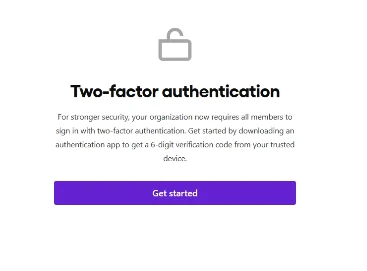
So far the feature behaved as designed. The next step was to look past the UI and ask what the backend did with the same session.

Exploitation
Step 1: send authenticated API requests from a blocked session
The researcher kept the session of the account that had not enabled 2FA and sent requests directly to the backend. The backend continued processing authenticated API requests. Although the dashboard prevented the user from accessing the organisation, the same user could still interact with organisation resources by sending direct API requests with their session cookies.
That was the first finding: the 2FA requirement was being checked in the UI, but the backend was not consistently enforcing it.
Step 2: create an administrator that has never enabled 2FA
Because both owners and administrators can enable or disable mandatory 2FA, the researcher created another administrator account, invited it to the organisation and deliberately did not enable 2FA on it.
Logging in with the new administrator, the application again prevented access to the organisation dashboard and showed the same message requiring 2FA.
The account was still an administrator, and administrators have permission to manage the organisation's 2FA enforcement setting. That raised the question of what would happen if the enforcement setting were changed directly through the backend.

Step 3: disable organisation-wide 2FA through the API
The researcher inspected the request responsible for managing the organisation's 2FA enforcement setting and found this endpoint:
POST /dashboard_api/access_control/enforce_2fa/ HTTP/2Host: gate.example.comCookie: <administrator_session_cookies>Content-Type: application/jsonAccept: application/json
with this body:
{ "uid": "<organization_id>", "enforce": false}
The request is sent with the session of an administrator account that has never enabled 2FA. The body sets enforce to false, which turns the organisation-wide requirement off. The server processed the request successfully and organisation-wide 2FA enforcement was disabled.
Root cause
The application enforced the 2FA requirement in the UI but did not consistently enforce it on the backend. The access-control endpoint that changes the enforcement setting accepted a request from an administrator whose own account did not satisfy the organisation's 2FA requirement, so the very check the setting exists to guarantee was not applied to the action that controls the setting. The endpoint accepted a request from an administrator whose own account did not satisfy the organisation's 2FA requirement.
Impact
An administrator who has not enabled 2FA can still call the access-control API and disable mandatory 2FA for the whole organisation. After that, every organisation member could access the organisation without enabling 2FA. The researcher confirmed this by testing the organisation with accounts that had not enabled 2FA: they could access the dashboard normally, with no 2FA required.
The recap in the report:
- The organisation owner enabled mandatory 2FA.
- A new administrator joined without enabling 2FA.
- The application blocked that administrator from accessing the dashboard.
- The administrator directly called the access-control API.
- The backend allowed the administrator to disable mandatory 2FA.
- Every organisation member could now access the organisation without enabling 2FA.
The administrator performing the action had not enabled 2FA themselves.

Separately, the first finding means a member who has not enabled 2FA can still interact with organisation resources through direct API requests, despite the dashboard block.
Fix
The report does not describe any fix or vendor response. Based on the findings, the backend should enforce the 2FA requirement on every authenticated request that touches organisation resources, not only in the UI, and the access-control endpoint should refuse requests from administrators who have not enabled 2FA themselves.
Variants to test
- Replay other organisation-management endpoints (member invitations, role changes, SSO or security settings) with a session that has not enabled 2FA. A positive result is any state change accepted by the backend while the dashboard blocks the same user.
- Try the enforcement endpoint with an administrator session that has not enabled 2FA on other organisations where the researcher is an administrator. A positive result is the setting being changed despite the account failing the organisation's own 2FA requirement.
- Check whether the same gap exists for other organisation-wide security toggles, such as session policies or IP restrictions. A positive result is a toggle being changed by an account that the UI would block.
- Test whether the
uidparameter is bound to the caller's organisation. A positive result is changing the enforcement setting of an organisation the caller does not administer.
What happened, in plain words
A website lets organisations (a company, a team, a club) create a shared space where their people log in and work together. The organisation can turn on a security rule: every member must set up two-factor authentication (2FA) on their own account before they are allowed into the organisation. 2FA means logging in with two things: your password plus a second proof, usually a short code from a phone app or a text message. It is like a bank card that only works together with a PIN: stealing one is not enough.
The researcher found that this rule was only being checked by the part of the website you see in the browser (the dashboard). The part behind the scenes, the server, did not check it properly. So a person who had never set up 2FA could still talk to the server directly and do things inside the organisation. Worse, an administrator (a person with management rights) who had never set up 2FA could send one request to the server and switch the organisation-wide 2FA requirement off for everybody. After that, every member could get in without 2FA.
This kind of bug is a broken access control problem: the website decides what you are allowed to do in the wrong place. It is like a building where the receptionist stops you at the front desk, but the back door is unlocked and nobody checks who walks through it.
The feature and what it is supposed to do
The application offers an organisation-level security setting. An organisation owner or administrator can require every member of the organisation to enable 2FA on their own account before they are allowed to access the organisation. The report describes the feature like this:
- Organisation owners can enable or disable mandatory 2FA.
- Administrators can also manage this setting.
- Members must enable 2FA on their personal accounts before accessing the organisation.
The idea is simple: if an organisation wants an extra layer of security, nobody should be able to reach its resources without enabling 2FA. The visible part of the website (the front end, the pages your browser draws) enforces this by blocking the dashboard and showing a message telling the user to enable 2FA first. The question the researcher asked was whether the hidden part (the backend, the server that actually stores and changes data) enforced the same rule.
The screenshot shows the organisation-level setting that owners and administrators use to require 2FA for all members.
Setting up the test
The researcher worked with three accounts:
- An organisation owner account, used to turn the enforcement setting on.
- A second account that had not enabled 2FA, used to test what a blocked member can still do.
- A newly created administrator account, invited to the organisation, deliberately left without 2FA.
The only tooling mentioned is inspecting the application's API requests and replaying them directly against the backend while keeping the session authenticated. No product name, version or host is given; the endpoint in the report is shown against gate.example.com, which is a placeholder.
A quick word on the two central ideas, because everything below depends on them:
- API: the way a browser and a server talk to each other. When you click a button, your browser usually sends a small message to the server and the server answers. An API is that conversation, and you can have the same conversation yourself with a tool instead of a browser. Think of a restaurant: the menu and the waiter are the API, the kitchen is the server. You can order directly from the waiter even if the printed menu is hidden from you.
- Session cookie: after you log in, the server gives your browser a small piece of text that proves who you are. Your browser sends it back with every request. It works like a wristband at an event: show it at the door and you are let in without showing your ID again. If someone copies the wristband, they can act as you until it expires.
Finding it
The researcher logged in as the organisation owner, explored the organisation settings and found the option to enforce 2FA for all members, then enabled it.
With enforcement on, the researcher logged in with the account that had not enabled 2FA. The application blocked access and displayed a message requiring 2FA before the organisation could be accessed.
So far the feature behaved as designed. The next step was to look past the visible pages and ask what the backend did with the same session.
Exploitation
Step 1: send authenticated API requests from a blocked session
The researcher kept the session of the account that had not enabled 2FA and sent requests directly to the backend. The backend continued processing authenticated API requests. Although the dashboard prevented the user from accessing the organisation, the same user could still interact with organisation resources by sending direct API requests with their session cookies.
That was the first finding: the 2FA requirement was being checked in the visible pages, but the backend was not consistently enforcing it. In everyday terms, the receptionist said no, but the back door was open to anyone wearing the event wristband.
Step 2: create an administrator that has never enabled 2FA
Because both owners and administrators can enable or disable mandatory 2FA, the researcher created another administrator account, invited it to the organisation and deliberately did not enable 2FA on it.
Logging in with the new administrator, the application again prevented access to the organisation dashboard and showed the same message requiring 2FA.
The account was still an administrator, and administrators have permission to manage the organisation's 2FA enforcement setting. That raised the question of what would happen if the enforcement setting were changed directly through the backend.
Step 3: disable organisation-wide 2FA through the API
The researcher inspected the request responsible for managing the organisation's 2FA enforcement setting and found this endpoint:
POST /dashboard_api/access_control/enforce_2fa/ HTTP/2Host: gate.example.comCookie: <administrator_session_cookies>Content-Type: application/jsonAccept: application/json
Line by line, in plain words:
POST /dashboard_api/access_control/enforce_2fa/ HTTP/2is the request line.POSTmeans "I am sending data that should change something on the server". The path/dashboard_api/access_control/enforce_2fa/is the address of the feature that manages the 2FA enforcement setting.HTTP/2is simply the version of the language the browser and server use to talk.Host: gate.example.comtells the server which website the request is for.gate.example.comis a placeholder name, not a real address.Cookie: <administrator_session_cookies>is the wristband: the session cookie of the administrator account. The angle brackets mean a real value would go there; the report hides it.Content-Type: application/jsonsays the data being sent is in JSON, a simple text format for structured data (think of it as a very strict shopping list).Accept: application/jsonsays the sender would like the answer in JSON too.
with this body:
{ "uid": "<organization_id>", "enforce": false}
Line by line:
{ ... }is a JSON object, a set of named values."uid": "<organization_id>"is a field whose value is hidden in the report."enforce": falseis the actual instruction: turn the organisation-wide 2FA requirement off.falsemeans no.
The request is sent with the session of an administrator account that has never enabled 2FA. The body sets enforce to false, which turns the organisation-wide requirement off. The server processed the request successfully and organisation-wide 2FA enforcement was disabled.
Why it worked
The application enforced the 2FA requirement in the visible pages but did not consistently enforce it on the backend. The access-control endpoint that changes the enforcement setting accepted a request from an administrator whose own account did not satisfy the organisation's 2FA requirement, so the very check the setting exists to guarantee was not applied to the action that controls the setting. The endpoint accepted a request from an administrator whose own account did not satisfy the organisation's 2FA requirement.
In plain words: the server asked "are you an administrator?" and stopped there. It never asked "have you yourself set up 2FA?". It is like a fire-safety officer who is allowed to switch off the building's fire alarm but has never been trained to use it.
What the impact was
An administrator who has not enabled 2FA can still call the access-control API and disable mandatory 2FA for the whole organisation. After that, every organisation member could access the organisation without enabling 2FA. The researcher confirmed this by testing the organisation with accounts that had not enabled 2FA: they could access the dashboard normally, with no 2FA required.
The recap in the report:
- The organisation owner enabled mandatory 2FA.
- A new administrator joined without enabling 2FA.
- The application blocked that administrator from accessing the dashboard.
- The administrator directly called the access-control API.
- The backend allowed the administrator to disable mandatory 2FA.
- Every organisation member could now access the organisation without enabling 2FA.
The administrator performing the action had not enabled 2FA themselves.
Separately, the first finding means a member who has not enabled 2FA can still interact with organisation resources through direct API requests, despite the dashboard block.
What the fix should be
The report does not describe any fix or vendor response. Based on the findings, the backend should enforce the 2FA requirement on every authenticated request that touches organisation resources, not only in the visible pages, and the access-control endpoint should refuse requests from administrators who have not enabled 2FA themselves.
Other places to look
- Replay other organisation-management endpoints (member invitations, role changes, SSO or security settings) with a session that has not enabled 2FA. A positive result is any state change accepted by the backend while the dashboard blocks the same user.
- Try the enforcement endpoint with an administrator session that has not enabled 2FA on other organisations where the researcher is an administrator. A positive result is the setting being changed despite the account failing the organisation's own 2FA requirement.
- Check whether the same gap exists for other organisation-wide security toggles, such as session policies or IP restrictions. A positive result is a toggle being changed by an account that the visible pages would block.
- Test whether the
uidparameter is bound to the caller's organisation. A positive result is changing the enforcement setting of an organisation the caller does not administer.
Glossary
- 2FA (two-factor authentication): logging in with two separate proofs, usually a password plus a one-time code, so that one stolen secret is not enough.
- Access control: the rules that decide who is allowed to do what; broken access control means those rules are missing or checked in the wrong place.
- Administrator: a user with management rights inside an organisation, here including the right to change the 2FA enforcement setting.
- API: the set of messages a browser (or any program) can send to a server to read or change data.
- Authenticated request: a request that carries proof of who is sending it, normally a session cookie.
- Backend: the server-side part of an application that stores data and carries out actions; users do not see it directly.
- Body: the part of a request that carries data, as opposed to the address and headers.
- Cookie: a small piece of text a website stores in your browser and receives back on each request; a session cookie identifies your logged-in session.
- Dashboard: the main logged-in page of the application where a user sees and manages their organisation.
- Endpoint: a specific address on a server that performs a specific action, such as
/dashboard_api/access_control/enforce_2fa/. - Enforce: to make a rule mandatory, so that it cannot be skipped.
- Front end: the part of the application that runs in your browser and draws the pages you see.
- Header: extra labelled information attached to a request, such as
Host,CookieorContent-Type. - HTTP/2: a version of the protocol browsers and servers use to exchange requests and responses.
- JSON: a plain-text format for structured data, made of names and values in curly braces.
- Member: a regular user of an organisation, without owner or administrator rights.
- Organisation: a shared workspace on the application that groups users and their resources.
- Organisation owner: the user with the highest rights over an organisation, including enabling or disabling mandatory 2FA.
- POST: an HTTP method meaning "send data that changes something on the server".
- Replay: to send a captured request again, possibly with changes, to see whether the server accepts it.
- Request: a message a browser or tool sends to a server asking it to do something.
- Root cause: the underlying reason a bug exists, as opposed to its visible symptom.
- Session: the state of being logged in, maintained by a session cookie.
- SSO (single sign-on): a login system where one account is used to enter several separate services.
- State change: any action that alters stored data, such as turning a setting on or off.
- Toggle: a setting that can be switched on or off.
uid: a unique identifier; the report does not explain this field.- UI (user interface): the visible part of an application that a person interacts with.
- Vulnerability: a weakness in an application that lets someone do something the designers did not intend.