Bypassing unexpected IDOR
The 'Retire Team' endpoint used a team_id parameter that could be manipulated to retire another user's team. By appending a space character to the victim's team ID, the attacker bypassed the authorisation check and could retire any team.
 Published on medium.com
Hello guys, I am back again with another writeup on my very recent bug finding on HackerOne Private VDP.
The full write-up lives on its author's site
It belongs to its author, so we link to it rather than copy it. The other two tabs are our own rewrites, checked against it.
Context
On 4 August the researcher received a private VDP invitation on HackerOne with a limited scope. The target was a sports platform where a user can create a team for a particular sport, add members and manage the team as a coach. The feature at the centre of the write-up is Retire Team, found under the Team settings option. Retiring a team is an action a coach performs on their own team; the request carries the team identifier as a query parameter, which is exactly the shape that invites an IDOR test.
Setup
The researcher started with recon and subdomain enumeration, but found no interesting subdomain or endpoint. The work then moved to a manual walkthrough of the main domain, testing for bugs such as CSRF and XSS without success. The Retire Team option was spotted during that walkthrough.
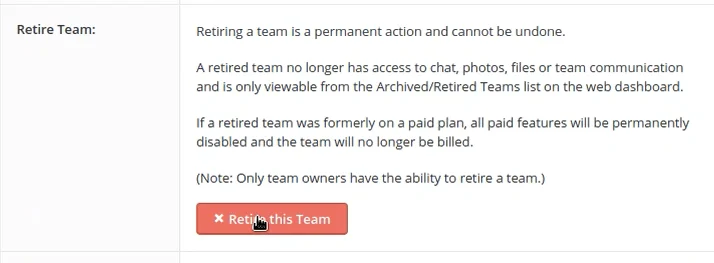
The screenshot shows the Team settings area where the Retire Team option appears.
To test the feature, two accounts were needed: the researcher's own account, and a second account created to act as the victim, with its own team. Requests were captured and replayed in Burp Suite, using the Repeater to modify and resend them.
Finding it
Selecting Retire Team and capturing the traffic produced a request of roughly this form:
POST /account/teamsetting/retired_team?team_id=12345
The team identifier travels in the query string, which is the shape that invites an IDOR test. That is the classic IDOR shape: an object reference supplied by the client, with no indication that ownership is checked against it.
Exploitation
Step 1: swap the team id
The researcher created a victim account with a victim team, then replaced the attacker's team id in the request with the victim's team id. The response in Burp Repeater was not in the researcher's favour: it returned an unauthorised access error. So a plain swap of the identifier was rejected.
Step 2: research bypasses instead of giving up
Rather than moving on to another functionality, the researcher researched ways to bypass the check and started trying them out. This is the central lesson of the write-up: a 401 or similar error on a swapped id is not the end of the test.
Step 3: append an encoded space
One of the techniques produced a 200 OK response, and with it the ability to retire the team of any user. The change was to put %20 at the end of the id parameter:
POST /account/teamsetting/retired_team?team_id=victim’s_id%20
The identifier is still the victim's, but with a trailing encoded space. The server returned a 200 OK, which the researcher says led to the ability to retire the team of any user, where the same request without the suffix had been refused.
Step 4: report and outcome
The bug was reported and the researcher waited for the triage team. After 6 days the response arrived.
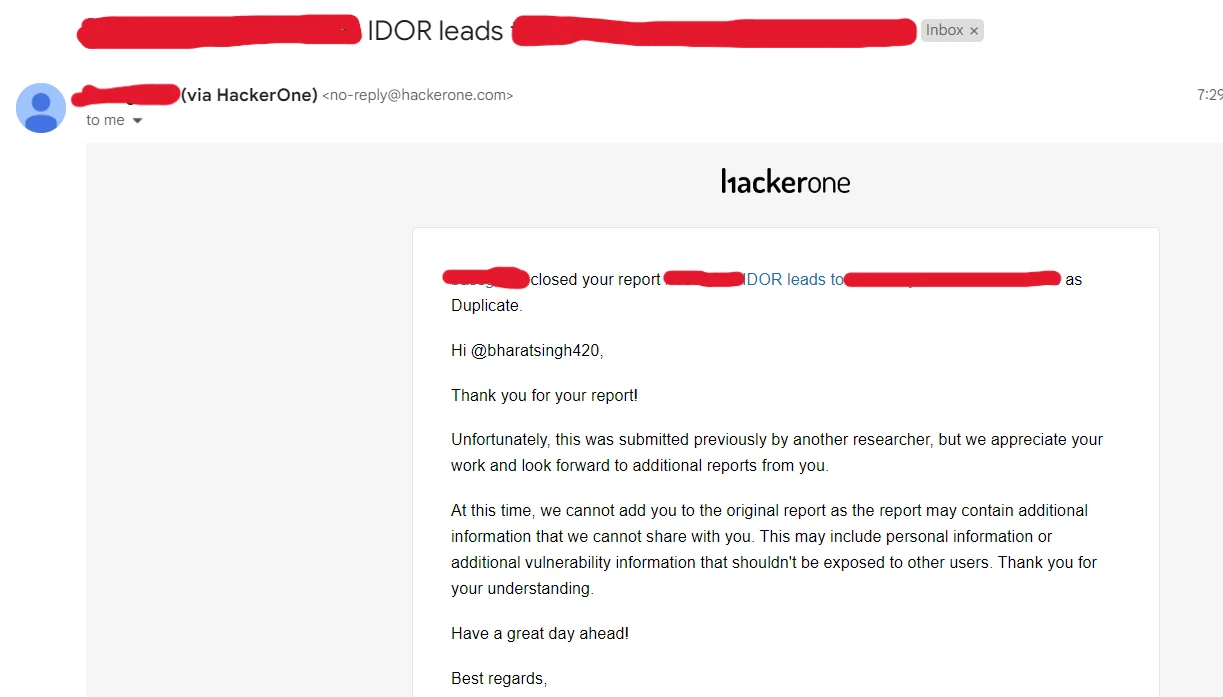
The screenshot shows the triage response: the report was marked duplicate.
Root cause
The report does not describe the server-side code, so the mechanism can only be inferred. The report does not describe the server-side code, so the mechanism is unknown.
Impact
An attacker could retire the team of any user. Because there was no rate limit, the team_id parameter could be brute-forced, allowing mass retirement of many users' teams.
Fix
Adding rate limiting on the endpoint would also reduce the mass-enumeration angle, but it does not fix the authorisation flaw itself.
Variants to test
The researcher closes with a set of general techniques for bypassing IDOR checks. Each is worth trying when a swapped id returns 401, access denied or an invalid request error.
- Parameter pollution. Supply multiple values for a single parameter so that the check and the action may pick different ones. Change the request from:
GET /api/card?custom_id=<attacker_id>
to:
GET /api/card?custom_id=<attacker_id>&custom_id=<victm's_is>
- Appending special characters and random strings. Replacing ids outright may get a 401, access denied or invalid request. Appending special characters such as
/, or strings such as%20,%09,%0b,%0c,%1c,%1d,%1e,%1f, may give an IDOR. Turn the request from:
GET /profile/update/12345
to:
GET /profile/update/12345%20
This may break the application's logic.
-
Changing the request method. If one HTTP request method does not work, try others: GET, POST, PUT, DELETE, PATCH and so on.
-
Placing ids into requests that have none. Even if the request URL uses no input parameters, add parameters to each request and observe whether it makes a difference. For example, if this request displays all your card details:
GET /api/card
what happens if the attacker appends the user id?
GET /api/card?custom_id=<victim_id>
Applications sometimes hide information related to parameters, so by observing adjacent requests you can add ids and see whether the response changes.
What happened, in plain words
A security researcher was invited to a private bug bounty programme on HackerOne. A bug bounty programme is a scheme where a company invites independent testers to look for security problems in its systems and report them, usually in exchange for a reward or recognition. A private programme means only selected testers are invited, and the invitation lists a limited scope: the set of websites and features the tester is allowed to test.
The target was a sports platform. On this platform a person can act as a coach: create a team for a particular sport, add members to it and manage it. One of the management options was called Retire Team, found under the Team settings area. Retiring a team is something a coach does to their own team.
The researcher noticed that the request sent when you click Retire Team includes a number that identifies the team, called team_id. The request includes a number that identifies the team, called team_id, and the researcher tested whether changing it would affect another user's team. This kind of flaw is called IDOR, short for Insecure Direct Object Reference: the application hands you a direct reference to an object (here, a team id) and does not properly check that the object belongs to you before acting on it.
A simple swap of the id was refused with an unauthorised access error. Instead of giving up, the researcher looked up known tricks for getting past that kind of check and tried them. One trick worked: adding %20 (an encoded space character) to the end of the id. The server then returned a 200 OK, which the researcher says led to the ability to retire the team of any user. Because the endpoint had no rate limit (no cap on how many requests you can send in a given time), an attacker could try many team ids in a row and retire the teams of many users.
The researcher reported the bug. Six days later the triage team (the people who first review incoming reports) replied: the report was marked as a duplicate, meaning somebody else had already reported the same issue.
The rest of the write-up is a list of general techniques for getting past IDOR checks, useful whenever a swapped id comes back with an error.
Background you need first
A few ideas come up again and again below, so here they are from zero.
- A web request. When you click a button on a website, your browser sends a message to the server that runs the site. The message has a method (a verb saying what kind of action it is, such as
GETto fetch something orPOSTto submit something), a path (which part of the site you are talking to), sometimes a query string (extra values attached to the address after a?), and sometimes a body (data sent along with it). The server replies with a status code:200means success,401means you are not authorised, and so on. - A query parameter. In an address like
/shop?item=42, the part after the?is the query string, anditem=42is a parameter with the nameitemand the value42. The server reads these values and usually acts on them. - An id. A number or string that identifies one particular object in the application's database, such as one team, one card, one profile. If ids are simple sequential numbers, they are easy to guess.
- An API. A way for one piece of software to talk to another, usually over the same kind of web request described above. When a website's page loads your card details, it often does so by calling an API endpoint such as
/api/cardbehind the scenes. - A cookie or token. A small piece of data your browser stores and sends back with every request so the server knows who you are. After you log in, the server gives your browser a cookie or token, and that is how it recognises your account on the next request. This is why an attacker testing a bug needs their own logged-in account: the requests must carry a valid session.
- Burp Suite and Repeater. Burp Suite is a tool that sits between your browser and the server and lets you see and edit the requests. Repeater is the part of it where you can change a captured request and send it again as many times as you like, watching each response. It is the standard way to test whether changing one value changes what the server does.
- Recon and subdomain enumeration. Recon is short for reconnaissance: gathering information about the target before testing. Subdomain enumeration means finding the other hostnames that belong to the organisation (for example
shop.example.comnext towww.example.com), because a weaker service sometimes hides on one of them. - CSRF and XSS. Two other common bug classes the researcher checked for. CSRF (Cross-Site Request Forgery) is when another website tricks your browser into sending an action to a site you are logged into. XSS (Cross-Site Scripting) is when an attacker gets their own code to run inside another user's browser on the target site.
- Rate limiting. A cap on how many requests a client may send in a period. Without it, an attacker can try thousands of values quickly.
The story of the bug
On 4 August the researcher received the private invitation on HackerOne, with a limited scope. The platform let a user create a team for a particular sport, add members and manage the team as a coach.
The researcher began with recon and subdomain enumeration, but found no interesting subdomain or endpoint. An endpoint is a specific address on a server that accepts requests, such as /account/teamsetting/retired_team. The work then moved to a manual walkthrough of the main domain: clicking through the site by hand, looking at each feature. During that walkthrough the researcher tested for bugs such as CSRF and XSS, without success. It was on this walkthrough that the Retire Team option under Team settings caught the eye.
The screenshot shows the Team settings area where the Retire Team option appears.
To test the feature properly, two accounts were needed: the researcher's own account, and a second account created to play the victim, with its own team. Having two accounts is essential for any IDOR test, because you need to prove that account A can affect an object belonging to account B. The requests were captured and replayed in Burp Suite, using Repeater to modify and resend them.
Finding it
Selecting Retire Team and capturing the traffic produced a request of roughly this form:
POST /account/teamsetting/retired_team?team_id=12345
Line by line:
POSTis the method: the browser is asking the server to perform an action, not just to show a page./account/teamsetting/retired_teamis the path: the part of the site that handles retiring a team.?team_id=12345is the query string: one parameter namedteam_idwhose value is12345, the identifier of the team being retired.
The important observation is that the team identifier travels in the query string, supplied by the client, and the server acts on whatever value it receives. That is the classic IDOR shape: an object reference supplied by the client, with no visible sign that ownership is checked against it. The natural next question is: what happens if I put somebody else's number there?
Exploitation
Step 1: swap the team id
The researcher created a victim account with a victim team, then replaced the attacker's team id in the request with the victim's team id. The response in Burp Repeater was not in the researcher's favour: it returned an unauthorised access error. So a plain swap of the identifier was rejected. This is the point where many testers stop, assuming the feature is safe.
Step 2: research bypasses instead of giving up
Rather than moving on to another functionality, the researcher researched ways to bypass the check and started trying them out. This is the central lesson of the write-up: a 401 or similar error on a swapped id is not the end of the test. The check exists, but the question becomes whether the check and the action look at the value in exactly the same way.
Step 3: append an encoded space
One of the techniques produced a 200 OK response, and with it the ability to retire the team of any user. The change was to put %20 at the end of the id parameter:
POST /account/teamsetting/retired_team?team_id=victim’s_id%20
Line by line:
- The method and path are unchanged: the same action is being requested.
team_id=victim’s_id%20is the victim's team id with%20appended.%20is how a space character is written inside a web address, because a literal space is not allowed there. So the value is the victim's id followed by a space.
The identifier is still the victim's, but with a trailing encoded space. The server accepted the request and retired the victim's team, where the same request without the suffix had been refused.
Step 4: report and outcome
The bug was reported and the researcher waited for the triage team. After 6 days the response arrived.
The screenshot shows the triage response: the report was marked duplicate.
Why it worked
The report does not describe the server-side code, so the mechanism can only be inferred. The report does not describe the server-side code, so the mechanism is unknown.
Two people, one badge, two readings.
Impact
An attacker could retire the team of any user. Because there was no rate limit, the team_id parameter could be brute-forced, allowing mass retirement of many users' teams. Brute-forcing here means simply trying many values in sequence, which is practical when ids are short numbers and nothing slows you down.
Fix
Adding rate limiting on the endpoint would also reduce the mass-enumeration angle, but it does not fix the authorisation flaw itself.
Variants to test
The researcher closes with a set of general techniques for bypassing IDOR checks. Each is worth trying when a swapped id returns 401, access denied or an invalid request error.
- Parameter pollution. Supply multiple values for a single parameter so that the check and the action may pick different ones. Change the request from:
GET /api/card?custom_id=<attacker_id>
to:
GET /api/card?custom_id=<attacker_id>&custom_id=<victm's_is>
Line by line:
GETmeans the browser is asking to fetch something, here a card./api/cardis the API endpoint that returns card details.custom_id=<attacker_id>is the parameter naming which card to return, set to the attacker's own id.- In the second version, the same parameter appears twice, joined by
&. The first value is the attacker's, the second is the victim's. Different parts of the server may read different occurrences: the check may look at the first and the action at the last, or the other way round.
- Appending special characters and random strings. Replacing ids outright may get a
401, access denied or invalid request. Appending special characters such as/, or strings such as%20,%09,%0b,%0c,%1c,%1d,%1e,%1f, may give an IDOR. Turn the request from:
GET /profile/update/12345
to:
GET /profile/update/12345%20
Line by line:
- The first request fetches or updates the profile whose id is
12345, placed directly in the path rather than in a query parameter. - The second is identical except for
%20appended to the id, again an encoded space. The list of other values in the write-up are other encoded control characters, each of which some part of a server may strip, trim or ignore.
This may break the application's logic.
-
Changing the request method. If one HTTP request method does not work, try others:
GET,POST,PUT,DELETE,PATCHand so on. Each method is a different verb, and a server sometimes routes each verb to a different piece of code, with the authorisation check attached to only some of them. -
Placing ids into requests that have none. Even if the request URL uses no input parameters, add parameters to each request and observe whether it makes a difference. For example, if this request displays all your card details:
GET /api/card
what happens if the attacker appends the user id?
GET /api/card?custom_id=<victim_id>
Line by line:
- The first request has no query string at all: the server decides whose cards to return from your session alone.
- The second adds a
custom_idparameter set to the victim's id. The server may ignore it, or it may quietly honour it and return the victim's cards instead of yours.
Applications sometimes hide information related to parameters, so by observing adjacent requests you can add ids and see whether the response changes.
Glossary
- Bug bounty programme: a scheme where a company invites independent testers to find and report security problems, often for a reward.
- Private programme / VDP: a programme open only to invited testers; VDP stands for Vulnerability Disclosure Programme, a scheme focused on receiving reports rather than paying rewards.
- Scope: the list of systems and features a tester is permitted to test.
- HackerOne: a platform that hosts bug bounty and disclosure programmes and handles reports and triage.
- Recon: reconnaissance, gathering information about a target before testing.
- Subdomain enumeration: finding the other hostnames belonging to an organisation, such as
shop.example.com. - Endpoint: a specific address on a server that accepts requests, such as
/account/teamsetting/retired_team. - API: a way for software to talk to software over web requests, often returning data rather than pages.
- HTTP method: the verb of a request, such as
GET(fetch) orPOST(submit). - Status code: the number in the server's reply saying what happened, such as
200(success) or401(not authorised). - Query string / query parameter: the
?name=valuepart of an address, carrying extra values to the server. - ID: a number or string identifying one particular object, such as one team or one card.
- IDOR: Insecure Direct Object Reference, a flaw where the application accepts a client-supplied reference to an object without properly checking that the object belongs to the caller.
- Cookie / token: data stored by the browser and sent with each request so the server knows which account is making it.
- Session: the logged-in state tied to your cookie or token.
- Burp Suite: a tool that intercepts, displays and lets you edit web requests between browser and server.
- Repeater: the part of Burp Suite where you modify a captured request and resend it repeatedly.
- CSRF: Cross-Site Request Forgery, tricking a logged-in user's browser into sending an unwanted action to a site.
- XSS: Cross-Site Scripting, getting attacker-supplied code to run in another user's browser on the target site.
%20: the encoded form of a space character in a web address.- Normalisation / canonicalisation: converting a value into one standard form, for example decoding
%20and trimming whitespace, before using it. - Authorisation check: the code that decides whether the caller is allowed to act on a particular object.
- Rate limit: a cap on how many requests a client may send in a period.
- Brute-force: trying many values in sequence until one works.
- Parameter pollution: sending the same parameter more than once with different values so that different parts of the server may read different ones.
- Triage team: the people who first review incoming bug reports and decide what happens to them.
- Duplicate: a report describing an issue that has already been reported.
- Root cause: the underlying reason a bug exists, as opposed to its visible symptom.
- Impact: what an attacker could actually do by exploiting the bug.



