Chaining IDOR to Privilege Escalation: A $$ Microsoft Bug Bounty
An IDOR in the partner-profile user-adding endpoint let an attacker inject a victim's EngagementId and set their own role to EngagementAdmin, joining the victim's partner profile. Because partner admins can add themselves to the main project as admins, the attacker then escalated to full project admin.

Bug Bounty
The full write-up lives on its author's site
It belongs to its author, so we link to it rather than copy it. The other two tabs are our own rewrites, checked against it.
Context
The target is the Microsoft Implementation Portal at implementationportal.dynamics.com, one of the subdomains the researcher found while looking at a Microsoft domain. Microsoft runs a broad bug bounty programme through MSRC covering Dynamics, Xbox, open source tools, websites, mobile applications and more.
The portal lets users create projects and add people to them. Within a project you can add users and admins, and you can also add partner profiles. A partner profile has its own membership: partner users and partner admins. The feature at the centre of this report is the one that lets a Partner Profile Admin add any user into the main project with either the Admin or the User role. That is intended behaviour, and it is exactly what turns a single object reference bug into a full privilege escalation.
Setup
The researcher used two separate accounts:
- A "Victim" user.
- An "Attacker" user.
A project was created under each account, and a partner profile was added to the project using the profile ID. The POST request issued when adding a normal user to the partner ID was intercepted so it could be captured and modified. No tool versions are given in the report.
Finding it
The researcher describes the bug as an Elevation of Privilege issue chained with IDOR, and notes a preference for chaining to increase impact.
The IDOR sits in the partner profile user-adding endpoint. The request that adds a user to a partner profile carries an EngagementId that identifies the partner profile (the engagement). That identifier is the object reference the server trusts. Because a Partner Profile Admin is, by design, allowed to add any user into the main project as Admin or User, control of someone else's engagement is enough to become an admin of their partner profile and then of their main project.

The author's illustration for the write-up.
Exploitation
Step 1: Prepare two accounts and two projects
Create a Victim account and an Attacker account, and create a new project under each. Add a partner profile to the project using the profile ID.
Step 2: Capture the add-user request
From the Victim's account, start the process of adding a normal user to the partner ID and intercept the resulting POST request:
POST /_api/cloudflow/v1.0/trigger/random_id_hereHost: implementationportal.dynamics.comcookie: <cookie>_requestverificationtoken: <token_here>Content-Type: application/json"eventData""{\"Email\":\"[redacted]\",\"Action\":\"Add\", \"Role\":\"EngagumentUser\",\"ProjectId\"\"c1c65fa3-xxxxxxxxxxx","EngagementId\":\"c34d4dd1-xxxxxxxxxx\",\"ContactId\":\"\"}"
The request goes to a cloud flow trigger endpoint under /_api/cloudflow/v1.0/trigger/. It carries the session cookie and a _requestverificationtoken header, and the body is JSON containing an eventData field.
Step 3: Analyse the payload
The eventData parameter contains several sub-parameters:
| Parameter | Meaning in the request |
|---|---|
Email |
The user being added |
Action |
The operation, here Add |
Role |
The role granted, here EngagumentUser |
ProjectId |
The main project |
EngagementId |
The partner profile (engagement) |
ContactId |
Contact reference, empty in the captured request |
The EngagementId is the parameter vulnerable to IDOR.
Step 4: Obtain the Victim's EngagementId
The attacker must acquire the Victim's EngagementId. The researcher calls this the tricky part and the most difficult step: the ID is encoded and not easily guessable. That difficulty is why the bug was classified as Important rather than Critical severity. The report does not describe how the ID was obtained.
Step 5: Replay with the Victim's EngagementId and an elevated Role
Once the Victim's EngagementId is known, the attacker sends the intercepted POST request from their own account, with the Victim's EngagementId injected into the payload. In the same manipulated request, the attacker changes the Role parameter to EngagementAdmin.
The server accepts the request and adds the attacker as an admin of the Victim's partner profile.
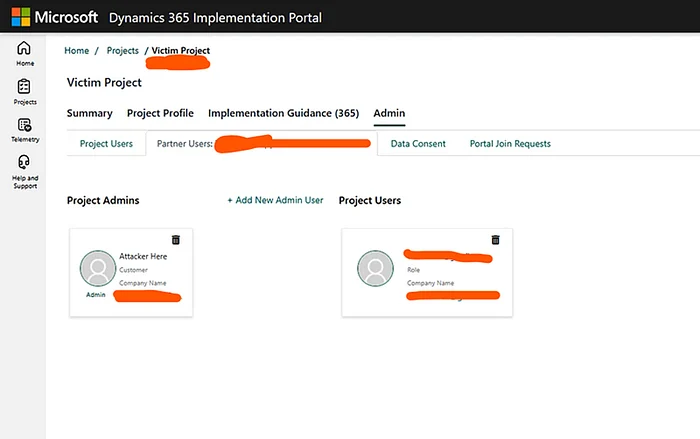
The attacker's account shown inside the Victim's partner profile.
Step 6: Escalate to main project admin
As an intended feature of the application, a Partner Profile Admin has the authority to add themselves, or anyone else, as an Admin to the main project. The attacker uses this newly acquired Partner Profile Admin privilege to elevate themselves to a full Admin on the Victim's main project.
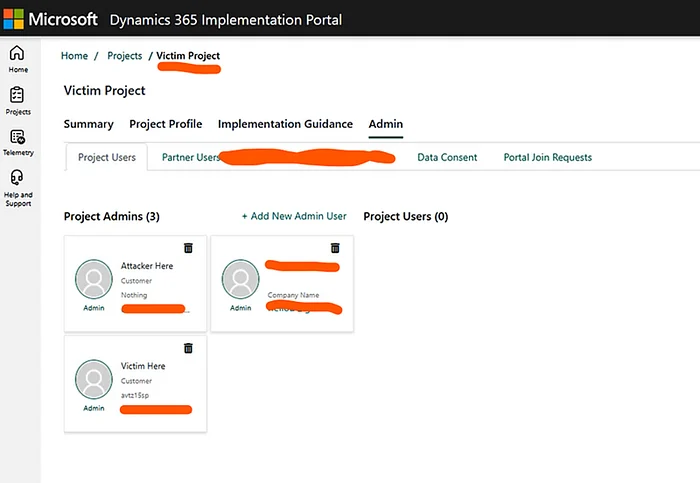
The attacker's account shown in the main project section.
From that position the attacker can perform all the actions available to a project admin, such as closing the project, deleting users, and adding users and admins.
Root cause
The report does not describe the server-side checks, but the IDOR implies the endpoint acts on the EngagementId supplied in the request body without confirming the caller administers that engagement. The attacker also changes the Role value in the request body from EngagumentUser to EngagementAdmin, and the server accepts it. Because the application then treats a Partner Profile Admin as trusted to add admins to the main project, the object reference bug becomes a full privilege escalation.
The encoded, non-guessable EngagementId is the most difficult step, and the report says this is why the bug was Important rather than Critical.
Impact
An attacker who knows a Victim's EngagementId can add themselves as an admin of the Victim's partner profile and then, through the intended Partner Profile Admin capability, become a full admin of the Victim's main project. As a project admin they can close the project, delete users, and add users and admins. The precondition is knowledge of the encoded EngagementId; without it the attack does not proceed.
Fix
The report says the issue was fixed within 10 days of submission, but does not describe the change. A correct fix would be to authorise the request against the caller's actual membership of the engagement identified by EngagementId, and to restrict which roles a caller may assign rather than trusting the Role value in the body.
Variants to test
- Swap the engagement or project identifier in any add-member, invite or role-assignment request for an identifier belonging to another tenant or account. A positive result is the target user appearing in the other account's member list.
- Change the role value in the same request to the highest privileged role the endpoint accepts. A positive result is the new role being applied without an additional authorisation step.
- Look for endpoints where a lower-privileged role can grant membership to a higher-privileged scope, as the Partner Profile Admin does here. A positive result is a two-step path from a limited role to full admin.
- Test whether identifiers that are encoded or non-sequential are still leaked elsewhere, for example in shared links, exports or API responses. A positive result is a reliable way to obtain another account's identifier.
Disclosure and rewards
The report was submitted to the MSRC portal on 9 June. Within 10 days the bounty was awarded and the report was fixed. It was the researcher's first report to MSRC. The rewards listed are MSRC leaderboard points, Hall of Fame, a bounty, swag from the swag store, and private invites to conferences and zero day quests.
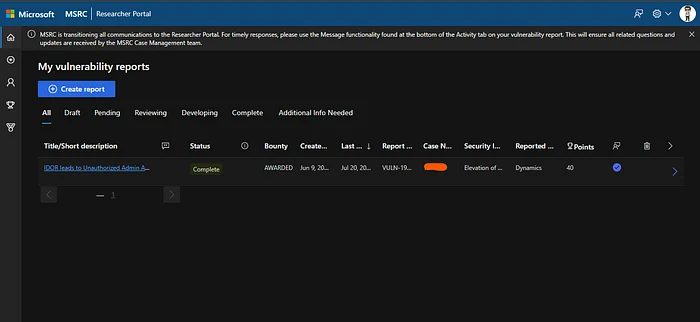
The MSRC report page.
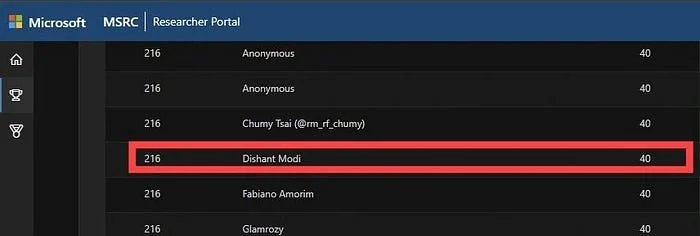
The researcher's Q2 2026 leaderboard position.
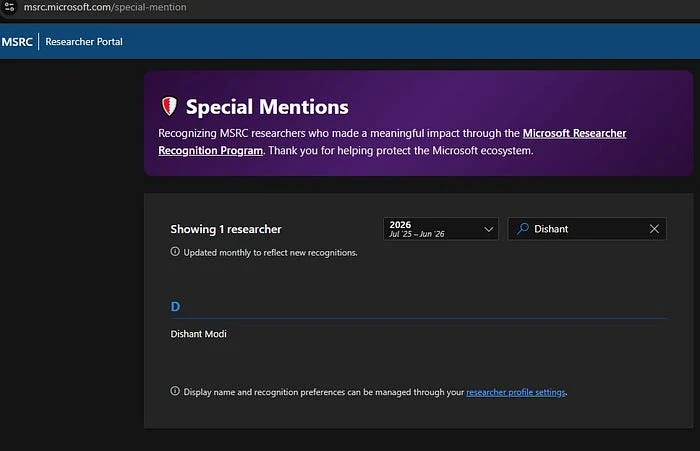
The Hall of Fame special mention.
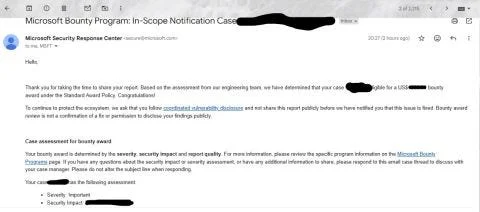
The bounty award.
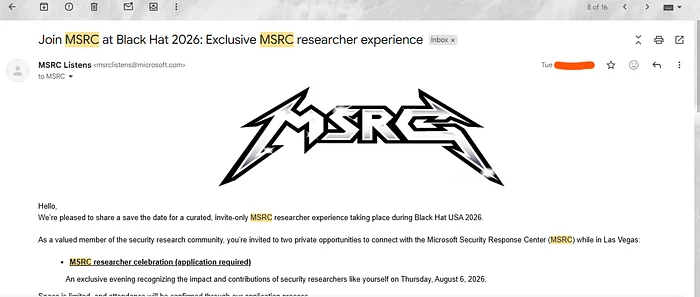
A private conference invite.
The researcher notes that MSRC pays only for vulnerabilities that qualify as Important or Critical severity, and that the bug was found after almost 20+ days of hunting on Microsoft, on what had been intended as the last day on that subdomain.
What happened, in plain words
A security researcher found a way to take over someone else's project on a Microsoft website. The site is the Microsoft Implementation Portal, at implementationportal.dynamics.com. On that site, people create projects and invite other people into them. The researcher found that one of the requests the site sends when you add a person to a project could be changed so that it added the researcher to a stranger's project instead, as an administrator. From there, a normal feature of the site let the researcher become a full administrator of that stranger's main project.
Microsoft runs a bug bounty programme: a scheme where companies pay people for finding and reporting security problems instead of using them. The programme is run by MSRC, the Microsoft Security Response Center. It covers many different products, including Dynamics, Xbox, open source tools, websites and mobile applications. The researcher reported this bug to MSRC, it was fixed, and a bounty was paid.
This article walks through the same steps the researcher took, explaining every idea from scratch along the way.
Some words you will meet
Before the steps, a few everyday explanations.
- A website is what you see in your browser. Behind it sits a server, a computer somewhere else that answers your browser's requests.
- An API is the way a website's own pages talk to its server. Think of a restaurant: the menu and the waiter are the API. You do not walk into the kitchen yourself; you tell the waiter what you want, and the waiter carries your order in a fixed format. When you click a button on a web page, the page usually sends a small message to the server in that fixed format, and the server replies.
- A request is one such message. It has a method (such as
POST, meaning "here is some data, please act on it"), a path (which part of the server you are talking to), some headers (small labels with extra information) and often a body (the data itself). - A cookie is a small piece of text your browser stores for a site and sends back with every request. It is how the server recognises you after you log in. If someone else gets your cookie, they can often act as you.
- A token is similar: a value that proves you are allowed to do something. The
_requestverificationtokenheader in this report is a token the site uses to check that a request really came from its own pages and not from a malicious page pretending to be you. - JSON is a common text format for data, made of names and values in curly braces, like
{"name": "value"}. Servers and pages use it to exchange structured information. - An ID (identifier) is a label that names one specific thing, such as one project or one partner profile. If IDs were simple numbers like 1, 2, 3, anyone could guess someone else's.
- IDOR stands for Insecure Direct Object Reference. It means the server accepts an ID from the request and acts on whatever object that ID names, without checking that the person sending the request is allowed to touch that object. A comparison: a hotel receptionist who hands out room keys to anyone who says a room number, without checking the name on the booking. The room number is the "direct object reference".
- Privilege escalation means getting more permissions than you were given. Elevation of Privilege is the same idea, and it is the category Microsoft used for this bug.
- Chaining means combining two or more smaller weaknesses so that together they do more damage than either alone. The researcher says they like chaining because it increases the impact of a bug.
- An intercepting proxy is a tool that sits between your browser and the server, so you can pause a request, look at it, change it, and then let it continue. The report does not name or version any tool.
The product and the feature
The Implementation Portal lets a user create projects. Inside a project you can add users and admins. You can also add a partner profile. A partner profile is like a sub-group with its own members: partner users and partner admins.
The feature at the centre of this report is this: a Partner Profile Admin is allowed to add any user into the main project, with either the Admin role or the User role. That is intended behaviour, a normal convenience. It is also exactly what turns a small IDOR into a full takeover, because once you control a partner profile, the site itself will help you climb into the main project.
The author's illustration for the write-up.
Setting up the test
The researcher used two separate accounts:
- A "Victim" user.
- An "Attacker" user.
Why two accounts? Because to prove that one person can affect another person's data, you need to be two people. With one account you can only see your own things, and you cannot tell whether a request worked because it was allowed or because it was your own data anyway.
A project was created under each account, and a partner profile was added to the project using the profile ID. The request sent when adding a normal user to the partner ID was intercepted so it could be captured and modified.
Finding the weak point
The researcher describes the bug as an Elevation of Privilege issue chained with IDOR. The IDOR sits in the partner profile user-adding endpoint. An endpoint is one specific address on the server that accepts requests, like one particular counter in a large office.
The request that adds a user to a partner profile carries an EngagementId. That value identifies the partner profile, which the site calls an engagement. The server trusts this value from the request. Because a Partner Profile Admin is, by design, allowed to add any user into the main project as Admin or User, control of someone else's engagement is enough to become an admin of their partner profile, and then of their main project.
Step by step
Step 1: Prepare two accounts and two projects
Create a Victim account and an Attacker account, and create a new project under each. Add a partner profile to the project using the profile ID.
This gives you a clean, controlled pair of playgrounds. You know exactly what belongs to whom, so when something appears in the wrong account you can be sure it is a real problem and not a display glitch.
Step 2: Capture the add-user request
From the Victim's account, start the process of adding a normal user to the partner ID. With the intercepting proxy running, the request is paused before it reaches the server, and it looks like this:
POST /_api/cloudflow/v1.0/trigger/random_id_hereHost: implementationportal.dynamics.comcookie: <cookie>_requestverificationtoken: <token_here>Content-Type: application/json"eventData""{\"Email\":\"[redacted]\",\"Action\":\"Add\", \"Role\":\"EngagumentUser\",\"ProjectId\"\"c1c65fa3-xxxxxxxxxxx","EngagementId\":\"c34d4dd1-xxxxxxxxxx\",\"ContactId\":\"\"}"
Line by line, in plain words:
POST /_api/cloudflow/v1.0/trigger/random_id_hereis the method and the path.POSTmeans "here is data, please act on it". The path points at a cloud flow trigger endpoint under/_api/cloudflow/v1.0/trigger/. A cloud flow is an automation that runs on the server when something triggers it; here, adding a user triggers a flow.Host: implementationportal.dynamics.comsays which site the request is for.cookie: <cookie>is the session cookie, the value that tells the server who is logged in. In this write-up the real value is replaced by a placeholder._requestverificationtoken: <token_here>is the anti-forgery token mentioned earlier. The site expects it so that only its own pages can send this request.Content-Type: application/jsonsays the body is JSON.- The body contains an
eventDatafield, and inside it the actual data: the email of the user being added, the action, the role, the project ID, the engagement ID and a contact ID.
Why capture it at all? Because you cannot change what you cannot see. The proxy lets you read the exact shape of the request, and later replay it with your own values.
Step 3: Analyse the payload
The eventData parameter contains several sub-parameters:
| Parameter | Meaning in the request |
|---|---|
Email |
The user being added |
Action |
The operation, here Add |
Role |
The role granted, here EngagumentUser |
ProjectId |
The main project |
EngagementId |
The partner profile (engagement) |
ContactId |
Contact reference, empty in the captured request |
The EngagementId is the parameter vulnerable to IDOR. In other words, this is the value the server uses to decide which partner profile to change, and it takes that value from the request rather than from anything tied to the logged-in user.
Step 4: Obtain the Victim's EngagementId
The attacker must acquire the Victim's EngagementId. The researcher calls this the tricky part and the most difficult step: the ID is encoded and not easily guessable. That difficulty is why the bug was classified as Important rather than Critical severity. The report does not describe how the ID was obtained.
Why does this matter so much? Because an IDOR is only useful if you can name someone else's object. If the ID were a simple number, an attacker could try 1, 2, 3 and find yours in seconds. An encoded, hard-to-guess ID is a real barrier, and it is the reason the severity was Important rather than Critical.
Step 5: Replay with the Victim's EngagementId and an elevated Role
Once the Victim's EngagementId is known, the attacker sends the intercepted POST request from their own account, with the Victim's EngagementId injected into the payload. In the same manipulated request, the attacker changes the Role parameter to EngagementAdmin.
Two changes, two purposes. Swapping the EngagementId points the request at the Victim's partner profile instead of the attacker's own. Changing the Role asks for the highest role in that profile rather than the ordinary EngagumentUser role. The server accepts the request and adds the attacker as an admin of the Victim's partner profile.
The attacker's account shown inside the Victim's partner profile.
Step 6: Escalate to main project admin
As an intended feature of the application, a Partner Profile Admin has the authority to add themselves, or anyone else, as an Admin to the main project. The attacker uses this newly acquired Partner Profile Admin privilege to elevate themselves to a full Admin on the Victim's main project.
This step needs no trickery at all. It is the site working as designed, but now the attacker is the one holding the trusted role. That is the chain: a small IDOR gives a partner profile admin role, and the partner profile admin role gives the main project.
The attacker's account shown in the main project section.
From that position the attacker can perform all the actions available to a project admin, such as closing the project, deleting users, and adding users and admins.
Why it worked
The attacker also changes the Role value in the request body from EngagumentUser to EngagementAdmin, and the server accepts it. Because the application then treats a Partner Profile Admin as trusted to add admins to the main project, the object reference bug becomes a full privilege escalation.
The encoded, non-guessable EngagementId is the most difficult step, and the report says this is why the bug was Important rather than Critical.
What an attacker could do
An attacker who knows a Victim's EngagementId can add themselves as an admin of the Victim's partner profile and then, through the intended Partner Profile Admin capability, become a full admin of the Victim's main project. As a project admin they can close the project, delete users, and add users and admins. The precondition is knowledge of the encoded EngagementId; without it the attack does not proceed.
How it should be fixed
The report says the issue was fixed within 10 days of submission, but does not describe the change. A correct fix would be to authorise the request against the caller's actual membership of the engagement identified by EngagementId, and to restrict which roles a caller may assign rather than trusting the Role value in the body. In plain words: check who is asking, not just what they are asking for, and do not let the request decide how much power it gets.
Similar things to test
- Swap the engagement or project identifier in any add-member, invite or role-assignment request for an identifier belonging to another tenant or account. A positive result is the target user appearing in the other account's member list.
- Change the role value in the same request to the highest privileged role the endpoint accepts. A positive result is the new role being applied without an additional authorisation step.
- Look for endpoints where a lower-privileged role can grant membership to a higher-privileged scope, as the Partner Profile Admin does here. A positive result is a two-step path from a limited role to full admin.
- Test whether identifiers that are encoded or non-sequential are still leaked elsewhere, for example in shared links, exports or API responses. A positive result is a reliable way to obtain another account's identifier.
Reporting it and the rewards
The report was submitted to the MSRC portal on 9 June. Within 10 days the bounty was awarded and the report was fixed. It was the researcher's first report to MSRC. The rewards listed are MSRC leaderboard points, Hall of Fame, a bounty, swag from the swag store, and private invites to conferences and zero day quests.
The MSRC report page.
The researcher's Q2 2026 leaderboard position.
The Hall of Fame special mention.
The bounty award.
A private conference invite.
The researcher notes that MSRC pays only for vulnerabilities that qualify as Important or Critical severity, and that the bug was found after almost 20+ days of hunting on Microsoft, on what had been intended as the last day on that subdomain.
Glossary
- API: the fixed way a website's pages and its server exchange messages, like a waiter carrying orders between you and the kitchen.
- Attacker account: the account the researcher controls and uses to try to reach another person's data.
- Body: the part of a request that carries data, as opposed to the address and headers.
- Bug bounty programme: a scheme where a company pays people for reporting security problems responsibly.
- Chaining: combining several smaller weaknesses so that together they cause more damage.
- Cloud flow: an automation on the server that runs when something triggers it.
- Cookie: a small value your browser stores for a site and sends back with each request, used to recognise you.
- Critical / Important severity: Microsoft's rating of how serious a bug is; the report explains that the hard-to-guess ID kept this one at Important rather than Critical.
- Elevation of Privilege: getting more permissions than you were given.
- Endpoint: one specific address on a server that accepts requests.
- Engagement: the site's internal name for a partner profile, identified by an
EngagementId. - Header: a small labelled piece of extra information attached to a request, such as the cookie or content type.
- ID: an identifier that names one specific object, such as a project or a partner profile.
- IDOR (Insecure Direct Object Reference): a bug where the server acts on an ID taken from the request without checking that the caller is allowed to touch that object.
- Intercepting proxy: a tool placed between browser and server that lets you pause, read and change requests.
- JSON: a text format for structured data, made of names and values in curly braces.
- MSRC: the Microsoft Security Response Center, which runs Microsoft's bug bounty programme and receives reports.
- Partner profile: a sub-group inside a project with its own partner users and partner admins.
- Payload: the data carried in a request, here the JSON inside
eventData. - POST: a request method meaning "here is data, please act on it".
- Privilege escalation: the same as elevation of privilege, reaching permissions you were not granted.
- Project: the main workspace on the Implementation Portal, containing users, admins and partner profiles.
- Request: one message from browser to server, with a method, a path, headers and often a body.
- Role: the level of permission a user has, such as
EngagumentUserorEngagementAdmin. - Server: the remote computer that answers your browser's requests.
- Session: the period during which the server recognises you as logged in, usually via a cookie.
- Severity: how serious a bug is judged to be.
- Swag: promotional merchandise given as a reward.
- Token: a value that proves you are allowed to do something, such as the
_requestverificationtokenheader. - Victim account: the account whose data the researcher tries to reach, standing in for a real user.
- Zero day quest: one of the private invitations listed among the MSRC rewards.



