Chaining improper authorization to Race condition to harvest credit card details
A checkout page returned a partially filled form to any browser that loaded the same checkout URL, and a race condition allowed an attacker to repeatedly request that URL and receive the victim's full credit card details without needing an error. The attacker could obtain the victim's payment information by luring them to the checkout URL and flooding requests.
 Published on medium.com
In this post I would be covering how I ended up finding an unusual race condition at an unexpected place due to a logical flaw .
The full write-up lives on its author's site
It belongs to its author, so we link to it rather than copy it. The other two tabs are our own rewrites, checked against it.
Context
The target, referred to throughout as redacted.com, was a shopping website. A user selects a product and then enters personal and credit card details on a checkout page. The vulnerable URL had the following shape:
https://www.redacted.com/checkout/36014f0cc44343434/details/
The 36014f0cc44343434 segment is a random-looking string in the checkout URL. The page behind this URL is the form where the buyer types their details and submits them.
Setup
The researcher worked with two separate accounts in two different browsers. The checkout URL was opened in one browser while the form was being filled in the other. Burp Intruder was used for the automated part of the attack, configured with NULL payloads and 100 threads. No product versions are given in the report.
Finding it
While testing the checkout form, the researcher noticed that server-side validation was in place: if an input error occurred after the details had been entered and the checkout button was pressed, the same page came back asking the user to fill the form in correctly.
The interesting behaviour appeared when the checkout URL, with a partially filled form, was copied and pasted into a different browser logged in to a different account. The same partially filled information was returned. That alone is an authorisation problem: one account can read another account's in-progress checkout data.
The obstacle to turning this into an attack was the random string in the URL. The researcher spent time trying to reverse it and failed, so the identifier could not be predicted.
The first exploitation idea was to send the checkout URL to a victim, ask them to complete the checkout (lured with an offer), and have the attacker refresh the same URL in their own window. If the victim made a syntactical mistake and pressed the checkout button, the error would cause the prefilled form to be shown back to the victim, and the attacker refreshing the page would see the same prefilled form, including unmasked card details.
That scenario was rejected as too dependent on the victim making a mistake. The researcher also tried CSRF to force the victim to generate the error, but that was pointless because the only prefilled information being produced was the researcher's own.
Exploitation
The idea that replaced the error-dependent scenario was to request the checkout URL many times concurrently instead of refreshing it manually.
Step 1: Send the checkout URL to the victim
The attacker sends the checkout URL to the victim and asks them to complete the checkout, luring them with an offer.
https://www.redacted.com/checkout/36014f0cc44343434/details/
Step 2: The victim starts entering details
The victim opens the page and begins filling in the checkout form.
Step 3: Flood the same URL from the attacker's side
The attacker takes the checkout URL and runs it through Burp Intruder with NULL payloads at 100 threads, so the same URL is requested repeatedly and concurrently.
Step 4: The victim submits
While the intruder is running, the victim fills the form and presses Submit. The researcher was watching for a change on the intruder side.
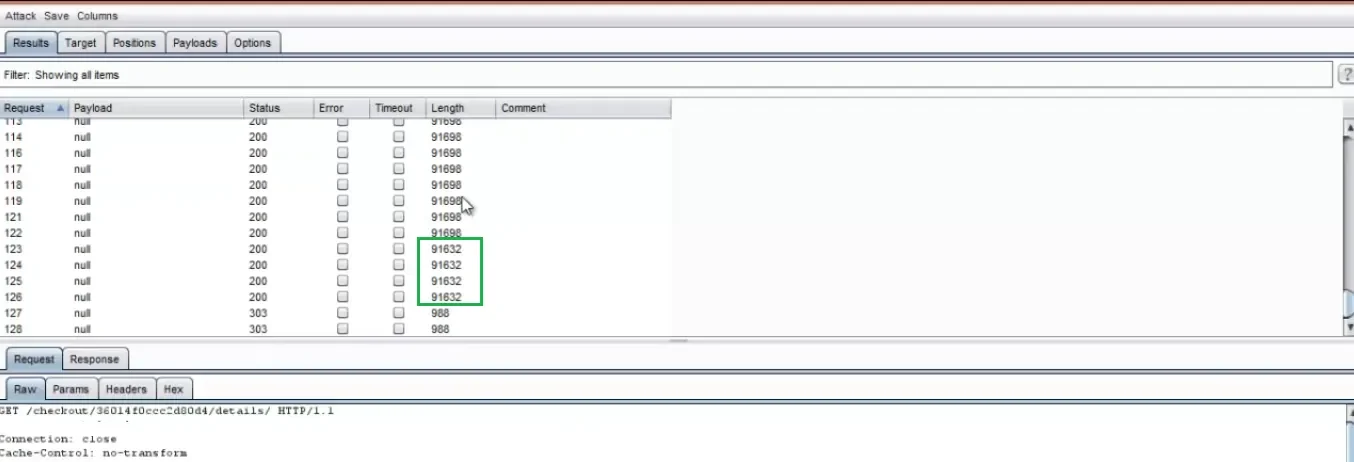
A different response length appeared just after the submission. The response then went to a 3xx, which indicates that the checkout had been completed and the flow was moving to the final page.
Step 5: Read the response
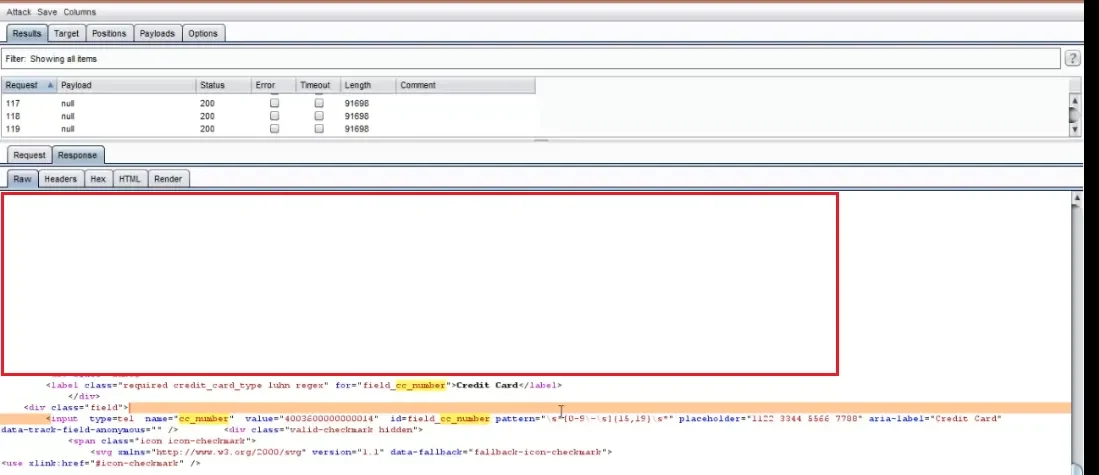
The credit card number was leaked in the response. The response contained all the details the victim had entered.
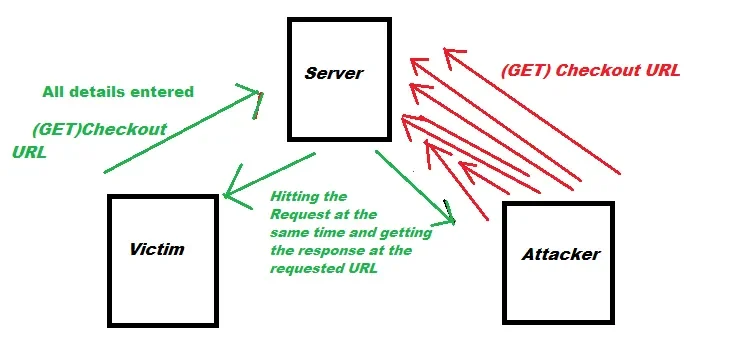
The diagram summarises the sequence: the attacker requests the checkout URL in an extremely fast, multi-threaded manner; as soon as the victim submits the full details, the server caches them and inadvertently returns the response, containing all the form information, to the attacker's pending requests. This happens before the flow moves to the next page (the 3xx), and it does not require any error on the victim's side.
Root cause
The checkout page returned prefilled form data to a different account after a validation error, without checking that the requester owned the checkout.
The report says the server caches the details at submission and inadvertently gives the response to the attacker's concurrent requests. The multi-threaded flood means requests are running at the moment the victim submits, and the response they received contained the submitted data. The report describes this as the server caching the details and inadvertently giving the response to the attacker's requests; the precise implementation is not shown.
Impact
An attacker who knows a victim's checkout URL can obtain the personal and credit card details the victim enters, including the card number, which was not masked in the response. In the described scenario, the victim uses the attacker-supplied checkout URL and submits the form while the attacker's requests are running. The report does not describe how the attacker obtains the random checkout identifier in the first place; the researcher's own attempt to reverse it failed.
Fix
The report does not describe any fix or remediation.
Variants to test
- Cross-account object access on checkout or cart URLs. Open a checkout or cart URL in a second account and see whether the first account's partially filled data is returned. A positive result is any field from the other account appearing in the response.
- Concurrent reads during submission. Run the same URL through an intruder with NULL payloads at high thread count while a second session submits the form. A positive result is a response with a different length or a 3xx that contains the submitted values.
- Unmasked sensitive fields in error responses. Trigger a validation error after entering card data and inspect the returned HTML for the full card number. A positive result is the unmasked number in the response body.
- Identifier predictability. Collect several checkout identifiers and check whether they are sequential, time-based or otherwise derivable. A positive result is an identifier that can be computed for another user's checkout.
- Cached response reuse. After a submission, request the same checkout URL from a different session and check whether the completed data is still served. A positive result is the submitted details returned after the flow has moved on.
What happened, in plain words
A security researcher found a way to steal credit card details from an online shop. The shop had a checkout page where you type your name, address and card number. The page address contained a random string. The researcher discovered two problems that, when combined, let an attacker see everything a victim typed into that page.
First, the checkout page did not check who was asking. If you knew the page address, you could open it in your own browser and, after a validation error, see what another person had typed there, even from a different account. That is an authorisation problem: the website failed to confirm that the person asking for the data was allowed to see it.
Second, the researcher found a way to grab the data at the exact moment the victim pressed the submit button. By sending many requests to the same page at almost the same time (a race condition), the attacker's requests received the response containing the victim's details. The server then sent back the victim's full details, including the card number, to those waiting requests. The attacker did not need the victim to make a mistake; they only needed the victim to submit the form while the attacker's requests were running.
The researcher used a tool called Burp Intruder to send the requests automatically, with 100 threads (100 requests at once). The report does not say how the attacker would obtain the random checkout address in the first place; the researcher tried to guess it and failed.
The target and the checkout page
The website, called redacted.com in the report, was a shopping site. A user picks a product, then goes to a checkout page to enter personal and credit card details. The vulnerable page had this address:
https://www.redacted.com/checkout/36014f0cc44343434/details/
This is a URL, the address you type into a browser to reach a page. The part 36014f0cc44343434 is a random-looking string that identifies this particular checkout. Think of it like a temporary ticket number: each checkout gets its own. The page behind this URL is the form where the buyer types their details and submits them.
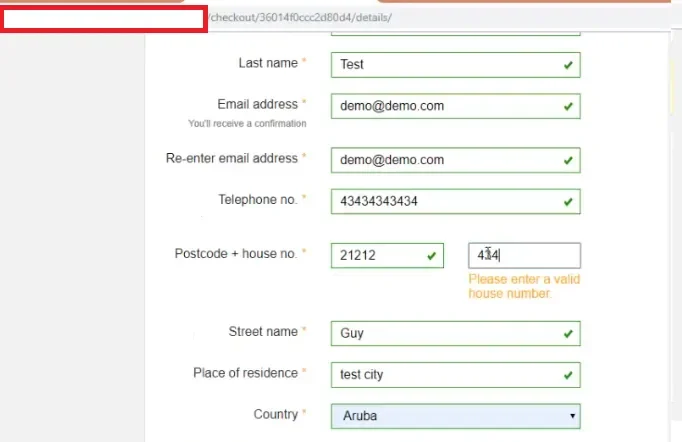
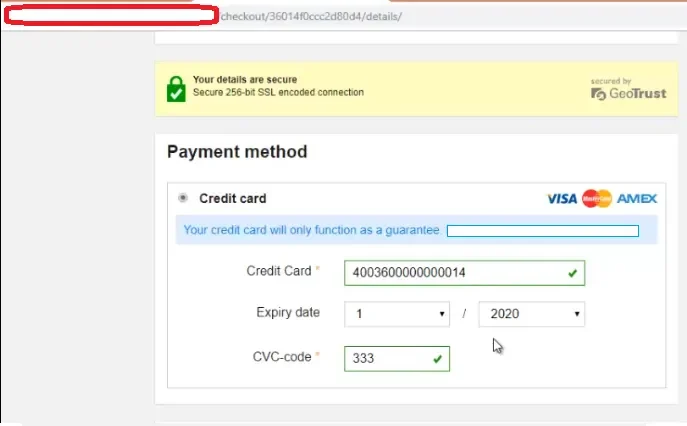
The two screenshots show the checkout page as it appeared. The researcher notes that the screenshots were taken from a video, so the clarity is not perfect.
Finding the authorisation problem
While testing the checkout form, the researcher noticed that the site checked the input on the server side. That means when you press the checkout button, the server (the computer that runs the website) examines what you typed. If something is wrong, such as a missing field or a badly formatted value, the server sends the same page back with an error message asking you to fill it in correctly. This is normal and good: it stops bad data from being processed.
The interesting behaviour appeared when the researcher copied the checkout URL, with a partially filled form, and pasted it into a different browser that was logged in to a different account. The same partially filled information came back. In other words, one account could read another account's in-progress checkout data. That alone is a security flaw: the website did not check that the person requesting the page was the same person who owned that checkout.
The obstacle to turning this into an attack was the random string in the URL. The researcher spent time trying to reverse it, meaning to figure out how it was generated so that it could be predicted, but failed. Without being able to guess the string, an attacker cannot easily target a specific victim's checkout.
The first exploitation idea was to send the checkout URL to a victim, ask them to complete the checkout (lured with an offer), and have the attacker refresh the same URL in their own window. If the victim made a syntactical mistake (a typing error) and pressed the checkout button, the error would cause the prefilled form to be shown back to the victim, and the attacker refreshing the page would see the same prefilled form, including unmasked card details. But this scenario was rejected as too dependent on the victim making a mistake. The researcher also tried CSRF (Cross-Site Request Forgery, a technique to make a victim's browser send a request without their knowledge) to force the victim to generate the error, but that was pointless because the only prefilled information being produced was the researcher's own.
Exploitation
The idea that replaced the error-dependent scenario was to request the checkout URL many times concurrently instead of refreshing it manually. This is the race condition: a situation where the timing of actions matters, and doing many things at once can produce a result that would not happen if they were done one by one.
Step 1: Send the checkout URL to the victim
The attacker sends the checkout URL to the victim and asks them to complete the checkout, luring them with an offer.
https://www.redacted.com/checkout/36014f0cc44343434/details/
This is the same URL as before. The attacker hopes the victim will open it and start typing their details.
Step 2: The victim starts entering details
The victim opens the page and begins filling in the checkout form. At this point, the form is partially filled on the victim's screen, but the data has not yet been sent to the server.
Step 3: Flood the same URL from the attacker's side
The attacker takes the checkout URL and runs it through Burp Intruder with NULL payloads at 100 threads. Burp Intruder is a tool that automates sending many requests to a web server. NULL payloads means the tool sends requests with no extra data attached; it simply requests the same URL over and over. 100 threads means it sends 100 requests at the same time, rather than one after another. The goal is to have many requests pending at the server, all asking for the same checkout page, so that when the victim submits, some of those requests are still waiting and will receive the response that contains the victim's data.
Step 4: The victim submits
While the intruder is running, the victim fills the form and presses Submit. The researcher was watching for a change on the intruder side.
A different response length appeared just after the submission. Response length is the size of the reply from the server; a change in length can indicate that the server sent something different, such as a page with the victim's data instead of the usual empty form. The response then went to a 3xx status code. HTTP status codes are numbers that tell the browser what happened: 3xx means a redirection, so the flow was moving to the final page, indicating that the checkout had been completed.
Step 5: Read the response
The credit card number was leaked in the response. The response contained all the details the victim had entered. In other words, the attacker's pending requests received the page that the server generated after the victim's submission, and that page included the card number, which was not masked (hidden with asterisks or similar).
The diagram summarises the sequence: the attacker requests the checkout URL in an extremely fast, multi-threaded manner; as soon as the victim submits the full details, the server caches them (stores them temporarily) and inadvertently returns the response, containing all the form information, to the attacker's pending requests. This happens before the flow moves to the next page (the 3xx), and it does not require any error on the victim's side.
Root cause
The checkout page returned prefilled form data to a different account after a validation error, without checking that the requester owned the checkout. A session is like a temporary ID card that a website gives your browser after you log in, so it can recognise you on subsequent requests. Here, the page did not verify that the session asking for the data matched the session that created the checkout.
The report says the server caches the details at submission and inadvertently gives the response to the attacker's concurrent requests. The multi-threaded flood means requests are running at the moment the victim submits, and the response they received contained the submitted data. The report describes this as the server caching the details and inadvertently giving the response to the attacker's requests; the precise implementation is not shown.
Impact
An attacker who knows a victim's checkout URL can obtain the personal and credit card details the victim enters, including the card number, which was not masked in the response. In the described scenario, the victim uses the attacker-supplied checkout URL and submits the form while the attacker's requests are running. The report does not describe how the attacker obtains the random checkout identifier in the first place; the researcher's own attempt to reverse it failed.
Fix
Variants to test
- Cross-account object access on checkout or cart URLs. Open a checkout or cart URL in a second account and see whether the first account's partially filled data is returned. A positive result is any field from the other account appearing in the response.
- Concurrent reads during submission. Run the same URL through an intruder with NULL payloads at high thread count while a second session submits the form. A positive result is a response with a different length or a 3xx that contains the submitted values.
- Unmasked sensitive fields in error responses. Trigger a validation error after entering card data and inspect the returned HTML for the full card number. A positive result is the unmasked number in the response body.
- Identifier predictability. Collect several checkout identifiers and check whether they are sequential, time-based or otherwise derivable. A positive result is an identifier that can be computed for another user's checkout.
- Cached response reuse. After a submission, request the same checkout URL from a different session and check whether the completed data is still served. A positive result is the submitted details returned after the flow has moved on.
Glossary
- API: Application Programming Interface; a set of rules that lets one piece of software talk to another. In web terms, it is often a way for a browser to exchange data with a server without reloading the page.
- Authorisation: The process of checking whether a user is allowed to do something or see something. Authentication is proving who you are; authorisation is what you are permitted to do.
- Burp Intruder: A tool within the Burp Suite security testing software that automates sending many HTTP requests, often used to test for issues like brute force or race conditions.
- Caching: Temporarily storing data so that future requests can be served faster. A cache is the storage itself.
- Checkout URL: The web address of the page where a buyer enters payment and personal details to complete a purchase.
- CSRF (Cross-Site Request Forgery): An attack that tricks a logged-in user's browser into sending a request to a website without the user's knowledge, often to perform an action on their behalf.
- HTTP status code: A three-digit number in a server's response that indicates the outcome, such as 200 for success, 3xx for redirection, 404 for not found, 500 for server error.
- NULL payloads: In Burp Intruder, a setting that sends requests with no additional data, effectively repeating the same request many times.
- Race condition: A flaw that occurs when the timing of actions affects the outcome, often when multiple requests are processed simultaneously and the system is not designed to handle that concurrency correctly.
- Response length: The size, in bytes, of the data returned by the server. A change in length can signal that different content was returned.
- Server-side validation: Checking the data on the server (rather than only in the browser) to ensure it meets required rules before processing.
- Session: A period of interaction between a user and a website, typically tracked by a session ID stored in a cookie, so the server can remember who you are across requests.
- Threads: In computing, a thread is a sequence of instructions that can run concurrently with others. Using many threads means performing many tasks at the same time.
- 3xx: A class of HTTP status codes indicating redirection; the server tells the browser to go to a different URL.
- URL: Uniform Resource Locator; the address of a resource on the web, like
https://www.example.com/page.



