Checkmk: Remote Code Execution by Chaining Multiple Bugs (2/3)
The article describes how an unauthenticated attacker can forge LQL queries to exfiltrate monitoring data and use the PROCESS_FILE command to delete arbitrary files, then race the recreation of the auth.secret file to bypass NagVis authentication. This allows the attacker to gain access to the NagVis component, increasing the attack surface for further exploitation.

blog.sonarsource.com
Published on blog.sonarsource.com
This is the second of three articles in the Checkmk - Remote Code Execution by Chaining Multiple Bugs series (first article). The series of articles outlines the results of our effort to help secure the open-source world and better understand real-world vulnerabilities by auditing the open-source edition of Checkmk.
The full write-up lives on its author's site
It belongs to its author, so we link to it rather than copy it. The other two tabs are our own rewrites, checked against it.
Context
This is the second article in a three-part series on chaining vulnerabilities in Checkmk, an open-source monitoring platform, and its NagVis integration. The first article covered a Server-Side Request Forgery in the agent-receiver and a Line Feed Injection that lets an unauthenticated attacker forge arbitrary LQL queries. This part examines what those forged queries can actually do, and how they lead to a NagVis authentication bypass.
LQL (Livestatus Query Language) is the interface Checkmk uses to talk to its monitoring core. It is mainly used to retrieve data: internal hostnames and IP addresses of monitored hosts, running services, contact persons and their email addresses. It can also send external commands to the core with a COMMAND request. The documented commands can enable or disable checks and notifications. Because the open-source Raw Edition uses a Nagios monitoring core, a few additional Nagios commands are available as well.
Checkmk integrates the NagVis PHP component, and the integration is seamless from an authentication point of view: a user authenticated to the Checkmk GUI can also access NagVis. That shared trust boundary is what this article breaks.
Setup
The research was performed against the open-source edition of Checkmk. The precondition is the state reached at the end of the first article: an unauthenticated, remote attacker who can forge arbitrary LQL queries through the SSRF and LF Injection. The response to those queries cannot be read, so every technique here is blind.
Finding it
The exploitation chain has four links. The first two, the SSRF in the agent-receiver (1) and the LF Injection (2), were covered in the first article. They give the attacker forged LQL queries. The third is an Arbitrary File Read and the fourth a Code Injection, but before either can be used, authenticated access to NagVis is required. This article fills the gap between link two and link three.
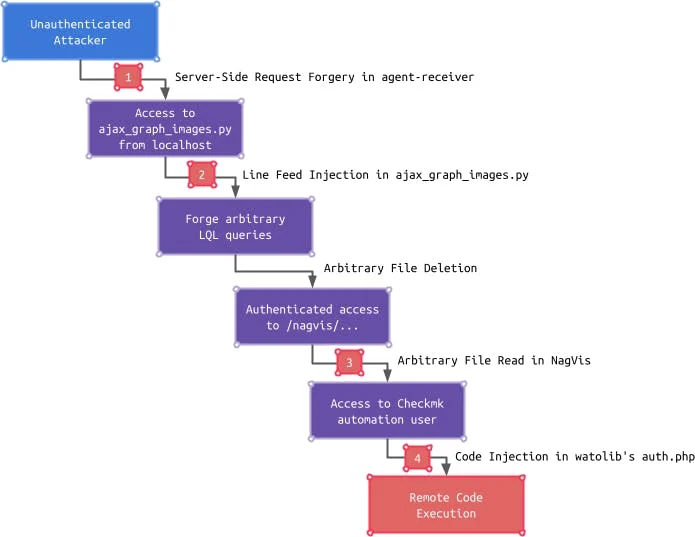
The picture summarises the full chain that lets an unauthenticated attacker reach remote code execution.
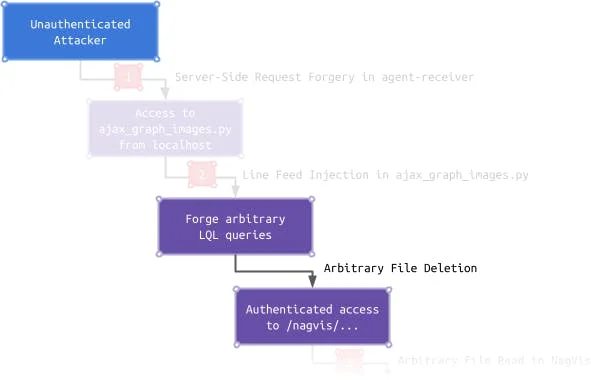
The second picture shows the two topics of this article: exfiltrating monitoring data through LQL, and using the LQL interface to delete arbitrary files and bypass NagVis authentication.
Exploitation
Step 1: confirm the injection is blind
The vulnerable endpoint /ajax_graph_images.py does not directly output the retrieved data, and the SSRF used to request it cannot read the response either. The attacker therefore deals with a blind LQL injection, comparable to a blind SQL injection.
In a blind SQL injection, a time-based approach is typical. The following query could be used to determine whether the first character of the first name in the table users is 'a':
If the condition holds, the call to SLEEP(5) delays the response by five seconds. Iterating over each possible character and measuring response time recovers the value one character at a time.
Step 2: use LQL time delays as the timing oracle
LQL has a native equivalent: time delays, whose purpose is to retrieve some data only when a condition is satisfied, for example reporting disk usage only when CPU load exceeds a threshold. The relevant headers are prefixed with Wait:
WaitObject: name identifying the object for which a condition should be satisfied.WaitCondition: the condition that should be satisfied.WaitTimeout: limit in milliseconds after which the query is executed even if the condition was not satisfied.
WaitObject is required, so the attacker must know the name of the object whose data they want. The noisiest approach is a word list. The following query determines whether a host named ldap exists:
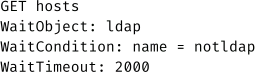
If no host named ldap exists, the query returns immediately. If the host exists, the condition is never satisfied and the query times out after 2000 ms, which confirms the host.
Step 3: enumerate hostnames through the hostgroups table
A more efficient route avoids guessing. By default every host is added to the default host group check_mk. That is the name of the hostgroups object in the table, so it can be used as the WaitObject header. The table has a column called members containing all hostnames in the host group. A request to this table may look like this:
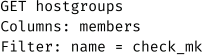
The response contains the name of all hosts:
By setting WaitCondition on the members column with a regular expression, hostnames can be exfiltrated character by character. The following query determines whether a hostname begins with serv:
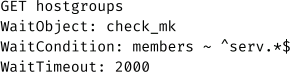
Step 4: pivot from hostnames to host data and contacts
Once the hostnames are known, they can be used as the WaitObject header on the hosts table to retrieve all data for a given host, for example its IP address:
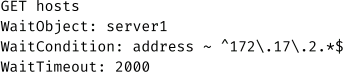
The name of the contact responsible for the host can be exfiltrated the same way:
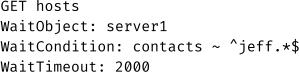
With a contact name in hand, further information about that contact is retrievable via the contacts table:

Values in a column of one table often contain the names of objects in another table, which is what makes it possible to walk the whole data set gradually. A video in the article demonstrates an unauthenticated remote attacker using the two vulnerabilities from the first article to exfiltrate monitoring data from a vulnerable Checkmk server.
Step 5: obtain an arbitrary file deletion primitive
LQL can also send external commands to the monitoring core with a COMMAND request. The abilities are very limited. Sensitive commands such as CMD_CHANGE_HOST_CHECK_COMMAND, which alters the command executed for host checks, were disabled for security reasons back in 2008. One Nagios command that is still enabled is PROCESS_FILE, with this format:
Issuing it makes the Nagios core read the file named by <file_name> and execute each line as an external command. On its own this does not increase the attack surface, since it is no different from issuing the external command directly. The second parameter matters: if <delete> is non-zero, the file is deleted after processing, regardless of its contents. Even a file with no valid external command is deleted. That gives the attacker an arbitrary file deletion primitive.
Step 6: understand the Checkmk session cookie
After a successful login, Checkmk creates a session cookie that identifies the user. The cookie is structured like this:
For example, a cookie for the cmkadmin user may look like this:

The hash at the end is produced by _generate_auth_hash, which calls _generate_hash in checkmk/cmk/gui/login.py. The hash is calculated like this:
To verify a cookie, the Checkmk GUI recalculates the hash and compares it with the one in the cookie, again in checkmk/cmk/gui/login.py.
Forging a cookie requires all four inputs to the hash. username and session_id are part of the cookie itself. serial starts at 0 and is incremented by one each time the user's password is changed or the account is locked, so successive values from 0 can simply be tried. The last input, secret, comes from _load_secret in checkmk/cmk/gui/login.py: it is read from a file called auth.secret. If that file is empty or only 32 bytes long, a new secret is generated and written to it. _generate_secret returns 256 random characters:

Without that value a valid cookie cannot be forged. Two aspects of _load_secret matter here:
- It always returns 256 random characters, even if
auth.secretwas absent or not read properly. - The
auth.secretfile is recreated if it is not present.
Step 7: compare with NagVis
Deleting auth.secret with PROCESS_FILE does not help against the Checkmk GUI, because the file is recreated on the fly with a new, unknown secret. NagVis, however, verifies the same cookie differently. The class CoreLogonMultisite checks it in checkAuthCookie in nagvis/share/nagvis/htdocs/server/core/classes/CoreLogonMultisite.php. The cookie is split into $username, $sessionId and $cookieHash. The $user_secret value read via loadAuthFile is the serial value already described. generateHash computes the hash from the given parameters, and if it matches the cookie hash the user is treated as authenticated. A type juggling vulnerability in this comparison was reported separately as CVE-2022-3979; its exploitation is far more laborious and irrelevant here.
The generateHash function resembles its Python equivalent, but the loadSecret function it calls is simpler than the Python one, in nagvis/share/nagvis/htdocs/server/core/classes/CoreLogonMultisite.php. It reads $secret from auth.secret but neither handles file reading errors nor recreates the file when it is missing.
Calling file_get_contents on a non-existent file raises a warning and returns false. NagVis's error handlers turn that warning into an exception, which stops further code from executing. So simply deleting auth.secret does not yield an empty $secret.
Step 8: win the file race
The gap is in how the Checkmk GUI recreates the file. _load_secret creates auth.secret with a new secret when it is missing, but creation (open) and writing the value (write) are two distinct operations. If NagVis's loadSecret calls file_get_contents right after the file was recreated but before the new value was written, it operates on an existing but empty file and gets an empty string back:
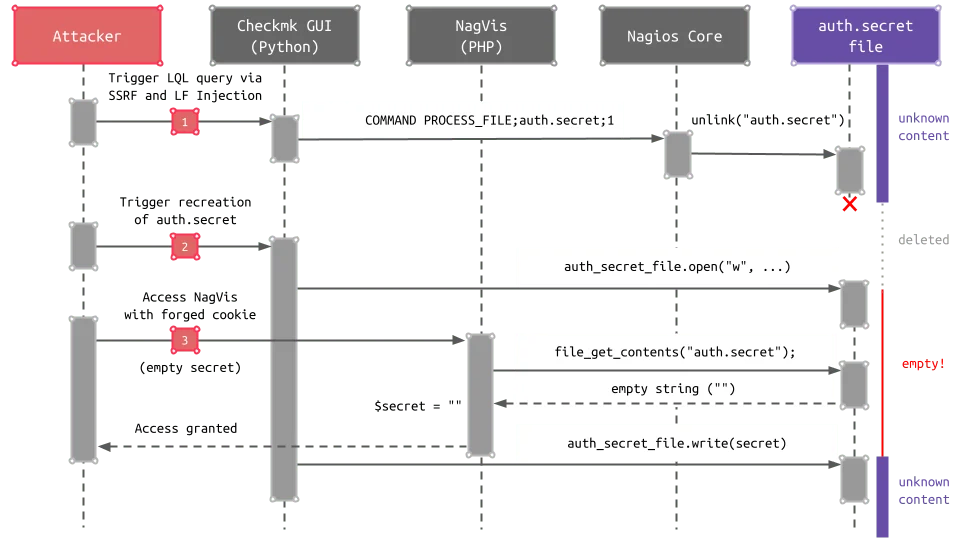
The sequence is:
- Use the SSRF and LF Injection to trigger an LQL query with
PROCESS_FILEthat deletesauth.secret. - Quickly trigger a request to the Checkmk GUI to recreate
auth.secret. - Quickly trigger a request to NagVis with a forged cookie that assumes an empty
$secret.
If the file_get_contents call in NagVis lands in the right window, $secret is empty and access to NagVis is granted. If the attempt fails, repeat it. The attack needs a few attempts but can reliably be exploited.
Root cause
The chain rests on two implementation differences. First, PROCESS_FILE with a non-zero delete parameter removes a file regardless of its contents, giving an unauthenticated attacker arbitrary file deletion through forged LQL. Second, the two implementations of the secret loading disagree. The Checkmk GUI's _load_secret is fail-safe: it always returns 256 random characters and recreates a missing file. NagVis's loadSecret is not: it does not recreate the file and does not handle read errors. The window between open and write in the GUI turns a missing file into an empty secret for anyone reading at the wrong moment. The GUI's own implementation prevents the bypass there, which is why the technique only works against NagVis.
Impact
An unauthenticated, remote attacker can exfiltrate monitoring data: internal hostnames, IP addresses, running services, contact persons and their email addresses. That data is not highly sensitive on its own but is useful for mounting further attacks. The attacker can also delete arbitrary files, and by winning the race can bypass NagVis authentication. With NagVis access, another security boundary is crossed and the exposed attack surface grows, setting up the arbitrary file read and code injection covered in the third article. The bypass requires several attempts and depends on timing, but the article reports it as reliable.
Fix
The article does not describe the patch itself. It credits the Checkmk team with a comprehensive patch for all reported vulnerabilities and a quick response. The design lesson it draws is defence in depth: the Checkmk GUI's fail-safe secret handling, which guarantees the secret cannot be empty, prevents the technique there. The type juggling issue in NagVis was tracked separately as CVE-2022-3979.
Variants to test
- Other LQL deployments: send a
WaitObject/WaitCondition/WaitTimeoutquery against a table with a known object and measure whether the response is delayed until timeout. A positive result is a measurable difference between an existing and a non-existing object. - Other external command surfaces: look for commands that process or delete files, such as
PROCESS_FILEwith a non-zero delete flag, and check whether the file is removed regardless of content. A positive result is a file disappearing after the command. - Secret file handling in sibling components: find components that share a session cookie but read the secret with a different implementation. A positive result is a reader that returns an empty value when the file exists but is empty, or throws on a missing file.
- File creation races: where a secret or key file is created and then written in separate operations, request the reader in parallel with recreation. A positive result is an authentication decision made with an empty secret.
- Serial values: where a cookie includes a counter that starts at
0and increments on password change or lock, try successive values. A positive result is a forged cookie accepted with a low serial.
What happened, in plain words
Checkmk is a piece of software that watches other computers for you. It is called a monitoring platform: it keeps an eye on servers, network devices and services, and tells you when something goes wrong. NagVis is an add-on that draws maps and diagrams of what is being monitored. Checkmk is open source, meaning anyone can read and change the code.
A group of security researchers read through the open-source edition of Checkmk and found several bugs. On their own, each bug does something modest. Chained together, they let someone who has never logged in take full control of the server. This article is the second of three that describe that chain.
The first article covered two bugs: a Server-Side Request Forgery (the server is tricked into making a request on the attacker's behalf) and a Line Feed Injection (a newline character smuggled into a request so that extra instructions get added). Together they let an attacker who is not logged in send their own queries to Checkmk's monitoring core, the part of the software that actually holds the monitoring data. The catch is that the attacker cannot see the answers.
This second article answers two questions. What can an attacker do with queries whose answers they cannot read? And can those queries be used to get past the login of NagVis, the map component? The answer to the second question is yes, and the route is surprising: by deleting a file and then racing two requests against each other.
The pieces you need to know
Before the details, a few everyday ideas.
What an API is. An API is a way for one program to ask another program to do something, without a human clicking anything. Think of a restaurant: you do not walk into the kitchen, you tell the waiter what you want, and the waiter brings it back. The waiter is the API. In this article, the waiter is a small web address that Checkmk exposes, and the kitchen is the monitoring core.
What a query is. A query is the request you hand to the waiter: "give me the list of hosts", "delete this file". Checkmk has its own query language for this, called LQL, short for Livestatus Query Language. Livestatus is the name of the component that answers those queries.
What a cookie is. When you log in to a website, the site sends your browser a small piece of text called a cookie. Your browser shows it back on every later request, and that is how the site remembers who you are. A cookie is like a cloakroom ticket: it does not contain your coat, it just proves the coat is yours. If someone can forge a valid ticket, the cloakroom will hand them your coat.
What a hash is. A hash is a fingerprint of some data, produced by a mathematical recipe. Feed the same data in, get the same fingerprint out. Change one character, and the fingerprint changes completely. You cannot work backwards from a fingerprint to the data. Websites often store a hash instead of a password, and compare fingerprints rather than the originals.
What a blind vulnerability is. A blind vulnerability is one where the attacker can send instructions but cannot see the reply. It is like shouting into a closed room: you cannot hear the answer, but you can still learn things by timing how long the silence lasts.
What a race condition is. A race condition happens when two operations run at almost the same moment and the result depends on which one finishes first. Think of two people grabbing for the same door handle: whoever gets there first decides what happens next.
The exploitation chain
The chain has four links. The first two, the Server-Side Request Forgery in the agent-receiver (1) and the Line Feed Injection (2), were covered in the first article. They give the attacker the ability to send forged LQL queries. The third link is an Arbitrary File Read (reading any file on the server) and the fourth is a Code Injection (getting the server to run the attacker's code). Before either of those can be used, the attacker needs to be logged in to NagVis. This article fills the gap between link two and link three.
The picture summarises the whole chain, from an attacker who is not logged in all the way to running their own code on the server.
The second picture shows the two topics of this article: pulling monitoring data out through LQL, and using the LQL interface to delete arbitrary files and get past the NagVis login.
Step 1: confirm the injection is blind
The vulnerable endpoint /ajax_graph_images.py does not directly output the data it retrieves, and the Server-Side Request Forgery used to reach it cannot read the response either. The attacker therefore deals with a blind LQL injection, comparable to a blind SQL injection.
A blind SQL injection is the same idea in the world of databases: you cannot see the query result, so you ask questions whose answers change how long the database takes. The following query could be used to determine whether the first character of the first name in the table users is 'a':
Line by line, in plain words:
- The query asks the database a yes-or-no question: is the first letter of the first name in the
userstable equal toa? - If the answer is yes, the database is told to sleep for five seconds before replying.
- If the answer is no, it replies straight away.
- The attacker measures how long the reply takes. Five seconds means yes; instant means no.
- By repeating this for every possible letter, and then for the second letter, and so on, the attacker recovers the whole name one character at a time, without ever seeing it.
Step 2: use LQL time delays as the timing oracle
LQL has a built-in version of the same trick: time delays. Their normal purpose is to fetch some data only when a condition is met, for example reporting disk usage only when CPU load is above a threshold. The relevant headers are prefixed with Wait:
WaitObject: the name identifying the object for which a condition should be satisfied.WaitCondition: the condition that should be satisfied.WaitTimeout: the limit in milliseconds after which the query runs anyway, even if the condition was not satisfied.
WaitObject is required, so the attacker must know the name of the object whose data they want. The noisiest approach is a word list: try a long list of likely names and see which ones make the query hang. The following query determines whether a host named ldap exists:
Line by line:
- The query names
ldapas the object to wait for. - It sets a condition that will never be true, so the query can only end by timing out.
- The timeout is 2000 milliseconds, two seconds.
- If no host called
ldapexists, the query returns immediately, because there is nothing to wait for. - If the host does exist, the query waits the full two seconds and then gives up. That two-second pause is the signal that the host is there.
Step 3: enumerate hostnames through the hostgroups table
Guessing names from a word list is slow and noisy. A more efficient route avoids guessing. By default every host is added to the default host group check_mk. That is the name of the hostgroups object in the table, so it can be used as the WaitObject header. The table has a column called members containing all hostnames in the host group. A request to this table may look like this:
Line by line:
- The request asks the
hostgroupstable for its contents. - It asks for the
memberscolumn, which lists every hostname in the group. - The group it asks about is
check_mk, the default group that every host lands in. - Because the attacker cannot read the reply, the value of this request is not the list itself but the fact that the list exists and can be probed with conditions.
The response contains the name of all hosts:
That response is what the attacker cannot see directly. It is shown here so you know what is being hidden.
By setting WaitCondition on the members column with a regular expression, hostnames can be pulled out character by character. A regular expression is a pattern for matching text, like a search with wildcards but more precise. The following query determines whether a hostname begins with serv:
Line by line:
- The query waits on the
check_mkhost group again. - The condition is a pattern match against the
memberscolumn. - The pattern asks: does any member start with the letters
serv? - If yes, the condition is satisfied and the query returns quickly. If no, it waits until the timeout.
- By trying
s, thense, thenser, thenserv, and so on, the attacker builds up each hostname one letter at a time, using only the length of the pause as feedback.
Step 4: pivot from hostnames to host data and contacts
Once the hostnames are known, they can be used as the WaitObject header on the hosts table to retrieve all data for a given host, for example its IP address:
Line by line:
- This time the object being waited on is a specific host, by the name just recovered.
- The table is
hosts, which holds the details of each monitored machine. - The condition probes a field of that host, such as its IP address, one character at a time.
- The same timing trick applies: a pause means the guess was right.
The name of the contact responsible for the host can be pulled out the same way:
Line by line:
- The object is still the host.
- The condition now targets the contact field instead of the address.
- Again, the attacker learns the value by measuring pauses, not by reading anything.
With a contact name in hand, further information about that contact is retrievable via the contacts table:
Line by line:
- The object is now the contact, by the name just recovered.
- The table is
contacts, which holds details about the people responsible for hosts. - The condition probes fields of that contact, such as an email address, character by character.
Values in a column of one table often contain the names of objects in another table. That is what makes it possible to walk the whole data set gradually: a hostname leads to a contact name, a contact name leads to contact details, and so on. A video in the article demonstrates an unauthenticated remote attacker using the two vulnerabilities from the first article to pull monitoring data out of a vulnerable Checkmk server.
Step 5: obtain an arbitrary file deletion primitive
LQL can also send external commands to the monitoring core with a COMMAND request. An external command is an instruction to the monitoring software itself, rather than a question about data. The abilities are very limited. Sensitive commands such as CMD_CHANGE_HOST_CHECK_COMMAND, which alters the command run when a host is checked, were switched off for security reasons back in 2008. One Nagios command that is still switched on is PROCESS_FILE, with this format:
Line by line:
- The command is
PROCESS_FILE. <file_name>is the path of a file on the server.<delete>is a flag: if it is non-zero, the file is deleted after it has been processed.- Issuing the command makes the monitoring core read the file and run each line in it as an external command.
- On its own this does not add much, because running a command from a file is no different from running it directly.
- The second parameter is the interesting part: the file is deleted after processing regardless of what is in it. Even a file with no valid command in it is deleted. That gives the attacker a way to delete any file they like.
Step 6: understand the Checkmk session cookie
After a successful login, Checkmk creates a session cookie that identifies the user. The cookie is structured like this:
Line by line:
- The cookie is made of several parts joined together.
- One part is the username.
- One part is a session identifier, a random-looking label for this particular login.
- One part is a serial number, a counter tied to the account.
- The last part is a hash, the fingerprint described earlier, which proves the other parts were issued by the server.
For example, a cookie for the cmkadmin user may look like this:
Line by line:
cmkadminis the username in this example.- The middle part is the session identifier for that login.
- The trailing part is the hash, which the server will check.
The hash at the end is produced by _generate_auth_hash, which calls _generate_hash in checkmk/cmk/gui/login.py. The hash is calculated like this:
Line by line:
- The function takes four inputs: the username, the session identifier, the serial number and a secret value.
- It combines them and runs them through the hashing recipe.
- The result is the fingerprint that goes at the end of the cookie.
- Anyone who knows all four inputs can produce the same fingerprint, and therefore a cookie the server will accept.
To verify a cookie, the Checkmk GUI recalculates the hash and compares it with the one in the cookie, again in checkmk/cmk/gui/login.py.
Forging a cookie requires all four inputs to the hash. username and session_id are part of the cookie itself, so the attacker already has them. serial starts at 0 and goes up by one each time the user's password is changed or the account is locked, so successive values from 0 can simply be tried. The last input, secret, comes from _load_secret in checkmk/cmk/gui/login.py: it is read from a file called auth.secret. If that file is empty or only 32 bytes long, a new secret is generated and written to it. _generate_secret returns 256 random characters:
Line by line:
- The function produces a long random string, 256 characters.
- That string is the secret used in the hash calculation.
- Without knowing it, a valid cookie cannot be forged, because the fingerprint would come out wrong.
- The secret is stored in the
auth.secretfile so that it survives restarts and can be read again later.
Two aspects of _load_secret matter here:
- It always returns 256 random characters, even if
auth.secretwas absent or not read properly. - The
auth.secretfile is recreated if it is not present.
Step 7: compare with NagVis
Deleting auth.secret with PROCESS_FILE does not help against the Checkmk GUI, because the file is recreated on the fly with a new, unknown secret. NagVis, however, checks the same cookie differently. The class CoreLogonMultisite checks it in checkAuthCookie in nagvis/share/nagvis/htdocs/server/core/classes/CoreLogonMultisite.php. The cookie is split into $username, $sessionId and $cookieHash. The $user_secret value read via loadAuthFile is the serial value already described. generateHash computes the hash from the given parameters, and if it matches the cookie hash the user is treated as logged in. A type juggling vulnerability in this comparison was reported separately as CVE-2022-3979; exploiting it is far more laborious and irrelevant here.
The generateHash function resembles its Python equivalent, but the loadSecret function it calls is simpler than the Python one, in nagvis/share/nagvis/htdocs/server/core/classes/CoreLogonMultisite.php. It reads $secret from auth.secret but neither handles file reading errors nor recreates the file when it is missing.
Calling file_get_contents on a file that does not exist raises a warning and returns false. NagVis's error handlers turn that warning into an exception, which stops further code from running. So simply deleting auth.secret does not give an empty $secret.
Step 8: win the file race
The gap is in how the Checkmk GUI recreates the file. _load_secret creates auth.secret with a new secret when it is missing, but creating the file (open) and writing the value into it (write) are two separate operations. If NagVis's loadSecret calls file_get_contents right after the file was recreated but before the new value was written, it reads an existing but empty file and gets an empty string back:
Line by line:
- The Checkmk GUI notices the file is missing and opens a new, empty one.
- Before it has written the new secret into that file, NagVis reads it.
- NagVis sees a file that exists but is empty, so it gets an empty string as the secret.
- An empty secret is a known secret: the attacker can calculate the hash with it and produce a cookie that NagVis will accept.
The sequence is:
- Use the Server-Side Request Forgery and Line Feed Injection to trigger an LQL query with
PROCESS_FILEthat deletesauth.secret. - Quickly trigger a request to the Checkmk GUI to recreate
auth.secret. - Quickly trigger a request to NagVis with a forged cookie that assumes an empty
$secret.
If the file_get_contents call in NagVis lands in the right window, $secret is empty and access to NagVis is granted. If the attempt fails, repeat it. The attack needs a few attempts but can reliably be exploited.
Why it works
The chain rests on two implementation differences. First, PROCESS_FILE with a non-zero delete parameter removes a file regardless of its contents, giving an unauthenticated attacker arbitrary file deletion through forged LQL. Second, the two implementations of the secret loading disagree. The Checkmk GUI's _load_secret is fail-safe: it always returns 256 random characters and recreates a missing file. NagVis's loadSecret is not: it does not recreate the file and does not handle read errors. The window between open and write in the GUI turns a missing file into an empty secret for anyone reading at the wrong moment. The GUI's own implementation prevents the bypass there, which is why the technique only works against NagVis.
What an attacker gets
An unauthenticated, remote attacker can pull out monitoring data: internal hostnames, IP addresses, running services, contact persons and their email addresses. That data is not highly sensitive on its own but is useful for mounting further attacks. The attacker can also delete arbitrary files, and by winning the race can get past the NagVis login. With NagVis access, another security boundary is crossed and the exposed attack surface grows, setting up the arbitrary file read and code injection covered in the third article. The bypass requires several attempts and depends on timing, but the article reports it as reliable.
The fix
The article does not describe the patch itself. It credits the Checkmk team with a comprehensive patch for all reported vulnerabilities and a quick response. The design lesson it draws is defence in depth: the Checkmk GUI's fail-safe secret handling, which guarantees the secret cannot be empty, prevents the technique there. The type juggling issue in NagVis was tracked separately as CVE-2022-3979.
Things worth testing elsewhere
- Other LQL deployments: send a
WaitObject/WaitCondition/WaitTimeoutquery against a table with a known object and measure whether the response is delayed until timeout. A positive result is a measurable difference between an existing and a non-existing object. - Other external command surfaces: look for commands that process or delete files, such as
PROCESS_FILEwith a non-zero delete flag, and check whether the file is removed regardless of content. A positive result is a file disappearing after the command. - Secret file handling in sibling components: find components that share a session cookie but read the secret with a different implementation. A positive result is a reader that returns an empty value when the file exists but is empty, or throws on a missing file.
- File creation races: where a secret or key file is created and then written in separate operations, request the reader in parallel with recreation. A positive result is an authentication decision made with an empty secret.
- Serial values: where a cookie includes a counter that starts at
0and increments on password change or lock, try successive values. A positive result is a forged cookie accepted with a low serial.
Glossary
- API: a way for one program to ask another program to do something, without a human clicking anything.
- Arbitrary File Read: a bug that lets an attacker read any file on a server, not just the ones they are meant to see.
- Authentication: the process of proving who you are, usually by logging in.
- Blind injection: a bug where the attacker can send instructions but cannot see the reply, so they learn by timing or other side effects.
- Checkmk: an open-source monitoring platform that watches servers, services and network devices.
- Code Injection: a bug that lets an attacker get their own code run by the server.
- Cookie: a small piece of text a website gives your browser after login, which the browser shows back on later requests so the site remembers you.
- Defence in depth: designing systems so that several independent safeguards each protect against the same problem, so one failure does not open the door.
- Endpoint: a specific web address that a program exposes so other programs can talk to it.
- Exception: an error signal in a program that stops the current code from continuing unless it is caught.
- External command: an instruction sent to the monitoring core to do something, rather than a question about data.
- Fail-safe: designed so that when something goes wrong, it falls back to a safe state rather than an unsafe one.
- Hash: a fingerprint of some data, produced by a mathematical recipe; the same input always gives the same fingerprint, and you cannot work backwards from it.
- Header: a labelled field in a request that carries extra information alongside the main content.
- Host: a computer or device being monitored.
- Host group: a named collection of hosts, used to organise them.
- Line Feed Injection: a bug where a newline character is smuggled into a request so that extra instructions get added.
- Livestatus: the component of Checkmk that answers LQL queries about monitoring data.
- LQL (Livestatus Query Language): Checkmk's own query language for talking to its monitoring core.
- Nagios: a monitoring core, the engine underneath some editions of Checkmk.
- NagVis: an add-on for Checkmk that draws maps and diagrams of what is being monitored.
- Open source: software whose code anyone can read and change.
- Query: a request for information or an action, sent to a program.
- Race condition: a situation where two operations run at almost the same moment and the result depends on which finishes first.
- Regular expression: a pattern for matching text, like a search with wildcards but more precise.
- Remote Code Execution: a bug that lets an attacker run their own commands on someone else's server over the network.
- Serial number: a counter tied to an account that goes up by one on certain events, such as a password change.
- Server-Side Request Forgery (SSRF): a bug where the server is tricked into making a request on the attacker's behalf.
- Session: a period of activity tied to one login, identified by a session identifier.
- Session cookie: the cookie that carries the session identifier and proves you are logged in.
- Time-based attack: learning information by measuring how long a system takes to respond.
- Type juggling: a bug where a program compares values of different types loosely and reaches the wrong conclusion.
- Unauthenticated: not logged in, with no account or credentials.
- Word list attack: trying a long list of likely names or passwords one after another.



